
Cómo el WiFi puede mejorar la experiencia del paciente en los hospitales
Esta guía técnica autorizada explica cómo los hospitales pueden aprovechar la infraestructura de WiFi para invitados empresariales y la analítica para mejorar de manera medible la experiencia del paciente hospitalizado. Cubre la arquitectura de red, los requisitos de cumplimiento (HIPAA, DSPT, GDPR), el diseño de Captive Portal, la integración de orientación (wayfinding) y los marcos de ROI, brindando a los tomadores de decisiones de TI las herramientas para construir un caso de negocio interno sólido y ejecutar un despliegue exitoso.
Escucha esta guía
Ver transcripción del podcast
Parte de nuestra serie principal: WiFi Analytics Guide →
Executive Summary
For modern healthcare facilities, free WiFi in hospitals has evolved from a basic amenity into a critical layer of patient experience and operational infrastructure. As hospitals digitise patient records, introduce telemedicine, and rely on connected medical devices, the underlying network architecture must simultaneously support clinical demands and rising patient expectations. This guide is for IT directors, network architects, and operations leaders who need to architect, deploy, and optimise a Guest WiFi solution that delivers measurable improvements to the inpatient experience — from entertainment and wayfinding to real-time feedback collection.
The core argument is straightforward: a well-deployed patient WiFi network, integrated with a WiFi Analytics platform, transforms the network from a passive utility into an active intelligence layer. It reduces missed appointments through indoor navigation, improves HCAHPS satisfaction scores through automated feedback, and gives operations teams the footfall data they need to optimise staffing and resource allocation. This guide covers the architecture, compliance requirements, implementation steps, and ROI framework to make that case internally and execute it successfully.
Technical Deep-Dive
Network Architecture for Healthcare Environments
Deploying enterprise-grade Guest WiFi in a hospital requires a fundamentally different approach to a standard commercial deployment. The primary constraint is the co-existence of clinical and guest traffic on the same physical infrastructure, which demands strict logical separation. The standard architecture uses 802.1Q VLANs to segment traffic into at minimum three tiers: clinical systems (EHR, PACS, telemetry), staff administrative networks, and the patient/visitor guest SSID.
The guest VLAN must be routed directly to a dedicated internet uplink — ideally a separate leased line — with no routing path to clinical VLANs. Firewall ACLs should enforce this at the distribution layer, not just at the perimeter. This is a non-negotiable architectural requirement under both HIPAA and the NHS DSPT framework. For a detailed breakdown of compliance obligations, refer to Healthcare WiFi: HIPAA, DSPT and WiFi Compliance Explained.
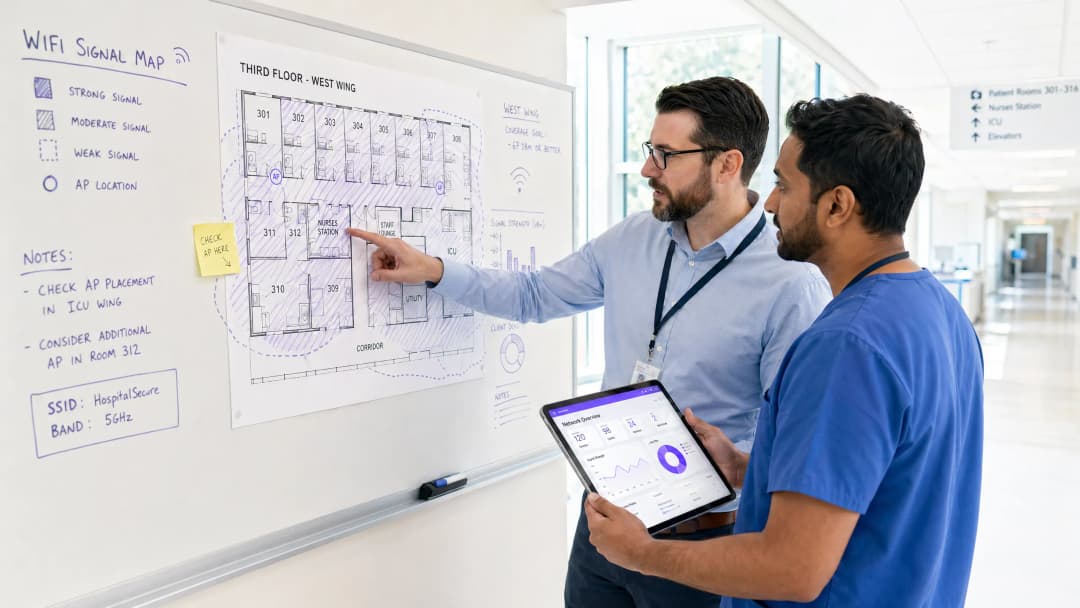
Access Point placement in hospitals presents unique RF challenges. Lead-lined radiology suites, reinforced concrete floors between wards, and high-density patient room clusters all create attenuation profiles that differ significantly from office environments. The design target for patient areas should be a minimum RSSI of -67 dBm with at least 20 dB signal-to-noise ratio. Critically, design for capacity, not just coverage. A ward with 30 beds may have 60-90 active devices at peak visiting hours — each potentially streaming video. AP selection should target devices supporting Wi-Fi 6 (802.11ax) or Wi-Fi 6E to handle that density efficiently.
Spectrum management is equally important. The 2.4 GHz band is heavily contested in hospital environments by legacy telemetry equipment, nurse call systems, and Bluetooth devices. Band steering should be configured to push capable devices to 5 GHz or 6 GHz bands. Automatic channel selection algorithms should be reviewed manually after deployment — they rarely produce optimal results in high-interference healthcare environments.
Captive Portal Architecture and Identity Management
The captive portal is the patient's first interaction with the hospital's digital services layer. It must be fast, reliable, and accessible across a wide range of devices — from the latest iPhone to a five-year-old Android tablet running a legacy browser. A poorly designed portal that fails to redirect correctly on certain devices will generate immediate complaints and support tickets.
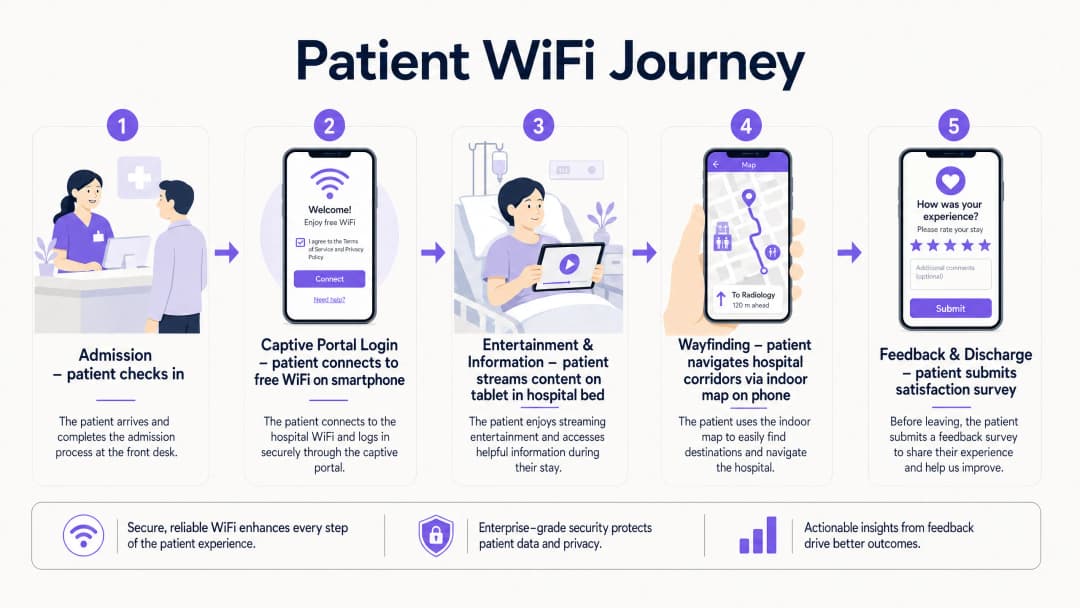
Modern deployments move away from pre-shared keys entirely. The recommended approach is a social login or email-based captive portal that presents the hospital's terms of service and privacy notice, collects explicit consent for marketing communications (separately from network access consent, per GDPR Article 7), and authenticates the session. This flow, when integrated with a platform like Purple's Guest WiFi solution, simultaneously onboards the patient into a CRM-compatible data layer, enabling post-discharge communications and feedback surveys.
DNS-level security filtering should be applied to all guest traffic at the resolver level. This prevents access to known malicious domains, blocks inappropriate content categories, and provides an audit trail for compliance purposes. See Protect Your Network with Strong DNS and Security for implementation guidance on DNS filtering in guest network contexts.
WPA3-SAE (Simultaneous Authentication of Equals) should be the target encryption standard for any new SSID deployment. For legacy device compatibility, a WPA2/WPA3 transition mode is acceptable in the short term, but a migration timeline to WPA3-only should be planned. Client Isolation must be enabled on the guest SSID — this prevents device-to-device communication on the same network segment, which is critical for both security and GDPR compliance.
WiFi Analytics and Location Intelligence
The analytics layer is where patient WiFi transitions from a cost centre to a strategic asset. A properly instrumented network, feeding data into a platform like Purple's WiFi Analytics, provides three categories of actionable intelligence.
Network Performance Monitoring delivers real-time visibility into AP health, channel utilisation, client association rates, and throughput per SSID. This enables proactive fault resolution before patients experience degraded service. Threshold-based alerting on RSSI drops or AP disassociation events is standard practice.
Footfall and Dwell Analytics work by analysing probe request data and association patterns to generate footfall heatmaps showing patient and visitor movement through the facility. This data is directly applicable to staffing decisions — if analytics show a consistent 45-minute queue build-up in the outpatient waiting area between 10:00 and 11:30, that is an operational insight with a direct staffing solution.
Feedback and Satisfaction Loops are enabled through automated post-discharge survey triggers, delivered via the email address captured at captive portal login, providing real-time HCAHPS-relevant data. Response rates for WiFi-triggered surveys consistently outperform paper-based alternatives because the contact is timely and the channel is already established.

¿Tiene preguntas sobre su configuración específica?
Nuestro equipo trabaja con gestores de espacios, responsables de TI e ingenieros de redes en 80 000 establecimientos. Reserve una llamada de 20 minutos y le mostraremos cómo lo resolvieron otros profesionales como usted.
Implementation Guide
A phased deployment approach reduces risk and allows for iterative optimisation.
Phase 1 — Discovery and Design (Weeks 1-4)
Commission a professional predictive RF design using the hospital's architectural drawings, followed by an active site survey of any existing infrastructure. Document all sources of RF interference. Define VLAN architecture, firewall policy, and internet uplink strategy. Engage the Information Governance team early to align the captive portal data collection with GDPR and DSPT requirements.
Phase 2 — Infrastructure Deployment (Weeks 5-10)
Deploy and configure switching infrastructure, ensuring PoE++ budget is sufficient for high-density APs. Install APs per the validated RF design. Configure SSIDs, VLAN tagging, and QoS policies. Implement QoS markings to prioritise voice (DSCP EF) and video (DSCP AF41) traffic over best-effort bulk data. This ensures telemedicine sessions and video calls remain stable even under network load.
Phase 3 — Captive Portal and Analytics Integration (Weeks 9-12)
Deploy and brand the captive portal. Integrate with the hospital's CRM or patient engagement platform. Configure the analytics platform with custom venue maps. Establish baseline metrics: daily active users, average session duration, peak concurrent connections, and portal completion rate. Set up automated reporting dashboards for the IT and operations teams.
Phase 4 — Wayfinding Integration (Weeks 12-16)
Integrate indoor positioning with the WiFi infrastructure. Publish the hospital's indoor map to the guest portal or a dedicated patient app. Configure points of interest (wards, departments, cafeteria, car parks). Measure wayfinding adoption rates and correlate with missed appointment data.
Best Practices
| Practice | Rationale | Standard Reference |
|---|---|---|
| Strict VLAN segmentation (clinical vs. guest) | Prevents lateral movement from compromised guest devices | HIPAA Security Rule, NHS DSPT |
| WPA3-SAE encryption | Protects against offline dictionary attacks on guest credentials | IEEE 802.11-2020 |
| Client Isolation on guest SSID | Prevents inter-device communication and data exposure | GDPR Article 25 (Privacy by Design) |
| Band Steering to 5/6 GHz | Reduces congestion and interference from legacy 2.4 GHz devices | Wi-Fi Alliance best practices |
| QoS for voice and video | Maintains call quality under network load | IEEE 802.11e / WMM |
| DNS filtering on guest traffic | Blocks malicious domains and inappropriate content | NCSC network security guidance |
| Dedicated internet uplink for guest traffic | Guarantees clinical network performance is unaffected | NHS DSPT, HIPAA |
| Automated post-discharge feedback surveys | Provides timely, actionable HCAHPS-relevant data | NHS Friends and Family Test guidance |
Troubleshooting & Risk Mitigation
RF Interference from Medical Equipment: Conduct regular spectrum analysis using a dedicated spectrum analyser tool. Legacy nurse call systems and patient monitoring equipment operating on 2.4 GHz are common culprits. The solution is typically a combination of channel reassignment and power reduction on affected APs, combined with a migration plan for the interfering equipment.
Captive Portal Redirect Failures: Modern operating systems use Captive Network Assistant (CNA) probes to detect captive portals. Ensure the portal server responds correctly to HTTP requests to known probe URLs (e.g., connectivitycheck.gstatic.com, captive.apple.com). HTTPS-only portal configurations frequently break CNA detection — maintain an HTTP redirect path even if the portal itself is served over HTTPS.
Coverage Gaps in Shielded Areas: Radiology suites, MRI rooms, and some operating theatres use RF shielding that creates complete signal blackouts. The only solution is to deploy APs inside the shielded space, connected via a penetrating cable entry point. Coordinate with the medical physics team before any cabling work in these areas.
GDPR Compliance Risk: The most common compliance failure is collecting marketing consent as part of the terms of service acceptance, rather than as a separate, explicit opt-in. This is a clear GDPR violation. Audit your captive portal flow to ensure consent for network access and consent for marketing communications are presented as separate, independent choices.
Bandwidth Contention: Without per-user bandwidth policies, a small number of heavy users can degrade the experience for everyone. Implement a per-device rate limit of 5-10 Mbps on the guest SSID. This is sufficient for HD streaming while preventing any single device from monopolising capacity.
ROI & Business Impact
The business case for investing in patient WiFi infrastructure rests on four measurable pillars.
HCAHPS Score Improvement: Patient satisfaction scores directly influence hospital reimbursement rates under value-based care models. Hospitals that have implemented automated WiFi-triggered feedback surveys report response rate improvements of 3-5x over paper-based methods, providing a statistically significant data set for quality improvement programmes.
Reduced Missed Appointments: Indoor wayfinding reduces the rate of patients arriving late or missing appointments due to navigation difficulties. A typical 500-bed hospital with 10% of outpatient appointments affected by navigation issues, at an average appointment cost of £150, represents a significant recoverable revenue opportunity.
Operational Efficiency: Footfall analytics from the WiFi network enable data-driven staffing decisions. Correlating waiting area dwell times with staffing levels allows operations managers to reduce average wait times without increasing headcount — simply by optimising shift patterns against actual demand data.
First-Party Data Asset: Every patient who connects to the guest WiFi and completes the captive portal flow represents a consented first-party data record. For a 500-bed hospital with an average length of stay of 4 days, this generates thousands of new, compliant data records per month — a valuable asset for patient engagement, health promotion communications, and service improvement research.
The Healthcare sector is increasingly recognising that the network is not just IT infrastructure — it is a patient experience platform. Organisations that treat it as such are consistently outperforming peers on satisfaction metrics and operational efficiency.
Definiciones clave
Captive Portal
Una página web que se presenta a un usuario antes de que se le conceda acceso a una red WiFi pública, utilizada para mostrar los términos de servicio, recopilar credenciales de autenticación o consentimiento, y redirigir a internet.
El punto de contacto principal del paciente en una red WiFi para invitados de un hospital. La calidad del diseño afecta directamente las tasas de finalización del portal y la calidad de la captura de datos. Debe probarse en todos los sistemas operativos móviles principales.
VLAN (Red de Área Local Virtual)
Un segmento de red lógico creado dentro de una infraestructura física conmutada utilizando el etiquetado 802.1Q, lo que permite aislar el tráfico de diferentes grupos de usuarios en la Capa 2 sin necesidad de un cableado físico independiente.
Esencial para separar el tráfico de invitados de los pacientes de las redes clínicas de EHR y administrativas. La ausencia de una segmentación VLAN adecuada es el hallazgo de seguridad de red más común en las auditorías de TI de salud.
Band Steering
Una técnica de gestión de redes inalámbricas que fomenta que los dispositivos cliente con capacidad de doble banda se asocien con la banda de radio de 5 GHz o 6 GHz, que está menos congestionada, en lugar de la banda de 2.4 GHz.
Especialmente valioso en entornos hospitalarios donde los equipos médicos heredados generan una interferencia significativa en la banda de 2.4 GHz. Reduce la congestión y mejora el rendimiento para aplicaciones de streaming.
Client Isolation
Una función de seguridad de red inalámbrica que evita que los dispositivos asociados al mismo SSID se comuniquen directamente entre sí en la Capa 2, forzando a que todo el tráfico pase a través de la puerta de enlace.
Obligatorio en los SSID de invitados de atención médica. Evita que el malware en el dispositivo de un paciente escanee o ataque otros dispositivos en el mismo segmento de red. También tiene implicaciones de GDPR en torno a la exposición de datos.
WPA3-SAE (Autenticación Simultánea de Iguales)
El protocolo de autenticación utilizado en redes inalámbricas certificadas con WPA3, que reemplaza el saludo de clave precompartida de WPA2 con un intercambio de claves Dragonfly que es resistente a ataques de diccionario fuera de línea.
El estándar de cifrado recomendado actualmente para nuevas implementaciones de SSID. Protege las credenciales de los pacientes y los datos de la sesión contra la interceptación, incluso en redes abiertas o con seguridad ligera.
RSSI (Indicador de Fuerza de la Señal Recibida)
Una medida del nivel de potencia de una señal de radio recibida, expresada en dBm (decibelios relativos a un milivatio). Los valores más negativos indican una señal más débil.
Se utiliza durante los estudios de cobertura para validar la ubicación de los AP. El objetivo para las áreas de pacientes es de -67 dBm o mejor. Los valores inferiores a -75 dBm suelen provocar inestabilidad en la conexión y un rendimiento deficiente del streaming.
QoS (Calidad de Servicio)
Políticas de gestión de tráfico de red que clasifican y priorizan diferentes tipos de paquetes de datos para garantizar que las aplicaciones sensibles a la latencia (voz, video) reciban un trato preferencial sobre el tráfico de mejor esfuerzo.
Crítico para mantener la calidad de las llamadas de telemedicina y la estabilidad de las videollamadas de los pacientes durante períodos de alta utilización de la red. Se implementa utilizando marcados DSCP: EF para voz, AF41 para video.
Análisis de Ubicación
El proceso de derivar datos de movimiento, tiempo de permanencia y afluencia a partir de las solicitudes de sondeo WiFi y los eventos de asociación generados por los dispositivos móviles a medida que se desplazan por un establecimiento.
Permite a los equipos de operaciones hospitalarias generar mapas de calor de afluencia, identificar cuellos de botella en el flujo de pacientes y optimizar los niveles de personal en función de datos de demanda reales en lugar de suposiciones programadas.
HCAHPS (Evaluación de Proveedores y Sistemas de Atención Médica por Consumidores de Hospitales)
Una encuesta estandarizada y reportada públicamente sobre las perspectivas de los pacientes respecto a la atención hospitalaria, utilizada para medir y comparar la experiencia del paciente entre los proveedores de atención médica.
La calidad de WiFi y la disponibilidad de servicios digitales están cada vez más correlacionadas con las puntuaciones de comunicación y capacidad de respuesta de HCAHPS. Las encuestas automatizadas activadas por WiFi mejoran las tasas de respuesta y la puntualidad de los datos.
Filtrado DNS
Un control de seguridad que intercepta las solicitudes de resolución DNS y bloquea las consultas a dominios categorizados como maliciosos, inapropiados o que violan las políticas antes de que se establezca una conexión.
Se aplica a nivel de resolución para todo el tráfico WiFi de invitados. Proporciona una capa de protección ligera pero eficaz contra la distribución de malware, el phishing y el acceso a contenido inapropiado en las redes de pacientes.
Ejemplos resueltos
Un hospital regional del NHS de 500 camas está experimentando una congestión de red severa en su WiFi para pacientes durante las horas de visita nocturnas (18:00-20:00), lo que genera quejas sobre la carga lenta de transmisiones de video y videollamadas fallidas con familiares.
- Realizar un análisis de espectro durante las horas pico para confirmar si el problema es la congestión de RF o la saturación del backhaul. 2. Si es RF: habilitar el band steering para forzar a los dispositivos compatibles con 5 GHz a salir de la banda de 2.4 GHz; revisar las asignaciones de canales de los AP y reducir la potencia de transmisión para estrechar los límites de las celdas y reducir la interferencia de canal adyacente. 3. Si es backhaul: revisar la utilización del enlace ascendente de internet durante las horas pico; si una conexión compartida se está saturando, implementar modelado de tráfico para priorizar el tráfico en tiempo real (DSCP EF para voz, DSCP AF41 para video) sobre las descargas masivas. 4. Implementar un límite de ancho de banda por dispositivo de 8 Mbps en el SSID de invitados para garantizar un acceso equitativo. 5. Desplegar AP adicionales en las salas de mayor densidad si el conteo de clientes por AP supera los 30 durante las horas pico. 6. Revisar el panel de analíticas para las salas específicas que generan la mayor cantidad de quejas; el problema rara vez es uniforme en toda la instalación.
Un grupo de hospitales privados está desplegando una nueva clínica de consulta externa y desea utilizar el Captive Portal de WiFi de invitados para recopilar datos de pacientes para encuestas de retroalimentación posteriores a la visita y comunicaciones de marketing, garantizando al mismo tiempo una separación estricta de la red clínica que contiene datos de EHR.
- Crear una VLAN dedicada (por ejemplo, VLAN 100) para el SSID de invitados, con un alcance de DHCP independiente y sin adyacencia de enrutamiento hacia las VLAN clínicas. 2. Enrutar todo el tráfico de invitados a un enlace ascendente de internet dedicado a través de una zona de firewall independiente; no utilizar el mismo firewall perimetral que protege los sistemas clínicos. 3. Habilitar el aislamiento de clientes en el SSID de invitados. 4. Diseñar el Captive Portal con dos casillas de verificación de consentimiento independientes: una para aceptar los términos de servicio de la red (obligatoria para el acceso) y otra para optar por recibir comunicaciones de marketing (opcional, claramente etiquetada). Este es un requisito del Artículo 7 del GDPR: el consentimiento para marketing debe otorgarse libremente y de forma independiente de la condición del servicio. 5. Integrar el portal con la plataforma de WiFi de invitados de Purple para capturar los datos consentidos en un formato compatible con CRM. 6. Configurar activadores automáticos de encuestas posteriores a la visita para que se envíen 24 horas después de que finalice la sesión del paciente. 7. Implementar filtrado de DNS en la VLAN de invitados para bloquear dominios maliciosos.
Preguntas de práctica
Q1. ¿Un administrador de hospital propone utilizar la red WiFi de invitados para rastrear la ubicación en tiempo real de equipos médicos móviles costosos (bombas de infusión, monitores de ECG portátiles). Como Director de TI, ¿cómo respondes y qué alternativa recomiendas?
Sugerencia: Considera la separación arquitectónica entre la infraestructura de invitados y la clínica, y los requisitos de confiabilidad para el rastreo de activos en un contexto clínico.
Ver respuesta modelo
Aconsejaría no utilizar la red WiFi de invitados para el rastreo de activos clínicos por dos razones. Primero, el SSID de invitados está separado arquitectónicamente de los sistemas clínicos; cualquier dato de rastreo de activos tendría que atravesar un límite de firewall para llegar a los sistemas de gestión clínica, lo que introduce una complejidad innecesaria y un riesgo potencial de seguridad. Segundo, la precisión de ubicación del WiFi de invitados (típicamente de 5 a 15 metros usando triangulación RSSI) es insuficiente para un rastreo confiable de activos a nivel de habitación en un entorno clínico. La alternativa recomendada es un RTLS dedicado que utilice etiquetas BLE activas en los equipos, con lectores BLE dedicados instalados en cada habitación. Esto proporciona una precisión de menos de un metro, funciona de manera independiente de la red de invitados y se integra directamente con los sistemas de gestión de activos clínicos. La infraestructura BLE a menudo puede compartir el mismo cableado físico que los AP de WiFi, lo que reduce el costo de implementación.
Q2. Durante una auditoría posterior a la implementación, descubres que el Captive Portal del hospital presenta una única casilla de verificación que dice: "Acepto los términos de servicio y acepto recibir comunicaciones del hospital". ¿Cuál es el riesgo de cumplimiento y cuál es la solución?
Sugerencia: Considera los requisitos del Artículo 7 del GDPR para un consentimiento válido, específicamente las condiciones bajo las cuales se considera que el consentimiento se otorga libremente.
Ver respuesta modelo
Esta es una clara violación al Artículo 7 del GDPR. El consentimiento para comunicaciones de marketing debe otorgarse libremente, lo que significa que no puede condicionarse al acceso a la red como requisito del servicio. La solución es dividir el Captive Portal en dos mecanismos de consentimiento distintos: (1) una aceptación obligatoria de los términos de servicio de la red (requerida para el acceso), y (2) una casilla de verificación de consentimiento opcional y separada para comunicaciones de marketing, claramente etiquetada y desmarcada por defecto. Cualquier registro existente capturado bajo el consentimiento unificado debe ser revisado con el DPO; es posible que deban tratarse como no consentidos para fines de marketing hasta que se obtenga un nuevo consentimiento.
Q3. Se está agregando una nueva ala de oncología de 200 camas a un hospital existente. El gerente del proyecto pregunta si la infraestructura de WiFi de invitados existente simplemente se puede extender para cubrir la nueva ala. ¿Qué preguntas haces antes de dar una recomendación?
Sugerencia: Piensa en la planificación de capacidad, el backhaul y los desafíos específicos de RF de la estructura de un edificio nuevo antes de asumir que la infraestructura existente puede escalar.
Ver respuesta modelo
Antes de hacer cualquier recomendación, preguntaría: (1) ¿Cuál es la utilización actual del enlace de backhaul existente durante las horas pico? Si ya supera el 70%, agregar 200 camas causará saturación. (2) ¿Cuál es la especificación de construcción de la nueva ala? Específicamente, ¿hay habitaciones revestidas de plomo o pisos de concreto reforzado que requieran AP dentro de espacios blindados? (3) ¿Cuál es el conteo de clientes por AP en la infraestructura existente durante las horas pico? Si los AP existentes ya manejan más de 40 clientes, el hardware de los AP actuales podría no ser suficiente incluso con unidades adicionales. (4) ¿La infraestructura de conmutación existente es compatible con PoE++, o se requerirán nuevos switches? (5) ¿Se ha realizado un diseño predictivo de RF sobre los planos arquitectónicos de la nueva ala? No recomendaría simplemente extender la infraestructura existente sin una evaluación formal de capacidad y un diseño predictivo.
Continúe leyendo esta serie
Medición del ROI empresarial de Guest WiFi y Location Analytics
Esta referencia técnica muestra a los equipos de TI y de recintos cómo medir el ROI de Guest WiFi con una cadena defendible desde la salud de la red y los datos consentidos hasta los resultados operativos o comerciales validados. Separa la evidencia medible de las suposiciones, mapea Purple Connect, Capture y Engage con la capa de medición correcta y ofrece escenarios de planificación para hoteles, propiedades de retail y recintos de eventos.
Privacy by Design: Anonymising WiFi Data for GDPR Compliance
Esta guía de autoridad detalla la arquitectura técnica y las estrategias de implementación para la anonimización de datos de WiFi para garantizar el cumplimiento de la norma GDPR. Proporciona a los líderes de TI y arquitectos de redes marcos de trabajo prácticos para equilibrar la analítica robusta de las instalaciones con los estrictos requisitos de privacidad de datos.
Heatmapping frente a Analítica de Presencia: Diferencias Técnicas
Esta guía técnica autorizada detalla las diferencias arquitectónicas y operativas críticas entre el heatmapping de WiFi y la analítica de presencia para operadores de recintos empresariales. Proporciona a los líderes de TI, arquitectos de red y directores de operaciones marcos de implementación accionables, escenarios de implementación del mundo real y mejores prácticas neutrales con respecto al proveedor para extraer el máximo ROI de su infraestructura inalámbrica existente.
¿Tiene preguntas sobre su configuración específica?
Nuestro equipo trabaja con gestores de espacios, responsables de TI e ingenieros de redes en 80 000 establecimientos. Reserve una llamada de 20 minutos y le mostraremos cómo lo resolvieron otros profesionales como usted.