
Como o WiFi pode melhorar a experiência do paciente em hospitais
Este guia técnico de autoridade explica como os hospitais podem aproveitar a infraestrutura de WiFi para visitantes corporativos e analytics para melhorar de forma mensurável a experiência do paciente internado. Ele abrange arquitetura de rede, requisitos de conformidade (HIPAA, DSPT, GDPR), design de Captive Portal, integração de wayfinding e estruturas de ROI - fornecendo aos tomadores de decisão de TI as ferramentas para construir um caso de negócios interno convincente e executar uma implantação bem-sucedida.
Ouça este guia
Ver transcrição do podcast
Parte da nossa série principal: WiFi Analytics Guide →
Executive Summary
For modern healthcare facilities, free WiFi in hospitals has evolved from a basic amenity into a critical layer of patient experience and operational infrastructure. As hospitals digitise patient records, introduce telemedicine, and rely on connected medical devices, the underlying network architecture must simultaneously support clinical demands and rising patient expectations. This guide is for IT directors, network architects, and operations leaders who need to architect, deploy, and optimise a Guest WiFi solution that delivers measurable improvements to the inpatient experience — from entertainment and wayfinding to real-time feedback collection.
The core argument is straightforward: a well-deployed patient WiFi network, integrated with a WiFi Analytics platform, transforms the network from a passive utility into an active intelligence layer. It reduces missed appointments through indoor navigation, improves HCAHPS satisfaction scores through automated feedback, and gives operations teams the footfall data they need to optimise staffing and resource allocation. This guide covers the architecture, compliance requirements, implementation steps, and ROI framework to make that case internally and execute it successfully.
Technical Deep-Dive
Network Architecture for Healthcare Environments
Deploying enterprise-grade Guest WiFi in a hospital requires a fundamentally different approach to a standard commercial deployment. The primary constraint is the co-existence of clinical and guest traffic on the same physical infrastructure, which demands strict logical separation. The standard architecture uses 802.1Q VLANs to segment traffic into at minimum three tiers: clinical systems (EHR, PACS, telemetry), staff administrative networks, and the patient/visitor guest SSID.
The guest VLAN must be routed directly to a dedicated internet uplink — ideally a separate leased line — with no routing path to clinical VLANs. Firewall ACLs should enforce this at the distribution layer, not just at the perimeter. This is a non-negotiable architectural requirement under both HIPAA and the NHS DSPT framework. For a detailed breakdown of compliance obligations, refer to Healthcare WiFi: HIPAA, DSPT and WiFi Compliance Explained.
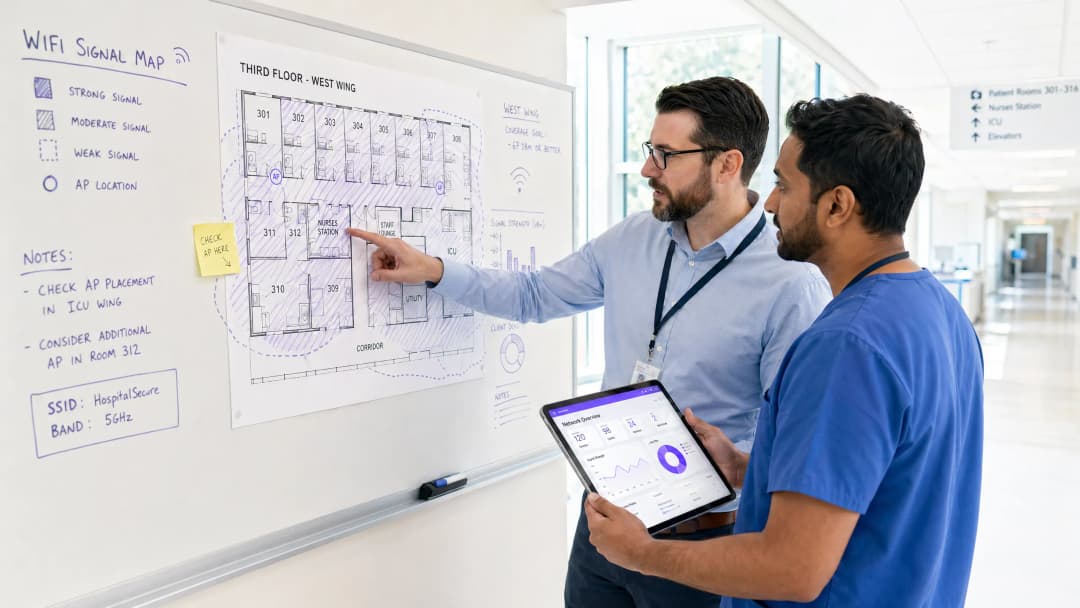
Access Point placement in hospitals presents unique RF challenges. Lead-lined radiology suites, reinforced concrete floors between wards, and high-density patient room clusters all create attenuation profiles that differ significantly from office environments. The design target for patient areas should be a minimum RSSI of -67 dBm with at least 20 dB signal-to-noise ratio. Critically, design for capacity, not just coverage. A ward with 30 beds may have 60-90 active devices at peak visiting hours — each potentially streaming video. AP selection should target devices supporting Wi-Fi 6 (802.11ax) or Wi-Fi 6E to handle that density efficiently.
Spectrum management is equally important. The 2.4 GHz band is heavily contested in hospital environments by legacy telemetry equipment, nurse call systems, and Bluetooth devices. Band steering should be configured to push capable devices to 5 GHz or 6 GHz bands. Automatic channel selection algorithms should be reviewed manually after deployment — they rarely produce optimal results in high-interference healthcare environments.
Captive Portal Architecture and Identity Management
The captive portal is the patient's first interaction with the hospital's digital services layer. It must be fast, reliable, and accessible across a wide range of devices — from the latest iPhone to a five-year-old Android tablet running a legacy browser. A poorly designed portal that fails to redirect correctly on certain devices will generate immediate complaints and support tickets.
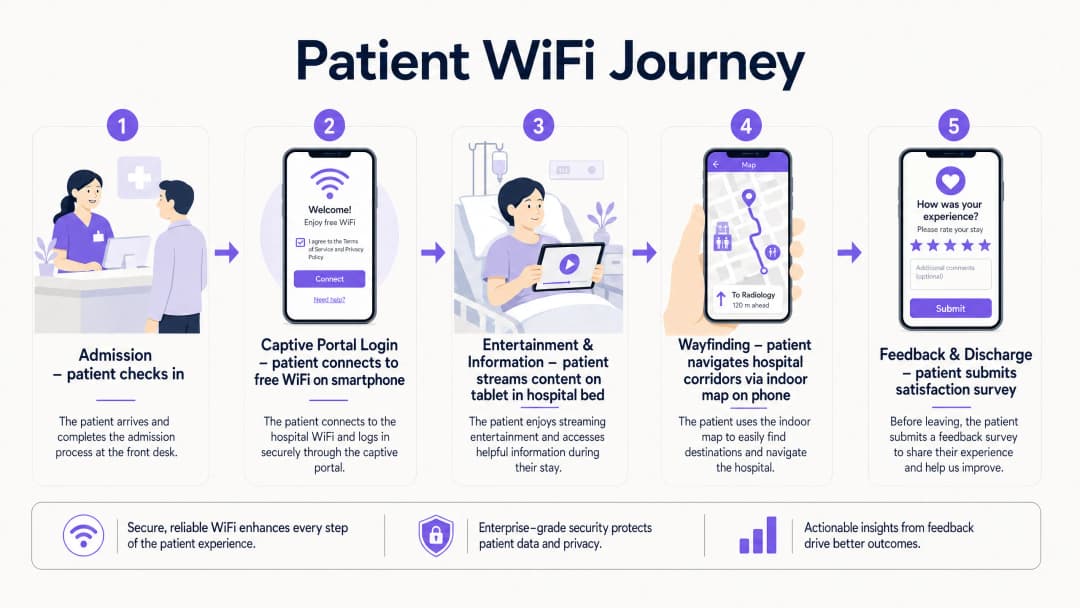
Modern deployments move away from pre-shared keys entirely. The recommended approach is a social login or email-based captive portal that presents the hospital's terms of service and privacy notice, collects explicit consent for marketing communications (separately from network access consent, per GDPR Article 7), and authenticates the session. This flow, when integrated with a platform like Purple's Guest WiFi solution, simultaneously onboards the patient into a CRM-compatible data layer, enabling post-discharge communications and feedback surveys.
DNS-level security filtering should be applied to all guest traffic at the resolver level. This prevents access to known malicious domains, blocks inappropriate content categories, and provides an audit trail for compliance purposes. See Protect Your Network with Strong DNS and Security for implementation guidance on DNS filtering in guest network contexts.
WPA3-SAE (Simultaneous Authentication of Equals) should be the target encryption standard for any new SSID deployment. For legacy device compatibility, a WPA2/WPA3 transition mode is acceptable in the short term, but a migration timeline to WPA3-only should be planned. Client Isolation must be enabled on the guest SSID — this prevents device-to-device communication on the same network segment, which is critical for both security and GDPR compliance.
WiFi Analytics and Location Intelligence
The analytics layer is where patient WiFi transitions from a cost centre to a strategic asset. A properly instrumented network, feeding data into a platform like Purple's WiFi Analytics, provides three categories of actionable intelligence.
Network Performance Monitoring delivers real-time visibility into AP health, channel utilisation, client association rates, and throughput per SSID. This enables proactive fault resolution before patients experience degraded service. Threshold-based alerting on RSSI drops or AP disassociation events is standard practice.
Footfall and Dwell Analytics work by analysing probe request data and association patterns to generate footfall heatmaps showing patient and visitor movement through the facility. This data is directly applicable to staffing decisions — if analytics show a consistent 45-minute queue build-up in the outpatient waiting area between 10:00 and 11:30, that is an operational insight with a direct staffing solution.
Feedback and Satisfaction Loops are enabled through automated post-discharge survey triggers, delivered via the email address captured at captive portal login, providing real-time HCAHPS-relevant data. Response rates for WiFi-triggered surveys consistently outperform paper-based alternatives because the contact is timely and the channel is already established.

Tem dúvidas sobre a sua configuração específica?
A nossa equipa trabalha com operadores de espaços, gestores de TI e engenheiros de rede em 80.000 locais. Agende uma chamada de 20 minutos e mostraremos como outros profissionais na sua situação o resolveram.
Implementation Guide
A phased deployment approach reduces risk and allows for iterative optimisation.
Phase 1 — Discovery and Design (Weeks 1-4)
Commission a professional predictive RF design using the hospital's architectural drawings, followed by an active site survey of any existing infrastructure. Document all sources of RF interference. Define VLAN architecture, firewall policy, and internet uplink strategy. Engage the Information Governance team early to align the captive portal data collection with GDPR and DSPT requirements.
Phase 2 — Infrastructure Deployment (Weeks 5-10)
Deploy and configure switching infrastructure, ensuring PoE++ budget is sufficient for high-density APs. Install APs per the validated RF design. Configure SSIDs, VLAN tagging, and QoS policies. Implement QoS markings to prioritise voice (DSCP EF) and video (DSCP AF41) traffic over best-effort bulk data. This ensures telemedicine sessions and video calls remain stable even under network load.
Phase 3 — Captive Portal and Analytics Integration (Weeks 9-12)
Deploy and brand the captive portal. Integrate with the hospital's CRM or patient engagement platform. Configure the analytics platform with custom venue maps. Establish baseline metrics: daily active users, average session duration, peak concurrent connections, and portal completion rate. Set up automated reporting dashboards for the IT and operations teams.
Phase 4 — Wayfinding Integration (Weeks 12-16)
Integrate indoor positioning with the WiFi infrastructure. Publish the hospital's indoor map to the guest portal or a dedicated patient app. Configure points of interest (wards, departments, cafeteria, car parks). Measure wayfinding adoption rates and correlate with missed appointment data.
Best Practices
| Practice | Rationale | Standard Reference |
|---|---|---|
| Strict VLAN segmentation (clinical vs. guest) | Prevents lateral movement from compromised guest devices | HIPAA Security Rule, NHS DSPT |
| WPA3-SAE encryption | Protects against offline dictionary attacks on guest credentials | IEEE 802.11-2020 |
| Client Isolation on guest SSID | Prevents inter-device communication and data exposure | GDPR Article 25 (Privacy by Design) |
| Band Steering to 5/6 GHz | Reduces congestion and interference from legacy 2.4 GHz devices | Wi-Fi Alliance best practices |
| QoS for voice and video | Maintains call quality under network load | IEEE 802.11e / WMM |
| DNS filtering on guest traffic | Blocks malicious domains and inappropriate content | NCSC network security guidance |
| Dedicated internet uplink for guest traffic | Guarantees clinical network performance is unaffected | NHS DSPT, HIPAA |
| Automated post-discharge feedback surveys | Provides timely, actionable HCAHPS-relevant data | NHS Friends and Family Test guidance |
Troubleshooting & Risk Mitigation
RF Interference from Medical Equipment: Conduct regular spectrum analysis using a dedicated spectrum analyser tool. Legacy nurse call systems and patient monitoring equipment operating on 2.4 GHz are common culprits. The solution is typically a combination of channel reassignment and power reduction on affected APs, combined with a migration plan for the interfering equipment.
Captive Portal Redirect Failures: Modern operating systems use Captive Network Assistant (CNA) probes to detect captive portals. Ensure the portal server responds correctly to HTTP requests to known probe URLs (e.g., connectivitycheck.gstatic.com, captive.apple.com). HTTPS-only portal configurations frequently break CNA detection — maintain an HTTP redirect path even if the portal itself is served over HTTPS.
Coverage Gaps in Shielded Areas: Radiology suites, MRI rooms, and some operating theatres use RF shielding that creates complete signal blackouts. The only solution is to deploy APs inside the shielded space, connected via a penetrating cable entry point. Coordinate with the medical physics team before any cabling work in these areas.
GDPR Compliance Risk: The most common compliance failure is collecting marketing consent as part of the terms of service acceptance, rather than as a separate, explicit opt-in. This is a clear GDPR violation. Audit your captive portal flow to ensure consent for network access and consent for marketing communications are presented as separate, independent choices.
Bandwidth Contention: Without per-user bandwidth policies, a small number of heavy users can degrade the experience for everyone. Implement a per-device rate limit of 5-10 Mbps on the guest SSID. This is sufficient for HD streaming while preventing any single device from monopolising capacity.
ROI & Business Impact
The business case for investing in patient WiFi infrastructure rests on four measurable pillars.
HCAHPS Score Improvement: Patient satisfaction scores directly influence hospital reimbursement rates under value-based care models. Hospitals that have implemented automated WiFi-triggered feedback surveys report response rate improvements of 3-5x over paper-based methods, providing a statistically significant data set for quality improvement programmes.
Reduced Missed Appointments: Indoor wayfinding reduces the rate of patients arriving late or missing appointments due to navigation difficulties. A typical 500-bed hospital with 10% of outpatient appointments affected by navigation issues, at an average appointment cost of £150, represents a significant recoverable revenue opportunity.
Operational Efficiency: Footfall analytics from the WiFi network enable data-driven staffing decisions. Correlating waiting area dwell times with staffing levels allows operations managers to reduce average wait times without increasing headcount — simply by optimising shift patterns against actual demand data.
First-Party Data Asset: Every patient who connects to the guest WiFi and completes the captive portal flow represents a consented first-party data record. For a 500-bed hospital with an average length of stay of 4 days, this generates thousands of new, compliant data records per month — a valuable asset for patient engagement, health promotion communications, and service improvement research.
The Healthcare sector is increasingly recognising that the network is not just IT infrastructure — it is a patient experience platform. Organisations that treat it as such are consistently outperforming peers on satisfaction metrics and operational efficiency.
Definições principais
Captive Portal
Uma página da web apresentada a um usuário antes de lhe ser concedido acesso a uma rede WiFi pública, usada para exibir termos de serviço, coletar credenciais de autenticação ou consentimento e redirecionar para a internet.
O principal ponto de contato do paciente em uma rede WiFi de visitantes de hospital. A qualidade do design afeta diretamente as taxas de conclusão do portal e a qualidade da captura de dados. Deve ser testado em todos os principais sistemas operacionais móveis.
VLAN (Virtual Local Area Network)
Um segmento lógico de rede criado dentro de uma infraestrutura física comutada usando marcação 802.1Q, permitindo que o tráfego de diferentes grupos de usuários seja isolado na Camada 2 sem a necessidade de cabeamento físico separado.
Essencial para separar o tráfego de visitantes do paciente das redes clínicas de EHR e administrativas. A ausência de uma segmentação adequada de VLAN é a descoberta de segurança de rede mais comum em auditorias de TI de saúde.
Band Steering
Uma técnica de gerenciamento de rede sem fio que incentiva dispositivos clientes compatíveis com banda dupla a se associarem à banda de rádio de 5 GHz ou 6 GHz, menos congestionada, em vez da banda de 2,4 GHz.
Particularmente valioso em ambientes hospitalares onde equipamentos médicos legados geram interferência significativa de 2,4 GHz. Reduz o congestionamento e melhora o rendimento para aplicativos de streaming.
Client Isolation
Um recurso de segurança de rede sem fio que impede que dispositivos associados ao mesmo SSID se comuniquem diretamente entre si na Camada 2, forçando todo o tráfego a passar pelo gateway.
Obrigatório em SSIDs de visitantes de saúde. Impede que malwares no dispositivo de um paciente verifiquem ou ataquem outros dispositivos no mesmo segmento de rede. Também possui implicações de GDPR em relação à exposição de dados.
WPA3-SAE (Simultaneous Authentication of Equals)
O protocolo de autenticação usado em redes sem fio certificadas por WPA3, substituindo o handshake de chave pré-compartilhada do WPA2 por uma troca de chaves Dragonfly que é resistente a ataques de dicionário offline.
O padrão de criptografia atualmente recomendado para novas implantações de SSID. Protege as credenciais e os dados de sessão dos pacientes contra interceptação, mesmo em redes abertas ou com segurança leve.
RSSI (Received Signal Strength Indicator)
Uma medição do nível de potência de um sinal de rádio recebido, expresso em dBm (decibéis em relação a um miliwatts). Valores mais negativos indicam sinal mais fraco.
Usado durante vistorias de local para validar o posicionamento dos APs. O alvo para áreas de pacientes é -67 dBm ou melhor. Valores abaixo de -75 dBm normalmente resultam em instabilidade de conexão e baixo desempenho de streaming.
QoS (Quality of Service)
Políticas de gerenciamento de tráfego de rede que classificam e priorizam diferentes tipos de pacotes de dados para garantir que aplicativos sensíveis à latência (voz, vídeo) recebam tratamento preferencial sobre o tráfego de melhor esforço.
Crítico para manter a qualidade das chamadas de telemedicina e a estabilidade das chamadas de vídeo dos pacientes durante períodos de alta utilização da rede. Implementado usando marcações DSCP: EF para voz, AF41 para vídeo.
Location Analytics
O processo de obtenção de dados de movimento, tempo de permanência e fluxo de pessoas a partir de solicitações de varredura de WiFi e eventos de associação gerados por dispositivos móveis à medida que se movem por um local.
Permite que as equipes de operações hospitalares gerem mapas de calor de fluxo de pessoas, identifiquem gargalos no fluxo de pacientes e otimizem os níveis de pessoal com base em dados de demanda real, em vez de suposições programadas.
HCAHPS (Hospital Consumer Assessment of Healthcare Providers and Systems)
Uma pesquisa padronizada e relatada publicamente sobre as perspectivas dos pacientes em relação ao atendimento hospitalar, usada para medir e comparar a experiência do paciente entre prestadores de serviços de saúde.
A qualidade do WiFi e a disponibilidade de serviços digitais estão cada vez mais correlacionadas com as pontuações de comunicação e capacidade de resposta do HCAHPS. Pesquisas automatizadas acionadas por WiFi melhoram as taxas de resposta e a pontualidade dos dados.
DNS Filtering
Um controle de segurança que intercepta solicitações de resolução DNS e bloqueia consultas a domínios categorizados como maliciosos, inadequados ou violadores de políticas antes que uma conexão seja estabelecida.
Aplicado no nível do resolvedor para todo o tráfego de WiFi de visitantes. Oferece uma camada leve, mas eficaz, de proteção contra distribuição de malware, phishing e acesso a conteúdo inadequado em redes de pacientes.
Exemplos práticos
Um hospital regional do NHS de 500 leitos está enfrentando forte congestionamento de rede em seu WiFi de pacientes durante o horário de visitas noturnas (18:00-20:00), gerando reclamações sobre lentidão no carregamento de vídeos e falhas em chamadas de vídeo com familiares.
- Execute uma análise de espectro durante os horários de pico para confirmar se o problema é congestionamento de RF ou saturação de backhaul. 2. Se for RF: ative o band steering para forçar dispositivos compatíveis com 5 GHz a saírem da banda de 2,4 GHz; revise as atribuições de canais dos APs e reduza a potência de transmissão para estreitar os limites das células e reduzir a interferência de canal adjacente. 3. Se for backhaul: revise a utilização do link de internet durante as horas de pico - se uma conexão compartilhada estiver saturada, implemente modelagem de tráfego para priorizar o tráfego em tempo real (DSCP EF para voz, DSCP AF41 para vídeo) em detrimento de downloads em massa. 4. Implemente um limite de largura de banda por dispositivo de 8 Mbps no SSID de visitantes para garantir o acesso justo. 5. Implante APs adicionais nas enfermarias de maior densidade se a contagem de clientes por AP exceder 30 durante as horas de pico. 6. Revise o painel de analytics para as enfermarias específicas que geram mais reclamações - o problema raramente é uniforme em toda a instalação.
Um grupo de hospitais privados está implantando uma nova clínica ambulatorial e deseja usar o Captive Portal do WiFi de visitantes para coletar dados de pacientes para pesquisas de feedback pós-visita e comunicações de marketing, garantindo ao mesmo tempo uma separação rigorosa da rede clínica que contém dados de prontuário eletrônico (EHR).
- Crie uma VLAN dedicada (por exemplo, VLAN 100) para o SSID de visitantes, com um escopo DHCP separado e sem adjacência de roteamento para as VLANs clínicas. 2. Roteie todo o tráfego de visitantes para um link de internet dedicado por meio de uma zona de firewall separada - não use o mesmo firewall de perímetro que protege os sistemas clínicos. 3. Ative o client isolation no SSID de visitantes. 4. Projete o Captive Portal com duas caixas de seleção de consentimento separadas: uma para aceitar os termos de serviço da rede (obrigatória para o acesso) e outra para optar por receber comunicações de marketing (opcional, claramente identificada). Este é um requisito do Artigo 7 do GDPR - o consentimento para marketing deve ser dado livremente e separado da condição do serviço. 5. Integre o portal com a plataforma de WiFi de visitantes da Purple para capturar os dados consentidos em um formato compatível com CRM. 6. Configure gatilhos automatizados de pesquisa pós-visita para disparar 24 horas após o término da sessão do paciente. 7. Implemente filtragem de DNS na VLAN de visitantes para bloquear domínios maliciosos.
Questões práticas
Q1. Um administrador de hospital propõe usar a rede WiFi de visitantes para rastrear a localização em tempo real de equipamentos médicos móveis caros (bombas de infusão, monitores de ECG portáteis). Como Diretor de TI, como você responde e qual alternativa você recomenda?
Dica: Considere a separação arquitetônica entre a infraestrutura de visitantes e a clínica, e os requisitos de confiabilidade para rastreamento de ativos em um contexto clínico.
Ver resposta modelo
Eu desaconselharia o uso da rede WiFi de visitantes para rastreamento de ativos clínicos por dois motivos. Primeiro, o SSID de visitantes é separado arquitetonicamente dos sistemas clínicos - qualquer dado de rastreamento de ativos precisaria atravessar uma barreira de firewall para alcançar os sistemas de gerenciamento clínico, introduzindo complexidade desnecessária e riscos potenciais de segurança. Segundo, a precisão de localização do WiFi de visitantes (normalmente de 5 a 15 metros usando triangulação RSSI) é insuficiente para um rastreamento confiável de ativos no nível de sala em um ambiente clínico. A alternativa recomendada é um RTLS dedicado usando tags BLE ativas nos equipamentos, com leitores BLE dedicados instalados em cada sala. Isso fornece precisão submétrica, opera de forma independente da rede de visitantes e se integra diretamente aos sistemas de gerenciamento de ativos clínicos. A infraestrutura BLE muitas vezes pode compartilhar o mesmo cabeamento físico que os APs de WiFi, reduzindo o custo de implantação.
Q2. Durante uma auditoria pós-implantação, você descobre que o Captive Portal do hospital apresenta uma única caixa de seleção que diz: 'Aceito os termos de serviço e concordo em receber comunicações do hospital.' Qual é o risco de conformidade e qual é a remediação?
Dica: Considere os requisitos do Artigo 7 do GDPR para consentimento válido, especificamente as condições sob as quais o consentimento é considerado livremente dado.
Ver resposta modelo
Esta é uma violação clara do Artigo 7 do GDPR. O consentimento para comunicações de marketing deve ser dado livremente, o que significa que não pode ser vinculado ao consentimento para acesso à rede como condição de serviço. A remediação consiste em dividir o Captive Portal em dois mecanismos de consentimento distintos: (1) uma aceitação obrigatória dos termos de serviço da rede (necessária para o acesso) e (2) uma caixa de seleção opcional separada para comunicações de marketing, claramente identificada e desmarcada por padrão. Quaisquer registros existentes capturados sob o consentimento vinculado devem ser revisados com o DPO - eles podem precisar ser tratados como não consentidos para fins de marketing até que um novo consentimento seja obtido.
Q3. Uma nova ala de oncologia de 200 leitos está sendo adicionada a um hospital existente. O gerente de projeto pergunta se a infraestrutura de WiFi de visitantes existente pode simplesmente ser estendida para cobrir a nova ala. Quais perguntas você faz antes de fazer uma recomendação?
Dica: Pense no planejamento de capacidade, backhaul e nos desafios específicos de RF de uma nova estrutura de edifício antes de assumir que a infraestrutura existente pode ser dimensionada.
Ver resposta modelo
Antes de fazer qualquer recomendação, eu perguntaria: (1) Qual é a utilização atual do link de backhaul existente durante as horas de pico? Se já estiver acima de 70%, a adição de 200 leitos causará saturação. (2) Qual é a especificação de construção da nova ala - especificamente, existem salas revestidas de chumbo ou pisos de concreto armado que exigirão APs dentro de espaços blindados? (3) Qual é a contagem de clientes por AP na infraestrutura existente durante as horas de pico? Se os APs existentes já estiverem lidando com mais de 40 clientes, o hardware de AP existente pode não ser suficiente, mesmo com unidades adicionais. (4) A infraestrutura de comutação existente é compatível com PoE++, ou serão necessários novos switches? (5) Foi realizado um projeto preditivo de RF com base nos desenhos arquitetônicos da nova ala? Eu não recomendaria simplesmente estender a infraestrutura existente sem uma avaliação formal de capacidade e um projeto preditivo.
Continue a ler esta série
Medindo o ROI de Negócios de Guest WiFi e Location Analytics
Esta referência técnica mostra às equipes de TI e de locais como medir o ROI do guest WiFi com uma cadeia defensável que vai desde a integridade da rede e dados consentidos até resultados operacionais ou comerciais validados. Ela separa evidências mensuráveis de suposições, mapeia o Purple Connect, Capture e Engage para a camada de medição correta e apresenta cenários de planejamento para hotéis, redes de varejo e locais de eventos.
Privacy by Design: Anonimização de Dados WiFi para Conformidade com a GDPR
Este guia autoritativo detalha a arquitetura técnica e as estratégias de implementação para anonimizar dados de WiFi para garantir a conformidade com a GDPR. Ele fornece aos líderes de TI e arquitetos de rede frameworks práticos para equilibrar análises robustas de locais com requisitos estritos de privacidade de dados.
Heatmapping vs Presence Analytics: Diferenças Técnicas
Este guia técnico de autoridade detalha as diferenças arquitetônicas e operacionais críticas entre WiFi heatmapping e presence analytics para operadores de locais corporativos. Ele fornece aos líderes de TI, arquitetos de rede e diretores de operações estruturas de implantação práticas, cenários de implementação do mundo real e as melhores práticas independentes de fornecedor para extrair o ROI máximo de sua infraestrutura sem fio existente.
Tem dúvidas sobre a sua configuração específica?
A nossa equipa trabalha com operadores de espaços, gestores de TI e engenheiros de rede em 80.000 locais. Agende uma chamada de 20 minutos e mostraremos como outros profissionais na sua situação o resolveram.