

WISPr y Auto-Inicio de Sesión en Captive Portal: Qué Sigue Funcionando en 2026
Esta guía de referencia técnica autorizada examina el estado actual del protocolo WISPr y los mecanismos de auto-inicio de sesión en Captive Portal en 2026, cubriendo qué plataformas de OS aún respetan la especificación, cómo iOS y Android manejan la detección de Captive Portal, y por qué las implementaciones empresariales están migrando a Passpoint y OpenRoaming. Proporciona a los arquitectos de red y gerentes de TI orientación de implementación práctica, estrategias de migración y marcos de mitigación de riesgos tanto para implementaciones de Wi-Fi heredadas como modernas.
🎧 Escucha esta guía
Ver transcripción
Resumen Ejecutivo
Durante más de una década, el protocolo de roaming de proveedores de servicios de internet inalámbrico (WISPr) sirvió como el estándar de facto para el auto-inicio de sesión en Captive Portal y la federación de roaming. En 2026, el panorama ha cambiado fundamentalmente. Si bien los Captive Portals siguen siendo omnipresentes en entornos de Hospitalidad y Comercio Minorista , la dependencia del XML de WISPr para una autenticación sin interrupciones ha sido en gran medida reemplazada por los modernos Asistentes de Red Cautiva (CNA) a nivel de OS y la rápida adopción de Passpoint (Hotspot 2.0).
Esta guía proporciona a los tomadores de decisiones de TI de alto nivel un análisis pragmático de lo que aún funciona con respecto a WISPr y la detección de Captive Portal. Exploramos cómo iOS 17/18 y las versiones modernas de Android manejan la redirección del portal, por qué los clientes inteligentes tradicionales están fallando y cómo los arquitectos de redes empresariales deben planificar su transición a arquitecturas OpenRoaming. Al comprender las limitaciones técnicas de los flujos UAM (Método de Acceso Universal) heredados, los directores de operaciones de recintos pueden mitigar los problemas de conectividad de los huéspedes mientras sientan las bases para un acceso Wi-Fi seguro y cifrado desde el primer paquete.
Análisis Técnico Detallado: El Estado de WISPr en 2026
El Legado del XML de WISPr
Originalmente presentado como un borrador de protocolo a la Wi-Fi Alliance, WISPr fue diseñado para permitir a los usuarios hacer roaming entre diferentes proveedores de servicios de internet inalámbrico. La innovación central fue el Protocolo de Interfaz de Cliente Inteligente a Puerta de Enlace de Acceso, definido en el Apéndice D de la especificación. Este protocolo basado en XML permitía al software de cliente inteligente detectar un Captive Portal, analizar el desafío XML incrustado en la redirección HTML y enviar automáticamente las credenciales RADIUS a través de HTTPS POST sin requerir que el usuario interactuara con un navegador.
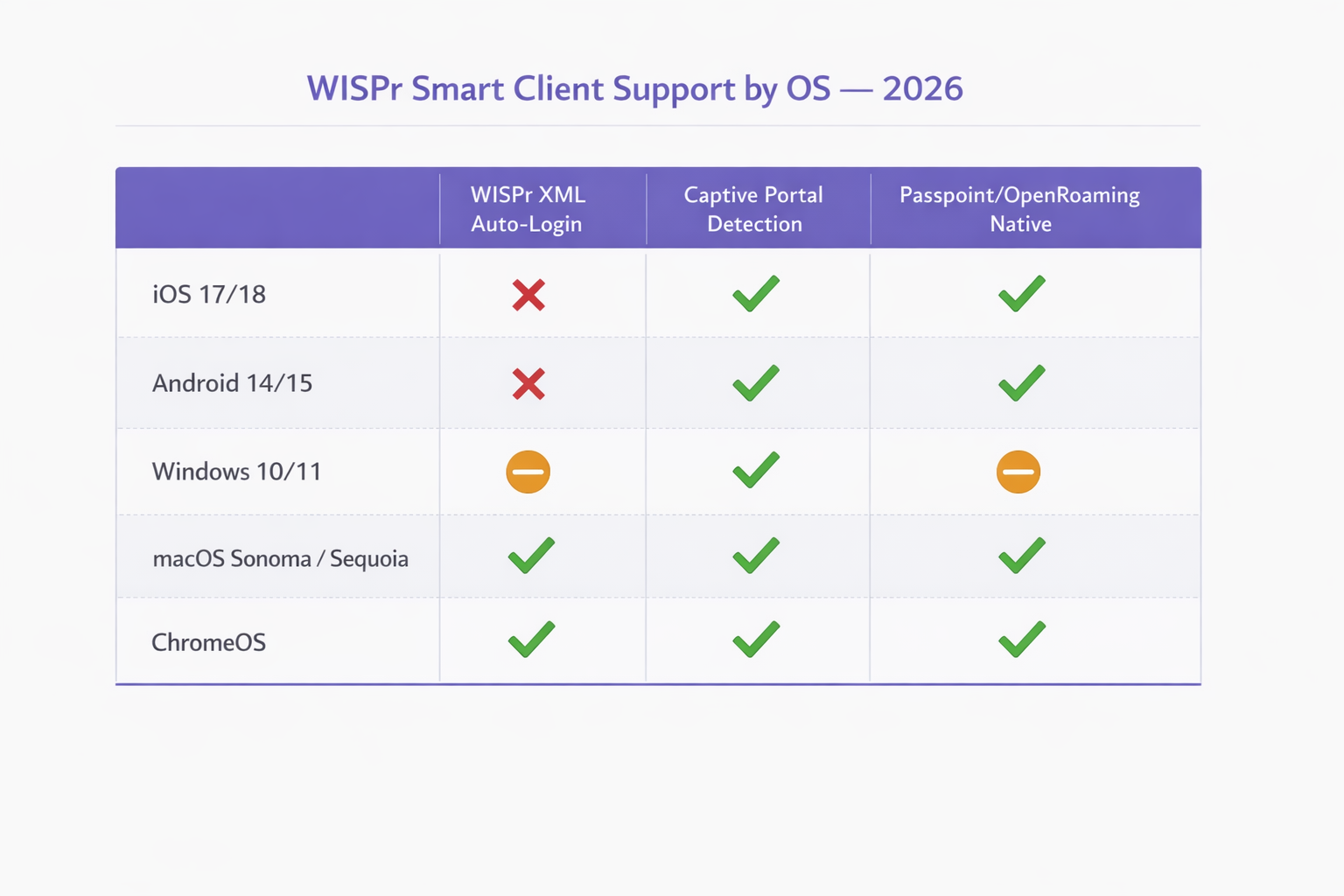
En 2026, este mecanismo está efectivamente obsoleto en los sistemas operativos móviles modernos. El iOS de Apple nunca ha soportado de forma nativa el auto-inicio de sesión XML de WISPr, confiando en su lugar en su Captive Network Assistant. Android ha deprecado de manera similar el soporte en favor de sus propias comprobaciones de conectividad. Solo dispositivos específicos gestionados por MDM empresariales e implementaciones heredadas de Windows (a través de WLAN AutoConfig) conservan capacidades parciales de análisis de XML de WISPr. Sin embargo, los atributos RADIUS definidos por WISPr — como WISPr-Bandwidth-Max-Up y WISPr-Location-ID — siguen siendo muy utilizados por los principales proveedores de red para la conformación del tráfico y la aplicación de políticas.
Mecanismos Modernos de Detección de Captive Portal
Cuando un cliente se conecta a un SSID abierto, debe determinar si tiene acceso directo a internet o si está detrás de un Captive Portal. Esto se logra mediante sondas HTTP específicas que difieren según el sistema operativo.
iOS y macOS (Captive Network Assistant): Los dispositivos Apple realizan una solicitud HTTP GET a puntos finales específicos, principalmente http://captive.apple.com/hotspot-detect.html. Si la red intercepta esta solicitud y devuelve una redirección HTTP 302 o un HTTP 200 OK con una carga útil que no coincide con la cadena "Success" esperada, el OS marca la red como cautiva. Luego, lanza el Captive Network Assistant (CNA) — un mini-navegador en un entorno aislado — para renderizar la página del portal. Fundamentalmente, en iOS 17 y 18, la aplicación estricta significa que si la red utiliza HTTPS para la redirección inicial o bloquea completamente el acceso a la URL de la sonda, el CNA no se iniciará, dejando al usuario conectado al Wi-Fi pero sin acceso a internet.
Android y ChromeOS: Los dispositivos Android utilizan comprobaciones de conectividad similares, sondeando puntos finales como http://connectivitycheck.gstatic.com/generate_204. Si no se recibe una respuesta 204 No Content, Android solicita al usuario que "Inicie sesión en la red". A diferencia de iOS, las versiones más recientes de Android pueden realizar estas comprobaciones a través de HTTPS, aunque HTTP sigue siendo el estándar de respaldo para la compatibilidad con puntos de acceso heredados.
Windows 10/11: El servicio WLAN AutoConfig de Microsoft sondea http://www.msftconnecttest.com/connecttest.txt. Windows conserva una capacidad limitada de análisis de XML de WISPr en su servicio WLAN AutoConfig, pero esto solo se activa para SSIDs con un perfil WISPr preconfigurado, típicamente implementado a través de MDM o Directiva de Grupo. Para el Wi-Fi de invitados general, Windows se comporta de manera similar a los OS móviles, presentando una notificación al usuario.
| Operating System | WISPr XML Auto-Login | Captive Portal Detection | Passpoint / OpenRoaming Native |
|---|---|---|---|
| iOS 17 / 18 | No soportado | Sí (sonda HTTP a captive.apple.com) | Sí (nativo) |
| Android 14 / 15 | No soportado | Sí (sonda HTTP a gstatic.com) | Sí (nativo) |
| Windows 10 / 11 | Parcial (solo aprovisionado por MDM) | Sí (sonda HTTP a msftconnecttest.com) | Parcial (requiere perfil) |
| macOS Sonoma / Sequoia | Solo heredado | Sí (CNA, igual que iOS) | Sí (nativo) |
| ChromeOS | Limitado | Sí | Sí |
Los Atributos RADIUS de WISPr Que Aún Importan
Si bien el handshake de autenticación XML es obsoleto para la mayoría de las implementaciones, los Atributos Específicos del Proveedor (VSAs) RADIUS definidos por la especificación WISPr siguen siendo una parte activa de la política de red empresarial. Proveedores como Aruba (HPE), Cisco, Ruckus, Fortinet y Extreme Networks, todos soportan estos atributos en sus pipelines de procesamiento RADIUS.
| Attribute | Function | Still Relevant in 2026 |
|---|---|---|
WISPr-Bandwidth-Max-Up |
Límite de ancho de banda de subida | Sí — utilizado para la limitación de invitados |
WISPr-Bandwidth-Max-Down |
Límite de ancho de banda de bajada | Sí — utilizado para la limitación de invitados |
WISPr-Locat"ion-ID |
Identifica la ubicación del hotspot | Sí — utilizado para análisis y facturación |
WISPr-Location-Name |
Ubicación legible para humanos | Sí — utilizado para informes |
WISPr-Session-Terminate-Time |
Marca de tiempo de caducidad de la sesión | Sí — utilizado para acceso con tiempo limitado |
WISPr-Logoff-URL |
Punto final de terminación de sesión | En desuso — reemplazado por CoA |
WISPr-Redirection-URL |
Objetivo de redirección post-autenticación | Sí — utilizado para páginas de bienvenida de marketing |
Guía de Implementación: Transición a Passpoint
A medida que la industria se aleja de las redes abiertas no cifradas, Passpoint (Hotspot 2.0) y OpenRoaming representan la evolución necesaria para las implementaciones empresariales. Construido sobre el estándar IEEE 802.11u, Passpoint permite que los dispositivos descubran y se autentiquen en las redes automáticamente utilizando EAP-TLS o EAP-TTLS, proporcionando cifrado WPA2/WPA3 Enterprise desde el momento de la conexión.
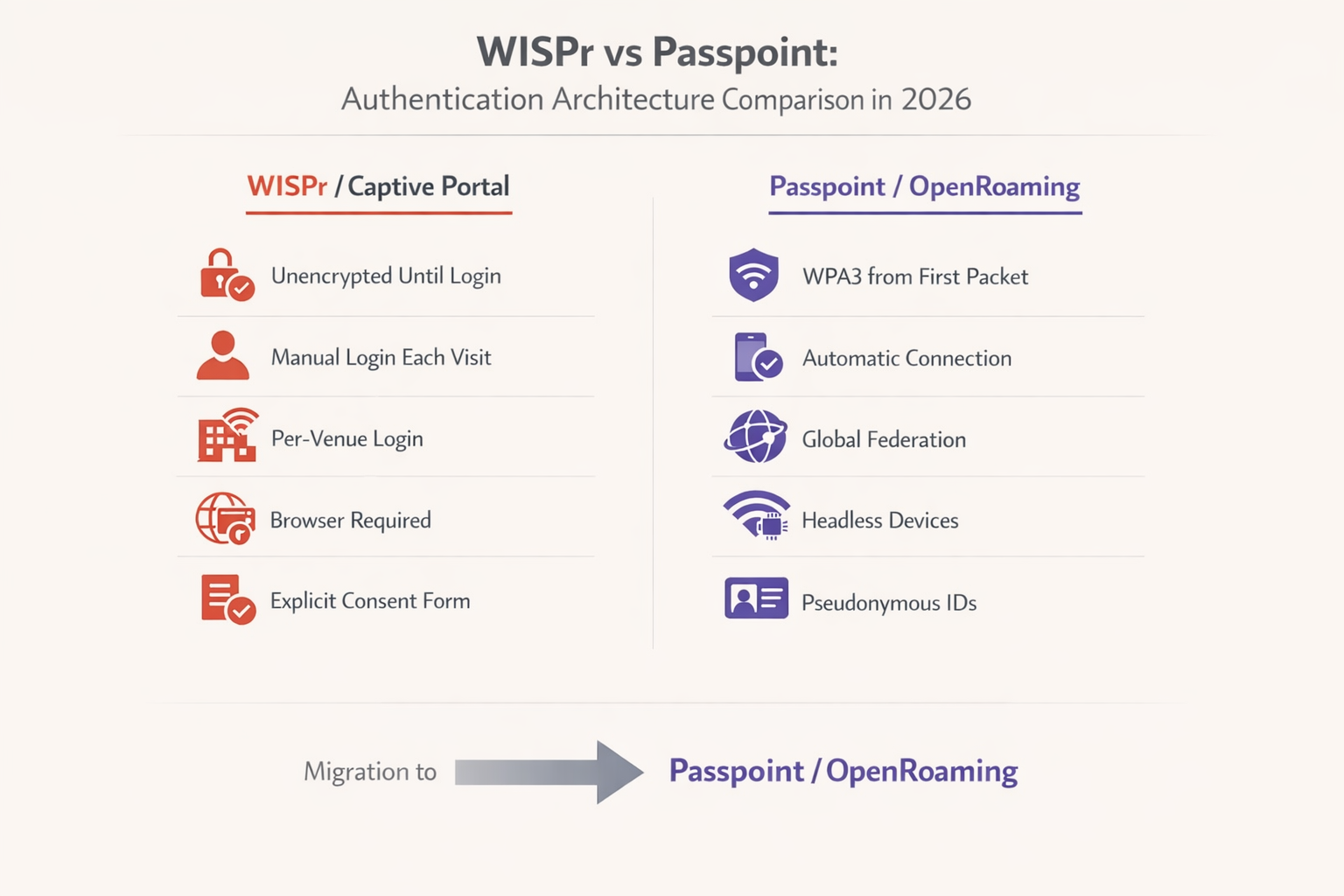
Según el Informe de la Industria WBA 2025, el 81% de los ejecutivos de Wi-Fi planean implementar OpenRoaming dentro de su infraestructura. Para centros de Transporte , instalaciones de Salud y entornos minoristas a gran escala, esta transición es cada vez más un requisito de cumplimiento que una mejora discrecional.
Estrategia de Migración Paso a Paso
Paso 1 — Auditar Atributos RADIUS Actuales: Revise sus configuraciones de servidor RADIUS existentes. Identifique qué Atributos Específicos del Proveedor WISPr se utilizan actualmente para la limitación de velocidad de ancho de banda, los tiempos de espera de sesión o la notificación de ubicación. Estas políticas deben asignarse a atributos equivalentes en su nueva implementación de Passpoint antes de que el SSID heredado sea dado de baja.
Paso 2 — Implementar SSIDs Duales: Durante la fase de transición, configure sus puntos de acceso para transmitir tanto el SSID abierto heredado (con el Captive Portal) como un nuevo SSID habilitado para Passpoint. Esto garantiza la compatibilidad con versiones anteriores para dispositivos heredados y hardware IoT sin interfaz que no pueden participar en la autenticación EAP.
Paso 3 — Configurar el Proveedor de Identidad: Para habilitar OpenRoaming, debe integrarse con un proveedor de identidad establecido. Purple ofrece un servicio de proveedor de identidad gratuito para OpenRoaming bajo la licencia Connect, facilitando la autenticación sin interrupciones para los usuarios que poseen perfiles válidos de operadores y proveedores de servicios participantes.
Paso 4 — Actualizar el Equipo de Red: Asegúrese de que sus Controladores de LAN Inalámbrica (WLC) y puntos de acceso estén ejecutando firmware que admita Passpoint Release 2 o superior. Los principales proveedores, incluidos Cisco, Aruba y Ruckus, ofrecen soporte integral. Para entornos SMB, consulte la guía TP-Link Omada and Purple WiFi for SMB Deployments para un recorrido práctico de implementación.
Paso 5 — Monitorear y Desaprobar: Utilice WiFi Analytics para rastrear la tasa de adopción del SSID Passpoint frente al SSID Captive Portal heredado. Una vez que se alcanza un umbral suficiente —típicamente el 70-80% de las sesiones—, el Captive Portal heredado puede restringirse a casos de uso específicos o eliminarse por completo.
Mejores Prácticas para la Resiliencia del Captive Portal
Para entornos que deben mantener un Captive Portal en 2026, adherirse a estrictas mejores prácticas de configuración es fundamental para garantizar que el CNA se inicie de manera confiable en todos los dispositivos.
No Bloquee las URLs de Sondeo: Asegúrese de que su "walled garden" o ACLs de pre-autenticación permitan la resolución de DNS y el tráfico HTTP a captive.apple.com, connectivitycheck.gstatic.com y msftconnecttest.com. Bloquear estos dominios evitará que el sistema operativo detecte el portal y active el CNA.
Use HTTP para la Redirección Inicial: La redirección inicial debe ocurrir a través de HTTP (Puerto 80). Intentar redirigir una solicitud HTTPS resultará en una advertencia de certificado TLS, ya que el punto de acceso no puede presentar un certificado válido para el dominio que el usuario solicitó originalmente. Esta es la configuración errónea más común encontrada en las implementaciones de Captive Portal empresariales.
Proteja la Página del Portal con HTTPS: Una vez que ocurre la redirección, la página de destino real del Captive Portal debe alojarse a través de HTTPS con un certificado SSL válido y de confianza pública. Esto asegura que las credenciales del usuario y los datos de consentimiento de GDPR se transmitan de forma segura y que la página del portal no sea marcada como insegura por los navegadores modernos.
Optimice para el CNA: El Captive Network Assistant es un navegador limitado. Evite frameworks complejos de JavaScript, ventanas emergentes o la descarga de activos grandes. El portal debe cargarse rápidamente y ser totalmente responsivo para adaptarse a varios tamaños de pantalla. Un portal que tarda más de tres segundos en cargarse resultará en una tasa de abandono significativamente mayor.
Implemente CoA para la Gestión de Sesiones: En lugar de depender del mecanismo heredado WISPr-Logoff-URL, implemente RADIUS Change of Authorisation (CoA) para la gestión dinámica de sesiones. Esto proporciona una terminación de sesión y disparadores de reautenticación más confiables en todos los tipos de dispositivos.
Solución de Problemas y Mitigación de Riesgos
Modos de Falla Comunes y Resoluciones
Síntoma: Los dispositivos iOS se conectan al Wi-Fi, pero la pantalla de inicio de sesión nunca aparece.
Causa Raíz: La red está bloqueando el acceso a captive.apple.com, devolviendo una respuesta inválida a la sonda, o la función "Bypass Apple Captive Network Assistant" está habilitada inadvertidamente en el controlador inalámbrico.
Resolución: Verifique las ACLs de pre-autenticación. Deshabilite cualquier función de omisión de CNA en el WLC. Confirme que la redirección HTTP 302 se está entregando correctamente monitoreando los registros de estado del cliente del WLC.
Síntoma: Los usuarios reciben errores de certificado antes de ver el Captive Portal. Causa Raíz: La red está intentando interceptar y redirigir el tráfico HTTPS. El WLC no posee la clave privada para el dominio solicitado, lo que activa un error TLS del navegador. Resolución: Coconfigure el portal cautivo para interceptar y redirigir únicamente el tráfico HTTP en el Puerto 80. Confíe en las sondas de conectividad a nivel del sistema operativo para activar el portal.
Síntoma: Se solicita a los usuarios de Android que inicien sesión, pero la página del portal no se carga correctamente. Causa Raíz: La página del portal está utilizando funciones de JavaScript o CSS que no son compatibles con el componente Android WebView utilizado para la renderización del captive portal. Resolución: Pruebe la página del portal en un entorno de navegador restringido. Asegúrese de que todos los activos se carguen desde el propio servidor del portal (sin dependencias de CDN externas que estén bloqueadas por la ACL de preautenticación).
Síntoma: Los límites de ancho de banda de WISPr no se aplican después de migrar a la autenticación Passpoint.
Causa Raíz: El servidor RADIUS no devuelve los VSAs de ancho de banda de WISPr para sesiones autenticadas con 802.1X, solo para sesiones UAM.
Resolución: Actualice la política de RADIUS para devolver los atributos WISPr-Bandwidth-Max-Up y WISPr-Bandwidth-Max-Down para todas las sesiones autenticadas, independientemente del método de autenticación utilizado.
ROI e Impacto Empresarial
La migración de los portales cautivos WISPr heredados a arquitecturas Passpoint/OpenRoaming ofrece un valor empresarial significativo, particularmente en entornos de alta densidad como centros de transporte y despliegues minoristas a gran escala.
Desde una perspectiva de seguridad y cumplimiento, reemplazar las redes abiertas con cifrado WPA3 Enterprise elimina la ventana sin cifrar que existe entre la conexión y la autenticación del portal. Esto aborda directamente las vulnerabilidades destacadas en PCI DSS 4.0 y reduce el riesgo de ataques de gemelo malvado que son trivialmente fáciles de ejecutar contra SSIDs abiertos.
Operacionalmente, la eliminación de la fricción del captive portal reduce los tickets de soporte relacionados con problemas de conectividad Wi-Fi. En una propiedad hotelera de 500 habitaciones, esto puede representar una reducción significativa en las llamadas a la recepción durante los períodos pico de check-in. Cuando se integra con una sólida plataforma de Guest WiFi , la mayor tasa de conexión de las conexiones Passpoint sin interrupciones se traduce en análisis más ricos y servicios basados en la ubicación más efectivos. Para obtener más información sobre cómo el posicionamiento interior se integra con estas arquitecturas, consulte nuestra Guía del Sistema de Posicionamiento Interior: UWB, BLE y WiFi .
Si bien el despliegue inicial de Passpoint requiere actualizaciones de configuración e integración con el proveedor de identidad, las eficiencias operativas a largo plazo y la experiencia de usuario mejorada proporcionan un retorno de la inversión convincente para los operadores de redes empresariales. El enfoque de migración de doble SSID minimiza las interrupciones, permitiendo a las organizaciones realizar la transición a un ritmo que se adapte a sus limitaciones operativas.
Términos clave y definiciones
WISPr (Wireless Internet Service Provider roaming)
A draft protocol originally submitted to the Wi-Fi Alliance that defined XML-based auto-login mechanisms and specific RADIUS attributes for captive portal environments. WISPr 2.0 was published by the Wireless Broadband Alliance in March 2010.
While the XML auto-login is largely deprecated in 2026, the WISPr RADIUS attributes are still heavily used for bandwidth control and session management across enterprise WLCs.
Captive Portal
A web page that a user of a public-access network is obliged to view and interact with before full internet access is granted. Typically implemented via HTTP redirection at the network access layer.
Used extensively in hospitality and retail to capture user consent and first-party data before granting internet access. GDPR Article 7 compliance requirements apply to the consent mechanism.
Captive Network Assistant (CNA)
A limited, sandboxed web browser built into operating systems (iOS, macOS, Android, Windows) specifically designed to render captive portal login pages when a network is detected as captive.
IT teams must ensure portal pages are optimised for the CNA, as it lacks the full feature set of a standard browser and cannot execute complex JavaScript frameworks reliably.
Passpoint (Hotspot 2.0)
An industry standard based on IEEE 802.11u that enables devices to automatically discover and securely connect to Wi-Fi networks using EAP-based authentication, providing WPA2/WPA3 Enterprise encryption from the first packet.
The primary upgrade path for enterprise networks looking to replace unencrypted captive portals with secure, seamless authentication. Supported natively on iOS, Android, Windows, and macOS.
OpenRoaming
A global roaming federation managed by the Wireless Broadband Alliance (WBA), built upon Passpoint technology, that allows seamless Wi-Fi onboarding across participating networks worldwide.
Enables users to automatically connect to participating networks without registering at each venue. Purple acts as a free identity provider for OpenRoaming under the Connect license.
UAM (Universal Access Method)
A standard method for browser-based login at a captive portal, utilizing HTTP redirection to a centralized authentication server. The underlying mechanism that powers traditional captive portal deployments.
Distinct from 802.1X authentication. UAM relies on the user's browser (or CNA) to render the portal page, making it dependent on the OS captive portal detection mechanism.
Pre-Authentication ACL (Walled Garden)
An Access Control List applied to a client before successful authentication, defining what limited network resources they can access. Must allow DNS resolution and access to the portal server while blocking general internet access.
Misconfigured pre-auth ACLs are the most common cause of captive portal failures, particularly when probe URLs for iOS or Android are inadvertently blocked.
ANQP (Access Network Query Protocol)
A query and response protocol used by Passpoint (IEEE 802.11u) to allow devices to discover network capabilities, roaming consortium identifiers, and authentication requirements before associating.
ANQP queries replace the WISPr XML discovery mechanism in Passpoint deployments, enabling automatic and secure network selection without user interaction.
WISPr VSAs (Vendor-Specific Attributes)
RADIUS Vendor-Specific Attributes defined by the WISPr specification, including WISPr-Bandwidth-Max-Up, WISPr-Bandwidth-Max-Down, WISPr-Location-ID, and WISPr-Session-Terminate-Time.
These attributes remain fully functional in 2026 and are returned by RADIUS servers to enforce bandwidth policies and session management for both UAM and 802.1X authenticated sessions.
CoA (Change of Authorisation)
A RADIUS extension (RFC 5176) that allows the AAA server to dynamically modify or terminate an active session without requiring the client to re-authenticate.
The recommended replacement for the legacy WISPr-Logoff-URL mechanism for session management in modern enterprise deployments.
Casos de éxito
A large conference centre with 3,000 concurrent users is experiencing a high volume of complaints from attendees using iOS 17 devices. Users report that they connect to the 'Conference_Guest' Wi-Fi SSID, but the captive portal login screen never appears, leaving them connected to the network but without internet access. Android users on the same SSID are not experiencing this issue. The network runs on Cisco Catalyst 9800 WLCs.
Step 1: Verify the Pre-Authentication ACLs on the Wireless LAN Controller. Navigate to the guest SSID policy and confirm that DNS resolution is permitted for all clients, and that HTTP traffic (Port 80) destined for any IP address is being intercepted and redirected to the portal URL — not dropped.
Step 2: Check the WLC configuration for any CNA Bypass settings. On Cisco 9800 WLCs, this is found under the WLAN security settings. If 'Captive Bypass Portal' is enabled, disable it immediately. This setting prevents the WLC from redirecting Apple's specific HTTP probe requests, assuming the user will open a full browser manually.
Step 3: Confirm the initial redirection is occurring on HTTP port 80, not HTTPS port 443. Use a packet capture on the WLC management interface to verify the 302 redirect is being sent in response to the iOS probe.
Step 4: Ensure the portal server's HTTPS certificate is valid and trusted. While the initial redirect is HTTP, the portal page itself must be HTTPS. An expired or self-signed certificate will cause the CNA to display a warning and prevent login.
Step 5: Test with an iOS device, monitoring the RADIUS logs and WLC client state to confirm the HTTP 302 redirect is successfully delivered and the CNA launches.
A national retail chain with 200 stores is planning to migrate from their legacy open SSID with a captive portal to a Passpoint-enabled network to improve security and reduce PCI DSS 4.0 compliance risk. However, their network operations team relies heavily on the WISPr-Bandwidth-Max-Down RADIUS attribute to throttle guest traffic to 5Mbps, and their RADIUS infrastructure is managed by a third-party provider. How should they approach this migration without losing bandwidth control?
Step 1: Deploy a dual-SSID strategy across all 200 stores simultaneously using a centralised WLC or cloud management platform. Keep the existing open SSID active while broadcasting the new Passpoint-enabled SSID with the same SSID name as the OpenRoaming profile.
Step 2: Work with the third-party RADIUS provider to update the RADIUS policy. The policy must be configured to return WISPr-Bandwidth-Max-Down (value: 5120 Kbps) and WISPr-Bandwidth-Max-Up attributes in the RADIUS Access-Accept message for all authenticated sessions — including 802.1X/EAP sessions from Passpoint clients, not just UAM sessions from the captive portal.
Step 3: Verify that the WLC firmware at each store supports applying WISPr VSAs to 802.1X-authenticated sessions. Most enterprise WLCs (Cisco, Aruba, Ruckus) support this, but it may require a firmware update on older hardware.
Step 4: Integrate with an OpenRoaming identity provider (such as Purple under the Connect license) to enable automatic onboarding for users whose devices carry valid roaming credentials.
Step 5: Use the WiFi Analytics platform to monitor per-store adoption of the Passpoint SSID. After 90 days, review adoption rates and plan the phased decommissioning of the legacy open SSID on a store-by-store basis.
Análisis de escenarios
Q1. Your deployment requires users to download a specific loyalty app before accessing the internet. You configure the pre-authentication ACL to allow access to the Apple App Store and Google Play Store IP ranges. However, users report they cannot access the stores. What is the most likely architectural limitation causing this, and what is the correct resolution?
💡 Sugerencia:Consider how modern Content Delivery Networks (CDNs) and cloud services resolve IP addresses dynamically.
Mostrar enfoque recomendado
The App Store and Play Store utilise complex, dynamic CDNs (such as Akamai or CloudFront). Creating IP-based ACLs for these services is highly unreliable because the IP addresses change frequently based on geography and load balancing. The correct resolution is to use DNS-based ACLs (if supported by the WLC) to whitelist the specific domain names required by the app stores, rather than attempting to maintain a list of static IP ranges. Alternatively, configure the portal to provide a direct download link to the app hosted on your own portal server, bypassing the app store requirement entirely during the pre-auth phase.
Q2. A network engineer proposes implementing a strict HTTPS-only policy for all network traffic, including the initial captive portal redirect, to improve security. Why is this approach fundamentally flawed for captive portal environments, and what is the correct security architecture?
💡 Sugerencia:Think about how TLS certificates are validated by a client browser and what happens when the WLC intercepts an HTTPS request.
Mostrar enfoque recomendado
When a client attempts to access a secure site (e.g., https://example.com ) and the WLC intercepts that traffic to redirect to the portal, the WLC must present a TLS certificate. Because the WLC does not possess the valid private key for 'example.com', the client browser correctly identifies the interception as a Man-in-the-Middle attack and displays a severe security warning, preventing the portal from loading. The correct architecture is: (1) allow the OS connectivity probe (HTTP) to be intercepted and redirected, triggering the CNA; (2) host the portal login page itself on HTTPS with a valid, publicly trusted certificate; (3) use WPA2/WPA3 Enterprise (Passpoint) for full encryption from connection, eliminating the need for the initial unencrypted phase entirely.
Q3. You are tasked with migrating a 60,000-seat stadium network from a legacy captive portal to OpenRoaming. The business requires that user bandwidth is still strictly limited to 5Mbps down / 2Mbps up, and the stadium hosts IoT devices (point-of-sale terminals, digital signage) that cannot participate in EAP authentication. How do you architect this migration?
💡 Sugerencia:Consider both the bandwidth policy persistence challenge and the IoT device compatibility requirement.
Mostrar enfoque recomendado
This requires a three-SSID architecture: (1) A Passpoint/OpenRoaming SSID for modern guest devices, with the RADIUS server returning WISPr-Bandwidth-Max-Down (5120 Kbps) and WISPr-Bandwidth-Max-Up (2048 Kbps) VSAs upon successful EAP authentication — confirming that WISPr bandwidth attributes remain functional in 802.1X contexts. (2) A legacy open SSID with captive portal for transitional guest devices that do not yet have OpenRoaming profiles. (3) A separate WPA2-PSK SSID on a dedicated VLAN for IoT devices, with MAC address filtering and strict firewall rules to prevent lateral movement. The WISPr bandwidth attributes must be explicitly configured in the RADIUS policy for the Passpoint SSID, as they are not automatically inherited from the legacy UAM policy.




