

WISPr और Captive Portal ऑटो-लॉगिन: 2026 में क्या अभी भी काम करता है
यह आधिकारिक तकनीकी संदर्भ मार्गदर्शिका 2026 में WISPr प्रोटोकॉल और Captive Portal ऑटो-लॉगिन तंत्र की वर्तमान स्थिति की जांच करती है, यह बताते हुए कि कौन से OS प्लेटफॉर्म अभी भी विनिर्देश का सम्मान करते हैं, iOS और Android Captive Portal डिटेक्शन को कैसे संभालते हैं, और क्यों एंटरप्राइज़ डिप्लॉयमेंट Passpoint और OpenRoaming पर माइग्रेट हो रहे हैं। यह नेटवर्क आर्किटेक्ट्स और IT प्रबंधकों को विरासत और आधुनिक Wi-Fi डिप्लॉयमेंट दोनों के लिए कार्रवाई योग्य कार्यान्वयन मार्गदर्शन, माइग्रेशन रणनीतियाँ और जोखिम न्यूनीकरण फ्रेमवर्क प्रदान करता है।
🎧 इस गाइड को सुनें
ट्रांसक्रिप्ट देखें
कार्यकारी सारांश
एक दशक से अधिक समय तक, वायरलेस इंटरनेट सर्विस प्रोवाइडर रोमिंग (WISPr) प्रोटोकॉल Captive Portal ऑटो-लॉगिन और रोमिंग फेडरेशन के लिए वास्तविक मानक के रूप में कार्य करता रहा। 2026 में, परिदृश्य मौलिक रूप से बदल गया है। जबकि Captive Portal हॉस्पिटैलिटी और रिटेल वातावरण में सर्वव्यापी बने हुए हैं, सहज प्रमाणीकरण के लिए WISPr XML पर निर्भरता को आधुनिक OS-स्तरीय Captive Network Assistants (CNA) और Passpoint (Hotspot 2.0) के तेजी से अपनाने से काफी हद तक बदल दिया गया है।
यह मार्गदर्शिका वरिष्ठ IT निर्णय निर्माताओं को WISPr और Captive Portal डिटेक्शन के संबंध में क्या अभी भी काम करता है, इसका एक व्यावहारिक विश्लेषण प्रदान करती है। हम यह पता लगाते हैं कि iOS 17/18 और आधुनिक Android संस्करण पोर्टल रीडायरेक्शन को कैसे संभालते हैं, पारंपरिक स्मार्ट क्लाइंट क्यों विफल हो रहे हैं, और एंटरप्राइज़ नेटवर्क आर्किटेक्ट्स को OpenRoaming आर्किटेक्चर में अपने संक्रमण की योजना कैसे बनानी चाहिए। विरासत UAM (यूनिवर्सल एक्सेस मेथड) प्रवाह की तकनीकी सीमाओं को समझकर, स्थल संचालन निदेशक मेहमानों की कनेक्टिविटी समस्याओं को कम कर सकते हैं, जबकि सुरक्षित, पहले-पैकेट से एन्क्रिप्टेड Wi-Fi एक्सेस के लिए आधार तैयार कर सकते हैं।
तकनीकी गहन-विश्लेषण: 2026 में WISPr की स्थिति
WISPr XML की विरासत
मूल रूप से Wi-Fi Alliance को एक ड्राफ्ट प्रोटोकॉल के रूप में प्रस्तुत किया गया, WISPr को उपयोगकर्ताओं को विभिन्न वायरलेस इंटरनेट सेवा प्रदाताओं के बीच रोम करने की अनुमति देने के लिए डिज़ाइन किया गया था। मुख्य नवाचार स्मार्ट क्लाइंट से एक्सेस गेटवे इंटरफ़ेस प्रोटोकॉल था, जिसे विनिर्देश के परिशिष्ट D में परिभाषित किया गया है। इस XML-आधारित प्रोटोकॉल ने स्मार्ट-क्लाइंट सॉफ़्टवेयर को एक Captive Portal का पता लगाने, HTML रीडायरेक्ट में एम्बेडेड XML चुनौती को पार्स करने और उपयोगकर्ता को ब्राउज़र के साथ इंटरैक्ट करने की आवश्यकता के बिना HTTPS POST के माध्यम से RADIUS क्रेडेंशियल स्वचालित रूप से सबमिट करने की अनुमति दी।
2026 में, यह तंत्र आधुनिक मोबाइल ऑपरेटिंग सिस्टम पर प्रभावी रूप से अप्रचलित हो गया है। Apple के iOS ने कभी भी मूल रूप से WISPr XML ऑटो-लॉगिन का समर्थन नहीं किया है, इसके बजाय अपने Captive Network Assistant पर निर्भर करता है। Android ने भी इसी तरह अपनी कनेक्टिविटी जांच के पक्ष में समर्थन को अप्रचलित कर दिया है। केवल विशिष्ट एंटरप्राइज़ MDM-प्रबंधित डिवाइस और विरासत Windows डिप्लॉयमेंट (WLAN AutoConfig के माध्यम से) आंशिक WISPr XML पार्सिंग क्षमताओं को बनाए रखते हैं। हालांकि, WISPr द्वारा परिभाषित RADIUS विशेषताएँ — जैसे WISPr-Bandwidth-Max-Up और WISPr-Location-ID — प्रमुख नेटवर्क विक्रेताओं द्वारा ट्रैफिक शेपिंग और नीति प्रवर्तन के लिए भारी रूप से उपयोग की जाती हैं।
आधुनिक Captive Portal डिटेक्शन तंत्र
जब कोई क्लाइंट किसी खुले SSID से कनेक्ट होता है, तो उसे यह निर्धारित करना होगा कि उसके पास सीधा इंटरनेट एक्सेस है या वह Captive Portal के पीछे है। यह विशिष्ट HTTP प्रोब के माध्यम से प्राप्त किया जाता है जो ऑपरेटिंग सिस्टम के अनुसार भिन्न होते हैं।
iOS और macOS (Captive Network Assistant): Apple डिवाइस विशिष्ट एंडपॉइंट्स पर एक HTTP GET अनुरोध करते हैं, मुख्य रूप से http://captive.apple.com/hotspot-detect.html। यदि नेटवर्क इस अनुरोध को इंटरसेप्ट करता है और एक HTTP 302 रीडायरेक्ट या एक HTTP 200 OK एक ऐसे पेलोड के साथ लौटाता है जो अपेक्षित "Success" स्ट्रिंग से मेल नहीं खाता है, तो OS नेटवर्क को Captive के रूप में फ़्लैग करता है। फिर यह Captive Network Assistant (CNA) — एक सैंडबॉक्स मिनी-ब्राउज़र — को पोर्टल पेज को रेंडर करने के लिए लॉन्च करता है। महत्वपूर्ण रूप से, iOS 17 और 18 में, सख्त प्रवर्तन का मतलब है कि यदि नेटवर्क प्रारंभिक रीडायरेक्ट के लिए HTTPS का उपयोग करता है या प्रोब URL तक पहुंच को पूरी तरह से ब्लॉक करता है, तो CNA लॉन्च होने में विफल हो जाएगा, जिससे उपयोगकर्ता Wi-Fi से कनेक्ट रहेगा लेकिन इंटरनेट एक्सेस के बिना।
Android और ChromeOS: Android डिवाइस समान कनेक्टिविटी जांचों का उपयोग करते हैं, http://connectivitycheck.gstatic.com/generate_204 जैसे एंडपॉइंट्स को प्रोब करते हैं। यदि 204 नो कंटेंट प्रतिक्रिया प्राप्त नहीं होती है, तो Android उपयोगकर्ता को "नेटवर्क में साइन इन करें" के लिए संकेत देता है। iOS के विपरीत, नए Android संस्करण HTTPS पर इन जांचों को कर सकते हैं, हालांकि HTTP विरासत एक्सेस पॉइंट के साथ संगतता के लिए फॉलबैक मानक बना हुआ है।
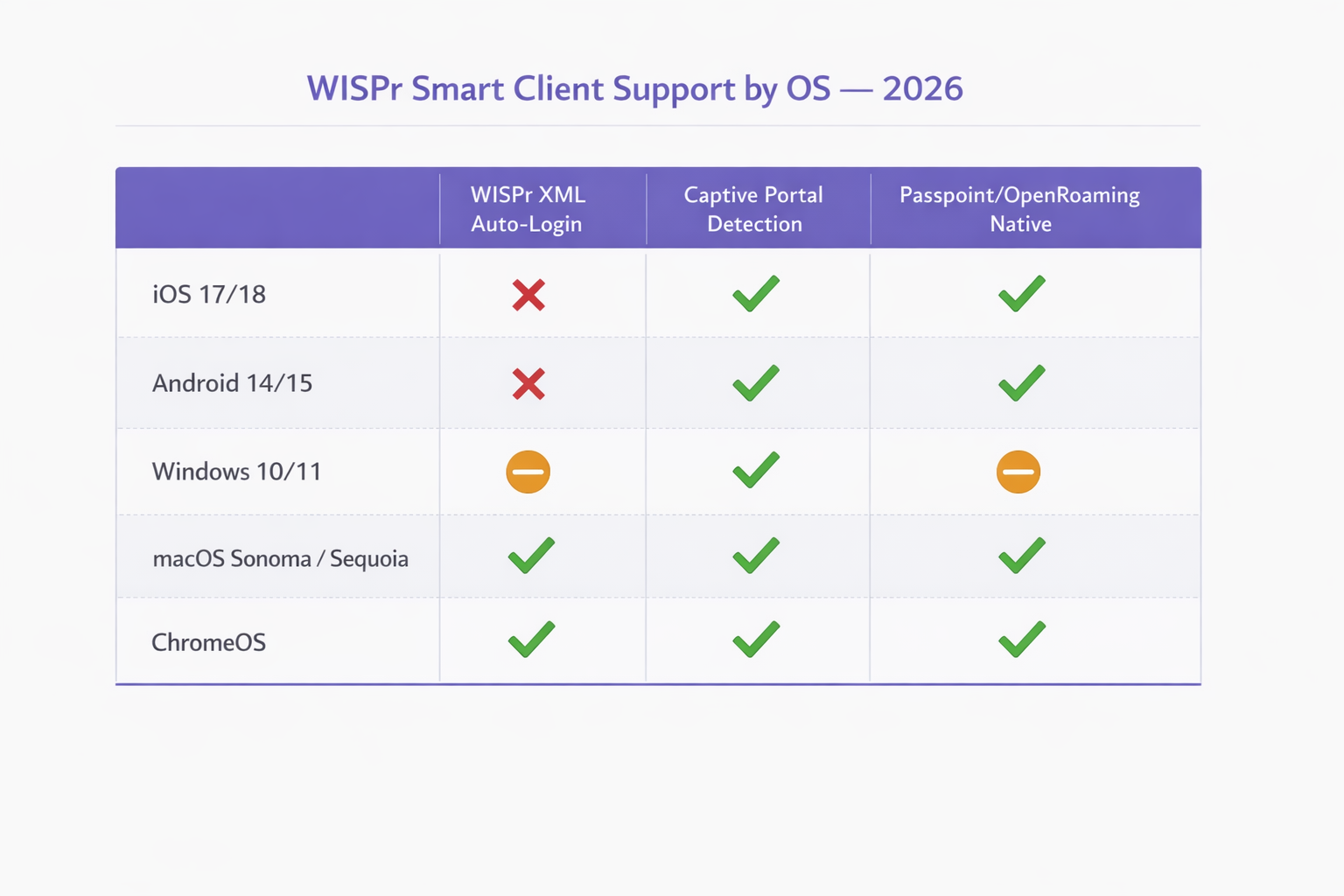
Windows 10/11: Microsoft की WLAN AutoConfig सेवा http://www.msftconnecttest.com/connecttest.txt को प्रोब करती है। Windows अपनी WLAN AutoConfig सेवा में सीमित WISPr XML पार्सिंग क्षमता को बरकरार रखता है, लेकिन यह केवल पूर्व-कॉन्फ़िगर किए गए WISPr प्रोफ़ाइल वाले SSIDs के लिए ट्रिगर होता है, जिसे आमतौर पर MDM या ग्रुप पॉलिसी के माध्यम से डिप्लॉय किया जाता है। सामान्य अतिथि Wi-Fi के लिए, Windows मोबाइल OSs के समान व्यवहार करता है, उपयोगकर्ता को एक सूचना प्रस्तुत करता है।
| ऑपरेटिंग सिस्टम | WISPr XML ऑटो-लॉगिन | Captive Portal डिटेक्शन | Passpoint / OpenRoaming नेटिव |
|---|---|---|---|
| iOS 17 / 18 | समर्थित नहीं | हाँ (captive.apple.com पर HTTP प्रोब) | हाँ (नेटिव) |
| Android 14 / 15 | समर्थित नहीं | हाँ (gstatic.com पर HTTP प्रोब) | हाँ (नेटिव) |
| Windows 10 / 11 | आंशिक (केवल MDM-प्रावधानित) | हाँ (msftconnecttest.com पर HTTP प्रोब) | आंशिक (प्रोफ़ाइल की आवश्यकता है) |
| macOS Sonoma / Sequoia | केवल विरासत | हाँ (CNA, iOS के समान) | हाँ (नेटिव) |
| ChromeOS | सीमित | हाँ | हाँ |
WISPr RADIUS विशेषताएँ जो अभी भी मायने रखती हैं
जबकि XML प्रमाणीकरण हैंडशेक अधिकांश डिप्लॉयमेंट के लिए अप्रचलित है, WISPr विनिर्देश द्वारा परिभाषित RADIUS विक्रेता-विशिष्ट विशेषताएँ (VSAs) एंटरप्राइज़ नेटवर्क नीति का एक सक्रिय हिस्सा बनी हुई हैं। Aruba (HPE), Cisco, Ruckus, Fortinet, और Extreme Networks सहित सभी विक्रेता अपनी RADIUS प्रोसेसिंग पाइपलाइन में इन विशेषताओं का समर्थन करते हैं।
| विशेषता | कार्य | 2026 में अभी भी प्रासंगिक |
|---|---|---|
WISPr-Bandwidth-Max-Up |
अपस्ट्रीम बैंडविड्थ कैप | हाँ — अतिथि थ्रॉटलिंग के लिए उपयोग किया जाता है |
WISPr-Bandwidth-Max-Down |
डाउनस्ट्रीम बैंडविड्थ कैप | हाँ — अतिथि थ्रॉटलिंग के लिए उपयोग किया जाता है |
WISPr-Locat |
ion-ID |
हॉटस्पॉट स्थान की पहचान करता है |
WISPr-Location-Name |
मानव-पठनीय स्थान | हाँ — रिपोर्टिंग के लिए उपयोग किया जाता है |
WISPr-Session-Terminate-Time |
सत्र समाप्ति टाइमस्टैम्प | हाँ — समय-सीमित पहुँच के लिए उपयोग किया जाता है |
WISPr-Logoff-URL |
सत्र समाप्ति एंडपॉइंट | घट रहा है — CoA द्वारा प्रतिस्थापित किया गया है |
WISPr-Redirection-URL |
प्रमाणीकरण के बाद रीडायरेक्ट लक्ष्य | हाँ — मार्केटिंग स्प्लैश पेजों के लिए उपयोग किया जाता है |
कार्यान्वयन मार्गदर्शिका: Passpoint में संक्रमण
जैसे-जैसे उद्योग एन्क्रिप्टेड खुले नेटवर्क से दूर जा रहा है, Passpoint (Hotspot 2.0) और OpenRoaming एंटरप्राइज़ परिनियोजन के लिए आवश्यक विकास का प्रतिनिधित्व करते हैं। IEEE 802.11u मानक पर निर्मित, Passpoint उपकरणों को EAP-TLS या EAP-TTLS का उपयोग करके स्वचालित रूप से नेटवर्क खोजने और प्रमाणित करने में सक्षम बनाता है, जो कनेक्शन के क्षण से WPA2/WPA3 Enterprise एन्क्रिप्शन प्रदान करता है।
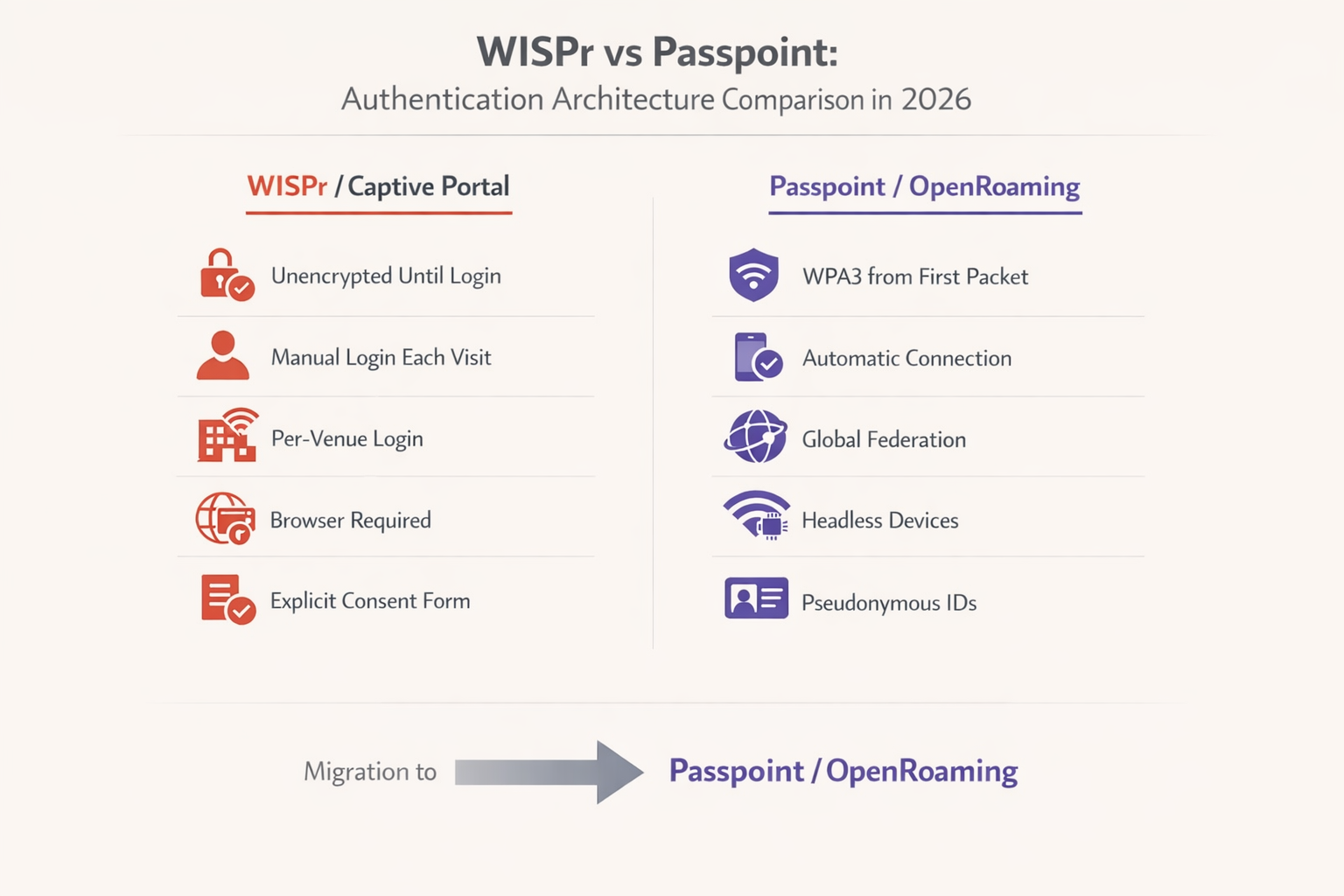
WBA इंडस्ट्री रिपोर्ट 2025 के अनुसार, 81% Wi-Fi अधिकारी अपने बुनियादी ढांचे के भीतर OpenRoaming को तैनात करने की योजना बना रहे हैं। परिवहन हब, स्वास्थ्य सेवा सुविधाओं और बड़े पैमाने के खुदरा वातावरण के लिए, यह संक्रमण तेजी से एक अनुपालन आवश्यकता बन रहा है, न कि एक विवेकाधीन अपग्रेड।
चरण-दर-चरण माइग्रेशन रणनीति
चरण 1 — वर्तमान RADIUS एट्रिब्यूट्स का ऑडिट करें: अपनी मौजूदा RADIUS सर्वर कॉन्फ़िगरेशन की समीक्षा करें। पहचानें कि बैंडविड्थ दर सीमित करने, सत्र टाइमआउट या स्थान रिपोर्टिंग के लिए वर्तमान में कौन से WISPr Vendor-Specific Attributes उपयोग में हैं। इन नीतियों को आपके नए Passpoint परिनियोजन में समतुल्य एट्रिब्यूट्स से मैप किया जाना चाहिए, इससे पहले कि लेगेसी SSID को निष्क्रिय किया जाए।
चरण 2 — दोहरे SSID तैनात करें: संक्रमण चरण के दौरान, अपने एक्सेस पॉइंट को लेगेसी ओपन SSID (Captive Portal के साथ) और एक नए Passpoint-सक्षम SSID दोनों को प्रसारित करने के लिए कॉन्फ़िगर करें। यह लेगेसी उपकरणों और हेडलेस IoT हार्डवेयर के लिए पिछड़े संगतता सुनिश्चित करता है जो EAP प्रमाणीकरण में भाग नहीं ले सकते।
चरण 3 — पहचान प्रदाता को कॉन्फ़िगर करें: OpenRoaming को सक्षम करने के लिए, आपको एक स्थापित पहचान प्रदाता के साथ एकीकृत होना चाहिए। Purple Connect लाइसेंस के तहत OpenRoaming के लिए एक मुफ्त पहचान प्रदाता सेवा प्रदान करता है, जो भाग लेने वाले वाहकों और सेवा प्रदाताओं से वैध प्रोफाइल रखने वाले उपयोगकर्ताओं के लिए सहज प्रमाणीकरण की सुविधा प्रदान करता है।
चरण 4 — नेटवर्क उपकरण अपडेट करें: सुनिश्चित करें कि आपके Wireless LAN Controllers (WLC) और एक्सेस पॉइंट ऐसे फ़र्मवेयर चला रहे हैं जो Passpoint रिलीज़ 2 या उच्चतर का समर्थन करते हैं। Cisco, Aruba और Ruckus सहित प्रमुख विक्रेता व्यापक समर्थन प्रदान करते हैं। SMB वातावरण के लिए, व्यावहारिक कार्यान्वयन के लिए TP-Link Omada and Purple WiFi for SMB Deployments मार्गदर्शिका देखें।
चरण 5 — मॉनिटर करें और अप्रचलित करें: Passpoint SSID बनाम लेगेसी Captive Portal SSID की अपनाने की दर को ट्रैक करने के लिए WiFi Analytics का उपयोग करें। एक बार पर्याप्त सीमा तक पहुँच जाने पर — आमतौर पर 70-80% सत्र — लेगेसी Captive Portal को विशिष्ट उपयोग के मामलों तक सीमित किया जा सकता है या पूरी तरह से चरणबद्ध तरीके से समाप्त किया जा सकता है।
Captive Portal लचीलेपन के लिए सर्वोत्तम अभ्यास
उन वातावरणों के लिए जिन्हें 2026 में Captive Portal बनाए रखना होगा, CNA सभी उपकरणों पर विश्वसनीय रूप से लॉन्च हो, यह सुनिश्चित करने के लिए सख्त कॉन्फ़िगरेशन सर्वोत्तम प्रथाओं का पालन करना महत्वपूर्ण है।
प्रोब URL को ब्लॉक न करें: सुनिश्चित करें कि आपका वॉल्ड गार्डन या पूर्व-प्रमाणीकरण ACLs DNS रिज़ॉल्यूशन और HTTP ट्रैफ़िक को captive.apple.com, connectivitycheck.gstatic.com, और msftconnecttest.com पर अनुमति देते हैं। इन डोमेन को ब्लॉक करने से OS पोर्टल का पता लगाने और CNA को ट्रिगर करने से रोकेगा।
प्रारंभिक रीडायरेक्ट के लिए HTTP का उपयोग करें: प्रारंभिक रीडायरेक्ट HTTP (पोर्ट 80) पर होना चाहिए। HTTPS अनुरोध को रीडायरेक्ट करने का प्रयास करने से TLS प्रमाणपत्र चेतावनी मिलेगी, क्योंकि एक्सेस पॉइंट उस डोमेन के लिए एक वैध प्रमाणपत्र प्रस्तुत नहीं कर सकता है जिसका उपयोगकर्ता ने मूल रूप से अनुरोध किया था। यह एंटरप्राइज़ Captive Portal परिनियोजन में सामना की जाने वाली सबसे आम गलत कॉन्फ़िगरेशन है।
पोर्टल पेज को HTTPS से सुरक्षित करें: एक बार रीडायरेक्ट होने के बाद, वास्तविक Captive Portal लैंडिंग पेज को एक वैध, सार्वजनिक रूप से विश्वसनीय SSL प्रमाणपत्र के साथ HTTPS के माध्यम से होस्ट किया जाना चाहिए। यह सुनिश्चित करता है कि उपयोगकर्ता क्रेडेंशियल और GDPR सहमति डेटा सुरक्षित रूप से प्रसारित होते हैं और पोर्टल पेज को आधुनिक ब्राउज़रों द्वारा असुरक्षित के रूप में फ़्लैग नहीं किया जाता है।
CNA के लिए अनुकूलित करें: Captive Network Assistant एक सीमित ब्राउज़र है। जटिल JavaScript फ़्रेमवर्क, पॉप-अप या बड़े एसेट डाउनलोड करने से बचें। पोर्टल को विभिन्न स्क्रीन आकारों को समायोजित करने के लिए तेज़ी से लोड होना चाहिए और पूरी तरह से प्रतिक्रियाशील होना चाहिए। एक पोर्टल जिसे लोड होने में तीन सेकंड से अधिक समय लगता है, उसके परिणामस्वरूप परित्याग दर काफी अधिक होगी।
सत्र प्रबंधन के लिए CoA लागू करें: लेगेसी WISPr-Logoff-URL तंत्र पर निर्भर रहने के बजाय, गतिशील सत्र प्रबंधन के लिए RADIUS Change of Authorisation (CoA) लागू करें। यह सभी डिवाइस प्रकारों में अधिक विश्वसनीय सत्र समाप्ति और पुनः-प्रमाणीकरण ट्रिगर प्रदान करता है।
समस्या निवारण और जोखिम न्यूनीकरण
सामान्य विफलता मोड और समाधान
लक्षण: iOS डिवाइस Wi-Fi से कनेक्ट होते हैं, लेकिन लॉगिन स्क्रीन कभी दिखाई नहीं देती।
मूल कारण: नेटवर्क captive.apple.com तक पहुँच को ब्लॉक कर रहा है, प्रोब को एक अमान्य प्रतिक्रिया दे रहा है, या वायरलेस कंट्रोलर पर "Bypass Apple Captive Network Assistant" सुविधा अनजाने में सक्षम हो गई है।
समाधान: पूर्व-प्रमाणीकरण ACLs सत्यापित करें। WLC पर किसी भी CNA बाईपास सुविधा को अक्षम करें। WLC क्लाइंट स्थिति लॉग की निगरानी करके पुष्टि करें कि HTTP 302 रीडायरेक्ट सही ढंग से वितरित किया जा रहा है।
लक्षण: उपयोगकर्ताओं को Captive Portal देखने से पहले प्रमाणपत्र त्रुटियाँ प्राप्त होती हैं। मूल कारण: नेटवर्क HTTPS ट्रैफ़िक को इंटरसेप्ट और रीडायरेक्ट करने का प्रयास कर रहा है। WLC के पास अनुरोधित डोमेन के लिए निजी कुंजी नहीं है, जिससे ब्राउज़र TLS त्रुटि ट्रिगर होती है। समाधान: Coकैप्टिव पोर्टल को केवल पोर्ट 80 पर HTTP ट्रैफ़िक को इंटरसेप्ट और रीडायरेक्ट करने के लिए कॉन्फ़िगर करें। पोर्टल को ट्रिगर करने के लिए OS-स्तर की कनेक्टिविटी जांचों पर निर्भर रहें।
लक्षण: Android उपयोगकर्ताओं को साइन इन करने के लिए कहा जाता है, लेकिन पोर्टल पेज सही ढंग से लोड नहीं होता है। मूल कारण: पोर्टल पेज JavaScript सुविधाओं या CSS का उपयोग कर रहा है जो कैप्टिव पोर्टल रेंडरिंग के लिए उपयोग किए जाने वाले Android WebView घटक द्वारा समर्थित नहीं हैं। समाधान: पोर्टल पेज को प्रतिबंधित ब्राउज़र वातावरण में परीक्षण करें। सुनिश्चित करें कि सभी एसेट पोर्टल सर्वर से ही लोड होते हैं (कोई बाहरी CDN निर्भरता नहीं जो प्री-ऑथ ACL द्वारा अवरुद्ध हो)।
लक्षण: Passpoint प्रमाणीकरण में माइग्रेट करने के बाद WISPr बैंडविड्थ सीमाएं लागू नहीं हो रही हैं।
मूल कारण: RADIUS सर्वर 802.1X-प्रमाणित सत्रों के लिए WISPr बैंडविड्थ VSA वापस नहीं कर रहा है, केवल UAM सत्रों के लिए।
समाधान: RADIUS नीति को अपडेट करें ताकि उपयोग की गई प्रमाणीकरण विधि की परवाह किए बिना, सभी प्रमाणित सत्रों के लिए WISPr-Bandwidth-Max-Up और WISPr-Bandwidth-Max-Down विशेषताएँ वापस की जा सकें।
ROI और व्यावसायिक प्रभाव
लेगेसी WISPr कैप्टिव पोर्टल से Passpoint/OpenRoaming आर्किटेक्चर में माइग्रेट करना महत्वपूर्ण व्यावसायिक मूल्य प्रदान करता है, विशेष रूप से परिवहन हब और बड़े पैमाने पर खुदरा परिनियोजन जैसे उच्च-घनत्व वाले वातावरण में।
सुरक्षा और अनुपालन के दृष्टिकोण से, खुले नेटवर्क को WPA3 Enterprise एन्क्रिप्शन से बदलने से कनेक्शन और पोर्टल प्रमाणीकरण के बीच मौजूद अनएन्क्रिप्टेड विंडो समाप्त हो जाती है। यह सीधे PCI DSS 4.0 में उजागर की गई कमजोरियों को संबोधित करता है और ईविल ट्विन हमलों के जोखिम को कम करता है जिन्हें खुले SSIDs के खिलाफ आसानी से निष्पादित किया जा सकता है।
परिचालन रूप से, कैप्टिव पोर्टल घर्षण को समाप्त करने से Wi-Fi कनेक्टिविटी समस्याओं से संबंधित हेल्पडेस्क टिकट कम हो जाते हैं। 500 कमरों वाले होटल में, यह पीक चेक-इन अवधियों के दौरान फ्रंट-डेस्क कॉलों में एक सार्थक कमी का प्रतिनिधित्व कर सकता है। जब एक मजबूत Guest WiFi प्लेटफॉर्म के साथ एकीकृत किया जाता है, तो सहज Passpoint कनेक्शन से उच्च अटैचमेंट दर समृद्ध एनालिटिक्स और अधिक प्रभावी स्थान-आधारित सेवाओं में बदल जाती है। इन आर्किटेक्चर के साथ इनडोर पोजिशनिंग कैसे एकीकृत होती है, इस पर अधिक पढ़ने के लिए, हमारी Indoor Positioning System: UWB, BLE, & WiFi Guide देखें।
जबकि Passpoint के प्रारंभिक परिनियोजन के लिए कॉन्फ़िगरेशन अपडेट और पहचान प्रदाता एकीकरण की आवश्यकता होती है, दीर्घकालिक परिचालन दक्षता और बेहतर उपयोगकर्ता अनुभव उद्यम नेटवर्क ऑपरेटरों के लिए निवेश पर एक आकर्षक प्रतिफल प्रदान करते हैं। दोहरी-SSID माइग्रेशन दृष्टिकोण व्यवधान को कम करता है, जिससे संगठनों को अपनी परिचालन बाधाओं के अनुकूल गति से संक्रमण करने की अनुमति मिलती है।
मुख्य शब्द और परिभाषाएं
WISPr (Wireless Internet Service Provider roaming)
A draft protocol originally submitted to the Wi-Fi Alliance that defined XML-based auto-login mechanisms and specific RADIUS attributes for captive portal environments. WISPr 2.0 was published by the Wireless Broadband Alliance in March 2010.
While the XML auto-login is largely deprecated in 2026, the WISPr RADIUS attributes are still heavily used for bandwidth control and session management across enterprise WLCs.
Captive Portal
A web page that a user of a public-access network is obliged to view and interact with before full internet access is granted. Typically implemented via HTTP redirection at the network access layer.
Used extensively in hospitality and retail to capture user consent and first-party data before granting internet access. GDPR Article 7 compliance requirements apply to the consent mechanism.
Captive Network Assistant (CNA)
A limited, sandboxed web browser built into operating systems (iOS, macOS, Android, Windows) specifically designed to render captive portal login pages when a network is detected as captive.
IT teams must ensure portal pages are optimised for the CNA, as it lacks the full feature set of a standard browser and cannot execute complex JavaScript frameworks reliably.
Passpoint (Hotspot 2.0)
An industry standard based on IEEE 802.11u that enables devices to automatically discover and securely connect to Wi-Fi networks using EAP-based authentication, providing WPA2/WPA3 Enterprise encryption from the first packet.
The primary upgrade path for enterprise networks looking to replace unencrypted captive portals with secure, seamless authentication. Supported natively on iOS, Android, Windows, and macOS.
OpenRoaming
A global roaming federation managed by the Wireless Broadband Alliance (WBA), built upon Passpoint technology, that allows seamless Wi-Fi onboarding across participating networks worldwide.
Enables users to automatically connect to participating networks without registering at each venue. Purple acts as a free identity provider for OpenRoaming under the Connect license.
UAM (Universal Access Method)
A standard method for browser-based login at a captive portal, utilizing HTTP redirection to a centralized authentication server. The underlying mechanism that powers traditional captive portal deployments.
Distinct from 802.1X authentication. UAM relies on the user's browser (or CNA) to render the portal page, making it dependent on the OS captive portal detection mechanism.
Pre-Authentication ACL (Walled Garden)
An Access Control List applied to a client before successful authentication, defining what limited network resources they can access. Must allow DNS resolution and access to the portal server while blocking general internet access.
Misconfigured pre-auth ACLs are the most common cause of captive portal failures, particularly when probe URLs for iOS or Android are inadvertently blocked.
ANQP (Access Network Query Protocol)
A query and response protocol used by Passpoint (IEEE 802.11u) to allow devices to discover network capabilities, roaming consortium identifiers, and authentication requirements before associating.
ANQP queries replace the WISPr XML discovery mechanism in Passpoint deployments, enabling automatic and secure network selection without user interaction.
WISPr VSAs (Vendor-Specific Attributes)
RADIUS Vendor-Specific Attributes defined by the WISPr specification, including WISPr-Bandwidth-Max-Up, WISPr-Bandwidth-Max-Down, WISPr-Location-ID, and WISPr-Session-Terminate-Time.
These attributes remain fully functional in 2026 and are returned by RADIUS servers to enforce bandwidth policies and session management for both UAM and 802.1X authenticated sessions.
CoA (Change of Authorisation)
A RADIUS extension (RFC 5176) that allows the AAA server to dynamically modify or terminate an active session without requiring the client to re-authenticate.
The recommended replacement for the legacy WISPr-Logoff-URL mechanism for session management in modern enterprise deployments.
केस स्टडीज
A large conference centre with 3,000 concurrent users is experiencing a high volume of complaints from attendees using iOS 17 devices. Users report that they connect to the 'Conference_Guest' Wi-Fi SSID, but the captive portal login screen never appears, leaving them connected to the network but without internet access. Android users on the same SSID are not experiencing this issue. The network runs on Cisco Catalyst 9800 WLCs.
Step 1: Verify the Pre-Authentication ACLs on the Wireless LAN Controller. Navigate to the guest SSID policy and confirm that DNS resolution is permitted for all clients, and that HTTP traffic (Port 80) destined for any IP address is being intercepted and redirected to the portal URL — not dropped.
Step 2: Check the WLC configuration for any CNA Bypass settings. On Cisco 9800 WLCs, this is found under the WLAN security settings. If 'Captive Bypass Portal' is enabled, disable it immediately. This setting prevents the WLC from redirecting Apple's specific HTTP probe requests, assuming the user will open a full browser manually.
Step 3: Confirm the initial redirection is occurring on HTTP port 80, not HTTPS port 443. Use a packet capture on the WLC management interface to verify the 302 redirect is being sent in response to the iOS probe.
Step 4: Ensure the portal server's HTTPS certificate is valid and trusted. While the initial redirect is HTTP, the portal page itself must be HTTPS. An expired or self-signed certificate will cause the CNA to display a warning and prevent login.
Step 5: Test with an iOS device, monitoring the RADIUS logs and WLC client state to confirm the HTTP 302 redirect is successfully delivered and the CNA launches.
A national retail chain with 200 stores is planning to migrate from their legacy open SSID with a captive portal to a Passpoint-enabled network to improve security and reduce PCI DSS 4.0 compliance risk. However, their network operations team relies heavily on the WISPr-Bandwidth-Max-Down RADIUS attribute to throttle guest traffic to 5Mbps, and their RADIUS infrastructure is managed by a third-party provider. How should they approach this migration without losing bandwidth control?
Step 1: Deploy a dual-SSID strategy across all 200 stores simultaneously using a centralised WLC or cloud management platform. Keep the existing open SSID active while broadcasting the new Passpoint-enabled SSID with the same SSID name as the OpenRoaming profile.
Step 2: Work with the third-party RADIUS provider to update the RADIUS policy. The policy must be configured to return WISPr-Bandwidth-Max-Down (value: 5120 Kbps) and WISPr-Bandwidth-Max-Up attributes in the RADIUS Access-Accept message for all authenticated sessions — including 802.1X/EAP sessions from Passpoint clients, not just UAM sessions from the captive portal.
Step 3: Verify that the WLC firmware at each store supports applying WISPr VSAs to 802.1X-authenticated sessions. Most enterprise WLCs (Cisco, Aruba, Ruckus) support this, but it may require a firmware update on older hardware.
Step 4: Integrate with an OpenRoaming identity provider (such as Purple under the Connect license) to enable automatic onboarding for users whose devices carry valid roaming credentials.
Step 5: Use the WiFi Analytics platform to monitor per-store adoption of the Passpoint SSID. After 90 days, review adoption rates and plan the phased decommissioning of the legacy open SSID on a store-by-store basis.
परिदृश्य विश्लेषण
Q1. Your deployment requires users to download a specific loyalty app before accessing the internet. You configure the pre-authentication ACL to allow access to the Apple App Store and Google Play Store IP ranges. However, users report they cannot access the stores. What is the most likely architectural limitation causing this, and what is the correct resolution?
💡 संकेत:Consider how modern Content Delivery Networks (CDNs) and cloud services resolve IP addresses dynamically.
अनुशंसित दृष्टिकोण दिखाएं
The App Store and Play Store utilise complex, dynamic CDNs (such as Akamai or CloudFront). Creating IP-based ACLs for these services is highly unreliable because the IP addresses change frequently based on geography and load balancing. The correct resolution is to use DNS-based ACLs (if supported by the WLC) to whitelist the specific domain names required by the app stores, rather than attempting to maintain a list of static IP ranges. Alternatively, configure the portal to provide a direct download link to the app hosted on your own portal server, bypassing the app store requirement entirely during the pre-auth phase.
Q2. A network engineer proposes implementing a strict HTTPS-only policy for all network traffic, including the initial captive portal redirect, to improve security. Why is this approach fundamentally flawed for captive portal environments, and what is the correct security architecture?
💡 संकेत:Think about how TLS certificates are validated by a client browser and what happens when the WLC intercepts an HTTPS request.
अनुशंसित दृष्टिकोण दिखाएं
When a client attempts to access a secure site (e.g., https://example.com ) and the WLC intercepts that traffic to redirect to the portal, the WLC must present a TLS certificate. Because the WLC does not possess the valid private key for 'example.com', the client browser correctly identifies the interception as a Man-in-the-Middle attack and displays a severe security warning, preventing the portal from loading. The correct architecture is: (1) allow the OS connectivity probe (HTTP) to be intercepted and redirected, triggering the CNA; (2) host the portal login page itself on HTTPS with a valid, publicly trusted certificate; (3) use WPA2/WPA3 Enterprise (Passpoint) for full encryption from connection, eliminating the need for the initial unencrypted phase entirely.
Q3. You are tasked with migrating a 60,000-seat stadium network from a legacy captive portal to OpenRoaming. The business requires that user bandwidth is still strictly limited to 5Mbps down / 2Mbps up, and the stadium hosts IoT devices (point-of-sale terminals, digital signage) that cannot participate in EAP authentication. How do you architect this migration?
💡 संकेत:Consider both the bandwidth policy persistence challenge and the IoT device compatibility requirement.
अनुशंसित दृष्टिकोण दिखाएं
This requires a three-SSID architecture: (1) A Passpoint/OpenRoaming SSID for modern guest devices, with the RADIUS server returning WISPr-Bandwidth-Max-Down (5120 Kbps) and WISPr-Bandwidth-Max-Up (2048 Kbps) VSAs upon successful EAP authentication — confirming that WISPr bandwidth attributes remain functional in 802.1X contexts. (2) A legacy open SSID with captive portal for transitional guest devices that do not yet have OpenRoaming profiles. (3) A separate WPA2-PSK SSID on a dedicated VLAN for IoT devices, with MAC address filtering and strict firewall rules to prevent lateral movement. The WISPr bandwidth attributes must be explicitly configured in the RADIUS policy for the Passpoint SSID, as they are not automatically inherited from the legacy UAM policy.




