

WISPr and Captive Portal Auto-Login: What Still Works in 2026
This authoritative technical reference guide examines the current state of the WISPr protocol and captive portal auto-login mechanisms in 2026, covering which OS platforms still honour the spec, how iOS and Android handle captive portal detection, and why enterprise deployments are migrating to Passpoint and OpenRoaming. It provides network architects and IT managers with actionable implementation guidance, migration strategies, and risk mitigation frameworks for both legacy and modern Wi-Fi deployments.
🎧 Listen to this Guide
View Transcript
Executive Summary
For over a decade, the Wireless Internet Service Provider roaming (WISPr) protocol served as the de facto standard for captive portal auto-login and roaming federation. In 2026, the landscape has fundamentally shifted. While captive portals remain ubiquitous across Hospitality and Retail environments, the reliance on WISPr XML for seamless authentication has been largely superseded by modern OS-level Captive Network Assistants (CNA) and the rapid adoption of Passpoint (Hotspot 2.0).
This guide provides senior IT decision-makers with a pragmatic analysis of what still works regarding WISPr and captive portal detection. We explore how iOS 17/18 and modern Android versions handle portal redirection, why traditional smart clients are failing, and how enterprise network architects should plan their transition to OpenRoaming architectures. By understanding the technical limitations of legacy UAM (Universal Access Method) flows, venue operations directors can mitigate guest connectivity issues while laying the groundwork for secure, encrypted-from-first-packet Wi-Fi access.
Technical Deep-Dive: The State of WISPr in 2026
The Legacy of WISPr XML
Originally submitted as a draft protocol to the Wi-Fi Alliance, WISPr was designed to allow users to roam between different wireless internet service providers. The core innovation was the Smart Client to Access Gateway Interface Protocol, defined in Appendix D of the specification. This XML-based protocol allowed smart-client software to detect a captive portal, parse the XML challenge embedded in the HTML redirect, and automatically submit RADIUS credentials via HTTPS POST without requiring the user to interact with a browser.
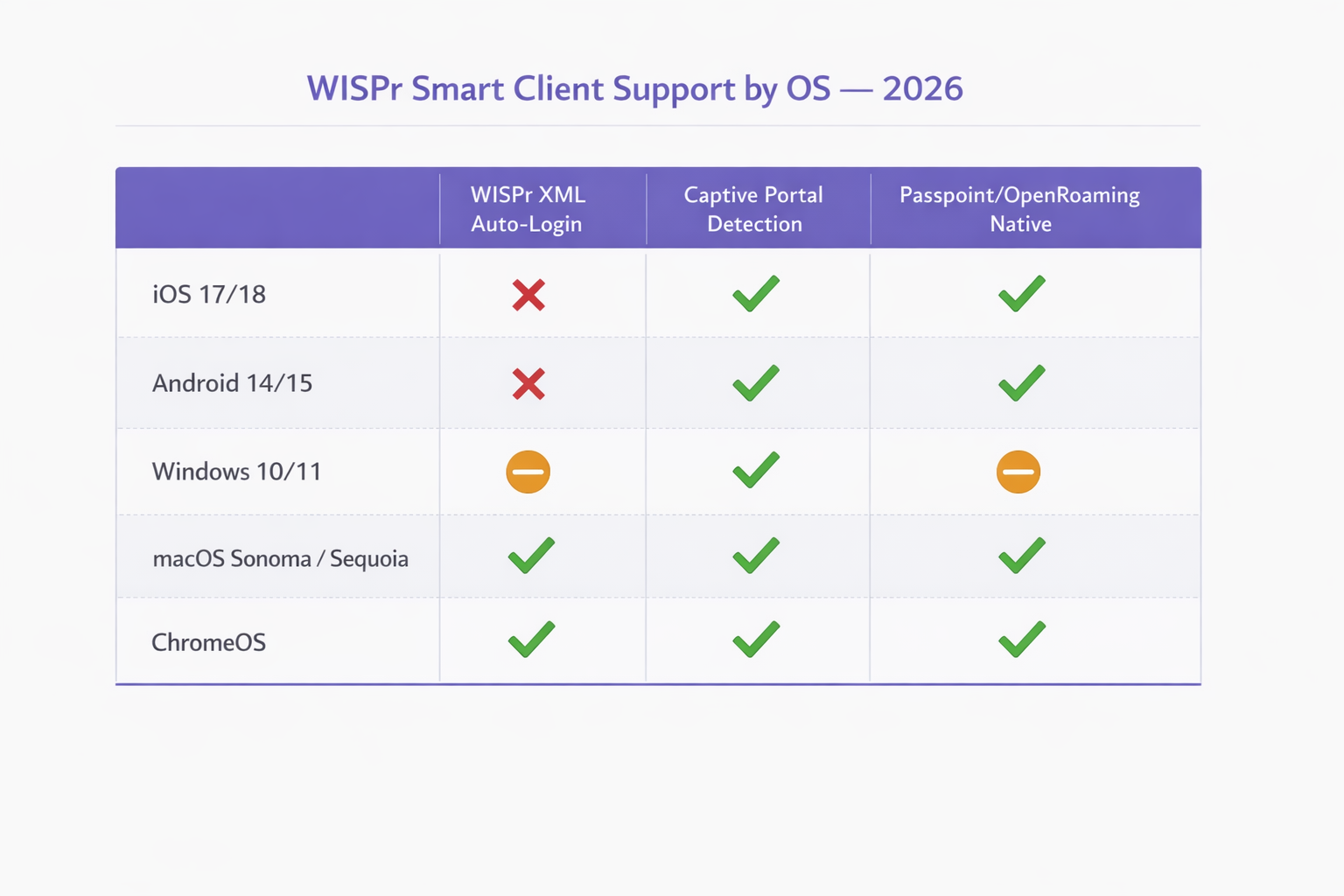
In 2026, this mechanism is effectively deprecated on modern mobile operating systems. Apple's iOS has never natively supported WISPr XML auto-login, relying instead on its Captive Network Assistant. Android has similarly deprecated support in favour of its own connectivity checks. Only specific enterprise MDM-managed devices and legacy Windows deployments (via WLAN AutoConfig) retain partial WISPr XML parsing capabilities. However, the RADIUS attributes defined by WISPr — such as WISPr-Bandwidth-Max-Up and WISPr-Location-ID — remain heavily utilized by major network vendors for traffic shaping and policy enforcement.
Modern Captive Portal Detection Mechanisms
When a client connects to an open SSID, it must determine if it has direct internet access or if it is behind a captive portal. This is achieved through specific HTTP probes that differ by operating system.
iOS and macOS (Captive Network Assistant): Apple devices perform an HTTP GET request to specific endpoints, primarily http://captive.apple.com/hotspot-detect.html. If the network intercepts this request and returns an HTTP 302 redirect or an HTTP 200 OK with a payload that does not match the expected "Success" string, the OS flags the network as captive. It then launches the Captive Network Assistant (CNA) — a sandboxed mini-browser — to render the portal page. Crucially, in iOS 17 and 18, strict enforcement means that if the network uses HTTPS for the initial redirect or blocks access to the probe URL entirely, the CNA will fail to launch, leaving the user connected to the Wi-Fi but without internet access.
Android and ChromeOS: Android devices utilise similar connectivity checks, probing endpoints like http://connectivitycheck.gstatic.com/generate_204. If a 204 No Content response is not received, Android prompts the user to "Sign in to network". Unlike iOS, newer Android versions can perform these checks over HTTPS, though HTTP remains the fallback standard for compatibility with legacy access points.
Windows 10/11: Microsoft's WLAN AutoConfig service probes http://www.msftconnecttest.com/connecttest.txt. Windows retains limited WISPr XML parsing capability in its WLAN AutoConfig service, but this is only triggered for SSIDs with a pre-configured WISPr profile, typically deployed via MDM or Group Policy. For general guest Wi-Fi, Windows behaves similarly to mobile OSs, presenting a notification to the user.
| Operating System | WISPr XML Auto-Login | Captive Portal Detection | Passpoint / OpenRoaming Native |
|---|---|---|---|
| iOS 17 / 18 | Not supported | Yes (HTTP probe to captive.apple.com) | Yes (native) |
| Android 14 / 15 | Not supported | Yes (HTTP probe to gstatic.com) | Yes (native) |
| Windows 10 / 11 | Partial (MDM-provisioned only) | Yes (HTTP probe to msftconnecttest.com) | Partial (requires profile) |
| macOS Sonoma / Sequoia | Legacy only | Yes (CNA, same as iOS) | Yes (native) |
| ChromeOS | Limited | Yes | Yes |
The WISPr RADIUS Attributes That Still Matter
While the XML authentication handshake is obsolete for most deployments, the RADIUS Vendor-Specific Attributes (VSAs) defined by the WISPr specification remain an active part of enterprise network policy. Vendors including Aruba (HPE), Cisco, Ruckus, Fortinet, and Extreme Networks all support these attributes in their RADIUS processing pipelines.
| Attribute | Function | Still Relevant in 2026 |
|---|---|---|
WISPr-Bandwidth-Max-Up |
Upstream bandwidth cap | Yes — used for guest throttling |
WISPr-Bandwidth-Max-Down |
Downstream bandwidth cap | Yes — used for guest throttling |
WISPr-Location-ID |
Identifies hotspot location | Yes — used for analytics and billing |
WISPr-Location-Name |
Human-readable location | Yes — used for reporting |
WISPr-Session-Terminate-Time |
Session expiry timestamp | Yes — used for time-limited access |
WISPr-Logoff-URL |
Session termination endpoint | Declining — superseded by CoA |
WISPr-Redirection-URL |
Post-auth redirect target | Yes — used for marketing splash pages |
Implementation Guide: Transitioning to Passpoint
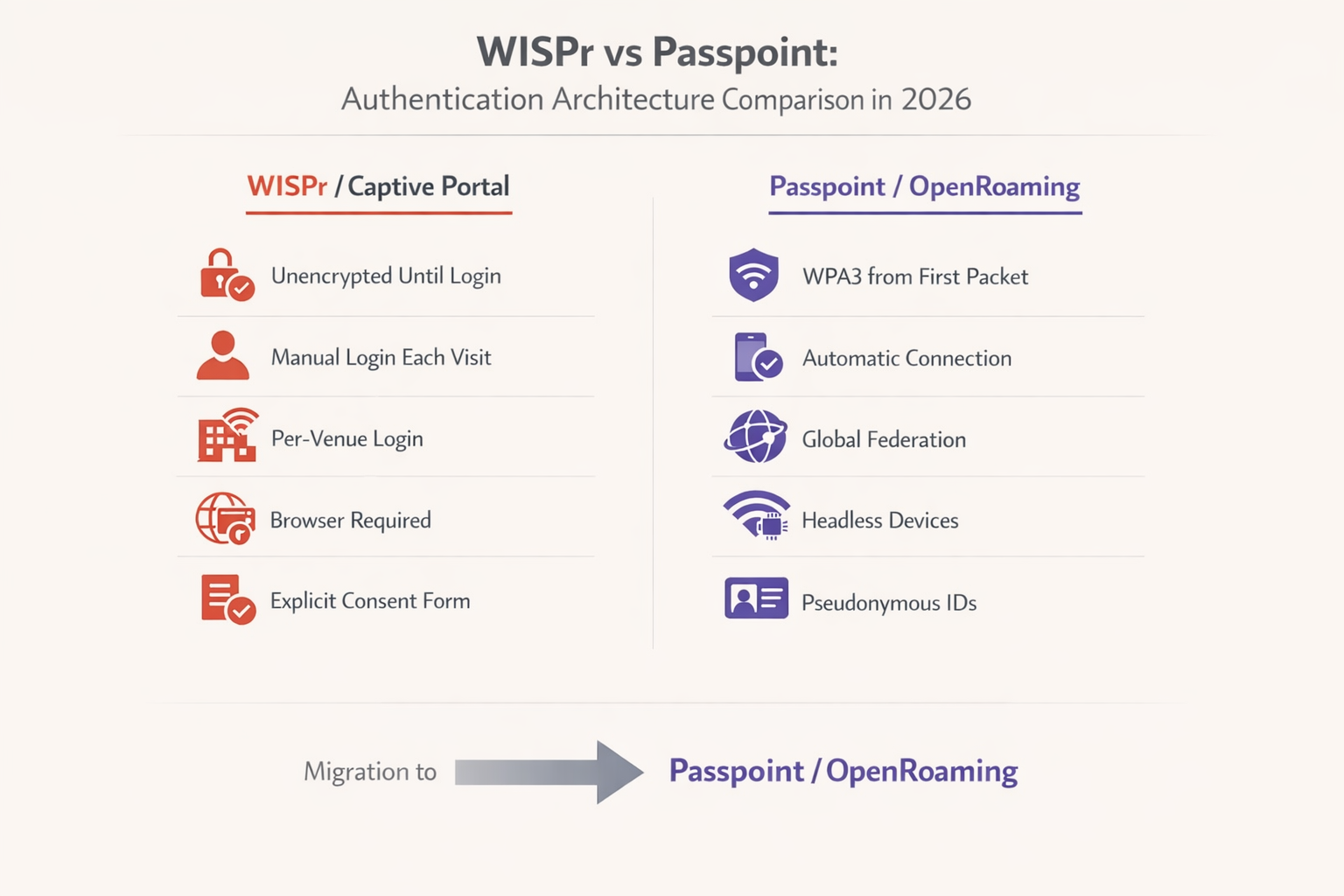
As the industry moves away from unencrypted open networks, Passpoint (Hotspot 2.0) and OpenRoaming represent the necessary evolution for enterprise deployments. Built on the IEEE 802.11u standard, Passpoint enables devices to discover and authenticate to networks automatically using EAP-TLS or EAP-TTLS, providing WPA2/WPA3 Enterprise encryption from the moment of connection.
According to the WBA Industry Report 2025, 81% of Wi-Fi executives plan to deploy OpenRoaming within their infrastructure. For Transport hubs, Healthcare facilities, and large-scale retail environments, this transition is increasingly a compliance requirement rather than a discretionary upgrade.
Step-by-Step Migration Strategy
Step 1 — Audit Current RADIUS Attributes: Review your existing RADIUS server configurations. Identify which WISPr Vendor-Specific Attributes are currently in use for bandwidth rate limiting, session timeouts, or location reporting. These policies must be mapped to equivalent attributes in your new Passpoint deployment before the legacy SSID is decommissioned.
Step 2 — Deploy Dual SSIDs: During the transition phase, configure your access points to broadcast both the legacy open SSID (with the captive portal) and a new Passpoint-enabled SSID. This ensures backwards compatibility for legacy devices and headless IoT hardware that cannot participate in EAP authentication.
Step 3 — Configure the Identity Provider: To enable OpenRoaming, you must integrate with an established identity provider. Purple provides a free identity provider service for OpenRoaming under the Connect license, facilitating seamless authentication for users holding valid profiles from participating carriers and service providers.
Step 4 — Update Network Equipment: Ensure your Wireless LAN Controllers (WLC) and access points are running firmware that supports Passpoint Release 2 or higher. Major vendors including Cisco, Aruba, and Ruckus provide comprehensive support. For SMB environments, refer to the TP-Link Omada and Purple WiFi for SMB Deployments guide for a practical implementation walkthrough.
Step 5 — Monitor and Deprecate: Utilize WiFi Analytics to track the adoption rate of the Passpoint SSID versus the legacy captive portal SSID. Once a sufficient threshold is reached — typically 70-80% of sessions — the legacy captive portal can be restricted to specific use cases or phased out entirely.
Best Practices for Captive Portal Resilience
For environments that must maintain a captive portal in 2026, adhering to strict configuration best practices is critical to ensure the CNA launches reliably across all devices.
Do Not Block Probe URLs: Ensure that your walled garden or pre-authentication ACLs allow DNS resolution and HTTP traffic to captive.apple.com, connectivitycheck.gstatic.com, and msftconnecttest.com. Blocking these domains will prevent the OS from detecting the portal and triggering the CNA.
Use HTTP for the Initial Redirect: The initial redirection must occur over HTTP (Port 80). Attempting to redirect an HTTPS request will result in a TLS certificate warning, as the access point cannot present a valid certificate for the domain the user originally requested. This is the single most common misconfiguration encountered in enterprise captive portal deployments.
Secure the Portal Page with HTTPS: Once the redirect occurs, the actual captive portal landing page must be hosted via HTTPS with a valid, publicly trusted SSL certificate. This ensures that user credentials and GDPR consent data are transmitted securely and that the portal page is not flagged as insecure by modern browsers.
Optimise for the CNA: The Captive Network Assistant is a limited browser. Avoid complex JavaScript frameworks, pop-ups, or downloading large assets. The portal must load quickly and be fully responsive to accommodate various screen sizes. A portal that takes more than three seconds to load will result in a significantly higher abandonment rate.
Implement CoA for Session Management: Rather than relying on the legacy WISPr-Logoff-URL mechanism, implement RADIUS Change of Authorisation (CoA) for dynamic session management. This provides more reliable session termination and re-authentication triggers across all device types.
Troubleshooting & Risk Mitigation
Common Failure Modes and Resolutions
Symptom: iOS devices connect to the Wi-Fi, but the login screen never appears.
Root Cause: The network is blocking access to captive.apple.com, returning an invalid response to the probe, or the "Bypass Apple Captive Network Assistant" feature is inadvertently enabled on the wireless controller.
Resolution: Verify pre-authentication ACLs. Disable any CNA bypass features on the WLC. Confirm the HTTP 302 redirect is being delivered correctly by monitoring WLC client state logs.
Symptom: Users receive certificate errors before seeing the captive portal. Root Cause: The network is attempting to intercept and redirect HTTPS traffic. The WLC does not possess the private key for the requested domain, triggering a browser TLS error. Resolution: Configure the captive portal to only intercept and redirect HTTP traffic on Port 80. Rely on the OS-level connectivity probes to trigger the portal.
Symptom: Android users are prompted to sign in, but the portal page does not load correctly. Root Cause: The portal page is using JavaScript features or CSS that are not supported by the Android WebView component used for captive portal rendering. Resolution: Test the portal page in a restricted browser environment. Ensure all assets are loaded from the portal server itself (no external CDN dependencies that are blocked by the pre-auth ACL).
Symptom: WISPr bandwidth limits are not being applied after migrating to Passpoint authentication.
Root Cause: The RADIUS server is not returning the WISPr bandwidth VSAs for 802.1X-authenticated sessions, only for UAM sessions.
Resolution: Update the RADIUS policy to return WISPr-Bandwidth-Max-Up and WISPr-Bandwidth-Max-Down attributes for all authenticated sessions, regardless of the authentication method used.
ROI & Business Impact
Migrating from legacy WISPr captive portals to Passpoint/OpenRoaming architectures delivers significant business value, particularly in high-density environments like transport hubs and large-scale retail deployments.
From a security and compliance perspective, replacing open networks with WPA3 Enterprise encryption eliminates the unencrypted window that exists between connection and portal authentication. This directly addresses vulnerabilities highlighted in PCI DSS 4.0 and reduces the risk of evil twin attacks that are trivially easy to execute against open SSIDs.
Operationally, the elimination of captive portal friction reduces helpdesk tickets related to Wi-Fi connectivity issues. In a 500-room hotel property, this can represent a meaningful reduction in front-desk calls during peak check-in periods. When integrated with a robust Guest WiFi platform, the higher attachment rate from seamless Passpoint connections translates to richer analytics and more effective location-based services. For further reading on how indoor positioning integrates with these architectures, see our Indoor Positioning System: UWB, BLE, & WiFi Guide .
While the initial deployment of Passpoint requires configuration updates and identity provider integration, the long-term operational efficiencies and enhanced user experience provide a compelling return on investment for enterprise network operators. The dual-SSID migration approach minimises disruption, allowing organisations to transition at a pace that suits their operational constraints.
Key Terms & Definitions
WISPr (Wireless Internet Service Provider roaming)
A draft protocol originally submitted to the Wi-Fi Alliance that defined XML-based auto-login mechanisms and specific RADIUS attributes for captive portal environments. WISPr 2.0 was published by the Wireless Broadband Alliance in March 2010.
While the XML auto-login is largely deprecated in 2026, the WISPr RADIUS attributes are still heavily used for bandwidth control and session management across enterprise WLCs.
Captive Portal
A web page that a user of a public-access network is obliged to view and interact with before full internet access is granted. Typically implemented via HTTP redirection at the network access layer.
Used extensively in hospitality and retail to capture user consent and first-party data before granting internet access. GDPR Article 7 compliance requirements apply to the consent mechanism.
Captive Network Assistant (CNA)
A limited, sandboxed web browser built into operating systems (iOS, macOS, Android, Windows) specifically designed to render captive portal login pages when a network is detected as captive.
IT teams must ensure portal pages are optimised for the CNA, as it lacks the full feature set of a standard browser and cannot execute complex JavaScript frameworks reliably.
Passpoint (Hotspot 2.0)
An industry standard based on IEEE 802.11u that enables devices to automatically discover and securely connect to Wi-Fi networks using EAP-based authentication, providing WPA2/WPA3 Enterprise encryption from the first packet.
The primary upgrade path for enterprise networks looking to replace unencrypted captive portals with secure, seamless authentication. Supported natively on iOS, Android, Windows, and macOS.
OpenRoaming
A global roaming federation managed by the Wireless Broadband Alliance (WBA), built upon Passpoint technology, that allows seamless Wi-Fi onboarding across participating networks worldwide.
Enables users to automatically connect to participating networks without registering at each venue. Purple acts as a free identity provider for OpenRoaming under the Connect license.
UAM (Universal Access Method)
A standard method for browser-based login at a captive portal, utilizing HTTP redirection to a centralized authentication server. The underlying mechanism that powers traditional captive portal deployments.
Distinct from 802.1X authentication. UAM relies on the user's browser (or CNA) to render the portal page, making it dependent on the OS captive portal detection mechanism.
Pre-Authentication ACL (Walled Garden)
An Access Control List applied to a client before successful authentication, defining what limited network resources they can access. Must allow DNS resolution and access to the portal server while blocking general internet access.
Misconfigured pre-auth ACLs are the most common cause of captive portal failures, particularly when probe URLs for iOS or Android are inadvertently blocked.
ANQP (Access Network Query Protocol)
A query and response protocol used by Passpoint (IEEE 802.11u) to allow devices to discover network capabilities, roaming consortium identifiers, and authentication requirements before associating.
ANQP queries replace the WISPr XML discovery mechanism in Passpoint deployments, enabling automatic and secure network selection without user interaction.
WISPr VSAs (Vendor-Specific Attributes)
RADIUS Vendor-Specific Attributes defined by the WISPr specification, including WISPr-Bandwidth-Max-Up, WISPr-Bandwidth-Max-Down, WISPr-Location-ID, and WISPr-Session-Terminate-Time.
These attributes remain fully functional in 2026 and are returned by RADIUS servers to enforce bandwidth policies and session management for both UAM and 802.1X authenticated sessions.
CoA (Change of Authorisation)
A RADIUS extension (RFC 5176) that allows the AAA server to dynamically modify or terminate an active session without requiring the client to re-authenticate.
The recommended replacement for the legacy WISPr-Logoff-URL mechanism for session management in modern enterprise deployments.
Case Studies
A large conference centre with 3,000 concurrent users is experiencing a high volume of complaints from attendees using iOS 17 devices. Users report that they connect to the 'Conference_Guest' Wi-Fi SSID, but the captive portal login screen never appears, leaving them connected to the network but without internet access. Android users on the same SSID are not experiencing this issue. The network runs on Cisco Catalyst 9800 WLCs.
Step 1: Verify the Pre-Authentication ACLs on the Wireless LAN Controller. Navigate to the guest SSID policy and confirm that DNS resolution is permitted for all clients, and that HTTP traffic (Port 80) destined for any IP address is being intercepted and redirected to the portal URL — not dropped.
Step 2: Check the WLC configuration for any CNA Bypass settings. On Cisco 9800 WLCs, this is found under the WLAN security settings. If 'Captive Bypass Portal' is enabled, disable it immediately. This setting prevents the WLC from redirecting Apple's specific HTTP probe requests, assuming the user will open a full browser manually.
Step 3: Confirm the initial redirection is occurring on HTTP port 80, not HTTPS port 443. Use a packet capture on the WLC management interface to verify the 302 redirect is being sent in response to the iOS probe.
Step 4: Ensure the portal server's HTTPS certificate is valid and trusted. While the initial redirect is HTTP, the portal page itself must be HTTPS. An expired or self-signed certificate will cause the CNA to display a warning and prevent login.
Step 5: Test with an iOS device, monitoring the RADIUS logs and WLC client state to confirm the HTTP 302 redirect is successfully delivered and the CNA launches.
A national retail chain with 200 stores is planning to migrate from their legacy open SSID with a captive portal to a Passpoint-enabled network to improve security and reduce PCI DSS 4.0 compliance risk. However, their network operations team relies heavily on the WISPr-Bandwidth-Max-Down RADIUS attribute to throttle guest traffic to 5Mbps, and their RADIUS infrastructure is managed by a third-party provider. How should they approach this migration without losing bandwidth control?
Step 1: Deploy a dual-SSID strategy across all 200 stores simultaneously using a centralised WLC or cloud management platform. Keep the existing open SSID active while broadcasting the new Passpoint-enabled SSID with the same SSID name as the OpenRoaming profile.
Step 2: Work with the third-party RADIUS provider to update the RADIUS policy. The policy must be configured to return WISPr-Bandwidth-Max-Down (value: 5120 Kbps) and WISPr-Bandwidth-Max-Up attributes in the RADIUS Access-Accept message for all authenticated sessions — including 802.1X/EAP sessions from Passpoint clients, not just UAM sessions from the captive portal.
Step 3: Verify that the WLC firmware at each store supports applying WISPr VSAs to 802.1X-authenticated sessions. Most enterprise WLCs (Cisco, Aruba, Ruckus) support this, but it may require a firmware update on older hardware.
Step 4: Integrate with an OpenRoaming identity provider (such as Purple under the Connect license) to enable automatic onboarding for users whose devices carry valid roaming credentials.
Step 5: Use the WiFi Analytics platform to monitor per-store adoption of the Passpoint SSID. After 90 days, review adoption rates and plan the phased decommissioning of the legacy open SSID on a store-by-store basis.
Scenario Analysis
Q1. Your deployment requires users to download a specific loyalty app before accessing the internet. You configure the pre-authentication ACL to allow access to the Apple App Store and Google Play Store IP ranges. However, users report they cannot access the stores. What is the most likely architectural limitation causing this, and what is the correct resolution?
💡 Hint:Consider how modern Content Delivery Networks (CDNs) and cloud services resolve IP addresses dynamically.
Show Recommended Approach
The App Store and Play Store utilise complex, dynamic CDNs (such as Akamai or CloudFront). Creating IP-based ACLs for these services is highly unreliable because the IP addresses change frequently based on geography and load balancing. The correct resolution is to use DNS-based ACLs (if supported by the WLC) to whitelist the specific domain names required by the app stores, rather than attempting to maintain a list of static IP ranges. Alternatively, configure the portal to provide a direct download link to the app hosted on your own portal server, bypassing the app store requirement entirely during the pre-auth phase.
Q2. A network engineer proposes implementing a strict HTTPS-only policy for all network traffic, including the initial captive portal redirect, to improve security. Why is this approach fundamentally flawed for captive portal environments, and what is the correct security architecture?
💡 Hint:Think about how TLS certificates are validated by a client browser and what happens when the WLC intercepts an HTTPS request.
Show Recommended Approach
When a client attempts to access a secure site (e.g., https://example.com ) and the WLC intercepts that traffic to redirect to the portal, the WLC must present a TLS certificate. Because the WLC does not possess the valid private key for 'example.com', the client browser correctly identifies the interception as a Man-in-the-Middle attack and displays a severe security warning, preventing the portal from loading. The correct architecture is: (1) allow the OS connectivity probe (HTTP) to be intercepted and redirected, triggering the CNA; (2) host the portal login page itself on HTTPS with a valid, publicly trusted certificate; (3) use WPA2/WPA3 Enterprise (Passpoint) for full encryption from connection, eliminating the need for the initial unencrypted phase entirely.
Q3. You are tasked with migrating a 60,000-seat stadium network from a legacy captive portal to OpenRoaming. The business requires that user bandwidth is still strictly limited to 5Mbps down / 2Mbps up, and the stadium hosts IoT devices (point-of-sale terminals, digital signage) that cannot participate in EAP authentication. How do you architect this migration?
💡 Hint:Consider both the bandwidth policy persistence challenge and the IoT device compatibility requirement.
Show Recommended Approach
This requires a three-SSID architecture: (1) A Passpoint/OpenRoaming SSID for modern guest devices, with the RADIUS server returning WISPr-Bandwidth-Max-Down (5120 Kbps) and WISPr-Bandwidth-Max-Up (2048 Kbps) VSAs upon successful EAP authentication — confirming that WISPr bandwidth attributes remain functional in 802.1X contexts. (2) A legacy open SSID with captive portal for transitional guest devices that do not yet have OpenRoaming profiles. (3) A separate WPA2-PSK SSID on a dedicated VLAN for IoT devices, with MAC address filtering and strict firewall rules to prevent lateral movement. The WISPr bandwidth attributes must be explicitly configured in the RADIUS policy for the Passpoint SSID, as they are not automatically inherited from the legacy UAM policy.




