

WISPr und Captive Portal Auto-Login: Was 2026 noch funktioniert
Dieser maßgebliche technische Leitfaden untersucht den aktuellen Stand des WISPr-Protokolls und der Captive Portal Auto-Login-Mechanismen im Jahr 2026, und beleuchtet, welche OS-Plattformen die Spezifikation noch einhalten, wie iOS und Android die Captive Portal-Erkennung handhaben und warum Unternehmensbereitstellungen zu Passpoint und OpenRoaming migrieren. Er bietet Netzwerkarchitekten und IT-Managern umsetzbare Implementierungsrichtlinien, Migrationsstrategien und Rahmenwerke zur Risikominderung für sowohl ältere als auch moderne Wi-Fi-Bereitstellungen.
🎧 Diesen Leitfaden anhören
Transkript anzeigen
Zusammenfassung
Seit über einem Jahrzehnt diente das Wireless Internet Service Provider Roaming (WISPr)-Protokoll als De-facto-Standard für Captive Portal Auto-Login und Roaming-Föderation. Im Jahr 2026 hat sich die Landschaft grundlegend verändert. Während Captive Portals in Gastgewerbe - und Einzelhandelsumgebungen weiterhin allgegenwärtig sind, wurde die Abhängigkeit von WISPr XML für eine nahtlose Authentifizierung weitgehend durch moderne OS-basierte Captive Network Assistants (CNA) und die schnelle Einführung von Passpoint (Hotspot 2.0) abgelöst.
Dieser Leitfaden bietet leitenden IT-Entscheidungsträgern eine pragmatische Analyse dessen, was bezüglich WISPr und Captive Portal-Erkennung noch funktioniert. Wir untersuchen, wie iOS 17/18 und moderne Android-Versionen die Portalumleitung handhaben, warum traditionelle Smart Clients versagen und wie Unternehmensnetzwerkarchitekten ihren Übergang zu OpenRoaming-Architekturen planen sollten. Durch das Verständnis der technischen Einschränkungen älterer UAM (Universal Access Method)-Abläufe können Betriebsleiter von Veranstaltungsorten Konnektivitätsprobleme für Gäste mindern und gleichzeitig die Grundlage für einen sicheren, vom ersten Paket an verschlüsselten Wi-Fi-Zugang legen.
Technischer Deep-Dive: Der Zustand von WISPr im Jahr 2026
Das Erbe von WISPr XML
Ursprünglich als Entwurfsprotokoll bei der Wi-Fi Alliance eingereicht, wurde WISPr entwickelt, um Benutzern das Roaming zwischen verschiedenen drahtlosen Internetdienstanbietern zu ermöglichen. Die Kerninnovation war das Smart Client to Access Gateway Interface Protocol, definiert in Anhang D der Spezifikation. Dieses XML-basierte Protokoll ermöglichte es Smart-Client-Software, ein Captive Portal zu erkennen, die in der HTML-Umleitung eingebettete XML-Challenge zu parsen und RADIUS-Anmeldeinformationen automatisch per HTTPS POST zu übermitteln, ohne dass der Benutzer mit einem Browser interagieren musste.
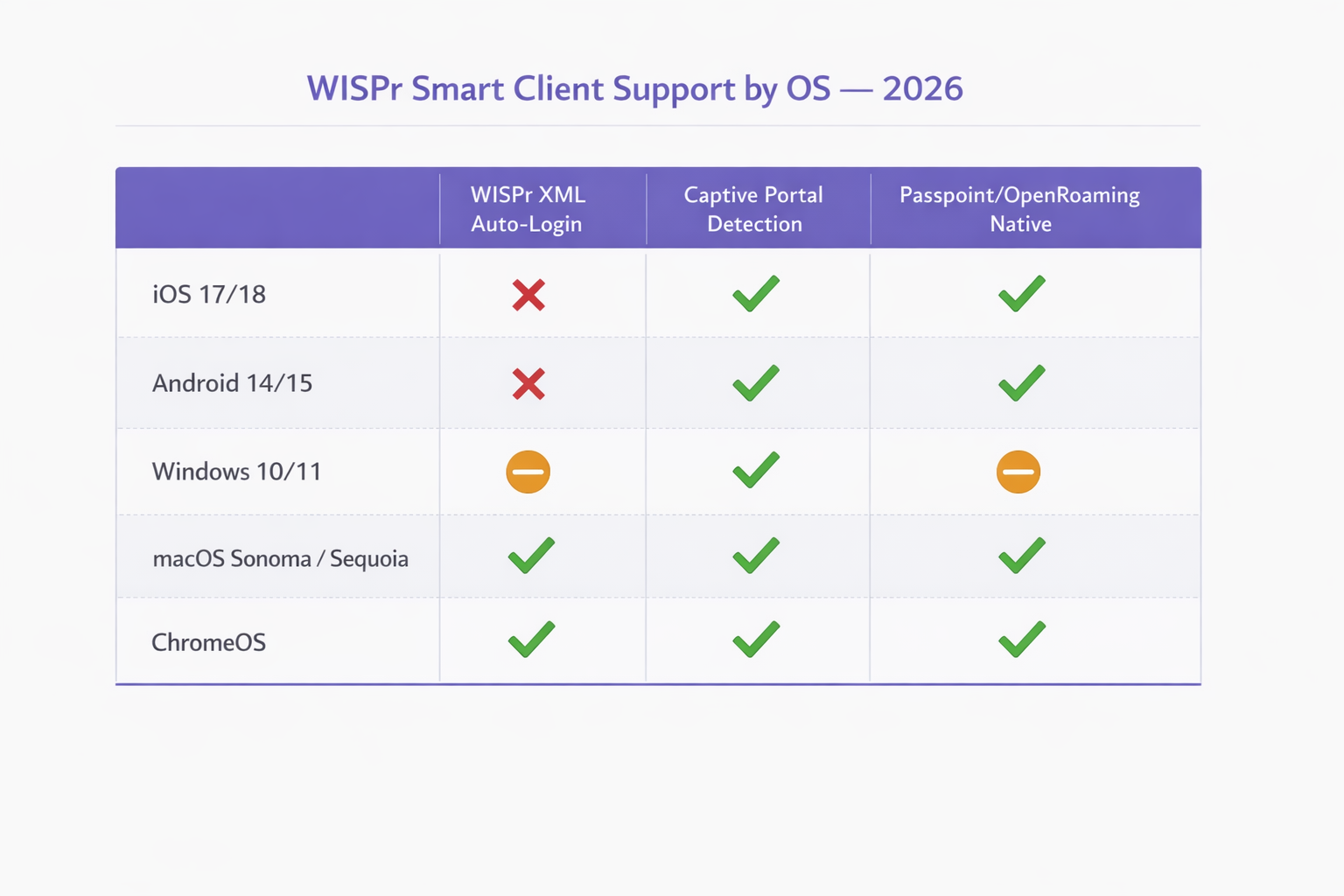
Im Jahr 2026 ist dieser Mechanismus auf modernen mobilen Betriebssystemen faktisch veraltet. Apples iOS hat WISPr XML Auto-Login nie nativ unterstützt, sondern sich stattdessen auf seinen Captive Network Assistant verlassen. Android hat die Unterstützung zugunsten eigener Konnektivitätsprüfungen ebenfalls eingestellt. Nur bestimmte MDM-verwaltete Unternehmensgeräte und ältere Windows-Bereitstellungen (über WLAN AutoConfig) behalten teilweise WISPr XML-Parsing-Fähigkeiten bei. Die von WISPr definierten RADIUS-Attribute — wie WISPr-Bandwidth-Max-Up und WISPr-Location-ID — werden jedoch von großen Netzwerkanbietern weiterhin intensiv für Traffic Shaping und Policy Enforcement genutzt.
Moderne Captive Portal-Erkennungsmechanismen
Wenn ein Client sich mit einer offenen SSID verbindet, muss er feststellen, ob er direkten Internetzugang hat oder sich hinter einem Captive Portal befindet. Dies wird durch spezifische HTTP-Probes erreicht, die sich je nach Betriebssystem unterscheiden.
iOS und macOS (Captive Network Assistant): Apple-Geräte führen eine HTTP GET-Anfrage an spezifische Endpunkte durch, hauptsächlich an http://captive.apple.com/hotspot-detect.html. Wenn das Netzwerk diese Anfrage abfängt und eine HTTP 302-Umleitung oder ein HTTP 200 OK mit einer Nutzlast zurückgibt, die nicht der erwarteten Zeichenfolge „Success“ entspricht, kennzeichnet das OS das Netzwerk als Captive. Es startet dann den Captive Network Assistant (CNA) — einen sandboxed Mini-Browser — um die Portalseite darzustellen. Entscheidend ist, dass in iOS 17 und 18 eine strikte Durchsetzung bedeutet, dass, wenn das Netzwerk HTTPS für die anfängliche Umleitung verwendet oder den Zugriff auf die Probe-URL vollständig blockiert, der CNA nicht gestartet wird, wodurch der Benutzer mit dem Wi-Fi verbunden bleibt, aber keinen Internetzugang hat.
Android und ChromeOS: Android-Geräte nutzen ähnliche Konnektivitätsprüfungen und testen Endpunkte wie http://connectivitycheck.gstatic.com/generate_204. Wird keine 204 No Content-Antwort empfangen, fordert Android den Benutzer auf, sich „im Netzwerk anzumelden“. Im Gegensatz zu iOS können neuere Android-Versionen diese Prüfungen über HTTPS durchführen, obwohl HTTP der Fallback-Standard für die Kompatibilität mit älteren Access Points bleibt.
Windows 10/11: Der WLAN AutoConfig-Dienst von Microsoft testet http://www.msftconnecttest.com/connecttest.txt. Windows behält eine begrenzte WISPr XML-Parsing-Fähigkeit in seinem WLAN AutoConfig-Dienst bei, diese wird jedoch nur für SSIDs mit einem vorkonfigurierten WISPr-Profil ausgelöst, das typischerweise über MDM oder Gruppenrichtlinien bereitgestellt wird. Für allgemeines Gast-Wi-Fi verhält sich Windows ähnlich wie mobile Betriebssysteme und zeigt dem Benutzer eine Benachrichtigung an.
| Betriebssystem | WISPr XML Auto-Login | Captive Portal Detection | Passpoint / OpenRoaming Native |
|---|---|---|---|
| iOS 17 / 18 | Nicht unterstützt | Ja (HTTP-Probe an captive.apple.com) | Ja (nativ) |
| Android 14 / 15 | Nicht unterstützt | Ja (HTTP-Probe an gstatic.com) | Ja (nativ) |
| Windows 10 / 11 | Teilweise (nur MDM-bereitgestellt) | Ja (HTTP-Probe an msftconnecttest.com) | Teilweise (erfordert Profil) |
| macOS Sonoma / Sequoia | Nur Legacy | Ja (CNA, wie iOS) | Ja (nativ) |
| ChromeOS | Begrenzt | Ja | Ja |
Die WISPr RADIUS-Attribute, die noch relevant sind
Während der XML-Authentifizierungs-Handshake für die meisten Bereitstellungen obsolet ist, bleiben die von der WISPr-Spezifikation definierten RADIUS Vendor-Specific Attributes (VSAs) ein aktiver Bestandteil der Unternehmensnetzwerkrichtlinien. Anbieter wie Aruba (HPE), Cisco, Ruckus, Fortinet und Extreme Networks unterstützen alle diese Attribute in ihren RADIUS-Verarbeitungspipelines.
| Attribut | Funktion | Noch relevant im Jahr 2026 |
|---|---|---|
WISPr-Bandwidth-Max-Up |
Upstream-Bandbreitenbegrenzung | Ja — wird für Gast-Drosselung verwendet |
WISPr-Bandwidth-Max-Down |
Downstream-Bandbreitenbegrenzung | Ja — wird für Gast-Drosselung verwendet |
WISPr-Location-ID` |
Identifiziert Hotspot-Standort | Ja – wird für Analysen und Abrechnung verwendet |
WISPr-Location-Name |
Menschlich lesbarer Standort | Ja – wird für die Berichterstattung verwendet |
WISPr-Session-Terminate-Time |
Zeitstempel für Sitzungsablauf | Ja – wird für zeitlich begrenzten Zugang verwendet |
WISPr-Logoff-URL |
Endpunkt für Sitzungsbeendigung | Rückläufig – durch CoA ersetzt |
WISPr-Redirection-URL |
Umleitungsziel nach der Authentifizierung | Ja – wird für Marketing-Splash-Pages verwendet |
Implementierungsleitfaden: Umstellung auf Passpoint
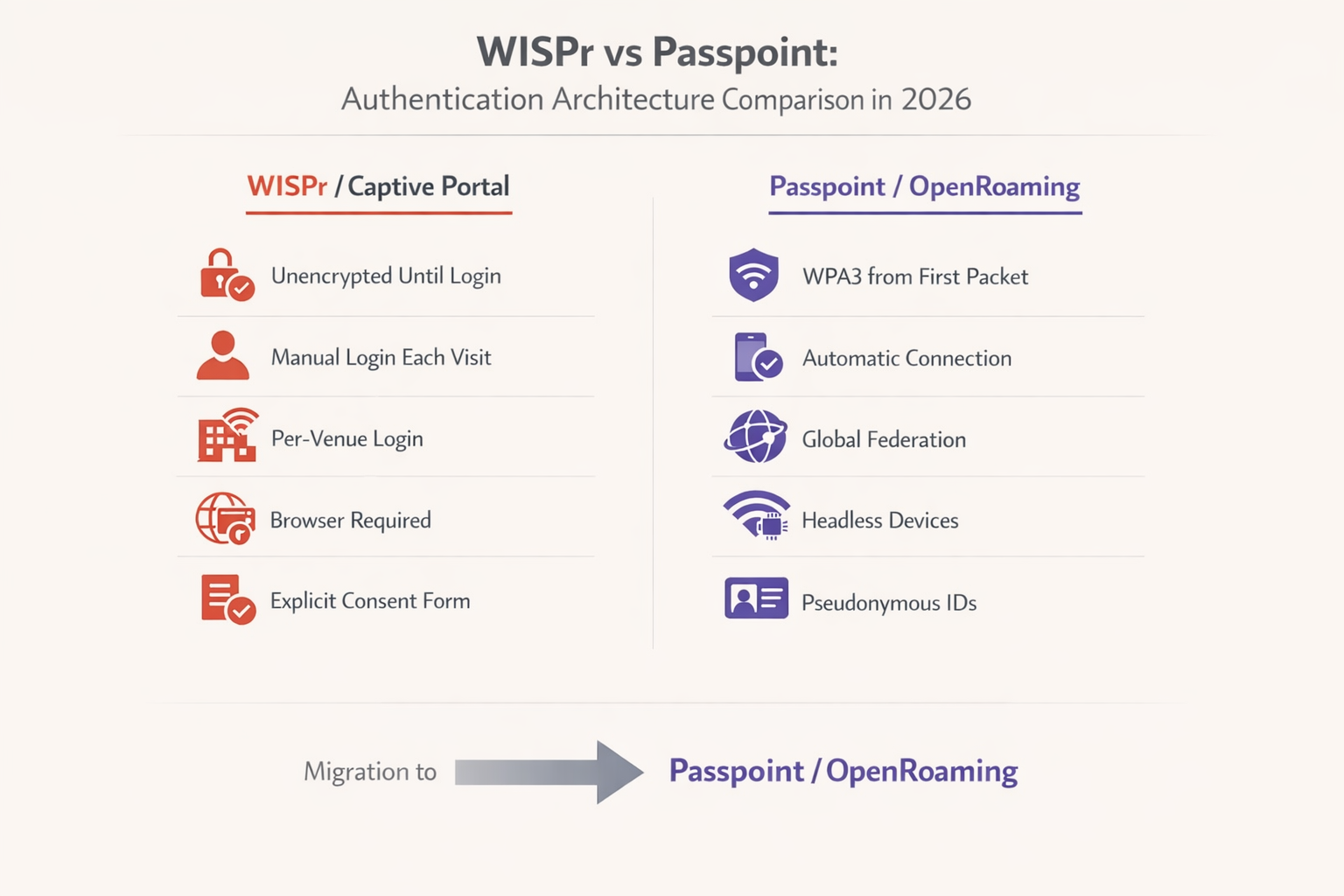
Da sich die Branche von unverschlüsselten offenen Netzwerken abwendet, stellen Passpoint (Hotspot 2.0) und OpenRoaming die notwendige Entwicklung für Unternehmensbereitstellungen dar. Basierend auf dem IEEE 802.11u-Standard ermöglicht Passpoint Geräten, Netzwerke automatisch mithilfe von EAP-TLS oder EAP-TTLS zu erkennen und sich bei ihnen zu authentifizieren, wodurch WPA2/WPA3 Enterprise-Verschlüsselung ab dem Zeitpunkt der Verbindung bereitgestellt wird.
Laut dem WBA Industry Report 2025 planen 81 % der Wi-Fi-Führungskräfte, OpenRoaming in ihrer Infrastruktur zu implementieren. Für Transport -Hubs, Healthcare -Einrichtungen und große Einzelhandelsumgebungen ist dieser Übergang zunehmend eine Compliance-Anforderung und kein optionales Upgrade mehr.
Schritt-für-Schritt-Migrationsstrategie
Schritt 1 — Aktuelle RADIUS-Attribute prüfen: Überprüfen Sie Ihre bestehenden RADIUS-Serverkonfigurationen. Identifizieren Sie, welche WISPr Vendor-Specific Attributes derzeit für Bandbreitenbegrenzung, Sitzungs-Timeouts oder Standortberichterstattung verwendet werden. Diese Richtlinien müssen vor der Außerbetriebnahme der alten SSID auf äquivalente Attribute in Ihrer neuen Passpoint-Bereitstellung abgebildet werden.
Schritt 2 — Duale SSIDs bereitstellen: Konfigurieren Sie während der Übergangsphase Ihre Access Points so, dass sie sowohl die alte offene SSID (mit dem Captive Portal) als auch eine neue Passpoint-fähige SSID senden. Dies gewährleistet die Abwärtskompatibilität für ältere Geräte und headless IoT-Hardware, die nicht an der EAP-Authentifizierung teilnehmen können.
Schritt 3 — Identitätsanbieter konfigurieren: Um OpenRoaming zu aktivieren, müssen Sie sich in einen etablierten Identitätsanbieter integrieren. Purple bietet einen kostenlosen Identitätsanbieterdienst für OpenRoaming unter der Connect-Lizenz an, der eine nahtlose Authentifizierung für Benutzer mit gültigen Profilen von teilnehmenden Carriern und Dienstanbietern ermöglicht.
Schritt 4 — Netzwerkausrüstung aktualisieren: Stellen Sie sicher, dass Ihre Wireless LAN Controller (WLC) und Access Points Firmware ausführen, die Passpoint Release 2 oder höher unterstützt. Große Anbieter wie Cisco, Aruba und Ruckus bieten umfassende Unterstützung. Für SMB-Umgebungen lesen Sie den Leitfaden TP-Link Omada and Purple WiFi for SMB Deployments für eine praktische Implementierungsanleitung.
Schritt 5 — Überwachen und außer Betrieb nehmen: Nutzen Sie WiFi Analytics , um die Akzeptanzrate der Passpoint SSID im Vergleich zur alten Captive Portal SSID zu verfolgen. Sobald ein ausreichender Schwellenwert erreicht ist – typischerweise 70-80 % der Sitzungen – kann das alte Captive Portal auf bestimmte Anwendungsfälle beschränkt oder vollständig abgeschafft werden.
Best Practices für die Ausfallsicherheit von Captive Portals
Für Umgebungen, die 2026 ein Captive Portal beibehalten müssen, ist die Einhaltung strenger Konfigurations-Best Practices entscheidend, um sicherzustellen, dass der CNA auf allen Geräten zuverlässig gestartet wird.
Probe-URLs nicht blockieren: Stellen Sie sicher, dass Ihr Walled Garden oder Ihre Pre-Authentifizierungs-ACLs die DNS-Auflösung und den HTTP-Verkehr zu captive.apple.com, connectivitycheck.gstatic.com und msftconnecttest.com zulassen. Das Blockieren dieser Domains verhindert, dass das Betriebssystem das Portal erkennt und den CNA auslöst.
HTTP für die anfängliche Umleitung verwenden: Die anfängliche Umleitung muss über HTTP (Port 80) erfolgen. Der Versuch, eine HTTPS-Anfrage umzuleiten, führt zu einer TLS-Zertifikatswarnung, da der Access Point kein gültiges Zertifikat für die ursprünglich vom Benutzer angeforderte Domain präsentieren kann. Dies ist die häufigste Fehlkonfiguration bei der Bereitstellung von Captive Portals in Unternehmen.
Portalseite mit HTTPS sichern: Sobald die Umleitung erfolgt ist, muss die eigentliche Captive Portal Landing Page über HTTPS mit einem gültigen, öffentlich vertrauenswürdigen SSL-Zertifikat gehostet werden. Dies stellt sicher, dass Benutzeranmeldeinformationen und GDPR-Einwilligungsdaten sicher übertragen werden und die Portalseite von modernen Browsern nicht als unsicher gekennzeichnet wird.
Für den CNA optimieren: Der Captive Network Assistant ist ein eingeschränkter Browser. Vermeiden Sie komplexe JavaScript-Frameworks, Pop-ups oder das Herunterladen großer Assets. Das Portal muss schnell geladen werden und vollständig responsiv sein, um verschiedene Bildschirmgrößen zu berücksichtigen. Ein Portal, das länger als drei Sekunden zum Laden benötigt, führt zu einer deutlich höheren Abbruchrate.
CoA für die Sitzungsverwaltung implementieren: Anstatt sich auf den alten WISPr-Logoff-URL-Mechanismus zu verlassen, implementieren Sie RADIUS Change of Authorisation (CoA) für die dynamische Sitzungsverwaltung. Dies bietet eine zuverlässigere Sitzungsbeendigung und Re-Authentifizierungs-Trigger über alle Gerätetypen hinweg.
Fehlerbehebung & Risikominderung
Häufige Fehlerursachen und Lösungen
Symptom: iOS-Geräte verbinden sich mit dem Wi-Fi, aber der Anmeldebildschirm erscheint nie.
Grundursache: Das Netzwerk blockiert den Zugriff auf captive.apple.com, gibt eine ungültige Antwort auf die Sonde zurück, oder die Funktion „Bypass Apple Captive Network Assistant“ ist versehentlich auf dem Wireless Controller aktiviert.
Lösung: Überprüfen Sie die Pre-Authentifizierungs-ACLs. Deaktivieren Sie alle CNA-Bypass-Funktionen auf dem WLC. Bestätigen Sie, dass die HTTP 302-Umleitung korrekt zugestellt wird, indem Sie die WLC-Client-Statusprotokolle überwachen.
Symptom: Benutzer erhalten Zertifikatsfehler, bevor sie das Captive Portal sehen. Grundursache: Das Netzwerk versucht, HTTPS-Verkehr abzufangen und umzuleiten. Der WLC besitzt nicht den privaten Schlüssel für die angeforderte Domain, was einen Browser-TLS-Fehler auslöst. Lösung: KoKonfigurieren Sie das Captive Portal so, dass es nur HTTP-Verkehr auf Port 80 abfängt und umleitet. Verlassen Sie sich auf die Konnektivitätssonden auf OS-Ebene, um das Portal auszulösen.
Symptom: Android-Benutzer werden zur Anmeldung aufgefordert, aber die Portalseite wird nicht korrekt geladen. Grundursache: Die Portalseite verwendet JavaScript-Funktionen oder CSS, die von der Android WebView-Komponente, die für das Rendern des Captive Portal verwendet wird, nicht unterstützt werden. Lösung: Testen Sie die Portalseite in einer eingeschränkten Browserumgebung. Stellen Sie sicher, dass alle Assets vom Portalserver selbst geladen werden (keine externen CDN-Abhängigkeiten, die durch die Pre-Auth-ACL blockiert werden).
Symptom: WISPr-Bandbreitenbeschränkungen werden nach der Migration zur Passpoint-Authentifizierung nicht angewendet.
Grundursache: Der RADIUS-Server gibt die WISPr-Bandbreiten-VSAs nicht für 802.1X-authentifizierte Sitzungen zurück, sondern nur für UAM-Sitzungen.
Lösung: Aktualisieren Sie die RADIUS-Richtlinie, um die Attribute WISPr-Bandwidth-Max-Up und WISPr-Bandwidth-Max-Down für alle authentifizierten Sitzungen zurückzugeben, unabhängig von der verwendeten Authentifizierungsmethode.
ROI & Geschäftsauswirkungen
Die Migration von älteren WISPr Captive Portals zu Passpoint/OpenRoaming-Architekturen bietet einen erheblichen Geschäftswert, insbesondere in Umgebungen mit hoher Dichte wie Verkehrsknotenpunkten und großen Einzelhandelsimplementierungen.
Aus Sicherheits- und Compliance-Sicht eliminiert der Ersatz offener Netzwerke durch WPA3 Enterprise-Verschlüsselung das unverschlüsselte Fenster, das zwischen Verbindung und Portal-Authentifizierung besteht. Dies adressiert direkt Schwachstellen, die in PCI DSS 4.0 hervorgehoben werden, und reduziert das Risiko von Evil Twin-Angriffen, die gegen offene SSIDs trivial einfach auszuführen sind.
Operativ reduziert die Eliminierung der Captive Portal-Reibung die Anzahl der Helpdesk-Tickets im Zusammenhang mit Wi-Fi-Konnektivitätsproblemen. In einem Hotel mit 500 Zimmern kann dies eine signifikante Reduzierung der Anrufe an der Rezeption während der Stoßzeiten des Check-ins bedeuten. Bei Integration mit einer robusten Guest WiFi -Plattform führt die höhere Bindungsrate durch nahtlose Passpoint-Verbindungen zu reichhaltigeren Analysen und effektiveren standortbasierten Diensten. Für weitere Informationen zur Integration von Indoor-Positionierung in diese Architekturen lesen Sie unseren Indoor Positioning System: UWB, BLE, & WiFi Guide .
Während die anfängliche Bereitstellung von Passpoint Konfigurationsaktualisierungen und die Integration von Identitätsanbietern erfordert, bieten die langfristigen betrieblichen Effizienzen und die verbesserte Benutzererfahrung einen überzeugenden Return on Investment für Unternehmensnetzwerkbetreiber. Der Dual-SSID-Migrationsansatz minimiert Störungen und ermöglicht es Organisationen, in einem Tempo zu wechseln, das ihren betrieblichen Einschränkungen entspricht.
Schlüsselbegriffe & Definitionen
WISPr (Wireless Internet Service Provider roaming)
A draft protocol originally submitted to the Wi-Fi Alliance that defined XML-based auto-login mechanisms and specific RADIUS attributes for captive portal environments. WISPr 2.0 was published by the Wireless Broadband Alliance in March 2010.
While the XML auto-login is largely deprecated in 2026, the WISPr RADIUS attributes are still heavily used for bandwidth control and session management across enterprise WLCs.
Captive Portal
A web page that a user of a public-access network is obliged to view and interact with before full internet access is granted. Typically implemented via HTTP redirection at the network access layer.
Used extensively in hospitality and retail to capture user consent and first-party data before granting internet access. GDPR Article 7 compliance requirements apply to the consent mechanism.
Captive Network Assistant (CNA)
A limited, sandboxed web browser built into operating systems (iOS, macOS, Android, Windows) specifically designed to render captive portal login pages when a network is detected as captive.
IT teams must ensure portal pages are optimised for the CNA, as it lacks the full feature set of a standard browser and cannot execute complex JavaScript frameworks reliably.
Passpoint (Hotspot 2.0)
An industry standard based on IEEE 802.11u that enables devices to automatically discover and securely connect to Wi-Fi networks using EAP-based authentication, providing WPA2/WPA3 Enterprise encryption from the first packet.
The primary upgrade path for enterprise networks looking to replace unencrypted captive portals with secure, seamless authentication. Supported natively on iOS, Android, Windows, and macOS.
OpenRoaming
A global roaming federation managed by the Wireless Broadband Alliance (WBA), built upon Passpoint technology, that allows seamless Wi-Fi onboarding across participating networks worldwide.
Enables users to automatically connect to participating networks without registering at each venue. Purple acts as a free identity provider for OpenRoaming under the Connect license.
UAM (Universal Access Method)
A standard method for browser-based login at a captive portal, utilizing HTTP redirection to a centralized authentication server. The underlying mechanism that powers traditional captive portal deployments.
Distinct from 802.1X authentication. UAM relies on the user's browser (or CNA) to render the portal page, making it dependent on the OS captive portal detection mechanism.
Pre-Authentication ACL (Walled Garden)
An Access Control List applied to a client before successful authentication, defining what limited network resources they can access. Must allow DNS resolution and access to the portal server while blocking general internet access.
Misconfigured pre-auth ACLs are the most common cause of captive portal failures, particularly when probe URLs for iOS or Android are inadvertently blocked.
ANQP (Access Network Query Protocol)
A query and response protocol used by Passpoint (IEEE 802.11u) to allow devices to discover network capabilities, roaming consortium identifiers, and authentication requirements before associating.
ANQP queries replace the WISPr XML discovery mechanism in Passpoint deployments, enabling automatic and secure network selection without user interaction.
WISPr VSAs (Vendor-Specific Attributes)
RADIUS Vendor-Specific Attributes defined by the WISPr specification, including WISPr-Bandwidth-Max-Up, WISPr-Bandwidth-Max-Down, WISPr-Location-ID, and WISPr-Session-Terminate-Time.
These attributes remain fully functional in 2026 and are returned by RADIUS servers to enforce bandwidth policies and session management for both UAM and 802.1X authenticated sessions.
CoA (Change of Authorisation)
A RADIUS extension (RFC 5176) that allows the AAA server to dynamically modify or terminate an active session without requiring the client to re-authenticate.
The recommended replacement for the legacy WISPr-Logoff-URL mechanism for session management in modern enterprise deployments.
Fallstudien
A large conference centre with 3,000 concurrent users is experiencing a high volume of complaints from attendees using iOS 17 devices. Users report that they connect to the 'Conference_Guest' Wi-Fi SSID, but the captive portal login screen never appears, leaving them connected to the network but without internet access. Android users on the same SSID are not experiencing this issue. The network runs on Cisco Catalyst 9800 WLCs.
Step 1: Verify the Pre-Authentication ACLs on the Wireless LAN Controller. Navigate to the guest SSID policy and confirm that DNS resolution is permitted for all clients, and that HTTP traffic (Port 80) destined for any IP address is being intercepted and redirected to the portal URL — not dropped.
Step 2: Check the WLC configuration for any CNA Bypass settings. On Cisco 9800 WLCs, this is found under the WLAN security settings. If 'Captive Bypass Portal' is enabled, disable it immediately. This setting prevents the WLC from redirecting Apple's specific HTTP probe requests, assuming the user will open a full browser manually.
Step 3: Confirm the initial redirection is occurring on HTTP port 80, not HTTPS port 443. Use a packet capture on the WLC management interface to verify the 302 redirect is being sent in response to the iOS probe.
Step 4: Ensure the portal server's HTTPS certificate is valid and trusted. While the initial redirect is HTTP, the portal page itself must be HTTPS. An expired or self-signed certificate will cause the CNA to display a warning and prevent login.
Step 5: Test with an iOS device, monitoring the RADIUS logs and WLC client state to confirm the HTTP 302 redirect is successfully delivered and the CNA launches.
A national retail chain with 200 stores is planning to migrate from their legacy open SSID with a captive portal to a Passpoint-enabled network to improve security and reduce PCI DSS 4.0 compliance risk. However, their network operations team relies heavily on the WISPr-Bandwidth-Max-Down RADIUS attribute to throttle guest traffic to 5Mbps, and their RADIUS infrastructure is managed by a third-party provider. How should they approach this migration without losing bandwidth control?
Step 1: Deploy a dual-SSID strategy across all 200 stores simultaneously using a centralised WLC or cloud management platform. Keep the existing open SSID active while broadcasting the new Passpoint-enabled SSID with the same SSID name as the OpenRoaming profile.
Step 2: Work with the third-party RADIUS provider to update the RADIUS policy. The policy must be configured to return WISPr-Bandwidth-Max-Down (value: 5120 Kbps) and WISPr-Bandwidth-Max-Up attributes in the RADIUS Access-Accept message for all authenticated sessions — including 802.1X/EAP sessions from Passpoint clients, not just UAM sessions from the captive portal.
Step 3: Verify that the WLC firmware at each store supports applying WISPr VSAs to 802.1X-authenticated sessions. Most enterprise WLCs (Cisco, Aruba, Ruckus) support this, but it may require a firmware update on older hardware.
Step 4: Integrate with an OpenRoaming identity provider (such as Purple under the Connect license) to enable automatic onboarding for users whose devices carry valid roaming credentials.
Step 5: Use the WiFi Analytics platform to monitor per-store adoption of the Passpoint SSID. After 90 days, review adoption rates and plan the phased decommissioning of the legacy open SSID on a store-by-store basis.
Szenarioanalyse
Q1. Your deployment requires users to download a specific loyalty app before accessing the internet. You configure the pre-authentication ACL to allow access to the Apple App Store and Google Play Store IP ranges. However, users report they cannot access the stores. What is the most likely architectural limitation causing this, and what is the correct resolution?
💡 Hinweis:Consider how modern Content Delivery Networks (CDNs) and cloud services resolve IP addresses dynamically.
Empfohlenen Ansatz anzeigen
The App Store and Play Store utilise complex, dynamic CDNs (such as Akamai or CloudFront). Creating IP-based ACLs for these services is highly unreliable because the IP addresses change frequently based on geography and load balancing. The correct resolution is to use DNS-based ACLs (if supported by the WLC) to whitelist the specific domain names required by the app stores, rather than attempting to maintain a list of static IP ranges. Alternatively, configure the portal to provide a direct download link to the app hosted on your own portal server, bypassing the app store requirement entirely during the pre-auth phase.
Q2. A network engineer proposes implementing a strict HTTPS-only policy for all network traffic, including the initial captive portal redirect, to improve security. Why is this approach fundamentally flawed for captive portal environments, and what is the correct security architecture?
💡 Hinweis:Think about how TLS certificates are validated by a client browser and what happens when the WLC intercepts an HTTPS request.
Empfohlenen Ansatz anzeigen
When a client attempts to access a secure site (e.g., https://example.com ) and the WLC intercepts that traffic to redirect to the portal, the WLC must present a TLS certificate. Because the WLC does not possess the valid private key for 'example.com', the client browser correctly identifies the interception as a Man-in-the-Middle attack and displays a severe security warning, preventing the portal from loading. The correct architecture is: (1) allow the OS connectivity probe (HTTP) to be intercepted and redirected, triggering the CNA; (2) host the portal login page itself on HTTPS with a valid, publicly trusted certificate; (3) use WPA2/WPA3 Enterprise (Passpoint) for full encryption from connection, eliminating the need for the initial unencrypted phase entirely.
Q3. You are tasked with migrating a 60,000-seat stadium network from a legacy captive portal to OpenRoaming. The business requires that user bandwidth is still strictly limited to 5Mbps down / 2Mbps up, and the stadium hosts IoT devices (point-of-sale terminals, digital signage) that cannot participate in EAP authentication. How do you architect this migration?
💡 Hinweis:Consider both the bandwidth policy persistence challenge and the IoT device compatibility requirement.
Empfohlenen Ansatz anzeigen
This requires a three-SSID architecture: (1) A Passpoint/OpenRoaming SSID for modern guest devices, with the RADIUS server returning WISPr-Bandwidth-Max-Down (5120 Kbps) and WISPr-Bandwidth-Max-Up (2048 Kbps) VSAs upon successful EAP authentication — confirming that WISPr bandwidth attributes remain functional in 802.1X contexts. (2) A legacy open SSID with captive portal for transitional guest devices that do not yet have OpenRoaming profiles. (3) A separate WPA2-PSK SSID on a dedicated VLAN for IoT devices, with MAC address filtering and strict firewall rules to prevent lateral movement. The WISPr bandwidth attributes must be explicitly configured in the RADIUS policy for the Passpoint SSID, as they are not automatically inherited from the legacy UAM policy.




