

WISPr e Captive Portal Auto-Login: Cosa funziona ancora nel 2026
Questa guida tecnica di riferimento autorevole esamina lo stato attuale del protocollo WISPr e dei meccanismi di auto-login dei Captive Portal nel 2026, coprendo quali piattaforme OS rispettano ancora le specifiche, come iOS e Android gestiscono il rilevamento dei Captive Portal e perché le implementazioni aziendali stanno migrando a Passpoint e OpenRoaming. Fornisce ad architetti di rete e IT manager indicazioni pratiche per l'implementazione, strategie di migrazione e framework di mitigazione del rischio per implementazioni Wi-Fi sia legacy che moderne.
🎧 Ascolta questa guida
Visualizza trascrizione
Riepilogo Esecutivo
Per oltre un decennio, il protocollo Wireless Internet Service Provider roaming (WISPr) è servito come standard de facto per l'auto-login dei Captive Portal e la federazione del roaming. Nel 2026, il panorama è cambiato radicalmente. Mentre i Captive Portal rimangono onnipresenti negli ambienti Ospitalità e Retail , l'affidamento su WISPr XML per l'autenticazione senza interruzioni è stato in gran parte sostituito dai moderni Captive Network Assistant (CNA) a livello di OS e dalla rapida adozione di Passpoint (Hotspot 2.0).
Questa guida fornisce ai responsabili IT senior un'analisi pragmatica di ciò che funziona ancora per quanto riguarda WISPr e il rilevamento dei Captive Portal. Esploriamo come iOS 17/18 e le moderne versioni di Android gestiscono il reindirizzamento del portale, perché i client smart tradizionali stanno fallendo e come gli architetti di rete aziendali dovrebbero pianificare la loro transizione alle architetture OpenRoaming. Comprendendo le limitazioni tecniche dei flussi UAM (Universal Access Method) legacy, i direttori delle operazioni delle sedi possono mitigare i problemi di connettività degli ospiti ponendo le basi per un accesso Wi-Fi sicuro e crittografato dal primo pacchetto.
Approfondimento Tecnico: Lo Stato di WISPr nel 2026
L'Eredità di WISPr XML
Originariamente presentato come bozza di protocollo alla Wi-Fi Alliance, WISPr è stato progettato per consentire agli utenti di effettuare il roaming tra diversi fornitori di servizi internet wireless. L'innovazione principale era il protocollo Smart Client to Access Gateway Interface, definito nell'Appendice D della specifica. Questo protocollo basato su XML consentiva al software client smart di rilevare un Captive Portal, analizzare la sfida XML incorporata nel reindirizzamento HTML e inviare automaticamente le credenziali RADIUS tramite HTTPS POST senza richiedere all'utente di interagire con un browser.
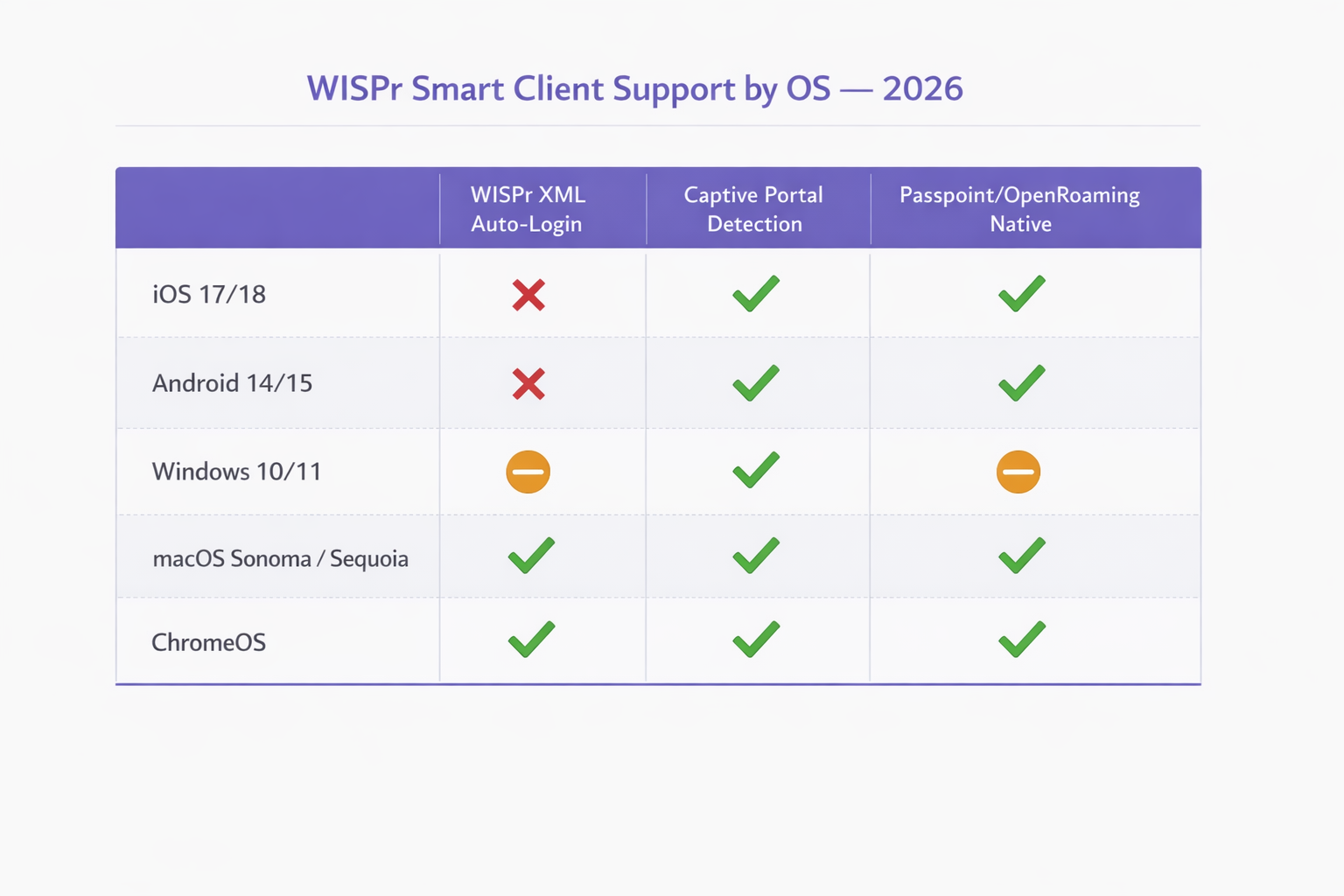
Nel 2026, questo meccanismo è effettivamente deprecato sui moderni sistemi operativi mobili. iOS di Apple non ha mai supportato nativamente l'auto-login WISPr XML, affidandosi invece al suo Captive Network Assistant. Android ha analogamente deprecato il supporto a favore dei propri controlli di connettività. Solo specifici dispositivi gestiti da MDM aziendali e implementazioni Windows legacy (tramite WLAN AutoConfig) mantengono capacità parziali di parsing WISPr XML. Tuttavia, gli attributi RADIUS definiti da WISPr — come WISPr-Bandwidth-Max-Up e WISPr-Location-ID — rimangono ampiamente utilizzati dai principali fornitori di rete per il traffic shaping e l'applicazione delle policy.
Meccanismi Moderni di Rilevamento dei Captive Portal
Quando un client si connette a un SSID aperto, deve determinare se ha accesso diretto a internet o se si trova dietro un Captive Portal. Questo viene ottenuto tramite specifiche probe HTTP che differiscono per sistema operativo.
iOS e macOS (Captive Network Assistant): I dispositivi Apple eseguono una richiesta HTTP GET a endpoint specifici, principalmente http://captive.apple.com/hotspot-detect.html. Se la rete intercetta questa richiesta e restituisce un reindirizzamento HTTP 302 o un HTTP 200 OK con un payload che non corrisponde alla stringa "Success" attesa, l'OS contrassegna la rete come Captive. Quindi avvia il Captive Network Assistant (CNA) — un mini-browser in sandbox — per renderizzare la pagina del portale. Fondamentalmente, in iOS 17 e 18, l'applicazione rigorosa significa che se la rete utilizza HTTPS per il reindirizzamento iniziale o blocca completamente l'accesso all'URL della probe, il CNA non si avvierà, lasciando l'utente connesso al Wi-Fi ma senza accesso a internet.
Android e ChromeOS: I dispositivi Android utilizzano controlli di connettività simili, sondando endpoint come http://connectivitycheck.gstatic.com/generate_204. Se non viene ricevuta una risposta 204 No Content, Android chiede all'utente di "Accedere alla rete". A differenza di iOS, le versioni più recenti di Android possono eseguire questi controlli tramite HTTPS, sebbene HTTP rimanga lo standard di fallback per la compatibilità con gli access point legacy.
Windows 10/11: Il servizio WLAN AutoConfig di Microsoft sonda http://www.msftconnecttest.com/connecttest.txt. Windows mantiene una capacità limitata di parsing WISPr XML nel suo servizio WLAN AutoConfig, ma questo viene attivato solo per gli SSID con un profilo WISPr preconfigurato, tipicamente distribuito tramite MDM o Criteri di gruppo. Per il Wi-Fi guest generale, Windows si comporta in modo simile agli OS mobili, presentando una notifica all'utente.
| Operating System | WISPr XML Auto-Login | Captive Portal Detection | Passpoint / OpenRoaming Native |
|---|---|---|---|
| iOS 17 / 18 | Non supportato | Sì (probe HTTP a captive.apple.com) | Sì (nativo) |
| Android 14 / 15 | Non supportato | Sì (probe HTTP a gstatic.com) | Sì (nativo) |
| Windows 10 / 11 | Parziale (solo con provisioning MDM) | Sì (probe HTTP a msftconnecttest.com) | Parziale (richiede profilo) |
| macOS Sonoma / Sequoia | Solo legacy | Sì (CNA, come iOS) | Sì (nativo) |
| ChromeOS | Limitato | Sì | Sì |
Gli Attributi RADIUS WISPr Che Contano Ancora
Mentre l'handshake di autenticazione XML è obsoleto per la maggior parte delle implementazioni, gli attributi RADIUS Vendor-Specific Attributes (VSA) definiti dalla specifica WISPr rimangono una parte attiva della policy di rete aziendale. Fornitori tra cui Aruba (HPE), Cisco, Ruckus, Fortinet ed Extreme Networks supportano tutti questi attributi nelle loro pipeline di elaborazione RADIUS.
| Attributo | Funzione | Ancora Rilevante nel 2026 |
|---|---|---|
WISPr-Bandwidth-Max-Up |
Limite di banda in upload | Sì — utilizzato per la limitazione degli ospiti |
WISPr-Bandwidth-Max-Down |
Limite di banda in download | Sì — utilizzato per la limitazione degli ospiti |
WISPr-Location-ID |
Identifica la posizione dell'hotspot | Sì — utilizzato per analisi e fatturazione |
WISPr-Location-Name |
Posizione leggibile dall'uomo | Sì — utilizzato per la reportistica |
WISPr-Session-Terminate-Time |
Timestamp di scadenza sessione | Sì — utilizzato per l'accesso a tempo limitato |
WISPr-Logoff-URL |
Endpoint di terminazione sessione | In declino — sostituito da CoA |
WISPr-Redirection-URL |
Destinazione reindirizzamento post-autenticazione | Sì — utilizzato per pagine splash di marketing |
Guida all'implementazione: Transizione a Passpoint
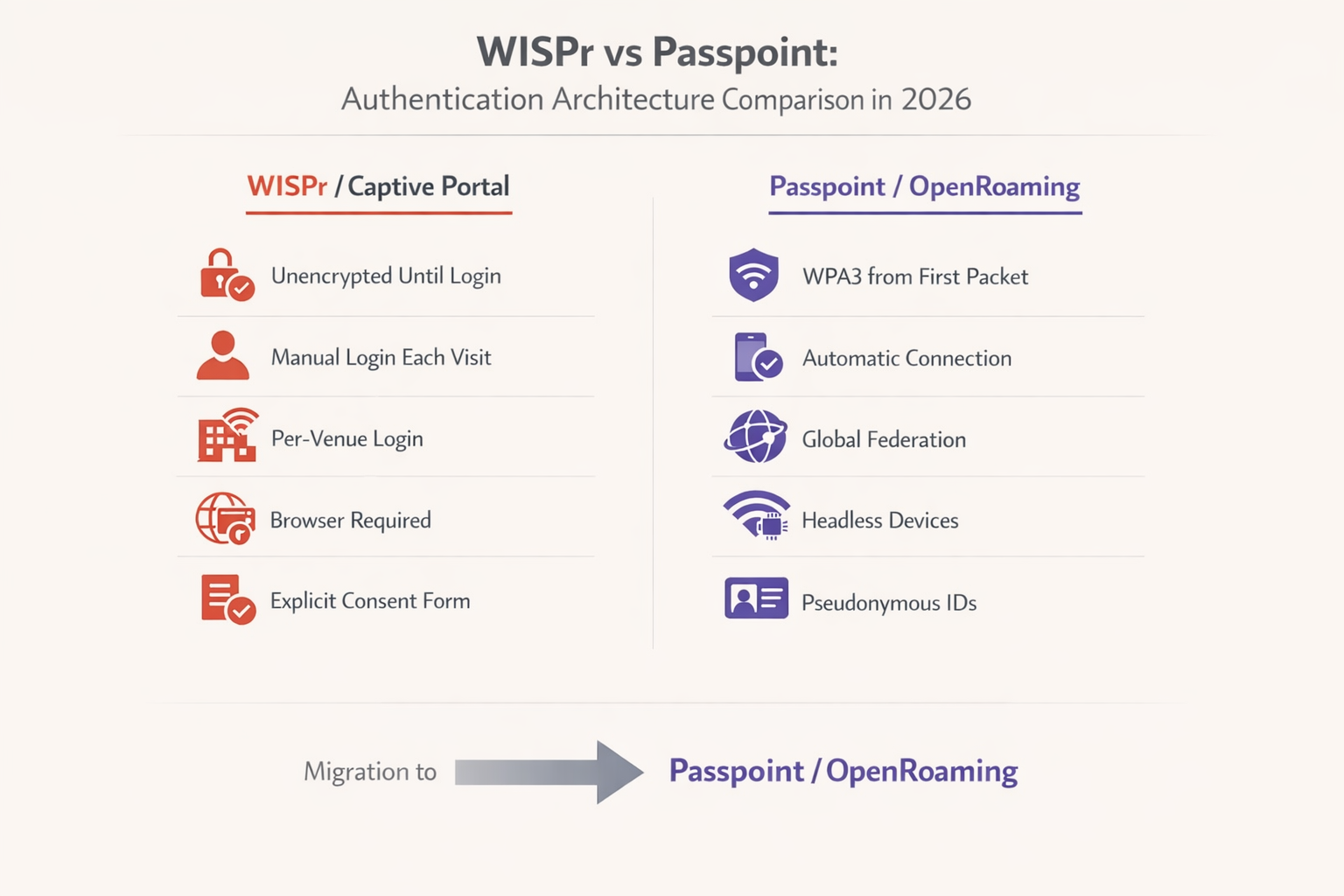
Mentre l'industria si allontana dalle reti aperte non crittografate, Passpoint (Hotspot 2.0) e OpenRoaming rappresentano l'evoluzione necessaria per le implementazioni aziendali. Basato sullo standard IEEE 802.11u, Passpoint consente ai dispositivi di scoprire e autenticarsi alle reti automaticamente utilizzando EAP-TLS o EAP-TTLS, fornendo la crittografia WPA2/WPA3 Enterprise dal momento della connessione.
Secondo il WBA Industry Report 2025, l'81% dei dirigenti Wi-Fi prevede di implementare OpenRoaming all'interno della propria infrastruttura. Per gli hub di Trasporto , le strutture Sanitarie e gli ambienti di vendita al dettaglio su larga scala, questa transizione è sempre più un requisito di conformità piuttosto che un aggiornamento discrezionale.
Strategia di migrazione passo-passo
Fase 1 — Verifica degli attributi RADIUS attuali: Esamina le configurazioni del tuo server RADIUS esistente. Identifica quali attributi specifici del fornitore WISPr sono attualmente in uso per la limitazione della larghezza di banda, i timeout di sessione o la segnalazione della posizione. Queste politiche devono essere mappate ad attributi equivalenti nella tua nuova implementazione Passpoint prima che l'SSID legacy venga dismesso.
Fase 2 — Implementazione di doppi SSID: Durante la fase di transizione, configura i tuoi access point per trasmettere sia l'SSID aperto legacy (con il captive portal) sia un nuovo SSID abilitato per Passpoint. Ciò garantisce la retrocompatibilità per i dispositivi legacy e l'hardware IoT headless che non possono partecipare all'autenticazione EAP.
Fase 3 — Configurazione del provider di identità: Per abilitare OpenRoaming, devi integrarti con un provider di identità consolidato. Purple offre un servizio di provider di identità gratuito per OpenRoaming con la licenza Connect, facilitando l'autenticazione senza interruzioni per gli utenti in possesso di profili validi da operatori e fornitori di servizi partecipanti.
Fase 4 — Aggiornamento dell'attrezzatura di rete: Assicurati che i tuoi Wireless LAN Controller (WLC) e gli access point eseguano firmware che supporti Passpoint Release 2 o superiore. I principali fornitori, tra cui Cisco, Aruba e Ruckus, offrono un supporto completo. Per gli ambienti SMB, consulta la guida TP-Link Omada e Purple WiFi per implementazioni SMB per una pratica guida all'implementazione.
Fase 5 — Monitoraggio e dismissione: Utilizza WiFi Analytics per monitorare il tasso di adozione dell'SSID Passpoint rispetto all'SSID captive portal legacy. Una volta raggiunta una soglia sufficiente — tipicamente il 70-80% delle sessioni — il captive portal legacy può essere limitato a casi d'uso specifici o eliminato completamente.
Best practice per la resilienza del Captive Portal
Per gli ambienti che devono mantenere un captive portal nel 2026, l'adesione a rigorose best practice di configurazione è fondamentale per garantire che il CNA si avvii in modo affidabile su tutti i dispositivi.
Non bloccare gli URL di sonda: Assicurati che il tuo walled garden o le ACL di pre-autenticazione consentano la risoluzione DNS e il traffico HTTP verso captive.apple.com, connectivitycheck.gstatic.com e msftconnecttest.com. Il blocco di questi domini impedirà al sistema operativo di rilevare il portal e di attivare il CNA.
Usa HTTP per il reindirizzamento iniziale: Il reindirizzamento iniziale deve avvenire tramite HTTP (Porta 80). Il tentativo di reindirizzare una richiesta HTTPS comporterà un avviso di certificato TLS, poiché l'access point non può presentare un certificato valido per il dominio originariamente richiesto dall'utente. Questa è la singola configurazione errata più comune riscontrata nelle implementazioni di captive portal aziendali.
Proteggi la pagina del portal con HTTPS: Una volta avvenuto il reindirizzamento, la pagina di destinazione effettiva del captive portal deve essere ospitata tramite HTTPS con un certificato SSL valido e pubblicamente attendibile. Ciò garantisce che le credenziali utente e i dati di consenso GDPR siano trasmessi in modo sicuro e che la pagina del portal non venga contrassegnata come non sicura dai browser moderni.
Ottimizza per il CNA: Il Captive Network Assistant è un browser limitato. Evita framework JavaScript complessi, pop-up o il download di risorse di grandi dimensioni. Il portal deve caricarsi rapidamente ed essere completamente reattivo per adattarsi a varie dimensioni dello schermo. Un portal che impiega più di tre secondi per caricarsi comporterà un tasso di abbandono significativamente più elevato.
Implementa CoA per la gestione delle sessioni: Anziché fare affidamento sul meccanismo legacy WISPr-Logoff-URL, implementa RADIUS Change of Authorisation (CoA) per la gestione dinamica delle sessioni. Ciò fornisce una terminazione della sessione e trigger di riautenticazione più affidabili su tutti i tipi di dispositivi.
Risoluzione dei problemi e mitigazione dei rischi
Modalità di errore comuni e risoluzioni
Sintomo: i dispositivi iOS si connettono al Wi-Fi, ma la schermata di accesso non appare mai.
Causa principale: la rete sta bloccando l'accesso a captive.apple.com, restituendo una risposta non valida alla sonda, oppure la funzione "Bypass Apple Captive Network Assistant" è inavvertitamente abilitata sul controller wireless.
Risoluzione: Verifica le ACL di pre-autenticazione. Disabilita qualsiasi funzione di bypass del CNA sul WLC. Conferma che il reindirizzamento HTTP 302 venga consegnato correttamente monitorando i log di stato del client WLC.
Sintomo: gli utenti ricevono errori di certificato prima di visualizzare il captive portal. Causa principale: la rete sta tentando di intercettare e reindirizzare il traffico HTTPS. Il WLC non possiede la chiave privata per il dominio richiesto, attivando un errore TLS del browser. Risoluzione: Configurare il captive portal per intercettare e reindirizzare solo il traffico HTTP sulla Porta 80. Affidarsi alle sonde di connettività a livello di sistema operativo per attivare il portal.
Sintomo: agli utenti Android viene richiesto di accedere, ma la pagina del portal non si carica correttamente. Causa Radice: la pagina del portal utilizza funzionalità JavaScript o CSS non supportate dal componente Android WebView utilizzato per il rendering del captive portal. Risoluzione: testare la pagina del portal in un ambiente browser ristretto. Assicurarsi che tutte le risorse siano caricate dal server del portal stesso (nessuna dipendenza CDN esterna bloccata dall'ACL di pre-autenticazione).
Sintomo: i limiti di banda WISPr non vengono applicati dopo la migrazione all'autenticazione Passpoint.
Causa Radice: il server RADIUS non restituisce i VSA di banda WISPr per le sessioni autenticate 802.1X, ma solo per le sessioni UAM.
Risoluzione: aggiornare la policy RADIUS per restituire gli attributi WISPr-Bandwidth-Max-Up e WISPr-Bandwidth-Max-Down per tutte le sessioni autenticate, indipendentemente dal metodo di autenticazione utilizzato.
ROI e Impatto sul Business
La migrazione dai legacy captive portal WISPr alle architetture Passpoint/OpenRoaming offre un significativo valore aziendale, in particolare in ambienti ad alta densità come gli hub di trasporto e le implementazioni retail su larga scala.
Da una prospettiva di sicurezza e conformità, la sostituzione delle reti aperte con la crittografia WPA3 Enterprise elimina la finestra non crittografata che esiste tra la connessione e l'autenticazione del portal. Questo affronta direttamente le vulnerabilità evidenziate nel PCI DSS 4.0 e riduce il rischio di attacchi evil twin che sono trivialmente facili da eseguire contro gli SSID aperti.
Operativamente, l'eliminazione dell'attrito del captive portal riduce i ticket dell'helpdesk relativi a problemi di connettività Wi-Fi. In una struttura alberghiera di 500 camere, questo può rappresentare una significativa riduzione delle chiamate alla reception durante i periodi di punta del check-in. Se integrato con una robusta piattaforma Guest WiFi , il tasso di adesione più elevato derivante dalle connessioni Passpoint senza interruzioni si traduce in analisi più ricche e servizi basati sulla posizione più efficaci. Per ulteriori letture su come il posizionamento indoor si integra con queste architetture, consulta la nostra Indoor Positioning System: UWB, BLE, & WiFi Guide .
Sebbene l'implementazione iniziale di Passpoint richieda aggiornamenti di configurazione e l'integrazione del provider di identità, le efficienze operative a lungo termine e l'esperienza utente migliorata offrono un ritorno sull'investimento convincente per gli operatori di rete aziendali. L'approccio di migrazione dual-SSID minimizza le interruzioni, consentendo alle organizzazioni di effettuare la transizione a un ritmo che si adatta ai loro vincoli operativi.
Termini chiave e definizioni
WISPr (Wireless Internet Service Provider roaming)
A draft protocol originally submitted to the Wi-Fi Alliance that defined XML-based auto-login mechanisms and specific RADIUS attributes for captive portal environments. WISPr 2.0 was published by the Wireless Broadband Alliance in March 2010.
While the XML auto-login is largely deprecated in 2026, the WISPr RADIUS attributes are still heavily used for bandwidth control and session management across enterprise WLCs.
Captive Portal
A web page that a user of a public-access network is obliged to view and interact with before full internet access is granted. Typically implemented via HTTP redirection at the network access layer.
Used extensively in hospitality and retail to capture user consent and first-party data before granting internet access. GDPR Article 7 compliance requirements apply to the consent mechanism.
Captive Network Assistant (CNA)
A limited, sandboxed web browser built into operating systems (iOS, macOS, Android, Windows) specifically designed to render captive portal login pages when a network is detected as captive.
IT teams must ensure portal pages are optimised for the CNA, as it lacks the full feature set of a standard browser and cannot execute complex JavaScript frameworks reliably.
Passpoint (Hotspot 2.0)
An industry standard based on IEEE 802.11u that enables devices to automatically discover and securely connect to Wi-Fi networks using EAP-based authentication, providing WPA2/WPA3 Enterprise encryption from the first packet.
The primary upgrade path for enterprise networks looking to replace unencrypted captive portals with secure, seamless authentication. Supported natively on iOS, Android, Windows, and macOS.
OpenRoaming
A global roaming federation managed by the Wireless Broadband Alliance (WBA), built upon Passpoint technology, that allows seamless Wi-Fi onboarding across participating networks worldwide.
Enables users to automatically connect to participating networks without registering at each venue. Purple acts as a free identity provider for OpenRoaming under the Connect license.
UAM (Universal Access Method)
A standard method for browser-based login at a captive portal, utilizing HTTP redirection to a centralized authentication server. The underlying mechanism that powers traditional captive portal deployments.
Distinct from 802.1X authentication. UAM relies on the user's browser (or CNA) to render the portal page, making it dependent on the OS captive portal detection mechanism.
Pre-Authentication ACL (Walled Garden)
An Access Control List applied to a client before successful authentication, defining what limited network resources they can access. Must allow DNS resolution and access to the portal server while blocking general internet access.
Misconfigured pre-auth ACLs are the most common cause of captive portal failures, particularly when probe URLs for iOS or Android are inadvertently blocked.
ANQP (Access Network Query Protocol)
A query and response protocol used by Passpoint (IEEE 802.11u) to allow devices to discover network capabilities, roaming consortium identifiers, and authentication requirements before associating.
ANQP queries replace the WISPr XML discovery mechanism in Passpoint deployments, enabling automatic and secure network selection without user interaction.
WISPr VSAs (Vendor-Specific Attributes)
RADIUS Vendor-Specific Attributes defined by the WISPr specification, including WISPr-Bandwidth-Max-Up, WISPr-Bandwidth-Max-Down, WISPr-Location-ID, and WISPr-Session-Terminate-Time.
These attributes remain fully functional in 2026 and are returned by RADIUS servers to enforce bandwidth policies and session management for both UAM and 802.1X authenticated sessions.
CoA (Change of Authorisation)
A RADIUS extension (RFC 5176) that allows the AAA server to dynamically modify or terminate an active session without requiring the client to re-authenticate.
The recommended replacement for the legacy WISPr-Logoff-URL mechanism for session management in modern enterprise deployments.
Casi di studio
A large conference centre with 3,000 concurrent users is experiencing a high volume of complaints from attendees using iOS 17 devices. Users report that they connect to the 'Conference_Guest' Wi-Fi SSID, but the captive portal login screen never appears, leaving them connected to the network but without internet access. Android users on the same SSID are not experiencing this issue. The network runs on Cisco Catalyst 9800 WLCs.
Step 1: Verify the Pre-Authentication ACLs on the Wireless LAN Controller. Navigate to the guest SSID policy and confirm that DNS resolution is permitted for all clients, and that HTTP traffic (Port 80) destined for any IP address is being intercepted and redirected to the portal URL — not dropped.
Step 2: Check the WLC configuration for any CNA Bypass settings. On Cisco 9800 WLCs, this is found under the WLAN security settings. If 'Captive Bypass Portal' is enabled, disable it immediately. This setting prevents the WLC from redirecting Apple's specific HTTP probe requests, assuming the user will open a full browser manually.
Step 3: Confirm the initial redirection is occurring on HTTP port 80, not HTTPS port 443. Use a packet capture on the WLC management interface to verify the 302 redirect is being sent in response to the iOS probe.
Step 4: Ensure the portal server's HTTPS certificate is valid and trusted. While the initial redirect is HTTP, the portal page itself must be HTTPS. An expired or self-signed certificate will cause the CNA to display a warning and prevent login.
Step 5: Test with an iOS device, monitoring the RADIUS logs and WLC client state to confirm the HTTP 302 redirect is successfully delivered and the CNA launches.
A national retail chain with 200 stores is planning to migrate from their legacy open SSID with a captive portal to a Passpoint-enabled network to improve security and reduce PCI DSS 4.0 compliance risk. However, their network operations team relies heavily on the WISPr-Bandwidth-Max-Down RADIUS attribute to throttle guest traffic to 5Mbps, and their RADIUS infrastructure is managed by a third-party provider. How should they approach this migration without losing bandwidth control?
Step 1: Deploy a dual-SSID strategy across all 200 stores simultaneously using a centralised WLC or cloud management platform. Keep the existing open SSID active while broadcasting the new Passpoint-enabled SSID with the same SSID name as the OpenRoaming profile.
Step 2: Work with the third-party RADIUS provider to update the RADIUS policy. The policy must be configured to return WISPr-Bandwidth-Max-Down (value: 5120 Kbps) and WISPr-Bandwidth-Max-Up attributes in the RADIUS Access-Accept message for all authenticated sessions — including 802.1X/EAP sessions from Passpoint clients, not just UAM sessions from the captive portal.
Step 3: Verify that the WLC firmware at each store supports applying WISPr VSAs to 802.1X-authenticated sessions. Most enterprise WLCs (Cisco, Aruba, Ruckus) support this, but it may require a firmware update on older hardware.
Step 4: Integrate with an OpenRoaming identity provider (such as Purple under the Connect license) to enable automatic onboarding for users whose devices carry valid roaming credentials.
Step 5: Use the WiFi Analytics platform to monitor per-store adoption of the Passpoint SSID. After 90 days, review adoption rates and plan the phased decommissioning of the legacy open SSID on a store-by-store basis.
Analisi degli scenari
Q1. Your deployment requires users to download a specific loyalty app before accessing the internet. You configure the pre-authentication ACL to allow access to the Apple App Store and Google Play Store IP ranges. However, users report they cannot access the stores. What is the most likely architectural limitation causing this, and what is the correct resolution?
💡 Suggerimento:Consider how modern Content Delivery Networks (CDNs) and cloud services resolve IP addresses dynamically.
Mostra l'approccio consigliato
The App Store and Play Store utilise complex, dynamic CDNs (such as Akamai or CloudFront). Creating IP-based ACLs for these services is highly unreliable because the IP addresses change frequently based on geography and load balancing. The correct resolution is to use DNS-based ACLs (if supported by the WLC) to whitelist the specific domain names required by the app stores, rather than attempting to maintain a list of static IP ranges. Alternatively, configure the portal to provide a direct download link to the app hosted on your own portal server, bypassing the app store requirement entirely during the pre-auth phase.
Q2. A network engineer proposes implementing a strict HTTPS-only policy for all network traffic, including the initial captive portal redirect, to improve security. Why is this approach fundamentally flawed for captive portal environments, and what is the correct security architecture?
💡 Suggerimento:Think about how TLS certificates are validated by a client browser and what happens when the WLC intercepts an HTTPS request.
Mostra l'approccio consigliato
When a client attempts to access a secure site (e.g., https://example.com ) and the WLC intercepts that traffic to redirect to the portal, the WLC must present a TLS certificate. Because the WLC does not possess the valid private key for 'example.com', the client browser correctly identifies the interception as a Man-in-the-Middle attack and displays a severe security warning, preventing the portal from loading. The correct architecture is: (1) allow the OS connectivity probe (HTTP) to be intercepted and redirected, triggering the CNA; (2) host the portal login page itself on HTTPS with a valid, publicly trusted certificate; (3) use WPA2/WPA3 Enterprise (Passpoint) for full encryption from connection, eliminating the need for the initial unencrypted phase entirely.
Q3. You are tasked with migrating a 60,000-seat stadium network from a legacy captive portal to OpenRoaming. The business requires that user bandwidth is still strictly limited to 5Mbps down / 2Mbps up, and the stadium hosts IoT devices (point-of-sale terminals, digital signage) that cannot participate in EAP authentication. How do you architect this migration?
💡 Suggerimento:Consider both the bandwidth policy persistence challenge and the IoT device compatibility requirement.
Mostra l'approccio consigliato
This requires a three-SSID architecture: (1) A Passpoint/OpenRoaming SSID for modern guest devices, with the RADIUS server returning WISPr-Bandwidth-Max-Down (5120 Kbps) and WISPr-Bandwidth-Max-Up (2048 Kbps) VSAs upon successful EAP authentication — confirming that WISPr bandwidth attributes remain functional in 802.1X contexts. (2) A legacy open SSID with captive portal for transitional guest devices that do not yet have OpenRoaming profiles. (3) A separate WPA2-PSK SSID on a dedicated VLAN for IoT devices, with MAC address filtering and strict firewall rules to prevent lateral movement. The WISPr bandwidth attributes must be explicitly configured in the RADIUS policy for the Passpoint SSID, as they are not automatically inherited from the legacy UAM policy.




