
Réseau WiFi ferroviaire : Comment les opérateurs déploient une connectivité performante
Ce guide de référence technique fournit des informations exploitables aux responsables informatiques, architectes réseau et directeurs des opérations de transport sur l'architecture et le déploiement de réseaux WiFi ferroviaires fiables. Il couvre l'ensemble de l'infrastructure, de l'équipement de bord de voie et l'agrégation multi-porteuse à la gestion de la bande passante, aux portails captifs et à l'analyse des données passagers. Le guide démontre comment les opérateurs peuvent cesser de considérer le WiFi embarqué comme un centre de coûts pour l'exploiter comme un actif stratégique qui génère des données de première partie, de l'intelligence opérationnelle et un retour sur investissement mesurable.
Écouter ce guide
Voir la transcription du podcast

Résumé analytique
Fournir un WiFi fiable dans un train en mouvement est l'un des défis les plus complexes de l'infrastructure réseau d'entreprise. Pour les directeurs informatiques, les architectes réseau et les directeurs de l'exploitation des sites, la connectivité des passagers n'est plus un luxe - c'est une attente fondamentale qui affecte directement la satisfaction des clients et la perception de la marque.
Ce guide présente l'architecture technique requise pour maintenir la connectivité à des vitesses de 200 km/h, y compris la gestion des transferts constants de cellules de téléphonie mobile, l'effet de cage de Faraday des wagons métalliques et la fluctuation de la densité d'utilisateurs. Nous explorons la transition des simples routeurs cellulaires vers des passerelles d'agrégation multi-porteuses et des infrastructures dédiées le long des voies. De plus, nous examinons comment les opérateurs utilisent les portails captifs et les plateformes d'analyse - telles que le guest WiFi et le WiFi analytics - pour gérer la bande passante, garantir la conformité GDPR et extraire des données de première partie exploitables. En traitant le réseau embarqué non pas comme un simple centre de coûts mais comme un actif stratégique, les opérateurs de transport peuvent générer un ROI significatif tout en répondant aux exigences numériques du passager moderne.
Analyse technique approfondie
La construction d'un réseau WiFi ferroviaire nécessite de s'écarter fondamentalement de la conception d'un réseau LAN d'entreprise statique. Le réseau doit faire le pont entre un environnement local en mouvement rapide et le réseau d'infrastructure Internet central, tout en maintenant la continuité de session pour des centaines d'utilisateurs simultanés.
Architecture réseau d'infrastructure multi-porteuse
S'appuyer sur un seul opérateur de réseau mobile est insuffisant pour un train en mouvement. Les déploiements modernes utilisent une passerelle d'agrégation multi-SIM (ou routeur multi-porteuse) montée sur le train. Cet appareil associe simultanément les connexions 4G et 5G de plusieurs opérateurs de réseaux mobiles.
À mesure que le train traverse différentes zones de couverture, l'agrégateur achemine dynamiquement le trafic vers les connexions disponibles en fonction de la latence en temps réel, de la perte de paquets et des mesures de puissance du signal. Si un opérateur perd le signal dans un tunnel ou une zone rurale, les autres maintiennent la session, offrant un basculement transparent sans interruption perceptible pour les passagers. C'est la décision architecturale la plus importante dans tout déploiement de WiFi ferroviaire.
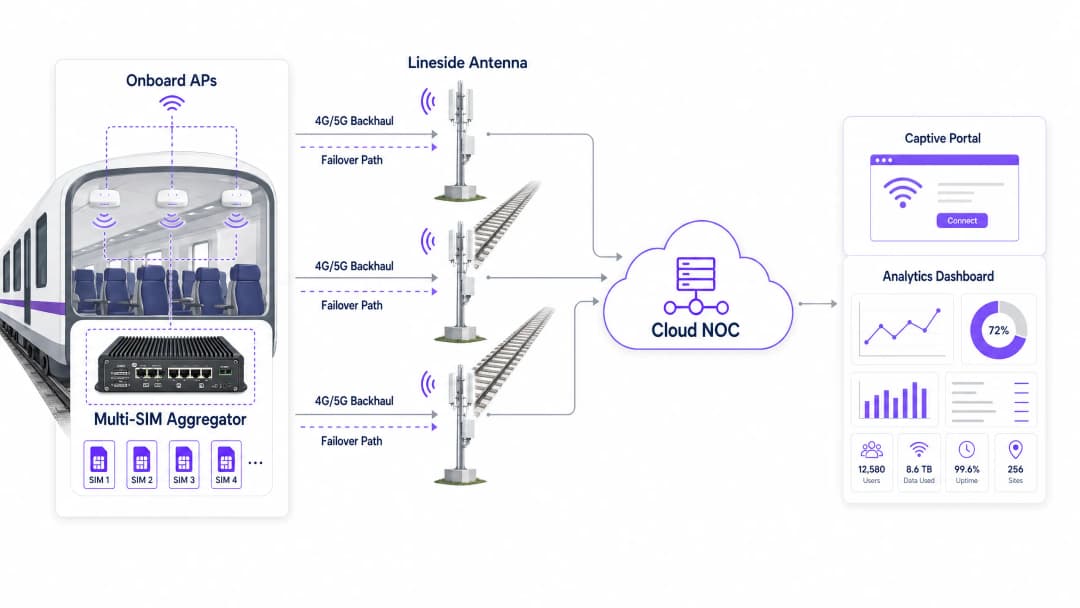
Infrastructure le long des voies (voie-train)
Pour les itinéraires de banlieue à forte affluence où les réseaux cellulaires publics sont saturés aux heures de pointe, les opérateurs investissent dans des infrastructures de bord de voie dédiées. Cela implique le déploiement d'antennes le long de la voie - généralement espacées de 500 mètres à 2 kilomètres, selon la technologie - utilisant des ondes millimétriques ou un spectre 5G dédié pour envoyer un signal ciblé directement vers des récepteurs montés à l'extérieur des wagons de train.
Cette approche contourne entièrement la congestion cellulaire publique et offre un débit garanti. Le compromis réside dans les dépenses d'investissement substantielles liées à la construction en bord de voie, mais pour les lignes interurbaines à fort rendement, l'analyse de rentabiliser le projet est convaincante. Un facteur clé à prendre en compte est l'effet Doppler : à des vitesses supérieures à 100 mph, la fréquence radio perçue par le récepteur diffère de la fréquence émise, ce qui nécessite un équipement radio spécialisé conçu pour les scénarios de mobilité à grande vitesse.
Distribution à bord et normes matérielles
Une fois la liaison terrestre sécurisée, le signal est distribué via un réseau fédérateur Ethernet embarqué vers des points d'accès (AP) WiFi dans chaque wagon. Le matériel déployé à bord des trains doit être conforme à des normes environnementales strictes, notamment la norme EN 50155. Cette norme spécifie les exigences relatives aux équipements électroniques utilisés sur le matériel roulant, garantissant la tolérance aux variations extrêmes de température (généralement de -25°C à +70°C), à l'humidité, aux chocs et aux vibrations.
Les points d'accès nécessitent généralement des connecteurs industriels M12 plutôt que des ports RJ45 standards pour éviter les déconnexions causées par les vibrations. Le Wi-Fi 6 (802.11ax) est la norme actuellement recommandée pour les nouveaux déploiements, offrant des performances améliorées dans les environnements à forte densité grâce à des technologies telles que l'OFDMA et le BSS Colouring.
La topologie du réseau local embarqué est tout aussi importante. Une approche en guirlande crée un point de défaillance unique à chaque connexion entre les wagons. L'architecture recommandée est une topologie en anneau redondante, dans laquelle une rupture dans un segment de câble unique est automatiquement contournée en acheminant le trafic dans la direction opposée autour de l'anneau.
Guide de mise en œuvre
Le déploiement d'un service WiFi ferroviaire nécessite une planification minutieuse et une exécution par étapes. Les étapes suivantes fournissent aux équipes informatiques un cadre pratique.
Étape 1 : Étude RF et évaluation de la liaison terrestre
Avant de sélectionner le matériel, effectuez une étude RF complète de l'ensemble de l'itinéraire du train. Cartographiez la force du signal et le débit de données pour tous les principaux opérateurs de réseau mobile le long de la voie à des heures représentatives de la journée. Identifiez les zones blanches - tunnels, tranchées profondes, tronçons ruraux - où la couverture cellulaire est totalement inexistante. Ces données influencent directement la configuration de la carte SIM de la passerelle d'agrégation et mettent en évidence les zones où l'investissement dans des infrastructures de bord de voie peut être justifié.
Étape 2 : Achat et installation du matériel
Sélectionnez du matériel conforme à la norme EN 50155 auprès de fournisseurs ayant fait leurs preuves dans le secteur ferroviaire. Installez l'agrégateur multi-SIM dans une armoire de communication sécurisée et ventilée, généralement dans la voiture de tête ou de queue. Installez un câblage résilient entre les voitures - un anneau Ethernet doublement redondant utilisant du câble de qualité industrielle - vers les APs. Assurez-vous que les antennes externes ont un profil aérodynamique et sont étanches selon la norme IP67 ou supérieure contre le vent et les intempéries.
Étape 3 : configuration du captive portal et de la gestion de la bande passante
C'est le point d'intégration crucial où l'infrastructure rencontre l'expérience passager. Vous ne pouvez pas offrir une bande passante illimitée dans un train ; la liaison de raccordement est une ressource finie et partagée. Implémentez une solution de captive portal pour appliquer une politique d'utilisation équitable (FUP).
La limitation du débit plafonne la vitesse de chaque utilisateur - généralement 5 Mbps en téléchargement - pour garantir un accès équitable à tous les appareils connectés. Le façonnage du trafic bloque ou limite les applications gourmandes en bande passante telles que le streaming 4K ou les mises à jour logicielles volumineuses, en donnant la priorité à la navigation web, aux e-mails et à la VoIP. L'authentification via le portail capture les données des passagers (adresse e-mail, connexion via les réseaux sociaux) en totale conformité avec le GDPR et les transmet à votre plateforme d'analyse.
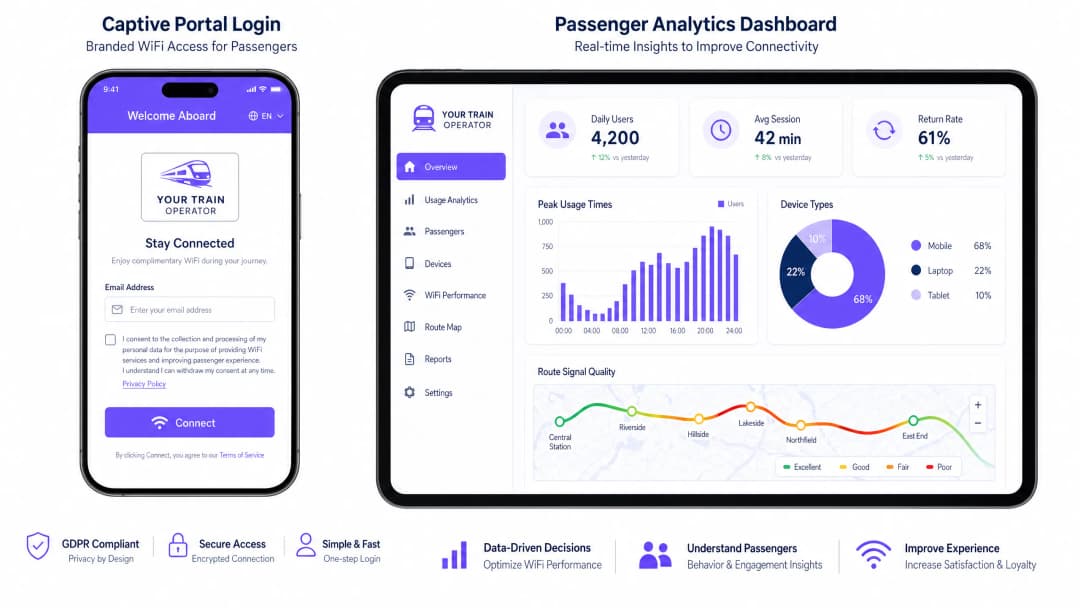
Étape 4 : intégration et surveillance du NOC
Intégrez le réseau embarqué à un centre d'opérations réseau (NOC) basé sur le cloud. Configurez des alertes en temps réel pour l'état de santé des APs, les seuils de latence de la liaison de raccordement et les événements de basculement de carte SIM. Superposez les données de position GPS du train avec les indicateurs de performance du réseau pour créer des cartes de qualité du signal à l'échelle de la ligne. C'est la base d'une gestion proactive plutôt que d'un traitement réactif des plaintes.
Bonnes pratiques
Implémentez l'isolation des clients sur tous les APs. Assurez-vous que les appareils des passagers ne peuvent pas communiquer directement entre eux sur le réseau local. Cela réduit le risque d'attaques de pair à pair, d'attaques de type "man-in-the-middle" et de propagation de logiciels malveillants sur le réseau local embarqué. Il s'agit d'une base de sécurité non négociable pour tout réseau public.
Adoptez OpenRoaming pour réduire les frictions liées au portail. Afin d'améliorer l'expérience des passagers réguliers, prenez en charge Passpoint et OpenRoaming (IEEE 802.11u). Cela permet aux appareils compatibles de s'authentifier de manière sécurisée et automatique sans avoir à interagir avec le captive portal à chaque trajet. Pour les opérateurs qui utilisent déjà la plateforme, Purple agit comme un fournisseur d'identité gratuit pour les services OpenRoaming, ce qui en fait une option de mise à niveau viable. Pour plus d'informations sur les principes fondamentaux de la sécurité réseau, consultez la page Protéger votre réseau avec un DNS robuste et la sécurité .
La surveillance proactive est non négociable. Ne comptez pas sur les plaintes des passagers pour identifier les pannes. Intégrez le réseau embarqué à un NOC cloud pour surveiller le taux de disponibilité, la latence du backhaul et l'état des AP en temps réel. L'objectif est d'identifier et de résoudre les problèmes avant que le premier passager ne s'en rende compte.
Traitez le Captive Portal comme un produit, pas comme un simple utilitaire. Le portail est votre principal point de contact avec les passagers. Investissez dans une expérience personnalisée aux couleurs de votre marque, au chargement rapide, qui communique clairement les conditions d'utilisation et la manière dont les données seront utilisées. Un portail mal conçu crée des frictions et fait chuter les taux d'authentification, ce qui affecte directement la qualité de vos données de première partie.
Dépannage et atténuation des risques
L'effet de surcharge en gare
Risque : Lorsqu'un train entre dans une gare bondée, des centaines d'appareils embarqués peuvent tenter simultanément de se connecter au réseau cellulaire macro de la gare ou au réseau WiFi public propre à la gare, provoquant de graves interférences, la saturation du backhaul et une expérience dégradée pour tous les passagers.
Atténuation : Configurez les AP embarqués pour basculer dynamiquement le backhaul du cellulaire vers un lien WiFi haute capacité dédié ou une liaison fibre au niveau des quais de la gare. Utilisez des déclencheurs de géolocalisation ou GPS pour ajuster automatiquement les politiques de bande passante lorsque le train est à l'arrêt dans les grands hubs, en levant temporairement les limites par utilisateur pendant que la capacité du backhaul est pratiquement illimitée.
Défaillance du câble d'intercirculation
Risque : Les connexions physiques entre les voitures subissent des contraintes mécaniques constantes, des vibrations et des mouvements lors des opérations d'attelage et de dételage, ce qui entraîne la dégradation des câbles et la segmentation du réseau.
Atténuation : Implémentez une topologie en anneau redondante pour le LAN embarqué en utilisant des commutateurs conformes à la norme EN 50155 avec le protocole Rapid Spanning Tree (RSTP) ou un protocole en anneau propriétaire. Si un câble entre deux voitures tombe en panne, le trafic est automatiquement redirigé dans le sens opposé de l'anneau, maintenant la connectivité vers tous les AP en quelques secondes.
Saturation du backhaul à la sortie des tunnels
Risque : Lorsqu'un train sort d'un long tunnel, chaque appareil tente simultanément de resynchroniser ses données (e-mails, mises à jour d'applications, sauvegardes cloud), créant un pic de trafic qui sature le backhaul pendant 30 à 60 secondes.
Atténuation : Mettez en œuvre des politiques de mise en forme du trafic (traffic shaping) agressives qui limitent spécifiquement le trafic des applications en arrière-plan. Configurez le Captive Portal pour déprioriser le trafic de mise à jour du système d'exploitation et les services de synchronisation cloud au niveau de la couche applicative, garantissant ainsi que le trafic interactif (navigation web, messagerie) soit toujours prioritaire.
ROI et impact commercial
Bien que le déploiement d'un réseau WiFi ferroviaire nécessite des dépenses d'investissement importantes - généralement de 50 000 £ à 200 000 £ par train, selon la complexité de la solution de backhaul - il génère des rendements considérables et mesurables lorsqu'il est intégré à une plateforme d'analyse robuste.
| Facteur de valeur | Mécanisme | Résultat mesurable |
|---|---|---|
| Acquisition de données first-party | Authentification par captive portal | Base de données d'e-mails des passagers pour le CRM et le marketing |
| Intelligence opérationnelle | Analyses NOC + superposition GPS | Responsabilité des opérateurs vis-à-vis des SLA, identification des lacunes de couverture |
| Revenus des médias de détail | Publicité sur captive portal | Revenus directs issus de contenus sponsorisés lors de la connexion |
| Satisfaction des passagers | Connectivité fiable | Scores NPS améliorés, part modale ferroviaire plus élevée |
| Conformité réglementaire | Capture de données conforme au GDPR | Exposition juridique réduite, registres de consentement vérifiables |
En exigeant une authentification via le captive portal, les opérateurs constituent une base de données précieuse sur la démographie et les habitudes de voyage des passagers. Ces données peuvent être utilisées pour des campagnes de marketing ciblées, des programmes de fidélité et la personnalisation des services. Les tableaux de bord analytiques qui superposent les performances du réseau avec les données de position des trains permettent aux opérateurs d'identifier précisément les lacunes de couverture le long des voies et de tenir les fournisseurs de téléphonie mobile pour responsables des SLA contractuels.
Le captive portal lui-même est un espace numérique de premier choix. Les opérateurs peuvent insérer des publicités ciblées ou des messages sponsorisés dans le flux de connexion, générant ainsi des revenus directs pour compenser les coûts d'infrastructure. Ce modèle s'est avéré très fructueux dans d'autres secteurs, notamment les hubs de commerce de détail et de transport , et les mêmes principes s'appliquent directement à l'environnement ferroviaire. Pour les opérateurs de l'hôtellerie gérant des hôtels de gare ou des salons, les mêmes principes de plateforme s'appliquent - voir notre guide sur les déploiements WiFi dans l' hôtellerie pour des modèles d'implémentation parallèles.
Définitions clés
Agrégation multi-porteuse
Le processus consistant à combiner plusieurs connexions réseau - généralement plusieurs cartes SIM 4G ou 5G de différents opérateurs - en une seule connexion de données robuste à l'aide d'une passerelle de liaison pour améliorer la bande passante globale et assurer un basculement automatique.
Essentielle pour les trains, car elle empêche les coupures de réseau lors du passage dans des zones où un seul fournisseur cellulaire manque de couverture. La passerelle achemine de manière dynamique et en temps réel les paquets à travers toutes les porteuses disponibles.
EN 50155
Une norme internationale (IEC 60571) couvrant les équipements électroniques utilisés sur le matériel roulant pour les applications ferroviaires, spécifiant les exigences relatives à la température, à l'humidité, aux vibrations, aux chocs et aux fluctuations d'alimentation électrique.
Les équipes informatiques doivent s'assurer que tous les routeurs, commutateurs et points d'accès embarqués sont certifiés EN 50155. Le matériel d'entreprise standard tombera en panne dans l'environnement ferroviaire en raison des vibrations et des températures extrêmes.
Captive Portal
Une page web que l'utilisateur d'un réseau à accès public est obligé de consulter et avec laquelle il doit interagir avant de bénéficier d'un accès complet à internet. Elle requiert généralement une authentification et l'acceptation des conditions d'utilisation.
Utilisé par les opérateurs pour authentifier les utilisateurs, appliquer des politiques d'usage équitable et capturer des données marketing de première main précieuses. Il s'agit de l'interface commerciale principale entre l'opérateur et le passager sur le réseau WiFi.
Client Isolation
Une fonctionnalité de sécurité sur les points d'accès sans fil qui empêche les appareils connectés de communiquer directement entre eux sur le réseau local, forçant tout le trafic à transiter par la passerelle.
Essentiel pour les réseaux publics comme le WiFi des trains afin de protéger les passagers contre les tentatives de piratage entre pairs, les attaques de l'homme du milieu et la propagation de logiciels malveillants sur le LAN embarqué.
Lineside Infrastructure
Équipement de télécommunication dédié - comprenant des antennes, des unités radio et une liaison de raccordement en fibre optique - installé le long de la voie ferrée pour fournir un réseau de raccordement privé à haute capacité pour les trains.
Déployée lorsque les réseaux cellulaires publics ne peuvent pas répondre aux demandes de données élevées des lignes de banlieue denses. Elle nécessite un investissement en capital important mais offre un débit garanti indépendant de la congestion du réseau public.
Passpoint / OpenRoaming
Une suite de protocoles (basée sur IEEE 802.11u et Hotspot 2.0) qui permet aux appareils de se connecter automatiquement et de manière sécurisée aux réseaux WiFi participants sans nécessiter de connexion via un Captive Portal, en utilisant une authentification basée sur des certificats.
Améliore l'expérience des passagers réguliers en offrant une connectivité transparente et automatique. Purple agit en tant que fournisseur d'identité pour ce service, permettant aux opérateurs de le proposer sans avoir à construire leur propre infrastructure d'authentification.
Traffic Shaping (QoS)
La pratique consistant à réguler le transfert de données réseau pour contrôler l'allocation de la bande passante, donner la priorité à certains types de trafic et bloquer ou limiter les autres, garantissant ainsi une qualité de service définie pour tous les utilisateurs.
Utilisé dans les trains pour bloquer les applications gourmandes en bande passante (comme le streaming vidéo 4K) et donner la priorité au trafic interactif (navigation web, e-mail, VoIP) afin de garantir que tous les passagers disposent d'une connexion exploitable malgré une capacité de raccordement limitée.
Doppler Shift
La variation de fréquence d'une onde radio perçue par un récepteur en mouvement par rapport à l'émetteur. À grande vitesse, ce décalage de fréquence peut dégrader la qualité de la liaison radio.
Un défi physique fondamental dans les réseaux ferroviaires à grande vitesse. Des équipements radio voie-train spécialisés sont nécessaires pour compenser l'effet Doppler à des vitesses supérieures à 160 km/h, ce qui rend les points d'accès extérieurs d'entreprise standard inadaptés à un déploiement le long des voies.
Fair Usage Policy (FUP)
Un ensemble de règles appliquées par l'opérateur réseau qui limite la bande passante ou la consommation de données des utilisateurs individuels afin de garantir un accès équitable pour tous les appareils connectés.
Mise en œuvre via le Captive Portal et le moteur de Traffic Shaping sur l'agrégateur multi-SIM. Sans FUP, un petit nombre d'utilisateurs intensifs peut saturer l'ensemble de la liaison de raccordement, dégradant ainsi l'expérience de tous les passagers.
Exemples concrets
Un opérateur ferroviaire régional disposant de 50 trains fait face à de graves plaintes concernant le WiFi. Les passagers signalent que le réseau se coupe complètement pendant un trajet de 15 minutes dans une vallée rurale. La configuration actuelle utilise un routeur 4G à SIM unique dans chaque voiture. Quelle est l'approche de remédiation recommandée ?
L'opérateur doit passer à une architecture multi-porteuse. Étape 1 : Remplacer les routeurs à SIM unique par une passerelle d'agrégation multi-SIM centralisée conforme à la norme EN 50155 par train. Étape 2 : Effectuer une étude radio de la vallée pour déterminer quels opérateurs mobiles ont une couverture partielle dans le segment concerné. Étape 3 : Équiper la passerelle avec des cartes SIM d'au moins trois opérateurs différents (ex. EE, O2, Vodafone), en configurant la passerelle pour une agrégation au niveau des paquets et un basculement transparent. Étape 4 : Mettre en œuvre un Captive Portal pour appliquer une limite stricte de débit de 2 Mbps par utilisateur pendant la traversée de la vallée à faible couverture afin d'éviter les interruptions de connexion pour la navigation web de base. Étape 5 : Intégrer un NOC cloud pour surveiller les événements de basculement en temps réel et créer une carte de couverture pour les négociations avec les opérateurs.
Un grand opérateur interurbain lance un nouveau service premium et souhaite proposer une expérience WiFi différenciée : les passagers de première classe bénéficient de 20 Mbps non plafonnés, tandis que les passagers de classe standard reçoivent 5 Mbps avec le streaming bloqué. Comment structurer cette architecture ?
Cela nécessite une architecture multi-SSID avec des politiques de QoS par SSID. Étape 1 : Configurer deux SSIDs distincts sur les APs embarqués - un pour la première classe, un pour la classe standard. Étape 2 : Assigner chaque SSID à un VLAN distinct. Étape 3 : Sur l'agrégateur multi-SIM, configurer des politiques de régulation du trafic par VLAN : le VLAN 10 (première classe) bénéficie d'une file d'attente prioritaire sans blocage au niveau de la couche applicative ; le VLAN 20 (classe standard) reçoit un plafond de 5 Mbps par utilisateur avec des règles de Deep Packet Inspection (DPI) bloquant les domaines et plages IP des services de streaming connus. Étape 4 : Déployer des instances de Captive Portal distinctes pour chaque SSID, le portail de première classe étant pré-rempli pour les voyageurs fréquents via OpenRoaming ou un jeton de programme de fidélité.
Questions d'entraînement
Q1. Vous concevez le LAN embarqué pour une nouvelle flotte de trains de 8 voitures. Le chef de projet suggère de connecter les AP en cascade via un câble Cat6 standard entre les voitures afin de réduire les coûts. Quel est le risque principal de cette approche, et quelle architecture devriez-vous recommander à la place ?
Conseil : Prenez en compte l'environnement physique d'un train en mouvement et ce qui arrive aux segments de réseau en aval d'un câble d'intercirculation rompu.
Voir la réponse type
Le risque principal est un point de défaillance unique en cascade. Si le câble entre la voiture 3 et la voiture 4 se rompt en raison de vibrations ou de contraintes mécaniques lors de l'attelage, les voitures 4 à 8 perdent toute connectivité réseau. Je recommanderais une topologie en anneau redondante utilisant des commutateurs administrables conformes à la norme EN 50155 avec des connecteurs M12 et RSTP ou un protocole d'anneau propriétaire. Dans une topologie en anneau, une rupture dans un segment de câble est automatiquement contournée en quelques millisecondes en acheminant le trafic dans la direction opposée de l'anneau, maintenant ainsi la connectivité pour tous les AP.
Q2. Votre tableau de bord analytique montre que la bande passante totale sur le service de banlieue de 08h00 sature la liaison multi-SIM, provoquant des plaintes généralisées concernant la lenteur de la connexion. Pourtant, seulement 30 % des passagers se sont authentifiés sur le Captive Portal. Quelle est la cause probable et quelle est la solution ?
Conseil : Pensez à ce que font les appareils en arrière-plan lorsqu'ils détectent un réseau WiFi connu ou ouvert, avant même qu'un utilisateur ne navigue activement.
Voir la réponse type
La cause la plus probable est l'activité des appareils en arrière-plan : les mises à jour du système d'exploitation, les sauvegardes cloud (iCloud, Google Drive), les cycles de rafraîchissement des applications et la synchronisation des e-mails se lancent automatiquement dès qu'un appareil s'associe au SSID, que l'utilisateur se soit authentifié ou non via le Captive Portal. La solution consiste à mettre en œuvre des walled gardens de pré-authentification stricts sur le Captive Portal - en autorisant uniquement l'accès au portail lui-même avant la connexion - combinés à une limitation du trafic post-authentification qui bloque les plages d'adresses IP de serveurs de mise à jour connus et les domaines CDN pendant les heures de pointe. Une limitation du débit par utilisateur doit également être appliquée immédiatement après l'authentification.
Q3. Un opérateur ferroviaire souhaite déployer une infrastructure dédiée de communication voie-train pour contourner complètement les réseaux cellulaires publics. Leur équipe d'approvisionnement a identifié une option à bas coût utilisant des points d'accès WiFi extérieurs d'entreprise standard montés sur des poteaux tous les 200 mètres le long de la voie. Les trains circulent à 200 km/h. Pourquoi cette approche va-t-elle échouer, et que doivent-ils spécifier à la place ?
Conseil : Prenez en compte à la fois la physique des communications radio à haute vitesse et les exigences opérationnelles du transfert entre les points d'accès.
Voir la réponse type
Cette approche va échouer pour deux raisons fondamentales. Premièrement, les AP extérieurs d'entreprise standard ne sont pas conçus pour gérer les transferts rapides requis lorsqu'un train se déplace à 200 km/h. À cette vitesse, le train traverse une cellule de 200 mètres en moins de 4 secondes, bien plus rapidement que les protocoles de roaming 802.11 standard ne peuvent exécuter un transfert propre. Deuxièmement, l'effet de glissement Doppler à ces vitesses dégradera la qualité de la liaison radio, car les AP standard ne peuvent pas compenser le décalage de fréquence causé par la vitesse relative entre le train et l'antenne fixe. L'opérateur doit spécifier des équipements radio voie-train dédiés provenant de fournisseurs ayant fait leurs preuves dans les déploiements ferroviaires à grande vitesse, utilisant des technologies spécifiquement conçues pour les scénarios de mobilité, avec des antennes directives et des protocoles de transfert propriétaires optimisés pour la vitesse des trains.
Q4. Un opérateur de transport ferroviaire de passagers prépare un audit GDPR. Leur Captive Portal collecte des adresses e-mail et les utilise à des fins de marketing. Quelles sont les trois exigences de conformité les plus critiques qu'ils doivent démontrer ?
Conseil : Concentrez-vous sur la base légale du traitement, le droit de retirer son consentement et la conservation des données.
Voir la réponse type
Les trois exigences les plus cruciales sont : 1) Base légale et consentement explicite - le portail doit présenter une case à cocher de consentement claire et non pré-cochée pour les communications marketing, séparée de l'acceptation des conditions d'utilisation requises pour l'accès WiFi. Les passagers doivent pouvoir accéder au WiFi sans consentir au marketing. 2) Droit de retrait - il doit y avoir un mécanisme clair et accessible permettant aux passagers de retirer leur consentement marketing à tout moment, généralement un lien de désinscription dans chaque e-mail et un centre de préférences en libre-service. 3) Conservation et minimisation des données - l'opérateur doit disposer d'une politique de conservation des données documentée spécifiant la durée de conservation des données des passagers, et doit être en mesure de prouver que les données sont supprimées ou anonymisées après la période de conservation. Ces trois points doivent être étayés par des journaux d'audit.
Continuer la lecture de cette série
Staff WiFi vs. Guest WiFi : meilleures pratiques pour la segmentation des réseaux d'entreprise
Un guide technique complet destiné aux leaders de l'informatique sur la segmentation des réseaux WiFi pour le personnel et les invités. Il couvre l'architecture VLAN, l'authentification 802.1X, les politiques de pare-feu et l'impact commercial d'une conception de réseau sécurisée.
Solutions WiFi pour appartements : un guide complet pour les entreprises
Ce guide couvre l'architecture, le déploiement et l'analyse de rentabilité des solutions WiFi pour appartements dans l'immobilier locatif géré (Build to Rent) et les résidences collectives. Il explique comment la technologie iPSK (Identity Pre-Shared Key) crée des bulles de réseau sécurisées et isolées pour chaque résident tout en prenant en charge les appareils intelligents et l'IoT. Les promoteurs immobiliers, les propriétaires et les opérateurs de BTR y trouveront des conseils de déploiement pratiques, des données sur le ROI et des scénarios de mise en œuvre concrets.
Cox business managed WiFi : un guide complet pour les entreprises
Ce guide détaille comment les promoteurs immobiliers et les opérateurs BTR peuvent déployer des réseaux évolutifs et sécurisés grâce à Cox Business managed WiFi. Il couvre l'architecture réseau, le déploiement de matériel indépendant du fournisseur, et l'impact commercial de la transition d'une connectivité complexe vers une infrastructure fiable.