
Railway WiFi Network: How Operators Are Delivering Connectivity at Speed
This technical reference guide provides actionable insights for IT leaders, network architects, and transportation operations directors on architecting and deploying reliable railway WiFi networks. It covers the full stack from lineside infrastructure and multi-carrier aggregation to bandwidth management, captive portals, and passenger analytics. The guide demonstrates how operators can move beyond treating onboard WiFi as a cost center and instead leverage it as a strategic asset that generates first-party data, operational intelligence, and measurable ROI.
Video overview
Listen to this guide
View podcast transcript
Part of our core series: Guest WiFi Guide →

Executive summary
Delivering reliable WiFi on a moving train is one of the most complex challenges in enterprise networking. For IT managers, network architects and venue operations directors, passenger connectivity is no longer a luxury - it is a baseline expectation that directly affects customer satisfaction and brand perception.
This guide outlines the technical architecture required to maintain connectivity at speeds of 125 mph, including handling constant cell tower handoffs, the Faraday cage effect of metal cars, and fluctuating user density. We explore the shift from simple cellular routers to multi-bearer aggregation gateways and dedicated lineside infrastructure. Crucially, we examine how operators use captive portals and analytics platforms - such as guest WiFi and WiFi analytics - to manage bandwidth, ensure CCPA/CPRA compliance, and extract actionable first-party data. By treating the onboard network not merely as a cost center but as a strategic asset, transportation operators can drive significant ROI while meeting the digital demands of the modern passenger.
Technical deep-dive
Building a railway WiFi network requires a fundamental departure from static enterprise LAN design. The network must bridge between a fast-moving local environment and the core internet backhaul, while maintaining session continuity for hundreds of concurrent users.
Multi-bearer backhaul architecture
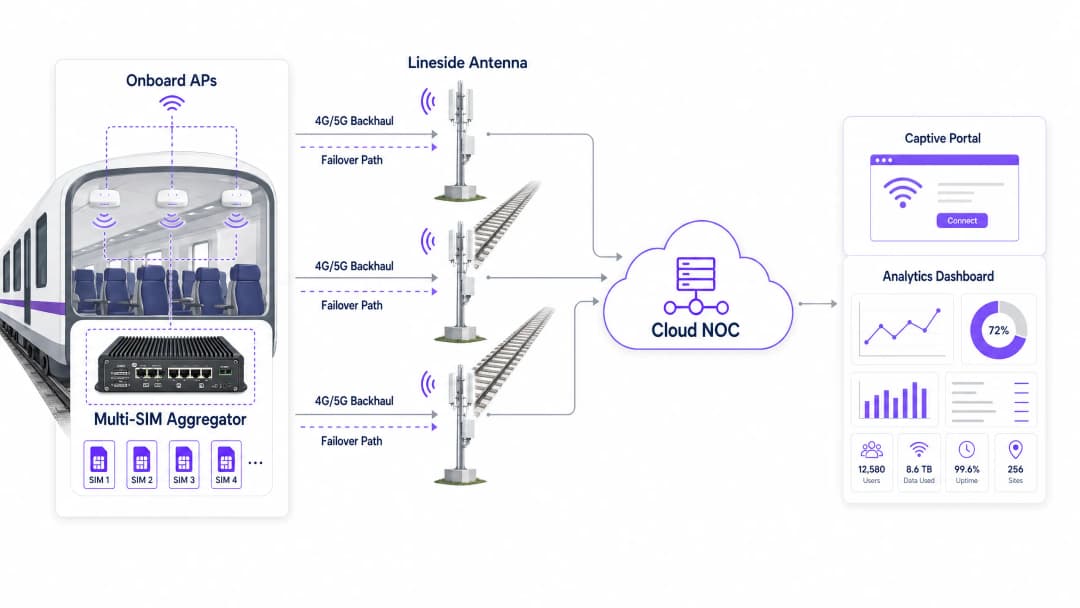
Relying on a single mobile network operator is insufficient for a moving train. Modern deployments use a multi-SIM aggregation gateway (or multi-bearer router) mounted on the train. This device bonds 4G and 5G connections from multiple mobile network operators (MNOs) simultaneously.
As the train passes through different coverage areas, the aggregator dynamically routes traffic across the available connections based on real-time latency, packet loss and signal strength metrics. If one operator loses signal in a tunnel or rural section, the others sustain the session, providing seamless failover with no perceptible interruption for passengers. This is the single most important architectural decision in any railway WiFi deployment.
Lineside infrastructure (track-to-train)
For high-density commuter routes where the public cellular networks become congested at peak times, operators are investing in dedicated lineside infrastructure. This involves deploying antennas along the track - typically spaced 500 meters to 2 kilometers apart, depending on the technology - using millimeter wave or dedicated 5G spectrum to fire a dedicated signal directly at receivers mounted on the exterior of the train carriages.
This approach bypasses public cellular congestion entirely and delivers guaranteed throughput. The trade-off is the substantial capital expenditure of trackside construction, but for high-revenue intercity routes the business case is compelling. A key consideration is the Doppler effect: at speeds above 100 mph, the radio frequency perceived by the receiver differs from the transmitted frequency, requiring specialized radio equipment designed for high-speed mobility scenarios.
Onboard distribution and hardware standards
Once the backhaul is secured, the signal is distributed via an onboard Ethernet backbone to wireless access points (APs) in each carriage. Hardware deployed on trains must comply with strict environmental standards, notably EN 50155. This standard specifies the requirements for electronic equipment used on rolling stock, ensuring tolerance of extreme temperature variation (typically -13°F to +158°F), humidity, shock, and vibration.
APs typically require M12 industrial connectors rather than standard RJ45 ports to prevent disconnection caused by vibration. WiFi 6 (802.11ax) is the current recommended standard for new deployments, delivering improved performance in high-density environments through technologies such as OFDMA and BSS Coloring.
The onboard LAN topology is equally important. A daisy-chain approach creates a single point of failure at every inter-carriage connection. The recommended architecture is a redundant ring topology, in which a break in any single cable segment is automatically bypassed by routing traffic in the opposite direction around the ring.
Implementation guide
Deploying a railway WiFi service requires careful planning and phased execution. The following steps give IT teams a practical framework.
Step 1: RF survey and backhaul assessment
Before selecting hardware, conduct a comprehensive RF survey of the entire train route. Map signal strength and data throughput for all major MNOs along the track at representative times of day. Identify dead zones - tunnels, deep cuttings, rural stretches - where cellular coverage drops out entirely. This data directly informs the SIM carrier configuration of the aggregation gateway and highlights where investment in lineside infrastructure may be justified.
Step 2: hardware procurement and installation
Select EN 50155-compliant hardware from vendors with proven railway deployments. Install the multi-SIM aggregator in a secure, ventilated communications cabinet, typically in the leading or trailing car. Run resilient cabling between carriages - a dual-redundant Ethernet ring using industrial-grade cable - to the APs. Ensure external antennas have an aerodynamic profile and are sealed to IP67 or higher against wind and weather ingress.
Step 3: captive portal and bandwidth management configuration
This is the critical integration point where infrastructure meets passenger experience. You cannot offer unrestricted bandwidth on a train; the backhaul is a finite, shared resource. Implement a captive portal solution to enforce a fair usage policy (FUP).
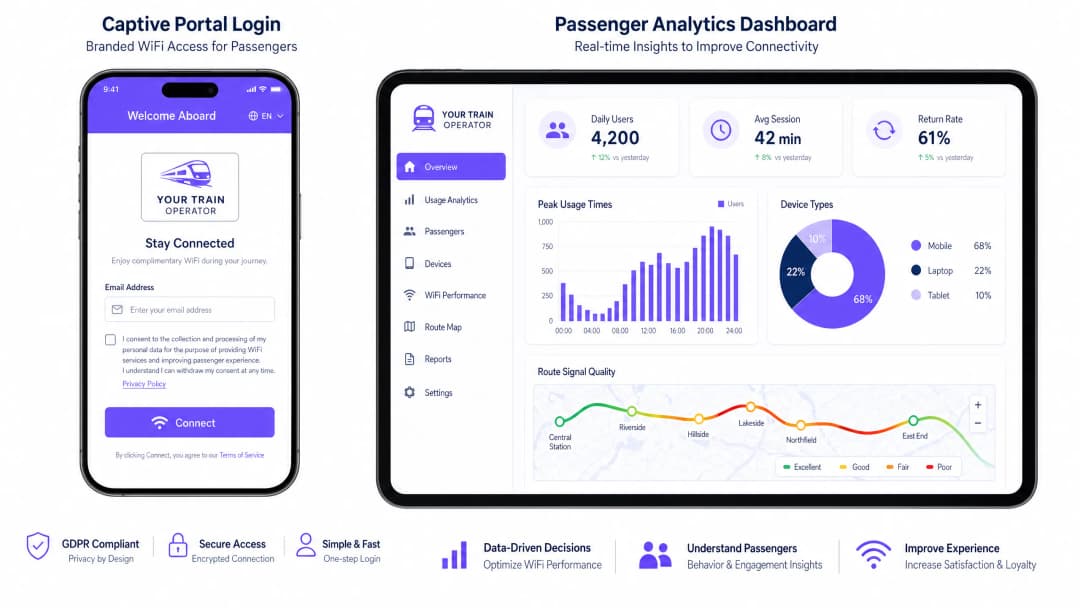
Rate limiting caps individual user speeds - typically 5 Mbps download - to ensure fair access for all connected devices. Traffic shaping blocks or throttles high-bandwidth applications such as 4K streaming or large software updates, prioritizing web browsing, email and VoIP. Authentication through the portal captures passenger data (email address, social login) in full CCPA/CPRA compliance and feeds it into your analytics platform.
Step 4: NOC integration and monitoring
Integrate the onboard network with a cloud-based Network Operations Center (NOC). Configure real-time alerts for AP health, backhaul latency thresholds and SIM failover events. Overlay GPS train position data with network performance metrics to build route-level signal quality maps. This is the foundation of proactive management rather than reactive complaint handling.
Got questions about your specific setup?
Our team works with venue operators, IT managers, and network engineers across 80,000 venues. Book a 20-minute call and we will show you how others like you solved it.
Best practices
Implement client isolation on all APs. Ensure passenger devices cannot communicate directly with each other on the local network. This reduces the risk of peer-to-peer attacks, man-in-the-middle attacks and malware propagation across the onboard LAN. It is a non-negotiable security baseline for any public network.
Adopt OpenRoaming to reduce portal friction. To improve the passenger experience for repeat travelers, support Passpoint and OpenRoaming (IEEE 802.11u). This allows compatible devices to authenticate securely and automatically without interacting with the captive portal on every journey. For operators already using the platform, Purple acts as a free identity provider for OpenRoaming services, making it a viable upgrade path. For further background on network security fundamentals, see Protecting your network with robust DNS and security.
Proactive monitoring is non-negotiable. Do not rely on passenger complaints to identify outages. Integrate the onboard network with a cloud NOC to monitor uptime, backhaul latency, and AP health in real time. The goal is to identify and resolve issues before the first passenger notices.
Treat the captive portal as a product, not a utility. The portal is your primary touchpoint with passengers. Invest in a branded, fast-loading experience that clearly communicates the terms of service and how data will be used. A poorly designed portal creates friction and depresses authentication rates, directly affecting the quality of your first-party data.
Troubleshooting and risk mitigation
The station surge effect
Risk: When a train pulls into a busy station, hundreds of onboard devices may simultaneously attempt to connect to the station's macro cellular network or the station's own public WiFi, causing severe interference, backhaul saturation, and a degraded experience for all passengers.
Mitigation: Configure the onboard APs to dynamically switch backhaul from cellular to a dedicated high-capacity WiFi or fiber link at station platforms. Use geolocation or GPS triggers to automatically adjust bandwidth policies when the train is stationary at major hubs, temporarily lifting per-user limits while backhaul capacity is effectively unlimited.
Inter-car cable failure
Risk: The physical connections between train cars endure constant mechanical stress, vibration, and movement during coupling and uncoupling operations, leading to cable degradation and network segmentation.
Mitigation: Implement a redundant ring topology for the onboard LAN using EN 50155-compliant switches with Rapid Spanning Tree Protocol (RSTP) or a proprietary ring protocol. If a cable between any two cars fails, traffic automatically routes the opposite way around the ring, maintaining connectivity to all APs within seconds.
Backhaul saturation on tunnel exit
Risk: When a train emerges from a long tunnel, every device simultaneously attempts to resynchronize data (email, app updates, cloud backups), creating a burst of traffic that saturates the backhaul for 30 to 60 seconds.
Mitigation: Implement aggressive traffic shaping policies that specifically throttle background application traffic. Configure the captive portal to deprioritize OS update traffic and cloud sync services at the application layer, ensuring interactive traffic (web browsing, messaging) always takes precedence.
ROI and business impact
While deploying a railway WiFi network requires substantial capital expenditure - typically $65,000 to $260,000 per train, depending on the complexity of the backhaul solution - it delivers considerable, measurable returns when integrated with a robust analytics platform.
| Value driver | Mechanism | Measurable outcome |
|---|---|---|
| First-party data acquisition | Captive portal authentication | Passenger email database for CRM and marketing |
| Operational intelligence | NOC analytics + GPS overlay | Carrier SLA accountability, coverage gap identification |
| Retail media revenue | Captive portal advertising | Direct revenue from sponsored content at login |
| Passenger satisfaction | Reliable connectivity | Improved NPS scores, higher rail modal share |
| Regulatory compliance | CCPA/CPRA-compliant data capture | Reduced legal exposure, auditable consent records |
By requiring authentication through the captive portal, operators build a valuable database of passenger demographics and travel habits. This data can be used for targeted marketing campaigns, loyalty programs and service personalization. Analytics dashboards that overlay network performance with train position data allow operators to pinpoint coverage gaps along the track and hold cellular providers accountable to contracted SLAs.
The captive portal itself is prime digital real estate. Operators can insert targeted advertising or sponsored messages into the login flow, generating direct revenue to offset infrastructure costs. This model has proven highly successful in other sectors, including retail and transport hubs, and the same principles apply directly to the railway environment. For hospitality operators managing station hotels or lounges, the same platform principles apply - see our guide to hospitality WiFi deployments for parallel implementation patterns.
Key Definitions
Multi-Carrier Aggregation
The process of combining multiple network connections - typically several 4G or 5G SIM cards from different carriers - into a single, robust data connection using a bonding gateway to improve aggregate bandwidth and provide automatic failover.
Essential for trains, as it prevents network dropouts when passing through areas where a single cellular provider lacks coverage. The gateway dynamically routes packets across all available carriers in real-time.
EN 50155
An international standard (IEC 60571) covering electronic equipment used on rolling stock for railway applications, specifying requirements for temperature, humidity, vibration, shock, and power supply fluctuations.
IT teams must ensure all onboard routers, switches, and APs are EN 50155 certified. Standard enterprise hardware will fail in the railway environment due to vibration and temperature extremes.
Captive Portal
A web page that the user of a public-access network is obliged to view and interact with before full internet access is granted. It typically requires authentication and acceptance of terms of service.
Used by operators to authenticate users, enforce fair usage policies, and capture valuable first-party marketing data. It is the primary commercial interface between the operator and the passenger on the WiFi network.
Client Isolation
A security feature on wireless access points that prevents connected devices from communicating directly with each other on the local network, forcing all traffic through the gateway.
Critical for public networks like train WiFi to protect passengers from peer-to-peer hacking attempts, man-in-the-middle attacks, and malware propagation across the onboard LAN.
Lineside Infrastructure
Dedicated telecommunications equipment - including antennas, radio units, and fiber backhaul - installed along the railway track to provide a private, high-capacity backhaul network for the trains.
Deployed when public cellular networks cannot handle the high data demands of dense commuter routes. Requires significant capital investment but offers guaranteed throughput independent of public network congestion.
Passpoint / OpenRoaming
A protocol suite (based on IEEE 802.11u and Hotspot 2.0) that allows devices to automatically and securely connect to participating WiFi networks without requiring a captive portal login, using certificate-based authentication.
Improves the passenger experience for repeat travelers by providing seamless, automatic connectivity. Purple acts as an identity provider for this service, enabling operators to offer it without building their own authentication infrastructure.
Traffic Shaping (QoS)
The practice of regulating network data transfer to control bandwidth allocation, prioritize certain types of traffic, and block or throttle others, ensuring a defined quality of service for all users.
Used on trains to block high-bandwidth applications (like 4K video streaming) and prioritize interactive traffic (web browsing, email, VoIP) to ensure all passengers have a usable connection despite finite backhaul capacity.
Doppler Shift
The change in frequency of a radio wave as perceived by a receiver that is moving relative to the transmitter. At high speeds, this frequency shift can degrade the quality of the radio link.
A fundamental physical challenge in high-speed rail networking. Specialized track-to-train radio equipment is required to compensate for Doppler shift at speeds above 100 mph, making standard enterprise outdoor APs unsuitable for lineside deployment.
Fair Usage Policy (FUP)
A set of rules enforced by the network operator that limits the bandwidth or data consumption of individual users to ensure equitable access for all connected devices.
Implemented via the captive portal and traffic shaping engine on the multi-SIM aggregator. Without an FUP, a small number of heavy users can saturate the entire backhaul, degrading the experience for all passengers.
Worked Examples
A regional rail operator with 50 trains is experiencing severe WiFi complaints. Passengers report the network drops out completely during a 15-minute stretch of the journey through a rural valley. The current setup uses a single-SIM 4G router in each car. What is the recommended remediation approach?
The operator must upgrade to a multi-carrier architecture. Step 1: Replace the single-SIM routers with a centralized EN 50155-compliant multi-SIM aggregation gateway per train. Step 2: Conduct an RF survey of the valley to determine which MNOs have partial coverage in the affected segment. Step 3: Provision the gateway with SIMs from at least three different carriers (e.g., AT&T, T-Mobile, Verizon), configuring the gateway for packet-level bonding and seamless failover. Step 4: Implement a Captive Portal to enforce a strict 2 Mbps per-user rate limit during the low-coverage valley segment to prevent connection timeouts for basic web browsing. Step 5: Integrate with a cloud NOC to monitor the failover events in real-time and build a coverage map for carrier negotiations.
A major intercity operator is launching a new premium service and wants to offer a differentiated WiFi experience: first-class passengers get 20 Mbps uncapped, while standard-class passengers receive 5 Mbps with streaming blocked. How should this be architected?
This requires a multi-SSID architecture with per-SSID QoS policies. Step 1: Configure two separate SSIDs on the onboard APs - one for first class, one for standard class. Step 2: Assign each SSID to a separate VLAN. Step 3: On the multi-SIM aggregator, configure per-VLAN traffic shaping policies: VLAN 10 (first class) receives priority queuing with no application-layer blocking; VLAN 20 (standard class) receives a 5 Mbps per-user cap with Deep Packet Inspection (DPI) rules blocking known streaming service domains and IP ranges. Step 4: Deploy separate Captive Portal instances for each SSID, with the first-class portal pre-populated for frequent travelers via OpenRoaming or a loyalty program token.
Practice Questions
Q1. You are designing the onboard LAN for a new fleet of 8-car trains. The project manager suggests daisy-chaining the APs via standard Cat6 cable between cars to reduce cost. What is the primary risk of this approach, and what architecture should you recommend instead?
Hint: Consider the physical environment of a moving train and what happens to network segments downstream of a broken inter-car cable.
View model answer
The primary risk is a cascading single point of failure. If the cable between Car 3 and Car 4 breaks due to vibration or mechanical stress during coupling, Cars 4 through 8 lose all network connectivity. I would recommend a redundant ring topology using EN 50155-compliant managed switches with M12 connectors and RSTP or a proprietary ring protocol. In a ring topology, a break in any single cable segment is automatically bypassed within milliseconds by routing traffic in the opposite direction around the ring, maintaining connectivity for all APs.
Q2. Your analytics dashboard shows that total bandwidth on the 8:00 AM commuter service is maxing out the multi-SIM backhaul, causing widespread complaints about slow speeds. However, only 30% of passengers have authenticated on the Captive Portal. What is the likely cause and what is the solution?
Hint: Think about what devices do in the background when they detect a known or open WiFi network, even before a user actively browses.
View model answer
The most likely cause is background device activity: OS updates, cloud backups (iCloud, Google Drive), app refresh cycles, and email sync all initiate automatically as soon as a device associates with the SSID, regardless of whether the user has authenticated through the Captive Portal. The solution is to implement strict pre-authentication walled gardens on the Captive Portal - only allowing access to the portal itself before login - combined with post-authentication traffic shaping that blocks known update server IP ranges and CDN domains during peak hours. Per-user rate limiting should also be applied immediately post-authentication.
Q3. A train operator wants to deploy dedicated lineside track-to-train infrastructure to bypass public cellular networks entirely. Their procurement team has identified a low-cost option using standard enterprise outdoor WiFi access points mounted on poles at 200-meter intervals along the track. The trains travel at 125 mph. Why will this approach fail, and what should they specify instead?
Hint: Consider both the physics of high-speed radio communication and the operational requirements of handoff between access points.
View model answer
This approach will fail for two fundamental reasons. First, standard enterprise outdoor APs are not designed to handle the rapid handoffs required when a train is moving at 125 mph - at that speed, the train passes a 200-meter cell in under 4 seconds, far faster than standard 802.11 roaming protocols can execute a clean handoff. Second, the Doppler shift effect at those speeds will degrade the radio link quality, as standard APs cannot compensate for the frequency shift caused by the relative velocity between the train and the fixed antenna. The operator must specify dedicated track-to-train radio equipment from vendors with proven high-speed railway deployments, using technologies specifically designed for mobility scenarios, with directional antennas and proprietary handoff protocols optimized for train speeds.
Q4. A passenger rail operator is preparing for a CCPA/CPRA audit. Their Captive Portal collects email addresses and uses them for marketing. What are the three most critical compliance requirements they must demonstrate?
Hint: Focus on the lawful basis for processing, the right to withdraw consent, and data retention.
View model answer
The three most critical requirements are: 1) Lawful basis and explicit consent - the portal must present a clear, unbundled consent checkbox for marketing communications that is not pre-checked and is separate from the terms of service acceptance required for WiFi access. Passengers must be able to access WiFi without consenting to marketing. 2) Right to withdraw - there must be a clear, accessible mechanism for passengers to withdraw their marketing consent at any time, typically an unsubscribe link in every email and a self-service preference center. 3) Data retention and minimization - the operator must have a documented data retention policy specifying how long passenger data is held, and must be able to demonstrate that data is deleted or anonymized after the retention period. All three must be evidenced with audit logs.
Continue reading in this series
Staff WiFi vs. Guest WiFi: Best Practices for Corporate Network Segmentation
A comprehensive technical guide for IT leaders on segmenting staff and guest WiFi networks. It covers VLAN architecture, 802.1X authentication, firewall policies, and the business impact of secure network design.
Hotel Guest WiFi Management: Integrating PMS, Portals, and Brand Standards
This technical guide details how to architect enterprise-grade hotel WiFi networks, focusing on VLAN segmentation, PMS integration for automated session management, and captive portal optimisation for GDPR-compliant data capture.
How to Set Up Guest WiFi: A Secure Enterprise Configuration Guide
This authoritative guide provides IT leaders and network architects with a definitive blueprint for deploying secure enterprise guest WiFi. It covers essential architecture, WPA3 migration, VLAN segmentation, and captive portal integration to protect internal systems while capturing compliant first-party data.
Got questions about your specific setup?
Our team works with venue operators, IT managers, and network engineers across 80,000 venues. Book a 20-minute call and we will show you how others like you solved it.