

Is Hotel WiFi Safe? What Every Traveller Needs to Know
This comprehensive technical guide details the specific security risks inherent in hotel WiFi networks, including rogue APs and MITM attacks. It provides actionable, vendor-neutral implementation steps for IT managers and network architects to secure their wireless infrastructure and utilise managed guest WiFi platforms.
🎧 Listen to this Guide
View Transcript
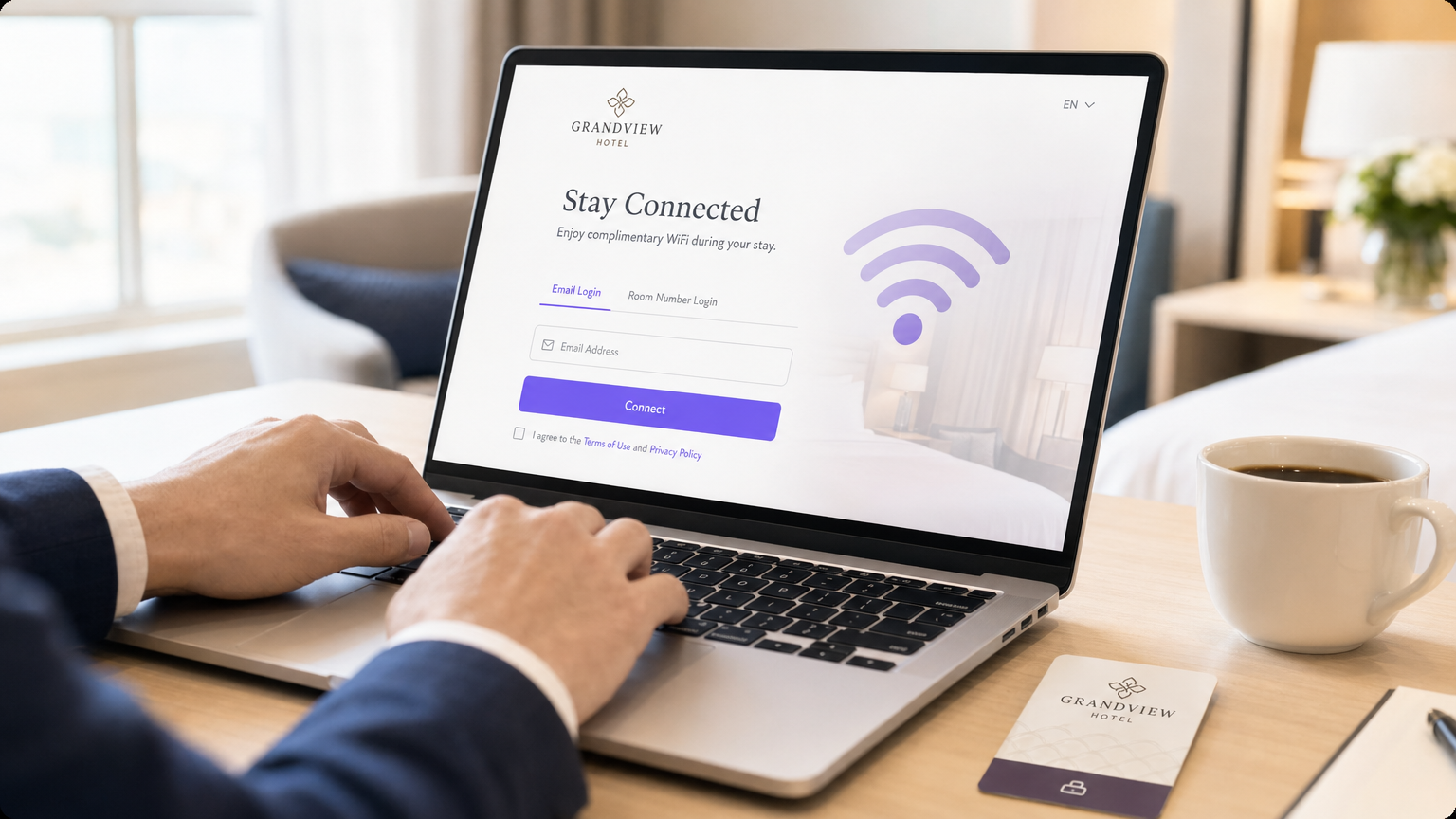
Executive Summary
The question "is hotel WiFi safe?" frequently dominates discussions among enterprise IT managers and corporate travel teams. For venue operations directors and network architects, providing secure, reliable connectivity is no longer a guest amenity—it is a critical infrastructure requirement. While the underlying technology powering hotel networks has advanced, the threat landscape has evolved in parallel. Rogue access points, man-in-the-middle (MITM) attacks, and poorly segmented architectures continue to expose both guests and hotel operations to significant risk.
This technical reference guide provides actionable guidance for IT professionals managing wireless infrastructure in Hospitality , Retail , and other large-scale public venues. We dissect the specific vulnerabilities inherent in legacy deployments, detail the architectural standards required to mitigate them, and outline how implementing a managed Guest WiFi solution can transform a potential liability into a secure, value-generating asset.
Technical Deep-Dive
To understand the security posture of a hotel WiFi network, we must examine the architecture, the authentication mechanisms, and the traffic flow.
The Authentication Problem: From Open Networks to WPA3
Historically, hotel networks relied on open SSIDs with captive portals for MAC address registration, or WPA2-Personal with a shared Pre-Shared Key (PSK). Both approaches present fundamental security flaws:
- Open Networks: Transmit data in plaintext over the air. Anyone with a packet sniffer can capture traffic between the client and the Access Point (AP).
- WPA2-PSK: While traffic is encrypted, the shared nature of the key means any authenticated user can decrypt the traffic of other users on the same SSID.
The industry standard is shifting towards WPA3-SAE (Simultaneous Authentication of Equals). SAE replaces the PSK handshake, ensuring that even if multiple users connect with the same password, each session is secured with a unique, forward-secret encryption key. Furthermore, enterprise deployments should utilise Passpoint (Hotspot 2.0), allowing devices to authenticate seamlessly and securely using certificates or SIM credentials, eliminating the need for vulnerable shared passwords.
Network Segmentation and VLAN Architecture
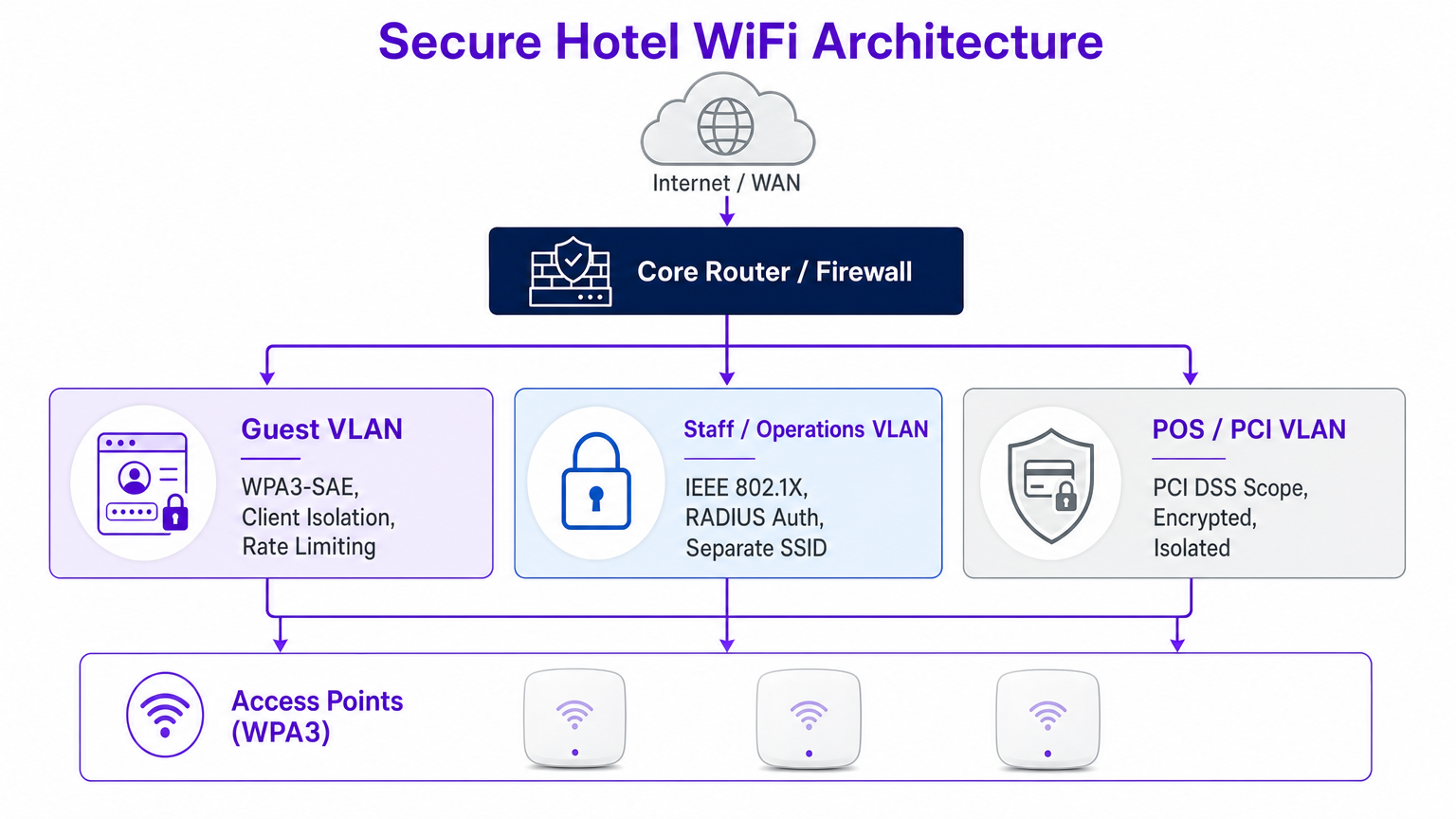
A flat network is a compromised network. When guest devices share the same broadcast domain as operational technology (OT), Point of Sale (POS) systems, or administrative workstations, the attack surface expands exponentially.
Best practice dictates strict VLAN segmentation at the core router and firewall level. The guest VLAN must be logically isolated from the staff VLAN (secured via IEEE 802.1X and RADIUS authentication) and the PCI VLAN (governed by strict PCI DSS scope requirements).
The Threat Landscape: Rogue APs and MITM
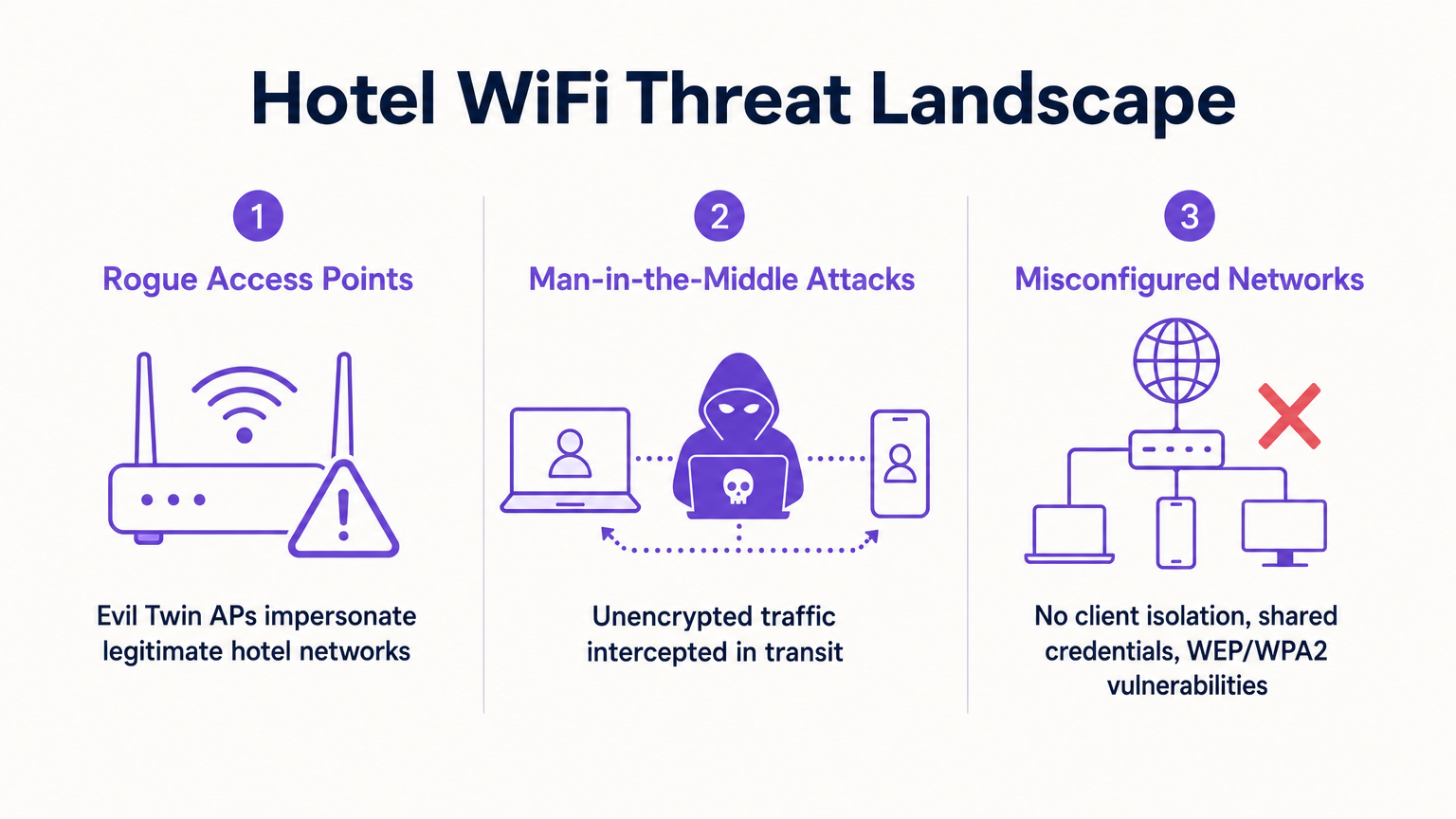
The most prevalent threats in hospitality environments are not sophisticated zero-day exploits, but rather opportunistic attacks utilising misconfigurations.
- Evil Twin Attacks (Rogue APs): Attackers deploy unauthorised APs broadcasting the hotel's SSID. Devices auto-connect based on signal strength, allowing the attacker to intercept all traffic. Enterprise wireless controllers must have continuous rogue AP detection and suppression enabled.
- Man-in-the-Middle (MITM) via ARP Poisoning: If client isolation is disabled, an attacker on the guest network can spoof the gateway MAC address, routing all subnet traffic through their device.
Implementation Guide
Deploying a secure hotel WiFi infrastructure requires a systematic approach. Follow these vendor-neutral steps to harden your wireless estate.
Step 1: Enforce Client Isolation
Client isolation (or AP isolation) prevents wireless clients on the same SSID from communicating directly with each other. This single configuration change neutralises ARP poisoning and peer-to-peer malware propagation.
- Action: Enable client isolation on all guest-facing SSIDs via your wireless LAN controller (WLC) or cloud management dashboard.
Step 2: Migrate to WPA3
Transitioning to WPA3-SAE is critical for protecting over-the-air traffic.
- Action: Audit your AP hardware for WPA3 support. Enable WPA3-Transition mode to support legacy devices while enforcing WPA3 for capable clients.
Step 3: Implement Strict VLAN Segmentation
Ensure physical and logical separation of traffic.
- Action: Configure firewall rules to block all traffic originating from the guest VLAN destined for internal subnets (RFC 1918 addresses). Allow only outbound HTTP/HTTPS and DNS traffic to the WAN.
Step 4: Deploy a Managed Captive Portal
A robust captive portal does more than present terms and conditions; it manages device onboarding and integrates with backend analytics.
- Action: Implement a centralised Guest WiFi platform. Ensure the portal is served over HTTPS to prevent credential interception during the login phase.
Step 5: Enable Rogue AP Detection
Proactive monitoring is essential.
- Action: Configure your WLC to scan for unauthorised BSSIDs. Set up automated alerting for the network operations centre (NOC) when a rogue AP is detected operating on the premises.
Best Practices
When architecting or auditing enterprise wireless networks, adhere to these industry-standard best practices:
- Adopt Zero TrJust Principles for Guests: Treat the guest network as hostile. Internal corporate resources should never be accessible from the guest SSID without a secure VPN connection.
- Regular Configuration Audits: Network drift occurs. Conduct quarterly reviews of VLAN ACLs, WLC configurations, and AP firmware versions. For more insights on AP selection, review Your Guide to a Wireless Access Point Ruckus .
- Prioritise Privacy and Compliance: Ensure your data collection practices align with GDPR and local privacy regulations. A compliant WiFi Analytics platform provides secure, anonymised insights without compromising user privacy.
- Educate Staff and Guests: Provide clear guidelines to corporate travellers. Recommend the use of corporate VPNs and warn against ignoring certificate errors on captive portals.
Troubleshooting & Risk Mitigation
Even well-designed networks experience issues. Here are common failure modes and mitigation strategies.
Failure Mode: Captive Portal Certificate Errors
Symptom: Guests receive browser warnings when attempting to access the login page. Root Cause: The WLC or portal server is presenting an expired, self-signed, or improperly chained SSL certificate. Mitigation: Ensure the captive portal uses a valid certificate from a trusted public Certificate Authority (CA). Implement automated certificate renewal processes.
Failure Mode: Poor Roaming and Dropped Connections
Symptom: Guests experience disconnects when moving between access points. Root Cause: Improper RF planning, overlapping channels, or lack of support for fast roaming protocols (802.11r/k/v). Mitigation: Conduct a comprehensive site survey. Enable 802.11r (Fast BSS Transition) to streamline authentication when roaming, particularly critical for voice and video applications.
Failure Mode: Network Congestion and Bandwidth Exhaustion
Symptom: Slow speeds and high latency during peak hours. Root Cause: A few heavy users consuming the available WAN bandwidth. Mitigation: Implement per-client rate limiting and application-level traffic shaping at the firewall or controller level to ensure fair distribution of resources.
ROI & Business Impact
Viewing hotel WiFi solely as a cost centre ignores its potential as a strategic asset. A secure, well-managed network delivers measurable business impact.
- Risk Reduction: Mitigating the risk of a data breach protects the brand's reputation and avoids costly regulatory fines (e.g., PCI DSS non-compliance penalties).
- Operational Efficiency: Centralised management and automated onboarding reduce helpdesk tickets and free up IT resources for strategic projects.
- Data-Driven Insights: By leveraging a secure Guest WiFi platform, venues can capture first-party data, driving loyalty programmes and personalised marketing campaigns. For a broader perspective on selecting the right platform, consult our Enterprise WiFi Solutions: A Buyer's Guide .
When integrated effectively, the network transforms from a utility into a secure foundation for customer engagement and operational excellence.
Listen to the Briefing
For a deeper dive into these topics, listen to our audio briefing:
Key Terms & Definitions
Evil Twin Access Point
A rogue wireless access point that masquerades as a legitimate network (often copying the SSID) to intercept user traffic and credentials.
IT teams must configure WLCs to detect and suppress these devices to protect guests from credential harvesting.
Client Isolation (AP Isolation)
A wireless network configuration that prevents devices connected to the same AP or SSID from communicating directly with one another.
Essential for public networks to prevent ARP poisoning, MITM attacks, and peer-to-peer malware spread.
WPA3-SAE
Simultaneous Authentication of Equals; the modern encryption standard that replaces the vulnerable Pre-Shared Key (PSK) exchange, ensuring forward secrecy.
Hotels must migrate to WPA3 to protect guest traffic from passive decryption by other users on the network.
VLAN Segmentation
The practice of dividing a physical network into multiple logical networks to isolate traffic and limit the blast radius of a potential breach.
Critical for separating untrusted guest traffic from sensitive operational and PCI-scoped environments.
Passpoint (Hotspot 2.0)
A standard that enables seamless and secure authentication to WiFi networks using certificates or SIM credentials, eliminating captive portals and shared passwords.
The future of secure guest onboarding, providing cellular-like roaming experiences for WiFi.
Rogue AP Detection
A feature of enterprise wireless controllers that scans the RF environment for unauthorized access points operating within the venue's airspace.
A necessary defensive measure to identify and mitigate Evil Twin attacks and unauthorized shadow IT.
ARP Poisoning
An attack where a malicious actor sends falsified Address Resolution Protocol (ARP) messages over a local area network to link their MAC address with the IP address of a legitimate gateway.
The primary mechanism for MITM attacks on poorly configured networks; mitigated by client isolation.
Captive Portal
A web page that users are forced to view and interact with before access is granted to the broader network.
Used for authentication, terms of service acceptance, and data capture via platforms like Purple's Guest WiFi.
Case Studies
A luxury 300-room hotel currently operates a flat network where guest devices, staff tablets, and POS terminals all connect to the same subnet. The IT Director needs to secure the environment ahead of a PCI DSS audit without disrupting the guest experience.
- Deploy three distinct VLANs: Guest (VLAN 10), Staff (VLAN 20), and POS/PCI (VLAN 30).
- Configure firewall ACLs: Block all inter-VLAN routing. Restrict Guest VLAN to outbound internet only. Restrict POS VLAN to specific payment gateway IPs.
- Enable AP Client Isolation on the Guest SSID.
- Implement WPA3-SAE on the Guest SSID, and 802.1X/RADIUS for the Staff SSID.
- Deploy a managed captive portal for guest onboarding.
A retail chain with 50 locations offers free public WiFi. The security team has detected multiple instances of attackers setting up 'Free_Store_WiFi' hotspots near the entrances to harvest credentials.
- Enable Rogue AP Detection on the enterprise wireless controllers across all locations.
- Configure the system to automatically classify APs broadcasting the corporate SSID on unauthorized MAC addresses as malicious.
- Implement wireless intrusion prevention system (WIPS) features to actively de-authenticate clients attempting to connect to the rogue APs.
- Transition the legitimate guest network to Passpoint (Hotspot 2.0) to rely on certificate-based authentication rather than open SSIDs.
Scenario Analysis
Q1. You are auditing a newly acquired boutique hotel. The network uses WPA2-Personal with a password printed on a card in every room. The network is a single flat subnet. What is the immediate, most critical risk, and what is the first remediation step?
💡 Hint:Consider what happens when every guest has the same encryption key on a flat network.
Show Recommended Approach
The most critical risk is that any guest can decrypt the traffic of any other guest, and because the network is flat, they can also attempt to access operational systems. The immediate first step is to enable AP Client Isolation to prevent peer-to-peer communication, followed closely by implementing VLAN segmentation to isolate guest traffic from hotel operations.
Q2. A corporate client requires assurance that their executives can safely work from your hotel. They demand that you implement WPA3. Your current APs only support WPA2. What is the best architectural response to secure their traffic without immediately replacing hardware?
💡 Hint:Think about how the client can secure their own traffic end-to-end regardless of the local wireless encryption.
Show Recommended Approach
While WPA3 is ideal, the architectural response is to advise the client to mandate Corporate VPN usage for all executives. A VPN creates an encrypted tunnel at the network layer (IPsec/OpenVPN) or application layer (SSL/TLS), ensuring that even if the local WPA2 over-the-air encryption is compromised, the data payload remains secure.
Q3. Your WLC dashboard shows an alert for a 'Rogue AP' broadcasting your exact guest SSID. The signal is strongest near the lobby bar. What is the correct operational response?
💡 Hint:Balancing automated technical responses with physical security investigation.
Show Recommended Approach
- Verify the alert in the WLC to confirm the BSSID does not belong to your infrastructure. 2. If supported and legal in your jurisdiction, initiate wireless containment (de-authentication frames) against the rogue AP to protect guests. 3. Dispatch onsite security or IT staff to the lobby bar to physically locate and remove the device.




