
Sicurezza WiFi negli aeroporti: come proteggere i passeggeri sulle reti pubbliche
Questa guida di riferimento tecnico descrive in dettaglio il panorama delle minacce specifiche del WiFi aeroportuale, coprendo gli access point Evil Twin, l'hardware rogue e gli attacchi Man-in-the-Middle. Fornisce ai responsabili IT, agli architetti di rete e ai direttori delle operazioni delle strutture strategie architetturali attuabili - tra cui l'implementazione di WPA3, la segmentazione VLAN, il deployment di WIPS e la progettazione di Captive Portal conformi al GDPR - per proteggere i passeggeri e l'infrastruttura aziendale su scala. La piattaforma di guest WiFi e analytics di Purple è mappata concretamente su ciascun dominio problematico.
Ascolta questa guida
Visualizza trascrizione del podcast
Parte della nostra serie principale: Guida alla sicurezza WiFi aziendale →
Executive Summary
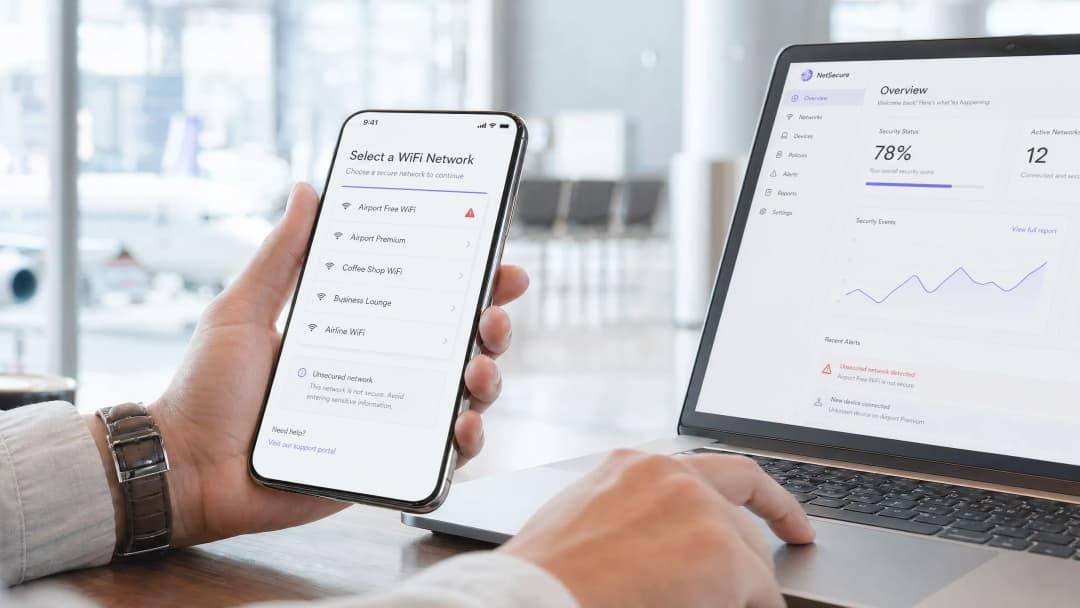
Per i CTO e i direttori IT che gestiscono ambienti pubblici ad alta densità, la domanda "il WiFi degli aeroporti è sicuro?" non è una semplice curiosità dei consumatori - è una sfida di conformità e infrastruttura con implicazioni dirette in termini di responsabilità. Le reti aeroportuali presentano una superficie di attacco unica e dinamica: migliaia di connessioni temporanee ogni ora, una gamma diversificata di dispositivi che va dai normali telefoni cellulari ai laptop aziendali, e un mix di traffico di ospiti, personale, negozianti e tecnologie operative che si appoggia su un'infrastruttura spesso in ritardo di anni rispetto agli attuali standard di sicurezza.
Le minacce principali - gli access point (AP) Evil Twin e le installazioni di hardware contraffatto - sono attacchi a basso costo e ad alto impatto che richiedono competenze tecniche minime per essere eseguiti. Se non si interviene, i passeggeri rischiano il furto di credenziali e frodi finanziarie, mentre l'operatore aeroportuale rischia sanzioni per il mancato rispetto del GDPR e danni d'immagine. Implementando il WPA3 con Opportunistic Wireless Encryption, applicando una rigorosa segmentazione VLAN, distribuendo Wireless Intrusion Prevention Systems (WIPS) e integrando una piattaforma di guest WiFi sicura e conforme al GDPR, i gestori delle strutture possono proteggere i dati dei passeggeri mantenendo al contempo una connettività senza interruzioni. Il livello di WiFi analytics di Purple aggiunge intelligenza operativa a questa base di sicurezza, trasformando l'onboarding sicuro in un ROI commerciale misurabile.
Approfondimento Tecnico: Il Panorama delle Minacce del WiFi Aeroportuale
Gli ambienti aeroportuali sono tra gli spazi pubblici più colpiti dagli attacchi wireless. L'elevato volume di passeggeri, gli utenti di passaggio che raramente segnalano problemi e i viaggiatori d'affari che trasmettono dati sensibili - tutti questi elementi si combinano per creare l'ambiente ideale per i malintenzionati. Comprendere i vettori di minaccia specifici è un requisito fondamentale per progettare un'architettura di difesa efficace.
Access Point Evil Twin
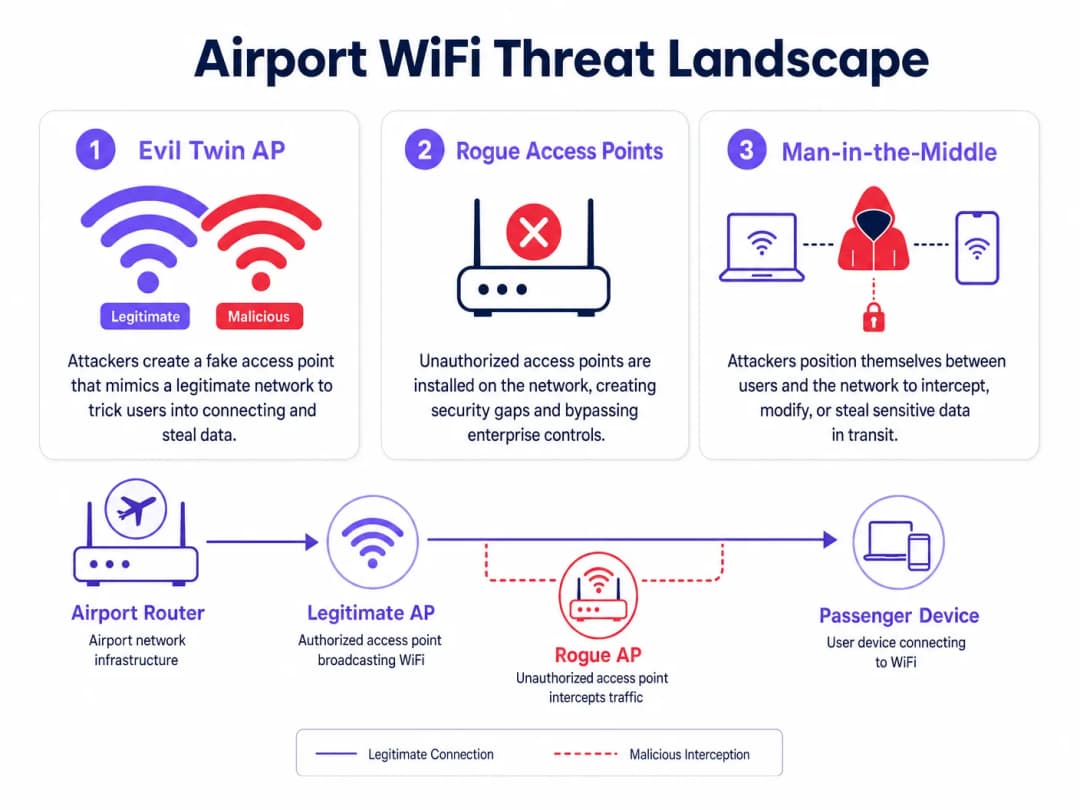
Un Evil Twin è un AP dannoso configurato per trasmettere l'esatto SSID della rete aeroportuale legittima - ad esempio, "Airport Free WiFi" o "LHR_Passenger_WiFi". Poiché i dispositivi client standard applicano la selezione automatica della rete in base alla corrispondenza dell'SSID e all'intensità del segnale, il dispositivo di un passeggero preferirà connettersi all'Evil Twin se questo fornisce un segnale più forte rispetto all'infrastruttura legittima. Questo si ottiene facilmente: un router portatile che trasmette alla massima potenza da un sedile vicino supererà facilmente un AP aziendale montato a soffitto che opera a livelli di potenza controllati.
Una volta che un client si connette all'Evil Twin, l'attaccante può lanciare diverse classi di attacco. L'intercettazione passiva acquisisce il traffico HTTP non crittografato, le query DNS e i cookie di sessione. Lo SSL stripping esegue il downgrade delle connessioni HTTPS a HTTP in tempo reale, esponendo le credenziali sui siti che non applicano l'HTTP Strict Transport Security (HSTS). Il DNS spoofing reindirizza gli utenti verso pagine di phishing che imitano portali bancari o sistemi di prenotazione delle compagnie aeree. Il passeggero vede una normale connessione senza alcun indicatore di avviso, poiché l'Evil Twin fornisce l'effettivo accesso a internet tramite la propria connessione a monte - l'attacco rimane completamente trasparente per l'utente finale.
Il costo operativo per un attaccante è minimo: un router da viaggio di tipo consumer, un laptop con strumenti open-source e un posto a sedere nella sala partenze. Questo attacco non richiede alcun accesso fisico all'infrastruttura dell'aeroporto.
Rogue Access Points
I rogue AP sono dispositivi non autorizzati collegati fisicamente all'infrastruttura di rete cablata dell'aeroporto. A differenza degli Evil Twin, che operano interamente via etere, i rogue AP rappresentano un vettore di minaccia interna - richiedono l'accesso fisico a una porta di rete. Tuttavia, in un grande ambiente aeroportuale con centinaia di concessioni commerciali, appaltatori di servizi e personale addetto alle pulizie, ottenere l'accesso fisico a una porta di rete non è difficile.
La fonte più comune di rogue AP non è un attore malintenzionato, ma il personale in buona fede. Un concessionario retail che riscontra una scarsa copertura WiFi nel Terminal 3 acquista un router di tipo consumer e lo collega alla porta Ethernet dietro il bancone. Il router trasmette il proprio SSID, aggirando il firewall aziendale, le policy di Network Access Control (NAC) e le configurazioni WPA3 Enterprise, creando un percorso diretto e non gestito dalla rete internet pubblica alla rete interna dell'aeroporto. Da quel momento, qualsiasi dispositivo connesso al rogue AP - che si tratti del terminale POS del concessionario o di un passeggero che si è connesso accidentalmente - ottiene un potenziale accesso a livello di rete a sistemi che dovrebbero rimanere completamente isolati.
Per gli operatori di trasporto e i team IT degli aeroporti, il problema dei rogue AP è ulteriormente complicato dalle dimensioni stesse dell'ambiente. In un grande aeroporto internazionale, centinaia di porte di rete possono essere distribuite tra terminal, punti vendita, lounge e aree di back-office. L'audit manuale senza strumenti di rilevamento automatizzati è impraticabile.
Man-in-the-Middle Attacks
\nSia gli scenari Evil Twin che quelli con AP canaglia abilitano attacchi Man-in-the-Middle (MitM), in cui l'autore dell'attacco si posiziona tra il dispositivo client e la rete legittima. In uno scenario MitM, l'attaccante può intercettare, leggere e modificare il traffico in entrambe le direzioni. La crittografia TLS moderna riduce significativamente l'impatto degli attacchi MitM sul traffico HTTPS, ma la superficie di attacco rimane significativa: protocolli non crittografati, implementazioni TLS configurate in modo errato e l'uso di applicazioni legacy che non impongono la convalida dei certificati creano lacune pronte per essere sfruttate.
Per chi viaggia per affari - che rappresenta una quota significativa di utenti della rete WiFi aeroportuale - gli attacchi MitM che mirano alla cattura delle credenziali VPN o al dirottamento delle sessioni di posta elettronica aziendale rappresentano un vettore di attacco ad alto valore che moltiplica i danni ben oltre il singolo passeggero.
-
Hai domande sulla tua configurazione specifica?
Il nostro team collabora con gestori di sedi, responsabili IT e ingegneri di rete in 80.000 sedi. Prenota una chiamata di 20 minuti e ti mostreremo come altri professionisti come te hanno risolto il problema.
Guida all'implementazione: architettura sicura
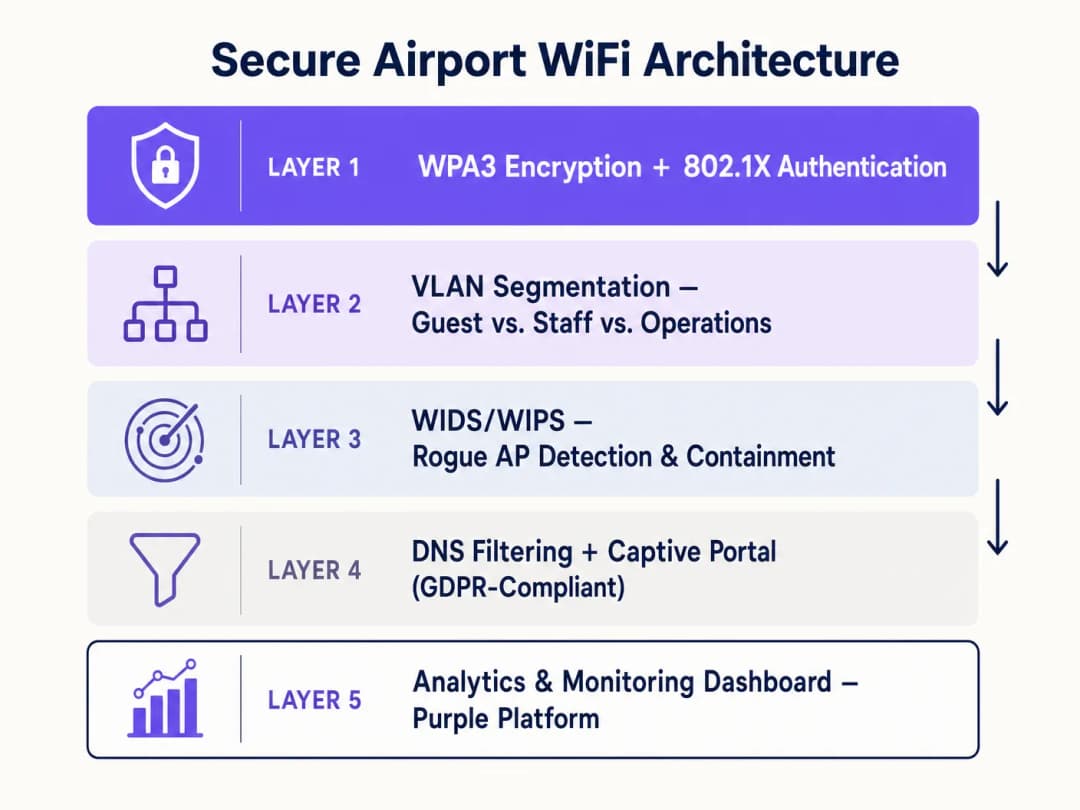
Affrontare il panorama delle minacce WiFi negli aeroporti richiede un'architettura stratificata di difesa in profondità. Nessun singolo controllo è sufficiente; l'obiettivo è rendere ogni successivo livello di attacco progressivamente più difficile e rilevabile.
Livello 1: standard di crittografia e autenticazione
La transizione a WPA3 è un requisito primario. Per le reti pubbliche aperte, WPA3 introduce Opportunistic Wireless Encryption (OWE), definito in IEEE 802.11-2020. OWE fornisce una crittografia personalizzata per ogni sessione client senza richiedere una password condivisa o una chiave precondivisa. Ogni associazione client-AP negozia uno scambio di chiavi Diffie-Hellman univoco, il che significa che anche se un utente malintenzionato acquisisce il traffico a radiofrequenza grezzo dell'intero terminal, non può decrittografare alcuna sessione specifica. Ciò mitiga direttamente l'intercettazione passiva ed elimina il vettore di attacco primario dell'intercettazione di reti aperte.
Per i segmenti di rete autenticati - personale, operazioni, inquilini commerciali - lo standard corretto è IEEE 802.1X con autenticazione RADIUS. Lo standard 802.1X impone l'autenticazione per singolo dispositivo prima di concedere l'accesso alla rete, con ogni evento di autenticazione registrato a fini di conformità e controllo. Combinato con il protocollo Extensible Authentication Protocol basato su certificati (EAP-TLS), questo elimina completamente gli attacchi basati su credenziali contro le reti del personale. Per le sedi che desiderano offrire un onboarding fluido dei passeggeri, OpenRoaming - lo standard di identità federata della Wireless Broadband Alliance - fornisce un'autenticazione basata su profilo che connette automaticamente i passeggeri a reti verificate senza selezione manuale dell'SSID. Purple opera come provider di identità gratuito all'interno dell'ecosistema OpenRoaming con la sua licenza Connect, consentendo agli aeroporti di offrire una connettività fluida e sicura ed eliminando l'elemento di errore umano nella selezione della rete. Questo è direttamente rilevante per la minaccia Evil Twin: se il dispositivo di un passeggero si connette automaticamente tramite un profilo verificato, non si connetterà a un Evil Twin che trasmette lo stesso SSID.
Layer 2: Segmentazione della rete e isolamento dei client
Una rigida codifica VLAN a livello di AP deve essere utilizzata per mantenere il traffico degli ospiti completamente isolato dalla tecnologia operativa (OT), dalle reti del personale e dai sistemi dei punti vendita al dettaglio (POS). Un modello di segmentazione minimo per un ambiente aeroportuale dovrebbe includere: una VLAN per gli ospiti pubblici (solo accesso a Internet, nessun instradamento interno), una VLAN per il personale (autenticata tramite 802.1X, accesso ai sistemi interni), una VLAN per i partner commerciali (isolata sia dagli ospiti che dal personale, accesso a Internet per i sistemi POS) e una VLAN operativa (air-gapped o rigorosamente protetta da firewall, per segnaletica digitale, gestione dell'edificio e sistemi lato volo).
L'isolamento dei client - isolamento di Layer 2 tra dispositivi sulla stessa VLAN - deve essere abilitato sulla VLAN degli ospiti. Senza l'isolamento dei client, due passeggeri connessi alla stessa rete WiFi per ospiti possono comunicare direttamente a livello IP, consentendo attacchi da dispositivo a dispositivo. Si tratta di un'impostazione di configurazione sul controller wireless che viene spesso trascurata nelle installazioni legacy.
Per gli ambienti hospitality e retail che operano all'interno dei terminal aeroportuali si applicano gli stessi principi di segmentazione. Indipendentemente dal rapporto commerciale con l'operatore aeroportuale, una lounge d'hotel lato volo o una concessione di vendita al dettaglio devono essere trattate come un segmento di rete non attendibile.
Layer 3: Sistemi di rilevamento e prevenzione delle intrusioni wireless (WIDS/WIPS)
Un Wireless Intrusion Prevention System è la principale difesa automatizzata sia contro le minacce Evil Twin sia contro gli AP non autorizzati. Il WIPS deve essere configurato per scansionare continuamente l'ambiente delle radiofrequenze su tutti i canali e le bande (2.4 GHz, 5 GHz e 6 GHz per le installazioni Wi-Fi 6E) alla ricerca di SSID non autorizzati, spoofing di indirizzi MAC e attacchi di de-autenticazione flood.
In caso di rilevamento di un Evil Twin - caratterizzato da una corrispondenza dell'SSID e da un BSSID che non corrisponde ad alcun AP autorizzato nell'infrastruttura gestita - il WIPS dovrebbe attivare automaticamente il contenimento. Il contenimento prevede la trasmissione di frame di de-autenticazione IEEE 802.11 mirati ai client che tentano di associarsi all'AP dannoso, impedendo una connessione corretta. Si tratta di una risposta automatizzata a velocità di macchina, molto più rapida di qualsiasi intervento da parte di un operatore umano.
Per il rilevamento dei rogue AP, il sistema WIPS mette in relazione le osservazioni via etere con la topologia della rete cablata. Un AP che trasmette via etere e che appare anche come dispositivo connesso sulla rete cablata - ma non è presente nell'inventario degli AP autorizzati - viene contrassegnato come rogue. Il sistema può quindi attivare lo spegnimento automatico della porta sullo switch gestito per scollegare fisicamente il dispositivo.
Livello 4: Filtro DNS e Progettazione Sicura del Captive Portal
Indipendentemente dallo stato di sicurezza del singolo dispositivo, il filtraggio a livello DNS fornisce un controllo fondamentale per proteggere gli utenti da domini dannosi. Instradando tutte le query DNS attraverso un resolver di filtraggio, la rete può bloccare la risoluzione di domini di phishing noti, infrastrutture di comando e controllo e siti di distribuzione di malware. Ciò è particolarmente prezioso nel contesto di un aeroporto, dove i passeggeri potrebbero connettere dispositivi compromessi che erano già stati infettati prima dell'arrivo.
Come dettagliato nella nostra guida su come Proteggere la tua Rete con DNS Solidi e Sicurezza, l'implementazione di DNS over HTTPS (DoH) o DNS over TLS (DoT) per le connessioni del resolver impedisce che le query DNS vengano intercettate o contraffatte durante il transito - una considerazione importante quando il contenimento WIPS potrebbe non intercettare istantaneamente ogni Evil Twin.
Il Captive Portal rappresenta il punto di contatto principale per la registrazione dei passeggeri e deve essere progettato con la sicurezza come requisito di primo ordine, non come un'aggiunta successiva. Il portale deve essere erogato tramite HTTPS con un certificato valido rilasciato da un'Autorità di Certificazione attendibile. I moduli di registrazione devono raccogliere solo i dati necessari per lo scopo specificato (principio di minimizzazione dei dati ai sensi dell'Articolo 5 del GDPR), con meccanismi di consenso chiari e granulari per qualsiasi uso di marketing. La piattaforma Captive Portal di Purple è appositamente progettata per soddisfare questi requisiti di conformità, offrendo un'integrazione fluida con l'acquisizione di dati conforme al GDPR, la gestione del consenso e i livelli di analisi. Per comprendere come questo modello si applichi su scala in ambienti aeroportuali multi-terminal, consulta Airport WiFi: How Operators Provide Connectivity Across Terminals e la sua versione italiana WiFi Aeroportuale.
Livello 5: Analytics, Monitoraggio e Miglioramento Continuo
La sicurezza non è un'attività una tantum; richiede un monitoraggio continuo e un miglioramento iterativo. La piattaforma di WiFi analytics di Purple fornisce il livello di visibilità operativa che trasforma i dati di connessione grezzi in informazioni utili. Monitorando i modelli di connessione dei dispositivi, i tempi di permanenza e le anomalie delle sessioni, i team operativi di rete possono identificare gli indicatori di compromissione - picchi di connessione insoliti, dispositivi che si connettono da posizioni fisiche impreviste o pattern di autenticazione falliti che indicano un attacco di scansione.
L'analisi dei dati fornisce anche una giustificazione commerciale per gli investimenti nella sicurezza. Tassi di adesione dei passeggeri più elevati - favoriti da un'esperienza di onboarding affidabile e protetta - generano set di dati di prima parte più ricchi. Questi dati consentono un marketing mirato, analisi del flusso di visitatori nei negozi e l'ottimizzazione del layout del terminal, offrendo un ROI misurabile sull'investimento infrastrutturale. Per gli ambienti sanitari che gestiscono il WiFi nelle strutture mediche aeroportuali, si applica lo stesso framework di analisi con ulteriori controlli sui dati di categoria speciale previsti dal GDPR.
Best Practice e Mitigazione dei Rischi
Applicare le policy di rete per i partner commerciali a livello tecnico. I documenti di policy non sono sufficienti. Alle concessioni commerciali deve essere fornito un accesso di rete gestito e segmentato - una VLAN dedicata con accesso a internet e nessun instradamento interno - e le porte di rete fisiche nei loro locali devono essere configurate per rifiutare l'hardware non autorizzato tramite l'autenticazione delle porte 802.1X o l'allowlist degli indirizzi MAC. Eliminate l'incentivo all'implementazione di AP non autorizzati fornendo una connettività gestita e adeguata.
Condurre regolari rilevamenti del sito RF. I rilevamenti fisici e RF trimestrali del sito identificano l'hardware non autorizzato che il WIPS potrebbe aver mancato a causa dell'attenuazione del segnale, di ostruzioni fisiche o di schermature RF intenzionali. Un rilevamento dovrebbe coprire tutti i terminal, le lounge, i negozi e le aree di back-office. Documentate l'inventario degli AP autorizzati e confrontatelo con i risultati del rilevamento.
Implementare una leased line o una connessione internet aziendale dedicata per l'infrastruttura critica. Come discusso nella nostra guida su Cosa è una Leased Line? Internet Aziendale Dedicato, la separazione del traffico operativo critico su una connessione dedicata e non condivisa garantisce che qualsiasi attacco DDoS o evento di esaurimento della larghezza di banda sulla rete guest non possa influire sui sistemi operativi dell'area sterile.
Testare le procedure di risposta agli incidenti. Condurre esercitazioni simulate che riproducano un evento di rilevamento Evil Twin. Verificare che il contenimento WIPS funzioni, che il team NOC conosca le procedure di escalation e che la comunicazione rivolta ai passeggeri sia pronta per uno scenario in cui la rete guest debba essere temporaneamente sospesa.
ROI e Impatto Aziendale
La sicurezza della rete è la base del valore commerciale, non un centro di costo isolato. Una rete WiFi guest sicura, affidabile e affidabile aumenta direttamente i tassi di adesione dei passeggeri sul Captive Portal. Tassi di adesione più elevati generano set di dati di prima parte più ampi e di qualità superiore. Questi dati consentono al gestore aeroportuale di offrire promozioni retail personalizzate, ottimizzare i layout dei terminal sulla base di dati reali sul flusso di visitatori e creare programmi di fidelizzazione che stimolano un coinvolgimento continuo.Il costo di un incidente di sicurezza - sanzioni per violazione del GDPR, danni reputazionali e costi operativi per la gestione dell'incidente - supera di gran lunga il costo dell'implementazione dei controlli di sicurezza descritti in questa guida. L'Information Commissioner's Office (ICO) del Regno Unito ha inflitto sanzioni fino a 17,5 milioni di sterline ai sensi del UK GDPR per violazioni della protezione dei dati. Per un grande aeroporto internazionale che gestisce milioni di connessioni passeggeri ogni anno, l'esposizione al rischio è significativa.
La piattaforma di Purple è progettata per allineare gli investimenti in sicurezza con i risultati commerciali. Il Captive Portal sicuro, l'acquisizione dei dati conforme al GDPR e il livello di analisi costituiscono un'unica implementazione integrata - anziché tre diversi processi di acquisto. Questo riduce il costo totale di proprietà, accelerando al contempo il time-to-value sia per i team IT che per quelli di marketing.
Definizioni chiave
Evil Twin Access Point
Un access point wireless dannoso che si maschera da rete legittima trasmettendo lo stesso SSID, progettato per intercettare i dati degli utenti tramite attacchi Man-in-the-Middle.
Comune nei terminal aeroportuali dove gli utenti malintenzionati sfruttano i dispositivi che si connettono automaticamente agli SSID noti in base alla potenza del segnale. Mitigato dalla crittografia OWE e dal contenimento tramite WIPS.
Rogue Access Point
Un access point wireless non autorizzato collegato fisicamente alla rete cablata aziendale, che aggira i controlli di sicurezza inclusi firewall, policy NAC e configurazioni WiFi aziendali.
Spesso installato da inquilini commerciali o dal personale alla ricerca di una copertura migliore. Risolto tramite l'autenticazione delle porte 802.1X su tutte le porte ethernet e il rilevamento automatico tramite WIPS.
Opportunistic Wireless Encryption (OWE)
Una funzionalità WPA3 definita in IEEE 802.11-2020 che fornisce una crittografia individualizzata e unica per sessione per le reti aperte senza richiedere una password condivisa, utilizzando lo scambio di chiavi Diffie-Hellman.
Lo standard di crittografia corretto per le reti WiFi pubbliche degli ospiti negli aeroporti. Elimina l'intercettazione passiva senza aggiungere attriti di autenticazione per i passeggeri.
Wireless Intrusion Prevention System (WIPS)
Infrastruttura di rete che monitora continuamente lo spettro delle radiofrequenze alla ricerca di access point non autorizzati, Evil Twin e firme di attacco, e distribuisce automaticamente contromisure incluse le trame di de-autenticazione.
La principale difesa automatizzata contro le minacce di Evil Twin e rogue AP in ambienti ad alta densità. Deve essere configurato per coprire tutte le bande di frequenza, inclusi i 6 GHz per le distribuzioni Wi-Fi 6E.
Isolamento dei Client
Una configurazione di rete wireless che impedisce ai dispositivi connessi allo stesso SSID di comunicare direttamente tra loro al Layer 2, limitando tutto il traffico verso il gateway.
Obbligatorio sulle VLAN ospiti per prevenire attacchi da dispositivo a dispositivo. Una semplice impostazione di configurazione che è frequentemente assente nelle distribuzioni legacy.
Segmentazione VLAN
La pratica di dividere una rete fisica in più reti logiche utilizzando i tag VLAN IEEE 802.1Q per isolare i tipi di traffico e applicare i limiti di controllo dell'accesso.
Utilizzata per separare il traffico ospiti non attendibile dalle operazioni aeroportuali sicure, dai sistemi del personale e dall'infrastruttura POS commerciale. Elimina il rischio di movimento laterale da dispositivi ospiti compromessi.
IEEE 802.1X
Uno standard IEEE per il controllo dell'accesso alla rete basato su porta che richiede ai dispositivi di autenticarsi prima di ottenere l'accesso alla rete, tipicamente tramite un server RADIUS.
Lo standard di autenticazione per le VLAN del personale e operative, e per l'applicazione a livello di porta sulle porte ethernet commerciali per prevenire l'installazione di rogue AP.
OpenRoaming
Uno standard di federazione della Wireless Broadband Alliance che consente l'autenticazione WiFi automatica e fluida tra le reti partecipanti utilizzando profili di dispositivi pre-configurati, senza selezione manuale dell'SSID.
Mitiga direttamente gli attacchi Evil Twin eliminando la fase di selezione manuale della rete. Purple opera come identity provider gratuito all'interno dell'ecosistema OpenRoaming sotto la sua licenza Connect.
Attacco Man-in-the-Middle (MitM)
Un attacco in cui l'autore intercetta, trasmette e potenzialmente modifica segretamente le comunicazioni tra due parti che credono di comunicare direttamente.
L'obiettivo principale delle installazioni Evil Twin. Mitigato dalla crittografia OWE a livello radio e dall'applicazione HSTS a livello applicativo.
Captive Portal
Una pagina web presentata ai nuovi utenti di una rete pubblica prima che venga concesso loro l'accesso a Internet, utilizzata per l'autenticazione, l'accettazione dei termini e la raccolta dei dati.
Il principale punto di contatto per l'onboarding dei passeggeri. Deve essere erogato tramite HTTPS con un certificato valido e progettato per la conformità al GDPR, inclusi meccanismi di consenso esplicito.
Esempi pratici
Un importante aeroporto internazionale sta aggiornando il Terminal 3. L'attuale rete è piatta - tutti i dispositivi, inclusi i sistemi POS dei negozi, la segnaletica digitale e i dispositivi dei passeggeri, condividono lo stesso dominio di trasmissione. I venditori al dettaglio si lamentano frequentemente della scarsa connettività, il che li spinge a installare i propri router di livello consumer. Il direttore IT ha bisogno di una riprogettazione che affronti la sicurezza senza interrompere le operazioni commerciali durante un rollout graduale.
Fase 1 - Architettura VLAN: progettare quattro VLAN: Public Guest (solo internet, client isolation abilitata), Staff (autenticata con 802.1X, accesso interno), Retail Tenant (solo internet, isolata da guest e staff, autenticazione di porta 802.1X su tutte le porte ethernet retail) e Operations (air-gapped, per segnaletica e gestione dell'edificio). Fase 2 - Eliminazione degli AP rogue: abilitare l'autenticazione di porta 802.1X su tutte le porte ethernet retail. A qualsiasi dispositivo privo di un certificato valido viene negato l'accesso alla rete, eliminando la possibilità di collegare router non autorizzati. Contemporaneamente, fornire ai locatari retail un SSID Retail Tenant gestito con un'adeguata copertura del segnale, rimuovendo l'incentivo all'uso di hardware rogue. Fase 3 - Distribuzione WIPS: configurare il controller wireless per la ricerca di SSID non autorizzati e contenere automaticamente gli Evil Twin. Configurare l'invio di avvisi al NOC per qualsiasi evento di rilevamento di AP rogue. Fase 4 - Captive Portal e Analytics: distribuire il Captive Portal di Purple sulla VLAN Guest con onboarding conforme al GDPR, crittografia OWE e integrazione degli analytics.
I passeggeri di un aeroporto regionale visualizzano avvisi del browser quando si connettono al Captive Portal del WiFi ospiti, e il team di marketing riferisce che i tassi di adesione sono diminuiti del 40% negli ultimi sei mesi. Il team IT sospetta che il certificato SSL sul Captive Portal sia scaduto. Come si deve risolvere questo problema e quali miglioramenti più ampi dovrebbero essere apportati all'architettura di onboarding?
Risoluzione immediata: rinnovare il certificato SSL sul server del Captive Portal e implementare il rinnovo automatico del certificato (ad esempio tramite Let's Encrypt con script di rinnovo automatico) per evitare che il problema si ripeta. Miglioramenti più ampi: 1) Aggiornare l'SSID guest a WPA3 con OWE per fornire la crittografia a livello radio, che i moderni sistemi operativi mobili segnalano come un indicatore di attendibilità positivo. 2) Implementare HSTS sul dominio del Captive Portal per prevenire gli attacchi di SSL stripping. 3) Integrare la piattaforma Captive Portal di Purple, che gestisce il ciclo di vita dei certificati, i flussi di consenso GDPR e gli analytics come servizio gestito, eliminando il carico operativo dal team interno. 4) Valutare l'autenticazione basata su profilo OpenRoaming per i passeggeri che ritornano, eliminando completamente l'interazione con il portale per gli utenti che hanno aderito.
Domande di esercitazione
Q1. La tua dashboard WIPS ti avvisa di un nuovo AP che trasmette l'SSID ospite ufficiale dell'aeroporto dall'interno di una caffetteria nel Terminal 2. Il BSSID dell'AP non compare nel tuo inventario degli AP autorizzati e non è collegato alla tua rete cablata. Di quale tipo di minaccia si tratta, qual è la risposta WIPS automatizzata e quale azione di follow-up dovrebbe intraprendere il team NOC?
Suggerimento: Considera se il dispositivo è fisicamente collegato alla tua infrastruttura cablata o se opera interamente via etere. La distinzione determina sia la classificazione della minaccia sia il percorso di risoluzione.
Visualizza risposta modello
Si tratta di un AP Evil Twin. Poiché non è collegato alla rete cablata, sta tentando di dirottare le connessioni dei client via etere imitando l'SSID legittimo. La risposta automatizzata del WIPS dovrebbe consistere nell'inviare frame di de-autenticazione ai client che tentano di associarsi a quel BSSID specifico, impedendo il completamento della connessione. Il team NOC dovrebbe inviare la sicurezza fisica presso la caffetteria per identificare e rimuovere il dispositivo, documentare l'incidente nel registro di sicurezza e verificare se alcuni client si sono connessi con successo all'Evil Twin prima dell'attivazione del contenimento - tali sessioni dovrebbero essere trattate come potenzialmente compromesse.
Q2. Un nuovo terminal aprirà tra sei mesi. Il direttore operativo desidera una rete completamente aperta senza Captive Portal per massimizzare la comodità dei passeggeri. Il direttore marketing desidera la massima raccolta di dati con consenso (opt-in). Il CISO esige la conformità GDPR e la crittografia. Come soddisfi tutti e tre gli stakeholder in un'unica architettura?
Suggerimento: Considera WPA3 OWE per il requisito di crittografia, OpenRoaming per il requisito di autenticazione fluida e la piattaforma di Purple per i requisiti di raccolta dati e conformità. Questi elementi non si escludono a vicenda.
Visualizza risposta modello
Distribuisci WPA3 con OWE sull'SSID pubblico - questo fornisce la crittografia senza richiedere una password, soddisfacendo il requisito di crittografia del CISO e mantenendo al contempo l'esperienza fluida e aperta desiderata dal direttore operativo. Implementa OpenRoaming tramite la funzionalità di identity provider di Purple, in modo che i passeggeri di ritorno con profili esistenti si connettano automaticamente e in sicurezza senza alcuna interazione manuale. Per i nuovi passeggeri, presenta un Captive Portal leggero e conforme al GDPR che raccolga il consenso e i dati del profilo - soddisfacendo così il requisito del direttore marketing. Il risultato finale è una rete crittografata per impostazione predefinita, fluida per gli utenti di ritorno e in grado di acquisire dati per i nuovi utenti, nel pieno rispetto del GDPR.
Q3. Durante un rilevamento RF trimestrale del sito, il tuo team scopre un AP in un corridoio di servizio sul retro che è collegato alla rete cablata ma non compare nell'inventario degli AP autorizzati. Sta trasmettendo un SSID nascosto ed è attivo da circa tre mesi in base ai log delle porte dello switch. Qual è la classificazione della minaccia, qual è l'azione di contenimento immediata e cosa comporta la finestra di tre mesi per il tuo processo di gestione degli incidenti?
Suggerimento: Questo dispositivo ha accesso alla rete cablata, il che lo rende una classe di minaccia diversa rispetto a un Evil Twin. La finestra di tre mesi ha implicazioni specifiche per gli obblighi di notifica di violazione dei dati ai sensi del GDPR.
Visualizza risposta modello
Si tratta di un Rogue AP con accesso alla rete cablata - un incidente ad alta gravità. Contenimento immediato: spegnere la porta dello switch a cui è collegato il dispositivo, rimuovere fisicamente il dispositivo e conservarlo come prova. La finestra attiva di tre mesi implica che un attore sconosciuto ha avuto un accesso persistente alla rete per circa 90 giorni. Ai sensi dell'Articolo 33 del UK GDPR, una violazione dei dati personali deve essere segnalata all'ICO entro 72 ore dal momento in cui se ne viene a conoscenza, se è probabile che presenti un rischio per i diritti e le libertà delle persone fisiche. Il team di risposta agli incidenti deve valutare immediatamente a quali dati era possibile accedere da quel segmento di rete, se si è verificata un'esfiltrazione (esaminando i log NetFlow/IPFIX per la porta dello switch) e preparare una notifica di violazione se la valutazione indica un rischio. Questo incidente indica anche una lacuna nella configurazione WIPS - il sistema avrebbe dovuto rilevare la presenza cablata del rogue AP e la sua trasmissione over-the-air entro poche ore dall'installazione, non tre mesi dopo.
Continua a leggere questa serie
Come segmentare in sicurezza le reti WiFi del personale e degli ospiti: Best Practice per LAN aziendali
Questa guida fornisce ai responsabili IT e agli architetti di rete un progetto tecnico, indipendente dai vendor, per proteggere le LAN aziendali segmentando correttamente il traffico WiFi del personale e degli ospiti. Copre l'autenticazione 802.1X, il cloud RADIUS, l'isolamento VLAN e la gestione del ciclo di vita delle credenziali necessaria per eliminare le password condivise e proteggere le risorse aziendali.
Il miglior filtro DNS: una guida completa per le aziende
Questa guida tecnica di riferimento spiega in che modo il filtraggio DNS aziendale protegge le reti pubbliche bloccando i domini dannosi a livello di risoluzione - prima ancora che venga stabilita una connessione. Fornisce ai direttori IT, agli architetti di rete e ai team operativi delle sedi l'architettura di implementazione, la configurazione del firewall e il contesto di conformità necessari per proteggere il WiFi per gli ospiti in ambienti alberghieri, retail e del settore pubblico. Purple Shield blocca malware, botnet e contenuti inappropriati a livello DNS in oltre 80.000 sedi attive.
Comprensione di Cisco SUDI: Identità ancorata all'hardware nel controllo degli accessi di rete sicuro
Questa guida spiega come Cisco SUDI fornisca un'identità crittograficamente sicura e ancorata all'hardware per l'infrastruttura di rete aziendale. Scopri come sostituire gli indirizzi MAC facilmente falsificabili con certificati 802.1AR immutabili per proteggere il controllo degli accessi alla rete della tua struttura.
Hai domande sulla tua configurazione specifica?
Il nostro team collabora con gestori di sedi, responsabili IT e ingegneri di rete in 80.000 sedi. Prenota una chiamata di 20 minuti e ti mostreremo come altri professionisti come te hanno risolto il problema.