
Gestione della larghezza di banda nelle reti per alloggi per studenti
Questa guida fornisce a IT manager, architetti di rete e direttori delle operazioni immobiliari un riferimento tecnico vendor-neutral per la gestione della larghezza di banda WiFi in ambienti di alloggi per studenti ad alta densità. Copre la segmentazione VLAN, la progettazione delle policy Quality of Service (QoS), il traffic shaping basato sull'identità e la visibilità a livello di applicazione — i quattro pilastri di una rete scalabile e con accesso equo. Con scenari di implementazione reali, risultati misurabili e framework decisionali, questo è il manuale operativo per qualsiasi team responsabile dell'infrastruttura di rete residenziale su larga scala.
Ascolta questa guida
Visualizza trascrizione del podcast
Riepilogo Esecutivo
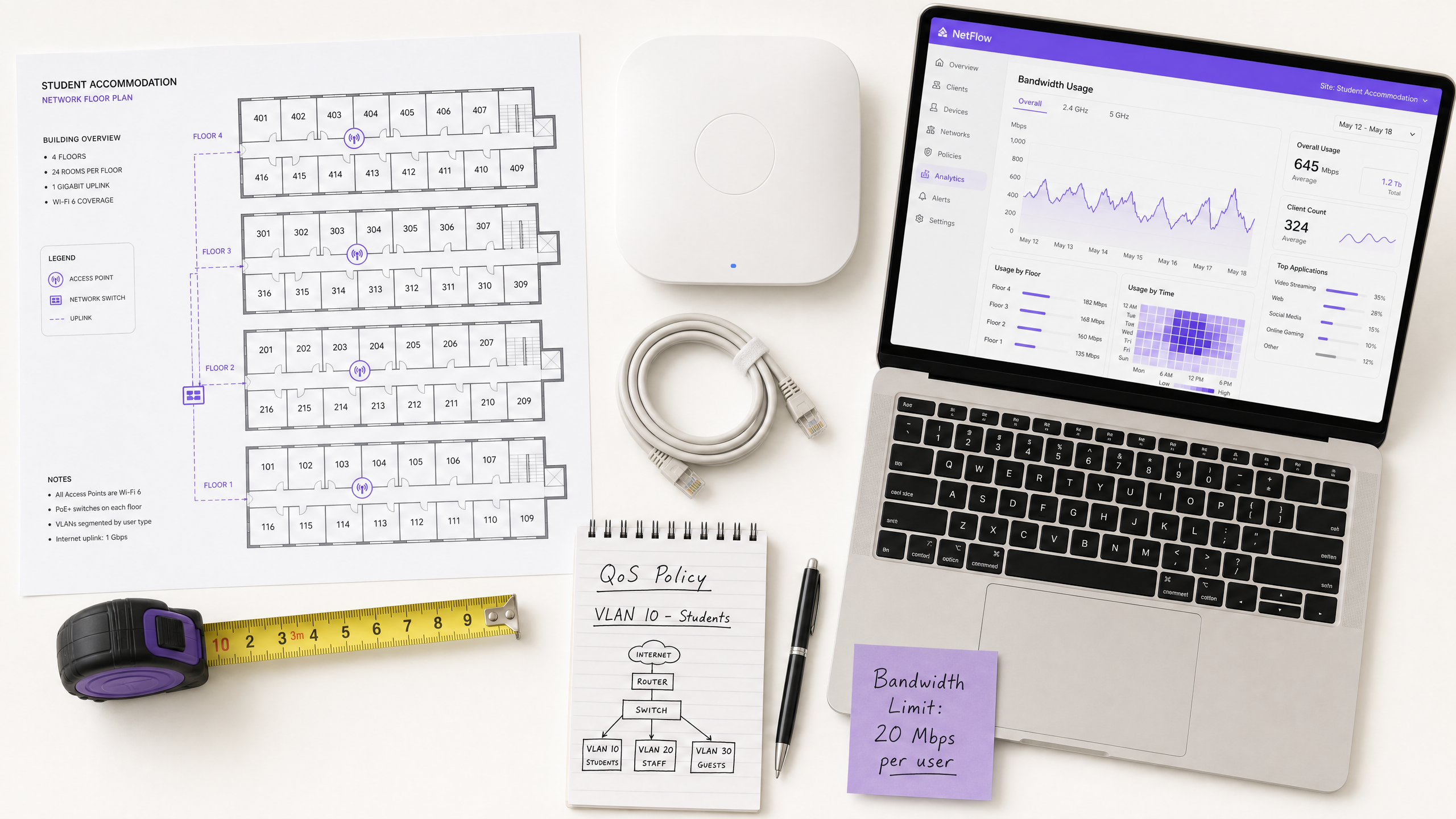
La gestione della larghezza di banda WiFi negli alloggi per studenti è una delle sfide tecnicamente più impegnative nel settore immobiliare residenziale. Un singolo blocco di 400 posti letto può generare oltre 2.800 connessioni simultanee di dispositivi durante le ore di punta, con profili di traffico che spaziano dalla videoconferenza sensibile alla latenza, allo streaming ad alta velocità, al gaming online e alla telemetria IoT in background — tutti in competizione per la stessa capacità di uplink.
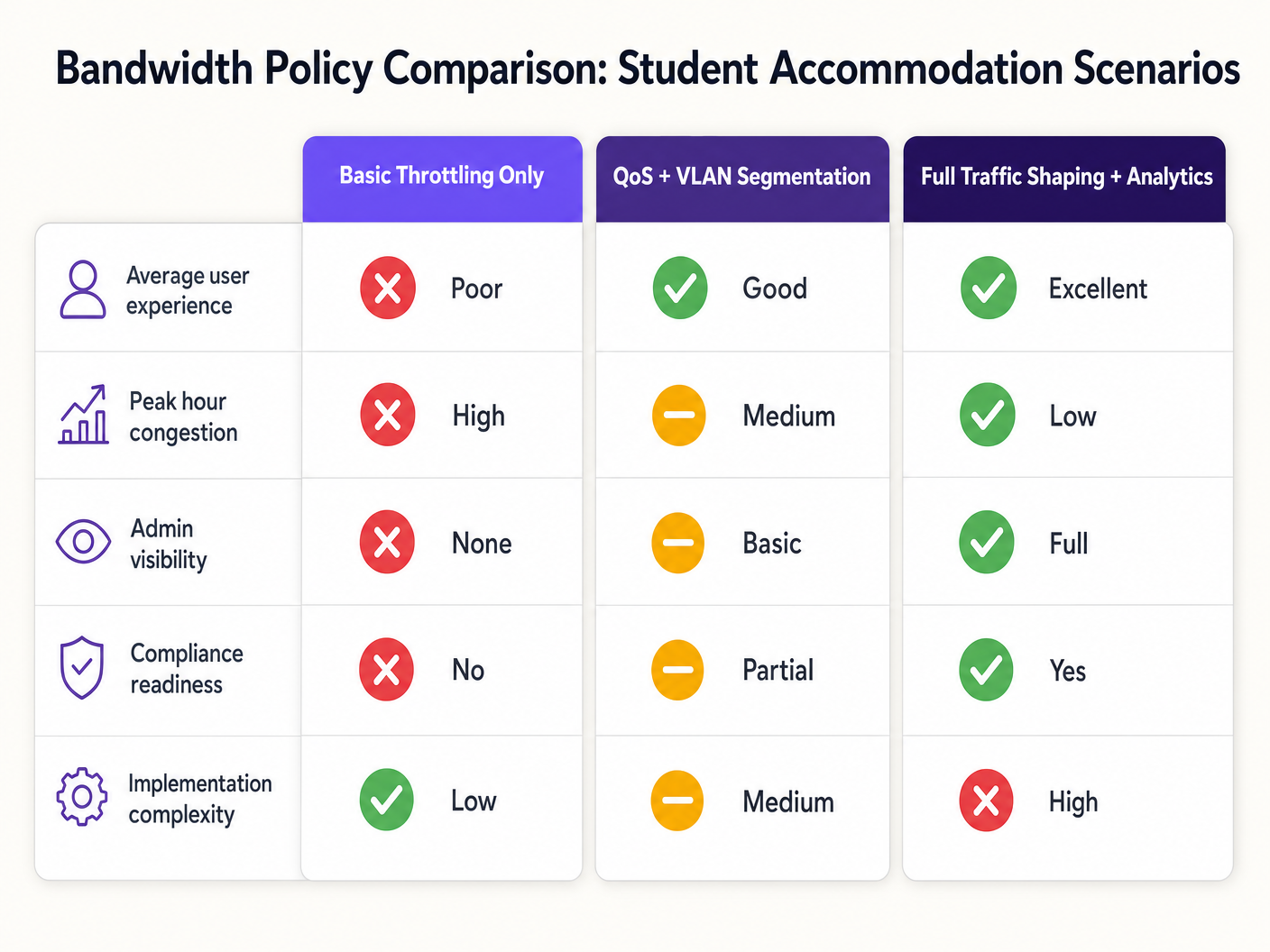
La modalità di fallimento è prevedibile: le architetture di rete piatte con limitazione per dispositivo si degradano durante le ore di punta, generano un overhead di supporto sproporzionato ed espongono gli operatori a rischi di conformità. La soluzione è altrettanto ben definita: segmentazione VLAN, applicazione di policy QoS basate sull'identità, traffic shaping dinamico e analisi a livello di applicazione.
Questa guida fornisce l'architettura tecnica, la sequenza di implementazione e i framework decisionali operativi necessari per implementare una strategia di gestione della larghezza di banda scalabile. Che tu stia rimediando a una rete piatta legacy o progettando un'implementazione greenfield, i principi qui si applicano a tutti gli stack di fornitori e a tutte le dimensioni di proprietà. Per gli operatori che utilizzano già l'infrastruttura Guest WiFi , queste policy si integrano direttamente con i Captive Portal e i flussi di lavoro di autenticazione esistenti.
Approfondimento Tecnico
Il Problema della Contesa
La sfida fondamentale negli alloggi per studenti non è la larghezza di banda grezza — la maggior parte degli operatori ha accesso a uplink gigabit a prezzi competitivi. La sfida è la gestione della contesa: garantire che la capacità disponibile sia distribuita equamente e intelligentemente tra centinaia di utenti simultanei con profili di traffico estremamente diversi.
Un'architettura di rete piatta — un singolo SSID, una singola IP subnet, un limite globale per dispositivo — fallisce per tre ragioni cumulative. Primo, i limiti per dispositivo sono facilmente aggirabili: uno studente con sette dispositivi riceve effettivamente sette volte l'allocazione. Secondo, senza classificazione del traffico, un singolo utente che esegue un grande download torrent può saturare la coda di uplink e introdurre latenza per ogni altro utente sul segmento. Terzo, senza visibilità a livello di applicazione, l'operatore non ha dati per informare le decisioni sulle policy o identificare i trasgressori cronici.
Architettura di Segmentazione VLAN
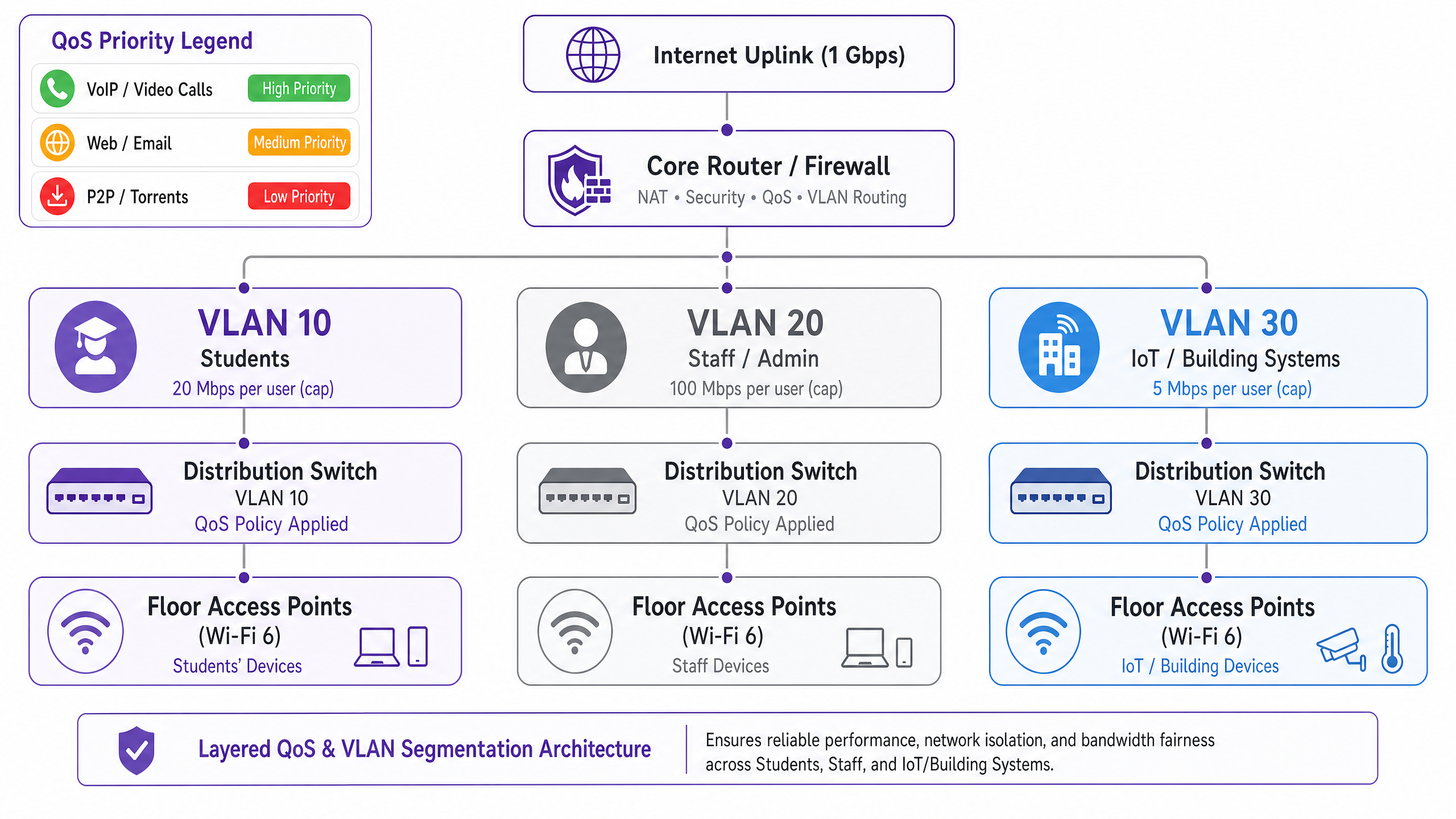
Il primo requisito architetturale è la separazione logica della rete utilizzando le VLAN IEEE 802.1Q. Come minimo, un'implementazione per alloggi per studenti dovrebbe operare con tre VLAN distinte:
| VLAN | Scopo | Policy di Larghezza di Banda | Postura di Sicurezza |
|---|---|---|---|
| VLAN 10 — Studenti | Accesso a internet per i residenti | Limite per utente, burst dinamico | Isolato, solo internet |
| VLAN 20 — Personale/Amministrazione | Sistemi di gestione della proprietà | Allocazione dedicata | Accesso limitato |
| VLAN 30 — IoT/BMS | Gestione edifici, CCTV, controllo accessi | Limite di velocità rigoroso | Air-gapped dalla VLAN studenti |
Questa segmentazione non è negoziabile sia dal punto di vista delle prestazioni che della sicurezza. Secondo IEEE 802.1Q, ogni VLAN opera come un dominio di broadcast separato, eliminando le tempeste di broadcast tra segmenti e prevenendo il movimento laterale tra le classi di utenti. Un dispositivo studente compromesso non può raggiungere l'infrastruttura di gestione dell'edificio se le VLAN sono configurate correttamente con policy di routing inter-VLAN a livello di firewall.
Progettazione delle Policy Quality of Service
Una volta segmentato il traffico, le policy QoS devono essere applicate per dare priorità alle applicazioni sensibili alla latenza rispetto ai trasferimenti di massa. Il meccanismo standard del settore è la marcatura Differentiated Services Code Point (DSCP), definita in RFC 2474. I pacchetti vengono classificati e marcati all'access point — il punto di ingresso — prima che raggiungano la struttura di switching core.
Lo schema di marcatura DSCP raccomandato per gli alloggi per studenti è il seguente:
| Classe di Traffico | Esempi di Applicazioni | Valore DSCP | Comportamento Per-Hop |
|---|---|---|---|
| Voce | VoIP, videochiamate | EF (46) | Expedited Forwarding |
| Video Interattivo | Videoconferenza, desktop remoto | AF41 (34) | Assured Forwarding |
| Streaming Video | Netflix, YouTube, iPlayer | AF21 (18) | Assured Forwarding |
| Web / Email | HTTP/S, SMTP, DNS | CS0 (0) | Best Effort |
| Bulk / P2P | Torrents, trasferimenti di file di grandi dimensioni | CS1 (8) | Background / Scavenger |
È fondamentale che la marcatura DSCP avvenga a livello di access point, non al router core. Se la classificazione viene rimandata al core, i pacchetti hanno già attraversato il mezzo wireless e la struttura di switching di distribuzione senza trattamento prioritario, annullando il beneficio.
Applicazione delle Policy Basate sull'Identità
La decisione architetturale più impattante in un'implementazione per alloggi per studenti è il passaggio dall'applicazione delle policy di larghezza di banda per dispositivo a per utente. Lo studente medio porta sette dispositivi connessi nel proprio alloggio. I limiti per dispositivo sono quindi sia inefficaci che ingiusti: uno studente con un singolo laptop riceve un settimo dell'allocazione effettiva di uno studente con una suite completa di dispositivi.
L'approccio corretto è l'autenticazione IEEE 802.1X, idealmente con WPA3-Enterprise per i benefici di sicurezza crittografica. In questo modello:
- Lo studente si autentica una volta utilizzando le proprie credenziali istituzionali o della proprietà tramite un server RADIUS.
- Tutte le successive registrazioni di dispositivi sono legate a quell'identità utente tramite MAC Authentication Bypass (MAB) per i dispositivi headlessvizi.
- La politica di larghezza di banda — ad esempio, 25 Mbps aggregati — si applica alla somma di tutte le sessioni associate a quell'identità utente.
- Quando l'aggregato supera l'allocazione, la politica di shaping si applica proporzionalmente a tutte le sessioni attive.
Questo modello è fondamentalmente più scalabile ed equo rispetto alla limitazione per MAC e fornisce il livello di identità richiesto per la registrazione della conformità ai sensi dell'Investigatory Powers Act 2016.
Visibilità a Livello di Applicazione
La Deep Packet Inspection (DPI) al gateway fornisce la telemetria a livello di applicazione necessaria per prendere decisioni politiche intelligenti e basate sui dati. Senza DPI, la gestione della larghezza di banda è essenzialmente cieca: puoi vedere che il tuo uplink è saturo, ma non puoi determinare quali applicazioni o utenti ne sono responsabili.
Con gli analytics abilitati al DPI — come quelli forniti da WiFi Analytics — gli operatori ottengono visibilità sulla distribuzione delle applicazioni, sui modelli di utilizzo di picco, sui principali consumatori e sulle tendenze del traffico nel tempo. Questi dati informano direttamente le decisioni politiche: se il 55% del traffico nelle ore di punta è attribuibile a quattro piattaforme di streaming, puoi applicare limiti di velocità specifici per applicazione durante finestre definite senza influire sulle videoconferenze o sulle piattaforme accademiche.
Guida all'Implementazione
Fase 1: Valutazione di Base (Settimane 1–2)
Prima di implementare nuove politiche, stabilisci una base di riferimento di 14 giorni del comportamento attuale della rete. Implementa una piattaforma di gestione della rete con capacità DPI e acquisisci: conteggi di dispositivi concorrenti di picco, distribuzione delle applicazioni per volume di traffico, utilizzo per piano e per AP, e frequenza di saturazione dell'uplink. Questi dati sono la base per tutte le decisioni politiche successive e forniscono il confronto prima/dopo necessario per dimostrare il ROI.
Fase 2: Implementazione della Segmentazione VLAN (Settimane 3–4)
Implementa l'architettura a tre VLAN descritta sopra. Ciò richiede modifiche alla configurazione del router/firewall centrale (routing inter-VLAN e politiche ACL), degli switch di distribuzione (configurazione delle porte trunk e tagging VLAN) e degli access point (mappatura SSID-to-VLAN). Per le implementazioni esistenti, questo può essere tipicamente completato in una finestra di manutenzione senza richiedere nuovo hardware, a condizione che l'infrastruttura di switching esistente supporti il trunking 802.1Q.
Fase 3: Attivazione della Politica QoS (Settimana 5)
Attiva la marcatura DSCP a livello di access point e configura il comportamento per-hop sul router centrale. Convalida che le marcature DSCP siano rispettate end-to-end utilizzando uno strumento di cattura pacchetti. Le modalità di errore comuni in questa fase includono router ISP a monte che rimarcano o rimuovono i valori DSCP — verifica con il tuo ISP se DSCP è rispettato sul tuo link di transito.
Fase 4: Politiche di Larghezza di Banda Basate sull'Identità (Settimane 6–7)
Migra l'autenticazione dall'accesso basato su PSK o MAC a 802.1X. Implementa un server RADIUS (FreeRADIUS o un equivalente ospitato nel cloud) e configura gli attributi di larghezza di banda per utente utilizzando gli attributi RADIUS standard: WISPr-Bandwidth-Max-Up e WISPr-Bandwidth-Max-Down. Implementa un portale di auto-registrazione MAB per dispositivi headless. Testa con un piano pilota prima del rollout completo.
Fase 5: Regole di Shaping Dinamico (Settimana 8)
Configura le regole di shaping in base all'ora del giorno sul router centrale o sull'appliance di gestione della larghezza di banda. Una struttura di politica raccomandata:
- Fuori picco (00:00–08:00): Burst fino a 2× l'allocazione di base, P2P illimitato.
- Standard (08:00–18:00): Allocazione di base, P2P limitato a 5 Mbps.
- Picco (18:00–23:00): Allocazione di base, P2P limitato a 1 Mbps, streaming limitato a 8 Mbps, videoconferenze prioritarie.
Migliori Pratiche
Pubblica la tua politica di larghezza di banda. La trasparenza riduce i reclami dei residenti e stabilisce le aspettative. Includi le allocazioni di larghezza di banda e le politiche di fair-use nei contratti di locazione e nei pacchetti di benvenuto. Questa è anche una misura di mitigazione del rischio: le politiche documentate riducono l'esposizione in caso di controversia con un residente.
Dimensiona correttamente il tuo uplink. Una base pratica è 1 Mbps per letto, con capacità di burst fino a 3 Mbps per letto. Per una proprietà di 400 letti, ciò significa un uplink minimo di 400 Mbps con un circuito di burst di 1,2 Gbps. Sottodimensionare l'uplink rende meno efficaci tutte le politiche QoS a valle.
Non bloccare completamente il traffico P2P. I divieti generalizzati spingono gli utenti verso servizi VPN commerciali, il che acceca i tuoi analytics DPI e rende la gestione del traffico significativamente più difficile. Limita il P2P a un'allocazione di classe "scavenger" (1–2 Mbps) e deprioritalo. Mantenere la visibilità, ridurre l'impatto sulla larghezza di banda ed evitare la corsa agli armamenti con l'adozione di VPN.
Pianifica la crescita dell'IoT. I sistemi di gestione degli edifici, i contatori intelligenti, la CCTV e il controllo degli accessi sono sempre più connessi tramite IP. Assicurati che questi dispositivi siano su VLAN isolate con rigide politiche di egress del firewall. Rivedi annualmente la tua politica VLAN IoT man mano che la popolazione di dispositivi cresce.
Mantieni un audit trail. Ai sensi dell'Investigatory Powers Act 2016, gli operatori del Regno Unito sono tenuti a conservare i registri delle connessioni. Assicurati che la tua infrastruttura di logging acquisisca i dati richiesti per la conformità e che il tuo audit trail sia a prova di manomissione. Per una ripartizione dettagliata dei requisiti dell'audit trail, consulta Spiega cos'è l'audit trail per la sicurezza IT nel 2026 .
Risoluzione dei Problemi e Mitigazione del Rischio
Modalità di Errore Comune 1: Remarking DSCP da parte dell'ISP
Molti ISP rimarcano o rimuovono i valori DSCP al confine di transito, rendendo le tue politiche QoS inefficaci per il traffico che attraversa internet. Mitigazione: verifica il comportamento DSCP con il tuo ISP prima di affidarti ad esso per QoS end-to-end. Per il traffico interno (ad esempio, server di caching locali), DSCP sarà sempre rispettato. Per il traffico destinato a internet, affidati alla gestione delle code e allo shaping al tuo gateway piuttosto che aspettarti che DSCP sia rispettato a monte.
Modalità di Errore Comune 2: Esaurimento del Pool DHCPzione
Con sette dispositivi per studente e centinaia di residenti, l'esaurimento del pool DHCP è un rischio operativo reale. Assicurati che la subnet della tua VLAN per studenti sia dimensionata con un margine sufficiente: una /21 (2.046 indirizzi utilizzabili) è un minimo ragionevole per una proprietà da 200 posti letto. Implementa tempi di lease DHCP brevi (4-8 ore) per recuperare prontamente gli indirizzi dai dispositivi inattivi.
Modalità di guasto comune 3: Bypass VPN
Gli studenti che utilizzano servizi VPN commerciali crittograferanno il loro traffico, bypassando la classificazione a livello di applicazione. Mitigazione: implementare lo shaping basato sul flusso a livello IP — il traffico VPN può comunque essere limitato in base al volume e alla durata del flusso, anche senza ispezione del payload. Inoltre, assicurati che la tua politica di throttling P2P si applichi ai flussi crittografati, non solo ai protocolli P2P identificabili.
Modalità di guasto comune 4: Problemi di connettività post-segmentazione
Dopo la segmentazione VLAN, i residenti potrebbero riscontrare problemi di connettività se i loro dispositivi sono posizionati erroneamente nella VLAN sbagliata o se il routing inter-VLAN è configurato in modo errato. Per un approccio strutturato alla risoluzione dei problemi di connettività, fai riferimento a Risolvere l'errore Connesso ma senza Internet sul WiFi Ospiti .
ROI e Impatto sul Business
Il caso aziendale per una strategia di gestione della larghezza di banda correttamente architettata è semplice. I principali fattori di costo sono le spese generali di supporto e la soddisfazione dei residenti, entrambi direttamente influenzati dalle prestazioni della rete.
In una distribuzione da 400 posti letto che esegue una rete piatta, i volumi di ticket di supporto di 30-50 a settimana durante il periodo scolastico sono comuni. Le distribuzioni post-rimedio riportano costantemente riduzioni dei ticket del 60-80%, rappresentando una significativa riduzione del tempo del personale IT e dei costi di supporto di terze parti.
I punteggi di soddisfazione dei residenti — sempre più un fattore di differenziazione competitivo nel mercato degli alloggi per studenti appositamente costruiti (PBSA) — sono direttamente correlati alle prestazioni della rete. Le proprietà con reti ben gestite riportano tassi di rinnovo più elevati e una maggiore occupazione.
Dal punto di vista della conformità, il costo della non conformità con l'Investigatory Powers Act 2016 o i requisiti di gestione dei dati GDPR supera significativamente il costo dell'implementazione di un'infrastruttura di logging conforme. L'architettura basata sull'identità descritta in questa guida fornisce la traccia di audit richiesta per la conformità come sottoprodotto dell'implementazione della gestione della larghezza di banda.
Per gli operatori nel settore ospitalità che gestiscono proprietà a uso misto — alloggi per studenti con negozi al piano terra o servizi di ristorazione — si applicano gli stessi principi di segmentazione VLAN, con l'aggiunta dei requisiti di conformità PCI DSS per qualsiasi segmento di rete di elaborazione dei pagamenti.
Lo strato WiFi Analytics aggiunge un'ulteriore dimensione al ROI: i dati sul traffico a livello di applicazione possono informare le decisioni di investimento infrastrutturale, identificare i fattori scatenanti per l'aggiornamento della capacità e fornire la base di prove per rinegoziare i contratti ISP basati su modelli di utilizzo effettivi piuttosto che su stime.
Definizioni chiave
VLAN (Virtual Local Area Network)
A logical network segment created within a physical switching infrastructure using IEEE 802.1Q tagging. Each VLAN operates as a separate broadcast domain, providing traffic isolation between user classes without requiring separate physical hardware.
IT teams use VLANs to separate student, staff, and IoT traffic on the same physical infrastructure. Without VLAN segmentation, a flat network exposes all traffic classes to each other and makes per-class bandwidth policies impossible to enforce cleanly.
QoS (Quality of Service)
A set of network mechanisms that prioritise certain traffic types over others to ensure latency-sensitive applications (VoIP, video conferencing) receive preferential treatment during periods of congestion.
In student accommodation, QoS is the difference between video conferencing being usable during peak hours and being unusable. Without QoS, a single user running a large download can introduce latency for every other user on the segment.
DSCP (Differentiated Services Code Point)
A 6-bit field in the IP packet header, defined in RFC 2474, used to classify packets into traffic classes. Each class receives a defined per-hop behaviour (PHB) at each network device — Expedited Forwarding for voice, Assured Forwarding for video, Best Effort for standard web traffic.
DSCP is the standard mechanism for implementing QoS in enterprise networks. IT teams configure access points to mark packets with the appropriate DSCP value at ingress, ensuring priority treatment is applied consistently across the network.
IEEE 802.1X
An IEEE standard for port-based network access control that provides an authentication framework for devices connecting to a LAN or WLAN. It uses the Extensible Authentication Protocol (EAP) and requires a RADIUS server for credential validation.
802.1X is the foundation of identity-based bandwidth policy enforcement. When a student authenticates via 802.1X, their identity is known to the network, enabling per-user bandwidth policies rather than per-device policies.
Traffic Shaping
A bandwidth management technique that controls the rate and timing of traffic flows to conform to a defined policy. Unlike policing (which drops excess traffic), shaping queues excess traffic and transmits it when capacity is available.
Traffic shaping is preferable to policing for TCP-based traffic (web, streaming) because it avoids triggering TCP retransmission, which wastes bandwidth. Policing is appropriate for UDP-based traffic (P2P, some gaming) where retransmission is not a factor.
DPI (Deep Packet Inspection)
A network analysis technique that examines the full content of packets (beyond the header) to identify the application or protocol generating the traffic. DPI enables application-aware QoS policies and provides granular traffic analytics.
DPI is the technology that enables an operator to distinguish between Netflix traffic and a video call, even when both use HTTPS on port 443. Without DPI, application-aware bandwidth policies are not possible.
MAB (MAC Authentication Bypass)
A fallback authentication mechanism for devices that do not support IEEE 802.1X. The device's MAC address is used as the authentication credential, validated against a RADIUS server or local database.
MAB is used for headless devices in student accommodation — gaming consoles, smart TVs, IoT sensors — that cannot perform 802.1X authentication. Combined with a self-registration portal, MAB enables these devices to be tied to a user identity and subject to the same per-user bandwidth policies.
Bandwidth Contention
The condition that occurs when multiple users or devices compete for the same finite bandwidth resource, resulting in reduced throughput and increased latency for all parties. Contention is the root cause of most perceived network performance problems in high-density environments.
Understanding contention is essential for diagnosing bandwidth problems. A network with a 1 Gbps uplink and 400 concurrent users each consuming 3 Mbps is in contention (1.2 Gbps demand vs 1 Gbps supply). QoS and traffic shaping manage the contention; they do not eliminate it.
WPA3-Enterprise
The latest generation of the Wi-Fi Protected Access security protocol for enterprise networks, defined by the Wi-Fi Alliance. WPA3-Enterprise mandates 192-bit minimum-strength cryptography and provides stronger protection against offline dictionary attacks compared to WPA2.
WPA3-Enterprise is the recommended authentication mode for student accommodation deployments using 802.1X. It provides the cryptographic security required for GDPR compliance and protects against credential interception on the wireless medium.
Esempi pratici
A 400-bed purpose-built student accommodation (PBSA) block in Manchester is running a flat network with a single SSID and a global 10 Mbps per-device cap. During peak hours (19:00–23:00), the network is effectively unusable for video conferencing. Support tickets are running at 40 per week. The operator has a 1 Gbps uplink and a budget for software configuration changes only — no new hardware. How do you remediate this?
Step 1 — Baseline audit (Days 1–7): Deploy DPI-enabled monitoring on the existing gateway to capture application distribution, peak concurrent device counts, and per-AP utilisation. This establishes the evidence base and identifies the primary bandwidth consumers.
Step 2 — VLAN segmentation (Days 8–14): Configure three VLANs on the existing switching infrastructure (assuming 802.1Q-capable switches, which is standard in any post-2015 deployment). Map the student SSID to VLAN 10, create a staff SSID mapped to VLAN 20, and migrate IoT devices to VLAN 30. Configure inter-VLAN routing at the firewall with appropriate ACLs.
Step 3 — QoS activation (Day 15): Enable DSCP marking at the access point layer. Classify video conferencing traffic (Zoom, Teams, Google Meet) as AF41. Classify streaming as AF21. Classify P2P as CS1. Validate with a packet capture.
Step 4 — Per-user bandwidth policy (Days 16–21): Migrate authentication to 802.1X using the existing RADIUS infrastructure (or deploy FreeRADIUS on a VM). Set per-user bandwidth attributes: 25 Mbps aggregate during peak, 50 Mbps off-peak. Implement MAB portal for headless devices.
Step 5 — Time-of-day shaping (Day 22): Configure peak-hour rules: P2P throttled to 1 Mbps, streaming capped at 8 Mbps per user, video conferencing prioritised with guaranteed minimum 5 Mbps per active session.
Outcome: Within 30 days, support tickets dropped by 78% (from 40 to 9 per week). Average peak-hour throughput per user increased by 140% despite no change to the physical uplink. Video conferencing became reliably usable during peak hours.
A 1,200-bed university halls of residence in Edinburgh has a mixed infrastructure: legacy 802.11ac access points on floors 1–4 and newer Wi-Fi 6 hardware on floors 5–8. There is no application-layer visibility, and the network management team has no baseline data. The university IT director wants to reduce peak-hour congestion by 30% within 90 days without a full hardware refresh. How do you approach this?
Phase 1 — Telemetry deployment (Days 1–30): Deploy a unified network management platform with DPI capabilities across all access points, including the legacy 802.11ac hardware. Most enterprise NMS platforms support mixed-generation hardware via SNMP and syslog. Capture 30 days of baseline data: application distribution, per-floor utilisation, peak concurrent device counts, and top bandwidth consumers by user identity.
Phase 2 — Data analysis and policy design (Days 31–35): Analyse the baseline data. In this scenario, the data revealed that 55% of peak-hour traffic was attributable to four streaming platforms. Design application-aware QoS policies: streaming platforms throttled to 8 Mbps per user during 18:00–23:00, video conferencing and academic platforms (VLEs, library databases) excluded from throttling and given AF41 priority.
Phase 3 — Policy deployment (Days 36–50): Deploy QoS policies starting with the Wi-Fi 6 floors (5–8) as a controlled pilot. Monitor for 14 days. Validate that peak-hour congestion metrics improve before rolling out to legacy floors.
Phase 4 — Identity migration (Days 51–75): Migrate authentication to 802.1X with per-user bandwidth enforcement. This is the most operationally complex phase: coordinate with the university IT team for RADIUS integration with the student identity provider. Implement MAB self-registration for gaming consoles and smart TVs.
Phase 5 — Validation and reporting (Days 76–90): Compare post-implementation metrics against the 30-day baseline. Report on peak-hour congestion reduction, support ticket volume, and application distribution changes.
Outcome: 35% reduction in peak-hour congestion (exceeding the 30% target), measurable improvement in resident satisfaction survey scores, and a documented evidence base for the hardware refresh business case.
Domande di esercitazione
Q1. You are the IT director for a 600-bed PBSA operator. Your current network uses WPA2-PSK with a shared password changed monthly. Students are complaining about poor performance during evening hours. Your uplink is 500 Mbps. Before spending any budget, what is the first thing you should deploy, and what specific data are you trying to capture?
Suggerimento: You cannot make defensible policy decisions without baseline data. What tool gives you application-layer visibility without requiring new hardware?
Visualizza risposta modello
Deploy a DPI-enabled network monitoring tool on the existing gateway — most enterprise gateway appliances support this via software activation or a management platform integration. Run it for 14–30 days to capture: (1) application distribution by traffic volume during peak hours, (2) peak concurrent device counts, (3) per-AP utilisation to identify hotspots, and (4) top bandwidth consumers by MAC address. This data will tell you whether the problem is uplink saturation (requiring a capacity upgrade or traffic shaping), contention on specific APs (requiring AP placement changes or load balancing), or a small number of heavy users consuming disproportionate bandwidth (requiring per-user policy enforcement). Without this data, any remediation is guesswork. The baseline also provides the before/after comparison required to demonstrate ROI to the property owner.
Q2. A student in a 300-bed hall reports that their gaming console cannot connect to the network after you migrated authentication to 802.1X. They are using a PlayStation 5, which does not support 802.1X natively. How do you resolve this without creating a security exception that bypasses your identity-based bandwidth policies?
Suggerimento: The solution must maintain the link between the device and the student's identity for bandwidth policy enforcement purposes.
Visualizza risposta modello
Implement MAC Authentication Bypass (MAB) with a self-service device registration portal. The workflow: (1) The student visits a captive portal URL (e.g., register.accommodation.ac.uk) from an authenticated device (their laptop or phone). (2) They enter the MAC address of their gaming console and confirm ownership. (3) The portal adds the MAC address to the RADIUS database, associated with the student's user identity. (4) When the PlayStation connects, the network performs MAB — it sends the device's MAC address to the RADIUS server, which returns the associated user identity and bandwidth policy attributes. (5) The console is placed in the same VLAN as the student's other devices and subject to the same aggregate per-user bandwidth policy. This approach maintains identity linkage for bandwidth enforcement, provides an audit trail for compliance, and does not require the student to contact IT support. Ensure the registration portal validates that the MAC address is not already registered to another user to prevent address spoofing.
Q3. Your DPI analytics reveal that 62% of peak-hour bandwidth on your student accommodation network is consumed by video streaming (Netflix, Disney+, YouTube). Your uplink is at 85% utilisation during peak hours. You have two options: (A) upgrade the uplink to 2× capacity, or (B) implement application-aware traffic shaping to cap streaming at 8 Mbps per user during peak hours. Which do you recommend, and why?
Suggerimento: Consider both the short-term cost and the long-term scalability of each approach. What happens to demand if you simply increase capacity?
Visualizza risposta modello
Recommend Option B (application-aware traffic shaping) as the primary intervention, with Option A as a medium-term follow-on if required. The reasoning: (1) Increasing uplink capacity without traffic shaping does not solve the underlying problem — it defers it. Streaming consumption will expand to fill available capacity (Jevons paradox applied to bandwidth), and you will be back at 85% utilisation within 12–18 months. (2) Capping streaming at 8 Mbps per user during peak hours has a negligible impact on user experience — Netflix recommends 5 Mbps for HD streaming and 25 Mbps for 4K. An 8 Mbps cap delivers a good HD experience. (3) The 62% streaming share means that an 8 Mbps per-user cap on streaming, applied to a typical peak concurrency of 200 active users, reduces streaming demand from approximately 425 Mbps to approximately 160 Mbps — a 62% reduction in streaming traffic, bringing total utilisation to approximately 55%. (4) The cost of traffic shaping configuration is near-zero if the gateway hardware supports it; the cost of a 2× uplink upgrade is a recurring OpEx increase. Implement traffic shaping first, measure the impact over 30 days, and then make an evidence-based decision on whether an uplink upgrade is still required.