
Soluzioni WiFi per l'Hospitality: Cosa Cercare in un Provider
Questa guida autorevole descrive in dettaglio le considerazioni tecniche e commerciali fondamentali per la scelta di un provider WiFi per il settore hospitality. Copre l'architettura di rete, gli standard di sicurezza, il design del Captive Portal e l'analisi dei dati conforme al GDPR per aiutare i responsabili IT a implementare soluzioni che generino ricavi ed efficienza operativa.
Video overview
Ascolta questa guida
Visualizza trascrizione del podcast
Parte della nostra serie principale: Guida al WiFi per Ospiti →

Sintesi Esecutiva
Per i moderni gestori di location, il WiFi per gli ospiti non è più solo un centro di costo, ma rappresenta una risorsa di dati fondamentale e un canale di generazione di ricavi. Nella valutazione delle soluzioni WiFi per il settore hospitality da parte di IT manager, network architect e CTO, l'attenzione deve spostarsi dalla semplice connettività di base ad analisi, conformità e integrazione di livello enterprise. Questa guida fornisce un framework neutrale rispetto ai vendor per valutare i provider di WiFi per gli ospiti, dettagliando l'architettura di rete, i requisiti del Captive Portal e le funzionalità di analisi dei dati necessarie per un'implementazione di successo nei settori hospitality, retail e pubblico.
L'implementazione di una soluzione di Guest WiFi robusta richiede il bilanciamento di prestazioni ad alta densità con standard di sicurezza rigorosi come WPA3 e PCI-DSS. Inoltre, la capacità di acquisire dati di prima parte attraverso una piattaforma di WiFi Analytics trasforma la rete in un motore di marketing. Questa guida di riferimento illustra le specifiche tecniche e le considerazioni sull'impatto aziendale necessarie per selezionare un provider in grado di offrire sia una connettività sicura sia una business intelligence fruibile.
Approfondimento Tecnico
Architettura di Rete e Standard Radio
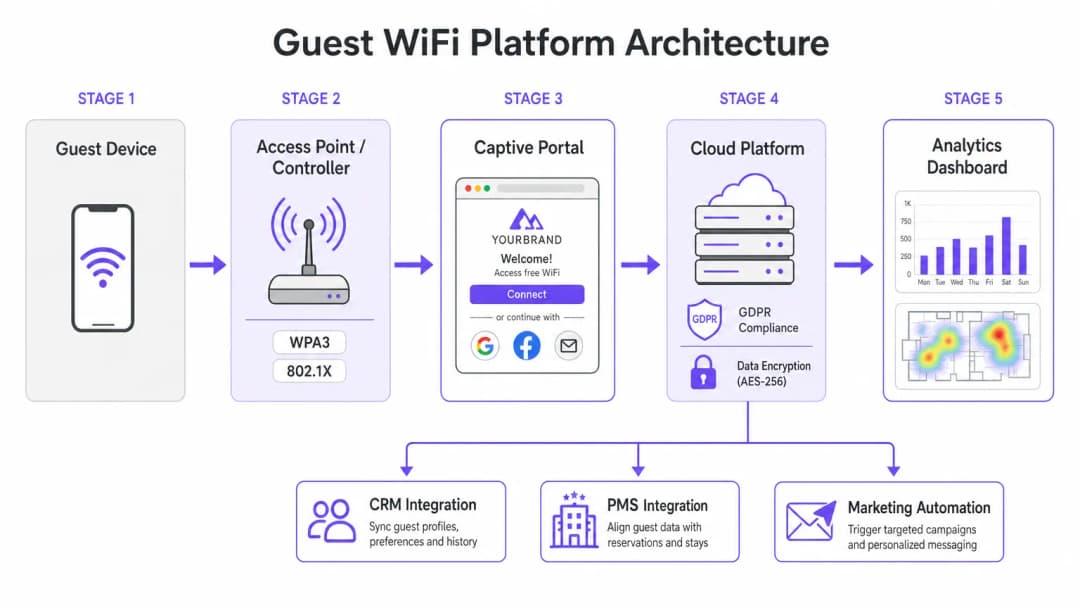
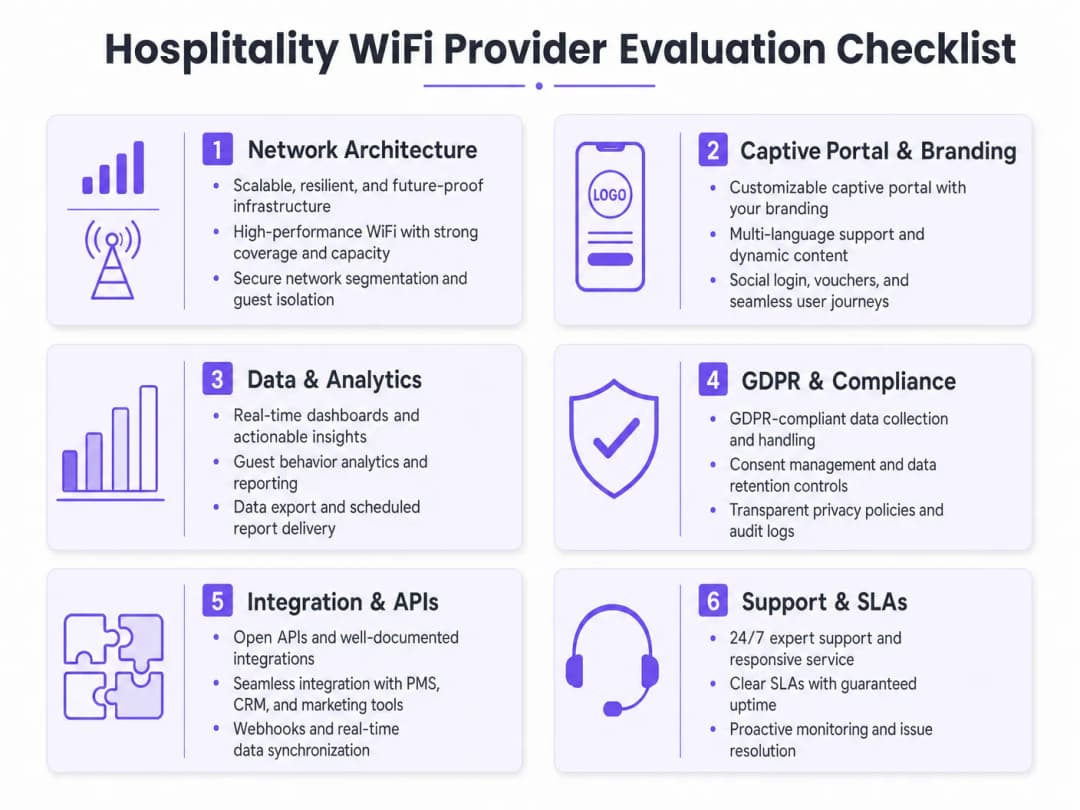
La base di qualsiasi implementazione WiFi aziendale è la sua architettura di rete sottostante. Per gli operatori multi-sito, l'architettura gestita in cloud è di gran lunga superiore ai tradizionali controller on-premises. La gestione in cloud consente il provisioning zero-touch, l'applicazione centralizzata delle policy e aggiornamenti firmware fluidi in centinaia di sedi senza la necessità di risorse IT in loco.
Nella valutazione delle specifiche degli Access Point (AP), il WiFi 6 (802.11ax) dovrebbe rappresentare lo standard di base. Il WiFi 6 introduce l'Orthogonal Frequency Division Multiple Access (OFDMA), che consente a un singolo AP di comunicare simultaneamente con più client su diversi sotto-canali. Nei contesti ad alta densità - come centri congressi o aree di passaggio degli stadi - questo riduce drasticamente la latenza e migliora la velocità di trasmissione rispetto al precedente standard WiFi 5 (802.11ac). Per le location che prevedono una densità di dispositivi estrema, il WiFi 6E estende queste funzionalità nello spettro a 6 GHz, decisamente meno congestionato.
Sicurezza e Segmentazione della Rete
La sicurezza dell'architettura WiFi nel settore hospitality deve garantire sia la sicurezza degli ospiti che la conformit aziendale. La segmentazione della rete un requisito non negoziabile; il traffico degli ospiti deve essere logicamente isolato dalle reti aziendali e dai sistemi Point-of-Sale (POS). Questo si ottiene in genere utilizzando il tagging VLAN a livello di AP, applicato tramite rigide regole di firewall sul gateway. Se i terminali di pagamento condividono l'infrastruttura di rete fisica, questo isolamento rappresenta un requisito fondamentale per la conformit PCI-DSS.
Anche gli standard di autenticazione sono altrettanto critici. Lo standard WPA3 dovrebbe essere predefinito per tutte le nuove reti ospiti, mitigando le vulnerabilit intrinseche del WPA2 (come gli attacchi KRACK). Per le reti del personale interno che operano sullo stesso hardware, l'autenticazione 802.1X supportata da un server RADIUS offre una sicurezza robusta basata su certificati che supera di gran lunga la sicurezza delle chiavi precondivise.
Hai domande sulla tua configurazione specifica?
Il nostro team collabora con gestori di sedi, responsabili IT e ingegneri di rete in 80.000 sedi. Prenota una chiamata di 20 minuti e ti mostreremo come altri professionisti come te hanno risolto il problema.
Guida all'implementazione
Captive Portal e acquisizione dati
Il Captive Portal funge da gateway tra l'access point e internet, rappresentando l'interfaccia principale per l'interazione con gli ospiti e l'acquisizione dei dati. Una semplice pagina HTML statica non sufficiente per le distribuzioni aziendali. I gestori richiedono un portale dinamico e completamente personalizzato con il proprio brand che supporti molteplici metodi di autenticazione, tra cui il social login (Google, Facebook), la registrazione via email e la verifica tramite SMS.
Ogni metodo di autenticazione fornisce risorse di dati differenti. Il social login fornisce dati demografici verificati, mentre la registrazione via email fondamentale per creare un database di marketing. Tuttavia, questa raccolta dati deve essere rigorosamente disciplinata da protocolli di gestione del consenso. Ai sensi del GDPR, il consenso al marketing deve essere esplicito, informato e liberamente fornito. I provider devono supportare caselle di controllo separate e non selezionate per l'accesso alla rete e per le comunicazioni di marketing, nonch fornire meccanismi trasparenti per le richieste di accesso ai dati da parte degli interessati (DSAR).
Integrazione e Analytics
Il vero valore di una moderna soluzione WiFi per l'hospitality risiede nelle sue capacit di analytics. I semplici dati sul numero di connessioni non sono sufficienti; i team IT e di marketing richiedono informazioni utili derivate dall'analisi dei tempi di permanenza, dall'identificazione dei visitatori ricorrenti e dalle mappe termiche del flusso di persone.
Per massimizzare il ROI, la piattaforma WiFi deve integrarsi perfettamente con lo stack tecnologico esistente della struttura. Consigliabile scegliere provider che offrono solide API e supporto webhook per la sincronizzazione dei dati in tempo reale con sistemi CRM, piattaforme di marketing automation e Property Management Systems (PMS). Questa integrazione consente campagne automatizzate e mirate basate sul comportamento degli ospiti in tempo reale.
Best Practice
- Eseguire accurati rilievi RF del sito: Non stimare mai il posizionamento degli AP basandosi esclusivamente sulle planimetrie. Eseguire rilievi RF completi del sito per tenere conto dell'attenuazione causata da pareti, acciaio strutturale e gruppi di utenti ad alta densità. Una regola empirica generale per le aree ad alta densità è un AP ogni 25 - 30 utenti simultanei.
- Garantire un backhaul adeguato: Anche la rete WiFi 6 più veloce fallirà se il collegamento internet a monte rappresenta un collo di bottiglia. Per le strutture che ospitano più di 100 utenti simultanei, investire in linee dedicate per garantire una larghezza di banda ininterrotta. Per saperne di più, consultare la nostra guida: What Is a Leased Line? Dedicated Business Internet.
- Ottimizzare continuamente il portale: Trattare il Captive Portal come un canale di marketing dinamico. Aggiornare periodicamente il branding, le promozioni e i messaggi di fidelizzazione per massimizzare il coinvolgimento e i tassi di acquisizione dei dati.
Risoluzione dei problemi e mitigazione dei rischi
Modalità di guasto comuni
- Segmentazione di rete inadeguata: La mancata separazione del traffico degli ospiti dai sistemi POS espone la struttura a significativi rischi di conformità PCI-DSS e a potenziali violazioni dei dati. Verificare sempre le configurazioni VLAN e le regole del firewall durante l'implementazione.
- Acquisizione dati non conforme: Unire l'accettazione dei Termini di Servizio al consenso di marketing viola il GDPR. Assicurarsi che il Captive Portal utilizzi meccanismi di opt-in chiari e separati per evitare sanzioni normative e danni alla reputazione.
- Densità di AP sottodimensionata: L'installazione di un numero insufficiente di access point nelle aree ad alto traffico comporta congestione dei canali, disconnessioni e una pessima esperienza per l'ospite. Progettare per la capacità, non solo per la copertura.
ROI e impatto aziendale
Il ritorno sull'investimento (ROI) per una soluzione WiFi aziendale per il settore dell'ospitalità va ben oltre la semplice connettività. Sfruttando una piattaforma di WiFi Analytics, le strutture possono trasformare il traffico pedonale anonimo in profili cliente noti. Questi dati di prima parte guidano campagne di marketing mirate, aumentando i tassi di visite ripetute e la spesa media per ospite.
Inoltre, si ottengono efficienze operative grazie alla gestione centralizzata in cloud e alle integrazioni CRM automatizzate, riducendo il carico di lavoro per il reparto IT. In definitiva, una soluzione WiFi ben progettata migliora l'esperienza dell'ospite offrendo al contempo una business intelligence misurabile ai team operativi e di marketing, in particolare in settori chiave come l'Hospitality e il Retail.
Definizioni chiave
Wi-Fi 6 (802.11ax)
L'attuale standard per le reti wireless che migliora significativamente le prestazioni in ambienti ad alta densità attraverso tecnologie come OFDMA.
Essenziale per sedi con un gran numero di utenti simultanei, come centri congressi e stadi, per prevenire la congestione della rete.
OFDMA (Orthogonal Frequency Division Multiple Access)
Una tecnologia che consente di dividere un singolo canale wireless in sottocanali più piccoli, permettendo a un access point di comunicare con più client contemporaneamente.
Cruciale per ridurre la latenza e migliorare la velocità di trasmissione quando molti ospiti cercano di accedere alla rete contemporaneamente.
Segmentazione della Rete
La pratica di suddividere una rete informatica in più sottoreti logiche (VLAN) per migliorare le prestazioni e la sicurezza.
Obbligatoria per isolare il traffico non attendibile degli ospiti dai dati aziendali sensibili e dai sistemi di elaborazione dei pagamenti.
Captive Portal
Una pagina web che l'utente di una rete ad accesso pubblico è obbligato a visualizzare e con cui deve interagire prima che venga concesso l'accesso.
Il principale punto di contatto per l'interazione con l'ospite, il branding e l'acquisizione dei dati conforme al GDPR.
WPA3
Il più recente programma di certificazione della sicurezza WiFi, che offre una crittografia più solida e una migliore protezione contro gli attacchi di tipo dizionario offline rispetto a WPA2.
Lo standard di sicurezza di base che dovrebbe essere implementato su tutte le nuove reti wireless aziendali e per gli ospiti.
PCI-DSS (Payment Card Industry Data Security Standard)
Uno standard di sicurezza delle informazioni per le organizzazioni che gestiscono carte di credito dei principali circuiti.
Rilevante quando una sede elabora pagamenti; richiede un rigido isolamento della rete di pagamento dalla rete WiFi degli ospiti.
Webhook
Un metodo per aumentare o alterare il comportamento di una pagina web o di un'applicazione web con callback personalizzate, consentendo il trasferimento di dati in tempo reale tra le applicazioni.
Utilizzato per sincronizzare istantaneamente i dati degli ospiti acquisiti sul portale WiFi con il CRM o la piattaforma di marketing automation di una sede.
Tempo di sosta
La durata del tempo in cui un visitatore staziona in una specifica posizione fisica, misurata tracciando la presenza dell'indirizzo MAC del suo dispositivo mobile.
Una metrica analitica chiave utilizzata dai team operativi per comprendere l'utilizzo della sede e dai team di marketing per misurare il coinvolgimento.
Esempi pratici
Un hotel da 200 camere deve aggiornare la sua rete legacy Wi-Fi 4 per supportare strutture congressuali ad alta densità e il roaming continuo degli ospiti, garantendo al contempo la conformità PCI-DSS per i suoi nuovi terminali POS mobili.
Distribuire un'architettura Wi-Fi 6 gestita in cloud con access point configurati per OFDMA per gestire l'elevata densità di client nelle sale conferenze. Implementare una rigida segmentazione di rete tramite VLAN per isolare il traffico degli ospiti dai dispositivi POS mobili, applicando la separazione a livello di firewall del gateway. Configurare il Captive Portal per richiedere un consenso esplicito e conforme al GDPR per l'acquisizione dei dati di marketing.
Una catena nazionale di pub desidera utilizzare il WiFi per gli ospiti per creare un database di marketing e comprendere i tempi di permanenza dei clienti nelle sue 50 sedi.
Implementare una piattaforma WiFi per ospiti di livello enterprise dotata di un Captive Portal personalizzato con opzioni di login social e registrazione via email. Assicurarsi che il portale includa caselle di controllo separate e non selezionate per il consenso al marketing. Utilizzare la dashboard analitica della piattaforma per tracciare gli indirizzi MAC (anonimizzati per motivi di privacy) al fine di calcolare i tempi di permanenza e le frequenze delle visite ripetute. Configurare integrazioni webhook per inviare gli indirizzi email verificati direttamente al sistema CRM della catena in tempo reale.
Domande di esercitazione
Q1. Il tuo direttore marketing desidera aggiungere automaticamente ogni ospite che si connette al WiFi alla newsletter promozionale settimanale per aumentare i ricavi F&B. Come configuri il Captive Portal per supportare questa richiesta?
Suggerimento: Considera i requisiti del GDPR in materia di consenso per le comunicazioni di marketing.
Visualizza risposta modello
Non è possibile aggiungere automaticamente gli ospiti a una lista di marketing solo perché si sono connessi al WiFi. Il Captive Portal deve essere configurato con un'informativa sulla privacy chiara e una casella di controllo separata e non selezionata che richieda esplicitamente il consenso per le comunicazioni di marketing. Solo gli ospiti che selezionano attivamente questa casella possono essere sincronizzati con il CRM tramite API o webhook per l'invio delle email.
Q2. Un direttore IT di uno stadio sta valutando un fornitore che propone di distribuire access point 802.11ac (Wi-Fi 5), sostenendo che farà risparmiare il 30% sui costi hardware fornendo al contempo una copertura sufficiente. Come dovrebbe rispondere il direttore?
Suggerimento: Considera la differenza tra copertura e capacità in un ambiente come uno stadio.
Visualizza risposta modello
Il direttore dovrebbe respingere la proposta. Sebbene il Wi-Fi 5 possa fornire una copertura fisica adeguata, manca delle funzionalità di gestione della capacità necessarie per uno stadio. Il Wi-Fi 6 (802.11ax) è essenziale in questo ambiente perché l'OFDMA consente agli AP di gestire in modo efficiente molte connessioni simultanee, evitando il collasso della rete in presenza di un'elevata densità di client.
Q3. Durante l'aggiornamento della rete presso una catena retail, il team di deployment suggerisce di far funzionare il nuovo WiFi ospiti e gli scanner di inventario del personale sulla stessa VLAN per semplificare la gestione degli indirizzi IP. Qual è il rischio e quale l'approccio corretto?
Suggerimento: Pensa alle migliori pratiche di sicurezza e ai requisiti di conformità.
Visualizza risposta modello
Far transitare il traffico ospiti e quello aziendale sulla stessa VLAN rappresenta un grave rischio per la sicurezza e viola le migliori pratiche (e potenzialmente lo standard PCI-DSS se sono coinvolti dati di pagamento). Espone i sistemi interni a dispositivi ospiti non attendibili. L'approccio corretto è una rigorosa segmentazione della rete: configurare SSID separati mappati su VLAN separate e utilizzare regole firewall per bloccare tutto il traffico tra la VLAN ospiti e la VLAN aziendale.
Continua a leggere questa serie
Come configurare il WiFi ospiti: Guida alla configurazione aziendale sicura
Questa guida autorevole fornisce ai responsabili IT e ai network architect un piano d'azione definitivo per implementare un WiFi ospiti aziendale sicuro. Copre l'architettura essenziale, la migrazione a WPA3, la segmentazione VLAN e l'integrazione del Captive Portal per proteggere i sistemi interni e acquisire dati di prima parte conformi.
Come Risolvere i Problemi di WiFi Lento Senza Potenziare il Piano Internet
Una guida tecnica di riferimento completa per IT manager e architetti di rete sull'ottimizzazione delle prestazioni WiFi aziendali senza aumentare la larghezza di banda dell'ISP. Copre l'ottimizzazione RF, la gestione della densità dei client, l'implementazione di QoS e l'uso di strumenti di WiFi analytics per diagnosticare e risolvere i colli di bottiglia.
Come progettare una rete WiFi per campus: guida IT per le università
Questa guida tecnica fornisce un progetto completo per la progettazione e l'implementazione di reti WiFi ad alta densità per campus, coprendo ogni aspetto - dai site survey attivi e il posizionamento degli access point fino all'architettura dei controller, al roaming continuo e all'onboarding sicuro degli ospiti. È scritta per IT manager, network architect e CTO di università e grandi strutture che necessitano di una guida pratica per pianificare ed eseguire un'implementazione wireless in questo trimestre. La guida mappa inoltre la piattaforma di Guest WiFi e analytics di Purple sui reali punti di integrazione all'interno del ciclo di vita dell'implementazione.
Hai domande sulla tua configurazione specifica?
Il nostro team collabora con gestori di sedi, responsabili IT e ingegneri di rete in 80.000 sedi. Prenota una chiamata di 20 minuti e ti mostreremo come altri professionisti come te hanno risolto il problema.