
Hospitality WiFi Solutions: What to Look for in a Provider
This authoritative guide details the critical technical and commercial considerations for selecting a hospitality WiFi provider. It covers network architecture, security standards, captive portal design, and CCPA/CPRA-compliant data analytics to help IT leaders deploy solutions that drive revenue and operational efficiency.
Video overview
Listen to this guide
View podcast transcript
Part of our core series: Guest WiFi Guide →

Executive Summary
For modern venue operators, guest WiFi is no longer just a cost center; it is a critical data asset and a revenue-generating channel. As IT managers, network architects, and CTOs evaluate hospitality WiFi solutions, their focus must shift from basic connectivity to enterprise-grade analytics, compliance, and integration. This guide provides a vendor-neutral framework for evaluating guest WiFi providers, detailing the network architecture, Captive Portal requirements, and data analytics capabilities necessary for successful deployment in hospitality, retail, and public sector environments.
Deploying a robust Guest WiFi solution requires balancing high-density performance with stringent security standards such as WPA3 and PCI-DSS. Furthermore, the ability to capture first-party data through a WiFi Analytics platform transforms the network into a marketing engine. This reference guide outlines the technical specifications and business impact considerations necessary to select a provider capable of delivering both secure connectivity and actionable intelligence.
Technical Deep Dive
Network Architecture and Radio Standards
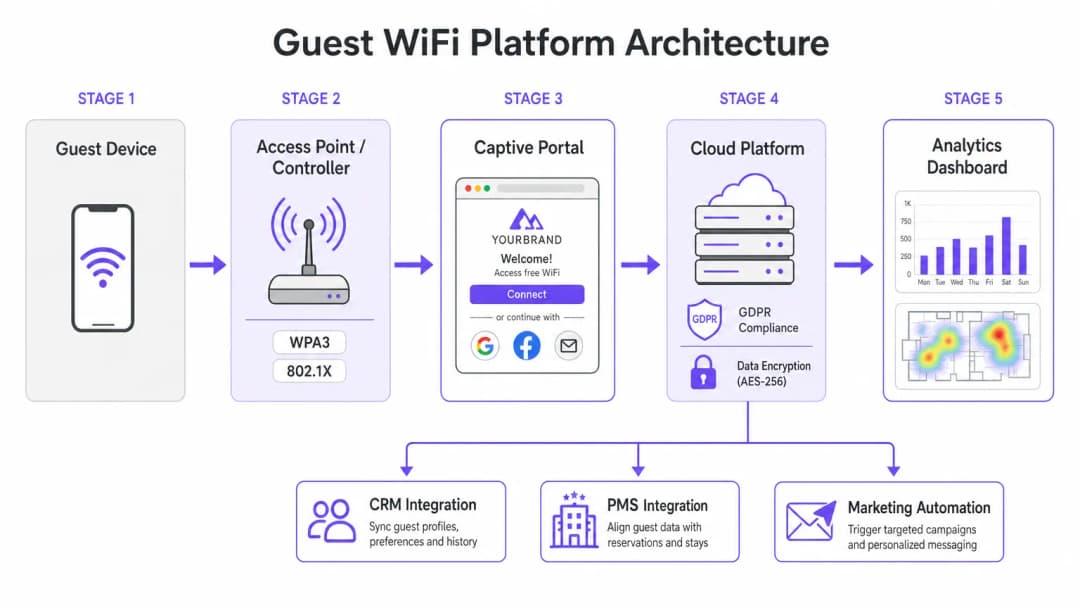
The foundation of any enterprise WiFi deployment is its underlying network architecture. For multi-site operators, cloud-managed architecture is far superior to traditional on-premises controllers. Cloud management enables zero-touch provisioning, centralized policy enforcement, and seamless firmware updates across hundreds of locations without the need for local IT resources.
When evaluating Access Point (AP) specifications, WiFi 6 (802.11ax) should be the baseline standard. WiFi 6 introduces Orthogonal Frequency Division Multiple Access (OFDMA), which allows a single AP to communicate with multiple clients simultaneously across different sub-channels. In high-density environments - such as conference centers or stadium concourses - this dramatically reduces latency and improves throughput compared to the older WiFi 5 (802.11ac) standard. For venues expecting extreme device density, WiFi 6E extends these capabilities into the less congested 6 GHz spectrum.
Security and Network Segmentation
Security architecture in hospitality WiFi must address both guest safety and corporate compliance. Network segmentation is a non-negotiable requirement; guest traffic must be logically isolated from corporate and Point-of-Sale (POS) networks. This is typically achieved using VLAN tagging at the AP level, enforced by strict firewall rules at the gateway. If payment terminals share the physical network infrastructure, this isolation is a core requirement for PCI-DSS compliance.
Authentication standards are equally critical. WPA3 should be the default for all new guest networks, mitigating vulnerabilities inherent in WPA2 (such as KRACK attacks). For internal staff networks operating on the same hardware, IEEE 802.1X authentication backed by a RADIUS server provides robust, certificate-based security that far exceeds the security of pre-shared keys.
Got questions about your specific setup?
Our team works with venue operators, IT managers, and network engineers across 80,000 venues. Book a 20-minute call and we will show you how others like you solved it.
Implementation Guide
Captive Portal and Data Capture
The Captive Portal acts as the gateway between the access point and the internet, serving as the primary interface for guest interaction and data capture. A basic static HTML page is insufficient for enterprise deployments. Operators require a dynamic, fully branded portal that supports multiple authentication methods, including social login (Google, Facebook), email registration, and SMS verification.
Each authentication method provides different data assets. Social login provides verified demographic data, while email registration is critical for building a marketing database. However, this data collection must be strictly governed by consent management protocols. Under the TCPA and CAN-SPAM, as well as CCPA/CPRA, marketing consent must be explicit, informed, and freely given. Providers must support separate, unchecked checkboxes for network access and marketing communications, as well as provide transparent mechanisms for Data Subject Access Requests (DSARs).
Integration and Analytics
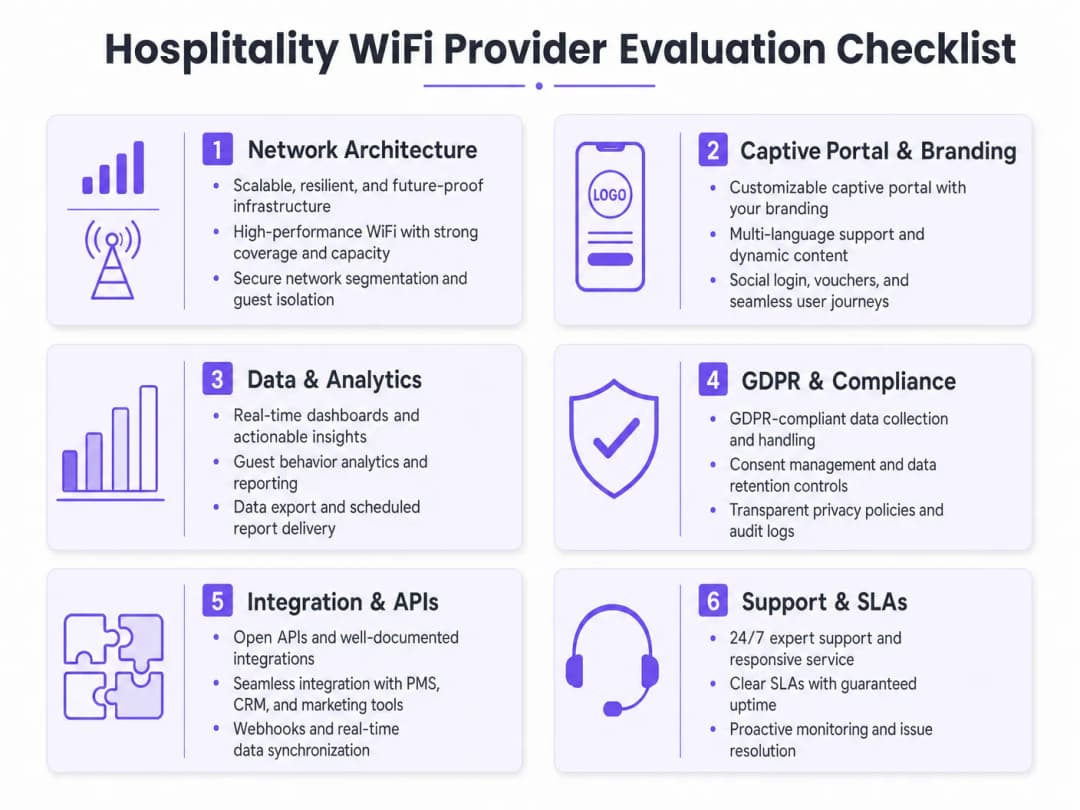
The true value of a modern hospitality WiFi solution lies in its analytics capabilities. Basic connection numbers are insufficient; IT and marketing teams require actionable insights derived from dwell time analysis, repeat visitor identification, and footfall heatmaps.
To optimize ROI, the WiFi platform must integrate seamlessly with the venue's existing technology stack. Look for providers that offer robust APIs and webhook support for real-time data synchronization with CRM systems, marketing automation platforms, and Property Management Systems (PMS). This integration enables automated, targeted campaigns based on real-time guest behavior.
Best Practices
- Conduct rigorous RF site surveys: Never estimate AP placement based solely on floor plans. Conduct comprehensive RF site surveys to account for attenuation from walls, structural steel, and high-density user groups. A general rule of thumb for high-density areas is one AP per 25-30 concurrent users.
- Ensure adequate backhaul: Even the fastest WiFi 6 network will fail if the internet uplink is a bottleneck. For venues supporting more than 100 concurrent users, invest in dedicated leased lines to guarantee uninterrupted bandwidth. To learn more about this, see our guide: What Is a Leased Line? Dedicated Business Internet.
- Continuously optimize the portal: Treat the Captive Portal as a dynamic marketing channel. Update branding, promotions, and loyalty messaging seasonally to maximize engagement and data capture rates.
Troubleshooting and Risk Mitigation
Common Failure Modes
- Inadequate network segmentation: Failing to isolate guest traffic from POS systems exposes the venue to significant PCI DSS compliance risks and potential data breaches. Always verify VLAN configurations and firewall rules during deployment.
- Non-compliant data capture: Bundling acceptance of Terms of Service with marketing consent violates the TCPA and CAN-SPAM. Ensure the Captive Portal uses clear, separate opt-in mechanisms to avoid regulatory enforcement and reputational damage.
- Under-provisioned AP density: Deploying too few access points in high-traffic areas leads to channel contention, dropped connections, and a poor guest experience. Design for capacity, not just coverage.
ROI and Business Impact
The return on investment (ROI) for an enterprise hospitality WiFi solution extends far beyond basic connectivity. By leveraging a WiFi Analytics platform, venues can transform anonymous foot traffic into known customer profiles. This first-party data drives targeted marketing campaigns, increasing repeat visit rates and average spend per guest.
Furthermore, operational efficiencies are gained through centralized cloud management and automated CRM integrations, reducing the IT burden. Ultimately, a well-architected WiFi solution elevates the guest experience while providing measurable business intelligence to operations and marketing teams, particularly in key sectors such as Hospitality and Retail.
Key Definitions
WiFi 6 (802.11ax)
The current standard for wireless networking that significantly improves performance in high-density environments through technologies like OFDMA.
Essential for venues with large numbers of simultaneous users, such as conference centers and stadiums, to prevent network congestion.
OFDMA (Orthogonal Frequency Division Multiple Access)
A technology that allows a single wireless channel to be divided into smaller sub-channels, enabling an access point to communicate with multiple clients simultaneously.
Crucial for reducing latency and improving throughput when many guests are trying to access the network at the same time.
Network Segmentation
The practice of dividing a computer network into multiple logical subnets (VLANs) to improve performance and security.
Mandatory for isolating untrusted guest traffic from sensitive corporate data and payment processing systems.
Captive Portal
A web page that a user of a public-access network is obliged to view and interact with before access is granted.
The primary touchpoint for guest interaction, branding, and CCPA/CPRA-compliant data capture.
WPA3
The latest WiFi security certification program, providing stronger encryption and better protection against offline dictionary attacks compared to WPA2.
The baseline security standard that should be deployed on all new guest and corporate wireless networks.
PCI DSS (Payment Card Industry Data Security Standard)
An information security standard for organizations that handle branded credit cards from the major card schemes.
Relevant when a venue processes payments; requires strict isolation of the payment network from the guest WiFi network.
Webhook
A method of augmenting or altering the behavior of a web page or web application with custom callbacks, allowing real-time data transfer between applications.
Used to instantly sync guest data captured on the WiFi portal with a venue's CRM or marketing automation platform.
Dwell Time
The length of time a visitor spends in a specific physical location, measured by tracking the presence of their mobile device's MAC address.
A key analytics metric used by operations teams to understand venue utilization and by marketing teams to gauge engagement.
Worked Examples
A 200-room hotel needs to upgrade its legacy WiFi 4 network to support high-density conference facilities and seamless guest roaming, while ensuring PCI DSS compliance for its new mobile point-of-sale terminals.
Deploy a cloud-managed WiFi 6 architecture with access points configured for OFDMA to handle the high client density in the conference rooms. Implement strict network segmentation using VLANs to isolate guest traffic from the mobile POS devices, enforcing the separation at the gateway firewall. Configure the captive portal to require explicit CCPA/CPRA-compliant consent for marketing data capture.
A national restaurant chain wants to use guest WiFi to build a marketing database and understand customer dwell times across its 50 locations.
Implement an enterprise guest WiFi platform featuring a branded captive portal with social login and email registration options. Ensure the portal includes separate, unchecked checkboxes for marketing consent. Utilize the platform's analytics dashboard to track MAC addresses (hashed for privacy) to calculate dwell times and repeat visit frequencies. Set up webhook integrations to push verified email addresses directly to the chain's CRM system in real-time.
Practice Questions
Q1. Your marketing director wants to automatically add every guest who connects to the WiFi to the weekly promotional email blast to increase F&B revenue. How do you configure the captive portal to support this?
Hint: Consider CCPA/CPRA requirements regarding consent for marketing communications.
View model answer
You cannot automatically add guests to a marketing list just because they connected to the WiFi. The captive portal must be configured with a clear privacy notice and a separate, unchecked checkbox explicitly requesting consent for marketing communications. Only guests who actively check this box can be synced to the CRM via API or webhook for the email blast.
Q2. A stadium IT director is evaluating a vendor who proposes deploying 802.11ac (WiFi 5) access points, arguing it will save 30% on hardware costs while providing sufficient coverage. How should the director respond?
Hint: Consider the difference between coverage and capacity in a stadium environment.
View model answer
The director should reject the proposal. While WiFi 5 might provide adequate physical coverage, it lacks the capacity management features required for a stadium. WiFi 6 (802.11ax) is essential in this environment because OFDMA allows the APs to handle many simultaneous connections efficiently, preventing the network from collapsing under high client density.
Q3. During a network upgrade at a retail chain, the deployment team suggests running the new guest WiFi and the staff inventory scanners on the same VLAN to simplify IP address management. What is the risk, and what is the correct approach?
Hint: Think about security best practices and compliance requirements.
View model answer
Running guest and corporate traffic on the same VLAN is a severe security risk and violates best practices (and potentially PCI-DSS if payment data is involved). It exposes internal systems to untrusted guest devices. The correct approach is strict network segmentation: configure separate SSIDs mapped to separate VLANs, and use firewall rules to block all traffic between the guest VLAN and the corporate VLAN.
Continue reading in this series
How to Set Up Guest WiFi: A Secure Enterprise Configuration Guide
This authoritative guide provides IT leaders and network architects with a definitive blueprint for deploying secure enterprise guest WiFi. It covers essential architecture, WPA3 migration, VLAN segmentation, and captive portal integration to protect internal systems while capturing compliant first-party data.
How to Fix Slow WiFi Without Upgrading Your Internet Plan
A comprehensive technical reference guide for IT managers and network architects on optimizing enterprise WiFi performance without increasing ISP bandwidth. Covers RF tuning, client density management, QoS implementation, and how to leverage WiFi analytics to diagnose and resolve bottlenecks.
How to Build a Campus WiFi Network: A University IT Guide
This technical guide provides a comprehensive blueprint for designing and deploying high-density campus WiFi networks, covering everything from active site surveys and access point placement to controller architecture, seamless roaming, and secure guest onboarding. It is written for IT managers, network architects, and CTOs at universities and large venues who need actionable guidance to plan and execute a wireless deployment this quarter. The guide also maps Purple's Guest WiFi and analytics platform to real integration points within the deployment lifecycle.
Got questions about your specific setup?
Our team works with venue operators, IT managers, and network engineers across 80,000 venues. Book a 20-minute call and we will show you how others like you solved it.