
Integrazione dell'autenticazione WeChat WiFi: Onboarding tramite Captive Portal per i clienti APAC
WeChat conta 1,41 miliardi di utenti attivi mensili, il che lo rende l'identità digitale primaria per i consumatori cinesi a livello globale. Questa guida spiega come integrare l'autenticazione OAuth 2.0 di WeChat nei captive portal aziendali per le sedi APAC, coprendo la registrazione sulla piattaforma, la selezione dell'ambito, l'applicazione della RADIUS Change of Authorisation e la conformità al doppio framework con GDPR e PIPL cinese. È rivolta a IT manager, network architect e direttori delle operazioni delle sedi che devono agire in questo trimestre.
Video overview
Ascolta questa guida
Visualizza trascrizione del podcast
Parte della nostra serie principale: Guida al Captive Portal →
Sintesi per l'executive
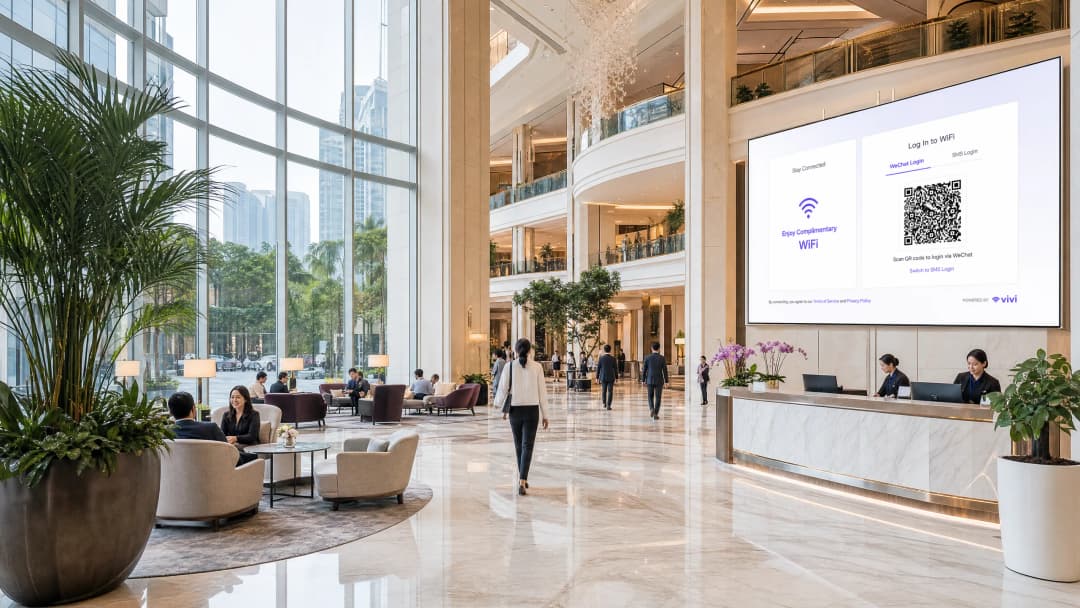
Per le sedi aziendali che operano nella regione APAC o che accolgono turisti cinesi a livello globale, l'autenticazione WeChat WiFi non è più opzionale. Con 1,41 miliardi di utenti attivi mensili nel 2025 (fonte: Tencent), WeChat rappresenta la principale identità digitale per i consumatori cinesi. Un ospite che si connette al tuo SSID e visualizza solo opzioni di accesso tramite e-mail o Facebook si scontra con un ostacolo immediato. Quasi certamente possiede WeChat, mentre quasi sicuramente non ha un indirizzo e-mail locale configurato su quel dispositivo.
Questa guida illustra in dettaglio come integrare WeChat OAuth 2.0 in un captive portal. Vengono trattate le due distinte registrazioni di piattaforma richieste da Tencent, la scelta dell'ambito che determina quali dati di prima parte raccogliere e il meccanismo RADIUS Change of Authorisation (CoA) che traduce un interscambio OAuth andato a buon fine in un effettivo accesso alla rete. Affronteremo inoltre i requisiti di conformità sovrapposti del GDPR e della Personal Information Protection Law (PIPL) cinese.
La piattaforma Guest WiFi di Purple automatizza il livello di applicazione della rete sull'hardware Cisco Meraki, HPE Aruba, Ruckus, Juniper Mist, Ubiquiti UniFi, Cambium, Extreme e Fortinet. Purple opera in oltre 80.000 sedi attive e ha registrato 440 milioni di accessi nel 2024 (dati interni Purple).
Approfondimento tecnico
Il flusso OAuth 2.0
Un Captive Portal (un gateway di autenticazione basato sul web che intercetta il traffico HTTP dai dispositivi non autenticati) reindirizza gli utenti ospiti a una pagina di login ospitata su un server del portale, in locale o nel cloud. L'integrazione di WeChat OAuth inserisce l'infrastruttura di identità di Tencent in questo flusso.
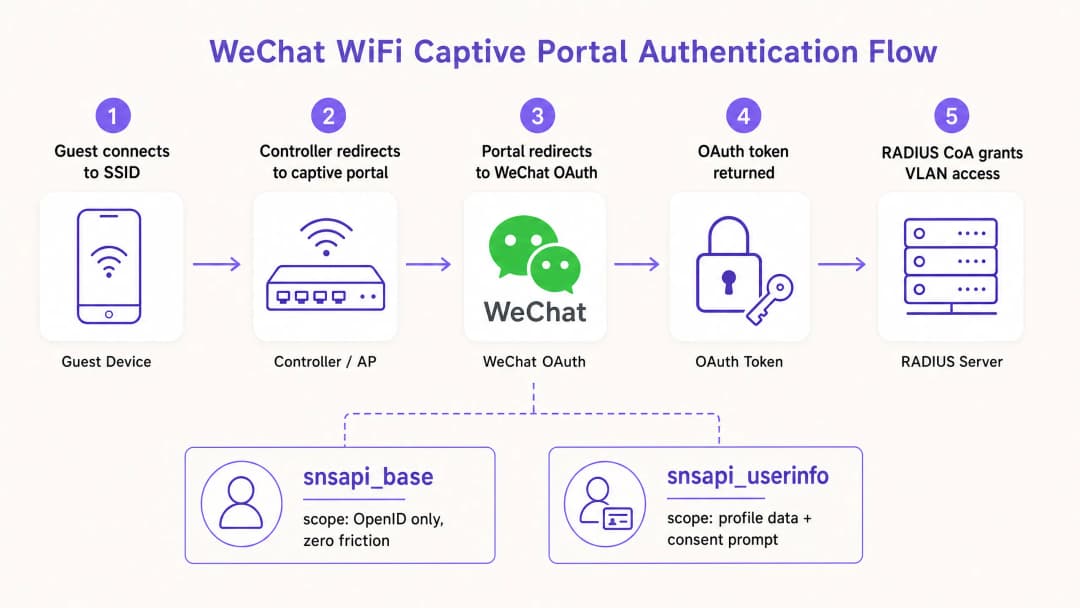
La sequenza si svolge come segue. L'ospite si associa all'SSID. Il controller wireless rileva l'assenza di una sessione autenticata e reindirizza tutto il traffico HTTP all'URL del Captive Portal. La pagina del portale si carica e presenta le opzioni di login, tra cui WeChat. L'ospite seleziona WeChat. Il server del portale genera un reindirizzamento all'endpoint di autorizzazione di WeChat all'indirizzo open.weixin.qq.com, passando quattro parametri: l'AppID, l'URI di reindirizzamento, il tipo di risposta impostato su code e lo scope richiesto.
WeChat autentica l'utente interamente sulla propria infrastruttura. Se l'ospite ha già effettuato l'accesso tramite il browser integrato nell'app WeChat, lo scope snsapi_base consente un'autenticazione invisibile senza alcuna richiesta esplicita. WeChat reindirizza l'utente all'URI di reindirizzamento registrato del portale fornendo un codice di autorizzazione a breve durata. Il server del portale scambia questo codice con un token di accesso chiamando api.weixin.qq.com/sns/oauth2/access_token con l'AppID, l'AppSecret, il codice e il tipo di concessione. WeChat restituisce un token di accesso, un token di aggiornamento, l'OpenID dell'utente e lo scope concesso. Se è stato richiesto snsapi_userinfo, una seconda chiamata API a api.weixin.qq.com/sns/userinfo recupera il nickname dell'utente, l'immagine del profilo, il genere e la città.
Registrazione della piattaforma: la scelta che ostacola la maggior parte delle implementazioni
Tencent gestisce due piattaforme di sviluppo distinte e la selezione di quella errata rappresenta la causa più comune di fallimento delle implementazioni.
| Contesto di accesso | Registrazione richiesta | URL della piattaforma | Scope supportati |
|---|---|---|---|
| Browser integrato in WeChat | Service Account (Official Accounts Platform) | mp.weixin.qq.com | snsapi_base, snsapi_userinfo |
| Browser mobile standard (Chrome, Safari) | Website Application (Open Platform) | open.weixin.qq.com | snsapi_login (flusso con codice QR) |
Un Subscription Account sulla Official Accounts Platform non funzionerà. Non dispone dei permessi di autorizzazione per le pagine web OAuth. Solo un Service Account possiede tali permessi.
La maggior parte delle implementazioni aziendali nei settori Hospitality e Retail implementa entrambe le registrazioni. Un ospite in un hotel potrebbe aprire il portale in Chrome, scansionare un codice QR con WeChat e autenticarsi tramite il flusso della Open Platform. Oppure potrebbe seguire un link all'interno di WeChat stesso, atterrare sul browser integrato nell'app e autenticarsi in modo invisibile tramite il flusso degli Official Accounts. Entrambi i percorsi devono essere gestiti.
Selezione dello scope e raccolta dei dati
Lo scope OAuth è una decisione architetturale reale, non un dettaglio di configurazione. Determina l'attrito che l'utente sperimenta e i dati che la tua piattaforma di WiFi Analytics riceve.
snsapi_base restituisce solo l'OpenID - un identificativo univoco e stabile per quell'utente all'interno del tuo account ufficiale. Non richiede alcuna richiesta di consenso all'utente. L'autenticazione è invisibile. Utilizzalo per gli ospiti che ritornano e di cui possiedi già i profili, o per ambienti ad alto rendimento come stadi e hub di trasporto dove la velocità di connessione è la priorità.
snsapi_userinfo restituisce l'OpenID più il nickname, l'immagine del profilo, il genere, l'impostazione della lingua e la città. Attiva una schermata di consenso esplicito. Utilizzalo per la registrazione dei nuovi ospiti per creare un profilo di dati di prima parte, abbinato a un livello di consenso conforme a PIPL e GDPR sulla pagina del Captive Portal.
La regola pratica: usa snsapi_base per la velocità, snsapi_userinfo per i dati. Puoi implementarli entrambi verificando se l'OpenID dell'utente esiste già nel tuo database. In caso affermativo, richiedi snsapi_base. In caso contrario, richiedi snsapi_userinfo.
Applicazione di rete: RADIUS CoA e MAC bypass
Un token OAuth prova l'identità. Non apre la rete. Un meccanismo separato deve tradurre l'autenticazione riuscita in un cambio di policy di rete.
Il RADIUS Change of Authorisation (CoA), definito in RFC 3576, è l'approccio standard. Dopo che il server del portale riceve un token OAuth valido, invia una richiesta CoA al controller wireless. Il controller aggiorna la sessione, spostando il dispositivo dalla VLAN del walled garden (un segmento di rete limitato che consente solo il traffico del portale) alla VLAN ospiti completa. Questo funziona con Cisco Meraki, HPE Aruba, Ruckus, Juniper Mist, Ubiquiti UniFi, Cambium, Extreme Networks e Fortinet.
Il MAC address bypass registra l'indirizzo MAC del dispositivo come client autorizzato dopo il successo di OAuth. Il controller consente quindi il traffico da quell'indirizzo senza ulteriori verifiche. È più semplice da implementare ma comporta due rischi: gli indirizzi MAC possono essere contraffatti e, a partire da iOS 14 e Android 10, viene utilizzata la randomizzazione dell'indirizzo MAC per impostazione predefinita, il che interrompe il meccanismo al momento della riconnessione.
Per qualsiasi implementazione in cui la sicurezza è importante, RADIUS CoA è la scelta corretta. Per ulteriori informazioni sulla sicurezza delle reti ospiti, consulta What Is Secure WiFi: Essential Guide for Business 2026 e Enterprise WiFi Security: A Complete Guide for 2026.
Hai domande sulla tua configurazione specifica?
Il nostro team collabora con gestori di sedi, responsabili IT e ingegneri di rete in 80.000 sedi. Prenota una chiamata di 20 minuti e ti mostreremo come altri professionisti come te hanno risolto il problema.
Guida all'implementazione
Checklist pre-configurazione
Prima di scrivere una sola riga di configurazione, completa questi cinque passaggi.
In primo luogo, determina il contesto di accesso. Analizza la tua struttura e identifica se gli ospiti visualizzeranno il portale all'interno del browser in-app di WeChat, in un browser mobile standard o in entrambi. La risposta determina i requisiti di registrazione della tua piattaforma.In secondo luogo, registrati sulla piattaforma corretta. Per l'accesso tramite browser in-app, crea un Service Account sulla WeChat Official Accounts Platform. Per l'accesso tramite browser standard, registra una Website Application sulla WeChat Open Platform. Prendi nota di AppID e AppSecret per ciascuna.
In terzo luogo, configura i tuoi URI di reindirizzamento. Registra ogni dominio e sottodominio utilizzato dal tuo portale, inclusi gli ambienti di staging. WeChat impone una convalida a corrispondenza esatta. Una mancata corrispondenza restituisce l'errore 40029.
In quarto luogo, implementa lo scambio di token lato server. L'AppSecret non deve mai apparire nel codice lato client. Crea un endpoint lato server che accetti il codice di autorizzazione, lo scambi con un token e restituisca solo i dati necessari al tuo portale.
In quinto luogo, implementa il parametro state per la protezione CSRF. Genera un valore crittograficamente casuale, memorizzalo nella sessione dell'utente, passalo nella richiesta OAuth e convalidalo al ritorno.
Passaggi di configurazione per Ruckus SmartZone
Per le sedi che utilizzano Ruckus SmartZone, la configurazione del portale WeChat si trova in Services and Profiles, poi Hotspots and Portals, e infine nella scheda WeChat. Configura l'Authentication URL (l'endpoint di callback WeChat del server del tuo portale), la DNAT Destination (il server che gestisce i reindirizzamenti dei client non autenticati) e il Grace Period (la finestra temporale durante la quale un utente disconnesso di recente può riconnettersi senza doversi autenticare nuovamente, impostata di default a 60 minuti). Configura anche la whitelist del walled garden per consentire il traffico verso gli endpoint API di WeChat durante la fase di autenticazione. Vedi anche la Step-by-Step Guide: Configuring Ruijie Wireless Controllers for Guest WiFi Captive Portals per modelli di configurazione dei controller simili.
Rilevamento del browser in-app
Il browser in-app di WeChat imposta una stringa user agent contenente MicroMessenger. Il tuo portale deve rilevare questa stringa e presentare il flusso OAuth appropriato. Se MicroMessenger è presente, utilizza il flusso Official Accounts. Se assente, utilizza il flusso con codice QR di Open Platform. Il mancato rilevamento corretto produce esperienze utente non funzionanti o errori di autenticazione.
Best practice
Minimizzazione dei dati e conformità al doppio quadro normativo
Il GDPR (applicabile ai visitatori europei) e la PIPL (applicabile ai cittadini cinesi) richiedono entrambi una base giuridica per il trattamento dei dati personali, una chiara limitazione delle finalità e la minimizzazione dei dati. L'ambito snsapi_base è più facile da giustificare in base ai principi di minimizzazione dei dati rispetto a snsapi_userinfo. Quando raccogli dati demografici tramite snsapi_userinfo, documenta la tua base giuridica, il periodo di conservazione e il tuo accordo sul trattamento dei dati con Tencent.La PIPL, in vigore da novembre 2021, richiede il consenso esplicito per le informazioni personali sensibili e impone ai responsabili del trattamento dei dati al di fuori della Cina di implementare standard di protezione equivalenti. Se il server del tuo portale si trova al di fuori della Cina continentale, devi valutare se le regole di trasferimento transfrontaliero dei dati si applicano all'OpenID di WeChat e ai dati del profilo che ricevi.
UnionID per implementazioni multi-proprietà
L'OpenID è unico per utente per ciascun Account Ufficiale. Se gestisci più Account Ufficiali in diverse proprietà, lo stesso ospite avrà OpenID differenti in ciascuno di essi. WeChat fornisce un UnionID che rimane coerente in tutti gli account collegati alla stessa registrazione sulla Open Platform. Per catene alberghiere, gruppi retail o operatori aeroportuali che gestiscono più sedi, si consiglia di implementare la risoluzione dell'identità basata su UnionID fin dall'inizio.
Rafforzamento della sicurezza
Conserva l'AppSecret in una variabile d'ambiente o in un gestore di segreti, mai nel codice sorgente. Ruotalo immediatamente se sospetti un'esposizione. Implementa il rate limiting sul tuo endpoint di scambio dei token per prevenire abusi. Registra tutti gli errori OAuth, in particolare il 40029 (codice non valido) e il 40163 (codice scaduto), poiché indicano una configurazione errata o un tentativo di probing attivo.
Per una panoramica più ampia sull'architettura di sicurezza delle reti guest, consulta Perché i dispositivi WiFi consumer non sono adatti alla tua rete guest.
Casi di studio
Catena di hotel di lusso, Singapore
Un hotel di lusso da 350 camere a Singapore, che serve prevalentemente un segmento di viaggiatori d'affari cinesi, ha implementato l'autenticazione WeChat WiFi insieme all'opzione di accesso tramite e-mail già esistente. Prima dell'implementazione, il personale della reception segnalava una media di 15 reclami al giorno da parte degli ospiti per difficoltà di accesso al WiFi. Gli ospiti cinesi tentavano di utilizzare indirizzi e-mail che non avevano configurato sui loro dispositivi di viaggio.
L'hotel ha registrato un Account di Servizio sulla piattaforma WeChat Official Accounts e un'Applicazione Web sulla Open Platform. Hanno configurato snsapi_userinfo per le prime connessioni e snsapi_base per gli ospiti di ritorno identificati tramite indirizzo MAC. Il controller HPE Aruba è stato configurato per RADIUS CoA per gestire la promozione della sessione.
Entro 30 giorni, i reclami relativi all'accesso al WiFi degli ospiti sono scesi a meno di due al giorno. Il database di WiFi Analytics dell'hotel è cresciuto di 4.200 profili verificati di prima parte nel primo mese, con dati demografici a livello di città che hanno consentito comunicazioni post-soggiorno mirate.
Centro commerciale internazionale, Kuala Lumpur
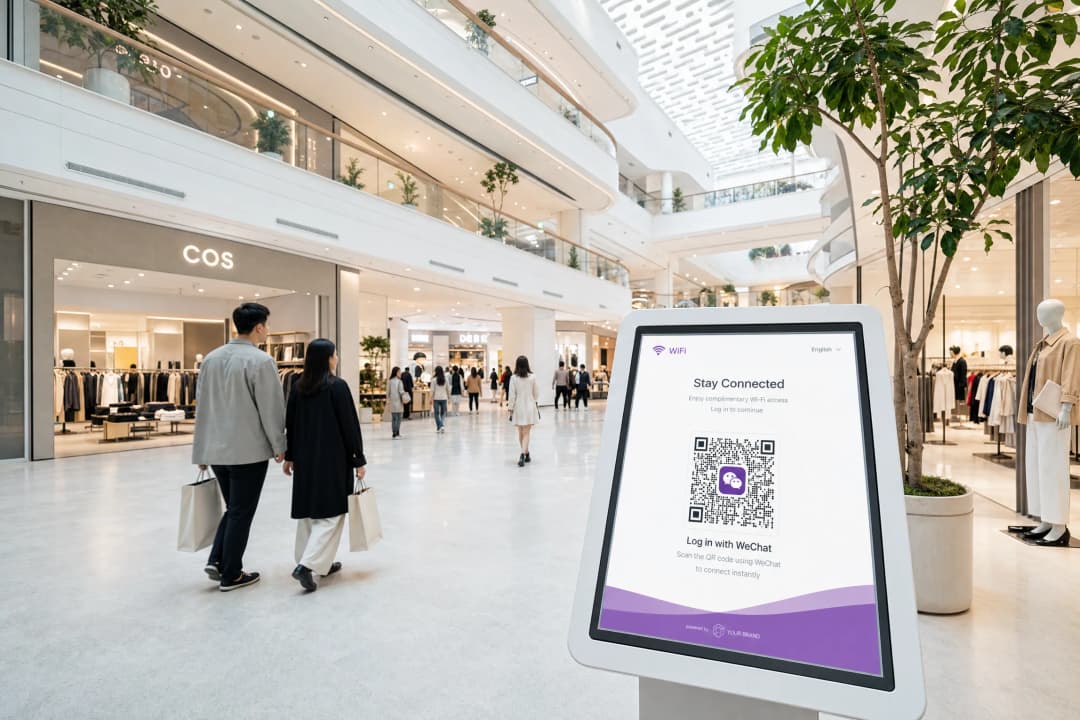
Un centro commerciale premium a Kuala Lumpur, con 12 milioni di utenti WeChat nella sola Malesia, aveva bisogno di un'esperienza di onboarding WiFi all'altezza delle aspettative digitali dei propri clienti. Il centro commerciale gestiva access point Cisco Meraki su una superficie di vendita di 180.000 metri quadrati.
La distribuzione ha utilizzato la piattaforma Guest WiFi di Purple come overlay cloud, con WeChat OAuth come metodo di autenticazione principale e l'OTP via SMS come alternativa. L'architettura indipendente dall'hardware di Purple ha gestito l'integrazione RADIUS CoA con Cisco Meraki senza richiedere sviluppo personalizzato.
Il centro commerciale ha registrato un aumento del 34% nelle sessioni WiFi avviate nel primo trimestre successivo alla distribuzione, attribuito alla riduzione degli ostacoli nel processo di onboarding per gli utenti WeChat. I dati di prima parte raccolti tramite i flussi di consenso snsapi_userinfo hanno consentito al team di marketing del centro commerciale di segmentare gli acquirenti in base alla città di provenienza per l'invio di campagne mirate.
Risoluzione dei problemi e mitigazione dei rischi
| Errore | Causa | Risoluzione |
|---|---|---|
| 40029 codice non valido | Mancata corrispondenza dell'URI di reindirizzamento o riutilizzo del codice | Verificare che gli URI registrati corrispondano esattamente; i codici sono monouso |
| 40163 codice scaduto | Scambio di token ritardato oltre i 5 minuti | Ridurre i tempi di elaborazione lato server; implementare la logica di ripetizione |
| Schermata vuota dopo l'autenticazione | RADIUS CoA non configurato o non funzionante | Verificare le impostazioni CoA del controller e le regole del firewall sulla porta UDP 3799 |
| La casualizzazione del MAC interrompe il flusso degli ospiti di ritorno | Casualizzazione del MAC di iOS/Android | Passare al tracciamento delle sessioni basato su OpenID; evitare l'identificazione basata esclusivamente sul MAC |
| snsapi_userinfo restituisce campi vuoti | L'utente ha impostato restrizioni sulla privacy di WeChat | Gestire i campi nulli in modo corretto; non richiedere i dati del profilo per l'accesso |
ROI e impatto aziendale
Il business case per l'autenticazione WeChat WiFi si basa su tre risultati misurabili.
Acquisizione di dati di prima parte. Ogni autenticazione snsapi_userinfo genera un profilo ospite verificato con dati demografici. Per un hotel da 200 camere che opera al 70% di occupazione con il 40% di ospiti cinesi, ciò rappresenta circa 20.000 nuovi profili verificati all'anno, ciascuno collegato a un'identità WeChat che supporta il re-engagement continuo.
Riduzione del carico di assistenza. Le difficoltà di accesso sono la causa principale delle chiamate di assistenza per il WiFi degli ospiti. Le strutture che aggiungono l'autenticazione WeChat alle opzioni esistenti segnalano costantemente una riduzione delle richieste relative al WiFi alla reception, liberando tempo del personale per interazioni a maggior valore.
Portata di marketing. Gli account ufficiali di WeChat consentono alle strutture di inviare notifiche ai follower. Un ospite che si autentica tramite il tuo account ufficiale può essere invitato a seguirlo, creando un canale di comunicazione diretta che opera all'interno dell'ecosistema di WeChat, dove i consumatori cinesi trascorrono in media 82 minuti al giorno (fonte: Walk the Chat).
Il piano Purple Engage estende ulteriormente questo aspetto, consentendo messaggi automatici post-visita, trigger di fidelizzazione e campagne segmentate create sulla base dei dati di prima parte raccolti al momento dell'autenticazione WiFi.
Definizioni chiave
Captive Portal
Un gateway di autenticazione basato sul web che intercetta il traffico HTTP da un dispositivo non autenticato e lo reindirizza a una pagina di login prima di concedere l'accesso alla rete.
Il meccanismo attraverso il quale l'autenticazione al WiFi ospiti viene presentata agli utenti. L'autenticazione WeChat OAuth è uno dei diversi metodi di autenticazione che un Captive Portal può offrire.
OAuth 2.0
Un protocollo di autorizzazione standard del settore che consente a un'applicazione terza (il Captive Portal) di ottenere un accesso limitato a un servizio web (WeChat) per conto di un utente, senza che quest'ultimo condivida la propria password con la terza parte.
Il framework sottostante che rende possibile l'accesso con WeChat. Il portale non vede mai le credenziali WeChat dell'utente; riceve solo un token che conferma che WeChat lo ha autenticato.
RADIUS CoA
Change of Authorisation (Modifica dell'Autorizzazione). Un meccanismo definito nella RFC 3576 che consente a un server RADIUS di modificare dinamicamente gli attributi di autorizzazione della sessione di un client di rete attivo, come ad esempio la modifica dell'assegnazione della VLAN.
Il meccanismo di imposizione di rete che traduce uno scambio WeChat OAuth andato a buon fine in un effettivo accesso alla rete. Senza CoA, l'ospite si autentica ma il controller non riceve l'istruzione di aprire la rete.
OpenID
Un identificatore univoco assegnato da WeChat a uno specifico utente per uno specifico account ufficiale o applicazione web. Rimane stabile tra le sessioni ma differisce da un account all'altro.
La chiave primaria utilizzata per identificare un ospite nel database di analisi del WiFi. Utilizza invece UnionID se gestisci più account ufficiali e hai bisogno di una risoluzione dell'identità tra account diversi.
snsapi_base
Un ambito WeChat OAuth che consente l'autenticazione invisibile, restituendo solo l'OpenID dell'utente senza mostrare alcuna richiesta di consenso.
Da utilizzare per gli ospiti che ritornano o per ambienti ad alto rendimento dove la velocità di connessione è la priorità. Non restituisce dati demografici oltre all'OpenID.
snsapi_userinfo
Un ambito WeChat OAuth che restituisce l'OpenID dell'utente, il nickname, l'immagine del profilo, il genere, la lingua e la città, richiedendo una schermata di consenso esplicito da parte dell'utente.
Da utilizzare per la registrazione degli ospiti al primo accesso per creare un profilo di dati proprietari. Deve essere abbinato a un livello di consenso conforme a GDPR e PIPL.
PIPL
Personal Information Protection Law (Legge sulla protezione delle informazioni personali). La legislazione completa sulla privacy dei dati in Cina, in vigore da novembre 2021, che disciplina le modalità di raccolta, trattamento e trasferimento dei dati personali dei cittadini cinesi.
Si applica a qualsiasi sede che raccolga dati da cittadini cinesi tramite WeChat OAuth, indipendentemente da dove si trovi la sede. Richiede un consenso esplicito, la limitazione delle finalità e la minimizzazione dei dati.
AppSecret
Una chiave crittografica riservata emessa da WeChat che autentica la tua applicazione quando questa chiama l'API di scambio token di WeChat.
Deve essere memorizzato esclusivamente sul lato server. L'esposizione nel codice lato client consente a chiunque di impersonare la tua applicazione ed effettuare chiamate API non autorizzate a WeChat.
VLAN
Virtual Local Area Network (Rete Locale Virtuale). Un segmento di rete logico che isola il traffico a livello di collegamento dati, consentendo a una singola rete fisica di trasportare più flussi di traffico isolati.
Utilizzato nelle implementazioni di Captive Portal per separare i dispositivi non autenticati (VLAN walled garden) dagli ospiti autenticati (VLAN ospiti). Il RADIUS CoA sposta un dispositivo tra le VLAN a seguito di un'autenticazione andata a buon fine.
UnionID
Un identificatore WeChat che rimane coerente per un determinato utente in tutti gli account ufficiali e le applicazioni web collegati alla stessa registrazione Open Platform.
Essenziale per catene alberghiere, gruppi di vendita al dettaglio e gestori di più sedi che hanno la necessità di riconoscere lo stesso ospite in diverse proprietà, ciascuna con il proprio account ufficiale.
Esempi pratici
Un hotel di lusso da 200 camere a Singapore utilizza controller HPE Aruba e serve un volume elevato di viaggiatori d'affari cinesi. Desiderano raccogliere dati demografici dai clienti che soggiornano per la prima volta e garantire che i clienti abituali si connettano automaticamente senza visualizzare nuovamente il portale. Come devono configurare l'integrazione di WeChat OAuth?
Passo 1: Registrare un account di servizio sulla WeChat Official Accounts Platform (mp.weixin.qq.com) per gestire gli ospiti che accedono al portale all'interno del browser in-app di WeChat. Registrare un'applicazione sito web sulla WeChat Open Platform (open.weixin.qq.com) per gli ospiti che utilizzano browser mobili standard.
Passo 2: Configurare il Captive Portal per rilevare la stringa user agent MicroMessenger. Offrire il flusso OAuth di Official Accounts per gli utenti del browser in-app e il flusso con codice QR di Open Platform per gli utenti del browser standard.
Passo 3: Per le prime connessioni (nessun OpenID esistente nel database), richiedere l'ambito snsapi_userinfo. Presentare una schermata di consenso conforme alla PIPL prima del reindirizzamento OAuth. Memorizzare l'OpenID restituito, il nickname, la città e il genere nel database dei profili degli ospiti.
Passo 4: Per i clienti abituali (l'OpenID esiste già nel database), richiedere l'ambito snsapi_base. Questo esegue l'autenticazione in modo silenzioso, senza alcun prompt visibile all'utente.
Passo 5: Configurare il controller HPE Aruba per RADIUS CoA sulla porta UDP 3799. Dopo aver completato con successo l'OAuth, il server del portale invia una richiesta CoA per promuovere il dispositivo dal walled garden VLAN alla guest VLAN.
Passo 6: Implementare la registrazione dell'indirizzo MAC insieme all'OpenID per gestire il rilevamento dei clienti abituali. Si noti che la randomizzazione del MAC richiede l'OpenID come identificatore primario, non il solo indirizzo MAC.
Il team IT di una catena di negozi segnala un alto tasso di fallimento per gli accessi WeChat WiFi in tre centri commerciali. Gli utenti si autenticano in WeChat ma vengono rimandati alla pagina del portale con un errore. I log del portale mostrano l'errore 40029. Qual è la causa probabile e come si risolve?
L'errore 40029 significa che WeChat ha rifiutato il codice di autorizzazione durante lo scambio dei token. Le due cause più comuni sono una mancata corrispondenza dell'URI di reindirizzamento e il riutilizzo del codice.
Passo 1: Accedere alla console per sviluppatori di WeChat sia per la Official Accounts Platform che per la Open Platform. Passare alle impostazioni OAuth ed elencare tutti gli URI di reindirizzamento registrati.
Passo 2: Confrontare questi dati con gli URI di reindirizzamento effettivi utilizzati dal server del portale in produzione in tutte e tre le sedi. Verificare la presenza di differenze nei sottodomini (portal.brand.com rispetto a brand.com), nei protocolli (HTTP rispetto a HTTPS) e nei percorsi (/callback rispetto a /wechat/callback).
Passo 3: Registrare ogni variante nella console di WeChat. WeChat esegue una convalida a corrispondenza esatta, non una corrispondenza di prefisso.
Passo 4: Se gli URI corrispondono, verificare se il server del portale sta tentando di riutilizzare i codici di autorizzazione. I codici WeChat sono monouso e scadono dopo cinque minuti. Se il server tenta nuovamente lo scambio di token con lo stesso codice, riceverà l'errore 40029 al secondo tentativo.
Passo 5: Implementare l'idempotenza nell'endpoint di scambio dei token per prevenire richieste duplicate.
Domande di esercitazione
Q1. Stai implementando un Captive Portal per uno stadio da 60.000 posti che ospita eventi internazionali con una significativa base di tifosi cinesi. La priorità è connettere online tutti i partecipanti entro i primi 15 minuti dall'apertura dei cancelli per ridurre la congestione della rete cellulare. La raccolta dei dati di marketing è un obiettivo secondario. Quale scope di WeChat OAuth dovresti configurare e perché?
Suggerimento: Considera l'impatto su un server del portale di una schermata di consenso mostrata a 15.000 utenti simultanei.
Visualizza risposta modello
Configura lo scope snsapi_base. Questo abilita l'autenticazione silenziosa senza richiedere il consenso dell'utente, offrendo l'esperienza di onboarding più rapida possibile. Su scala di uno stadio, una schermata di consenso aggiunge un attrito che si moltiplica su migliaia di connessioni simultanee e può causare picchi di carico sul server del portale. Lo scope snsapi_base restituisce solo l'OpenID, che è sufficiente per registrare la sessione e identificare i tifosi che ritornano. Per i nuovi tifosi di cui desideri raccogliere dati demografici, puoi richiedere il completamento del profilo tramite un sondaggio post-connessione anziché al momento dell'autenticazione.
Q2. Un network architect del tuo team propone di memorizzare l'AppSecret di WeChat nel JavaScript lato client del Captive Portal per ridurre i passaggi sul server effettuando la chiamata di scambio dei token direttamente dal browser. Spiega perché questo approccio rappresenta una grave vulnerabilità di sicurezza e quale sia l'architettura corretta.
Suggerimento: Considera chi può visualizzare il codice lato client e cosa consente di fare l'AppSecret.
Visualizza risposta modello
La memorizzazione dell'AppSecret nel JavaScript lato client lo espone a chiunque visualizzi il codice sorgente della pagina o intercetti il traffico di rete. L'AppSecret autentica la tua applicazione presso l'API di WeChat. Con esso, un malintenzionato può impersonare la tua applicazione, chiamare l'endpoint di scambio dei token di WeChat con qualsiasi codice di autorizzazione valido, recuperare gli OpenID e i dati del profilo degli utenti, e potenzialmente esaurire i limiti di utilizzo della tua API. L'architettura corretta prevede un endpoint di scambio dei token lato server. Il browser riceve il codice di autorizzazione da WeChat e lo passa al tuo server. Il tuo server, utilizzando l'AppSecret memorizzato in una variabile d'ambiente o in un gestore di segreti, scambia il codice con un token e restituisce solo i dati necessari al portale. L'AppSecret non lascia mai il tuo server.
Q3. La tua struttura gestisce tre hotel in città diverse, ognuno con il proprio account ufficiale WeChat. Un membro del programma fedeltà che si è autenticato in tutte e tre le strutture ha tre diversi OpenID nel tuo database. Come risolvi questa situazione per ottenere un'unica identità ospite?
Suggerimento: WeChat fornisce un meccanismo per la risoluzione dell'identità cross-account che richiede una configurazione specifica della piattaforma.
Visualizza risposta modello
Implementa il meccanismo UnionID di WeChat. Collega tutti e tre gli account ufficiali alla stessa registrazione della Open Platform su open.weixin.qq.com. Una volta collegati, WeChat restituisce un UnionID insieme all'OpenID nella risposta snsapi_userinfo. L'UnionID è coerente per un determinato utente in tutti gli account collegati alla stessa registrazione Open Platform. Migra il tuo database per utilizzare l'UnionID come identificatore principale dell'ospite per i record multi-struttura, conservando l'OpenID associato al singolo account per le chiamate API specifiche di quest'ultimo. Per gli ospiti che si sono autenticati prima dell'implementazione dell'UnionID, avvia una nuova autenticazione con snsapi_userinfo alla loro prossima visita per acquisire l'UnionID.
Q4. Dopo aver implementato l'autenticazione WeChat WiFi in un punto vendita dotato di access point Cisco Meraki, gli ospiti riferiscono di aver completato con successo il login a WeChat ma di essere stati reindirizzati alla pagina del portale senza poter navigare in internet. I log del server del portale mostrano che il recupero del token è andato a buon fine. Qual è la causa più probabile e come si esegue la diagnosi?
Suggerimento: Il portale ha verificato l'identità. Che cosa non è ancora successo?
Visualizza risposta modello
Il RADIUS Change of Authorisation (CoA) non si sta completando. Il server del portale ha verificato l'identità dell'ospite tramite WeChat OAuth ma non ha istruito con successo il controller Cisco Meraki a spostare il dispositivo dalla VLAN walled garden alla VLAN ospiti. Esegui la diagnosi verificando: (1) se il controller Meraki ha il RADIUS CoA abilitato e se l'IP del server del portale è elencato come client CoA autorizzato; (2) se la porta UDP 3799 è aperta tra il server del portale e il controller; (3) i log del server del portale per individuare errori o timeout della richiesta CoA; e (4) se il shared secret configurato su entrambi i lati corrisponde. Se il CoA non è supportato nel tuo livello di licenza Meraki, il MAC address bypass rappresenta l'alternativa di ripiego, sebbene comporti il rischio di randomizzazione del MAC evidenziato nella guida.
Continua a leggere questa serie
Ubiquiti UniFi guest portal non reindirizza: cause e soluzioni
Questa guida isola un errore di reindirizzamento del portale ospiti UniFi analizzando in sequenza lo stato dell'ospite, il reindirizzamento, il percorso di pre-autorizzazione e l'autorizzazione del controller. Fornisce ai team IT locali un metodo collaudato per risolvere i dubbi tra rete ospiti e Hotspot, i passaggi ai portali esterni, i requisiti correnti degli account UniFi OS e i test di isolamento DNS.
Cisco Meraki splash page non funzionante: un diagramma di flusso per la risoluzione dei problemi
Questa guida pratica per il secondo giorno isola i punti in cui un flusso splash Cisco Meraki ha fallito: autorizzazione del client, avvio del reindirizzamento HTTP, raggiungibilità del walled garden o sign-on RADIUS. Fornisce ai team IT delle sedi un percorso di verifica controllato, in modo da poter ripristinare il Guest WiFi senza apportare modifiche generiche a un'intera infrastruttura attiva.
Guida alla configurazione del WiFi ospiti aziendale: segmentazione VLAN, sicurezza e Captive Portals
Questa guida tecnica mostra ai team IT come configurare il WiFi ospiti come servizio di accesso internet controllato, utilizzando la segmentazione VLAN, le policy del firewall e un Captive Portal. Spiega inoltre come i moduli di registrazione e i controlli di onboarding di Purple supportino un'esperienza per i visitatori proporzionata senza indebolire il perimetro che circonda il personale, i pagamenti e i sistemi operativi.
Hai domande sulla tua configurazione specifica?
Il nostro team collabora con gestori di sedi, responsabili IT e ingegneri di rete in 80.000 sedi. Prenota una chiamata di 20 minuti e ti mostreremo come altri professionisti come te hanno risolto il problema.