
La guida aziendale a SCEP: implementare il Simple Certificate Enrollment Protocol per la sicurezza automatizzata del WiFi nei campus
Questa guida di riferimento tecnico fornisce un modello architetturale definitivo e una strategia di implementazione passo-passo per l'implementazione dei certificati WiFi aziendali tramite SCEP. Copre le differenze cruciali tra SCEP e PKCS, l'esatta sequenza di implementazione necessaria per il successo e le strategie reali di mitigazione del rischio per i leader IT.
Ascolta questa guida
Visualizza trascrizione del podcast

Sintesi esecutiva
Per le sedi aziendali, che si tratti di un vivace ambiente ricettivo, di un'operazione di vendita al dettaglio multi-sito o di un moderno campus aziendale, affidarsi a chiavi precondivise o a Captive Portal di base per il WiFi del personale rappresenta una vulnerabilità di sicurezza e un collo di bottiglia operativo. La moderna architettura di rete richiede l'autenticazione 802.1X tramite EAP-TLS, garantendo che ogni dispositivo sia verificato crittograficamente prima di accedere alla rete.
La sfida risiede nella distribuzione: come distribuire certificati client univoci a migliaia di dispositivi Windows, iOS e Android senza sommergere l'helpdesk di ticket di supporto? Microsoft Intune e altre piattaforme MDM risolvono questo problema attraverso la gestione automatizzata del ciclo di vita dei certificati. Implementando i profili Simple Certificate Enrollment Protocol (SCEP), i team IT distribuiscono silenziosamente i certificati root e client attendibili agli endpoint gestiti.
Questa guida fornisce un modello architetturale definitivo e una strategia di implementazione passo-passo per l'implementazione dei certificati WiFi aziendali. Esploriamo le differenze cruciali tra SCEP e PKCS, dettagliamo l'esatta sequenza di implementazione necessaria per il successo e delineiamo strategie reali di mitigazione del rischio per garantire che il tuo Guest WiFi e le reti aziendali rimangano sicuri e performanti.
Ascolta il briefing
Approfondimento tecnico: architettura SCEP
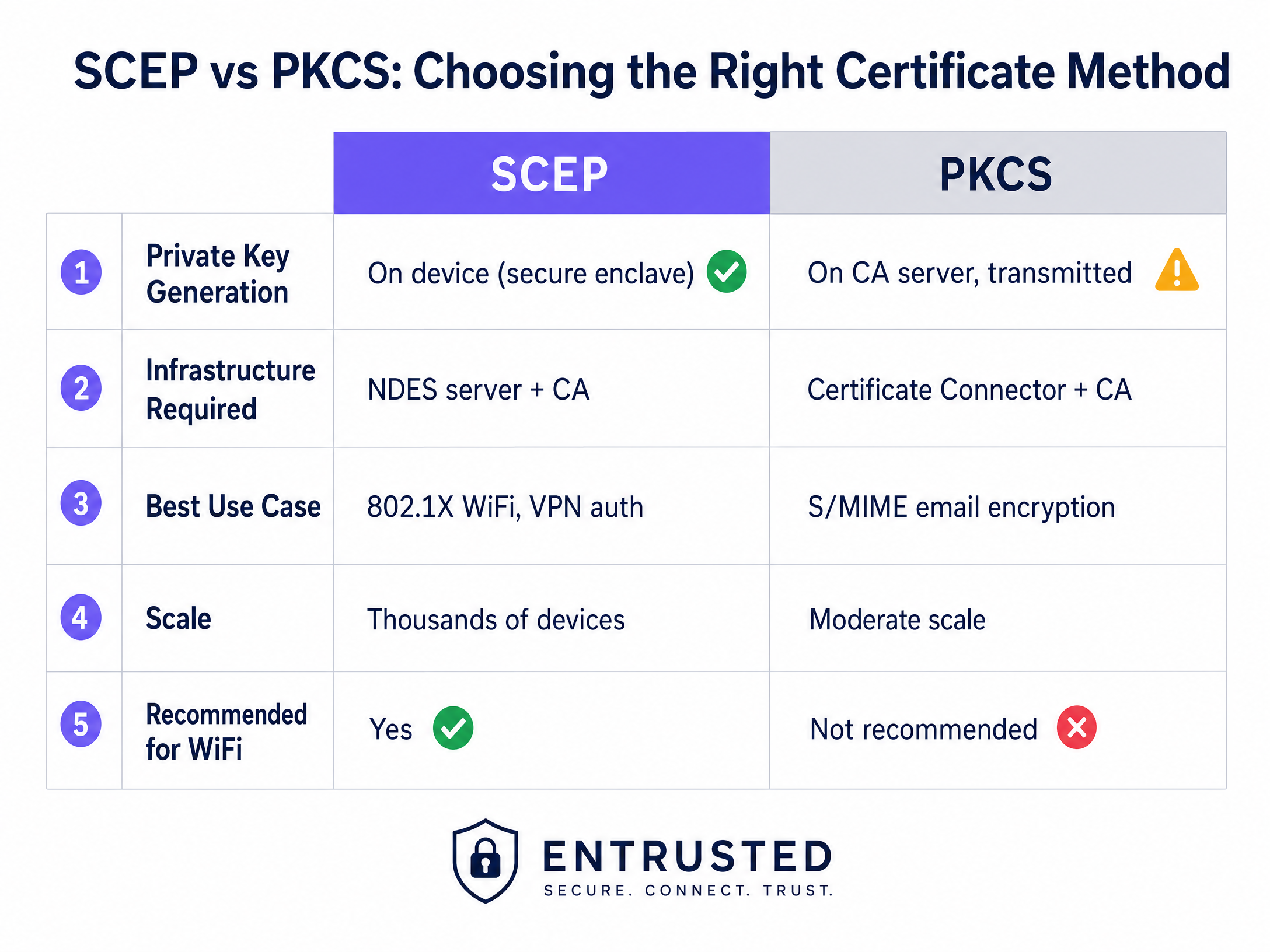
Quando si progetta la strategia di implementazione dei certificati WiFi aziendali, la prima decisione architetturale riguarda la scelta del meccanismo di distribuzione dei certificati. Le piattaforme di gestione dei dispositivi mobili supportano sia SCEP e PKCS, ma funzionano in modo fondamentalmente diverso.
Simple Certificate Enrollment Protocol (SCEP)
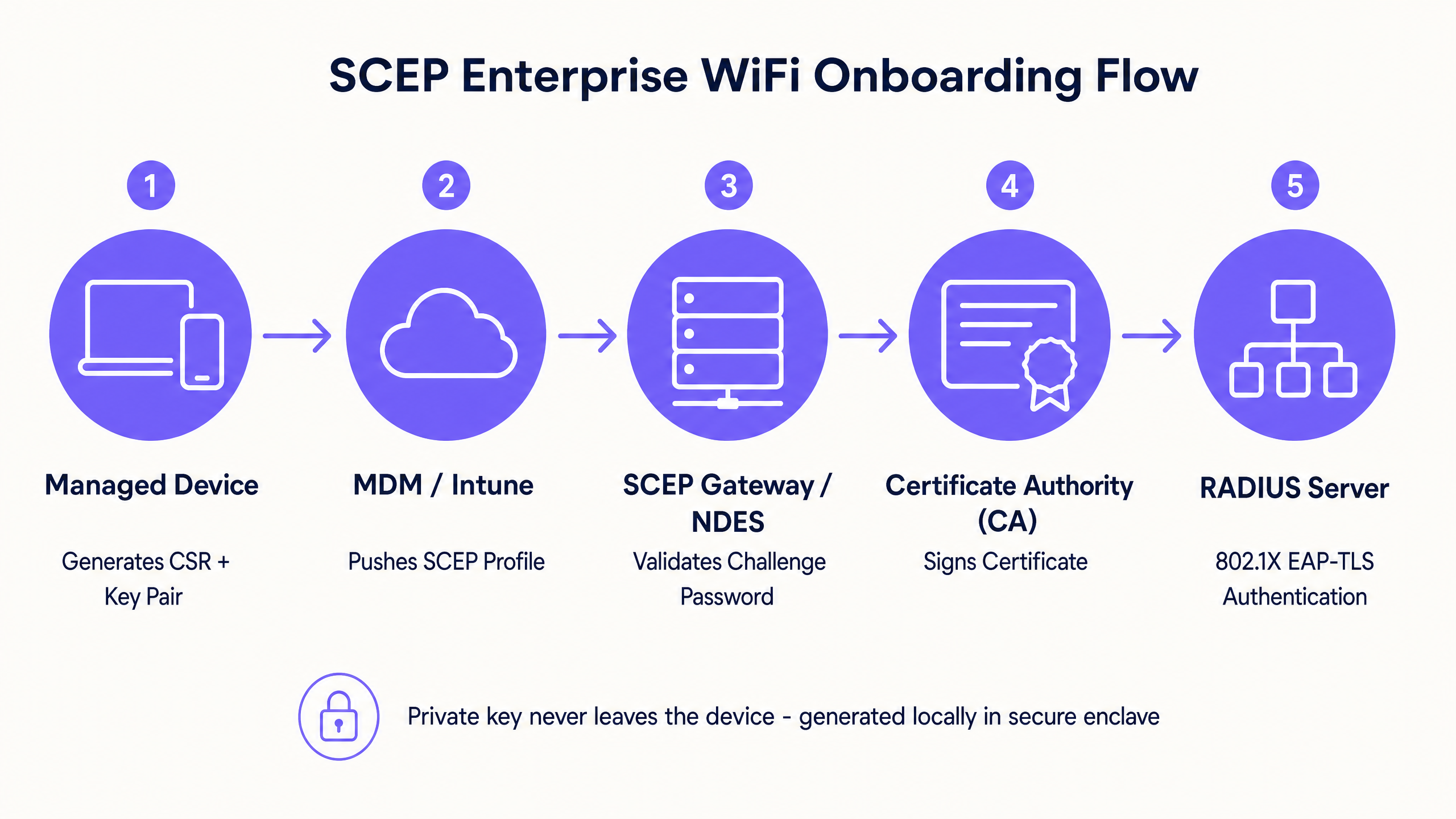
SCEP è lo standard di settore per la registrazione dei dispositivi aziendali. In un flusso di lavoro SCEP, il servizio di gestione indica all'endpoint di generare la propria coppia di chiavi privata e pubblica. Il dispositivo crea una Certificate Signing Request (CSR) e la invia tramite un server Network Device Enrollment Service (NDES) alla Certificate Authority (CA). La CA firma la richiesta e restituisce il certificato pubblico al dispositivo.
Il vantaggio cruciale in termini di sicurezza di SCEP è che la chiave privata non lascia mai il dispositivo. Viene generata localmente, memorizzata nell'enclave sicura del dispositivo (come il TPM su Windows o il Secure Enclave su iOS) e non viene mai trasmessa sulla rete. Questo rende SCEP l'approccio fortemente raccomandato per l'autenticazione 802.1X.
Public Key Cryptography Standards (PKCS)
Al contrario, con PKCS, la Certificate Authority genera centralmente sia la chiave pubblica che quella privata. Il connettore del certificato esporta in modo sicuro questa coppia di chiavi e la distribuisce al dispositivo di destinazione.
Sebbene PKCS elimini la necessità di implementare e mantenere un server NDES, semplificando l'impronta infrastrutturale, introduce un rischio teorico di sicurezza poiché la chiave privata viene trasmessa sulla rete. PKCS è generalmente più adatto per casi d'uso in cui è richiesto il deposito delle chiavi (key escrow), come la crittografia delle e-mail S/MIME, piuttosto che per l'autenticazione di rete.
Guida all'implementazione: la sequenza di distribuzione
La corretta configurazione di un profilo WiFi gestito per 802.1X richiede il rigoroso rispetto di una specifica sequenza di distribuzione. Le dipendenze del profilo impongono che l'attendibilità debba essere stabilita prima di poter configurare l'autenticazione.
Passo 1: Distribuzione del profilo del certificato root attendibile
Prima che qualsiasi dispositivo possa richiedere un certificato client o considerare attendibile il server RADIUS, deve considerare attendibile la Certificate Authority emittente.
- Esporta il certificato della CA radice (Root CA) e gli eventuali certificati della CA intermedia come file .cer.
- Nella console MDM, crea un nuovo profilo di configurazione.
- Seleziona la piattaforma di destinazione e scegli il tipo di profilo del certificato attendibile.
- Carica il file .cer e distribuisci questo profilo ai gruppi di dispositivi di destinazione.
Passo 2: Configurazione del profilo del certificato SCEP
Una volta stabilita l'attendibilità, configura il profilo SCEP per indicare ai dispositivi come ottenere il proprio certificato client.
- Crea un nuovo profilo di configurazione e seleziona il certificato SCEP.
- Configura il formato del nome del soggetto (subject name). Per l'autenticazione guidata dall'utente, lo standard è
CN={{UserPrincipalName}}. Per l'autenticazione del dispositivo, usaCN={{AAD_Device_ID}}. - Imposta l'utilizzo della chiave (key usage) su firma digitale e cifratura della chiave (key encipherment).
- In utilizzo avanzato della chiave (extended key usage), specifica l'autenticazione client (OID: 1.3.6.1.5.5.7.3.2).
- Collega questo profilo al profilo del certificato root attendibile creato al Passo 1.
- Fornisci l'URL esterno del gateway SCEP o del server NDES.
Passo 3: Distribuzione del profilo WiFi 802.1X
L'ultimo passaggio consiste nell'inviare la configurazione WiFi che associa i certificati all'SSID di rete.
- Crea un profilo di configurazione WiFi.
- Inserisci il nome della rete esattamente come viene trasmesso dai tuoi punti di accesso wireless (access point).
- Seleziona WPA2-Enterprise o WPA3-Enterprise come tipo di sicurezza.
- Imposta il tipo di EAP su EAP-TLS.
- Nelle impostazioni di autenticazgs, selezionare il profilo del certificato SCEP creato al Passaggio 2 come certificato di autenticazione client.
- Specificare il certificato root attendibile per la convalida del server per garantire che il dispositivo si connetta solo al server RADIUS legittimo.
Best practice e standard di settore
Quando si implementa la distribuzione dei certificati SCEP, attenersi alle seguenti best practice indipendenti dal fornitore per garantire conformità e affidabilità.
Posizionamento e sicurezza del gateway SCEP
Il gateway SCEP deve essere accessibile da Internet per consentire ai dispositivi remoti di eseguire il provisioning dei certificati prima di arrivare in sede. Esporre un server interno direttamente a Internet rappresenta un rischio di sicurezza significativo. Pubblicare l'URL SCEP utilizzando un proxy applicativo o un reverse proxy. Ciò fornisce un accesso remoto sicuro senza aprire porte in entrata nel firewall e consente di applicare criteri di accesso condizionale al flusso di registrazione.
Controllo RADIUS e CRL
La distribuzione dei certificati è solo metà dell'equazione di sicurezza; la revoca è altrettanto fondamentale. Se un dipendente viene licenziato, la disattivazione del suo account di directory potrebbe non revocare immediatamente il suo accesso WiFi se il suo certificato client rimane valido e il server RADIUS non controlla rigorosamente la Certificate Revocation List (CRL).
Configurare il server RADIUS per imporre un controllo CRL rigoroso. Assicurarsi che i punti di distribuzione CRL siano altamente disponibili; se il server RADIUS non riesce a raggiungere la CRL, l'autenticazione fallirà, causando un'interruzione diffusa del servizio.
Per considerazioni più ampie sulla connettività moderna, consultare la nostra guida su Gestione della larghezza di banda: una guida pratica per il 2026 .
Risoluzione dei problemi e mitigazione dei rischi
Anche con una pianificazione meticolosa, la distribuzione dei certificati può riscontrare problemi. Di seguito sono riportati i casi di errore più comuni e le relative strategie di mitigazione.
Impossibile applicare il profilo WiFi
Il dispositivo riceve i certificati root attendibile e SCEP, ma il profilo WiFi viene visualizzato come errore o non applicabile nella console MDM. Questo è quasi sempre causato da una mancata corrispondenza nel targeting dei gruppi. Se il profilo SCEP è assegnato a un gruppo di utenti, ma il profilo WiFi è assegnato a un gruppo di dispositivi, l'MDM non può risolvere la dipendenza. Verificare le assegnazioni. Assicurarsi che i profili root attendibile, SCEP e WiFi siano tutti distribuiti esattamente allo stesso gruppo.
Errori Gateway 403 Forbidden
I dispositivi non riescono a recuperare il certificato SCEP e i log del gateway mostrano errori HTTP 403. L'account di servizio del connettore non dispone delle autorizzazioni necessarie sul modello di certificato, oppure il filtraggio URL sul firewall sta bloccando i parametri specifici della stringa di query utilizzati da SCEP. Verificare che l'account del connettore disponga delle autorizzazioni di lettura e registrazione sul modello CA. Controllare i log del firewall per assicurarsi che gli URL contenenti ?operation=GetCACaps non vengano bloccati.
ROI e impatto aziendale
La transizione alla distribuzione dei certificati 802.1X basata su SCEP offre ritorni misurabili in termini di sicurezza e operazioni.
- Riduzione dei ticket di helpdesk: Il WiFi basato su password genera un volume significativo di ticket di supporto relativi a scadenze delle password, blocchi e refusi. L'autenticazione basata su certificato è invisibile all'utente, riducendo in genere il volume di helpdesk relativo al WiFi del 70%.
- Miglioramento della postura di sicurezza: EAP-TLS elimina il rischio di raccolta delle credenziali e di attacchi Man-in-the-Middle. Questo è fondamentale per la conformità a framework come PCI DSS e GDPR, in particolare negli ambienti Retail e Sanità .
- Onboarding fluido: L'integrazione della distribuzione dei certificati con i flussi di lavoro MDM esistenti garantisce un'esperienza di provisioning unificata e zero-touch fin dal primo giorno.
Mentre SCEP protegge i dispositivi aziendali gestiti, le reti per ospiti e visitatori richiedono un approccio diverso. Per i dispositivi non gestiti, un Captive Portal con login social o verifica tramite SMS alimenta un livello di dati di prima parte, offrendo insight utili. Esplora la nostra piattaforma di WiFi Analytics per scoprire come questi dati generano entrate.
Definizioni chiave
SCEP (Simple Certificate Enrollment Protocol)
A protocol that allows devices to request digital certificates from a Certificate Authority, where the private key is generated and stored securely on the device itself.
The recommended method for deploying WiFi authentication certificates due to its high security and scalability across enterprise fleets.
PKCS (Public Key Cryptography Standards)
A set of standards where both the public and private keys are generated by the Certificate Authority and then securely delivered to the endpoint.
Often used for S/MIME email encryption, but less ideal for WiFi authentication due to the network transmission of the private key.
NDES (Network Device Enrollment Service)
A Microsoft Windows Server role that acts as a bridge, allowing devices without domain credentials to obtain certificates via SCEP.
A required infrastructure component when implementing SCEP certificate deployment with on-premises Microsoft PKI.
EAP-TLS (Extensible Authentication Protocol - Transport Layer Security)
The most secure 802.1X authentication method, requiring both the server and the client to present valid digital certificates.
The target authentication protocol that MDM WiFi and certificate profiles are designed to enable, eliminating password-based access.
CRL (Certificate Revocation List)
A list published by the Certificate Authority containing the serial numbers of certificates that have been revoked before their scheduled expiration date.
RADIUS servers must check the CRL during authentication to ensure terminated employees cannot access the network using a previously valid certificate.
CSR (Certificate Signing Request)
A block of encoded text given to a Certificate Authority when applying for an SSL/TLS certificate, containing the public key and identity information.
Generated locally by the managed device during the SCEP flow to request its unique identity credential.
802.1X
An IEEE standard for port-based network access control that provides an authentication mechanism to devices wishing to attach to a LAN or WLAN.
The foundational framework that enforces the requirement for EAP-TLS certificate validation before granting network access.
RADIUS (Remote Authentication Dial-In User Service)
A networking protocol that provides centralized authentication, authorization, and accounting management for users who connect and use a network service.
The server that evaluates the client certificate against the CA and CRL to make the final allow or deny decision for WiFi access.
Esempi pratici
A 150-property hotel group needs to secure their staff network across a mix of Windows laptops for front-of-house, iOS devices for housekeeping, and Android tablets for restaurant point-of-sale. They currently use WPA2-Personal with a shared password rotated quarterly, generating massive helpdesk volume.
The hotel group deploys three Intune profiles in sequence to a unified device group. First, a Trusted Root Certificate profile establishes trust with the corporate CA. Second, a SCEP Certificate profile instructs devices to request a unique client certificate. Third, a WiFi profile configures the corporate SSID with WPA3-Enterprise and EAP-TLS, pointing to the SCEP certificate for authentication. The RADIUS server enforces strict CRL checking to revoke access instantly upon employee termination.
A fashion retailer with 200 stores requires PCI DSS compliance for their Windows-based point-of-sale systems managed through Intune. They must ensure strong authentication and strict network segmentation for any device handling cardholder data.
The retailer implements SCEP-based EAP-TLS for device-level authentication on the staff SSID. The RADIUS policy drives VLAN assignment, placing authenticated POS terminals onto a strictly isolated, PCI-scoped VLAN automatically. Guest WiFi is handled on a completely separate SSID with its own captive portal authentication flow, ensuring the two networks never intersect.
Domande di esercitazione
Q1. Your Intune deployment shows the Trusted Root and SCEP profiles successfully applied to a user's laptop, but the WiFi profile shows an 'Error' state. The user cannot connect to the corporate SSID. What is the most likely architectural cause?
Suggerimento: Consider how MDM platforms resolve dependencies between related configuration profiles.
Visualizza risposta modello
A group targeting mismatch. The SCEP profile is likely assigned to a User group, while the WiFi profile is assigned to a Device group (or vice versa). Intune cannot resolve the dependency across different group types, causing the WiFi profile deployment to fail. Audit the assignments and ensure all three profiles target the exact same Azure AD group.
Q2. A newly acquired subsidiary requires 802.1X authentication for their staff devices. Their security team mandates that private keys must never traverse the network and must be generated within the hardware TPM of the endpoint. Which certificate deployment method must you use?
Suggerimento: Compare where the private key is generated in the SCEP workflow versus the PKCS workflow.
Visualizza risposta modello
You must use SCEP (Simple Certificate Enrollment Protocol). In a SCEP workflow, the device generates its own private and public key pair locally within its secure enclave (TPM) and only sends a Certificate Signing Request (CSR) across the network. PKCS generates the private key centrally on the CA and transmits it over the network, which violates the security team's mandate.
Q3. An employee is terminated and their Active Directory account is disabled. However, their laptop remains connected to the corporate WiFi network for several hours before losing access. How do you resolve this security gap?
Suggerimento: Disabling an account does not invalidate an existing certificate. What mechanism does the RADIUS server use to check certificate validity?
Visualizza risposta modello
You must configure the RADIUS server to enforce strict Certificate Revocation List (CRL) checking. When an employee is terminated, their certificate must be explicitly revoked in the Certificate Authority. The RADIUS server will then check the CRL during the next authentication cycle and immediately deny access, regardless of the Active Directory account status.
Continua a leggere questa serie
Perché il mio WiFi per gli ospiti non si connette? Risoluzione dei problemi del Captive Portal
Questa guida di riferimento tecnico autorevole spiega i meccanismi alla base del rilevamento del Captive Portal e descrive in dettaglio le sei principali modalità di errore che impediscono la connessione del WiFi per gli ospiti. Fornisce ai responsabili IT e agli architetti di rete un framework pratico di risoluzione dei problemi per risolvere i problemi di reindirizzamento HTTP, i conflitti DNS e le sfide di randomizzazione MAC.
Come implementare SCEP per la registrazione automatizzata dei certificati WiFi
Questa guida spiega come implementare SCEP (Simple Certificate Enrollment Protocol) per la registrazione automatizzata dei certificati WiFi nelle sedi aziendali. Copre l'intero progetto architetturale - dalla progettazione PKI e integrazione MDM alla sequenza di implementazione obbligatoria in tre fasi - e mostra ai responsabili IT e agli architetti di rete come eliminare le credenziali condivise, automatizzare la gestione del ciclo di vita dei certificati e soddisfare i requisiti PCI DSS e GDPR su scala.
GDPR e Guest WiFi: Guida alla conformità per i responsabili marketing e IT delle strutture
Questa guida fornisce ai manager IT e ai gestori delle strutture un framework pratico per garantire che i servizi Guest WiFi siano pienamente conformi al GDPR. Copre l'architettura tecnica, i meccanismi di consenso, la conservazione dei dati e come trasformare la conformità in un asset sicuro di dati di prima parte.