
SCEP 企业指南:部署简单证书注册协议以实现自动化校园 WiFi 安全
本技术参考指南为使用 SCEP 的企业 WiFi 证书部署提供了权威的架构蓝图和逐步实施策略。它涵盖了 SCEP 与 PKCS 之间的关键区别、成功部署所需的精确步骤顺序,以及面向 IT 领导者的实际风险规避策略。
收听本指南
查看播客转录

执行摘要
对于企业场所而言,无论是繁忙的酒店环境、多网点零售业务,还是现代企业园区,依靠预共享密钥或基础 Captive Portal 来提供员工 WiFi 都是一种安全漏洞和运营瓶颈。现代网络架构要求使用 EAP-TLS 进行 802.1X 认证,以确保每个设备在访问网络前都经过加密验证。
挑战在于分发:如何向数千台 Windows、iOS 和 Android 设备部署唯一的客户端证书,而又不会让您的服务台淹没在支持工单中?Microsoft Intune 和其他 MDM 平台通过自动化证书生命周期管理解决了这一问题。通过部署简单证书注册协议 (SCEP) 配置文件,IT 团队可以将受信任的根证书和客户端证书静默推送到托管终端。
本指南为企业 WiFi 证书部署提供了权威的架构蓝图和逐步实施策略。我们将探讨 SCEP 与 PKCS 之间的关键区别,详细介绍成功部署所需的精确步骤顺序,并概述实际的风险规避策略,以确保您的 Guest WiFi 和企业网络保持安全与高效。
收听简报
技术深挖:SCEP 架构
在设计企业 WiFi 证书部署策略时,首要的架构决策是选择证书交付机制。移动设备管理平台同时支持 SCEP 和 PKCS,但它们的运行机制根本不同。
简单证书注册协议 (SCEP)
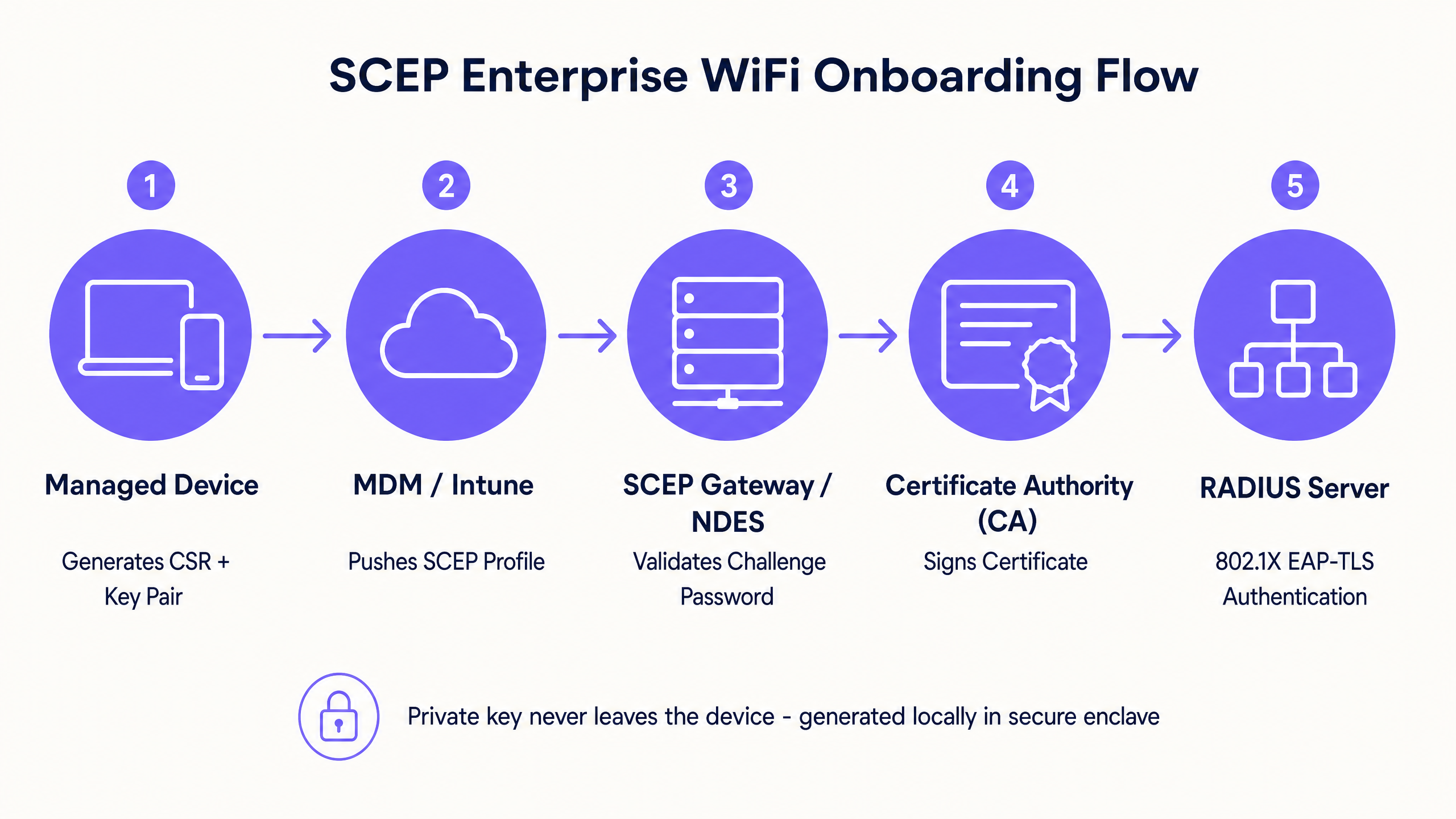
SCEP 是企业设备注册的行业标准。在 SCEP 工作流中,管理服务指示终端生成自己的私钥和公钥对。设备创建证书签名请求 (CSR),并通过网络设备注册服务 (NDES) 服务器将其发送到您的证书颁发机构 (CA)。CA 对请求进行签名,并将公钥证书返回给设备。
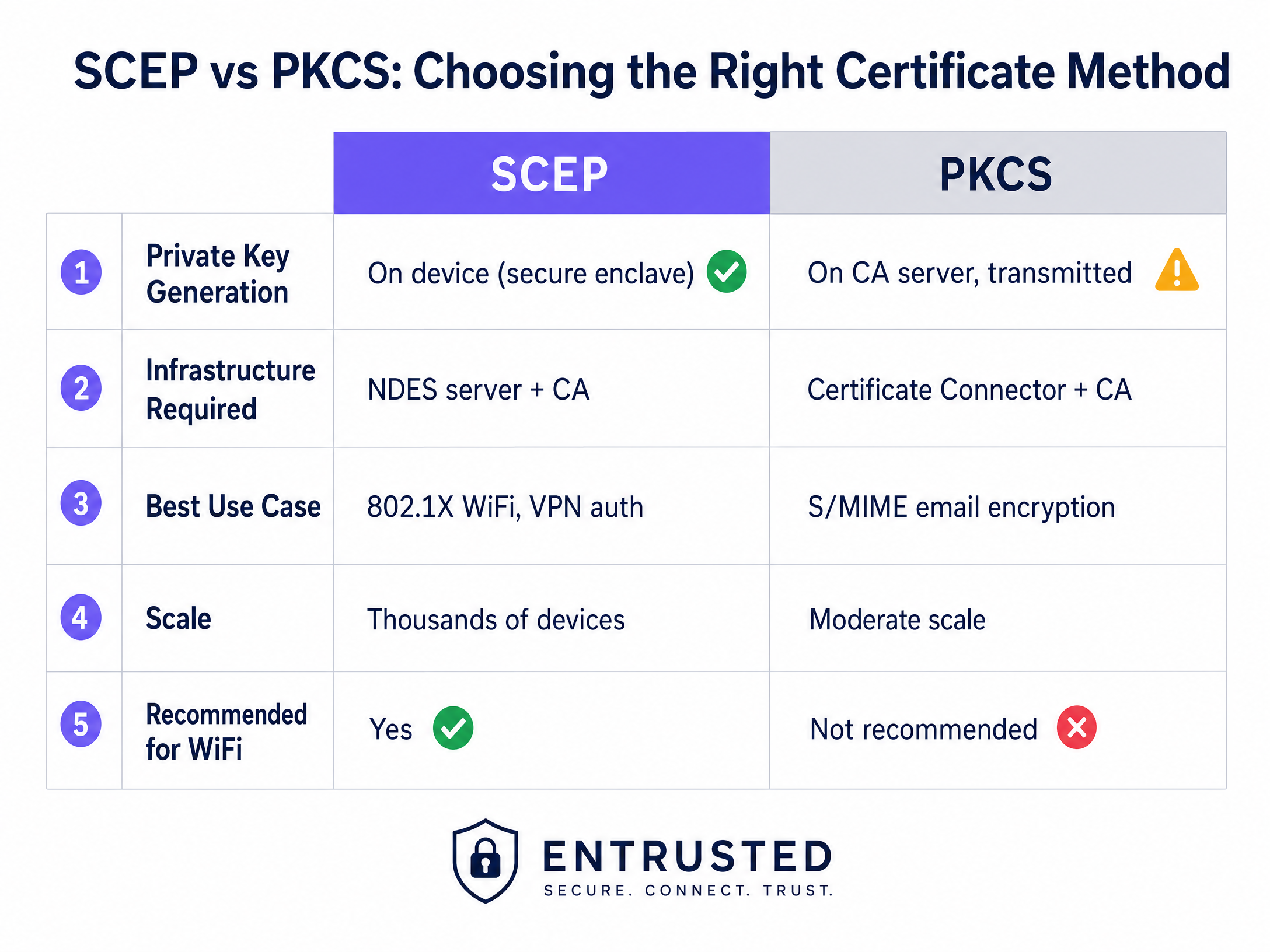
SCEP 的关键安全优势在于私钥永远不会离开设备。它在本地生成,存储在设备的安全区域中(例如 Windows 上的 TPM 或 iOS 上的 Secure Enclave),并且绝不会在网络上传输。这使得 SCEP 成为 802.1X 认证的强烈推荐方法。
公钥加密标准 (PKCS)
相反,在使用 PKCS 时,证书颁发机构会集中生成公钥和私钥。证书连接器安全地导出该密钥对并将其推送到目标设备。
虽然 PKCS 无需部署和维护 NDES 服务器,从而简化了基础设施占用空间,但由于私钥是通过网络传输的,它引入了理论上的安全风险。PKCS 通常更适合需要密钥托管的用例(例如 S/MIME 电子邮件加密),而不是网络认证。
实施指南:部署顺序
成功为 802.1X 配置托管 WiFi 配置文件需要严格遵守特定的部署顺序。配置文件依赖关系决定了在配置认证之前必须先建立信任。
步骤 1:部署受信任的根证书配置文件
在任何设备可以请求客户端证书或信任您的 RADIUS 服务器之前,它必须信任颁发证书的证书颁发机构。
- 将您的根 CA 证书和任何中间 CA 证书导出为 .cer 文件。
- 在您的 MDM 控制台中,创建一个新的配置文件。
- 选择目标平台并选择受信任的证书配置文件类型。
- 上传 .cer 文件并将此配置文件部署到您的目标设备组。
步骤 2:配置 SCEP 证书配置文件
建立信任后,配置 SCEP 配置文件以指示设备如何获取其客户端证书。
- 创建一个新的配置文件并选择 SCEP 证书。
- 配置使用者名称格式。对于用户驱动的认证,标准格式为
CN={{UserPrincipalName}}。对于设备认证,使用CN={{AAD_Device_ID}}。 - 将密钥用法设置为数字签名和密钥加密。
- 在扩展密钥用法下,指定客户端认证 (OID: 1.3.6.1.5.5.7.3.2)。
- 将此配置文件链接到步骤 1 中创建的受信任根证书配置文件。
- 提供您的 SCEP 网关或 NDES 服务器的外部 URL。
步骤 3:部署 802.1X WiFi 配置文件
最后一步是推送将证书与网络 SSID 绑定的 WiFi 配置。
- 创建一个 WiFi 配置文件。
- 输入与您的无线接入点广播完全一致的网络名称。
- 选择 WPA2-Enterprise 或 WPA3-Enterprise 作为安全类型。
- 将 EAP 类型设置为 EAP-TLS。
- 在认证设置中gs,选择在步骤 2 中创建的 SCEP 证书配置文件作为客户端身份验证证书。
- 指定用于服务器验证的受信任根证书,以确保设备仅连接到您的合法 RADIUS 服务器。
最佳实践与行业标准
在实施 SCEP 证书部署时,请遵循以下与厂商无关的最佳实践,以确保合规性和可靠性。
SCEP 网关部署与安全
SCEP 网关必须能够从互联网访问,以便远程设备在到达现场之前配置证书。将内部服务器直接暴露给互联网存在重大的安全风险。使用应用代理或反向代理发布 SCEP URL。这提供了安全的远程访问,而无需打开入站防火墙端口,并允许您对注册流程应用条件访问策略。
RADIUS 和 CRL 检查
证书部署只是安全方程式的一半;吊销同样至关重要。如果员工离职,如果其客户端证书仍然有效且 RADIUS 服务器没有严格检查证书吊销列表 (CRL),则禁用其目录帐户可能不会立即撤销其 WiFi 访问权限。
配置您的 RADIUS 服务器以执行严格的 CRL 检查。确保您的 CRL 分发点高度可用;如果 RADIUS 服务器无法访问 CRL,身份验证将失败,从而导致大范围的服务中断。
有关现代连接的更广泛考量,请参阅我们的指南: 带宽管理:2026 年实用指南 。
故障排除与风险缓解
即使经过精心规划,证书部署也可能会遇到问题。以下是常见的故障模式和缓解策略。
WiFi 配置文件应用失败
设备接收到了受信任的根证书和 SCEP 证书,但在 MDM 控制台中,WiFi 配置文件显示为错误或不适用。这几乎总是由于组目标不匹配引起的。如果将 SCEP 配置文件分配给用户组,而将 WiFi 配置文件分配给设备组,则 MDM 无法解析该依赖关系。审计您的分配。确保受信任的根证书、SCEP 和 WiFi 配置文件都部署到完全相同的组中。
网关 403 Forbidden 错误
设备无法检索 SCEP 证书,且网关日志显示 HTTP 403 错误。连接器服务帐户缺少对证书模板的必要权限,或者您防火墙上的 URL 过滤阻止了 SCEP 使用的特定查询字符串参数。验证连接器帐户是否对 CA 模板具有读取和注册权限。检查防火墙日志以确保包含 ?operation=GetCACaps 的 URL 未被阻止。
投资回报率 (ROI) 与业务影响
过渡到由 SCEP 驱动的 802.1X 证书部署可在安全和运营方面带来可衡量的回报。
- 减少服务台工单: 基于密码的 WiFi 会产生大量关于密码过期、锁定和拼写错误的常规支持工单。基于证书的身份验证对用户是无感的,通常可减少 70% 与 WiFi 相关的服务台工单量。
- 增强安全态势: EAP-TLS 消除了凭据窃取和中间人攻击的风险。这对于遵守 PCI DSS 和 GDPR 等框架至关重要,尤其是在 零售 和 医疗保健 环境中。
- 无缝入网: 将证书部署与现有的 MDM 工作流集成,可确保从第一天起就获得统一、零接触的配置体验。
虽然 SCEP 可以保护您托管的企业设备,但访客和来宾网络需要不同的方法。对于非托管设备,带有社交登录或短信验证的 Captive Portal 会接入第一方数据层,为您提供可操作的洞察。探索我们的 WiFi 分析 平台,了解这些数据如何推动收入增长。
关键定义
SCEP (Simple Certificate Enrollment Protocol)
A protocol that allows devices to request digital certificates from a Certificate Authority, where the private key is generated and stored securely on the device itself.
The recommended method for deploying WiFi authentication certificates due to its high security and scalability across enterprise fleets.
PKCS (Public Key Cryptography Standards)
A set of standards where both the public and private keys are generated by the Certificate Authority and then securely delivered to the endpoint.
Often used for S/MIME email encryption, but less ideal for WiFi authentication due to the network transmission of the private key.
NDES (Network Device Enrollment Service)
A Microsoft Windows Server role that acts as a bridge, allowing devices without domain credentials to obtain certificates via SCEP.
A required infrastructure component when implementing SCEP certificate deployment with on-premises Microsoft PKI.
EAP-TLS (Extensible Authentication Protocol - Transport Layer Security)
The most secure 802.1X authentication method, requiring both the server and the client to present valid digital certificates.
The target authentication protocol that MDM WiFi and certificate profiles are designed to enable, eliminating password-based access.
CRL (Certificate Revocation List)
A list published by the Certificate Authority containing the serial numbers of certificates that have been revoked before their scheduled expiration date.
RADIUS servers must check the CRL during authentication to ensure terminated employees cannot access the network using a previously valid certificate.
CSR (Certificate Signing Request)
A block of encoded text given to a Certificate Authority when applying for an SSL/TLS certificate, containing the public key and identity information.
Generated locally by the managed device during the SCEP flow to request its unique identity credential.
802.1X
An IEEE standard for port-based network access control that provides an authentication mechanism to devices wishing to attach to a LAN or WLAN.
The foundational framework that enforces the requirement for EAP-TLS certificate validation before granting network access.
RADIUS (Remote Authentication Dial-In User Service)
A networking protocol that provides centralized authentication, authorization, and accounting management for users who connect and use a network service.
The server that evaluates the client certificate against the CA and CRL to make the final allow or deny decision for WiFi access.
应用实例
A 150-property hotel group needs to secure their staff network across a mix of Windows laptops for front-of-house, iOS devices for housekeeping, and Android tablets for restaurant point-of-sale. They currently use WPA2-Personal with a shared password rotated quarterly, generating massive helpdesk volume.
The hotel group deploys three Intune profiles in sequence to a unified device group. First, a Trusted Root Certificate profile establishes trust with the corporate CA. Second, a SCEP Certificate profile instructs devices to request a unique client certificate. Third, a WiFi profile configures the corporate SSID with WPA3-Enterprise and EAP-TLS, pointing to the SCEP certificate for authentication. The RADIUS server enforces strict CRL checking to revoke access instantly upon employee termination.
A fashion retailer with 200 stores requires PCI DSS compliance for their Windows-based point-of-sale systems managed through Intune. They must ensure strong authentication and strict network segmentation for any device handling cardholder data.
The retailer implements SCEP-based EAP-TLS for device-level authentication on the staff SSID. The RADIUS policy drives VLAN assignment, placing authenticated POS terminals onto a strictly isolated, PCI-scoped VLAN automatically. Guest WiFi is handled on a completely separate SSID with its own captive portal authentication flow, ensuring the two networks never intersect.
练习题
Q1. Your Intune deployment shows the Trusted Root and SCEP profiles successfully applied to a user's laptop, but the WiFi profile shows an 'Error' state. The user cannot connect to the corporate SSID. What is the most likely architectural cause?
提示:Consider how MDM platforms resolve dependencies between related configuration profiles.
查看标准答案
A group targeting mismatch. The SCEP profile is likely assigned to a User group, while the WiFi profile is assigned to a Device group (or vice versa). Intune cannot resolve the dependency across different group types, causing the WiFi profile deployment to fail. Audit the assignments and ensure all three profiles target the exact same Azure AD group.
Q2. A newly acquired subsidiary requires 802.1X authentication for their staff devices. Their security team mandates that private keys must never traverse the network and must be generated within the hardware TPM of the endpoint. Which certificate deployment method must you use?
提示:Compare where the private key is generated in the SCEP workflow versus the PKCS workflow.
查看标准答案
You must use SCEP (Simple Certificate Enrollment Protocol). In a SCEP workflow, the device generates its own private and public key pair locally within its secure enclave (TPM) and only sends a Certificate Signing Request (CSR) across the network. PKCS generates the private key centrally on the CA and transmits it over the network, which violates the security team's mandate.
Q3. An employee is terminated and their Active Directory account is disabled. However, their laptop remains connected to the corporate WiFi network for several hours before losing access. How do you resolve this security gap?
提示:Disabling an account does not invalidate an existing certificate. What mechanism does the RADIUS server use to check certificate validity?
查看标准答案
You must configure the RADIUS server to enforce strict Certificate Revocation List (CRL) checking. When an employee is terminated, their certificate must be explicitly revoked in the Certificate Authority. The RADIUS server will then check the CRL during the next authentication cycle and immediately deny access, regardless of the Active Directory account status.
继续阅读本系列
为什么我的访客 WiFi 无法连接?Captive Portal 问题排查
本权威技术参考指南解释了 Captive Portal 检测的底层机制,并详细介绍了导致访客 WiFi 无法连接的六种主要故障模式。它为 IT 经理和网络架构师提供了一个实用的排查框架,以解决 HTTP 重定向问题、DNS 冲突和 MAC 随机化带来的挑战。
如何实施 SCEP 以实现自动化 WiFi 证书注册
本指南介绍了如何在企业场所实施 SCEP(简单证书注册协议)以实现自动化 WiFi 证书注册。它涵盖了完整的架构蓝图——从 PKI 设计和 MDM 集成到必不可少的三个步骤部署顺序——并向 IT 经理和网络架构师展示了如何在大规模场景下消除共享凭据、自动化证书生命周期管理,并满足 PCI DSS 和 GDPR 要求。
GDPR and Guest WiFi:场所营销人员与 IT 合规指南
本指南为 IT 经理和场所运营商提供了一个实用框架,以确保 Guest WiFi 服务完全符合 GDPR。内容涵盖技术架构、同意机制、数据保留,以及如何将合规性转化为安全的第一方数据资产。