
Perché il mio WiFi per gli ospiti non si connette? Risoluzione dei problemi del Captive Portal
Questa guida di riferimento tecnico autorevole spiega i meccanismi alla base del rilevamento del Captive Portal e descrive in dettaglio le sei principali modalità di errore che impediscono la connessione del WiFi per gli ospiti. Fornisce ai responsabili IT e agli architetti di rete un framework pratico di risoluzione dei problemi per risolvere i problemi di reindirizzamento HTTP, i conflitti DNS e le sfide di randomizzazione MAC.
Ascolta questa guida
Visualizza trascrizione del podcast
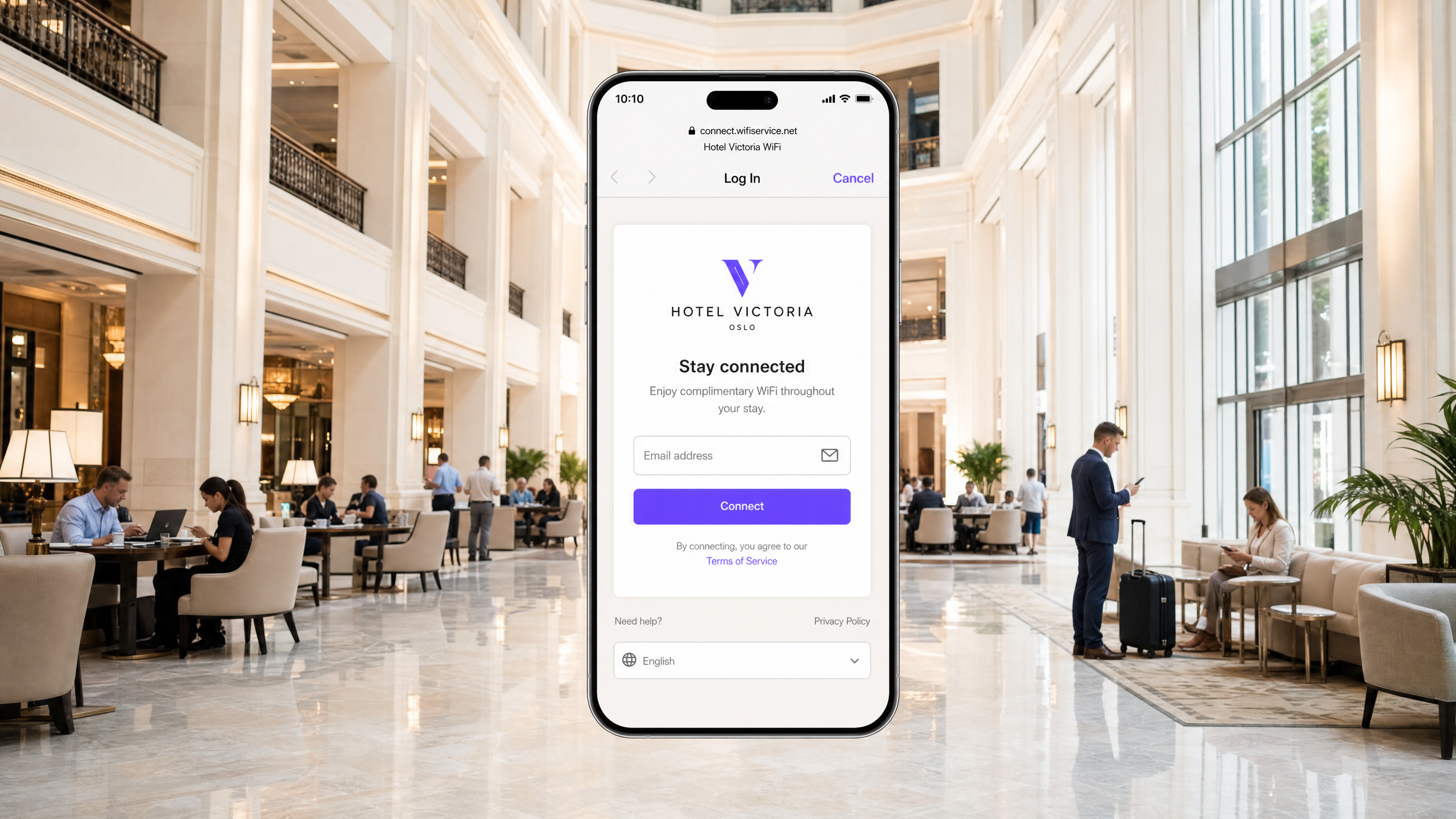
Sintesi operativa
Per le moderne strutture aziendali, le reti wireless per gli ospiti non sono più un semplice servizio di cortesia; rappresentano un punto di contatto fondamentale per il coinvolgimento dei clienti, l'intelligence operativa e il posizionamento del marchio. Tuttavia, il valore aziendale di queste reti dipende interamente dall'affidabilità dell'esperienza di connessione iniziale. Quando un ospite si connette a una rete e la pagina di accesso del Captive Portal non viene visualizzata, la struttura subisce immediatamente un aumento degli attriti in reception, un'impennata dei ticket di supporto e la perdita di opportunità di acquisizione dati.
Alla base di questi errori c'è una tensione fondamentale tra gli standard web sicuri e le tecniche di intercettazione a livello di rete storicamente utilizzate dai Captive Portal. I browser web e i sistemi operativi moderni sono progettati per rilevare e bloccare il reindirizzamento non autorizzato del traffico per proteggere gli utenti dagli attacchi man-in-the-middle. Comprendendo le precise sequenze di reindirizzamento HTTP e DNS, l'impatto di protocolli sicuri come HSTS e le funzionalità di privacy dei moderni dispositivi mobili, i team IT possono progettare soluzioni di accesso wireless robuste. Questa guida fornisce il framework definitivo per diagnosticare e risolvere le cause alla radice dello stato di errore "il WiFi ospiti non si connette al Captive Portal".
Ascolta il briefing tecnico completo:
Approfondimento tecnico: come funziona effettivamente il rilevamento del Captive Portal
Per risolvere un problema relativo al Captive Portal, è necessario innanzitutto comprendere cosa fa effettivamente un Captive Portal a livello di rete. La maggior parte delle persone lo considera semplicemente come una pagina di accesso. In realtà, si tratta di un meccanismo di intercettazione del traffico a livello di rete.
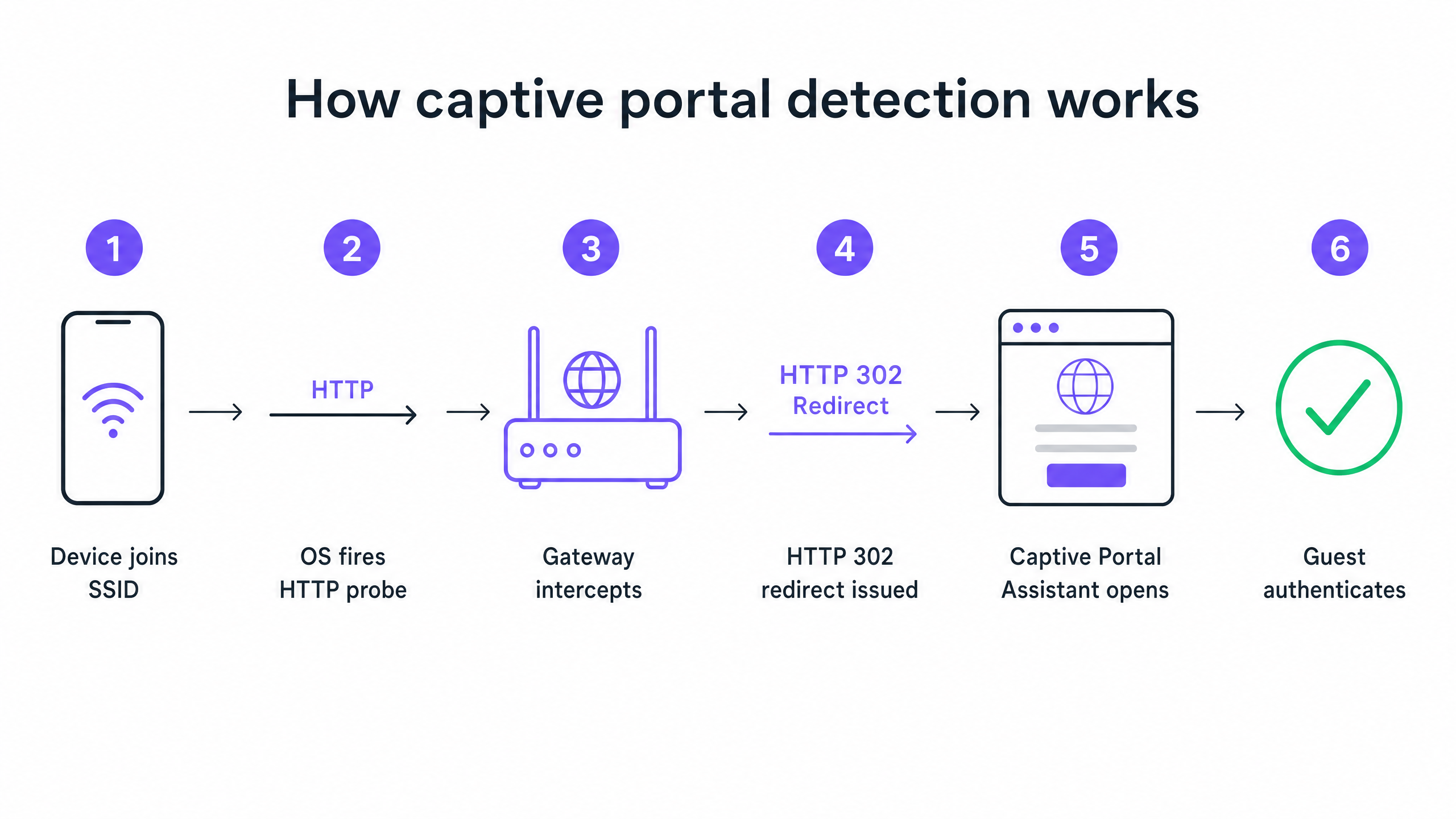
Quando un dispositivo si connette al tuo SSID ospite e riceve un indirizzo IP tramite DHCP, il sistema operativo non aspetta che l'utente apra un browser. In background, un servizio di sistema avvia immediatamente una richiesta HTTP GET non crittografata a un URL di probe controllato dal fornitore. I dispositivi Apple interrogano captive.apple.com. I dispositivi Android interrogano connectivitycheck.gstatic.com. I dispositivi Windows interrogano msftconnecttest.com.
Se la rete ha un accesso a Internet aperto, questi probe restituiscono le risposte previste e il sistema operativo conclude che tutto funziona correttamente. Ma su una rete ospite, il gateway o controller wireless intercetta quel probe HTTP prima che raggiunga Internet. Invece della risposta prevista, il gateway restituisce un reindirizzamento HTTP 302 che punta alla splash page del tuo Captive Portal. Il sistema operativo rileva il reindirizzamento imprevisto, si rende conto di trovarsi dietro un Captive Portal e apre una finestra del browser in modalità sandbox per visualizzare la pagina di accesso.
Le sei principali modalità di errore
Quando un ospite segnala che il WiFi non si connette, l'errore deriva quasi sempre da una delle sei cause principali che interrompono questa sequenza.
1. Esaurimento del pool DHCP Questo è il killer silenzioso negli eventi ad alta densità. Se gestisci una conferenza con 2.000 partecipanti su una subnet /24 standard, hai 254 indirizzi IP utilizzabili. Se il tempo di lease DHCP è impostato sul valore predefinito di 24 ore, esaurirai quel pool a pochi minuti dall'apertura delle porte. Ogni tentativo di connessione successivo fallisce prima ancora che inizi la sequenza del Captive Portal.
2. Errore di intercettazione DNS Il reindirizzamento del Captive Portal dipende dal gateway che intercetta il probe HTTP. Ma il probe richiede prima una risoluzione DNS. Se la configurazione DNS non consente ai client pre-autenticati di risolvere i nomi di dominio esterni, il probe non viene mai avviato.
3. Walled Garden incompleto Il walled garden definisce quali domini esterni possono essere raggiunti dagli ospiti non autenticati. Se la splash page del tuo portale carica risorse da una CDN che non si trova nel walled garden, la pagina viene visualizzata come una schermata vuota. Se offri l'accesso tramite social network come Google, Apple o Facebook, ogni dominio OAuth utilizzato da tali provider deve essere inserito nella whitelist. I provider di identità social aggiornano regolarmente i propri intervalli IP CDN. Un walled garden che funzionava perfettamente sei mesi fa potrebbe essere silenziosamente non funzionante oggi.
4. HSTS blocca il reindirizzamento HTTP Strict Transport Security (HSTS) è un criterio di sicurezza del browser che forza le connessioni a domini specifici solo tramite HTTPS. Se un ospite tenta di contattare un dominio precaricato HSTS e il gateway tenta di intercettare quella richiesta HTTPS per reindirizzarla al portale, il browser rileva una mancata corrispondenza del certificato. Presenta un avviso di sicurezza non ignorabile e blocca completamente il reindirizzamento. La soluzione corretta è non tentare mai l'intercettazione HTTPS. Il gateway dovrebbe reindirizzare solo i probe canarino HTTP non crittografati.
5. VPN attiva sul dispositivo ospite Una VPN crittografa tutto il traffico proveniente dal dispositivo e lo instrada attraverso un tunnel esterno prima che raggiunga il gateway. Il gateway non vede mai il probe HTTP. La sequenza di rilevamento del Captive Portal non si attiva mai.
6. Randomizzazione dell'indirizzo MAC I moderni dispositivi iOS e Android utilizzano indirizzi MAC randomizzati per impostazione predefinita come funzionalità di privacy. Poiché lo stato della sessione del Captive Portal viene tracciato tramite l'indirizzo MAC, a un ospite che si è autenticato un'ora fa potrebbe essere presentata nuovamente la pagina di accesso dopo la rotazione del MAC del dispositivo.
Guida all'implementazione: progettare per l'affidabilità
Un'implementazione del Captive Portal ben configurata richiede un'attenta coordinazione in tutta l'infrastruttura WiFi per gli ospiti .
Passaggio 1: ottimizzare l'architettura DHCP
Per qualsiasi struttura che preveda più di 200 dispositivi simultanei, abbandona la singola subnet /24. Utilizza una /22 o superiore e imposta i tempi di lease in base al profilo di permanenza della tua struttura. Un hotel imposta i lease a 8 ore. Uno stadio imposta i lease a 3 ore. Un centro commerciale imposta i lease a 90 minuti. Un centro congressi imposta i lease a 30 minuti.
Step 2: Automatizza la gestione del Walled Garden
Valuta e valida il tuo walled garden prima di ogni evento importante. Sulla piattaforma di Purple, manteniamo e aggiorniamo automaticamente queste voci di walled garden come parte del nostro servizio gestito in cloud, eliminando l'onere della manutenzione manuale per il tuo team. Supportiamo integrazioni con Cisco Meraki, HPE Aruba, Ruckus, Juniper Mist, Ubiquiti UniFi, Cambium, Extreme e Fortinet.
Step 3: Implementa RFC 8910 (DHCP Option 114)
La soluzione a lungo termine basata su standard per i conflitti HSTS è RFC 8910, che definisce la DHCP Option 114. Questa opzione consente al tuo server DHCP di pubblicizzare direttamente l'URL del Captive Portal al dispositivo client, evitando completamente la necessità di reindirizzamento HTTP. iOS 14 e Android 11 e versioni successive supportano questa funzionalità nativamente.
Best Practice
Implementa l'autenticazione basata su profilo per i visitatori ricorrenti I Captive Portal sono una tecnologia matura, ma comportano un attrito intrinseco. OpenRoaming, basato su Passpoint e 802.1X, consente agli ospiti ricorrenti di connettersi automaticamente e in sicurezza senza mai visualizzare una pagina di login. Purple funge da identity provider gratuito per OpenRoaming con il nostro piano Connect. Strutture come Premier Inn e Manchester Airports Group lo stanno già implementando per eliminare l'attrito della riautenticazione per i visitatori ricorrenti, mantenendo al contempo la piena conformità al GDPR e l'acquisizione di dati di prima parte.
Non testare mai da un dispositivo autenticato Un errore comune in cui incorrono molti team IT: testare il portale da un dispositivo che si è autenticato in precedenza. La sessione del dispositivo è ancora attiva, quindi si bypassa completamente il portale e si conclude che tutto funzioni. Esegui sempre i test da un dispositivo in uno stato pulito e non autenticato.
Leggi le guide correlate Per ulteriori approfondimenti sulla sicurezza delle tue reti, consulta la nostra guida Cos'è il WiFi sicuro: Guida essenziale per le aziende 2026 e la nostra Gestione della larghezza di banda: Una guida pratica per il 2026 .
Risoluzione dei problemi e mitigazione dei rischi
Quando un ospite segnala un problema di connessione, il personale di reception ha bisogno di un quadro diagnostico rapido.
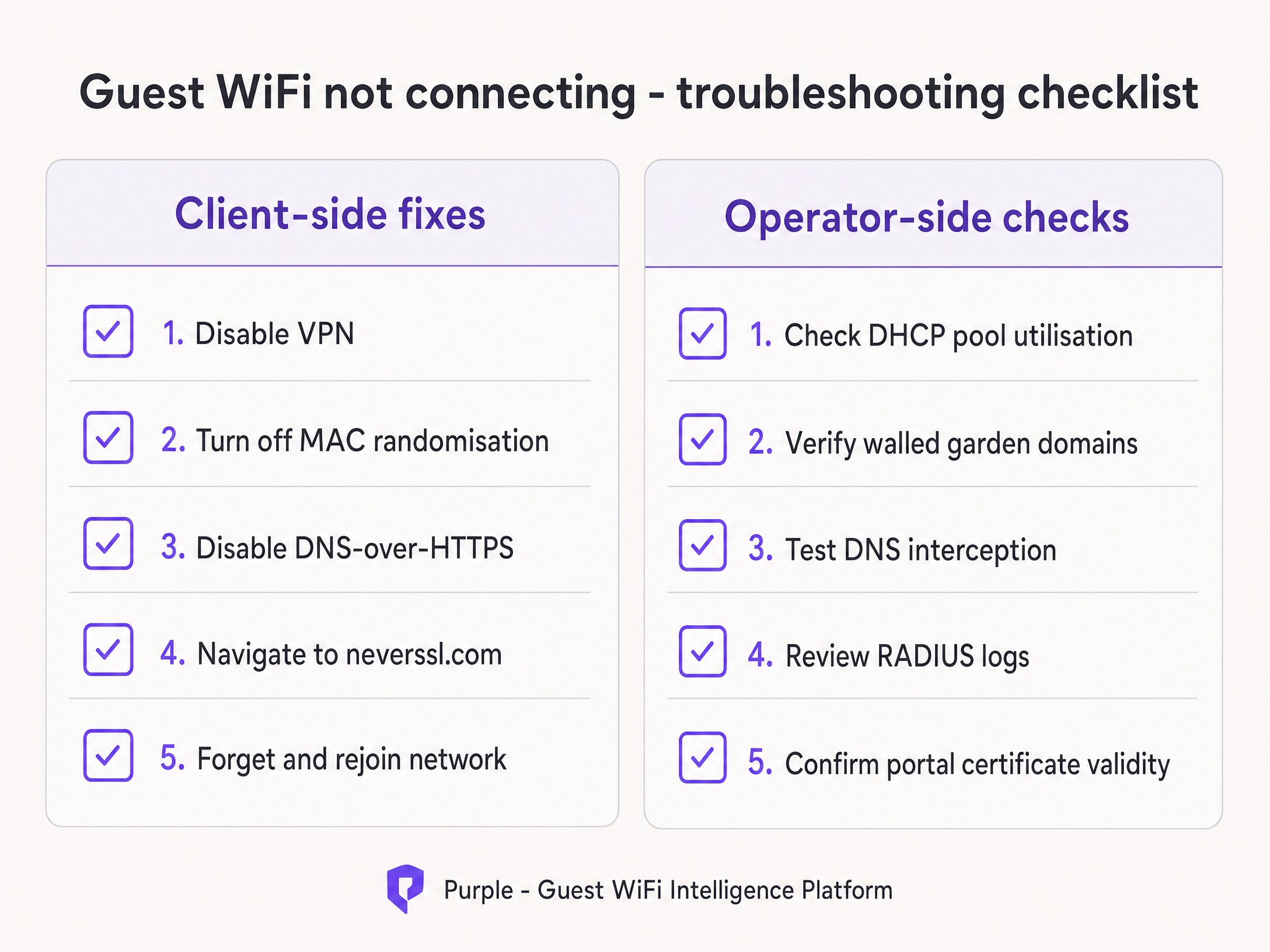
Istruisci il personale a eseguire prima le soluzioni lato client:
- Chiedi all'ospite di disattivare qualsiasi VPN attiva.
- Istruisci l'ospite a disattivare la randomizzazione dell'indirizzo MAC (Indirizzo privato) per il tuo SSID specifico.
- Chiedi all'ospite di aprire un browser standard e navigare su
http://neverssl.com. Poiché questo sito è progettato per non utilizzare mai SSL, il gateway può intercettare facilmente la richiesta e attivare il reindirizzamento. - If all else fails, chiedi all'ospite di dimenticare la rete e riconnettersi.
Se il problema persiste per più ospiti, passa ai controlli lato operatore. Verifica immediatamente l'utilizzo del pool DHCP, controlla i log RADIUS per eventuali messaggi di Access-Reject e testa l'intercettazione DNS.
ROI e impatto aziendale
L'impatto aziendale di un Captive Portal affidabile va ben oltre le metriche IT. Eliminando i problemi di connessione, le strutture aumentano direttamente il tasso di crescita del proprio database di marketing.
Considera Harrods, che ha ottenuto un ROI di marketing di 57 volte ottimizzando la propria piattaforma di WiFi Analytics e il flusso del Captive Portal. O AGS Airports, che ha registrato un ROI dell'842% grazie a una gestione fluida della larghezza di banda a livelli. Un'esperienza di connessione affidabile è il requisito fondamentale per raccogliere i dati moderni di raccolta feedback descritti nella nostra guida Raccolta moderna dei feedback: Un playbook per le strutture 2026 .
Ogni caricamento non riuscito del Captive Portal rappresenta un profilo cliente perso. Implementando gli standard architetturali descritti in questa guida, i responsabili IT trasformano la propria infrastruttura wireless da un centro di costo a un generatore di ricavi affidabile e conforme.
Definizioni chiave
Captive Portal
A network-level interception mechanism that forces an unauthenticated user to view and interact with a specific web page before being granted access to the public internet.
When IT teams deploy guest networks, the captive portal is the primary tool for enforcing terms of service and capturing first-party marketing data.
Walled Garden
A pre-authentication access control list (ACL) that defines which external IP addresses or domain names an unauthenticated device is permitted to access.
Crucial for allowing devices to load the captive portal splash page assets and communicate with social identity providers before the user has fully authenticated.
HSTS (HTTP Strict Transport Security)
A web security policy mechanism that helps to protect websites against man-in-the-middle attacks such as protocol downgrade attacks and cookie hijacking.
HSTS is the primary reason why intercepting HTTPS traffic to display a captive portal results in severe browser security warnings rather than a successful redirect.
RFC 8910 (DHCP Option 114)
An IETF standard that allows a DHCP server to directly advertise the URL of the captive portal to the client device during the initial IP address assignment.
This standard eliminates the need for HTTP redirection entirely, solving the HSTS conflict and providing a cleaner connection experience.
MAC Address Randomisation
A privacy feature in modern mobile operating systems that generates a new, random MAC address for each wireless network the device joins, or periodically rotates the address.
This feature breaks traditional captive portal session persistence, forcing returning guests to log in repeatedly unless the venue upgrades to profile-based authentication like OpenRoaming.
OpenRoaming
A global roaming federation built on Passpoint and 802.1X that allows users to connect to public WiFi networks automatically and securely without interacting with a captive portal.
Purple acts as a free identity provider for OpenRoaming under the Connect plan, allowing venues to eliminate re-authentication friction.
HTTP 302 Redirect
An HTTP response status code indicating that the requested resource resides temporarily under a different URI.
This is the specific mechanism the wireless gateway uses to redirect the device's HTTP canary probe to the captive portal splash page.
Canary Probe
An automated, unencrypted HTTP request sent by an operating system immediately after connecting to a network to test for internet connectivity.
Apple uses captive.apple.com; Android uses connectivitycheck.gstatic.com. Intercepting these probes is the foundation of captive portal detection.
Esempi pratici
A 2,500-capacity conference centre in London is hosting a major technology summit. Within 45 minutes of the keynote beginning, attendees report that the 'guest wifi not connecting captive portal' issue is widespread. The SSID is visible, but devices either fail to obtain an IP address or receive an IP but see no login screen. The network is configured with a single /23 subnet and 12-hour DHCP leases.
- Identify DHCP Exhaustion: A /23 subnet provides 1,022 usable IP addresses. With 2,500 attendees, the pool is undersized. The 12-hour lease means addresses are not returned to the pool when attendees leave the building for lunch.
- Expand the Subnet: Reconfigure the guest VLAN to use a /21 subnet, providing 4,094 usable IP addresses, comfortably exceeding the venue capacity.
- Reduce Lease Time: Change the DHCP lease time from 12 hours to 30 minutes. This ensures that IP addresses from devices that disconnect (e.g., when an attendee leaves) are quickly reclaimed.
- Clear Leases: Clear the existing DHCP bindings to force active devices to renew under the new parameters.
A retail chain rolls out a new captive portal featuring social login via Google and Facebook. During testing, the IT team finds that the portal splash page loads correctly, but when a user taps 'Log in with Google', the page times out and fails to connect. Standard email registration works perfectly.
- Diagnose Walled Garden Failure: The timeout indicates that the unauthenticated client device cannot reach the Google OAuth servers to complete the authentication handshake.
- Audit Walled Garden Entries: Review the pre-authentication access control list on the wireless controller (e.g., Cisco Meraki or HPE Aruba).
- Add Required Domains: Add the specific Google and Facebook authentication domains (e.g., accounts.google.com) to the walled garden. Crucially, add wildcard entries for the CDNs that serve the login page assets (e.g., *.gstatic.com).
- Implement Automated Updates: Because these providers change their IP ranges frequently, configure the controller to use wildcard domain snooping rather than static IP whitelisting.
Domande di esercitazione
Q1. A retail venue reports that their captive portal works perfectly for guests using standard email registration, but guests attempting to use the 'Log in with Facebook' option experience a blank white screen after tapping the button. What is the most likely architectural cause?
Suggerimento: Consider what network resources the unauthenticated device needs to reach to render the Facebook login prompt.
Visualizza risposta modello
The venue has an incomplete walled garden. The wireless gateway is blocking the unauthenticated device from reaching Facebook's OAuth domains or CDN infrastructure. The IT team must update the pre-authentication access control list to include all required wildcard domains for Facebook authentication.
Q2. You are designing the guest WiFi architecture for a major football stadium. The venue holds 60,000 fans, and matches last approximately 3 hours. The current configuration uses a /16 subnet and 24-hour DHCP lease times. During the first match, thousands of fans report they cannot connect. What changes should you implement?
Suggerimento: Calculate the total available IP addresses in the subnet versus the venue capacity, and evaluate the lifecycle of those addresses.
Visualizza risposta modello
The network is experiencing DHCP pool exhaustion. A /16 subnet provides 65,534 usable IP addresses, which is theoretically enough for 60,000 fans. However, with a 24-hour lease time, any device that connects briefly (e.g., staff, vendors, or fans walking past) consumes an IP address that will not be released until the next day. The solution is to reduce the DHCP lease time to 3 hours to match the venue's dwell profile, ensuring IP addresses are recycled efficiently during the event.
Q3. A hotel guest complains that the captive portal login page does not appear automatically on their laptop. When the front desk staff checks the guest's device, they notice a corporate VPN client is running. Why does the VPN prevent the portal from loading?
Suggerimento: Consider how a VPN routes traffic and how the gateway intercepts the captive portal probe.
Visualizza risposta modello
The VPN encrypts all traffic from the laptop and attempts to route it through a secure tunnel to the corporate server. Because the traffic is encrypted, the local wireless gateway cannot inspect it, cannot identify the unencrypted HTTP canary probe, and therefore cannot issue the HTTP 302 redirect required to trigger the captive portal. The guest must disable the VPN, authenticate via the portal, and then re-enable the VPN.
Continua a leggere questa serie
La guida aziendale a SCEP: implementare il Simple Certificate Enrollment Protocol per la sicurezza automatizzata del WiFi nei campus
Questa guida di riferimento tecnico fornisce un modello architetturale definitivo e una strategia di implementazione passo-passo per l'implementazione dei certificati WiFi aziendali tramite SCEP. Copre le differenze cruciali tra SCEP e PKCS, l'esatta sequenza di implementazione necessaria per il successo e le strategie reali di mitigazione del rischio per i leader IT.
Come implementare SCEP per la registrazione automatizzata dei certificati WiFi
Questa guida spiega come implementare SCEP (Simple Certificate Enrollment Protocol) per la registrazione automatizzata dei certificati WiFi nelle sedi aziendali. Copre l'intero progetto architetturale - dalla progettazione PKI e integrazione MDM alla sequenza di implementazione obbligatoria in tre fasi - e mostra ai responsabili IT e agli architetti di rete come eliminare le credenziali condivise, automatizzare la gestione del ciclo di vita dei certificati e soddisfare i requisiti PCI DSS e GDPR su scala.
GDPR e Guest WiFi: Guida alla conformità per i responsabili marketing e IT delle strutture
Questa guida fornisce ai manager IT e ai gestori delle strutture un framework pratico per garantire che i servizi Guest WiFi siano pienamente conformi al GDPR. Copre l'architettura tecnica, i meccanismi di consenso, la conservazione dei dati e come trasformare la conformità in un asset sicuro di dati di prima parte.