
Tre SSID per domarli tutti: guida alla configurazione del WiFi per ospiti, personale e IoT
Questa guida tecnica autorevole fornisce un piano d'azione passo-passo per implementare un'architettura WiFi a tre SSID. Spiega come segmentare il traffico di ospiti, personale e IoT utilizzando Captive Portals, 802.1X RADIUS e PSK per singolo dispositivo (xPSK) per ottimizzare le prestazioni e garantire la conformità PCI DSS.
Ascolta questa guida
Visualizza trascrizione del podcast
📚 Parte della nostra serie principale: Enterprise WiFi Security Guide →
Executive Summary
Venue operators face a growing crisis of WiFi spectrum congestion. Every time you broadcast a new SSID to segment guest, staff, point-of-sale, and IoT traffic, you actively degrade the performance of your entire wireless network. Each enabled SSID broadcasts a beacon frame every 100 milliseconds at the lowest basic data rate, consuming up to 20% of available airtime before a single packet of user data is transmitted.
The industry consensus is clear: broadcast no more than three SSIDs per access point radio. This authoritative technical reference guide explains how IT teams can eliminate WiFi performance degradation by collapsing multiple purpose-built networks into a single three-SSID architecture. This design balances strict logical network segmentation with optimal wireless airtime utilisation.
We will explore the technical configuration of an open Guest WiFi network with a captive portal, a WPA3-Enterprise Staff WiFi network using 802.1X for identity-based access, and an IoT WiFi network using per-device pre-shared keys (xPSK) for headless devices. By mapping these three SSIDs to dynamic VLANs via RADIUS, you achieve complete Layer 2 isolation for compliance standards like PCI DSS, without sacrificing throughput.
Technical Deep-Dive
To understand why SSID sprawl is so damaging, we have to look at 802.11 management frames. Every enabled SSID on an access point broadcasts a beacon frame every 100 milliseconds. To ensure that every client device at the edge of the coverage cell can hear the beacon, the access point transmits it at the lowest basic data rate, usually one or two megabits per second. If you have one access point broadcasting six SSIDs, that is 60 beacons per second. In a dense environment where a client can hear four access points on the same channel, that channel is carrying 240 beacons per second. This overhead increases latency, causes jitter on voice calls, and reduces overall throughput.
The solution is the three-SSID design. This architecture provides distinct authentication mechanisms for different device types while maintaining strict backend isolation through dynamic VLAN assignment.
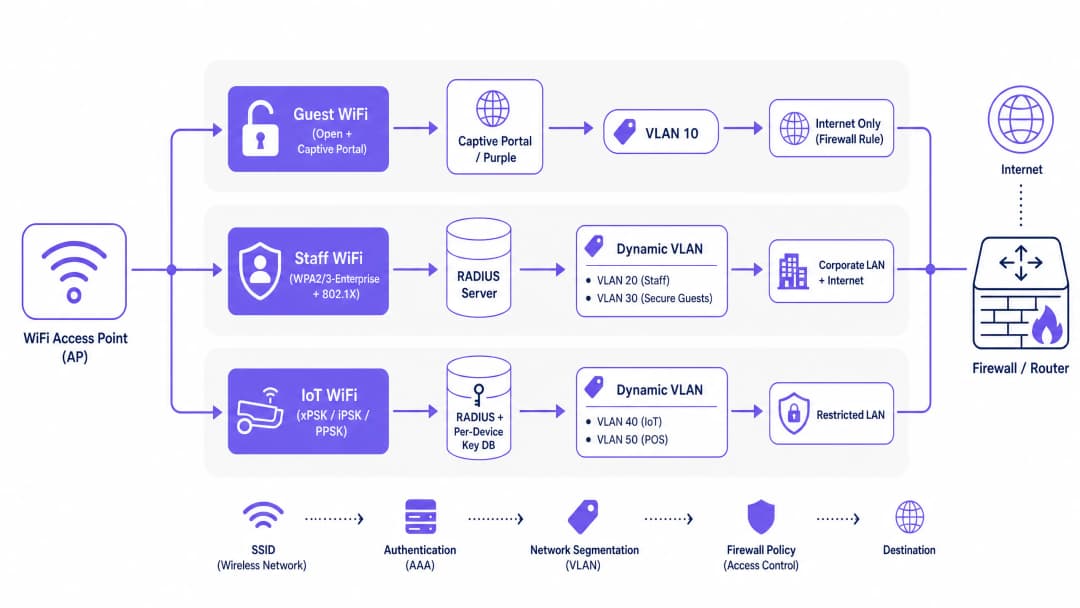
1. Guest WiFi: Open + Captive Portal
The first SSID is dedicated to visitors. You configure this as an open network without a WPA2-Personal password. When a visitor connects, their device receives an IP address from a DHCP server on your dedicated guest VLAN (for example, VLAN 10).
Every DNS query and HTTP request is intercepted by the wireless controller, which redirects the visitor's browser to a captive portal page. This is where Guest WiFi platforms like Purple integrate. The captive portal handles visitor authentication via social login, email registration, or voucher codes. It captures conscious-choice opt-ins for GDPR compliance and records the visitor's details as first-party data.
The visitor's session remains tagged to VLAN 10. Your firewall must enforce a strict policy on this subnet: internet access only, with an explicit deny-all rule blocking any route to your internal RFC 1918 address space.
A critical configuration step here is the walled garden. Before a visitor completes the portal login, their device needs to reach the portal page itself. You configure a walled garden, a whitelist of IP addresses and domains accessible without authentication. This must include your captive portal server's hostname, any CDN endpoints, and social login provider endpoints like Microsoft Entra ID or Google Workspace.
2. Staff WiFi: WPA2/3-Enterprise + 802.1X
The second SSID is for corporate devices. This uses WPA2-Enterprise or WPA3-Enterprise, requiring 802.1X authentication. When a staff member connects, their device initiates an Extensible Authentication Protocol (EAP) exchange with the access point, which forwards the credentials to your RADIUS server.
The RADIUS server validates the identity and returns an Access-Accept message containing three specific IETF standard attributes:
- Attribute 64 (Tunnel-Type): set to value 13 (VLAN)
- Attribute 65 (Tunnel-Medium-Type): set to value 6 (IEEE 802)
- Attribute 81 (Tunnel-Private-Group-ID): contains the actual VLAN ID string
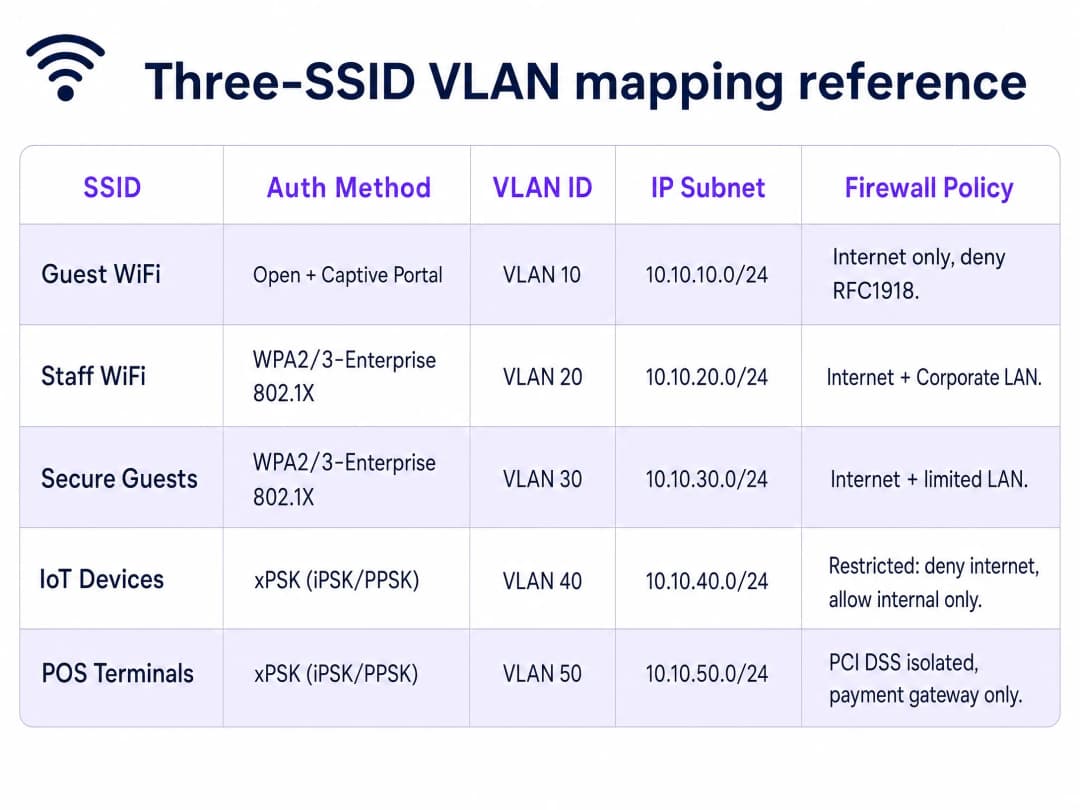
When the access point receives these attributes, it dynamically tags that session with the specified VLAN. A finance team member lands on VLAN 20. A contractor authenticates with different credentials and lands on VLAN 30. One broadcast SSID provides multiple logical segments.
For EAP method selection, PEAP with MSCHAPv2 is the pragmatic starting point for most venues, as it uses a server-side certificate and username-password credentials. EAP-TLS uses mutual certificate authentication and is the most secure option, but requires a Mobile Device Management (MDM) platform to push certificates silently.
3. IoT WiFi: per-device PSK (xPSK)
The third SSID solves a problem that neither open networks nor 802.1X can address. Headless IoT devices, card terminals, digital signage, and printers cannot authenticate with 802.1X because they lack a certificate store or browser. However, placing them on a flat WPA2-Personal network with a single shared password creates a lateral movement risk.
xPSK operates on a standard WPA2 or WPA3-Personal SSID. The wireless controller maintains a database of unique passwords. When a device connects using its specific password, the controller recognises that key and uses RADIUS attributes to dynamically assign that session to the correct VLAN.
A card terminal connects with its unique key and lands on VLAN 50, your PCI DSS-isolated payment network. A smart thermostat connects and lands on VLAN 40, your restricted IoT network.
Hardware vendors use different terms for this architecture: Cisco Meraki calls it iPSK, HPE Aruba calls it MPSK, Ruckus calls it DPSK, and Juniper Mist and Ubiquiti UniFi call it PPSK.
Implementation Guide
Phase 1: Traffic Classification and VLAN Design
Before touching a switch port, document every device type in your environment. Assign a VLAN ID and IP subnet to each traffic class. Keep your guest VLAN on a completely separate subnet with no route to your internal address space.
Phase 2: Switch Port Configuration
Configure the switch ports connecting to your access points as 802.1Q trunk ports. If a trunk port is accidentally configured as an access port, all traffic collapses onto a single VLAN and your segmentation disappears silently.
Phase 3: Controller Configuration
Map your three SSIDs on your wireless controller.
- Cisco Meraki: Navigate to Wireless > Access Control. Configure the Guest SSID as Open with a click-through splash page. Configure the Staff SSID with WPA2-Enterprise and point to your RADIUS server. Configure the IoT SSID with WPA2 and iPSK with RADIUS.
- HPE Aruba: In Aruba Central, configure the Guest SSID with an external captive portal profile. Configure the Staff SSID with 802.1X. Configure the IoT SSID with MPSK, integrating with ClearPass Policy Manager for enterprise scale.
- Ruckus: In SmartZone, configure the Guest WLAN with a Hotspot (WISPr) portal. Configure the Staff WLAN with 802.1X. Enable DPSK on the IoT WLAN and configure the DPSK database.
Phase 4: Firewall Policy
The VLAN architecture is only as strong as the inter-VLAN routing rules on your firewall. Document every permitted flow explicitly. Default-deny everything else.
Best Practices
- Limit SSID Count: Broadcast a maximum of three SSIDs per radio to preserve wireless airtime and performance.
- Automate Key Lifecycle: Do not manage thousands of unique xPSK passwords in a spreadsheet. Integrate your xPSK platform with your property management system or identity provider via API.
- Account for MAC Randomisation: Modern mobile devices use randomised MAC addresses. Ensure your xPSK implementation binds the session to the key itself rather than the MAC address to prevent authentication failures.
- Enable Client Isolation: Always enable client isolation on your Guest SSID to prevent devices from communicating directly with each other, mitigating peer-to-peer attacks.
- Implement Rate Limiting: Apply per-client bandwidth limits (e.g., 10-20 Mbps) on the Guest SSID to prevent a single user from saturating the internet uplink.
Troubleshooting & Risk Mitigation
- Captive Portal Fails to Load: This is almost always an incomplete walled garden. If visitors see a blank screen, test the walled garden from a fresh device with no cached DNS. Ensure all CDN endpoints and social login provider URLs are whitelisted.
- Dynamic VLAN Assignment Fails: Verify that your RADIUS server is sending exactly Attribute 64 (value 13), Attribute 65 (value 6), and Attribute 81 (the correct VLAN ID string). Use packet captures to inspect the Access-Accept message.
- IoT Devices Cannot Connect: Check key complexity. Some legacy IoT devices struggle with keys longer than 32 characters or keys containing special characters. Standardise on 16 to 24 character alphanumeric keys.
ROI & Business Impact
Consolidating to a three-SSID design delivers measurable business value across Hospitality , Retail , and Transport venues.
By reclaiming 15-20% of your wireless airtime, you extend the usable lifespan of your existing access points, deferring costly hardware refresh cycles. The performance improvement reduces latency for staff voice-over-IP devices and increases throughput for point-of-sale transactions.
From a compliance perspective, dynamic VLAN assignment provides the verifiable network segmentation required by PCI DSS 4.0 auditors. Isolating payment terminals onto a dedicated VLAN via xPSK removes your broader corporate network from the audit scope, significantly reducing compliance costs and risk.
Finally, standardising the Guest WiFi layer with Purple's captive portal enables the venue to capture first-party data, driving targeted marketing campaigns through the WiFi Analytics platform. This transforms the wireless network from an IT cost centre into a revenue-generating asset.
Definizioni chiave
VLAN (Virtual Local Area Network)
Un costrutto di Livello 2 definito in IEEE 802.1Q che consente a una singola infrastruttura di rete fisica di trasportare più domini di trasmissione logicamente separati.
Utilizzata per isolare il traffico di ospiti, personale e IoT sul backend cablato.
Captive Portal
Una pagina web che intercetta il traffico DNS e HTTP, reindirizzando gli utenti all'autenticazione prima di concedere l'accesso alla rete.
Utilizzato sull'SSID WiFi Ospiti per acquisire il consenso, autenticare i visitatori e raccogliere dati di prima parte.
Walled Garden
Una lista bianca di indirizzi IP e domini accessibili da un dispositivo client prima che completi l'autenticazione tramite Captive Portal.
Essenziale per consentire ai dispositivi di raggiungere la pagina del portale, le risorse CDN e i provider di login social come Microsoft Entra ID.
802.1X
Uno standard IEEE per il controllo dell'accesso alla rete basato su porta che fornisce un meccanismo di autenticazione ai dispositivi che desiderano connettersi a una LAN o WLAN.
Utilizzato sull'SSID WiFi del personale per autenticare gli utenti rispetto a un server RADIUS utilizzando le credenziali aziendali.
xPSK (Per-Device Pre-Shared Key)
Un termine ombrello per le tecnologie che consentono l'uso di più password univoche su un singolo SSID WPA2/3-Personal, con ciascuna password collegata a un dispositivo e a una VLAN specifici.
Utilizzato sull'SSID WiFi IoT per proteggere i dispositivi headless che non supportano l'autenticazione 802.1X.
RADIUS
Un protocollo di rete che fornisce una gestione centralizzata di autenticazione, autorizzazione e contabilità (AAA) per gli utenti che si connettono e utilizzano un servizio di rete.
Il server backend che convalida le credenziali e restituisce gli attributi dinamici della VLAN.
Beacon Frame
Un frame di gestione 802.11 trasmesso periodicamente da un access point per annunciare la presenza di una rete wireless.
La causa principale del sovraccarico del tempo di trasmissione radio quando sono abilitati troppi SSID.
Isolamento dei client
Una funzionalità del controller wireless che impedisce ai dispositivi connessi allo stesso SSID di comunicare direttamente tra loro.
Un controllo di sicurezza critico sulle reti Guest WiFi per prevenire attacchi peer-to-peer.
Esempi pratici
Un hotel di 200 camere deve fornire il WiFi per gli ospiti in tutte le camere, il WiFi per il personale della reception e delle pulizie, e la connettività IoT per termostati intelligenti e controller per serrature delle porte.
Distribuisci tre SSID su Cisco Meraki. L'SSID 1 (Ospiti) utilizza il Captive Portal di Purple; gli ospiti atterrano sulla VLAN 10 con accesso esclusivo a Internet. L'SSID 2 (Personale) utilizza WPA3-Enterprise con RADIUS su Microsoft Entra ID; il personale della reception atterra sulla VLAN 20, il personale delle pulizie sulla VLAN 21. L'SSID 3 (IoT) utilizza Meraki iPSK; i termostati utilizzano una chiave univoca associata alla VLAN 40, le serrature delle porte utilizzano una chiave associata alla VLAN 41. Tutte le VLAN IoT hanno regole firewall rigide e nessun accesso a Internet.
Una catena di negozi con 50 punti vendita deve proteggere i terminali di pagamento con carta, gli schermi di digital signage, i dispositivi portatili del personale e fornire il WiFi ai clienti.
Distribuisci tre SSID utilizzando access point HPE Aruba. L'SSID 1 (Clienti) utilizza un Captive Portal Purple per acquisire dati di prima parte. L'SSID 2 (Personale) utilizza WPA2-Enterprise con RADIUS su Okta, assegnando il personale alla VLAN 20. L'SSID 3 (IoT/POS) utilizza Aruba MPSK con ClearPass Policy Manager. I terminali di pagamento si connettono con chiavi univoche e atterrano sulla VLAN 50, una rete inclusa nell'ambito PCI DSS con regole firewall che consentono solo il traffico HTTPS in uscita verso il gateway di pagamento. Gli schermi di digital signage sono mappati sulla VLAN 45.
Domande di esercitazione
Q1. Stai implementando una nuova rete Guest WiFi. I visitatori lamentano che la pagina del captive portal è vuota e non riescono ad accedere. Qual è la causa più probabile?
Suggerimento: Considera quale tipo di accesso ha un dispositivo prima di completare l'autenticazione.
Visualizza risposta modello
La configurazione del walled garden è incompleta. Il dispositivo non riesce a raggiungere il server del captive portal, gli endpoint CDN o gli URL dei provider di social login. È necessario inserire questi domini nella whitelist dell'elenco di controllo degli accessi pre-autenticazione.
Q2. Il team IT di uno stadio desidera implementare 8 SSID per segmentare il traffico per tifosi, biglietteria, VIP, media, operazioni, gestione dell'edificio, appaltatori e dispositivi legacy. Perché questo design è inadeguato e quale è l'alternativa?
Suggerimento: Considera l'impatto dei frame di gestione 802.11 sulla trasmissione wireless.
Visualizza risposta modello
La trasmissione di 8 SSID causerà un grave degrado delle prestazioni a causa del sovraccarico dei beacon frame, consumando un tempo di trasmissione eccessivo alla velocità di trasmissione dati più bassa. L'alternativa è un design a tre SSID che utilizza l'assegnazione VLAN dinamica tramite RADIUS (per 802.1X) e xPSK (per dispositivi headless) per fornire una segmentazione logica senza il sovraccarico del wireless.
Q3. Stai configurando l'assegnazione dinamica delle VLAN per la rete Staff WiFi utilizzando un server RADIUS. L'autenticazione ha successo, ma l'utente viene inserito nella VLAN predefinita anziché in quella assegnata. Quali attributi RADIUS dovresti verificare?
Suggerimento: Esistono tre attributi standard IETF specifici richiesti per l'instradamento delle VLAN.
Visualizza risposta modello
È necessario verificare che il messaggio RADIUS Access-Accept contenga l'Attributo 64 (Tunnel-Type) impostato su 13, l'Attributo 65 (Tunnel-Medium-Type) impostato su 6 e l'Attributo 81 (Tunnel-Private-Group-ID) contenente la stringa ID VLAN corretta.
Continua a leggere questa serie
WPA2 Personal vs Enterprise: qual è la differenza e quale dovresti usare?
Questa guida di riferimento tecnica fornisce un confronto autorevole tra gli standard di sicurezza wireless WPA2 Personal e WPA2 Enterprise. Dettaglia gli handshake crittografici sottostanti, i requisiti architetturali e le metodologie di implementazione necessarie ai leader IT per proteggere le reti aziendali. I lettori impareranno come passare da passphrase condivise a un'autenticazione individualizzata e basata su certificati per allinearsi ai framework di conformità e mitigare le minacce interne.
Tre SSID per domarli tutti: guida alla configurazione di WiFi guest, Passpoint e IoT
Questa guida tecnica fornisce un progetto definitivo per l'implementazione del design a tre SSID WiFi nelle strutture aziendali. Dettaglia la configurazione di un Captive Portal Guest aperto, l'onboarding automatizzato di Passpoint e l'autenticazione xPSK per dispositivo per ottenere una segmentazione VLAN completa e un accesso di rete zero-trust.
Autenticazione WiFi Enterprise senza Active Directory o server on-premise
Questa guida spiega come implementare un'autenticazione WiFi WPA2/3-Enterprise sicura senza Active Directory on-premise, Windows NPS o server RADIUS. Copre la discrepanza di protocollo tra i provider di identità cloud e 802.1X, i vantaggi di EAP-TLS rispetto a PEAP-MSCHAPv2 e come implementare il RADIUS cloud con certificati emessi da MDM per Microsoft Entra ID, Okta o Google Workspace. Scritta per i responsabili IT di organizzazioni cloud-first e con un'alta presenza di Mac/Chromebook pronte a dismettere l'infrastruttura on-premise.