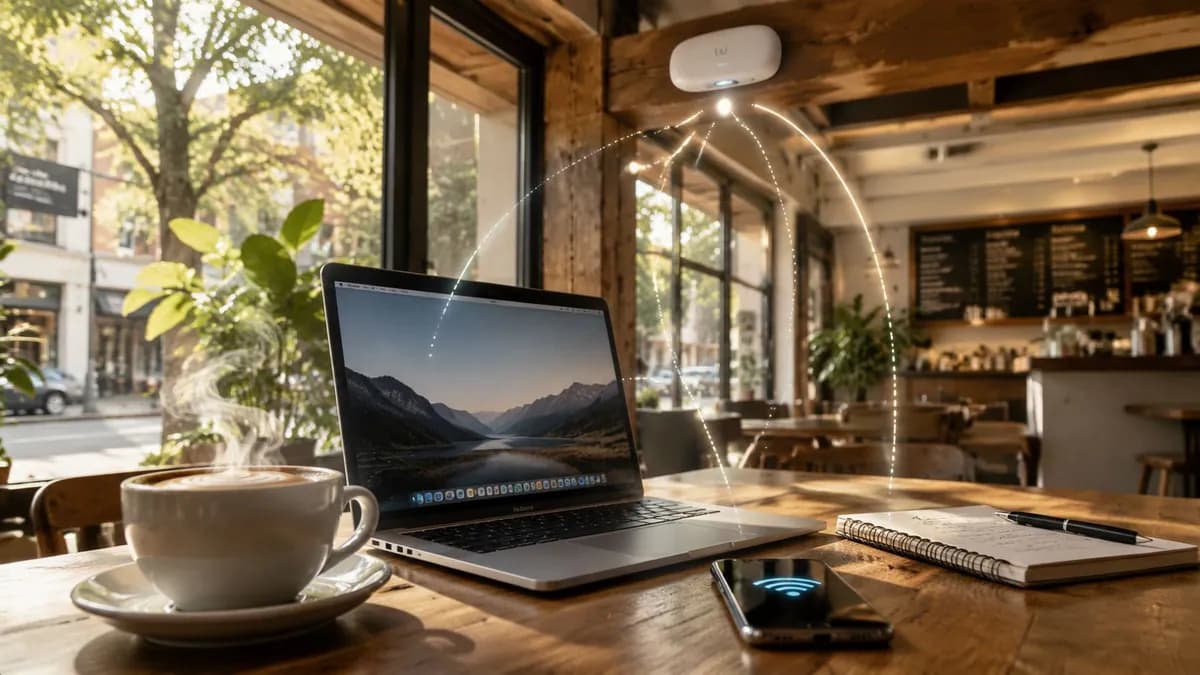
ते सहसा एकाच पद्धतीने सुरू होते. एक ग्राहक त्यांचा फ्लॅट व्हाईट आणि लॅपटॉप सांभाळत WiFi पासवर्ड विचारतो. पासवर्ड पुन्हा बदललेला असतो, किंवा खडूने फळ्यावर लिहिलेला पासवर्ड चुकीचा असतो, किंवा खिडकीजवळील जागांजवळ सिग्नल कमकुवत असतो. दहा मिनिटांनंतर, एक कर्मचारी रांगेतील लोकांना सर्व्ह करण्याऐवजी कनेक्शनची समस्या सोडवण्याचा प्रयत्न करत असतो.
बहुतेक ऑपरेटर्स कॉफी शॉपच्या wifi ला ब्लिंकिंग लाईट्स असलेले एक युटिलिटी बिल मानतात. हा दृष्टिकोन खर्चिक ठरतो. मल्टी-साईट कॉफी चेनमध्ये, WiFi चा परिणाम ग्राहक टिकवून ठेवण्यावर, कर्मचाऱ्यांच्या उत्पादकतेवर, सुरक्षेच्या जोखमींवर आणि तुमच्या फर्स्ट-पार्टी ग्राहक डेटाच्या गुणवत्तेवर होतो. ते चुकीच्या पद्धतीने केल्यास अडथळा निर्माण होतो. ते चांगल्या प्रकारे केल्यास, ते सेवा मॉडेलचा एक भाग बनते.
मला सर्वात जास्त दिसणारी चूक अगदी सोपी आहे. मालक इंटरनेट ॲक्सेस खरेदी करतात, राउटर इन्स्टॉल करतात, पासवर्ड शेअर करतात आणि काम संपले असे समजतात. असे नाही. एका चांगल्या कॉफी शॉपच्या wifi सेटअपला दुपारच्या गर्दीच्या वेळी चांगला परफॉर्मन्स द्यावा लागतो, व्यावसायिक सिस्टीम्सचे संरक्षण करावे लागते आणि वारंवार येणाऱ्या ग्राहकांसाठी भेटी सोप्या कराव्या लागतात, कठीण नाही.
तुमचे कॉफी शॉप WiFi तुम्हाला का अपयशी ठरवत आहे
गर्दीच्या वेळी, कमकुवत WiFi ची समस्या दुर्लक्षित राहत नाही. ती सर्वांसमोर समोर येते.
एक पाहुणा मीटिंगची लिंक लोड करू शकत नाही. दुसरा सतत रिफ्रेश होणाऱ्या लॉगिन पेजमुळे बाहेर फेकला जातो. एक नियमित ग्राहक दर आठवड्याला पासवर्ड बदलत असल्यामुळे तो विचारणे सोडून देतो. यातील कोणताही क्षण स्वतःमध्ये मोठा वाटत नाही, परंतु एकत्रितपणे ते लोक त्या जागेचे मूल्यांकन कसे करतात हे ठरवतात. जर कॉफी चांगली असेल पण डिजिटल अनुभव निराशाजनक असेल, तर ते दुकान रस्त्यावरील दुसऱ्या दुकानापेक्षा कमी विश्वासार्ह वाटते.
हे महत्त्वाचे आहे कारण कॉफी शॉपचे wifi आता केवळ एक अतिरिक्त सोय राहिलेली नाही. Ofcom च्या Connected Nations रिपोर्टनुसार संपूर्ण UK मध्ये शेकडो हजारो सार्वजनिक WiFi हॉटस्पॉट्स आहेत, म्हणूनच InformationWeek च्या कॉफी शॉप WiFi अपेक्षांवरील चर्चेच्या या सारांशानुसार, ग्राहक आता कनेक्टिव्हिटीला एक अतिरिक्त सुविधेऐवजी मूलभूत सेवा मानतात.
जुना सेटअप पूर्वनिर्धारित पद्धतींनी बिघडतो
बहुतेक खराब कामगिरी करणाऱ्या ठिकाणांमध्ये यापैकी एक सेटअप असतो:
- काउंटरवर ग्राहक-दर्जाचा राउटर: एका छोट्या फ्लॅटसाठी ठीक आहे, परंतु व्यस्त आदरातिथ्य (hospitality) फ्लोअरसाठी अविश्वासार्ह आहे.
- सर्वांसाठी एकच सामायिक पासवर्ड: देणे सोपे आहे, नियंत्रित करणे कठीण आहे, मोठ्या प्रमाणावर व्यवस्थापित करणे अशक्य आहे.
- एक कठीण Captive Portal: हे सुरुवातीला व्यावसायिक दिसते, परंतु पेज योग्यरित्या लोड न झाल्यास ग्राहकांना त्रास देते.
- युजर्स आणि डिवाइसेसमध्ये कोणतेही वेगळेपण नसणे: कर्मचाऱ्यांचे टॅब्लेट, म्युझिक सिस्टीम, बॅक-ऑफिस डिवाइसेस आणि पाहुणे सर्व एकच वातावरण सामायिक करतात.
प्रत्येक पर्याय एक वेगळी समस्या निर्माण करतो. स्वस्त हार्डवेअरमुळे खराब कव्हरेज मिळते. सामायिक केलेले पासवर्ड जागेच्या बाहेर पसरतात. खराब पोर्टल डिझाइनमुळे पाहुणे ऑनलाइन येण्यापूर्वीच अडथळे निर्माण होतात. फ्लॅट नेटवर्क्स साध्या सुविधेला सुरक्षेच्या जोखमीत बदलतात.
वाईट कॉफी शॉप WiFi कचितच एखाद्या मोठ्या चुकीमुळे अयशस्वी होते. ते अयशस्वी होते कारण अनेक लहान तडजोडी एकत्र येतात.
ग्राहकांच्या प्रत्यक्षात काय लक्षात येते
ग्राहक तुमच्या फायरवॉल पॉलिसीची तपासणी करत नाहीत किंवा तुम्ही कोणता ॲक्सेस पॉइंट विक्रेता वापरता हे विचारत नाहीत. त्यांच्या लक्षात येते की WiFi त्वरित काम करत आहे का, ते परत आल्यावर पुन्हा कनेक्ट होते का, आणि तिथे जास्त वेळ थांबण्याइतपत ते त्यावर विश्वास ठेवू शकतात का.
एकापेक्षा जास्त ठिकाणी आउटलेट्स असलेल्या चेनसाठी, याचा अर्थ असा की प्रश्न हा नाही की "आम्ही मोफत WiFi देतो का?" मुख्य प्रश्न हा आहे की नेटवर्क तुमच्या ब्रँडला प्रदान करायचा आहे अशा प्रकारच्या अनुभवाला सपोर्ट करते का. जर तुमचे पोझिशनिंग सोयीस्करता, आराम आणि पुन्हा पुन्हा येणाऱ्या ग्राहकांवर अवलंबून असेल, तर अविश्वसनीय गेस्ट ॲक्सेस या तिन्ही गोष्टींच्या विरुद्ध काम करतो.
चांगले ऑपरेटर्स WiFi कडे केवळ बॅक-रूम तांत्रिक समस्या म्हणून पाहणे बंद करतात. ते व्यवस्थापन आसन व्यवस्था, क्यू फ्लो आणि पेमेंट वेगाप्रमाणेच करतात. हा ग्राहकांच्या प्रवासाचा एक भाग आहे आणि ग्राहक आधीच ते सुरळीतपणे चालण्याची अपेक्षा करतात.
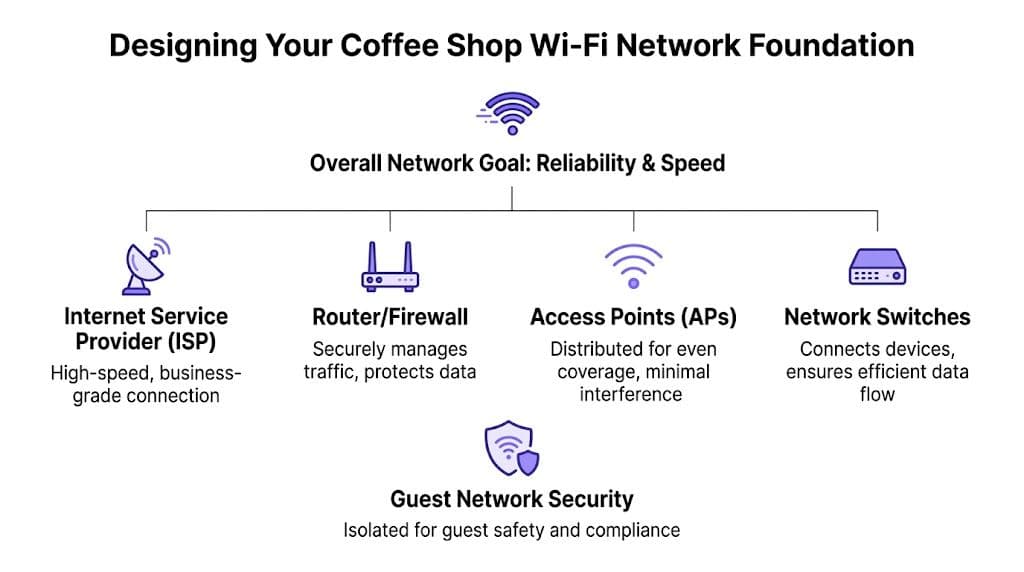
तुमच्या नेटवर्क फाउंडेशनची रचना करणे
तुम्ही लॉगिन पद्धत निवडण्यापूर्वी किंवा ॲनालिटिक्सचा विचार करण्यापूर्वी, फिजिकल आणि लॉजिकल फाउंडेशन योग्य करा. जर मूळ नेटवर्क कमकुवत असेल, तर गेस्टसाठी केलेली प्रत्येक सुधारणा एका अडथळ्यावर येऊन थांबते.
इच्छित कल्पनेऐवजी, वास्तविक वापरापासून सुरुवात करा
कॉफी शॉपमध्ये संमिश्र मागणी असते. एक ग्राहक दहा मिनिटांसाठी ईमेल तपासतो. दुसरा अर्धा दिवस व्हिडिओ कॉलवर घालवतो. कर्मचाऱ्यांची डिव्हाइसेस एकाच वेळी पेमेंट, ऑर्डरिंग, इन्व्हेंटरी आणि संगीत चालवतात. जर तुम्ही नेटवर्क सर्वात कमी वापरासाठी डिझाइन केले, तर गर्दी झाल्यावर संपूर्ण शॉपचे नेटवर्क मंदावते.
या घटकांचा विचार करून नियोजन करा:
- आसन व्यवस्थेचे स्वरूप: दाट आसन व्यवस्थेला खिडकीजवळील स्टूल असलेल्या लांब, अरुंद कॅफेच्या तुलनेत वेगळ्या कव्हरेजची आवश्यकता असते.
- डिव्हाइसेसचे मिश्रण: बहुतेक अतिथी एकापेक्षा जास्त डिव्हाइसेस सोबत बाळगतात, जरी ते प्रत्यक्षात फक्त एकच वापरत असले तरीही.
- पीक कंटेंशन: तुमच्या नेटवर्कला शांत वेळेत नव्हे, तर गर्दीच्या वेळी परिस्थिती सांभाळता आली पाहिजे.
- ऑपरेशनल ट्रॅफिक: POS, टॅबलेट्स, प्रिंटर, कॅमेरे, स्मार्ट स्पीकर्स आणि ऑफिस डिव्हाइसेस हे सर्व एअरटाईमसाठी स्पर्धा करतात जर तुम्ही त्यांना परवानगी दिली तर.
साधे फ्लोअर प्लॅनचे पुनरावलोकन अनेकदा मूळ समस्या समोर आणते. ॲक्सेस पॉइंट्स स्टॉक रूममध्ये, फ्रिजच्या वर किंवा डेकोरेटिव्ह बल्कहेड्सच्या मागे लपवले जातात कारण कोणालाही ते समोर दिलेले नको असतात. ते नीटनेटके असले, तरी ते वाईट रेडिओ डिझाइन आहे.
कंझ्युमर किटची किंमत सुरुवातीला कमी असते, पण नंतर जास्त पडते
लहान ऑपरेटर्स बऱ्याचदा ISP-प्रदान केलेल्या राउटर किंवा कंझ्युमर मेश गियरने सुरुवात करतात. हे अगदी सोप्या जागेत काम करू शकते, परंतु एकदा का तुमच्याकडे एकापेक्षा जास्त साइट्स, सामायिक ट्रबलशूटिंग जबाबदारी आणि सुसंगत पॉलिसीची आवश्यकता निर्माण झाली की ते अपयशी ठरते.
Cisco Meraki, Aruba, Ruckus, Mist, किंवा UniFi सारख्या विक्रेत्यांचे Enterprise ॲक्सेस पॉइंट्स हे केंद्रीय व्यवस्थापन, उत्तम रोमिंग वर्तन, सुलभ वर्गीकरण (segmentation) आणि अंदाज घेता येण्याजोग्या सपोर्टसाठी तयार केले आहेत. ते तुमच्या नेटवर्क टीमला प्रत्येक समस्येसाठी कोणालाही ऑन-साइट न पाठवता नेमके काय घडत आहे हे पाहण्याची परवानगी देतात.
व्यावहारिक नियम: जर एखाद्या साईटवर अतिथी (guest) WiFi, कर्मचारी उपकरणे आणि व्यवसाय प्रणाली असतील, तर त्याकडे घरगुती ब्रॉडबँड सेटअप म्हणून न पाहता व्यवस्थापित (managed) शाखा नेटवर्क म्हणून पहा.
तुम्ही नवीन साईट्स उघडत असाल किंवा त्यांचे नूतनीकरण करत असाल, तर नेटवर्कच्या निर्णयांना व्यापक लाँच प्लॅनसह जोडणे उपयुक्त ठरते. यूके कॅफेसाठीचे हे ADS रिसोर्स उपयुक्त आहे कारण ते पायाभूत सुविधांच्या निर्णयांना साईटची तयारी, उपकरणे आणि ऑपरेशन्सच्या व्यापक संदर्भात ठेवते.
ॲक्सेस पॉइंट्स अशा ठिकाणी ठेवा जिथे ग्राहक खरोखर बसतात
चांगले कव्हरेज मिळवणे म्हणजे तुम्हाला हवे असण्यापेक्षा जास्त हार्डवेअर खरेदी करणे नाही. तर योग्य हार्डवेअर योग्य ठिकाणी ठेवणे आहे.
जागा निवडीतील सामान्य चुकांमध्ये हे समाविष्ट आहे:
- बॅक-रूम इन्स्टॉलेशन्स ज्यामुळे समोरील सीटिंग एरियामध्ये कमकुवत सिग्नल मिळतो.
- सीलिंगचे कोपरे ज्यामुळे असमान कव्हरेज आणि डेड स्पॉट्स तयार होतात.
- खूप जास्त APs एकमेकांच्या अगदी जवळ असणे, ज्यामुळे सुधारणा होण्याऐवजी इंटरफरन्स (हस्तक्षेप) होतो.
- बांधकाम साहित्याकडे दुर्लक्ष करणे, विशेषतः जाड भिंती, धातूचे शेल्व्हिंग, आरसे आणि रेफ्रिजरेशन युनिट्स.
मल्टी-साइट ऑपरेटरसाठी, फ्लोअर प्लॅन वेगळे असले तरीही डिझाइन तत्त्वे प्रमाणित ठेवा. साईटच्या आकारानुसार नेमकी उपकरणे बदलू शकतात, परंतु डिझाइनचे लॉजिक बदलू नये. स्वतंत्र ISP हँडऑफ, बिझनेस-ग्रेड फायरवॉलिंग, व्यवस्थापित स्विचिंग आणि योग्य ठिकाणी ठेवलेले APs हे सामान्य असले पाहिजेत.
तुम्हाला आर्किटेक्चरच्या बाजूने व्यावहारिक संदर्भ हवा असल्यास, सुरक्षित आणि मॉनिटाइज्ड कॅफे WiFi साठीची ही मार्गदर्शिका रोलआउटपूर्वी ऑपरेटरनी सहसा विचार करायला हवा अशा घटकांची रूपरेषा सांगते.
सुरक्षित आणि विभागलेले (Segmented) ॲक्सेस लागू करणे
दीर्घकालीन समस्या निर्माण करण्याचा सर्वात जलद मार्ग म्हणजे पाहुणे, कर्मचारी आणि व्यवसाय प्रणाली एकाच नेटवर्कवर ठेवणे आणि त्याला सोयीचे नाव देणे.
कॉफी शॉप्समध्ये ही सोपी वाटणारी चूक अजूनही सामान्य आहे. कोणीतरी एकच SSID स्थापित करतो, प्रत्येकाला एकच पासवर्ड देतो आणि जोखीम केवळ सैद्धांतिक आहे असे गृहीत धरतो. पण तसे नाही. हॉस्पिटॅलिटी क्षेत्रात, सेगमेंटेशन हे अशा मोजक्या नियंत्रणांपैकी एक आहे जे व्यावहारिक आणि अत्यंत महत्त्वपूर्ण आहे.
पाहुण्यांना व्यावसायिक प्रणालींपासून दूर ठेवा
तुमचे अतिथी नेटवर्क कधीही तुमचे पेमेंट टर्मिनल्स, कर्मचाऱ्यांचे टॅब्लेट्स, प्रिंटर, कॅमेरा किंवा ऑफिस उपकरणांसारख्याच लेनमध्ये नसावे. म्युझिक प्लेअर्स किंवा डिजिटल मेनू बोर्ड यांसारखी कमी जोखमीची वाटणारी उपकरणे देखील व्यवसायाच्या ऑपरेशन्सशी संबंधित असल्यास त्यांच्या स्वतःच्या नियंत्रित सेगमेंटवर असणे आवश्यक आहे.
किमान, एका कॉफी चेनने खालील गोष्टी वेगळ्या केल्या पाहिजेत:
- Guest access: केवळ-इंटरनेट, अंतर्गत सिस्टमपासून वेगळे केलेले.
- Staff access: अधिकृत टीम सदस्यांसाठी आणि व्यवस्थापित कार्य उपकरणांसाठी.
- Operational devices: POS, प्रिंटर, बॅक-ऑफिस उपकरणे आणि साइट तंत्रज्ञान.
- Legacy or awkward devices: अशी उपकरणे जी आधुनिक ओळख पडताळणी पद्धती हाताळू शकत नाहीत आणि ज्यांना कठोरपणे नियंत्रित प्रवेश आवश्यक आहे.
हे व्यवसायाचे दोन प्रकारे रक्षण करते. पहिले, यामुळे अतिथीचे उपकरण धोक्यात आल्यास त्याचा प्रभाव मर्यादित होतो. दुसरे, यामुळे ट्रबलशूटिंग अधिक स्पष्ट होते कारण समस्या नेमकी कुठे आहे हे तुम्ही पाहू शकता.
Open access मुळे विश्वासाची समस्या निर्माण होते
सार्वजनिक WiFi च्या बाबतीत योग्य कारणांमुळे सुरक्षिततेची भीती असते. युकेचे राष्ट्रीय सायबर सुरक्षा केंद्र वापरकर्त्यांना असुरक्षित हॉटस्पॉटवर संवेदनशील व्यवहार न करण्याचा सल्ला देते, जसे की या सार्वजनिक WiFi सुरक्षा विहंगावलोकन मध्ये स्पष्ट केले आहे. कॅफे चालकांसाठी, याचा अर्थ असा की खिडकीवरील "free WiFi" चे स्टिकर लावून ग्राहकांमध्ये आपोआप विश्वास निर्माण होत नाही.
ग्राहक आता समंजस प्रश्न विचारतात. हे बँकिंगसाठी सुरक्षित आहे का? माझे कामाचे VPN व्यवस्थित चालेल का? हे लॉगिन पेज खरे आहे का? जर तुमचे उत्तर असेल की "पासवर्ड काउंटरवर आहे," तर यामुळे कोणाचेही समाधान होत नाही.
ग्राहकांच्या बाजूने असलेल्या जोखमीचे उपयुक्त स्पष्टीकरण या कॉफी शॉप WiFi सुरक्षा मार्गदर्शकामध्ये आढळते, विशेषतः अशा ऑपरेटरसाठी जे समजून घेण्याचा प्रयत्न करत आहेत की विश्वासाची बाब सोयीइतकीच का महत्त्वाची आहे.
जर एखादा ग्राहक तुमच्या नेटवर्कमध्ये सामील होण्यापूर्वी संकोच करत असेल, तर ती समस्या केवळ सुरक्षेची नाही. ती आदरातिथ्याची देखील आहे.
सामायिक पासवर्ड विरुद्ध आधुनिक प्रमाणीकरण
जुने अतिथी-प्रवेश मॉडेल अजूनही टिकून आहेत कारण ते सोपे वाटतात. प्रत्यक्षात, ते एकतर कमकुवत सुरक्षा किंवा निकृष्ट वापरकर्ता अनुभव तयार करतात, आणि काहीवेळा दोन्ही.
| वैशिष्ट्य | सामायिक पासवर्ड | Captive Portal | पासवर्डशिवाय (Passpoint/OpenRoaming) |
|---|---|---|---|
| पहिल्यांदा येणाऱ्या अतिथींसाठी सुलभता | जर कर्मचाऱ्यांनी तो योग्यरित्या शेअर केला तर सोपे | बऱ्याचदा संथ आणि अधिक नाजूक | एकदा योग्यरित्या सेट केल्यानंतर अतिशय सुलभ |
| सुरक्षा स्थिती | कमकुवत, विशेषतः जेव्हा पासवर्ड सगळीकडे पसरतो | मुक्त प्रवेशापेक्षा चांगले, परंतु अंमलबजावणीनुसार बदलते | अधिक मजबूत कारण सुरुवातीपासूनच प्रवेश प्रमाणित आणि कूटबद्ध केलेला असतो |
| कार्यरत नियंत्रण | कमी | मध्यम | उच्च |
| पुन्हा भेट देण्याचा अनुभव | सहसा मॅन्युअली पुन्हा प्रविष्ट करावा लागतो | बऱ्याचदा कंटाळवाणा | परतणाऱ्या वापरकर्त्यांसाठी स्वयंचलित रीकनेक्शन |
| सपोर्टचा बोजा | पासवर्ड बदलल्यास किंवा लीक झाल्यास जास्त असतो | उपकरणांवर पोर्टल अयशस्वी झाल्यास जास्त असतो | एकदा योग्यरित्या तैनात केल्यावर कमी असतो |
| Brand impression | सर्वोत्तम कार्यक्षम | थोडं कठीण वाटू शकतं | आधुनिक आणि हेतुपूर्ण वाटतं |
शेअर केलेले पासवर्ड्स अगदी प्राथमिक स्वरूपाचे असतात. Captive Portal उपयुक्त ठरू शकतात, विशेषतः जेव्हा तुम्हाला अटींचा स्वीकार आणि संमती प्रक्रिया आवश्यक असते, परंतु अयशस्वी रीडायरेक्ट्स, डिव्हाइसमधील त्रुटी आणि अर्धवट सोडलेल्या सेशन्ससाठी ते कुप्रसिद्ध आहेत. Passpoint आणि OpenRoaming मॉडेलसह Passwordless authenticated access, वेगळ्या प्रकारची समस्या सोडवतो. हे अडथळे कमी करते आणि त्याच वेळी सुरक्षा सुधारते.
प्रत्यक्ष जगात काय उपयुक्त ठरते
बहुतांश चेन्ससाठी, व्यावहारिक मॉडेल खालीलप्रमाणे आहे:
- विभागलेले SSIDs किंवा समतुल्य पॉलिसी सेपरेशन वापरा
- पेमेंट आणि मुख्य ऑपरेशन्स वेगळे ठेवा
- पूर्णपणे ओपन गेस्ट ॲक्सेस टाळा
- शक्य तिथे पासवर्ड्स वापरणे बंद करा
- सुसंगत डिव्हाइसेससाठी आधुनिक कूटबद्ध (encrypted) ऑथेंटिकेशनला सपोर्ट द्या
- संपूर्ण नेटवर्कची गुणवत्ता कमी न करता जुन्या हँडसेट्ससाठी फॉलबॅक पर्याय उपलब्ध करा
हा स्टॅकमधील असा टप्पा आहे जिथे प्लॅटफॉर्मची निवड महत्त्वाची ठरते. काही ऑपरेटर मूळ व्हेंडर टूल्स वापरतात. इतर आयडेंटिटी सिस्टम्सचा थर जोडतात. Purple हे अशा प्लॅटफॉर्मचे एक उदाहरण आहे जे अस्तित्वात असलेल्या वायरलेस इन्फ्रास्ट्रक्चरसह पासवर्डलेस गेस्ट ॲक्सेस आणि आयडेंटिटी-आधारित नेटवर्किंगला सपोर्ट करते, जे शेअर केलेल्या पासवर्ड्सवर किंवा क्लिष्ट ऑन-प्रिम सेटअपवर अवलंबून न राहता सुरक्षित ऑनबोर्डिंग करू इच्छिणाऱ्या चेन्ससाठी उपयुक्त ठरते.
एक अखंड गेस्ट जर्नी तयार करणे
कोणताही ग्राहक ऑथेंटिकेशन पद्धतींचा विचार करत तुमच्या दुकानात येत नाही. त्यांना फक्त बसायचे असते, पटकन ऑर्डर द्यायची असते, त्यांचे लॅपटॉप उघडून कोणत्याही व्यत्ययाशिवाय ऑनलाईन जायचे असते.
सर्वात चांगला कॉफी शॉप WiFi अनुभव जवळजवळ अदृश्य वाटतो.

नेटवर्क मिळण्यापूर्वीच अडथळे दिसू लागतात
जुन्या पोर्टल प्रवाह असलेल्या सामान्य कॅफेमध्ये काय घडते ते पहा. एखादा नवीन ग्राहक त्यांचा फोन सुरू करतो, नेटवर्क लिस्ट स्कॅन करतो, सर्वात योग्य SSID निवडतो, ब्राउझर पॉप-अपची वाट पाहतो, आणि नंतर स्प्लॅश पेज लोड न झाल्यामुळे अडकून पडतो. ते मोबाईल डेटा बंद करतात, पुन्हा प्रयत्न करतात, कर्मचाऱ्यांकडे मदत मागतात आणि थोड्या चिडचिडीने संभाषणाला सुरुवात करतात.
हा केवळ तांत्रिक बिघाड नाही. हे भेटीचा मूड बदलून टाकते.
पोर्टल अनुभवांमुळे सहसा त्रास का होतो हे जाणून घ्यायचे असल्यास, captive portal म्हणजे काय याचे हे स्पष्टीकरण उपयुक्त आहे. ही यंत्रणा ओळखीची आहे, पण ओळखीची असणे म्हणजे ती सुलभ असणे असे नाही.
अधिक चांगला अनुभव लहान आणि स्पष्ट असतो
एक चांगल्या गेस्ट जर्नीमध्ये काही मोजकेच टप्पे असतात:
- स्पष्ट चिन्हे: एक नेटवर्कचे नाव, गोंधळात टाकणारे तीन पर्याय नकोत.
- साधे ऑनबोर्डिंग: QR कोड, टॅप-टू-कनेक्ट, किंवा सरळ आणि सोपी प्रथम-वेळ नोंदणी.
- जलद रीकनेक्शन: परत येणाऱ्या पाहुण्यांना पुन्हा सुरुवातीपासून सुरुवात करावी लागू नये.
- कर्मचाऱ्यांवर अवलंबित्व नाही: बिलिंग टीमने तांत्रिक सपोर्ट म्हणून काम करण्याची आवश्यकता भासू नये.
प्रत्यक्षात, आदर्श अनुभव असा असावा. पहिल्यांदा आलेला अभ्यागत काउंटर किंवा बसण्याच्या जागेजवळ एक स्पष्ट चिन्ह पाहतो, QR कोड स्कॅन करतो, अटी स्वीकारतो आणि सुरक्षितपणे कनेक्ट होतो. पुढील भेटीदरम्यान, ऑथेंटिकेशन फ्रेमवर्क सपोर्ट करत असल्यास त्यांचे डिव्हाइस आपोआप पुन्हा कनेक्ट होते.
चांगले आदरातिथ्य ग्राहकांनी तक्रार करण्यापूर्वीच त्यांच्या छोट्या अडचणी दूर करते.
छोटे डिझाइनचे पर्याय महत्त्वाचे ठरतात
ऑपरेटर सहसा बॅकएंड कॉन्फिगरेशनवर लक्ष केंद्रित करतात आणि स्टोअरमधील प्रत्यक्ष अनुभवाकडे दुर्लक्ष करतात. चिन्हे वाचनीय, ब्रँडेड आणि अशा ठिकाणी असावीत जिथे पाहुणे सहसा थांबतात. कनेक्शनच्या सूचना पेस्ट्री केसच्या मागे लपवू नका किंवा इतर वेगवेगळ्या पोस्टर्सनी भरलेल्या नोटीस बोर्डवर कोंबू नका.
काही व्यावहारिक सवयी मदत करतात:
- SSID चे नाव स्पष्ट ठेवा: ब्रँड किंवा साईटचे नाव वापरा, जेनेरिक हार्डवेअर लेबल नाही.
- सूचना लहान ठेवा: बहुतांश पाहुण्यांसाठी दोन पायऱ्या पुरेशा असतात.
- नेहमीच्या डिव्हाइसेसवर चाचणी घ्या: iPhone, Android, Windows आणि Mac या सर्वांवर नियमितपणे तपासणी केली पाहिजे.
- कर्मचाऱ्यांना हलके-फुलके प्रशिक्षण द्या: त्यांना एखादी समस्या आल्यास काय करावे हे माहित असावे, नेटवर्किंगचे मोठे व्याख्यान देण्याची गरज नाही.
सर्वात सुरळीत चालणाऱ्या कॉफी शॉप WiFi सेटअप्समुळे एक ओळखीची लय तयार होते. आत या, ऑर्डर द्या, बसा, कनेक्ट करा, परत या, रीकनेक्ट करा. जेव्हा हा क्रम विनाव्यत्यय कार्य करतो, तेव्हा पाहुणे या ठिकाणाची एक सुव्यवस्थित आणि वापरण्यास सोपे ठिकाण म्हणून आठवण ठेवतात. बऱ्याच ऑपरेटरच्या कल्पनेपेक्षा हे जास्त महत्त्वाचे आहे.
WiFi डेटाचे व्यावसायिक वाढीत रूपांतर करणे
बहुतेक कॉफी शॉप्स आधीच कनेक्टिव्हिटीसाठी पैसे देतात. परंतु त्यातून व्यावसायिक मूल्य मिळवणारे प्रमाण खूप कमी आहे.
हीच उपयुक्तता आणि मालमत्ता यामधील दरी आहे. एक मूलभूत गेस्ट नेटवर्क लोकांना ऑनलाइन आणते. तर ओळख-आधारित (identity-based) गेस्ट नेटवर्क ऑपरेटर्सना लोक किती वेळा परत येतात, किती वेळ थांबतात आणि WiFi व्यवस्था व्यावसायिक उद्दिष्टांना मदत करत आहे की नाही याचा अधिक स्पष्ट दृष्टिकोन देते.
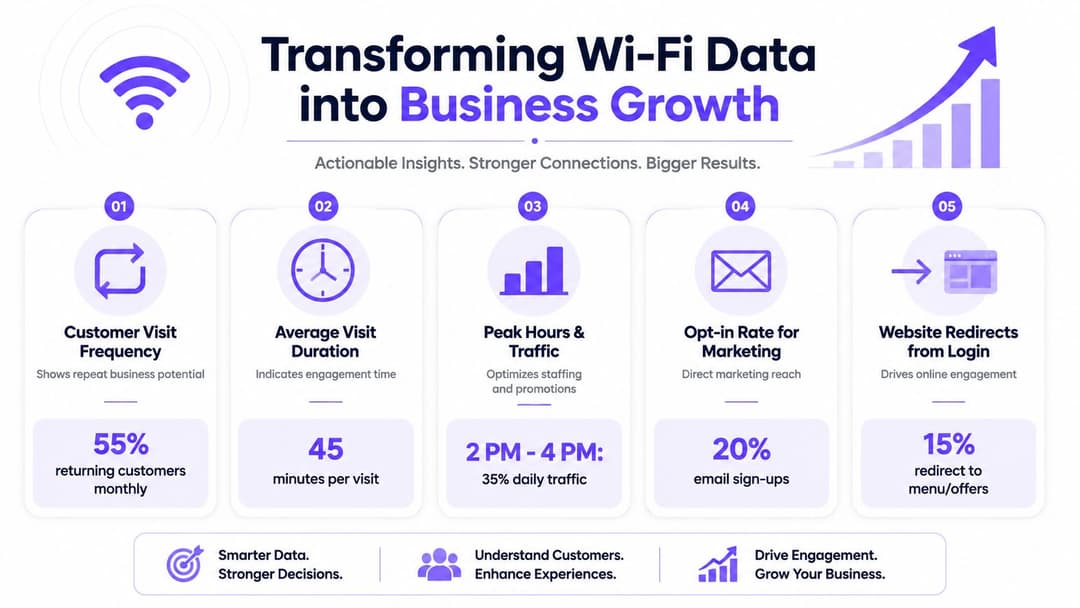
उपयुक्त मॅट्रिक्स वर्तणुकीशी संबंधित असतात, केवळ दिसण्यापुरते नाही
एखाद्या साईटवर WiFi आहे की नाही हा व्यावसायिक प्रश्न नाही. प्रश्न असा आहे की ते WiFi खर्च, निष्ठा आणि अधिक हुशार निर्णय घेण्यास हातभार लावते का.
कॉफी शॉप WiFi आणि ROI च्या या चर्चेत नमूद केल्याप्रमाणे, ओळख-आधारित अतिथी WiFi हे सत्र वारंवारता आणि पुन्हा भेट देण्याचे दर यासारखे मेट्रिक्स प्रदान करते, जे CRM आणि विपणन ऑटोमेशनला उपयुक्त ठरू शकतात. सामायिक पासवर्ड आणि व्यवस्थापित प्रवेश मॉडेलमधील हा मूलभूत फरक आहे.
उपयुक्त मोजमापांमध्ये खालील गोष्टींचा समावेश होतो:
- सत्र वारंवारता: ज्ञात अतिथी किती वेळा परत येतात.
- पुन्हा भेट देण्याचे पॅटर्न: कोणत्या साईट्स सवयीनुसार रहदारी तयार करतात.
- ऑप्ट-इन गुणवत्ता: अतिथी भविष्यातील संवादासाठी संमती देतात की नाही.
- थांबण्याचा कल (Dwell trends): विविध व्यावसायिक कालावधीत अभ्यागत किती काळ थांबतात.
- साइट तुलना: कोणत्या शाखा पहिल्यांदा येणाऱ्या वापरकर्त्यांना पुन्हा भेट देणाऱ्या अभ्यागतांमध्ये रूपांतरित करतात.
हे मेट्रिक्स महत्त्वाचे आहेत कारण ते नेटवर्क गुंतवणुकीला अशा वर्तनाशी जोडतात ज्यावर तुम्ही कृती करू शकता.
ऑपरेटर डेटाचा वापर कसा करू शकतात
प्रमाणित अतिथी प्रवेश असलेली साखळी (chain) प्रत्येक साइटवर एकच पासवर्ड वापरणाऱ्या साखळीपेक्षा बरेच चांगले व्यावसायिक निर्णय घेऊ शकते.
उदाहरणांमध्ये खालील गोष्टींचा समावेश होतो:
लॉयल्टी फॉलो-अप
जर एखाद्या अतिथीने ऑप्ट-इन केले, तर विपणन संघ प्रत्येकाला एकच सामान्य संदेश पाठवण्याऐवजी भेटीच्या वर्तनाला लॉयल्टी प्रवासाशी जोडू शकतात.साइट-स्तरीय समस्या निवारण
जर एखाद्या शाखेत तत्सम साइट्सच्या तुलनेत पुन्हा भेट देण्याचे प्रमाण कमी असेल, तर ती समस्या आसन व्यवस्था, सिग्नल गुणवत्ता, ऑनबोर्डिंगमधील अडथळे किंवा स्थानिक ऑपरेशन्सशी संबंधित असू शकते.मोहिमेची वेळ (Campaign timing)
भेटीचे पॅटर्न टीमला हे ठरवण्यास मदत करतात की जाहिराती कधी यशस्वी होण्याची दाट शक्यता आहे, विशेषतः संथ दिवसाच्या भागांसाठी किंवा कमी वापरल्या जाणाऱ्या ठिकाणांसाठी.गुंतवणुकीचे समर्थन
जेव्हा नेटवर्क अपग्रेड स्वच्छ प्रतिबद्धता डेटा तयार करतात आणि मोजता येण्याजोग्या धारणा उपक्रमांना समर्थन देतात, तेव्हा त्यांचे समर्थन करणे सोपे होते.
ॲनालिटिक्स तेव्हाच महत्त्वाचे ठरतात जेव्हा कोणीतरी त्यावर कृती करू शकते. जर तुमचा WiFi डेटा ऑपरेशन्स, मार्केटिंग किंवा साइट नियोजनाला माहिती पुरवू शकत नसेल, तर तुम्ही फक्त निरुपयोगी डेटा गोळा करत आहात.
काय काम करत नाही
बरेच ऑपरेटर प्रत्येक ग्राहकावर मोठा लॉगिन फॉर्म सक्तीने लादून WiFi द्वारे "मार्केटिंग करण्याचा" प्रयत्न करतात. हे सहसा अंगाशी येते. जॉइनिंगच्या वेळी खूप जास्त अडथळे आल्यास फॉर्म भरणे कमी होते, अतिथी नाराज होतात आणि तुम्हाला निकृष्ट दर्जाचा डेटा मिळतो.
एक चांगला पर्याय म्हणजे प्रगतीशील विश्वास (progressive trust). कनेक्टिव्हिटी सुलभ करा. तुम्हाला जेवढी गरज आहे तेवढीच माहिती विचारा. संमतीबद्दल स्पष्ट रहा. त्यानंतर CRM, प्रेक्षक वर्गीकरण आणि मोहीम लॉजिकमध्ये परिणामी फर्स्ट-पार्टी डेटाचा जबाबदारीने वापर करा.
अनेक साइट्स असलेल्या साखळीसाठी, अतिथी WiFi हा केवळ एक IT खर्च राहत नाही. तो ग्राहक डेटा पायाभूत सुविधांचा एक भाग बनतो. नेटवर्क तुम्हाला सांगते की कोण परत येत आहे, कोणती ठिकाणे निष्ठा निर्माण करतात आणि तुमचे वातावरण तुमच्या ब्रँडसाठी आवश्यक असलेल्या वारंवार भेटींना समर्थन देते की नाही.
Ensuring Compliance and Guest Privacy
जेव्हा तुम्ही कॉफी शॉपच्या WiFi द्वारे ग्राहकांचा डेटा गोळा करता, तेव्हा तुम्ही केवळ सोयीपलीकडे जाऊन जबाबदारीच्या क्षेत्रात प्रवेश करता. ऑपरेटर्स सहसा या भागाकडे दुर्लक्ष करतात कारण ऑनबोर्डिंग प्रवाह सोपा दिसतो. परंतु कायदेशीर आणि विश्वासाचे परिणाम सोपे नसतात.
व्यावहारिक मानक अगदी स्पष्ट आहे. तुम्हाला जेवढी गरज आहे तेवढीच माहिती गोळा करा, ती का हवी आहे ते स्पष्ट करा, तिचे योग्य संरक्षण करा आणि संदिग्ध भाषेमध्ये तपशील लपवू नका.
कनेक्शन प्रवाहामध्येच मूलभूत कायदेशीर बाबी समाविष्ट करा
जर तुमचा गेस्ट ॲक्सेस प्रवास वैयक्तिक डेटा गोळा करत असेल, तर तुमच्या अटी आणि गोपनीयतेची माहिती शोधणे आणि समजणे सोपे असणे आवश्यक आहे.
एका चांगल्या बेसलाइनमध्ये खालील गोष्टींचा समावेश होतो:
- सेवांच्या स्पष्ट अटी (Terms of service): स्वीकार्य वापर आणि पाहुणे कशास सहमती देत आहेत हे स्पष्ट करा.
- दृश्यमान गोपनीयता सूचना (Privacy notice): तुम्ही कोणता डेटा गोळा करता, का आणि तो किती काळ ठेवता हे नमूद करा.
- जिथे आवश्यक असेल तिथे स्पष्ट संमती: विशेषतः मार्केटिंग संपर्कांसाठी.
- स्पष्ट डेटा नियंत्रक ओळख (Data controller identity): पाहुण्यांना हे माहित असावे की कोणती व्यावसायिक संस्था यासाठी जबाबदार आहे.
ग्राहकांना कनेक्ट झाल्यानंतर वेबसाइटच्या फुटरमध्ये शोध घ्यायला लावू नका. संबंधित सूचना ऑनबोर्डिंग मार्गामध्ये किंवा त्याच्या अगदी जवळ ठेवा.
तुमच्या डेटा सवयी मर्यादित ठेवा
ऑपरेटर्स सहसा खूप जास्त डेटा गोळा करतात कारण प्लॅटफॉर्ममुळे ते तांत्रिकदृष्ट्या शक्य होते. ही चुकीची चाचणी आहे. योग्य चाचणी ही आहे की ती माहिती प्रवेश, सुरक्षा, संमती व्यवस्थापन किंवा स्पष्टपणे स्पष्ट केलेल्या व्यावसायिक हेतूसाठी आवश्यक आहे का.
एक साधी अंतर्गत चेकलिस्ट वापरा:
- हेतू: आम्ही हे फील्ड का गोळा करत आहोत?
- रिटेंशन (Retention): आम्हाला याची किती काळ गरज आहे?
- प्रवेश (Access): कोणते कर्मचारी कर्मचारी हे पाहू शकतात?
- डिलीशन (Deletion): आवश्यक असल्यास आम्ही ते सुरक्षितपणे काढून टाकू शकतो का?
- विक्रेता पुनरावलोकन (Vendor review): आमचे पुरवठादार अशा प्रकारे डेटा हाताळतात का ज्याचे आम्ही समर्थन करू शकू?
ग्राहकांसमोरील सुरक्षा अपेक्षा आणि प्रकटीकरणाबद्दल अधिक व्यापकपणे विचार करणाऱ्या टीम्ससाठी, Vendmoore Enterprises security and legal वरील हा लेख एक उपयुक्त स्मरणपत्र आहे की लोकांसमोर येणारे तंत्रज्ञान अनुपालन कर्तव्ये आणि विश्वासाचे प्रश्न दोन्ही निर्माण करते, जरी ते तंत्रज्ञान अगदी सामान्य वाटत असले तरीही.
गोपनीयतेची भाषा एखाद्या जबाबदार ऑपरेटरने स्पष्टपणे बोलल्यासारखी वाटली पाहिजे, उत्तर लपवणाऱ्या वकिलासारखी नाही.
विश्वास हा ऑफरचाच एक भाग आहे
जेव्हा डेटाची देवाणघेवाण वाजवी वाटते तेव्हा पाहुणे व्यस्त राहण्यास अधिक उत्सुक असतात. जर त्यांना कनेक्ट झाल्यानंतर काय होते हे समजले, तर त्यांना नंतरच्या ईमेलमुळे फसवणूक झाल्यासारखे वाटण्याची किंवा ब्रँडबद्दल संशय येण्याची शक्यता कमी असते.
हे विशेषतः साखळी व्यवसायांसाठी (chains) महत्त्वाचे आहे. एका ठिकाणी आलेला गोपनीयतेचा वाईट अनुभव संपूर्ण ब्रँडवरील विश्वासाला तडा जाऊ शकतो. धोरण प्रमाणित करा, भाषा सोपी ठेवा, आणि ऑपरेशन्स, मार्केटिंग आणि IT हे सर्व एकाच नियमांनुसार काम करत असल्याची खात्री करा.
ऑपरेशन्स व्यवस्थापित करणे आणि यशाचे मोजमाप करणे
नेटवर्क लाईव्ह झाल्यानंतर, काम इन्स्टॉलेशनकडून शिस्तीकडे सरकते. जेव्हा कोणीही नियमित देखभालीची जबाबदारी घेत नाही, तेव्हा कॉफी शॉपमधील WiFi कालांतराने निकामी होते. फर्मवेअर जुने होते, ॲक्सेस पॉइंट्स ऑफलाइन जातात, अपडेट्सनंतर पोर्टल्स बंद पडतात, आणि ग्राहकांच्या तक्रारी IT पर्यंत पोहोचण्यापूर्वी स्टोअर मॅनेजर्सपर्यंत पोहोचतात.
यावरील उपाय म्हणजे ऑपरेशनल रिदम (नियमितता). हे अवघड नाही, फक्त सातत्य हवे.
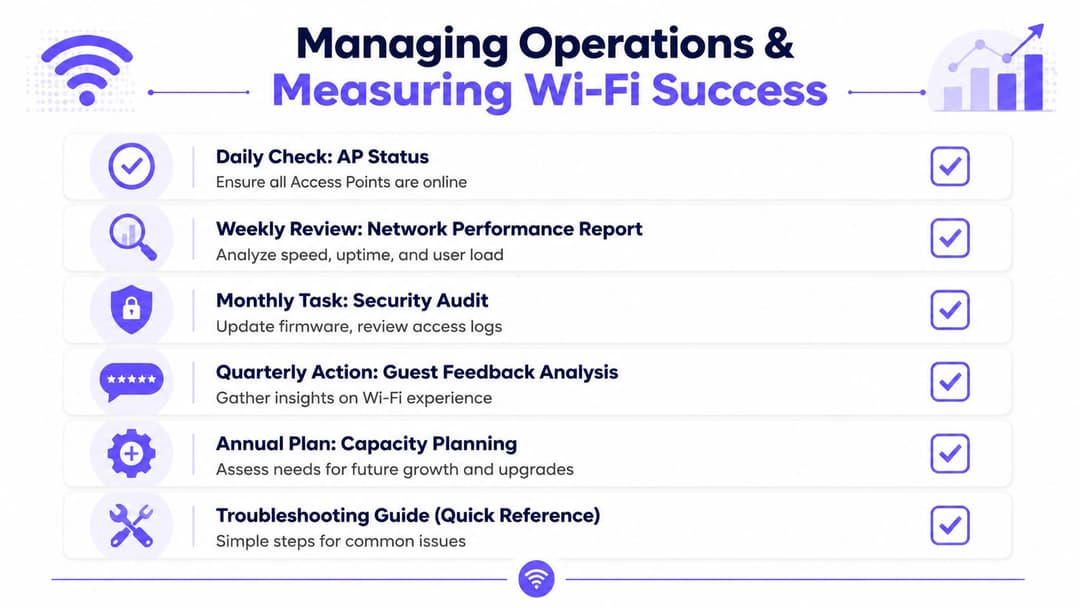
नेटवर्कचे व्यवस्थापन एखाद्या रिटेल सिस्टमप्रमाणे करा
अनेक शाखा असलेल्या कॉफी चेनमध्ये, गेस्ट WiFi चे व्यवस्थापन POS आणि पेमेंट सिस्टमसारख्याच व्यवस्थापन शिस्तीत केले पाहिजे. उपलब्धता, बदल नियंत्रण, व्हेंडर एस्केलेशन आणि रिपोर्टिंग यासाठी कोणाकडे तरी स्पष्ट जबाबदारी असणे आवश्यक आहे.
एक व्यावहारिक ऑपरेटिंग सायकल याप्रमाणे दिसते:
- दैनिक तपासणी: APs ऑनलाइन आहेत की नाही आणि साइटवरील स्पष्ट समस्यांचे निवारण झाले आहे की नाही याची खात्री करा.
- साप्ताहिक पुनरावलोकन: परफॉर्मन्स ट्रेंड्स, अयशस्वी जॉइन्स आणि असामान्य लोड पॅटर्न पहा.
- मासिक सुरक्षा कामे: फर्मवेअर स्थिती, ॲक्सेस पॉलिसी बदल आणि ऑथेंटिकेशन सेटिंग्जचे पुनरावलोकन करा.
- त्रैमासिक साइट अभिप्राय (फीडबॅक): तांत्रिक डेटाची तुलना स्टोअर स्तरावरील तक्रारी आणि कर्मचाऱ्यांच्या निरीक्षणांशी करा.
- वार्षिक क्षमता नियोजन: नूतनीकरण, मेनू बदल, मांडणीतील बदल किंवा ट्रेडिंग मॉडेलमधील बदल यानंतर ब्रँचच्या गरजांचे पुनर्मूल्यांकन करा.
योग्य क्रमाने समस्यांचे निवारण (Troubleshoot) करा
जेव्हा कर्मचारी "WiFi बंद आहे" असे सांगतात, तेव्हा त्याचे कारण बऱ्याचदा किरकोळ असते. साइटवरील टीम्सना अस्पष्ट तक्रारींऐवजी उपयुक्त माहिती देण्याचे प्रशिक्षण द्या.
एक सोपा तपासणी मार्ग मदत करतो:
व्याप्ती (Scope) तपासा
या समस्येचा परिणाम एका ग्राहकावर होत आहे, स्टोअरच्या एका भागावर होत आहे की संपूर्ण साइटवर होत आहे?डिपेंडन्सी तपासा
ब्रॉडबँड लिंक सुरू आहे का? कर्मचाऱ्यांच्या उपकरणांवरही परिणाम झाला आहे की केवळ गेस्ट्सच्या उपकरणांवर?अलीकडील बदल तपासा
कोणी उपकरणे हलवली, ISP राउटर बदलला किंवा स्टोअरची मांडणी बदलली का?पॅटर्न तपासा
वेग कमी होण्याची समस्या फक्त गर्दीच्या वेळीच होते का? हे सहसा क्षमतेच्या किंवा एअरटाइमच्या समस्येकडे बोट दाखवते, पूर्ण बिघाडाकडे नाही.
व्यवसाय आणि तांत्रिक परिणामांचे एकत्र मोजमाप करा
अनेक टीम्स फक्त अपटाइम मोजतात. ते आवश्यक आहे, पण अपूर्ण आहे. एखादे नेटवर्क तांत्रिकदृष्ट्या उपलब्ध असू शकते, परंतु ऑनबोर्डिंग कठीण असल्यास किंवा पुन्हा वापरण्याचे प्रमाण कमी असल्यास ते व्यावसायिकदृष्ट्या कमकुवत ठरू शकते.
एक संतुलित स्कोअरकार्ड वापरा ज्यामध्ये पुढील गोष्टींचा समावेश असेल:
- तांत्रिक आरोग्य: AP uptime, backhaul स्थिरता, roaming वर्तन, अयशस्वी प्रमाणीकरण ट्रेंड.
- अतिथी अनुभव: यशस्वीरित्या जोडणे, सुलभ रीकनेक्शन, तक्रारींचे विषय.
- व्यावसायिक संकेत: युनिक वापरकर्ते, वारंवार भेटी, ऑप्ट-इन गुणवत्ता, मोहीम पात्रता.
- कार्यात्मक कार्यक्षमता: समस्यांचे निवारण करण्यासाठी लागणारा वेळ, स्टोअर स्तरावरील एस्केलेशनची संख्या, सर्व साईट्सवरील सुसंगतता.
एक विश्वासार्ह नेटवर्क हे अंतिम ध्येय नाही. लक्ष्य अशा प्रणालीवर आहे जी ग्राहकांची निष्ठा वाढवते, व्यवसायाचे रक्षण करते आणि लोक त्यांच्या जागांचा कसा वापर करतात याबद्दल साखळीला अधिक स्पष्ट माहिती देते.
तुमच्या कॉफी साखळीने सामायिक पासवर्ड, पॅची पोर्टल्स आणि वन-साईज-फिट्स-ऑल अतिथी प्रवेश मर्यादा ओलांडली असल्यास, अधिक व्यापक नेटवर्क रीफ्रेशचा भाग म्हणून Purple चे मूल्यांकन करणे योग्य आहे. हे सुरक्षित अतिथी प्रमाणीकरण, ओळख-आधारित प्रवेश आणि ऑपरेटरना आवश्यक असलेले विश्लेषण स्तर प्रदान करते जेव्हा त्यांना केवळ इंटरनेट प्रवेश देण्याऐवजी कॉफी शॉपच्या WiFi चा उपयोग निष्ठा, विपणन आणि मोजता येण्याजोग्या ROI मध्ये योगदान देण्यासाठी करायचा असतो.