तुमच्या नेटवर्कवर कदाचित तुमच्या टीमला सहजपणे ट्रॅक करता येण्यापेक्षा जास्त आयडेंटिटी आधीच असतील. कर्मचाऱ्यांचे लॅपटॉप, वैयक्तिक फोन, प्रिंटर, स्मार्ट टीव्ही, POS टर्मिनल्स, स्कॅनर, टॅब्लेट, वैद्यकीय उपकरणे, अतिथींची उपकरणे, कंत्राटदार, रहिवासी, किऑस्क. समस्या केवळ ते कनेक्ट होऊ शकतात की नाही ही नाही. तर प्रत्येकाने कनेक्ट व्हावे का, कशाशी आणि कोणत्या अटींवर व्हावे, ही आहे.
तिथेच लोक एक अत्यंत व्यावहारिक प्रश्न विचारू लागतात: खरं तर network access control म्हणजे काय? वेंडरच्या स्लाईडवरील आवृत्ती नाही, तर ऑपरेशनल आवृत्ती.
याचे सोपे उत्तर अगदी सरळ आहे. Network access control (NAC) हा एक पॉलिसी स्तर आहे जो ठरवतो की तुमच्या नेटवर्कवर कोणी आणि काय प्रवेश मिळवावा, आणि नंतर योग्य स्तरावरील प्रवेश लागू करतो. एक चांगली NAC अंमलबजावणी केवळ युझरनेम तपासत नाही आणि ट्रॅफिकला पुढे जाऊ देत नाही. ती डिव्हाइस ओळखते, ते पॉलिसीचे पालन करते की नाही ते तपासते आणि त्याला नेटवर्कच्या योग्य भागात किंवा कुठेच नाही अशा ठिकाणी ठेवते.
हे आता अधिक महत्त्वाचे आहे कारण यूके मधील संस्था दाट, हाय-स्पीड आणि मिश्र-वापर असलेल्या वातावरणाचा सामना करत आहेत. यूके सरकारच्या सायबर सिक्युरिटी ब्रीचेस सर्वे २०२४ नुसार, ५०% यूके व्यवसायांनी मागील १२ महिन्यांत सायबर सुरक्षा भंग किंवा हल्ल्याची नोंद केली आहे, जी मोठ्या व्यवसायांसाठी ७४% पर्यंत वाढली आहे (यूके मधील सुरक्षा भंगाची आकडेवारी येथे संदर्भ दिली आहे). या पार्श्वभूमीवर, डीफॉल्टनुसार WiFi सिग्नल किंवा इथरनेट पोर्ट असलेल्या कोणत्याही गोष्टीला नेटवर्कवर प्रवेश देणे म्हणजे संकटाला आमंत्रण देण्यासारखे आहे.
डिजिटल बाउन्सर - प्रत्येक नेटवर्कला ॲक्सेस कंट्रोलची गरज का आहे
रिसेप्शन डेस्क, टर्नस्टाईल, स्टाफ पासेस, व्हिजिटर बॅजेस आणि प्रतिबंधित मजले असलेल्या उत्तम प्रकारे व्यवस्थापित इमारतीचा विचार करा. सुरक्षा रक्षक केवळ कोणी आले आहे का एवढेच विचारत नाही. ते ओळख, येण्याचे कारण आणि त्या व्यक्तीला कुठे जाण्याची परवानगी दिली पाहिजे हे तपासतात.
NAC नेटवर्कसाठी तेच काम करते.
फायरवॉल अजूनही महत्त्वाची आहे, पण ती एकटी पुरेशी नाही. फायरवॉल प्रामुख्याने ट्रॅफिक प्रवाहावर नियंत्रण ठेवते. NAC प्रवेशावर (admission) नियंत्रण ठेवते. जेव्हा एखादे डिव्हाइस नेटवर्कमध्ये सामील होण्याचा प्रयत्न करते, तेव्हा ते तिथे कार्यरत होते आणि वेगळे प्रश्न विचारते: हे कोण आहे, हे कोणते डिव्हाइस आहे, हे नियमांचे पालन करते का, आणि याला कुठपर्यंत पोहोचू दिले पाहिजे?
जुने मॉडेल का अपयशी ठरते
अनेक नेटवर्क्स एका साध्या गृहीतकावर तयार केले गेले होते - जर एखादे डिव्हाइस आत पोहोचले, तर त्यावर मोठ्या प्रमाणावर विश्वास ठेवला जात असे. आधुनिक वातावरणात हे मॉडेल अपयशी ठरते जिथे "आत" मध्ये अनमॅनेज्ड फोन, IoT किट, अतिथींचे ट्रॅफिक आणि तात्पुरते युझर्स समाविष्ट असतात.
काही सामान्य उदाहरणे:
- एका कंत्राटदाराचा लॅपटॉप फायनान्स स्टाफ वापरत असलेल्या त्याच वायरलेस इस्टेटशी कनेक्ट होतो.
- अतिथीचे डिव्हाइस अशा नेटवर्कवर येते जे अंतर्गत सेवांपासून स्पष्टपणे वेगळे (segmented) केलेले नव्हते.
- एक शेअर्ड टॅब्लेट वैध क्रेडेंशियल्ससह ऑथेंटिकेट होतो, परंतु तुमच्या पॉलिसीसाठी आवश्यक असलेली नियंत्रणे त्यात नसतात.
- तडजोड केलेले एंडपॉइंट (compromised endpoint) सामान्य प्रवेश मिळवते आणि लॅटरल प्रोबिंग सुरू करते.
यापैकी कोणतीही परिस्थिती काल्पनिक नाही. या सामान्य ऑपरेशनल वास्तविकता आहेत.
व्यावहारिक नियम: जर तुम्ही नेटवर्कच्या टोकावर (edge) प्रवेशाचा निर्णय घेऊ शकत नसाल, तर तुम्हाला नेटवर्कच्या आत खोलवर जाऊन विश्वासाच्या समस्यांचे निराकरण करण्याचा प्रयत्न करावा लागेल, जिथे त्यांचे नियंत्रण करणे अधिक कठीण असते.
UK च्या दृष्टीने विचार केल्यास, यामुळेच NAC हे नैसर्गिकरित्या Zero Trust network access approach शी जुळते. तुम्ही स्थान म्हणजे विश्वास आहे हे गृहीत धरणे थांबवता. आवारात असणे, SSID वर असणे किंवा वायरवर असणे याचा अर्थ असा नाही की वापरकर्ता किंवा उपकरणाला व्यापक प्रवेश मिळायला हवा.
व्यवहारात NAC काय बदलते
NAC आणणारा सर्वात मोठा बदल हा आहे: कनेक्शन म्हणजे विश्वास नाही.
उपकरणांना व्यापक प्रवेश देण्याऐवजी आणि गोष्टींचे वर्गीकरण करण्यासाठी डाउनस्ट्रीम नियंत्रणांवर अवलंबून राहण्याऐवजी, NAC हे करू शकते:
- सामान्य प्रवेश मंजूर करण्यापूर्वी वापरकर्ते आणि उपकरणांचे प्रमाणीकरण (Authenticate) करणे
- एंडपॉइंट्सचे प्रोफाइलिंग करणे जेणेकरून अज्ञात किंवा अनमॅनेज्ड साधने त्यात मिसळणार नाहीत
- भूमिका-आधारित प्रवेश (role-based access) लागू करणे जेणेकरून कर्मचारी, अतिथी आणि उपकरणांना समान नेटवर्कचा अनुभव घ्यावा लागणार नाही
- उत्पादन मालमत्तेत (production assets) मिसळू देण्याऐवजी अनुपालन न करणाऱ्या (noncompliant) सिस्टीमला क्वारंटाईन करणे
हे NAC ला फ्रंटलाईन नियंत्रण बनवते, कोणतीही दुरुस्ती करणारा स्तर नाही. हे विशेषतः अशा ठिकाणी उपयुक्त आहे जेथे बरेच लोक आणि उपकरणे समान भौतिक पायाभूत सुविधा (physical infrastructure) सामायिक करतात, परंतु त्यांनी कधीही समान विश्वास पातळी (trust level) सामायिक करू नये.
NAC चे मुख्य घटक समजून घेणे
NAC क्लिष्ट वाटू शकते कारण अनेक सिस्टीम एकत्र काम करतात. यासाठी शहराची स्वयंचलित वाहतूक यंत्रणा हे एक उपयुक्त मानसिक मॉडेल आहे. एक सिस्टीम नियम ठरवते, दुसरी कोणाला परवानगी आहे हे तपासते आणि तिसरी जमिनीवर अडथळे व लेन बदल नियंत्रित करते.
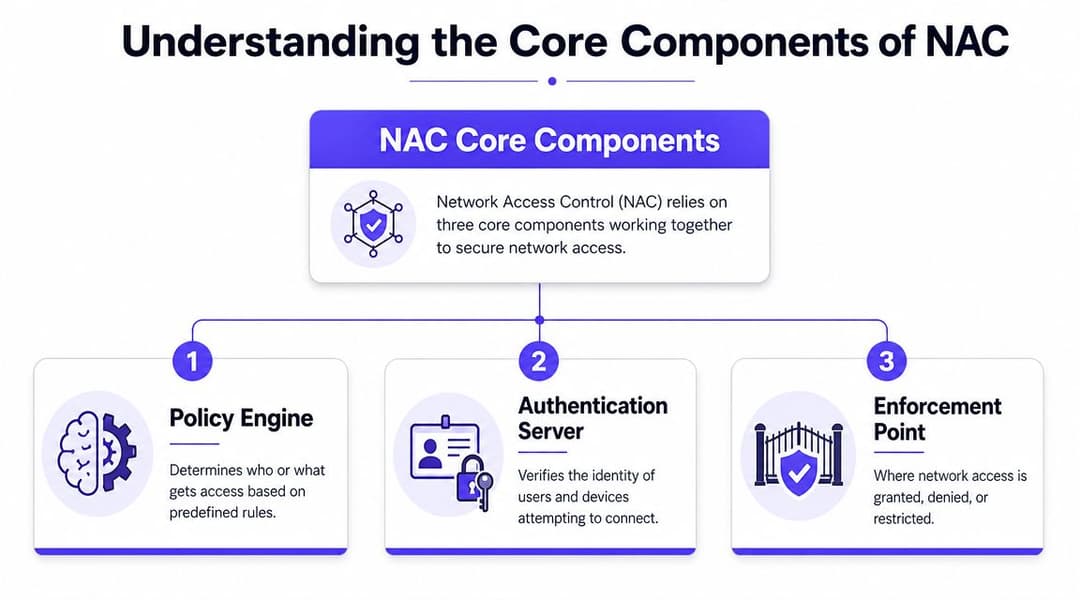
ते भाग म्हणजे पॉलिसी इंजिन (policy engine), ऑथेंटिकेशन सर्व्हर (authentication server), आणि अंमलबजावणी बिंदू (enforcement point).
पॉलिसी इंजिन (policy engine)
हा निर्णय घेणारा घटक आहे. हे वापरकर्ता, उपकरण, स्थान, कनेक्शन प्रकार आणि स्थिती याविषयी माहिती घेते, आणि नंतर त्यांना प्रवेशाच्या परिणामाशी मॅप करते.
साध्या शब्दांत, पॉलिसी इंजिन खालीलसारख्या प्रश्नांची उत्तरे देते:
- हा कर्मचाऱ्याचा लॅपटॉप आहे, अतिथीचा फोन आहे की प्रिंटर आहे?
- वापरकर्ता योग्य ग्रुपमध्ये आहे का?
- हे उपकरण ओळखीचे आणि नियमांनुसार (compliant) आहे का?
- या सेशनला पूर्ण प्रवेश, केवळ-इंटरनेट प्रवेश किंवा सुधारणा (remediation) प्रवेश मिळायला हवा का?
पॉलिसी इंजिन महत्त्वाचे आहे कारण NAC ही केवळ ऑथेंटिकेशन तपासणी नाही. ती एक पॉलिसी अंमलबजावणी प्रणाली (policy enforcement system) आहे. दोन व्यक्ती वैध ओळख दाखवू शकतात आणि तरीही त्यांना वेगवेगळे नेटवर्क मार्ग मिळू शकतात कारण पॉलिसी इंजिन संदर्भाला (context) वेगळ्या पद्धतीने हाताळते.
ऑथेंटिकेशन सर्व्हर (The authentication server)
हा ओळख पडताळणारा घटक आहे. बऱ्याच वातावरणात, याचा अर्थ RADIUS असा होतो, जो सहसा डिरेक्टरी आणि ओळख प्रणालीशी जोडलेला असतो.
जेव्हा एखादे डिव्हाइस कनेक्ट करण्याचा प्रयत्न करते, तेव्हा ऑथेंटिकेशन सर्व्हर सादर केलेली क्रेडेन्शियल्स किंवा सर्टिफिकेट तपासतो आणि मंजुरी, नकार किंवा अतिरिक्त ॲट्रिब्युट्ससह प्रतिसाद देतो ज्याचा वापर नेटवर्क करू शकते. त्या ॲट्रिब्युट्समध्ये भूमिका, VLAN असाइनमेंट किंवा प्रवेशाच्या अटींचा समावेश असू शकतो.
तज्ज्ञ नसलेल्या लोकांमध्ये एक सामान्य गैरसमज असा आहे की NAC आणि RADIUS या दोन्ही एकच गोष्टी आहेत. तसे नाही. RADIUS हा सहसा वर्कफ्लोचा एक भाग असतो. NAC त्या वर्कफ्लोचा वापर करते आणि नंतर त्यावर पॉलिसी आणि अंमलबजावणीचा थर जोडते.
एक सुदृढ NAC डिझाइन ओळखीचा पुरावा आणि प्रवेशाचा हेतू स्वतंत्र ठेवते. ऑथेंटिकेशन हे सांगते की कोण आहे. NAC ठरवते की त्या ओळखीला या नेटवर्कवर, या सेशनवर काय करण्याची परवानगी आहे.
अंमलबजावणी बिंदू (The enforcement point)
नेटवर्क आपले अंमलबजावणीचे कार्य पार पाडते. अंमलबजावणी बिंदू सहसा स्विच, वायरलेस कंट्रोलर किंवा ॲक्सेस पॉईंट असतो जो कनेक्टिव्हिटी मंजूर करतो, मर्यादित करतो किंवा नाकारतो.
जर पॉलिसी सांगत असेल की "केवळ इंटरनेट", तर अंमलबजावणी बिंदू एंडपॉइंटला गेस्ट VLAN किंवा मर्यादित भूमिकेकडे वळवू शकतो. जर पॉलिसी "क्वारंटाइन" सांगत असेल, तर एंडपॉइंट वेगळा केला जातो. जर पॉलिसी "नाकारणे" सांगत असेल, तर त्याला कुठेच प्रवेश मिळत नाही.
एक साधे दृश्य खालीलप्रमाणे आहे:
| घटक | मुख्य काम | सामान्य उदाहरण |
|---|---|---|
| पॉलिसी इंजिन | प्रवेश लॉजिक लागू करते | NAC प्लॅटफॉर्म |
| ऑथेंटिकेशन सर्व्हर | ओळख पडताळतो | RADIUS सेवा |
| अंमलबजावणी बिंदू | नेटवर्क प्रवेश सुधारतो | स्विच, AP, कंट्रोलर |
ऑपरेशनल दृष्ट्या महत्त्वाचे म्हणजे या घटकांमधील सुलभ हस्तांतरण होय. जर ओळखीचा डेटा कमकुवत असेल, तर पॉलिसी केवळ अंदाज ठरते. जर अंमलबजावणी कमकुवत असेल, तर पॉलिसी केवळ एक देखावा ठरते.
NAC चे प्रकार आणि अंमलबजावणी यंत्रणांचा शोध
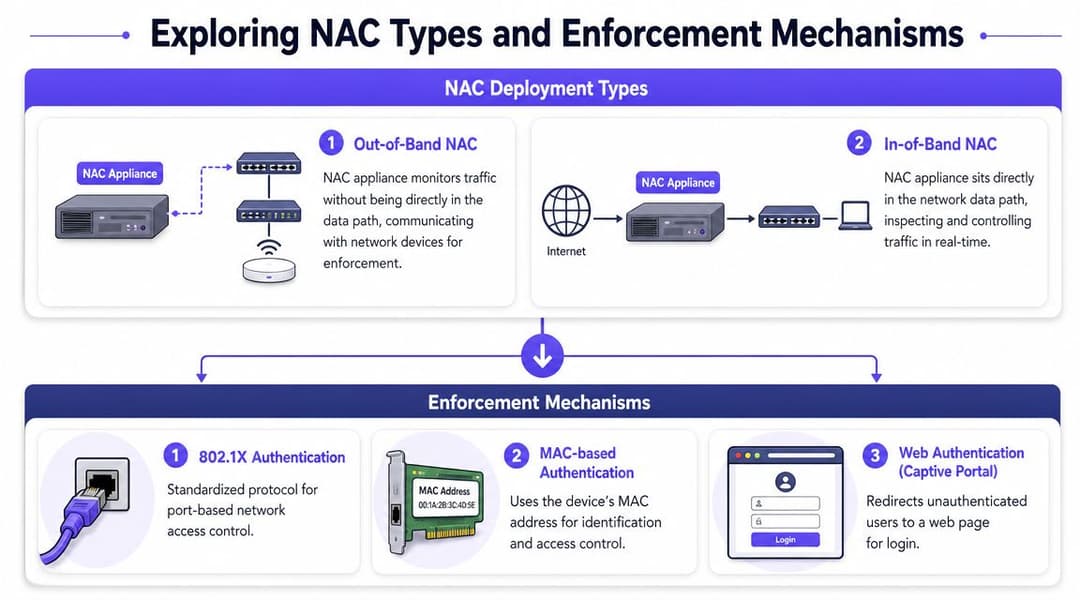
प्रत्येक NAC डिप्लॉयमेंट सारख्याच पद्धतीने काम करत नाही. काही नियंत्रणे डिव्हाइसला प्रत्यक्ष प्रवेश मिळण्यापूर्वीच होतात. इतर नियंत्रणे कनेक्शननंतरही सुरू राहतात आणि परिस्थिती बदलल्यानुसार प्रवेशामध्ये बदल करतात. सर्वोत्तम अंमलबजावणीमध्ये सहसा या दोन्हीचा समन्वय असतो.
UK मधील एंटरप्राइझ नेटवर्क्समध्ये, NAC सामान्यतः IEEE 802.1X आणि RADIUS च्या आसपास पॉलिसी अंमलबजावणी स्तर म्हणून लागू केले जाते, जिथे स्विच किंवा वायरलेस कंट्रोलर डिजिटल दारावर डिव्हाइस थांबवतो आणि credentials व आरोग्य तपासण्यासाठी RADIUS चा वापर करतो; यानंतर NAC हे डिव्हाइस एखाद्या विशिष्ट VLAN, प्रतिबंधित नेटवर्कमध्ये समाविष्ट करायचे की पूर्णपणे नकार द्यायचा हे ठरवते (802.1X आणि RADIUS सह NAC चे तांत्रिक विहंगावलोकन).
प्रवेशापूर्वी (Pre-admission) आणि प्रवेशानंतर (Post-admission)
प्रवेशापूर्वीचे नियंत्रण (Pre-admission control) हे अधिक स्पष्ट मॉडेल आहे. वास्तविक प्रवेश मिळण्यापूर्वी डिव्हाइस आपली ओळख सिद्ध करते आणि पॉलिसींचे पालन करते. हे अयशस्वी झाल्यास, नेटवर्क त्यास ब्लॉक करू शकते किंवा अत्यंत मर्यादित सेगमेंटमध्ये ठेवू शकते.
प्रवेशानंतरचे नियंत्रण (Post-admission control) हे गृहीत धरून चालते की सुरुवातीचे कनेक्शन म्हणजेच सर्व काही नाही. लॉगिन केल्यानंतर डिव्हाइसेस पॉलिसीच्या नियमांचे उल्लंघन करू शकतात, खात्यांमध्ये बदल होऊ शकतात आणि त्यांचे वर्तन संशयास्पद बनू शकते. प्रवेशानंतरचे नियंत्रणे NAC ला सत्रादरम्यान प्रवेशाचे पुनर्मूल्यांकन करण्यास आणि कडक नियंत्रण ठेवण्यास मदत करतात.
एक व्यावहारिक तुलना:
| दृष्टिकोन | काय चांगले करते | कुठे संघर्ष करावा लागू शकतो |
|---|---|---|
| Pre-admission | खराब प्रवेश आधीच रोखतो | जुन्या आणि अनमॅनेज्ड डिव्हाइसेससह अधिक कठीण |
| Post-admission | बदलत्या परिस्थितींना प्रतिसाद देतो | चांगली दृश्यमानता आणि स्पष्ट ट्रिगर्स आवश्यक आहेत |
टीम सहसा पहिल्या गेटवर जास्त लक्ष केंद्रित करतात आणि सत्र नियंत्रणाकडे दुर्लक्ष करतात. ती एक चूक आहे. सकाळी ९ वाजता स्वीकारार्ह असलेले डिव्हाइस नंतर स्वीकारार्ह नसू शकते, जर त्याची स्थिती बदलली किंवा जोखीम संदर्भ बदलला.
एजंट-आधारित (Agent-based) आणि एजंटशिवाय (Agentless)
काही NAC प्लॅटफॉर्म्स सुरक्षिततेची स्थिती अधिक अचूकपणे तपासण्यासाठी एंडपॉइंटवर एजंट वापरतात. हे मॅनेज्ड कर्मचारी लॅपटॉप आणि इतर कॉर्पोरेट डिव्हाइसेससाठी उपयुक्त ठरू शकते.
इतर परिस्थितींमध्ये एजंटशिवाय (agentless) तंत्रांची आवश्यकता असते. गेस्ट फोन्स, ग्राहक डिव्हाइसेस आणि अनेक IoT एंडपॉइंट्स तुमचे एजंट चालवू शकत नाहीत, आणि जबरदस्तीने ते वापरण्यास लावल्यास फायद्यापेक्षा त्रास जास्त होतो. अशा प्रकरणांमध्ये, प्रोफाइलिंग, प्रमाणपत्र तपासणी, पोर्टल फ्लो किंवा नेटवर्क मेटाडेटा अधिक व्यावहारिक ठरतात.
दोन्हीपैकी कोणतेही एक मॉडेल सार्वत्रिकपणे श्रेष्ठ नाही. खरा प्रश्न हा आहे की तुमच्याकडे कोणत्या वर्गातील डिव्हाइसेस आहेत आणि त्यापैकी कोणत्या डिव्हाइसेसवर तुमचे नियंत्रण आहे.
महत्त्वाची अंमलबजावणी साधने
जेव्हा लोक विचारतात की नेटवर्क ॲक्सेस कंट्रोल म्हणजे काय, तेव्हा ते सहसा एकाच यंत्रणेची अपेक्षा करतात. प्रत्यक्षात, NAC हा अंमलबजावणी पद्धतींचा एक संग्रह आहे.
काही सर्वात सामान्य पद्धती खालीलप्रमाणे आहेत:
802.1X
पोर्ट-आधारित ऍक्सेस नियंत्रणासाठीचे मानक. जेव्हा डिव्हाइसेस याचे योग्यरित्या समर्थन करू शकतात, तेव्हा हा प्राधान्य देण्याचा मार्ग आहे, कारण यामुळे तुम्हाला वायर्ड आणि वायरलेस नेटवर्कवर अधिक मजबूत ओळख-आधारित प्रवेश मिळतो.Dynamic VLAN assignment
NAC पॉलिसीच्या आधारावर युजर्स आणि डिव्हाइसेसना वेगवेगळ्या VLANs मध्ये ठेवू शकते. तोच स्विच पोर्ट किंवा SSID, पण वेगळा नेटवर्क परिणाम.भूमिका-आधारित ऍक्सेस नियंत्रण (Role-Based Access Control)
फायनान्स लॅपटॉप, गेस्ट हँडसेट आणि प्रिंटर यांना एकसारखाच विश्वास (trust) मिळू नये. RBAC पॉलिसीला फक्त कनेक्शनच्या ठिकाणाऐवजी कामाचे स्वरूप आणि डिव्हाइसच्या प्रकारानुसार सेट करण्याची परवानगी देते.Quarantine नेटवर्क्स
जेव्हा एखादे डिव्हाइस ओळखीचे असते परंतु पॉलिसीचे पालन करत नसते, तेव्हा हे उपयुक्त ठरते. सर्व किंवा काहीच नाही असा निर्णय घेण्याऐवजी, NAC त्याला अशा ठिकाणी ठेवू शकते जिथे ते संवेदनशील सिस्टम्सपर्यंत न पोहोचता स्वतःमध्ये सुधारणा करू शकते.MAC Authentication Bypass
हे सहसा अशा डिव्हाइसेससाठी वापरले जाते जे 802.1X करू शकत नाहीत, जसे की काही प्रिंटर, स्कॅनर किंवा विशेष साधने. हे काम करते, पण ते प्रमाणपत्र किंवा युजर-आधारित पद्धतींपेक्षा कमकुवत आहे, त्यामुळे याभोवती अधिक कडक पॉलिसी असणे आवश्यक आहे.Captive Portals आणि वेब प्रमाणीकरण
गेस्ट ऍक्सेस वातावरणात सामान्य आहे. तात्पुरत्या ऍक्सेससाठी ठीक आहे, परंतु वारंवार वापरणाऱ्या युजर्ससाठी गैरसोयीचे आहे आणि कर्मचारी किंवा विश्वसनीय डिव्हाइसेससाठी दीर्घकालीन उपाय म्हणून योग्य नाही.
प्लॅटफॉर्मच्या पर्यायांचे पुनरावलोकन करणाऱ्या संस्थांसाठी, केवळ मुख्य वैशिष्ट्यांच्या सूचीवर न जाता, यापैकी कोणत्या अंमलबजावणी पॅटर्न्सना ते चांगल्या प्रकारे सपोर्ट करतात यावर आधारित network access control solutions ची तुलना करणे सोयीचे ठरते.
NAC तुमच्या अस्तित्वात असलेल्या IT स्टॅकशी कसे इंटिग्रेट होते
NAC जेव्हा एकटे काम करत नसते, तेव्हा ते सर्वात जास्त उपयुक्त ठरते. स्वतःहून, ते कनेक्शनची विनंती तपासू शकते आणि स्थानिक नियम लागू करू शकते. योग्यरित्या इंटिग्रेट केल्यावर, ते ओळख, डिव्हाइस विश्वास आणि ऑपरेशनल संदर्भाद्वारे चालणारे ऍक्सेस निर्णय केंद्र बनते.
यामुळे निर्णयाची गुणवत्ता बदलते.

ओळख प्लॅटफॉर्म आणि डिरेक्टरीज
बऱ्याच संस्थांना NAC ने युजर्स आणि भूमिकांचे वेगळे जग सांभाळावे असे वाटत नाही. त्यांना ते कर्मचारी ओळख आधीच परिभाषित करणाऱ्या सिस्टम्सशी जोडलेले हवे असते. व्यवहारात, याचा अर्थ सहसा Microsoft Entra ID, Google Workspace, Okta, किंवा विद्यमान डिरेक्टरी सेवांशी इंटिग्रेट करणे असा होतो.
यामुळे NAC अधिक उपयुक्त प्रश्न विचारू शकते:
- हा युजर सध्या कार्यरत आणि ऍक्टिव्ह आहे का?
- ते कोणत्या ग्रुप किंवा रोलमध्ये आहेत?
- ऍक्सेस मध्यवर्ती पद्धतीने रद्द करण्यात आला आहे का?
- या व्यक्तीला कर्मचारी, कंत्राटदार, अतिथी की रहिवासी म्हणून मानले जावे?
जेव्हा ॲक्सेस पॉलिसी डिरेक्टरीच्या सत्यतेचे पालन करते, तेव्हा ऑनबोर्डिंग आणि ऑफबोर्डिंग प्रक्रिया अधिक सुलभ होते. जर HR-चलित आयडेंटिटीमधील बदल ॲक्सेसच्या निर्णयांमध्ये थेट परावर्तित झाले, तर नेटवर्क तुमच्या कंट्रोल प्लेनच्या मागे पडत नाही.
प्रमाणपत्रे, पॉश्चर आणि पासवर्डलेस ॲक्सेस
सर्वात मजबूत NAC वातावरण हे SSIDs वर फिरणाऱ्या शेअर केलेल्या पासवर्डवर किंवा जास्त काळ टिकणाऱ्या स्टॅटिक क्रेडेंशियल्सवर अवलंबून नसतात. एंडपॉइंट ओळखण्यासाठी ते प्रमाणपत्रे (certificates) आणि डिव्हाइस ट्रस्ट सिग्नल्सचा वापर करतात.
हे महत्त्वाचे आहे कारण युझर खाते केवळ कथेचा एक भाग सांगते. अनोळखी डिव्हाइसवर वैध युझर असणे हा अजूनही सुरक्षेचा धोका असू शकतो.
फील्ड सल्ला: जर तुमच्या कर्मचाऱ्यांचा ॲक्सेस अजूनही शेअर केलेल्या WiFi पासवर्डवर अवलंबून असेल, तर तुमच्याकडे प्रभावी ॲडमिशन कंट्रोल नाही. ती केवळ एक सोयीची सेटिंग आहे.
येथेच NAC आणि आधुनिक पासवर्डलेस नेटवर्किंग एकत्र येतात. आयडेंटिटी-आधारित ॲक्सेस जुन्या Captive Portal अनुभवाच्या पलीकडे जाऊ शकतो. अतिथी आणि कार्यक्रमांच्या ठिकाणांसाठी, OpenRoaming आणि Passpoint सारख्या तंत्रज्ञानामुळे कमी अडथळ्यांसह सुरक्षित, स्वयंचलित कनेक्टिव्हिटी शक्य होते. या ॲक्सेससाठी तरीही पॉलिसीची आवश्यकता असते, फक्त जुन्या आणि त्रासदायक युझर जर्नीची गरज उरत नाही.
NAC प्रत्यक्ष कृतीत - सामान्य वापर प्रकरणे (Use Cases)
जेव्हा तुम्ही NAC सोडवत असलेल्या व्यावसायिक समस्या पाहता, तेव्हा त्याचे महत्त्व अधिक स्पष्ट होते. पॉलिसी इंजिन आणि RADIUS फ्लो महत्त्वाचे आहेत, परंतु बहुतेक खरेदीदारांना एकाच गोष्टीची काळजी असते: युझर अनुभवात अडथळा न आणता नियंत्रण सुधारते का?
हॉस्पिटॅलिटी (आतिथ्य क्षेत्र)
हॉटेल्समध्ये एकमेकांवर ओव्हरलॅप होणारे अनेक ट्रस्ट झोन्स असतात. अतिथींच्या फोन्स आणि लॅपटॉप्सना इंटरनेट ॲक्सेस आवश्यक असतो. कर्मचाऱ्यांच्या डिव्हाइसेसना ऑपरेशनल सिस्टीम्सचा ॲक्सेस हवा असतो. टीव्ही, डोअर सिस्टीम्स, किओस्क आणि बॅक-ऑफिस उपकरणांना कनेक्टिव्हिटी आवश्यक असते, परंतु बाय डीफॉल्ट एकमेकांशी जोडण्याची गरज नसते.
एक उत्कृष्ट NAC डिझाइन या सर्व श्रेणींना व्यवस्थित वेगळे करते, अगदी त्या एकाच भौतिक पायाभूत सुविधा सामायिक करत असल्या तरीही. अतिथींना साधे ऑनबोर्डिंग आणि इंटरनेट ॲक्सेस मिळतो. कर्मचाऱ्यांची डिव्हाइसेस संस्थेच्या आयडेंटिटी स्टॅकसह ऑथेंटिकेट होतात. ऑपरेशनल डिव्हाइसेस विशिष्ट मर्यादित सेगमेंट्समध्ये विभागली जातात.
यामध्ये निष्काळजीपणा काम करत नाही - जसे की एकच मोठा SSID, एक पासवर्ड आणि "आम्ही संवेदनशील गोष्टी इतर कुठे तरी सुरक्षित ठेवू" असा विचार करणे. हॉस्पिटॅलिटी क्षेत्रात, यामुळे सहसा ट्रबलशूटिंगचा त्रास आणि अस्पष्ट जबाबदारी निर्माण होते.
रिटेल (किरकोळ व्यापार)
रिटेल वातावरणात बऱ्याचदा सार्वजनिक WiFi, कर्मचाऱ्यांचे टॅब्लेट्स, POS सिस्टीम्स, स्कॅनर्स, डिजिटल साइनेज आणि विक्रेत्यांद्वारे व्यवस्थापित उपकरणांचे मिश्रण असते. जर NAC नसेल, तर दुकानांमधील सिस्टीम्स केवळ जवळ असल्यामुळे एकमेकांवर विश्वास ठेवू लागतात.
येथे अधिक महत्त्वाचे नियंत्रण म्हणजे सेगमेंटेड ॲडमिशन (segmented admission) होय. POS सिस्टीम्सने केवळ त्यांच्या आवश्यक गोष्टींशीच संवाद साधला पाहिजे. अतिथींचा ट्रॅफिक कधीही गृहीत धरलेल्या विश्वासासह शेजारी नसावा. विक्रेत्यांच्या किटची ओळख पटवता आली पाहिजे आणि त्यावर मर्यादा असल्या पाहिजेत.
एक चांगली रिटेल NAC सेटअप ऑपरेशनल संदिग्धता देखील कमी करते. जेव्हा नेटवर्कवर काहीतरी विचित्र दिसते, तेव्हा टीम व्यापार तासांच्या दरम्यान सुधारणा करण्याऐवजी त्याचे जलद वर्गीकरण करू शकते आणि ज्ञात पॉलिसी लागू करू शकते.
Healthcare
Healthcare हे असे क्षेत्र आहे जिथे NAC जलद गतीने आपली उपयुक्तता सिद्ध करते. यामध्ये क्लिनिशियन्स, ॲडमिन स्टाफ, पाहुणे, कंत्राटदार, अनमॅनेज्ड वैद्यकीय उपकरणे आणि जुनी विशिष्ट उपकरणे समाविष्ट असतात जी नेहमी आधुनिक ऑथेंटिकेशनला स्पष्टपणे सपोर्ट करू शकत नाहीत.
NCSC मधील UK सार्वजनिक-क्षेत्राचे मार्गदर्शन प्रत्येक युझर आणि डिव्हाइसला ॲक्सेस देण्यापूर्वी पडताळून पाहण्याचा आणि तडजोडीचा प्रभाव मर्यादित करण्यासाठी सेगमेंटेशन वापरण्याचा सल्ला देऊन Zero Trust मानसिकता स्वीकारण्याची संस्थांना शिफारस करते, जे NAC च्या तत्त्वांशी सुसंगत आहे (Zero Trust and NAC alignment in UK public-sector guidance).
हॉस्पिटल आणि क्लिनिकमध्ये, कठीण भाग हा सिद्धांत नाही. तो म्हणजे संपूर्ण इस्टेटमध्ये विश्वासाला धक्का न लावता मिश्रित डिव्हाइस श्रेणी हाताळणे होय.
Multi-tenant निवासी आणि विद्यार्थी गृहनिर्माण
निवासी ऑपरेटर्सना अशा नेटवर्क मॉडेलची आवश्यकता असते जे रहिवाशांना सोपे वाटेल परंतु पडद्यामागे आयसोलेटेड राहील. एका रहिवाशाची उपकरणे केवळ ते एकाच इमारतीच्या इन्फ्रास्ट्रक्चरवर आहेत म्हणून दुसऱ्या रहिवाशाला शोधता येऊ नयेत.
NAC पॉलिसी, प्रायव्हेट नेटवर्क असाइनमेंट आणि iPSK सारखे दृष्टिकोन या परिस्थितींमध्ये उपयुक्तता देतात. रहिवाशांना घरासारखा अनुभव मिळतो. जुनी उपकरणे अजूनही कनेक्ट होऊ शकतात. ऑपरेटर विभक्तीकरण आणि नियंत्रण ठेवतात.
ती एंटरप्राइझ ऑफिस NAC पेक्षा खूप वेगळी समस्या आहे, परंतु समान ॲडमिशन लॉजिक लागू होते. ओळख, डिव्हाइस प्रकार आणि पॉलिसी ठरवतात की त्या युझरसाठी नेटवर्क काय बनते.
Deployment Best Practices आणि ROI Considerations
बहुतेक NAC अपयश कमकुवत तंत्रज्ञानामुळे होत नाहीत. ती महत्त्वाकांक्षी पॉलिसी, विस्कळीत इस्टेट आणि टीम्सद्वारे खूप लवकर खूप काही लागू करण्याचा प्रयत्न केल्यामुळे होतात.
यासाठी शिस्तबद्ध आणि थोडा संयमी दृष्टिकोन अधिक चांगला आहे. नेटवर्क सिक्युरिटीमध्ये सहसा यालाच उत्तम मानले जाते.
सामान्यतः काय कार्य करते
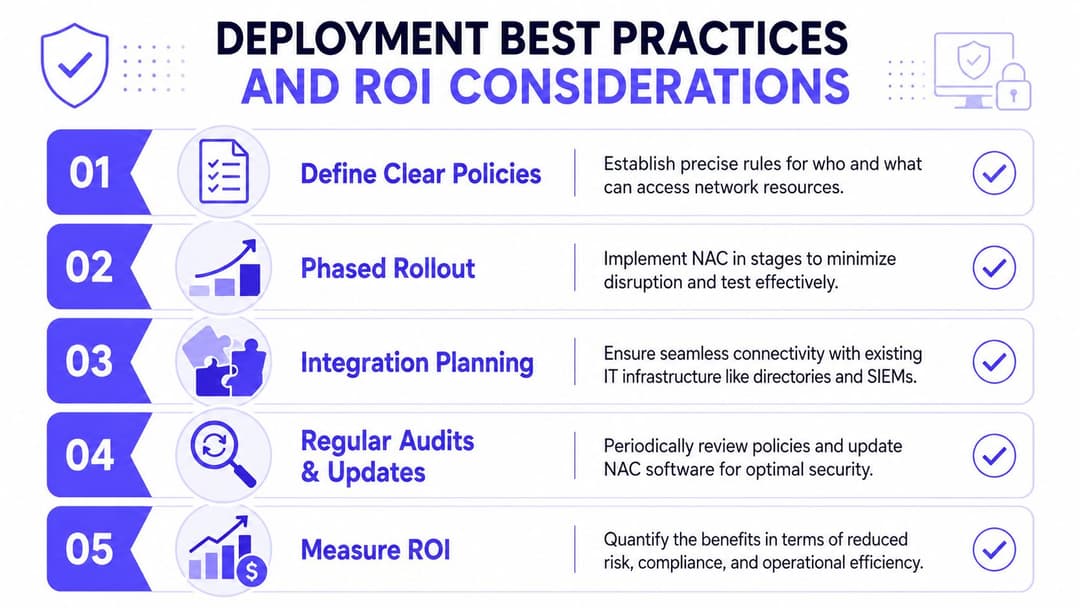
ब्लॉक करण्यापूर्वी निरीक्षण करण्यापासून सुरुवात करा. शक्य असेल तिथे मॉनिटरिंग किंवा कमी-प्रभाव मोडमध्ये NAC चालवा, डिव्हाइस प्रकारांचे वास्तववादी चित्र तयार करा, आणि नंतर टप्प्याटप्प्याने पॉलिसी कडक करा.
एक उपयुक्त क्रम असा दिसतो:
आधी इन्व्हेंटरी
काय कनेक्ट होत आहे ते जाणून घ्या. संस्थांना अनेकदा अपेक्षेपेक्षा जास्त अनमॅनेज्ड किंवा चुकीच्या पद्धतीने वर्गीकृत केलेली उपकरणे सापडतात.साध्या धोरणापासून सुरुवात करा
कॉर्पोरेट व्यवस्थापित डिव्हाइसेस, अतिथी, प्रिंटर आणि अज्ञात डिव्हाइसेस सुरुवातीच्या मॉडेलसाठी पुरेसे आहेत. तुम्ही नंतर त्यात आणखी बारकावे जोडू शकता.अपवादांसाठी स्पष्टपणे नियोजन करा
लेगसी डिव्हाइसेस, क्लिनिकल उपकरणे, विशेषज्ञ IoT आणि सुविधा प्रणालींना एका मार्गाची गरज असते. ते अगदी साध्या मॉडेलमध्ये बसतील असे गृहीत धरण्यात वेळ वाया जातो.वायर्ड आणि वायरलेसचा एकत्रितपणे विचार करा
जर धोरण WiFi वर मजबूत आणि स्विच पोर्ट्सवर कमकुवत असेल, तर लोक कमकुवत दुवा शोधून काढतील.
UK गोपनीयता आणि अनुपालन हे डिझाइनचाच भाग आहेत
NAC लेखांमध्ये या भागाकडे अनेकदा दुर्लक्ष केले जाते, परंतु UK मध्ये याला महत्त्व आहे. NAC डिव्हाइस आणि युजरचे गुणधर्म गोळा करते आणि त्यांचे मूल्यांकन करते, ज्यामुळे गव्हर्नन्सचे प्रश्न निर्माण होतात. डेटा मिनिमायझेशन आणि स्टोरेज मर्यादा यासंबंधीच्या UK GDPR तत्त्वांनुसार, संस्थांनी एका परिभाषित उद्देशासाठी आवश्यक तेच गोळा केले पाहिजे आणि ते आवश्यक तितक्या काळासाठीच ठेवले पाहिजे. याचा अर्थ असा की NAC डिझाइनने हे परिभाषित केले पाहिजे की प्रवेशाच्या निर्णयांसाठी कोणते गुणधर्म आवश्यक आहेत, काय लॉग केले जाते, लॉग किती काळ ठेवले जातात आणि सुरक्षा डेटा हा मार्केटिंग किंवा ॲनालिटिक्सच्या वापरापासून कसा वेगळा केला जातो (NAC आणि प्राइव्हसी-बाय-डिझाइनच्या बाबींची UK-केंद्रित चर्चा).
त्यामुळे NAC समस्याप्रधान ठरत नाही. याचा अर्थ फक्त इतकाच आहे की डेटा मॉडेलमध्ये शिस्त असणे आवश्यक आहे.
प्रत्येक उपलब्ध ओळख आणि डिव्हाइसचे गुणधर्म गोळा करण्यासाठी व्हॅक्यूम क्लीनर म्हणून NAC तयार करू नका. वाजवी पुराव्यांसह एक निर्णय प्रणाली म्हणून ते तयार करा.
ROI हा केवळ डेटा भंग कमी करण्यापुरता मर्यादित नाही
सुरक्षा खरेदीदार अनेकदा गुंतवणुकीवरील परतावा (ROI) विचारतात आणि नंतर त्याचे स्वरूप खूप मर्यादित ठेवतात. याचे मूल्य केवळ "NAC ने एखादी घटना रोखली का" यामध्येच नाही, तर ते दैनंदिन कामकाजातही दिसून येते.
परताव्याच्या सामान्य क्षेत्रांमध्ये पुढील गोष्टींचा समावेश होतो:
- कमी सपोर्ट समस्या कारण कर्मचारी आणि अतिथी अधिक सातत्याने योग्य प्रवेश स्थितीत पोहोचतात
- जलद ट्रबलशूटिंग कारण नेटवर्कमध्ये अधिक स्पष्ट ओळख आणि धोरण संदर्भ असतो
- अधिक सुलभ ऑफबोर्डिंग जेव्हा प्रवेश केंद्रीय ओळख आणि सर्टिफिकेट स्थितीवर अवलंबून असतो
- कमी मॅन्युअल अपवाद हाताळणी एकदा पुनरावृत्ती करण्यायोग्य भूमिका आणि डिव्हाइस श्रेणी योग्यरित्या मॅप केल्या गेल्या की हे सहज होते
येथेच क्लाउड-व्यवस्थापित आणि ओळख-प्रथम पर्याय उपयुक्त ठरू शकतात. काही संस्थांना अजूनही स्थानिक RADIUS आणि स्विचिंगशी जोडलेले ऑन-प्रिमाइसेस NAC हवे असते. इतर संस्था कमी इन्फ्रास्ट्रक्चर खर्चाला प्राधान्य देतात. Purple कडील नेटवर्क आणि वायरलेस सुरक्षा सेवा सारखे प्लॅटफॉर्म्स सामायिक पासवर्ड आणि मोठ्या प्रमाणावर मॅन्युअल अतिथी प्रवाहांचा जुना ऑपरेशनल बोजा न ठेवता ओळख-चालित प्रवेश, पासवर्डशिवाय वर्कफ्लो आणि व्हेंडर इंटिग्रेशन एकत्र करून या दुसऱ्या पद्धतीमध्ये चपखल बसतात.
प्रवेशाचे भविष्य - NAC कडून आयडेंटिटी नेटवर्किंगकडे
पारंपारिक NAC अजूनही महत्त्वाचे आहे. हे प्रवेशाचे ते स्तर आहे जे नेटवर्कला सांगते की कोणावर आणि कशावर विश्वास ठेवला पाहिजे, कोणत्या परिस्थितीमध्ये आणि प्रवेशाच्या कोणत्या पातळीसह.
पण NAC चा वापरकर्ता अनुभव बदलत आहे.
जानेवारी 2024 पर्यंत, UK मधील 96% परिसरांना गीगाबिट-सक्षम ब्रॉडबँडचा प्रवेश होता (UK कनेक्टिव्हिटी अपडेट येथे नोंदवले आहे). त्या पातळीवरील कनेक्टिव्हिटीचा अर्थ अधिक डिव्हाइसेस, अधिक सेशन्स आणि प्रवेश त्वरित असावा अशी वाढती अपेक्षा आहे. सामायिक केलेले पासवर्ड्स, त्रासदायक Captive Portals आणि मॅन्युअल अपवादांचे जुने मॉडेल या वातावरणात योग्यरित्या काम करत नाही.
नवीन दिशा ही identity networking ची आहे. प्रवेशाचा निर्णय अजूनही NAC च्या तत्त्वांचे पालन करतो, परंतु अंमलबजावणी अधिक सुलभ आणि अखंड होते. कर्मचारी ओळख-समर्थित, सर्टिफिकेट-ग्रेड विश्वासासह ऑथेंटिकेट करतात. अतिथी अशा मानकांंद्वारे जोडतात जे घर्षण कमी करतात आणि पहिल्या पॅकेटपासून एन्क्रिप्शन सुधारतात. मल्टी-टेनंट आणि मिश्र-वापर असलेल्या जागांना प्रत्येक वापरकर्त्याला लॉगिन पायऱ्यांशी संघर्ष न करायला लावता आयसोलेशन मिळते.
आज नेटवर्क ॲक्सेस कंट्रोल म्हणजे काय, याचे हे सध्याचे उत्तर आहे. तो आता फक्त एक जुना गेटकीपर राहिलेला नाही. तो पासवर्डलेस, ओळख-आधारित प्रवेशाचा पाया आहे जो एकाच वेळी सुरक्षित, विभागलेला आणि वापरण्यास सुलभ असू शकतो.
Purple संस्थांना सामायिक केलेले पासवर्ड्स आणि Captive Portals ऐवजी अतिथी, कर्मचारी आणि मल्टी-टेनंट वातावरणासाठी सुरक्षित, पासवर्डलेस प्रवेश देऊन मूलभूत WiFi प्रवेशापासून ओळख-आधारित नेटवर्किंगवर जाण्यास मदत करते. जर तुम्ही NAC तत्त्वे OpenRoaming, Passpoint, सर्टिफिकेट-आधारित कर्मचारी प्रवेश, किंवा आयसोलेटेड रहिवासी कनेक्टिव्हिटीला कशी मदत करू शकतात याचे मूल्यांकन करत असाल, तर Purple हे पुनरावलोकन करण्यासाठी एक व्यासपीठ आहे.