IndexLayout.skipToMainContent

Como Construir uma Rede WiFi de Campus: Um Guia de TI para Universidades

Este guia técnico oferece um plano abrangente para projetar e implementar redes WiFi de campus de alta densidade, cobrindo desde pesquisas de site ativas e posicionamento de pontos de acesso até arquitetura de controlador, roaming contínuo e integração segura de convidados. Ele é destinado a gerentes de TI, arquitetos de rede e CTOs em universidades e grandes locais que precisam de orientação prática para planejar e executar uma implantação sem fio neste trimestre. O guia também mapeia a plataforma Guest WiFi e de análise da Purple para pontos de integração reais dentro do ciclo de vida da implantação.

📖 7 min read📝 1,575 words🔧 2 worked examples3 practice questions📚 9 key definitions

Listen to this guide

View podcast transcript
Welcome to the Purple Enterprise Network Briefing. Today we're tackling a major infrastructure challenge: how to build a campus WiFi network. Specifically, we're looking at university and large-venue deployments. If you're a CTO, IT Director, or network architect, this briefing is for you. We'll cut through the theory and focus on the practical deployment realities of high-density wireless environments. Let's start with context. A campus WiFi network is no longer just a convenience. It is critical infrastructure. Students arrive on day one with three or four devices. Staff need reliable connectivity for video conferencing, cloud applications, and building management systems. And increasingly, the campus itself is becoming a smart environment — with IoT sensors, digital signage, and access control all riding on the same wireless infrastructure. The challenge is not just coverage. It's capacity. And that distinction is the single most important concept in this briefing. Let's start with the foundation: the site survey. In a campus environment, a predictive survey using floor plans is just the starting point. You absolutely need active, on-site surveys. We see too many venues rely solely on software models. A brick wall in a nineteenth-century lecture hall attenuates signal very differently than modern drywall. A Victorian-era building with thick stone walls and high ceilings will behave completely differently from a purpose-built modern campus block. Your active survey should map out high-density zones — auditoriums, student unions, libraries, cafeterias — and identify sources of RF interference. Microwave ovens, Bluetooth devices, and even neighbouring networks can all degrade performance if you haven't accounted for them. The output of your survey should be a heat map showing signal strength, channel utilisation, and interference levels across every floor of every building. This becomes the foundation of your access point placement plan. Now, when planning access point placement, the rule of thumb is capacity over coverage. It's no longer about just getting a signal to the corner of the room. It's about supporting three devices per student in a three-hundred-seat lecture theatre. That means deploying high-density access points, typically WiFi 6 or WiFi 6E, and managing channel overlap aggressively. For high-density spaces, consider deploying access points with directional antennas that focus RF energy downward into seating areas, rather than omnidirectional antennas that blast signal in all directions and cause interference between adjacent APs. Moving to architecture. A three-tier model is standard for enterprise campus networks: Management, Core, and Access. At the top, you have your centralised WLAN controller — whether on-premise or cloud-managed. This is the brain of the network. It handles seamless roaming, policy enforcement, RF optimisation, and firmware management across all your access points. Cloud-managed controllers have become the dominant choice for new deployments because they simplify multi-site management and reduce on-premise hardware costs. In the middle, you have your core and distribution switching infrastructure. These are your high-capacity switches that aggregate traffic from the access layer and route it to your internet gateway and internal resources. At the bottom, you have your access layer: Power over Ethernet switches and the wireless access points themselves. For new deployments, PoE Plus is the minimum standard, as WiFi 6 access points draw more power than their predecessors. Now let's talk about user onboarding and authentication — because this is where many campus networks fail in practice. You have thousands of transient users: enrolled students, staff, visiting academics, conference delegates, and the general public. Each group has different access requirements and different security implications. For staff and enrolled students, implementing 802.1X with EAP authentication is non-negotiable. This links wireless access to your existing identity provider — whether that's Active Directory, LDAP, or a cloud identity service. Users authenticate with their institutional credentials, and the network dynamically assigns them to the appropriate VLAN. This provides encrypted, credential-based access that meets the requirements of standards like ISO 27001 and Cyber Essentials. For guests and transient users, you need a captive portal solution that is secure, compliant, and doesn't generate a flood of helpdesk tickets. This is where a dedicated guest WiFi platform adds real value. A solution like Purple's Guest WiFi platform provides secure, GDPR-compliant onboarding, customisable splash pages, and critically, analytics on how your venue is being used. You gain visibility into footfall patterns, dwell times, and peak usage periods — intelligence that has real operational value. Let's discuss VLANs and network segmentation. Proper VLAN segmentation is essential for both security and performance. At minimum, you should have separate VLANs for staff, students, guests, and IoT devices. Your IoT VLAN is particularly important. Smart building sensors, HVAC controllers, digital signage, and security cameras should never share a network segment with user devices. An IoT device with a vulnerability should not be able to communicate with a student's laptop. Now let's talk about roaming — because seamless handoff is critical to the user experience. As a user walks from the library to the cafeteria, their VoIP call shouldn't drop. Their video stream shouldn't buffer. Their cloud application shouldn't time out. Achieving this requires careful tuning of transmit power and the implementation of fast roaming standards. The three standards you need to know are 802.11k, 802.11v, and 802.11r. Together, these are sometimes called the fast roaming trifecta. 802.11k allows access points to provide clients with a list of neighbouring APs, so the device knows where to roam before it needs to. 802.11v allows the network to suggest to a client that it should roam to a better AP. And 802.11r enables fast BSS transition, dramatically reducing the authentication time during a roam — which is critical for voice and real-time applications. But none of this works if your transmit power is misconfigured. If your APs are blasting at full power, client devices will stick to an AP even when a closer one is available. This is the classic sticky client problem. The device sees a strong signal from a distant AP and refuses to roam to a closer one, resulting in degraded performance for that user and unnecessary load on the distant AP. The solution is to tune your cell sizes. Reduce transmit power so that the coverage cells of adjacent APs just overlap — typically by around fifteen to twenty percent. And disable the lowest data rates — one, two, and five-point-five megabits per second — on your access points. When you allow devices to connect at these legacy speeds, they will hold onto a weak signal indefinitely. Disabling these rates forces the device to drop the connection and roam to a stronger AP. Time for some rapid-fire questions based on what we hear most often from clients. Question one: Should we separate IoT devices onto their own network? Absolutely. Put IoT devices — smart displays, HVAC sensors, access control systems — on a dedicated VLAN with strict firewall rules. Do not let them congest your primary data networks, and do not allow them to communicate laterally with user devices. Question two: How do we handle legacy devices that don't support modern authentication? For devices that can't do 802.1X — like older smart TVs or gaming consoles in student accommodation — implement MAC Authentication Bypass, or MAB. This allows you to register specific device MAC addresses and assign them to an appropriate VLAN without requiring credential-based authentication. Question three: What about outdoor coverage? It's essential, and it's often an afterthought. Use ruggedised, weather-proof access points with directional antennas to cover quads, outdoor seating areas, and sports facilities. Outdoor APs need to handle temperature extremes, moisture, and vandalism resistance — don't deploy indoor units outside. Question four: How do we handle the security of the management plane? Ensure your controller management interface is on a dedicated management VLAN, accessible only from authorised administrator workstations. Enable multi-factor authentication for all administrator accounts. And review your access point security posture regularly. To summarise the key takeaways from today's briefing. First: design for capacity, not just coverage. In a modern campus environment, the bottleneck is almost never signal strength — it's the ability to serve hundreds of concurrent devices efficiently. Second: conduct active, on-site RF surveys. Don't rely solely on predictive models. Building materials, interference sources, and physical layout all need to be validated in the real world. Third: implement a three-tier architecture with centralised management. A cloud-managed controller gives you visibility and control across your entire estate. Fourth: use 802.1X for staff and students, and a secure captive portal for guests. Leverage your guest WiFi platform to capture analytics and drive operational intelligence. Fifth: tune your network for seamless roaming. Implement 802.11k, v, and r. Reduce transmit power. Disable legacy data rates. Eliminate sticky clients. And sixth: segment your network with VLANs. Keep IoT, guest, staff, and student traffic separate. For a deeper technical dive, including architecture diagrams, worked examples, and a full implementation checklist, read our complete guide on how to build a campus WiFi network on the Purple website. Thanks for listening to the Purple Enterprise Network Briefing.

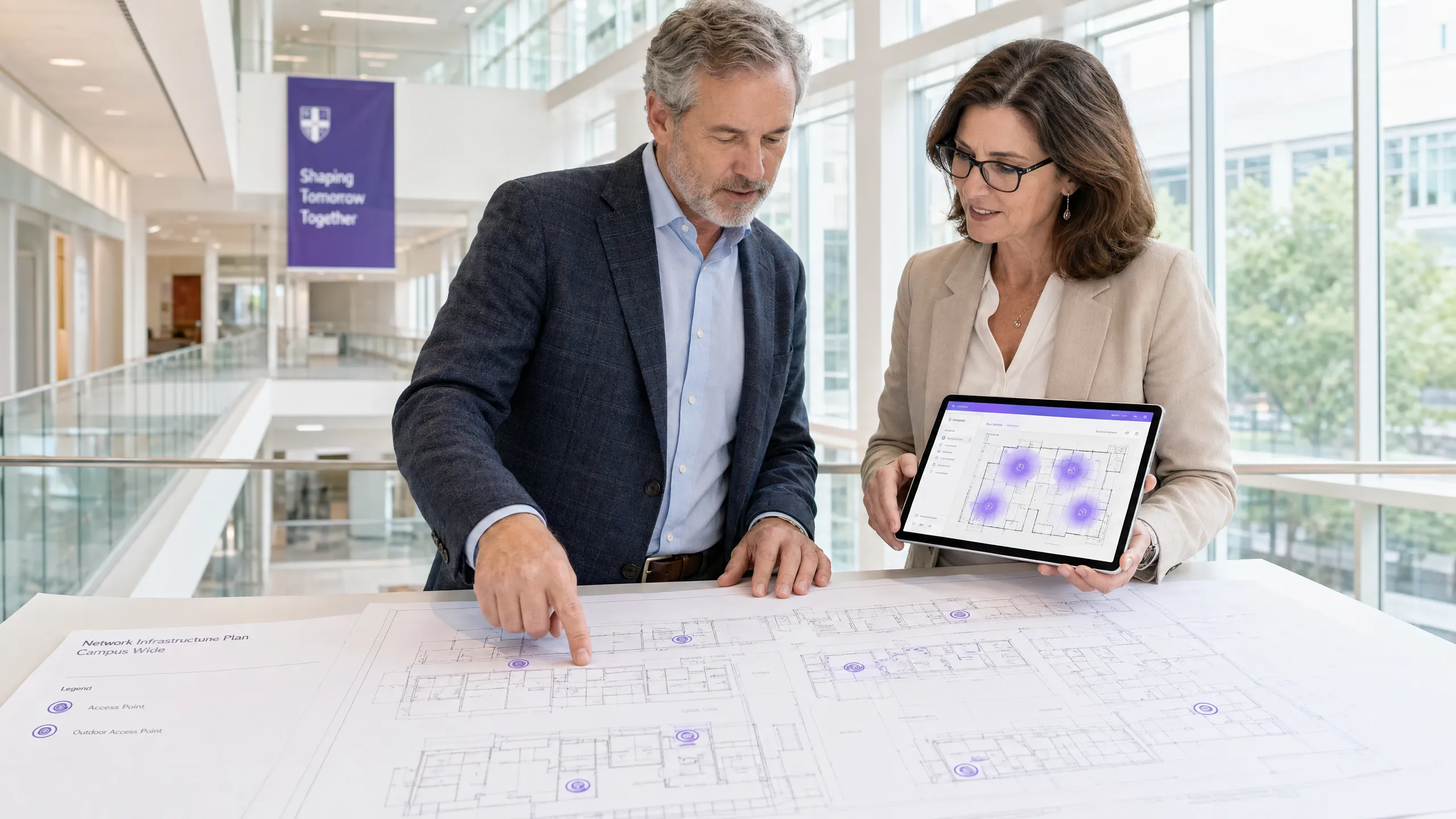
header_image.png

Resumo Executivo

Para equipes de TI universitárias e operadores de locais, uma rede WiFi de campus não é mais uma comodidade — é infraestrutura crítica. Ambientes modernos de ensino superior exigem redes sem fio de alta densidade e alto rendimento, capazes de suportar múltiplos dispositivos por usuário, aplicações que consomem muita largura de banda e mobilidade contínua em vastas áreas físicas. Este guia descreve a arquitetura técnica, estratégias de implantação e melhores práticas operacionais necessárias para construir uma rede sem fio de campus resiliente. Focamos na implementação prática — desde o planejamento de RF e seleção de pontos de acesso (AP) até a arquitetura do controlador e integração segura — garantindo que sua implantação ofereça ROI, conformidade e uma experiência de usuário sem atritos. Seja você implantando em um único edifício ou em um complexo multi-site, os princípios aqui se aplicam igualmente a ambientes de Hospitalidade , Varejo , Saúde e Transporte .


Análise Técnica Aprofundada: Arquitetura e Padrões

Construir uma rede sem fio de campus requer uma abordagem estruturada para a topologia e adesão aos padrões sem fio modernos. As decisões tomadas na fase de arquitetura determinam a escalabilidade, segurança e desempenho de tudo o que se segue.

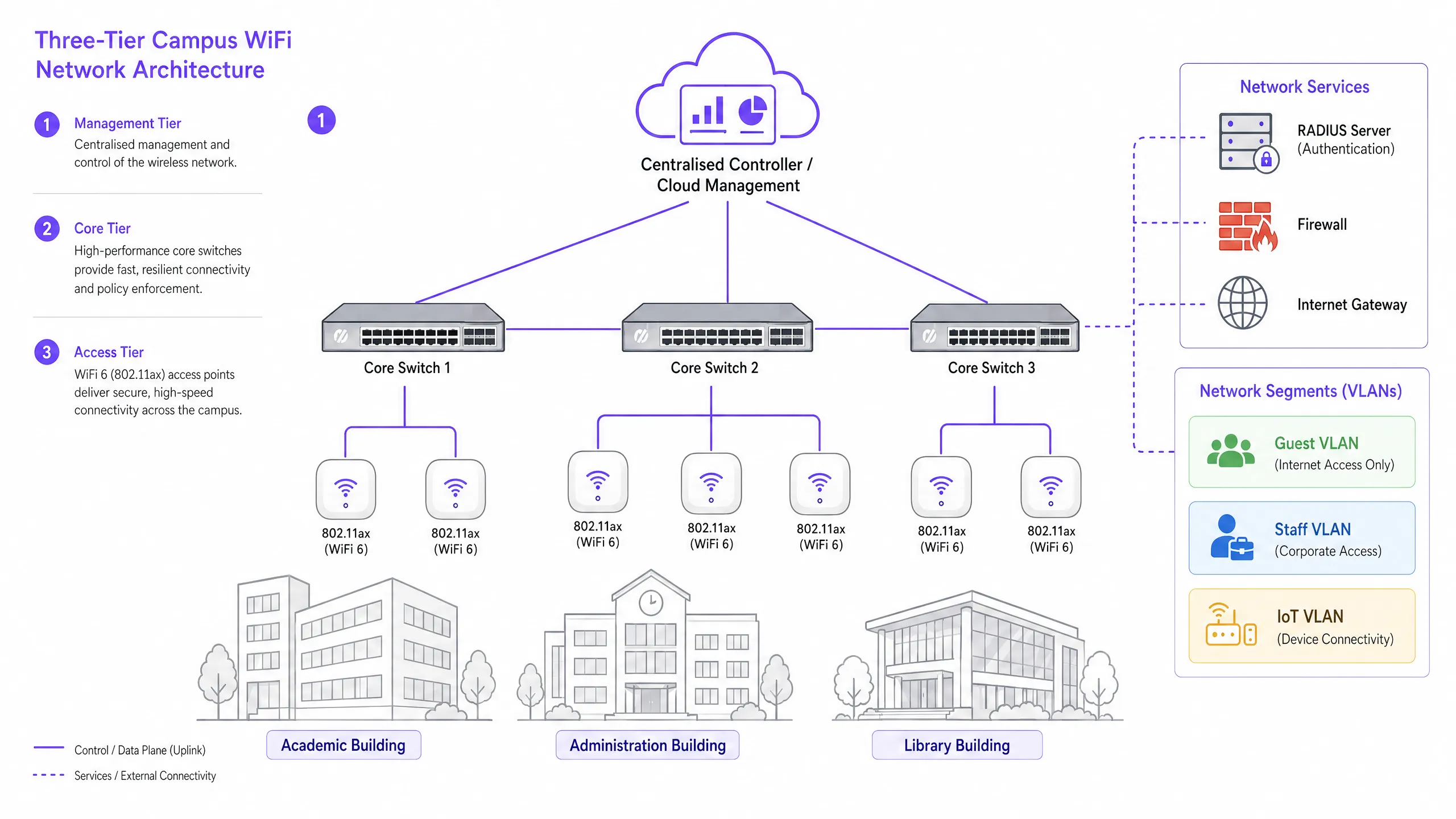
A Arquitetura de Três Camadas

Redes de campus corporativas empregam uma arquitetura hierárquica de três camadas para garantir escalabilidade, resiliência e desempenho. As três camadas são as seguintes:

Camada de Gerenciamento/Core: O sistema nervoso central da rede. Isso inclui switches de roteamento core de alta capacidade e o controlador WLAN central — seja local ou gerenciado em nuvem. O controlador gerencia RF, transferências de roaming, aplicação de políticas globais e gerenciamento de firmware em todos os pontos de acesso. Controladores gerenciados em nuvem tornaram-se a escolha dominante para novas implantações, simplificando o gerenciamento multi-site e reduzindo os custos de hardware local.

Camada de Distribuição: Agrega o tráfego da camada de acesso, aplicando políticas de roteamento e garantindo redundância antes de passar os dados para o core. Em campi menores, esta camada é frequentemente incorporada ao core.

Camada de Acesso: A borda da rede, compreendendo switches de borda Power over Ethernet Plus (PoE+) e os próprios Access Points (APs) sem fio. Para novas implantações, PoE+ é o padrão mínimo, pois os pontos de acesso WiFi 6 consomem significativamente mais energia do que seus predecessores.

network_architecture_overview.png

Padrões e Frequências Sem Fio

Implantações modernas devem padronizar em 802.11ax (WiFi 6) ou WiFi 6E. O WiFi 6 introduz recursos críticos de alta densidade, incluindo Acesso Múltiplo por Divisão de Frequência Ortogonal (OFDMA), que permite que um único AP atenda múltiplos clientes simultaneamente em subcanais, e Target Wake Time (TWT), que reduz o consumo de bateria em dispositivos IoT. O WiFi 6E estende essas capacidades para a banda de 6GHz, oferecendo um espectro contíguo massivo livre de interferência de dispositivos legados — uma vantagem significativa em ambientes de alta densidade como anfiteatros e salas de conferência.

Padrão Bandas de Frequência Taxa de Transferência Máx. Recurso Chave Melhor Caso de Uso
802.11n (WiFi 4) 2.4GHz / 5GHz 600 Mbps MIMO Apenas suporte legado
802.11ac (WiFi 5) 5GHz 3.5 Gbps MU-MIMO Implantações existentes
802.11ax (WiFi 6) 2.4GHz / 5GHz 9.6 Gbps OFDMA, TWT Novas implantações de campus
802.11ax (WiFi 6E) 2.4 / 5 / 6GHz 9.6 Gbps 6GHz spectrum Alta densidade, à prova de futuro

Segurança e Autenticação

A segurança deve ser multi-camadas. Para funcionários e alunos matriculados, a autenticação 802.1X/EAP vinculada ao provedor de identidade da universidade (Active Directory, LDAP ou um serviço de identidade em nuvem) é obrigatória. Isso fornece acesso criptografado baseado em credenciais que atende aos requisitos de padrões como ISO 27001 e Cyber Essentials. Para usuários transitórios — acadêmicos visitantes, delegados de conferências e membros do público — é necessário um Captive Portal seguro. A integração de uma solução robusta de Guest WiFi garante uma integração em conformidade com o GDPR, páginas de splash personalizáveis e a capacidade de coletar insights acionáveis via WiFi Analytics . Todo o tráfego sem fio deve ser criptografado usando WPA3, o padrão atual, que oferece proteções mais fortes contra ataques de força bruta do que seu predecessor WPA2. Para uma revisão abrangente da postura de segurança de pontos de acesso, consulte nosso Segurança de Pontos de Acesso: Seu Guia Empresarial 2026 .


Guia de Implementação: Da Pesquisa à Implantação

Implantar uma rede de campus é um processo faseado que requer planejamento meticuloso antes que um único cabo seja passado ou um AP seja montado.

Fase 1: A Pesquisa de Site Ativa

Uma pesquisa preditiva usando plantas baixas é insuficiente para ambientes de campus complexos. Você deve conduzir pesquisas de RF ativas e no local. Materiais de construção em universidades mais antigas — alvenaria espessa, ripas de metal, concreto armado — atenuam os sinais de forma imprevisível. A pesquisa identifica pontos cegos de RF e ajuda a determinar o posicionamento ideal do AP para garantir cobertura e capacidade. O resultado deve ser um mapa de calor validado mostrando a força do sinal, utilização do canal e níveis de interferência em cada andar.

Fase 2: Planejamento de Capacidade

Historicamente, as redes eram projetadas para cobertura — garantindo que um sinal chegasse a todos os cantos. Hoje, projete para capacidade. Em um anfiteatro de 300 lugares, assuma três dispositivos por aluno: laptop, smartphone e tablet. Isso requer a implantação de APs de alta densidade com antenas direcionais para setorizaro ambiente, em vez de depender de um único AP omnidirecional que rapidamente ficaria sobrecarregado. A regra geral para implantações de alta densidade é um AP por 25-30 usuários simultâneos em um ambiente de palestras.

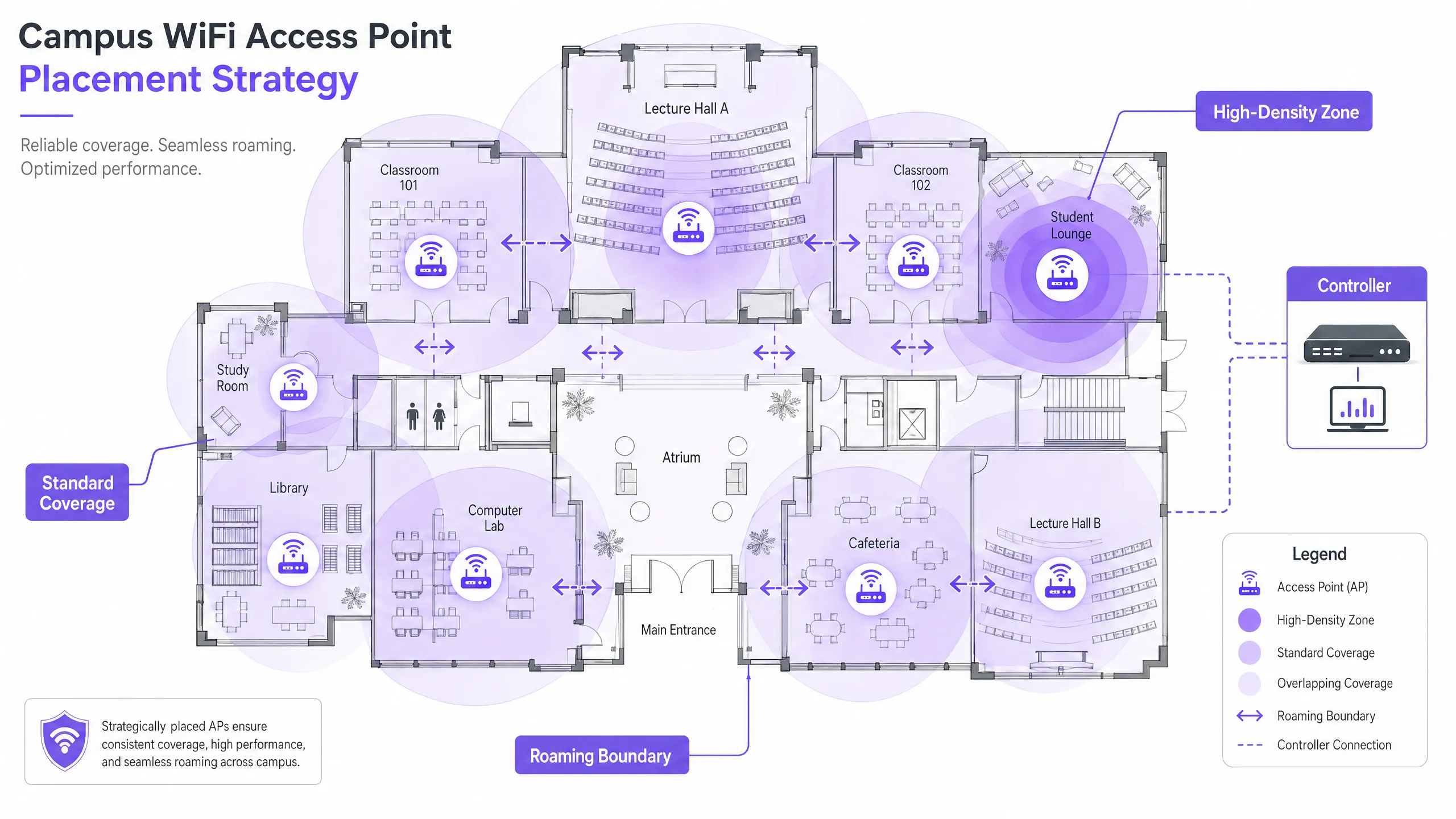
Fase 3: Posicionamento do AP e Planejamento de Canais

Um planejamento cuidadoso dos canais é essencial para minimizar a Interferência Co-Canal (CCI). Use canais não sobrepostos (1, 6, 11 em 2.4GHz; alocação dinâmica em 5GHz e 6GHz). Garanta que os APs sejam posicionados estrategicamente — evite montá-los acima de forros falsos ou atrás de dutos de HVAC, o que degrada o desempenho. Para ambientes com tetos altos, use APs com antenas direcionais voltadas para baixo.

ap_placement_diagram.png

Fase 4: Configurando o Roaming Contínuo

À medida que os usuários se movem entre os edifícios, sua conexão deve ser transferida de forma contínua entre os APs. Implemente a tríade de roaming rápido: 802.11k (relatórios de vizinhança), 802.11v (gerenciamento de transição BSS) e 802.11r (transição BSS rápida). Juntos, esses padrões permitem que os dispositivos clientes tomem decisões inteligentes de roaming e completem as transferências de autenticação em milissegundos, em vez de segundos — crucial para VoIP e aplicativos em tempo real.

Ajustar a potência de transmissão é igualmente importante. Se a potência de Tx for muito alta, os dispositivos clientes se agarrarão a um AP distante ('clientes pegajosos') em vez de fazer roaming para um mais próximo. Reduza a potência de Tx para criar células de cobertura sobrepostas, mas de tamanho apropriado, e desative as taxas de dados legadas (1, 2, 5.5 Mbps) para forçar os dispositivos a derrubar conexões fracas e fazer roaming.

Fase 5: Segmentação de VLAN e Aplicação de Políticas

Crie VLANs dedicadas para cada classe de usuário: Funcionários, Alunos, Convidados e dispositivos IoT. Dispositivos IoT — sistemas de gerenciamento de edifícios, câmeras de segurança, sinalização digital — nunca devem compartilhar um segmento de rede com dispositivos de usuário. Aplique regras de firewall rigorosas entre as VLANs, permitindo apenas a comunicação mínima necessária. Para segurança em nível de DNS e proteção contra domínios maliciosos, consulte nosso guia sobre como Proteger Sua Rede com DNS e Segurança Fortes .


Melhores Práticas para Ambientes de Campus

As seguintes recomendações independentes de fornecedores representam a prática padrão da indústria para grandes implantações de rede sem fio.

Band Steering: Force dispositivos clientes capazes para as bandas menos congestionadas de 5GHz ou 6GHz, reservando a banda de 2.4GHz para dispositivos legados e sensores IoT de longo alcance. A maioria dos controladores modernos suporta band steering automático.

Limiares Mínimos de RSSI: Configure o controlador para recusar conexões de clientes cuja força do sinal caia abaixo de um limiar definido (tipicamente -75 dBm). Isso impede que clientes com sinal fraco degradem a experiência para todos os outros usuários no AP.

Prevenção de Intrusão Sem Fio (WIPS): Habilite o WIPS no controlador para detectar e suprimir APs não autorizados — roteadores pessoais conectados por alunos ou funcionários que causam interferência e introduzem vulnerabilidades de segurança.

Cobertura Externa: Estenda a rede para pátios e áreas de estar externas usando APs robustos e à prova de intempéries com antenas direcionais. APs externos devem suportar temperaturas extremas, umidade e resistência a vandalismo.

Gerenciamento de Locação DHCP: Em áreas de alta rotatividade (refeitórios, bibliotecas), reduza os tempos de locação DHCP para redes de convidados para uma a duas horas para evitar o esgotamento de endereços IP.

O foco da Purple no ensino superior está crescendo rapidamente — leia sobre a entrada do nosso VP de Educação Tim Peers na equipe e o que isso significa para a estratégia de rede do campus.


Solução de Problemas e Mitigação de Riscos

Mesmo redes bem projetadas encontram problemas operacionais. A seguir, os modos de falha mais comuns e suas mitigações.

Modo de Falha Sintomas Causa Raiz Mitigação
Clientes Pegajosos Desempenho ruim apesar do sinal forte Potência de Tx muito alta; taxas legadas ativadas Reduzir potência de Tx; desativar taxas abaixo de 11 Mbps
Esgotamento de DHCP Usuários incapazes de conectar Tempos de locação muito longos; sub-rede muito pequena Reduzir tempos de locação; expandir sub-redes
Interferência Co-Canal Taxa de transferência lenta em todo o andar Planejamento de canais ruim Implementar atribuição dinâmica de canais
APs Não Autorizados Interferência; alertas de segurança Roteadores pessoais não autorizados Habilitar WIPS; realizar auditorias de RF regulares
Falhas de Autenticação Usuários incapazes de fazer login Sobrecarga ou má configuração do servidor RADIUS Implementar RADIUS redundante; monitorar logs de autenticação

ROI e Impacto nos Negócios

Para a liderança universitária e diretores de operações de locais, o ROI de uma rede de alto desempenho se estende muito além da conectividade básica. Uma rede sem fio robusta no campus suporta diretamente ferramentas pedagógicas modernas, iniciativas de campus digital e programas de eficiência operacional.

Aproveitar o WiFi Analytics fornece inteligência acionável sobre fluxo de pessoas, tempos de permanência e utilização do espaço. Esses dados podem informar decisões imobiliárias — identificando edifícios subutilizados ou espaços de pico de demanda — e otimizar o uso de HVAC com base em dados reais de ocupação, gerando economias de energia mensuráveis. Estas são as mesmas estratégias de análise implantadas por operadores em ambientes de Varejo e Hotelaria , agora cada vez mais aplicadas a ambientes de campus.

Para organizações que implementam guest WiFi como parte de uma estratégia mais ampla de engajamento digital, uma plataforma de Guest WiFi bem configurada também pode suportar automação de marketing, engajamento de ex-alunos e programas de experiência do visitante. Para locais de campus menores ou satélites, nosso guia sobre Como Configurar um Hotspot WiFi para Sua Empresa oferece um ponto de partida prático.


Ouça o Briefing

Key Definitions

802.11ax (WiFi 6)

The current IEEE standard for wireless networking, designed specifically to improve efficiency and performance in high-density environments through OFDMA, MU-MIMO, and TWT.

Essential for modern campus deployments to support a high volume of concurrent devices without performance degradation.

Co-Channel Interference (CCI)

Interference that occurs when multiple access points in the same area operate on the same channel, causing devices to wait for clear airtime before transmitting.

Poor channel planning leads to high CCI, which severely degrades network throughput even when signal strength is strong.

VLAN (Virtual Local Area Network)

A logical subnetwork that groups a collection of devices, isolating their traffic from other devices on the same physical network infrastructure.

Crucial for security and performance; separating guest, staff, student, and IoT traffic prevents lateral movement and reduces congestion.

802.1X

An IEEE standard for port-based Network Access Control, providing a credential-based authentication mechanism for devices connecting to a LAN or WLAN via a RADIUS server.

The mandatory standard for secure, enterprise-grade authentication for staff and enrolled students on campus networks.

Captive Portal

A web page that a user of a public-access network must interact with before network access is granted, typically used for terms of service acceptance, authentication, and data capture.

Used for guest onboarding on campus networks; must be GDPR-compliant and integrated with an analytics platform for operational value.

OFDMA (Orthogonal Frequency-Division Multiple Access)

A multi-user version of OFDM that allows a single access point to simultaneously serve multiple clients on different sub-channels within the same transmission.

A key WiFi 6 feature that dramatically improves efficiency in high-density environments like lecture halls.

Sticky Client

A wireless device that remains connected to a distant AP with a weak signal, even when a closer AP with a stronger signal is available, due to the client's reluctance to initiate a roam.

Causes poor performance for the affected user and unnecessary load on the distant AP; mitigated by proper RF tuning and disabling legacy data rates.

RSSI (Received Signal Strength Indicator)

A measurement of the power level of a received radio signal, typically expressed in dBm (decibels relative to one milliwatt), where values closer to zero indicate a stronger signal.

Used during site surveys to determine coverage boundaries and during controller configuration to set minimum connection thresholds.

PoE+ (Power over Ethernet Plus)

An IEEE 802.3at standard that delivers up to 30 watts of power over standard Ethernet cabling, sufficient to power WiFi 6 access points without a separate power supply.

The minimum PoE standard required for new campus deployments using WiFi 6 APs.

Worked Examples

A Russell Group university is upgrading a Grade II listed, 19th-century library to support 500 concurrent student connections. The building features thick stone walls, high ceilings, and ornate internal partitions. How should the IT team approach the wireless deployment?

Step 1: Commission an active, on-site RF survey — predictive modelling will be highly inaccurate due to the stone walls and irregular floor plan. Use professional wifi survey software to generate validated heat maps. Step 2: Deploy high-density WiFi 6 APs with directional patch antennas focused downward into reading areas, avoiding signal bounce off high ceilings. Target one AP per 25 concurrent users. Step 3: Implement a dedicated VLAN for student access via 802.1X linked to the university's Active Directory, and a separate guest VLAN with a captive portal for visiting researchers and public users. Step 4: Tune AP transmit power to create appropriately sized coverage cells, preventing sticky clients as students move between reading rooms. Step 5: Disable legacy data rates (1, 2, 5.5 Mbps) to enforce roaming. Step 6: Deploy a cloud-managed controller for centralised visibility and RF optimisation.

Examiner's Commentary: This approach correctly prioritises capacity over coverage and addresses the specific physical constraints of the historic building. The use of directional antennas is crucial for high-ceiling environments where omnidirectional APs waste RF energy upward. The separation of student and guest VLANs is essential for both security and GDPR compliance. The decision to use a cloud-managed controller simplifies ongoing management without requiring dedicated on-site hardware.

A Premier League football stadium needs to provide WiFi coverage for 40,000 concurrent connections on match days, with a secondary requirement for event-day analytics on fan movement and dwell times.

Step 1: Deploy under-seat APs with highly directional antennas to create micro-cells for specific seating sections — this is the only viable approach at this density. Step 2: Disable 2.4GHz radios on the majority of APs to eliminate Co-Channel Interference in the dense RF environment; force all traffic to 5GHz and 6GHz. Step 3: Enable 802.11k/v/r to facilitate rapid roaming as fans move through concourses during half-time. Step 4: Implement a captive portal via Purple's Guest WiFi platform for secure, high-throughput onboarding, capturing opt-in analytics data on fan movement and dwell times. Step 5: Segment the network with separate VLANs for fans, operations staff, broadcast equipment, and point-of-sale systems. Step 6: Ensure PCI DSS compliance on the payment network segment.

Examiner's Commentary: Stadium deployments are the ultimate test of capacity planning. The decision to use under-seat micro-cells demonstrates a strong understanding of high-density RF management — it is the industry-standard approach for major venues. Disabling 2.4GHz is a decisive but correct call in this environment. The integration of a guest WiFi analytics platform transforms the network from a cost centre into a business intelligence asset, providing the venue operator with data that has direct commercial value.

Practice Questions

Q1. You are deploying APs in a new university dormitory block. The building has long central corridors with student rooms on either side, separated by solid concrete walls. Should you place APs in the central corridors or inside the individual dorm rooms?

Hint: Consider the attenuation caused by concrete walls and fire doors, and the capacity required per room.

View model answer

Deploy APs inside the dorm rooms, using wall-plate APs that mount flush to the wall and connect via the in-room Ethernet port. Corridor deployments result in poor signal penetration into rooms due to concrete walls and heavy fire doors, and fail to provide the per-room capacity needed for multiple devices per student. Wall-plate APs provide a dedicated, high-quality connection for each room and are the industry-standard approach for student accommodation.

Q2. Users in the university cafeteria are reporting slow WiFi speeds during the lunch period, despite their devices showing full signal strength bars. What are the two most likely causes, and how would you investigate each?

Hint: Signal strength does not equal capacity. Consider both the RF environment and the number of concurrent users.

View model answer

The two most likely causes are: (1) AP capacity overload — the APs are overwhelmed by the sheer number of concurrent devices during the lunch rush. Investigate by checking the controller dashboard for client counts per AP and throughput utilisation. If APs are serving 80+ clients, additional APs or a high-density AP upgrade is required. (2) Co-Channel Interference — multiple APs in the cafeteria are operating on the same channel, causing devices to wait for clear airtime. Investigate using a spectrum analyser or the controller's RF health dashboard. Resolve by enabling dynamic channel assignment and ensuring non-overlapping channel allocation.

Q3. Your university is hosting a major international conference with 800 delegates, all of whom will need WiFi access for three days. The conference is held in a building that normally serves 200 staff. How do you approach the temporary network uplift?

Hint: Consider both the temporary capacity increase and the security separation between conference delegates and permanent staff.

View model answer

Deploy temporary high-density APs in the main conference hall and breakout rooms, connected to the existing switching infrastructure via temporary PoE+ switches if port capacity is insufficient. Create a dedicated conference VLAN, completely isolated from the staff network, with its own DHCP scope and internet breakout. Deploy a branded captive portal via a guest WiFi platform for delegate onboarding, capturing opt-in data for post-event analytics. Reduce DHCP lease times to two hours to manage IP address churn across the three-day event. After the conference, remove temporary APs and decommission the conference VLAN.