
Integração do Alcatel-Lucent Enterprise (ALE) OmniAccess com o Purple WiFi
Este guia detalha a integração técnica entre os pontos de acesso Alcatel-Lucent Enterprise (ALE) OmniAccess Stellar e o Purple WiFi. Ele aborda o redirecionamento de captive portal, autenticação RADIUS, configuração de Walled Garden, WiFi seguro para funcionários (Staff WiFi) via 802.1X e segmentação de WiFi multi-inquilino (Multi-Tenant WiFi) usando Chaves Privadas Pré-Compartilhadas (PPSK) com direcionamento dinâmico de VLAN — oferecendo aos gerentes de TI e arquitetos de rede uma referência completa e prática para implantar Redes Baseadas em Identidade em hardware ALE.
Ouça este guia
Ver transcrição do podcast
Resumo executivo
Os pontos de acesso Alcatel-Lucent Enterprise (ALE) OmniAccess Stellar integram-se ao Purple usando protocolos RADIUS padrão e redirecionamento externo de captive portal. Nenhum middleware proprietário é necessário. O Purple opera como uma sobreposição em nuvem, posicionando-se sobre a sua infraestrutura ALE existente e gerenciando a autenticação, captura de dados e políticas de sessão sem exigir alterações de hardware.
Este guia abrange três cenários de implantação. Primeiro, WiFi de convidados (Guest WiFi) com redirecionamento externo de captive portal e configuração de Walled Garden. Segundo, WiFi seguro para funcionários (Staff WiFi) usando 802.1X com PEAP ou EAP-TLS. Terceiro, WiFi multi-inquilino (Multi-Tenant WiFi) usando Chaves Privadas Pré-Compartilhadas (PPSK) e direcionamento dinâmico de VLAN via Atributos RADIUS 64, 65 e 81.
O Purple atende a mais de 80.000 locais ativos e processou mais de 440 milhões logins em 2024 (dados internos do Purple, 2024). Ele possui as certificações ISO 27001, GDPR, CCPA e Cyber Essentials. A plataforma opera com 99,999% de tempo de atividade (uptime), tornando-se um backend de autenticação confiável para implantações corporativas.
Se você é um gerente de TI ou arquiteto de rede implantando hardware ALE OmniAccess em ambientes de hotelaria, varejo, eventos ou setor público, este guia fornece as etapas exatas de configuração para ir do hardware a uma Rede Baseada em Identidade totalmente operacional.
Arquitetura técnica e fluxo de integração
A integração do Purple com o ALE OmniAccess Stellar baseia-se em dois protocolos padrão: RADIUS para autenticação e bilhetagem (accounting), e redirecionamento HTTP/HTTPS para entrega de captive portal. O AP ALE atua como o Servidor de Acesso à Rede (NAS), encaminhando as solicitações de autenticação para o servidor RADIUS em nuvem do Purple e aplicando as políticas retornadas na resposta Access-Accept.
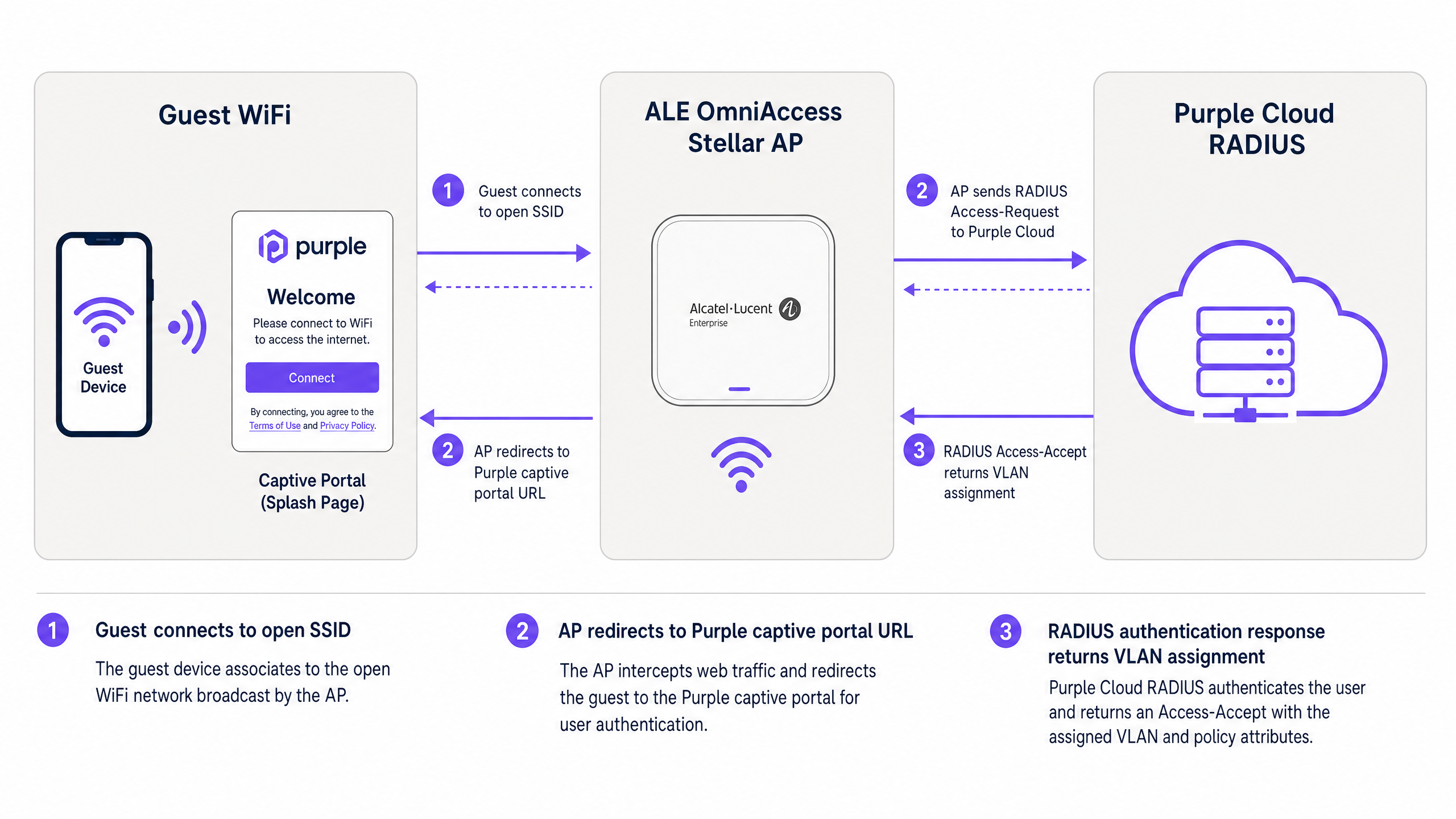
Figura 1: Fluxo de autenticação entre o dispositivo do convidado, o AP ALE OmniAccess Stellar e o RADIUS em nuvem do Purple.
O fluxo funciona da seguinte forma. Um visitante se conecta ao SSID de WiFi de convidados (Guest WiFi) aberto. O AP ALE atribui um endereço IP temporário do pool de DHCP de pré-autenticação e intercepta a primeira solicitação HTTP ou HTTPS do visitante. O AP redireciona o navegador para a URL do captive portal do Purple, passando o endereço MAC do cliente e o identificador NAS do AP como parâmetros de URL. O visitante se autentica por meio da splash page do Purple — usando e-mail, login social ou verificação por SMS. O servidor RADIUS do Purple valida a sessão e retorna uma mensagem Access-Accept para o AP ALE. O AP concede acesso à internet e começa a enviar atualizações de RADIUS Accounting para o Purple no intervalo configurado.
Para implantações avançadas usando PPSK e direcionamento dinâmico de VLAN, a mensagem RADIUS Access-Accept também inclui atributos de atribuição de VLAN. O AP ALE usa esses atributos para direcionar o tráfego do cliente diretamente para o segmento de VLAN correto, isolando-o de outros usuários na mesma infraestrutura física.
Guia de implementação
Parte 1: WiFi de convidados (Guest WiFi) com captive portal externo
Esta seção aborda a configuração do captive portal da Alcatel-Lucent para redirecionamento externo para o Purple. Estas etapas se aplicam aos APs ALE OmniAccess Stellar gerenciados via OmniVista Cirrus, OmniVista 2500 ou pela interface web Stellar Express.
Etapa 1: Obter as credenciais RADIUS do Purple
Faça login no seu portal Purple. Navegue até Management > Venues (Gerenciamento > Locais), selecione seu local e abra a seção Hardware. Adicione uma nova entrada de hardware e selecione Alcatel-Lucent OmniAccess Stellar como o tipo de hardware. O Purple gera um segredo compartilhado RADIUS exclusivo, o IP do servidor de autenticação e a URL do captive portal para o seu local. Anote esses valores antes de prosseguir.
Etapa 2: Configurar o servidor RADIUS no AP ALE
Na sua interface de gerenciamento ALE, navegue até as configurações de autenticação e adicione um novo perfil de servidor RADIUS.
| Parâmetro | Valor |
|---|---|
| IP do Servidor / Hostname | Conforme fornecido no portal Purple |
| Porta de Autenticação | 1812 |
| Porta de Bilhetagem (Accounting) | 1813 |
| Segredo Compartilhado | Conforme fornecido no portal Purple |
| RADIUS Accounting | Ativado |
| Intervalo de Bilhetagem | 300 segundos |
Ative um servidor RADIUS secundário usando o IP de backup do portal Purple. Isso garante o failover caso o servidor primário esteja temporariamente inacessível.
Etapa 3: Configurar o Walled Garden
O Walled Garden define os domínios que um dispositivo pode acessar antes que a autenticação seja concluída. Configure as seguintes entradas na lista de acesso de pré-autenticação:
Domínios principais do Purple (obrigatórios):
| Domínio | Finalidade |
|---|---|
| region1.purpleportal.net | Captive portal do Purple |
| venuewifi.com | Gerenciamento de sessão do Purple |
| cloudfront.net | CDN para recursos do portal |
| openweathermap.org | Widget de clima (opcional) |
| stripe.com | Pagamentos de WiFi pago (se aplicável) |
Domínios de login social (adicione conforme necessário):
| Provedor | Domínios |
|---|---|
| facebook.com, fbcdn.net, connect.facebook.net | |
| linkedin.com, licdn.net | |
| accounts.google.com, googleapis.com |
A omissão de qualquer domínio obrigatório fará com que o método de login correspondente falhe silenciosamente. Teste cada método de login após a configuração.
Etapa 4: Configurar o SSID de WiFi de convidados (Guest WiFi)
Crie um novo perfil de WLAN com as seguintes configurações:
| Parâmetro | Valor |
|---|---|
| Nível de Segurança | Aberto (Open) |
| Captive Portal | Ativado |
| Tipo de Captive Portal | Externo |
| URL de Redirecionamento | Conforme fornecido no portal Purple |
| Redirecionamento HTTPS | Desativado (a menos que um certificado SSL esteja instalado) |
| Tempo Limite de Inatividade | 1800 segundos (30 minutos) |
| Perfil do Servidor RADIUS | Perfil RADIUS do Purple (criado na Etapa 2) |
Se você precisar de redirecionamento HTTPS, instale um certificado SSL válido no AP ALE em System > General > Certificate Management (Sistema > Geral > Gerenciamento de Certificados). Observe que certificados curinga (wildcard) não são suportsuportado pelo Stellar AP para esta finalidade.
Passo 5: Atribuir o SSID a um grupo de APs
Aplique o perfil WLAN ao grupo de APs relevante no OmniVista. Verifique se os APs estão transmitindo o SSID e se os clientes conseguem se associar antes de testar o fluxo do Captive Portal.
Parte 2: Proteger o WiFi da equipe usando 802.1X
Para o WiFi da equipe, use WPA2-Enterprise ou WPA3-Enterprise com autenticação 802.1X. Isso elimina senhas compartilhadas e vincula o acesso a identidades de usuários individuais gerenciadas no Microsoft Entra ID, Okta ou Google Workspace.
Passo 1: Configurar o SSID 802.1X
Crie um perfil WLAN separado para a equipe. Defina o tipo de segurança como WPA2-Enterprise ou WPA3-Enterprise e atribua o servidor RADIUS da Purple como o backend de autenticação. O servidor RADIUS da Purple encaminha as solicitações de autenticação para o seu provedor de identidade via LDAP ou SAML.
Passo 2: Selecionar o método EAP
Para a maioria das implantações, use PEAP com MSCHAPv2. Isso requer apenas um certificado do lado do servidor e funciona com suplicantes padrão do Windows, macOS, iOS e Android. Para ambientes de maior segurança, use EAP-TLS com certificados de cliente emitidos por meio de sua PKI.
Passo 3: Atribuir a equipe a uma VLAN dedicada
Configure o servidor RADIUS da Purple para retornar Tunnel-Private-Group-ID = ID da VLAN da sua equipe na resposta Access-Accept. Isso garante que os dispositivos da equipe fiquem no segmento de rede corporativa, separados do tráfego de convidados na Camada 2.
Parte 3: WiFi Multi-Tenant usando PPSK e direcionamento dinâmico de VLAN
O PPSK (Private Pre-Shared Key) - também conhecido como iPSK (Identity PSK) em algumas documentações de fabricantes - permite que um único SSID atenda a múltiplos grupos de usuários isolados. Cada grupo recebe uma senha exclusiva. O servidor RADIUS mapeia cada senha para uma VLAN específica, fornecendo isolamento de rede por locatário (tenant) sem a sobrecarga de RF de múltiplos SSIDs.
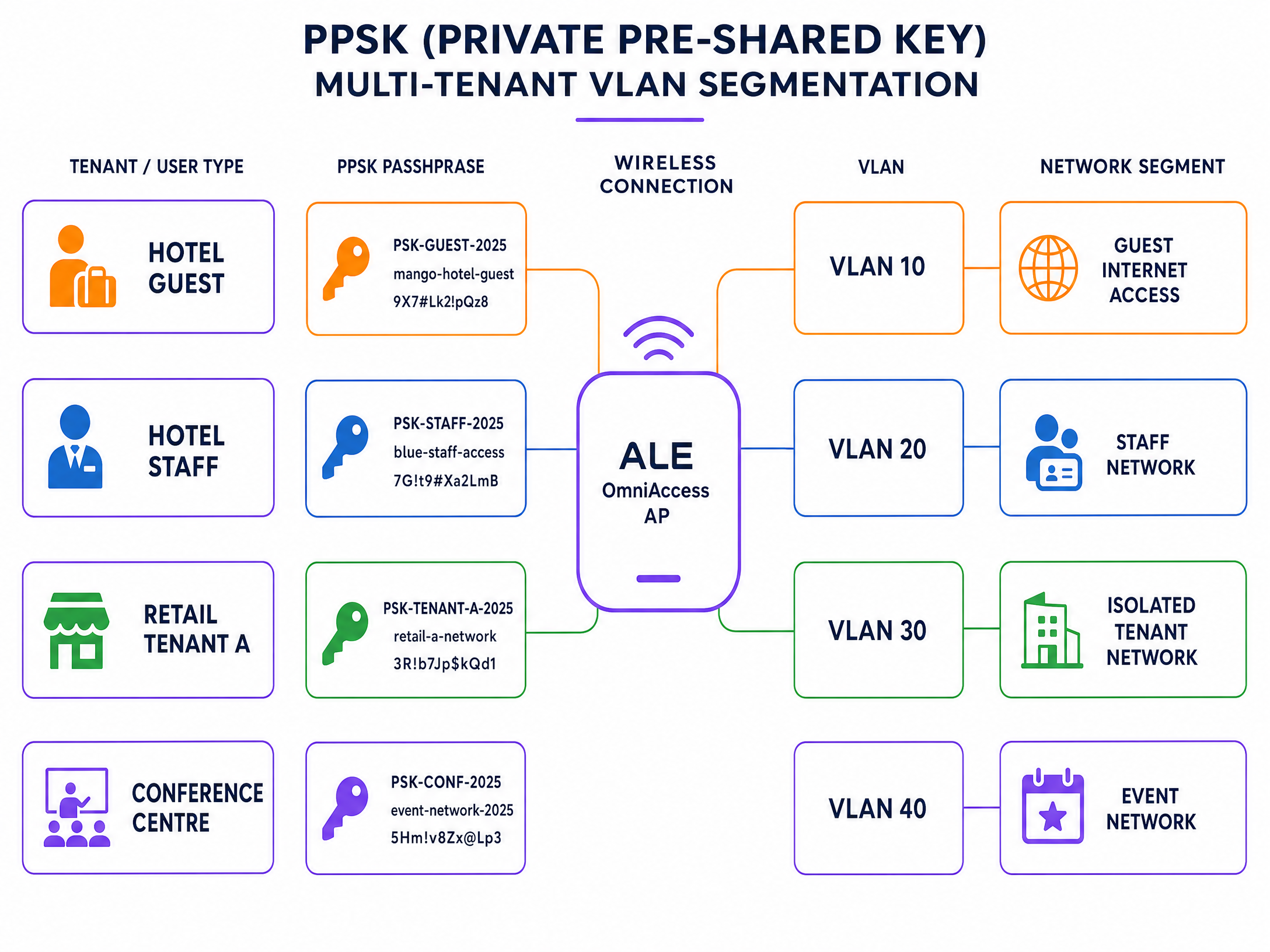
Figura 2: Segmentação de VLAN multi-tenant PPSK em um único SSID ALE OmniAccess.
Passo 1: Criar o SSID PPSK
Crie um novo perfil WLAN e defina o tipo de autenticação como WPA2-PSK com validação PSK baseada em RADIUS. No firmware Stellar 4.0.8.16 e superior (para modelos AP1301 e superiores), a atribuição dinâmica de VLAN via RADIUS é suportada no Modo Express. Para modelos mais antigos ou firmwares anteriores, use o modo gerenciado pelo OmniVista.
Passo 2: Definir as senhas dos locatários na Purple
No portal da Purple, crie um grupo PPSK para cada locatário. Atribua uma senha exclusiva por locatário e mapeie cada senha para o ID da VLAN correspondente. A Purple armazena esses mapeamentos em seu banco de dados RADIUS.
Passo 3: Configurar atributos RADIUS para direcionamento de VLAN
Certifique-se de que o servidor RADIUS da Purple retorne os seguintes atributos padrão IETF em cada resposta Access-Accept:
| Número do Atributo | Nome do Atributo | Valor |
|---|---|---|
| 64 | Tunnel-Type | 13 (VLAN) |
| 65 | Tunnel-Medium-Type | 6 (IEEE 802 / Ethernet) |
| 81 | Tunnel-Private-Group-ID | ID da VLAN (ex: "30") |
Todos os três atributos devem estar presentes. Se algum deles estiver ausente, o AP ALE ignorará a atribuição de VLAN e colocará o cliente na VLAN padrão.
Passo 4: Verificar o trunking de VLAN no uplink
Certifique-se de que todas as VLANs dos locatários estejam marcadas (tagged) na porta de uplink entre o AP ALE e o switch de distribuição. Um AP não pode direcionar o tráfego para uma VLAN que não seja permitida em seu tronco (trunk) de uplink.
Melhores práticas
As recomendações a seguir refletem as práticas padrão para implantações sem fio corporativas e estão alinhadas com os requisitos do IEEE 802.1X, PCI DSS 4.0 e GDPR.
Separe o WiFi de convidados do WiFi da equipe na Camada 2. Nunca coloque o tráfego de convidados e da equipe na mesma VLAN. Use a atribuição de VLAN orientada por RADIUS para impor essa separação automaticamente, independentemente de qual AP o usuário se conecte.
Use HTTPS para todos os redirecionamentos de Captive Portal. Instale um certificado SSL válido no AP ALE para habilitar o redirecionamento HTTPS. Isso evita que os navegadores exibam avisos de segurança na página de login (splash page), o que reduz as taxas de abandono e se alinha aos requisitos do GDPR para o manuseio seguro de dados.
Defina o intervalo de RADIUS Accounting para 300 segundos. Isso fornece à Purple atualizações regulares de sessão para maior precisão dos relatórios (analytics). Um intervalo superior a 600 segundos corre o risco de perder dados de sessão se um cliente se desconectar sem uma desautenticação limpa.
Teste o Walled Garden antes do lançamento (go-live). Conecte um dispositivo de teste ao SSID do WiFi de convidados e tente acessar cada provedor de login social. Se um login falhar, o domínio correspondente estará ausente no Walled Garden.
Segmente dispositivos IoT usando PPSK. Em ambientes de varejo e hotelaria, dispositivos IoT, como sinalização digital, terminais de pagamento e sensores ambientais, devem receber, cada um, um PPSK exclusivo mapeado para uma VLAN isolada. Isso evita que um dispositivo IoT comprometido acesse a rede mais ampla.
Para mais informações sobre padrões e arquitetura de segurança de WiFi corporativo, consulte nosso guia de segurança de WiFi corporativo .
Solução de problemas e mitigação de riscos
A tabela a seguir aborda os modos de falha mais comuns nas integrações do ALE OmniAccess e da Purple.
| Sintoma | Causa Mais Provável | Resolução |
|---|---|---|
| O Captive Portal não aparece | Configuração incorreta do Walled Garden ou DNS ausente | Verifique se os domínios da Purple estão na lista de permissões (whitelist); verifique se o escopo DHCP inclui um servidor DNS válido |
| A autenticação RADIUS falha | Incompatibilidade de segredo compartilhado (shared secret) ou firewall bloqueando UDP 1812/1813 | Insira novamente o segredo compartilhado do portal da Purple; confirme se as regras de firewall permitem UDP de saída 1812 e 1813 |
| Os usuários caem na VLAN errada | Atributos de Tunnel RADIUS ausentes ou limitação de firmware do AP | Confirme se todos os três atributos RADIUS (64, 65, 81) são retornados; verifique se a versão do firmware ALE suporta VLAN dinâmica |
| O botão de login social falha | Domínio do provedor social ausente no Walled Garden | Adicione os domínios do provedor social necessários tà lista de acesso de pré-autenticação |
| HTTPS captive portal mostra aviso de certificado | Certificado curinga (wildcard) usado ou nenhum certificado instalado | Instale um certificado SSL específico do domínio via Sistema > Geral > Gerenciamento de Certificados |
| Dados de sessão ausentes no Purple analytics | RADIUS Accounting desativado ou intervalo muito longo | Ative o RADIUS Accounting; defina o intervalo para 300 segundos |
Para problemas persistentes de RADIUS, ative o log de depuração (debug logging) no ALE AP e capture a troca de mensagens RADIUS. Procure por mensagens Access-Reject e verifique o código de motivo da rejeição. Os códigos comuns incluem 16 (falha de autenticação) e 18 (atributo ausente).
ROI e impacto nos negócios
A implantação do Purple no hardware ALE OmniAccess converte uma rede passiva em um ativo de dados ativo. Cada sessão autenticada gera um perfil de visitante: endereço de e-mail, frequência de visitas, tempo de permanência e tipo de dispositivo. Esses dados primários (first-party data) são enviados diretamente para o seu CRM por meio da biblioteca do Purple de mais de 400 conectores.
A Harrods alcançou um ROI de marketing de 57x com a implantação do Guest WiFi usando a captura de dados do Purple para impulsionar as inscrições no programa de fidelidade (estudo de caso do Purple, 2023). A AGS Airports gerou um ROI de 842% ao implementar o Paid WiFi com largura de banda em níveis em todas as suas propriedades (estudo de caso do Purple, 2022).
Para operadores de hospitalidade , o captive portal é o principal ponto de contato para a captura de dados dos hóspedes. Para ambientes de varejo , ele permite a análise do comportamento do consumidor e promoções direcionadas. Para hubs de transporte , ele fornece dados de fluxo de passageiros e registro de sessões em conformidade.
A plataforma Guest WiFi e as ferramentas de WiFi Analytics do Purple oferecem a infraestrutura de relatórios para medir esses resultados. Acompanhe taxas de autenticação, duração das sessões, taxas de visitantes recorrentes e conversão de opt-in a partir de um único painel.
Para obter orientações de integração relacionadas, consulte o guia de integração do WatchGuard Firebox , que aborda uma arquitetura semelhante baseada em RADIUS em uma plataforma de hardware diferente.
Definições principais
PPSK (Private Pre-Shared Key)
A security method where individual users or devices are issued unique passphrases for a single SSID, rather than sharing one global password. The RADIUS server maps each passphrase to a specific policy or VLAN.
Used in Multi-Tenant WiFi to isolate traffic between tenants, residents, or event groups without deploying multiple SSIDs.
RADIUS (Remote Authentication Dial-In User Service)
A networking protocol defined in RFC 2865 that provides centralised Authentication, Authorization, and Accounting (AAA) management for users connecting to a network service.
The core protocol Purple uses to communicate with ALE hardware. The ALE AP sends Access-Request messages; Purple responds with Access-Accept or Access-Reject.
Dynamic VLAN steering
The process of assigning a connected device to a specific VLAN based on RADIUS attributes returned during authentication, rather than a static VLAN configured on the SSID.
Essential for multi-tenant deployments where different user groups must be isolated on the same physical AP infrastructure.
Walled Garden
A controlled environment that restricts a device's internet access to a predefined set of domains before authentication is complete.
Required to allow devices to reach the Purple captive portal and external identity providers before the user has logged in.
Captive portal
A web page that intercepts a user's browser session and requires them to authenticate or accept terms before gaining full network access.
The primary interface where visitors provide consent and first-party data. Purple hosts this page in the cloud; the ALE AP performs the redirect.
Identity-Based Network
A network architecture where access policies, VLAN assignments, and bandwidth controls are determined by who the user is, rather than where or how they connect.
The architectural outcome of integrating ALE hardware with Purple's authentication overlay.
802.1X
An IEEE standard for port-based network access control that provides an authentication mechanism for devices connecting to a LAN or WLAN. It requires a supplicant on the client device, an authenticator (the AP), and an authentication server (RADIUS).
The standard used for secure Staff WiFi deployments. Eliminates shared passwords and ties access to individual user identities.
EAP-TLS (Extensible Authentication Protocol - Transport Layer Security)
A certificate-based EAP method where both the client and the RADIUS server present digital certificates for mutual authentication.
The most secure 802.1X method. Requires a PKI infrastructure to issue client certificates, but eliminates password-based credential theft entirely.
PEAP (Protected Extensible Authentication Protocol)
An EAP method that tunnels the inner authentication exchange inside a TLS session, protecting credentials in transit. Commonly used with MSCHAPv2 as the inner method.
The most common 802.1X method in enterprise deployments. Requires only a server-side certificate and works with standard OS supplicants.
NAS (Network Access Server)
In RADIUS terminology, the device that enforces access control - in this case, the ALE OmniAccess Stellar AP. The NAS forwards authentication requests to the RADIUS server and enforces the policies returned.
The ALE AP acts as the NAS in the Purple integration. Its IP address and shared secret must be registered in the Purple portal as a trusted NAS client.
Exemplos práticos
A 200-room hotel in central London uses ALE OmniAccess Stellar APs throughout the property. They need to serve hotel guests, back-of-house staff, and a ground-floor restaurant as three completely separate network segments. They want to avoid broadcasting multiple SSIDs to preserve RF performance.
Deploy a single secure SSID using PPSK. Configure the ALE OmniAccess APs to authenticate against the Purple RADIUS server. In the Purple portal, create three PPSK groups: Hotel Guests (VLAN 10), Staff (VLAN 20), and Restaurant (VLAN 30). The RADIUS server returns Tunnel-Private-Group-ID = 10, 20, or 30 depending on which passphrase the device uses. The ALE AP dynamically steers each device to the correct VLAN. Hotel guests receive internet access only. Staff receive access to the property management system. The restaurant receives an isolated segment for their EPOS terminals.
A conference centre hosts 15 corporate events simultaneously. Each event organiser needs their own isolated WiFi network for attendees, but the venue only has a single ALE OmniAccess infrastructure. The venue IT team needs to provision and de-provision networks quickly between events.
Use Purple's PPSK management to create per-event passphrases mapped to dedicated event VLANs. The venue pre-configures 15 VLAN segments on the ALE infrastructure. For each event, the IT team creates a new PPSK entry in the Purple portal, assigns it to the correct VLAN, and provides the passphrase to the event organiser. At the end of the event, they revoke the passphrase in Purple. The ALE AP immediately stops accepting that passphrase, isolating the de-provisioned VLAN. No AP reconfiguration is required.
Questões práticas
Q1. You have configured the Alcatel-Lucent captive portal on an ALE OmniAccess Stellar AP. Guests connect to the SSID and receive an IP address, but their devices show 'No Internet Connection' and the splash page does not appear. What are the two most likely causes, and how do you resolve each?
Dica: Consider what must happen at the DNS and HTTP layer before the captive portal redirect can occur.
Ver resposta modelo
Cause 1: The DHCP scope does not include a valid DNS server. Without DNS, the client cannot resolve the captive portal URL and the OS captive portal detection mechanism fails. Resolution: Add a valid DNS server (e.g., 8.8.8.8) to the DHCP scope on the guest VLAN. Cause 2: The Walled Garden does not include the Purple portal domains. Without these, the AP blocks the redirect request before it reaches the client. Resolution: Add region1.purpleportal.net, venuewifi.com, and cloudfront.net to the pre-authentication access list.
Q2. Your Multi-Tenant WiFi deployment uses PPSK on a single ALE OmniAccess SSID. Users authenticate successfully - the Purple portal shows successful logins - but all users receive IP addresses from VLAN 1 instead of their assigned tenant VLANs. What is the most likely cause?
Dica: Check the communication between the RADIUS server and the AP, and the AP's uplink configuration.
Ver resposta modelo
There are two likely causes. First, the Purple RADIUS server may not be returning all three required RADIUS tunnel attributes (64, 65, 81) in the Access-Accept message. Verify the enforcement policy includes Tunnel-Type = 13, Tunnel-Medium-Type = 6, and Tunnel-Private-Group-ID = the correct VLAN ID. Second, the tenant VLANs may not be tagged on the uplink trunk between the ALE AP and the distribution switch. If the VLAN does not exist on the trunk, the AP cannot steer traffic to it, even if the RADIUS attributes are correct.
Q3. A venue requires that guest sessions are automatically terminated after 60 minutes, and that guests who return within 24 hours are recognised and bypass the registration form. How should this be configured in the Purple and ALE architecture?
Dica: Consider which system controls session lifetime and which system controls returning visitor recognition.
Ver resposta modelo
Session termination is controlled via the RADIUS Session-Timeout attribute. Configure the Purple RADIUS server to include Session-Timeout = 3600 (seconds) in the Access-Accept message. The ALE AP will disconnect the client after 3600 seconds. Returning visitor recognition is controlled in the Purple portal. Enable the 'remember device' or MAC-based re-authentication setting for your venue. When a returning visitor connects within the configured window, Purple's RADIUS server recognises their MAC address and returns an Access-Accept without requiring the splash page interaction, providing a seamless reconnection experience.
Q4. You are deploying Staff WiFi using 802.1X on ALE OmniAccess Stellar APs. Your organisation uses Microsoft Entra ID as the identity provider. Staff devices are Windows 11 laptops managed via Intune. Which EAP method should you use, and what certificate requirements apply?
Dica: Consider the balance between security, deployment complexity, and the capabilities of the existing infrastructure.
Ver resposta modelo
Use PEAP with MSCHAPv2 as the EAP method. This requires only a server-side certificate on the Purple RADIUS server (already provisioned by Purple) and leverages the user's Entra ID credentials for authentication. No client certificates are required, which simplifies deployment on Intune-managed devices. Configure the Windows 11 supplicant via an Intune Wi-Fi profile, specifying the SSID, WPA2-Enterprise security, PEAP method, and the Purple RADIUS server certificate thumbprint for server validation. If your security policy requires certificate-based mutual authentication, upgrade to EAP-TLS and deploy client certificates via Intune SCEP profiles, but this adds significant PKI management overhead.
Continue a ler esta série
Aruba ClearPass e Purple WiFi: Guia de Integração e Implantação
Este guia fornece uma referência técnica completa para integrar o HPE Aruba ClearPass Policy Manager com a plataforma Purple WiFi, cobrindo a arquitetura de proxy RADIUS, configuração de Captive Portal e mapeamento dinâmico de função VLAN. Ele é projetado para gerentes de TI e arquitetos de rede em ambientes com forte presença Aruba que precisam manter o ClearPass para NAC enquanto implantam o Purple para autenticação de convidados e análises. A implementação desta integração preenche uma lacuna crítica de fornecedor, permitindo segurança e conformidade de nível empresarial juntamente com as capacidades líderes de mercado de inteligência de visitantes do Purple.
Aruba Central and Purple WiFi: Integração Gerenciada na Nuvem
Um guia de referência técnica abrangente para integrar o Aruba Central com a plataforma de inteligência de guest WiFi hospedada na nuvem da Purple. Este guia aborda arquitetura, configuração passo a passo de Captive Portals externos e RADIUS, e estratégias de implementação multi-site para equipes de TI corporativas.
Extreme Networks e Purple WiFi: Integração ExtremeCloud IQ
Este guia de referência técnica fornece um plano abrangente para integrar o Purple WiFi com a plataforma ExtremeCloud IQ da Extreme Networks. Ele detalha o fluxo arquitetural, as etapas de configuração para redirecionamento de Captive Portal e autenticação RADIUS, e as melhores práticas para alcançar acesso de convidado seguro e rico em dados em ambientes corporativos.