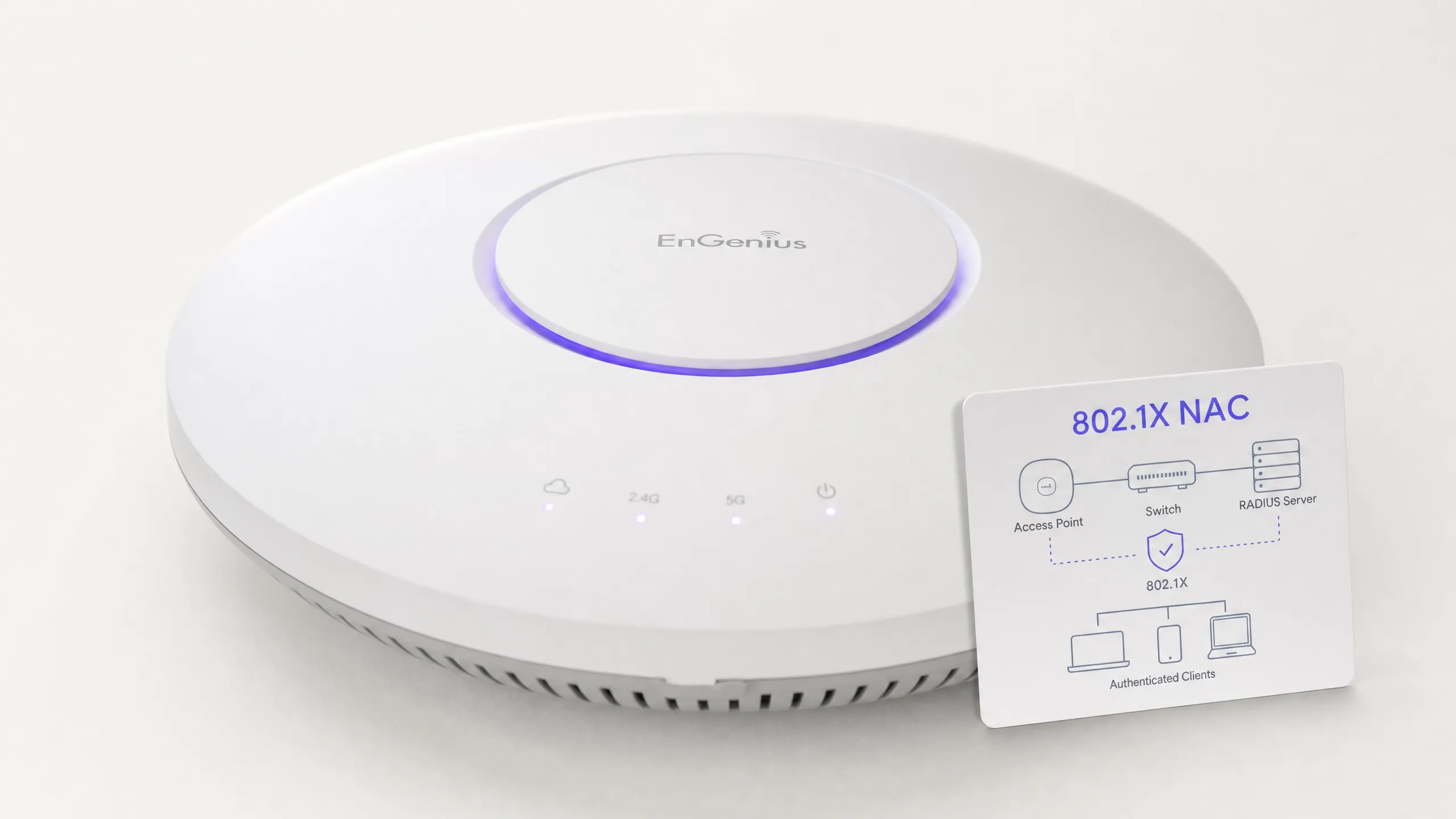
Melhores Práticas para Proteger Redes Escolares K-12 com NAC

Este guia de referência técnica oferece estratégias acionáveis para líderes de TI arquitetarem, implantarem e gerenciarem o Controle de Acesso à Rede (NAC) em ambientes escolares K-12. Abrange tópicos essenciais, desde autenticação 802.1X e segmentação de VLAN até o tratamento de dispositivos IoT com MAB e MPSK, garantindo proteção robusta e conformidade.

📖 6 min read📝 1,270 words🔧 2 worked examples3 practice questions📚 8 key definitions

Listen to this guide

View podcast transcript
Best Practices for Securing K-12 School Networks with NAC A Purple WiFi Intelligence Briefing — Approximately 10 Minutes --- INTRODUCTION AND CONTEXT — approximately 1 minute Welcome to the Purple WiFi Intelligence Briefing. I'm your host, and today we're getting into a topic that sits right at the intersection of safeguarding, compliance, and practical network engineering: securing K-12 school networks using Network Access Control, or NAC. If you're an IT manager or network architect working in education, you already know the challenge. You've got a single physical network that needs to serve teachers, students, governors, visiting parents, IoT devices like smartboards and CCTV cameras, and sometimes contractors — all at the same time, all with very different trust levels and access requirements. The stakes are high. Schools hold sensitive personal data on minors. They're subject to GDPR, CIPA in the US context, and increasingly, Ofsted and DfE guidance in the UK. A single misconfigured access point can expose safeguarding records or allow a student to pivot onto the admin network. So today, we're going to walk through exactly how to architect and deploy a NAC solution in a K-12 environment — the standards, the segmentation strategy, the integration points, and the pitfalls that trip up even experienced teams. Let's get into it. --- TECHNICAL DEEP-DIVE — approximately 5 minutes Let's start with the fundamentals. NAC — Network Access Control — is the discipline of controlling who and what can connect to your network, and what they can do once they're on it. In a K-12 context, this means enforcing authentication, authorisation, and policy at the point of network entry, whether that's a wired switch port or a wireless access point. The cornerstone standard here is IEEE 802.1X. This is the port-based authentication protocol that sits between a supplicant — that's the device trying to connect — an authenticator, which is your switch or access point, and an authentication server, typically a RADIUS server. When a device attempts to connect, 802.1X holds it in an unauthenticated state, passes credentials to the RADIUS server, and only grants network access once the server confirms the identity and policy match. In a school, this maps directly to your user populations. Staff authenticate with their Active Directory or Azure AD credentials. Students authenticate with their school-issued credentials or device certificates. Unmanaged devices — a parent's phone at an open evening, a contractor's laptop — get redirected to a captive portal or a restricted guest VLAN. Now, let's talk about VLAN segmentation, because this is where most school networks either get it right or leave themselves exposed. The minimum viable segmentation model for a K-12 network looks like this. You need at least four VLANs. First, a Staff and Administration VLAN — this carries teacher workstations, MIS systems, HR data, and finance applications. Full internet access, but no lateral access to student devices. Second, a Student VLAN — filtered internet access, content filtering enforced, no access to staff resources. Third, an IoT and Infrastructure VLAN — this is where your smartboards, IP cameras, door access controllers, and printers live. Critically, this VLAN should have no internet access at all unless a specific device requires it, and it should be firewalled from both staff and student VLANs. Fourth, a Guest or Visitor VLAN — internet-only, completely isolated, with a captive portal for terms acceptance and identity capture. The RADIUS server is the brain of this operation. In most school deployments, you'll integrate RADIUS with your existing directory service. If you're running Microsoft Active Directory, that's typically done via NPS — Network Policy Server — on Windows Server, or via a cloud RADIUS service if you've moved to Azure AD or Google Workspace. The RADIUS server applies policy based on group membership: a user in the "Staff" security group gets assigned to VLAN 10, a user in "Students" gets VLAN 20, and so on. On the wireless side, the current best practice is WPA3-Enterprise. WPA3 addresses the known vulnerabilities in WPA2, particularly around offline dictionary attacks and the KRACK vulnerability. WPA3-Enterprise uses 192-bit security mode for high-sensitivity environments, which is appropriate for the staff and admin SSID. For student SSIDs, WPA3-Personal with SAE — Simultaneous Authentication of Equals — is a significant improvement over WPA2-PSK, because it prevents offline brute-force attacks even if the pre-shared key is compromised. One architecture decision worth highlighting is whether to run a single SSID with dynamic VLAN assignment, or multiple SSIDs. The single-SSID approach is cleaner operationally — users connect to one network name, and the RADIUS server dynamically assigns them to the correct VLAN based on their credentials. This reduces RF overhead and simplifies device configuration. However, it requires all your access points to support dynamic VLAN assignment via RADIUS attributes, specifically the Tunnel-Type, Tunnel-Medium-Type, and Tunnel-Private-Group-ID attributes in the RADIUS Access-Accept response. Now, IoT device management is a particular challenge in schools. Smartboards, document cameras, environmental sensors — these devices often don't support 802.1X at all. The solution here is MAC Authentication Bypass, or MAB, combined with Multi-PSK, or MPSK. MAB allows you to authenticate devices by their MAC address against a whitelist in your RADIUS server. MPSK goes further — it allows you to assign a unique pre-shared key per device or device group, so each IoT device has its own credential, and compromise of one device's key doesn't affect others. For a detailed walkthrough of this approach, Purple's guide on Managing IoT Device Security with NAC and MPSK covers the configuration specifics in depth. Let's also address endpoint compliance posture checking, because this is where enterprise NAC solutions add significant value over basic 802.1X. Solutions like Cisco ISE, Aruba ClearPass, or Forescout can interrogate endpoints before granting access — checking whether a device has current antivirus definitions, whether the operating system is patched, whether disk encryption is enabled. In a school context, this is particularly valuable for staff-owned devices or BYOD scenarios. A device that fails posture checks can be quarantined to a remediation VLAN where it can only access update servers, rather than being granted full network access. --- IMPLEMENTATION RECOMMENDATIONS AND PITFALLS — approximately 2 minutes Let me give you the practical deployment sequence, and then flag the three pitfalls I see most often. Start with a full network audit. Before you touch a single configuration, you need a complete inventory of every device on the network — wired and wireless — and every SSID currently broadcasting. Use a tool like Nmap or your existing network management platform to enumerate devices. You'll almost certainly find shadow IT: personal hotspots, unmanaged switches, devices nobody knew were there. Phase your rollout. Do not attempt to enforce 802.1X authentication across the entire school on day one. Start with a pilot — typically the staff network in the admin block. Run in monitor mode first, where 802.1X is evaluated but not enforced, so you can identify devices that will fail authentication before you lock anyone out. Then move to enforcement, VLAN by VLAN. Integrate with your directory service before you deploy to users. The most common failure mode is deploying RADIUS and then discovering that your directory integration is broken — either because of firewall rules blocking LDAP traffic, or because the service account used by RADIUS doesn't have sufficient permissions to query group membership. Now, the three pitfalls. First: legacy devices. Every school has them. Older printers, legacy AV equipment, interactive whiteboards from 2012. These devices will not support 802.1X. Have a MAB whitelist strategy ready before you enforce authentication, or you'll be fielding calls from every teacher whose printer stopped working on the first day of term. Second: certificate management. WPA3-Enterprise and EAP-TLS authentication require certificates. If you're using a school-managed PKI, ensure your certificate authority is trusted on all managed devices before deployment. Unmanaged BYOD devices will prompt users to accept an untrusted certificate, which creates a phishing risk — users get trained to click "accept" on certificate warnings. Third: guest network compliance. Under GDPR, if you're capturing any personal data through a captive portal — even just an email address — you need a lawful basis, a privacy notice, and a data retention policy. Purple's guest WiFi platform handles this natively, providing compliant captive portal flows with built-in consent management, which is particularly useful for open evenings and parent events where you're onboarding large numbers of visitors quickly. --- RAPID-FIRE Q AND A — approximately 1 minute Let me run through the questions I get most often on this topic. "Do we need a dedicated RADIUS server or can we use a cloud service?" — Both are valid. On-premises NPS on Windows Server is free and integrates natively with Active Directory. Cloud RADIUS services like Foxpass or JumpCloud RADIUS are better suited to Azure AD or Google Workspace environments, and they reduce your on-premises infrastructure footprint. "What about Chromebooks?" — Chromebooks support 802.1X natively and can be configured via Google Admin Console to use EAP-TLS with device certificates issued through Google's certificate management. This is the cleanest approach for Google Workspace for Education deployments. "How do we handle parents at open evenings?" — Captive portal on an isolated guest VLAN. No 802.1X required. Purple's guest WiFi platform provides a branded, GDPR-compliant portal that captures consent and can push analytics back to your marketing or communications team. "What's the ROI case for NAC in a school?" — Primarily risk mitigation. A data breach involving student records can result in ICO fines, reputational damage, and significant remediation costs. The cost of a properly deployed NAC solution is a fraction of the cost of a single breach investigation. --- SUMMARY AND NEXT STEPS — approximately 1 minute To summarise: securing a K-12 network with NAC comes down to four pillars. Identity — knowing who and what is on your network at all times. Segmentation — ensuring that a compromised student device cannot reach staff data or IoT infrastructure. Compliance — meeting GDPR, CIPA, and DfE requirements for data protection and safeguarding. And visibility — having the logging and analytics capability to detect anomalies and respond quickly. The practical starting point is a network audit and VLAN design. Get that right, and the 802.1X deployment follows a logical sequence. Don't try to do everything at once — phase it, test in monitor mode, and build your MAB whitelist before you enforce. If you're evaluating how a guest WiFi and analytics platform fits into this architecture, Purple's platform integrates directly with your NAC infrastructure to provide compliant guest onboarding, visitor analytics, and policy enforcement — without adding complexity to your core network segmentation. For further reading, Purple's guides on IoT device security with NAC and MPSK, and the broader enterprise network architecture resources, are linked in the show notes. Thanks for listening. Until next time. --- END OF SCRIPT

header_image.png

Resumo Executivo

Proteger uma rede escolar K-12 é fundamentalmente um exercício de mitigação de riscos, gerenciamento de identidade e conformidade. Líderes de TI enfrentam o desafio complexo de fornecer acesso contínuo a uma base de usuários altamente diversa — funcionários, alunos, visitantes e contratados — enquanto simultaneamente protegem uma gama cada vez maior de dispositivos IoT, como lousas interativas e câmeras de segurança. O Controle de Acesso à Rede (NAC) impulsionado pelo IEEE 802.1X fornece a base arquitetônica para uma segmentação de rede robusta, garantindo que os dispositivos sejam autenticados, autorizados e isolados apropriadamente antes de terem acesso à rede.

Este guia fornece uma estrutura técnica abrangente para a implantação de NAC em ambientes educacionais. Ele detalha as melhores práticas para integração RADIUS, arquitetura de VLAN, verificação de postura de endpoint e integração segura de convidados. Ao implementar essas estratégias, diretores de operações de instalações e arquitetos de rede podem reduzir significativamente sua superfície de ataque, proteger dados sensíveis de segurança e manter estrita conformidade com padrões regulatórios como GDPR e CIPA, tudo sem comprometer a eficiência operacional da escola.

Análise Técnica Aprofundada

Em sua essência, o NAC opera com o princípio de confiança zero na borda da rede. Quando um dispositivo (o suplicante) se conecta a um switch de acesso ou ponto de acesso sem fio (o autenticador), ele é colocado em um estado restrito. O autenticador encaminha as credenciais para um servidor de autenticação (tipicamente um servidor RADIUS) usando o protocolo 802.1X. Somente após autenticação bem-sucedida e avaliação de política, o dispositivo é atribuído à VLAN apropriada com listas de controle de acesso (ACLs) específicas aplicadas.

O Protocolo 802.1X e Métodos EAP

A estrutura do Protocolo de Autenticação Extensível (EAP) fornece o mecanismo de transporte para vários métodos de autenticação dentro do 802.1X. Em um ambiente K-12, as implementações mais comuns são:

  • PEAP-MSCHAPv2: Frequentemente usado para dispositivos de funcionários e alunos que se autenticam contra credenciais do Active Directory. Embora mais fácil de implantar, é vulnerável a roubo de credenciais se o certificado do servidor não for estritamente validado pelo cliente.
  • EAP-TLS: O padrão ouro para segurança corporativa. Ele se baseia na autenticação mútua baseada em certificado, eliminando completamente a necessidade de senhas. Isso é altamente recomendado para dispositivos gerenciados (como Chromebooks emitidos pela escola ou laptops de funcionários) onde uma solução de Infraestrutura de Chave Pública (PKI) ou Gerenciamento de Dispositivos Móveis (MDM) pode provisionar automaticamente os certificados necessários.

Padrões de Segurança Sem Fio: WPA3-Enterprise

Para redes sem fio, WPA3-Enterprise é o padrão atual. Ele exige o uso de Protected Management Frames (PMF) para prevenir ataques de desautenticação e oferece um modo de segurança de 192 bits para ambientes altamente sensíveis (por exemplo, a rede de funcionários/administradores). Para redes de alunos onde WPA3-Enterprise pode ser muito complexo para cenários BYOD, WPA3-Personal com Simultaneous Authentication of Equals (SAE) oferece proteção robusta contra ataques de dicionário offline, uma melhoria significativa em relação ao padrão WPA2-PSK mais antigo.

Arquitetura de Segmentação de Rede

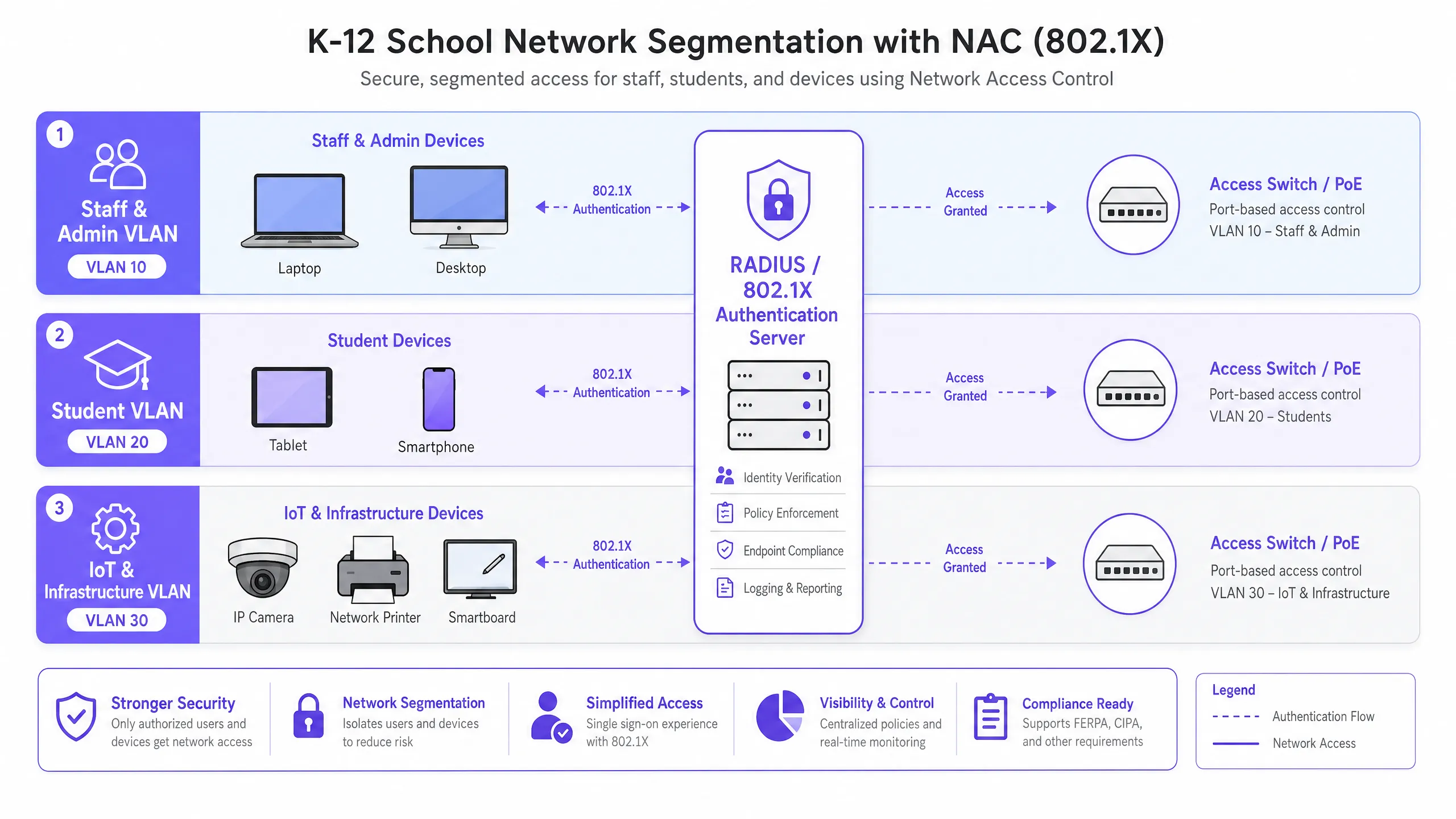
O NAC eficaz depende de uma segmentação de rede rigorosa. Uma arquitetura de rede plana é uma vulnerabilidade crítica. Uma implantação K-12 padrão deve, no mínimo, implementar a seguinte estrutura de VLAN:

  1. VLAN de Funcionários e Administradores: Acesso total a recursos internos, sistemas MIS e à internet. Movimento lateral altamente restrito de outras VLANs.
  2. VLAN de Alunos: Acesso à internet filtrado com aplicação rigorosa de filtragem de conteúdo. Sem acesso a recursos de funcionários ou interfaces de gerenciamento.
  3. VLAN de IoT e Infraestrutura: Abriga lousas interativas, câmeras IP e sistemas de gerenciamento predial. Esta VLAN não deve ter acesso à internet de saída, a menos que explicitamente exigido por um dispositivo específico, e deve ser isolada das VLANs de usuários.
  4. VLAN de Convidados: Acesso apenas à internet, isolada de todas as redes internas, tipicamente precedida por um Captive Portal para aceitação de termos e captura de identidade.

nac_architecture_overview.png

Guia de Implementação

A implantação de NAC requer uma abordagem faseada e metódica para evitar interrupções nas operações educacionais.

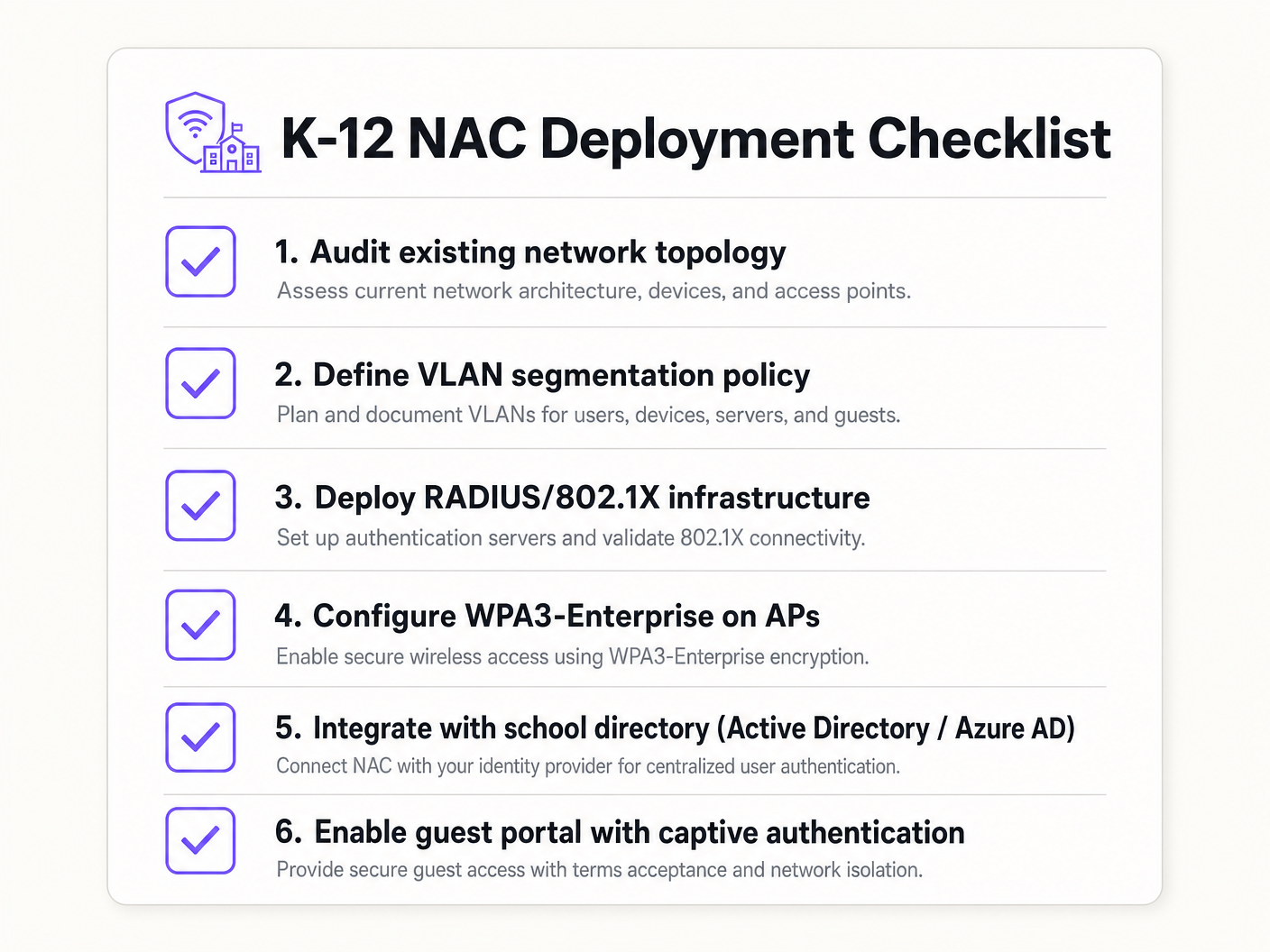
Fase 1: Descoberta e Auditoria

Antes de implementar qualquer aplicação, conduza uma auditoria de rede abrangente. Use ferramentas para descobrir todos os dispositivos conectados, identificar TI sombra (switches ou pontos de acesso não autorizados) e documentar o estado atual da rede. Esta fase é crucial para construir listas de permissão (whitelists) precisas de MAC Authentication Bypass (MAB) para dispositivos legados.

Fase 2: Implantação da Infraestrutura RADIUS

Implante sua infraestrutura RADIUS. Se estiver usando o Active Directory local, o Network Policy Server (NPS) é uma escolha comum. Para ambientes centrados na nuvem (Azure AD, Google Workspace), as soluções RADIUS em nuvem oferecem integração simplificada. Certifique-se de que o servidor RADIUS esteja configurado corretamente para se comunicar com seu serviço de diretório e que as regras de firewall permitam o tráfego LDAP/LDAPS.

Fase 3: Modo de Monitoramento

Habilite o 802.1X em switches de acesso e controladores sem fio no modo de monitoramento (às vezes chamado de modo aberto). Neste estado, o autenticador avalia as credenciais 802.1X e registra o resultado, mas não bloqueia o acesso se a autenticação falhar. Isso permite que as equipes de TI identifiquem dispositivos mal configurados, certificados ausentes ou equipamentos legados que exigem MAB, sem causar interrupções na rede.

Fase 4: Aplicação e Segmentação

Assim que os logs do modo de monitoramento mostrarem uma alta taxa de sucesso e todas as exceções tiverem sido contabilizadas, comece a aplicar o 802.Autenticação 1X. Implemente isso em fases — começando com um grupo piloto (por exemplo, o departamento de TI), depois expandindo para a equipe e, finalmente, para os alunos. Implemente a atribuição dinâmica de VLAN via atributos RADIUS (Tunnel-Type, Tunnel-Medium-Type, Tunnel-Private-Group-ID) para garantir que os usuários sejam colocados no segmento de rede correto com base na sua associação a grupos de diretório.

nac_deployment_checklist.png

Melhores Práticas

  • Implemente MAB e MPSK para IoT: Dispositivos legados e endpoints IoT sem interface de usuário geralmente não possuem suplicantes 802.1X. Use MAC Authentication Bypass (MAB) para equipamentos legados, mas prefira Multi-PSK (MPSK) para dispositivos IoT modernos. O MPSK atribui uma chave pré-compartilhada exclusiva a cada dispositivo, garantindo que, se uma chave for comprometida, o restante da rede permaneça seguro. Para um passo a passo de configuração detalhado, consulte o guia Gerenciando a Segurança de Dispositivos IoT com NAC e MPSK .
  • Aplique a Verificação de Postura de Endpoint: Vá além da autenticação simples integrando verificações de postura. Antes de conceder acesso, a solução NAC deve verificar se o endpoint possui software antivírus ativo, está totalmente atualizado e tem a criptografia de disco habilitada. Dispositivos não conformes devem ser colocados em uma VLAN de remediação.
  • Integre o Acesso de Convidados com Analytics: As redes de convidados devem ser isoladas e conformes. A integração de uma plataforma como Guest WiFi garante que o acesso de visitantes seja seguro, compatível com GDPR e forneça valiosos WiFi Analytics para entender o uso do local e o fluxo de pessoas.
  • Use Autenticação Baseada em Certificado (EAP-TLS) Sempre que Possível: Para dispositivos gerenciados, EAP-TLS elimina a dependência de senhas, reduzindo significativamente o risco de roubo de credenciais e ataques de phishing.

Solução de Problemas e Mitigação de Riscos

Modos de Falha Comuns

  1. Erros de Confiança de Certificado: Se os usuários BYOD forem solicitados a aceitar um certificado de servidor não confiável durante a autenticação PEAP, isso os treina a ignorar avisos de segurança, criando uma enorme vulnerabilidade de phishing. Mitigação: Sempre use um certificado assinado por uma Autoridade Certificadora (CA) publicamente confiável para o servidor RADIUS, ou garanta que o certificado raiz da CA interna seja enviado para todos os dispositivos gerenciados via MDM.
  2. Falhas na Integração de Diretório: A autenticação RADIUS falhará se o servidor não conseguir se comunicar com o serviço de diretório (por exemplo, os controladores de domínio AD estão inacessíveis ou a senha da conta de serviço expirou). Mitigação: Implemente servidores RADIUS redundantes e monitore continuamente a integridade da integração de diretório.
  3. O 'Problema da Impressora' (Bloqueio de Dispositivos Legados): A imposição de 802.1X sem uma lista branca MAB completa desconectará imediatamente impressoras legadas, equipamentos AV e smartboards mais antigos. Mitigação: A fase de modo de monitoramento é crítica. Não avance para a imposição até que todos os dispositivos não autenticadores tenham sido identificados e perfilados.

ROI e Impacto nos Negócios

Embora o NAC seja principalmente um investimento em segurança e conformidade, ele oferece valor de negócio mensurável:

  • Mitigação de Riscos: O custo financeiro e reputacional de uma violação de dados envolvendo registros de alunos é catastrófico. O NAC reduz drasticamente a superfície de ataque e impede o movimento lateral, contendo possíveis violações.
  • Eficiência Operacional: A atribuição dinâmica de VLAN reduz a sobrecarga administrativa de configurar portas de switch manualmente. A equipe de TI gasta menos tempo gerenciando VLANs e mais tempo em iniciativas estratégicas.
  • Garantia de Conformidade: Uma implantação robusta de NAC fornece os rastros de auditoria e controles de acesso necessários para demonstrar conformidade com GDPR, CIPA e regulamentações locais de proteção, simplificando auditorias e reduzindo a exposição legal.

Key Definitions

Network Access Control (NAC)

A security architecture that enforces policy on devices attempting to access a network, ensuring only authenticated and compliant devices are granted entry.

Essential for IT teams to prevent unauthorized access and segment network traffic based on user roles (e.g., staff vs. student).

IEEE 802.1X

The IEEE standard for port-based Network Access Control, providing an authentication mechanism to devices wishing to attach to a LAN or WLAN.

The foundational protocol that allows switches and access points to verify user identity before granting network access.

RADIUS (Remote Authentication Dial-In User Service)

A networking protocol that provides centralized Authentication, Authorization, and Accounting (AAA) management for users who connect and use a network service.

The 'brain' of the NAC deployment, responsible for verifying credentials against a directory (like Active Directory) and assigning VLANs.

MAC Authentication Bypass (MAB)

A technique used to authenticate devices that do not support 802.1X by using their MAC address as the credential against a pre-approved whitelist.

Crucial for allowing legacy devices like older printers and smartboards onto the network without compromising the 802.1X requirement for modern devices.

Multi-PSK (MPSK)

A wireless security feature that allows multiple unique Pre-Shared Keys to be used on a single SSID, with each key assigning specific network policies or VLANs.

The best practice for securing modern IoT devices that cannot perform 802.1X authentication, isolating them securely.

Dynamic VLAN Assignment

The process where a RADIUS server instructs the switch or access point to place an authenticated user into a specific VLAN based on their directory group membership.

Reduces administrative overhead by allowing a single SSID or switch port configuration to serve multiple user types securely.

EAP-TLS (Extensible Authentication Protocol - Transport Layer Security)

An 802.1X authentication method that requires mutual certificate authentication between the client and the server, eliminating the use of passwords.

The most secure authentication method, highly recommended for school-issued managed devices to prevent credential theft.

Endpoint Posture Checking

The process of evaluating a device's security state (e.g., antivirus status, OS patch level) before granting it network access.

Ensures that even authenticated users cannot introduce malware into the network via compromised or unpatched devices.

Worked Examples

A 1500-student secondary school needs to deploy 200 new wireless environmental sensors across the campus. These sensors only support WPA2-Personal and do not have an 802.1X supplicant. How should the network architect secure these devices without compromising the main network?

The architect should deploy a dedicated hidden SSID for IoT devices and implement Multi-PSK (MPSK). Each sensor (or group of sensors) is assigned a unique, complex pre-shared key. The wireless controller or RADIUS server is configured to map these specific keys to the isolated 'IoT & Infrastructure VLAN'. This VLAN must have strict ACLs applied, denying all access to the Staff and Student VLANs, and restricting outbound internet access only to the specific cloud endpoints required by the environmental sensors.

Examiner's Commentary: This approach isolates the vulnerable IoT devices while avoiding the operational nightmare of managing a single shared PSK. If a sensor is stolen or compromised, its individual key can be revoked without affecting the other 199 devices. This aligns with the best practices outlined in the [Managing IoT Device Security with NAC and MPSK](/guides/managing-iot-device-security-with-nac-and-mpsk) guide.

During the rollout of 802.1X (PEAP-MSCHAPv2) for BYOD student devices, the IT helpdesk is overwhelmed with tickets from students reporting that their devices are warning them about an 'untrusted network certificate'. How should this be resolved?

The issue occurs because the RADIUS server is using a certificate signed by the school's internal, private Certificate Authority (CA), which the BYOD devices do not natively trust. The immediate fix is to replace the RADIUS server's certificate with one issued by a widely recognized public CA (e.g., DigiCert, Let's Encrypt). Long-term, the school should implement an onboarding portal that securely configures the supplicant and installs the necessary trust anchors before the device attempts to connect.

Examiner's Commentary: Instructing users to manually 'accept' or 'trust' an unknown certificate is a critical security failure, as it trains them to fall victim to Evil Twin or Man-in-the-Middle (MitM) attacks. Using a public CA for BYOD RADIUS authentication is a standard industry best practice to ensure seamless and secure onboarding.

Practice Questions

Q1. A school district is migrating its directory services entirely to Google Workspace and phasing out on-premises Active Directory. They currently use NPS for RADIUS. What architectural change is required to maintain 802.1X authentication for their fleet of managed Chromebooks?

Hint: Consider how Chromebooks authenticate natively and what infrastructure is needed when AD is removed.

View model answer

The district should migrate to a cloud RADIUS provider (e.g., SecureW2, Foxpass) that integrates natively with Google Workspace, or utilize Google's own Cloud RADIUS capabilities if available in their licensing tier. They should configure the Chromebooks via the Google Admin Console to use EAP-TLS, leveraging device certificates automatically provisioned by Google's certificate management, completely removing the reliance on passwords and on-premises NPS servers.

Q2. During a network audit, the IT team discovers a consumer-grade wireless router plugged into a classroom wall port, broadcasting a hidden SSID. How does a properly configured NAC solution prevent this shadow IT from compromising the network?

Hint: Think about what happens at the switch port level when an unmanaged device is connected.

View model answer

With 802.1X enforced on the wired switch ports, the consumer router will fail authentication because it lacks valid credentials or a certificate. The switch port will either remain in an unauthorized state (blocking all traffic) or dynamically assign the port to an isolated remediation VLAN. Additionally, enterprise NAC solutions can detect the presence of NAT or multiple MAC addresses behind a single port, triggering an automatic port shutdown to isolate the rogue device.

Q3. A venue operations director at a large educational campus wants to provide seamless WiFi access for visiting parents during a sports tournament, but the IT team is concerned about GDPR compliance and network security. What is the recommended approach?

Hint: Consider the balance between ease of access and the legal requirements for capturing user data.

View model answer

The IT team should provision a dedicated Guest VLAN that is strictly isolated from all internal resources and has internet-only access. They should deploy a captive portal solution, such as Purple's Guest WiFi platform, to handle onboarding. This ensures that visitors must accept the terms and conditions and provide explicit consent for data processing before gaining access, satisfying GDPR requirements while keeping the core network secure.