
O que é Autenticação 802.1X? Como funciona e por que é importante
Um guia de referência técnica abrangente para gerentes de TI e arquitetos de rede sobre autenticação IEEE 802.1X. Este guia aborda a arquitetura subjacente, estratégias de implementação, benefícios de segurança em relação ao PSK e como implantar efetivamente o controle de acesso de nível empresarial juntamente com soluções de Guest WiFi.
Ouça este guia
Ver transcrição do podcast
Resumo Executivo
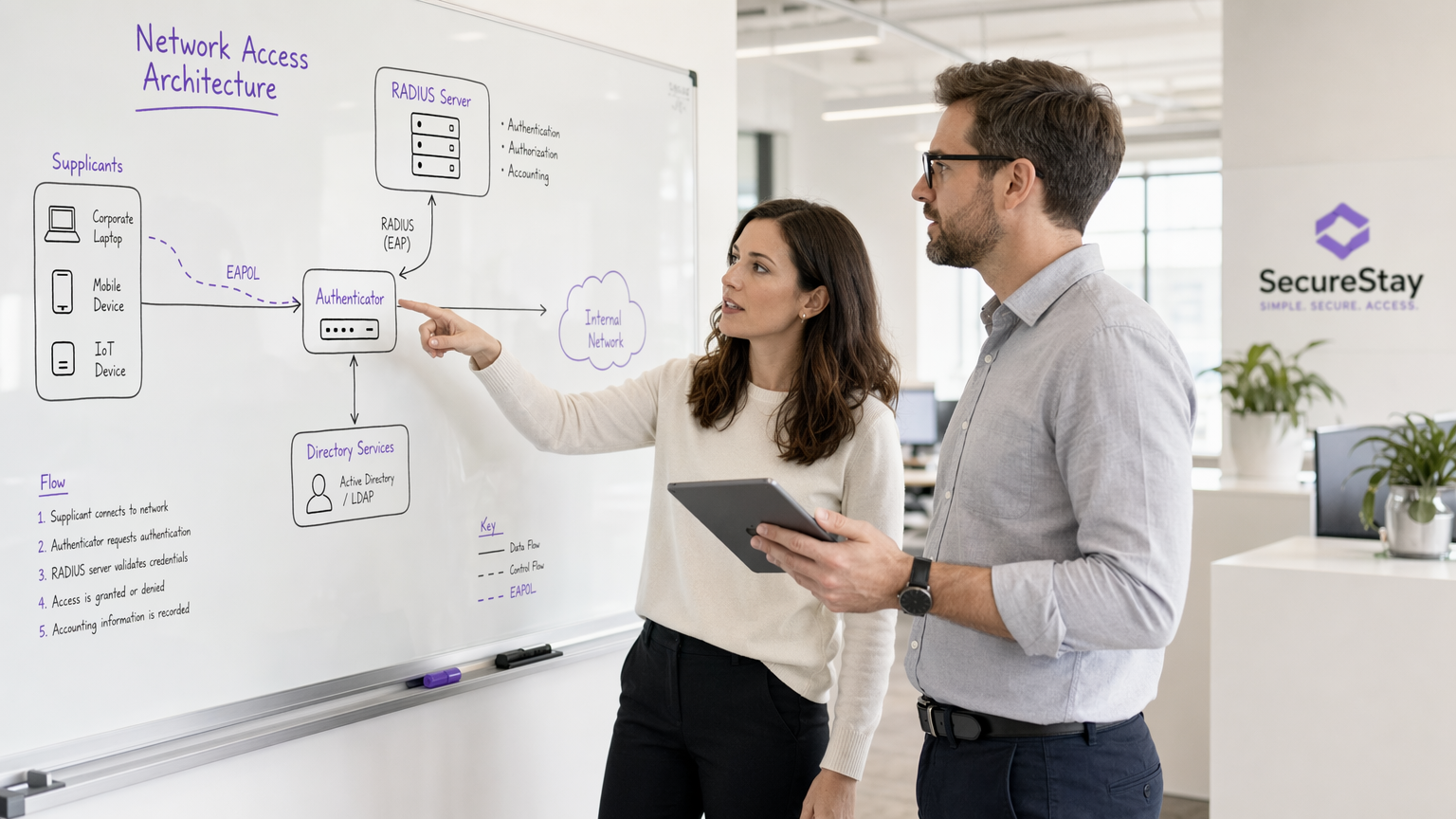
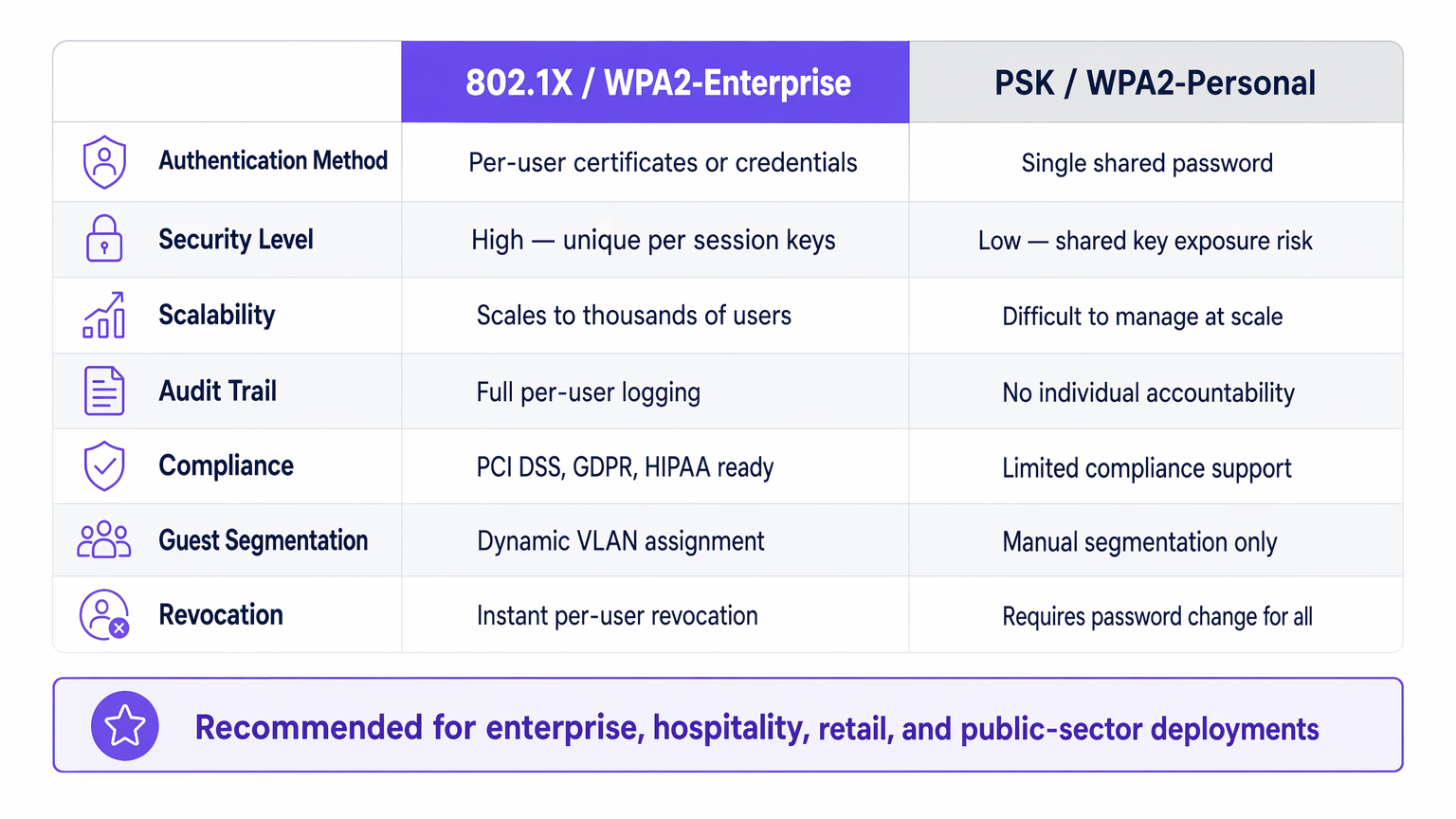
Para líderes de TI empresariais que gerenciam redes em locais de Hotelaria , Varejo , Saúde ou Transporte , garantir o acesso à rede é um requisito fundamental. Confiar em Chaves Pré-Compartilhadas (PSK) para acesso corporativo introduz riscos inaceitáveis: falta de responsabilidade individual, processos de revogação complexos e vulnerabilidades de criptografia compartilhadas.
IEEE 802.1X é a estrutura padrão da indústria para controle de acesso à rede baseado em porta. Ele impõe um processo de autenticação rigoroso antes que um dispositivo possa se comunicar na rede, permitindo verificação de identidade por usuário, aplicação dinâmica de políticas e conformidade com estruturas como PCI DSS e GDPR. Este guia explora a mecânica do 802.1X, as diferenças entre os métodos EAP comuns e estratégias práticas de implantação para ambientes empresariais, incluindo como ele se integra com soluções de Guest WiFi para fornecer uma estratégia de acesso holística.
Análise Técnica Aprofundada: Como o 802.1X Funciona
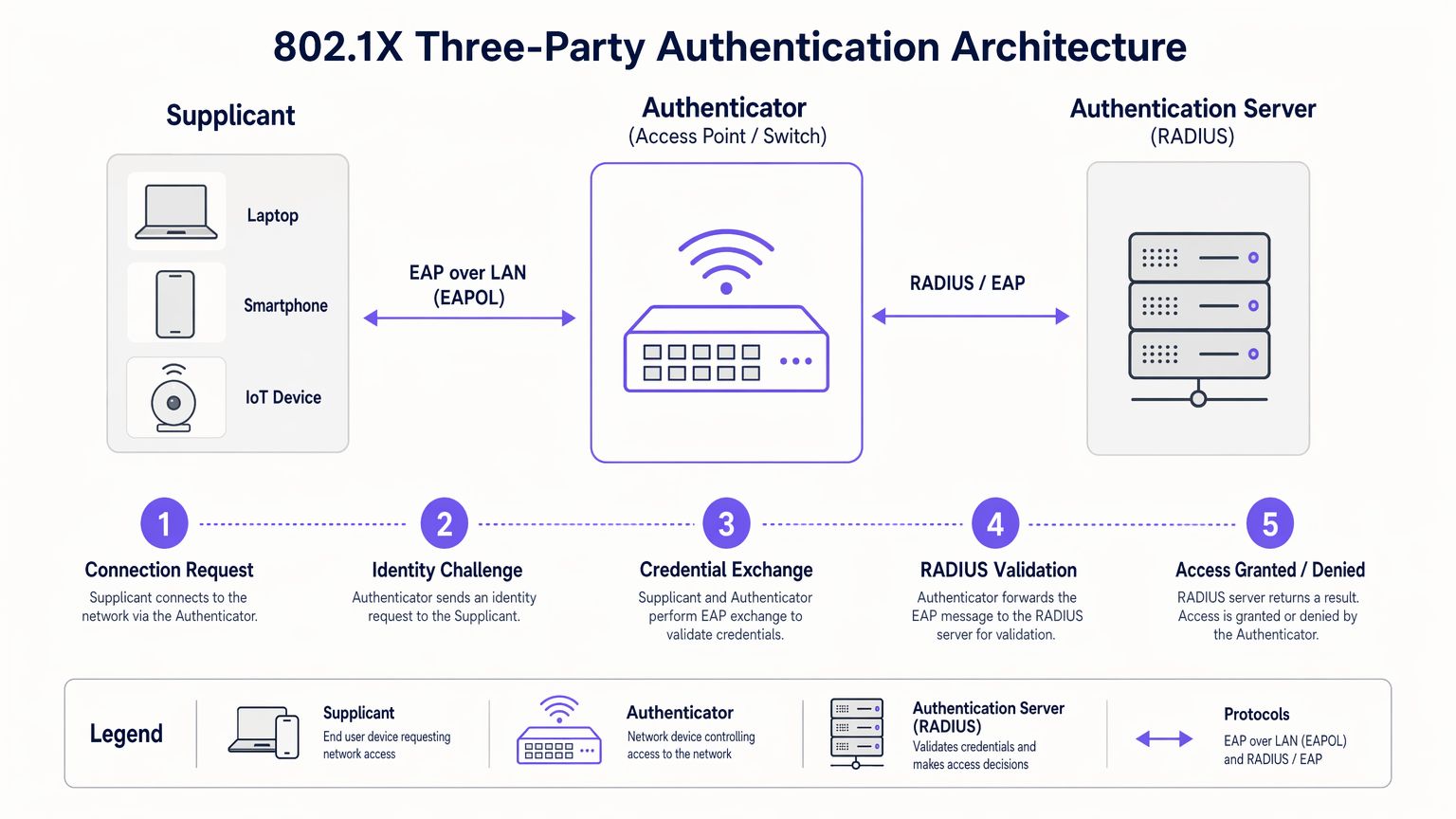
Em sua essência, o 802.1X opera em um modelo de três partes projetado para isolar dispositivos não autenticados da rede interna.
A Arquitetura de Três Partes
- Suplicante: O dispositivo do usuário final (laptop, smartphone, sensor IoT) solicitando acesso à rede. Ele deve executar um cliente de software compatível com 802.1X.
- Autenticador: O dispositivo de rede (ponto de acesso sem fio ou switch gerenciado) controlando a porta física ou lógica. Ele atua como um guardião, bloqueando todo o tráfego, exceto EAP (Extensible Authentication Protocol), até que a autenticação seja bem-sucedida.
- Servidor de Autenticação: Geralmente um servidor RADIUS (Remote Authentication Dial-In User Service). Ele valida as credenciais do suplicante em relação a um armazenamento de identidade de backend (como o Active Directory) e retorna uma decisão de política.
O Fluxo de Autenticação
Quando um suplicante se conecta a uma porta ou SSID habilitado para 802.1X, o autenticador coloca a porta em um estado não autorizado. O fluxo prossegue da seguinte forma:
- Início EAPOL: O suplicante envia um quadro EAP over LAN (EAPOL) Start para o autenticador.
- Solicitação de Identidade: O autenticador solicita a identidade do suplicante.
- Resposta de Identidade: O suplicante fornece sua identidade, que o autenticador encaminha para o servidor RADIUS via um pacote RADIUS Access-Request.
- Troca EAP: O servidor RADIUS e o suplicante negociam um método EAP e trocam credenciais de forma segura através do autenticador.
- Decisão de Acesso: Após validação bem-sucedida, o servidor RADIUS envia um pacote RADIUS Access-Accept para o autenticador. Este pacote frequentemente inclui atributos específicos do fornecedor (VSAs) para atribuição dinâmica de VLAN ou políticas de QoS.
- Porta Autorizada: O autenticador transiciona a porta para um estado autorizado, permitindo o tráfego de rede normal.
Métodos EAP: Escolhendo o Protocolo Certo
A estrutura EAP é extensível. A escolha do método EAP determina como as credenciais são trocadas e verificadas:
- EAP-TLS (Transport Layer Security): O padrão ouro para segurança. Requer autenticação mútua usando certificados digitais tanto no cliente quanto no servidor. Embora altamente seguro, exige uma robusta Infraestrutura de Chave Pública (PKI).
- PEAP-MSCHAPv2 (Protected EAP): A implantação mais comum em ambientes empresariais. Ele usa um certificado do lado do servidor para estabelecer um túnel TLS seguro, dentro do qual o cliente se autentica usando um nome de usuário e senha padrão (MSCHAPv2). Ele equilibra segurança com simplicidade de implantação.
- EAP-TTLS (Tunneled TLS): Semelhante ao PEAP, mas suporta uma gama mais ampla de protocolos de autenticação internos, incluindo PAP ou CHAP legados, frequentemente usados em ambientes não-Windows.
Guia de Implementação
A implantação do 802.1X requer planejamento cuidadoso para evitar interrupções para o usuário. Uma abordagem faseada é crítica para o sucesso.
Fase 1: Preparação da Infraestrutura
Antes de habilitar o 802.1X na borda, certifique-se de que sua infraestrutura central esteja preparada. Implante um servidor RADIUS (como Microsoft NPS ou FreeRADIUS) e integre-o ao seu provedor de identidade. Configure alta disponibilidade para a infraestrutura RADIUS; se o servidor de autenticação falhar, o acesso à rede será interrompido.
Fase 2: Configuração do Suplicante
Não dependa dos usuários para configurar manualmente seus dispositivos. Para dispositivos corporativos gerenciados, use Objetos de Política de Grupo (GPO) ou plataformas de Gerenciamento de Dispositivos Móveis (MDM) para enviar o perfil 802.1X correto, incluindo o método EAP necessário e o certificado raiz confiável para o servidor RADIUS.
Fase 3: Piloto e Lançamento
Comece com um pequeno grupo piloto usando um SSID de teste dedicado ou uma pilha de switch específica. Monitore os logs do RADIUS para falhas de autenticação, particularmente aquelas relacionadas a problemas de confiança de certificado ou credenciais incorretas. Uma vez que o piloto esteja estável, prossiga com um lançamento faseado em toda a organização.
Integrando com Acesso de Convidado
O 802.1X é projetado para usuários corporativos com credenciais conhecidas. Para visitantes, contratados e clientes, você precisa de uma estratégia paralela. É aqui que uma plataforma dedicada de Guest WiFi se torna essencial. Enquanto os dispositivos corporativos se autenticam de forma transparente via 802.1X em VLANs seguras, os convidados se autenticam via um Captive Portal, fornecendo dados valiosos de primeira parte para WiFi Analytics enquanto permanecem isolados dos recursos internos.
A plataforma da Purple também pode atuar como um provedor de identidade para serviços como OpenRoaming sob a licença Connect, preenchendo a lacuna entre o acesso público contínuo e a autenticação segura.
Melhores Práticas
- Impor Servidor "Validação de Certificado: Ao usar PEAP ou EAP-TTLS, você deve configurar os suplicantes para validar o certificado do servidor RADIUS. Não fazer isso deixa a rede vulnerável a ataques de pontos de acesso não autorizados (Evil Twin).
- Implementar Atribuição Dinâmica de VLAN: Utilize atributos RADIUS para atribuir usuários a VLANs específicas com base em sua associação a grupos do Active Directory. Isso reduz o número de SSIDs necessários e simplifica a segmentação da rede.
- Gerenciar Dispositivos IoT com MAB: Muitos dispositivos IoT (impressoras, smart TVs) não suportam suplicantes 802.1X. Use o MAC Authentication Bypass (MAB) como alternativa. O autenticador usa o endereço MAC do dispositivo como nome de usuário e senha. Como os endereços MAC podem ser falsificados, limite estritamente os privilégios de acesso de dispositivos autenticados por MAB.
Solução de Problemas e Mitigação de Riscos
Quando o 802.1X falha, os logs do servidor RADIUS são sua principal ferramenta de diagnóstico.
- Erro: EAP Timeout: O autenticador não está recebendo uma resposta do suplicante. Isso geralmente indica que o software do suplicante não está em execução ou que o dispositivo não está configurado para 802.1X.
- Erro: Usuário Desconhecido ou Senha Inválida: O usuário inseriu credenciais incorretas, ou o servidor RADIUS não consegue se comunicar com o armazenamento de identidade de backend.
- Erro: Falha na Confiança do Certificado: O suplicante rejeitou o certificado do servidor RADIUS. Certifique-se de que o certificado da CA Raiz que emitiu o certificado do servidor RADIUS esteja instalado no armazenamento raiz confiável do suplicante.
Para uma perspectiva mais ampla sobre a otimização da arquitetura de rede, considere como a autenticação se integra às estratégias WAN modernas, conforme discutido em Os Principais Benefícios do SD WAN para Empresas Modernas .
ROI e Impacto nos Negócios
A implementação do 802.1X oferece valor de negócio mensurável além da segurança bruta:
- Redução da Sobrecarga Operacional: Elimina a necessidade de rotacionar manualmente as PSKs quando funcionários saem ou contratados encerram seus contratos. O acesso é revogado instantaneamente desativando a conta de diretório do usuário.
- Conformidade Simplificada: Fornece trilhas de auditoria por usuário e controles de acesso robustos exigidos por PCI DSS, HIPAA e GDPR.
- Visibilidade de Rede Aprimorada: Integra a identidade com a atividade da rede, permitindo que as equipes de TI rastreiem eventos de segurança ou problemas de desempenho até usuários específicos, em vez de endereços IP genéricos.
Ao abandonar as chaves compartilhadas e adotar o controle de acesso baseado em porta, as redes corporativas alcançam a segurança granular exigida pelas demandas operacionais modernas. Para uma comparação detalhada dos padrões de segurança sem fio, consulte nosso guia sobre WPA, WPA2 e WPA3: Qual a Diferença e Qual Você Deve Usar? .
Briefing em Áudio
Ouça nosso briefing técnico de 10 minutos sobre autenticação 802.1X:
Definições principais
802.1X
An IEEE standard for port-based network access control that provides an authentication mechanism to devices wishing to attach to a LAN or WLAN.
The foundational standard replacing shared passwords with per-user authentication in enterprise networks.
Supplicant
The software client on an end-user device that requests network access and handles the EAP exchange.
Required on all laptops, phones, and tablets connecting to an 802.1X network.
Authenticator
The network edge device (switch or access point) that controls the physical or logical port, blocking traffic until authentication is complete.
The enforcement point in the network architecture.
RADIUS Server
Remote Authentication Dial-In User Service. The central server that validates credentials against a directory and returns policy decisions.
The brain of the 802.1X deployment, often implemented via Microsoft NPS or Cisco ISE.
EAP (Extensible Authentication Protocol)
An authentication framework frequently used in wireless networks and point-to-point connections, providing transport for various authentication methods.
The language spoken between the supplicant and the RADIUS server.
Dynamic VLAN Assignment
The process where a RADIUS server instructs the authenticator to place a user into a specific VLAN based on their identity or group membership.
Crucial for network segmentation and compliance without broadcasting dozens of SSIDs.
EAP-TLS
An EAP method requiring mutual certificate-based authentication between the client and the server.
The most secure method, ideal for highly regulated environments like healthcare or finance.
PEAP (Protected EAP)
An EAP method that establishes a secure TLS tunnel using a server certificate, protecting the inner credential exchange (usually a username/password).
The most common deployment method due to its balance of security and operational simplicity.
Exemplos práticos
A 200-room hotel needs to secure its back-of-house operational network (staff tablets, VoIP phones, management laptops) while maintaining a separate, open guest network. They currently use a single PSK for staff.
- Deploy Microsoft NPS (RADIUS) integrated with the hotel's Active Directory.
- Configure the wireless controller to broadcast a new 'Staff_Secure' SSID using WPA2-Enterprise (802.1X).
- Push a PEAP-MSCHAPv2 profile to all managed staff laptops and tablets via MDM.
- For VoIP phones lacking 802.1X support, configure MAC Authentication Bypass (MAB) on the RADIUS server, assigning them to an isolated Voice VLAN.
- Retain the open guest network, securing it with Purple's captive portal for guest isolation and analytics.
A large retail chain is failing PCI DSS compliance because their Point of Sale (PoS) terminals are on the same logical network segment as store manager laptops, using a shared WPA2-Personal key.
- Implement 802.1X across all corporate access points.
- Configure dynamic VLAN assignment on the RADIUS server.
- Create a policy: If the authenticating device is a PoS terminal (authenticated via machine certificate using EAP-TLS), assign it to the highly restricted PCI-VLAN.
- Create a second policy: If the user is a Store Manager (authenticated via PEAP), assign them to the Corp-VLAN with standard internet and intranet access.
Questões práticas
Q1. Your organization is migrating from WPA2-Personal to WPA2-Enterprise. You have a mix of corporate-owned Windows laptops and employee-owned BYOD smartphones. You do not have a PKI infrastructure. Which EAP method should you deploy?
Dica: Consider the requirement for client certificates versus server-only certificates.
Ver resposta modelo
PEAP-MSCHAPv2. Since you lack a PKI infrastructure, deploying client certificates for EAP-TLS is not feasible. PEAP only requires a server-side certificate on the RADIUS server, allowing users to authenticate with their standard Active Directory username and password.
Q2. After deploying 802.1X using PEAP, several users report they are prompted with a security warning asking them to 'Trust' a certificate when connecting to the network. What configuration step was missed?
Dica: Think about how the supplicant validates the identity of the RADIUS server.
Ver resposta modelo
The supplicant profile pushed to the devices was not configured to explicitly trust the Root CA that issued the RADIUS server's certificate. Without this configuration, the OS prompts the user to manually verify the server's identity, which is a security risk and poor user experience.
Q3. You need to connect 50 smart TVs in hotel conference rooms to the network. These devices do not support 802.1X supplicants. How can you provide them access while maintaining security?
Dica: Consider alternative authentication methods for headless devices and how to restrict their access.
Ver resposta modelo
Implement MAC Authentication Bypass (MAB). The authenticator will use the smart TV's MAC address to authenticate against the RADIUS server. Crucially, the RADIUS server must be configured to assign these devices to a heavily restricted VLAN (e.g., internet-only, no internal access) to mitigate the risk of MAC address spoofing.
Continue a ler esta série
PSK por Dispositivo por Fabricante: Comparativo entre iPSK, DPSK, MPSK e PPSK (e Suporte a WPA3)
Uma comparação abrangente das implementações de PSK por dispositivo no Cisco Meraki, HPE Aruba, Ruckus, Juniper Mist, Extreme, Fortinet e Ubiquiti UniFi. Saiba como o WPA3-SAE impacta as estratégias de chaves por dispositivo e quando implantar modos de transição em vez de migrar para o 802.1X.
O Que É Autenticação por Endereço MAC? Quando Usar e Quando Evitar
Este guia de referência técnica abrangente aborda a autenticação por endereço MAC em ambientes de WiFi corporativos — como a autenticação MAC baseada em RADIUS funciona na Camada 2, suas vulnerabilidades de segurança inerentes (incluindo spoofing de MAC e o impacto da randomização de MAC em nível de OS), e os contextos operacionais precisos onde ela permanece uma ferramenta válida para gerenciar dispositivos IoT e sem interface. Ele fornece orientação de implantação acionável para gerentes de TI e arquitetos de rede em locais de hotelaria, varejo, saúde e setor público, com exemplos práticos do mundo real, estruturas de decisão e contexto de integração para a plataforma de guest WiFi e análise da Purple.
Como Configurar WiFi Corporativo em iOS e macOS com 802.1X
Este guia autorizado fornece aos líderes de TI sêniores passos acionáveis para implantar WiFi corporativo 802.1X em dispositivos iOS e macOS. Ele aborda autenticação baseada em certificado (EAP-TLS), perfis de configuração MDM e integração de arquitetura para proteger redes corporativas, ao mesmo tempo que suporta iniciativas BYOD.