
O Que é EAP-TLS? Autenticação WiFi Baseada em Certificados Explicada
Este guia oferece uma referência técnica abrangente sobre EAP-TLS (Extensible Authentication Protocol com Transport Layer Security), o método de autenticação 802.1X mais seguro disponível para WiFi corporativo. Ele aborda a infraestrutura de certificado X.509 necessária, o handshake de autenticação mútua e padrões práticos de implantação para ambientes de hotelaria, varejo, saúde e setor público. Gerentes de TI, arquitetos de rede e CTOs encontrarão orientações acionáveis sobre design de PKI, provisionamento de certificados integrado a MDM, configuração de RADIUS e alinhamento de conformidade com PCI DSS e GDPR.
Ouça este guia
Ver transcrição do podcast
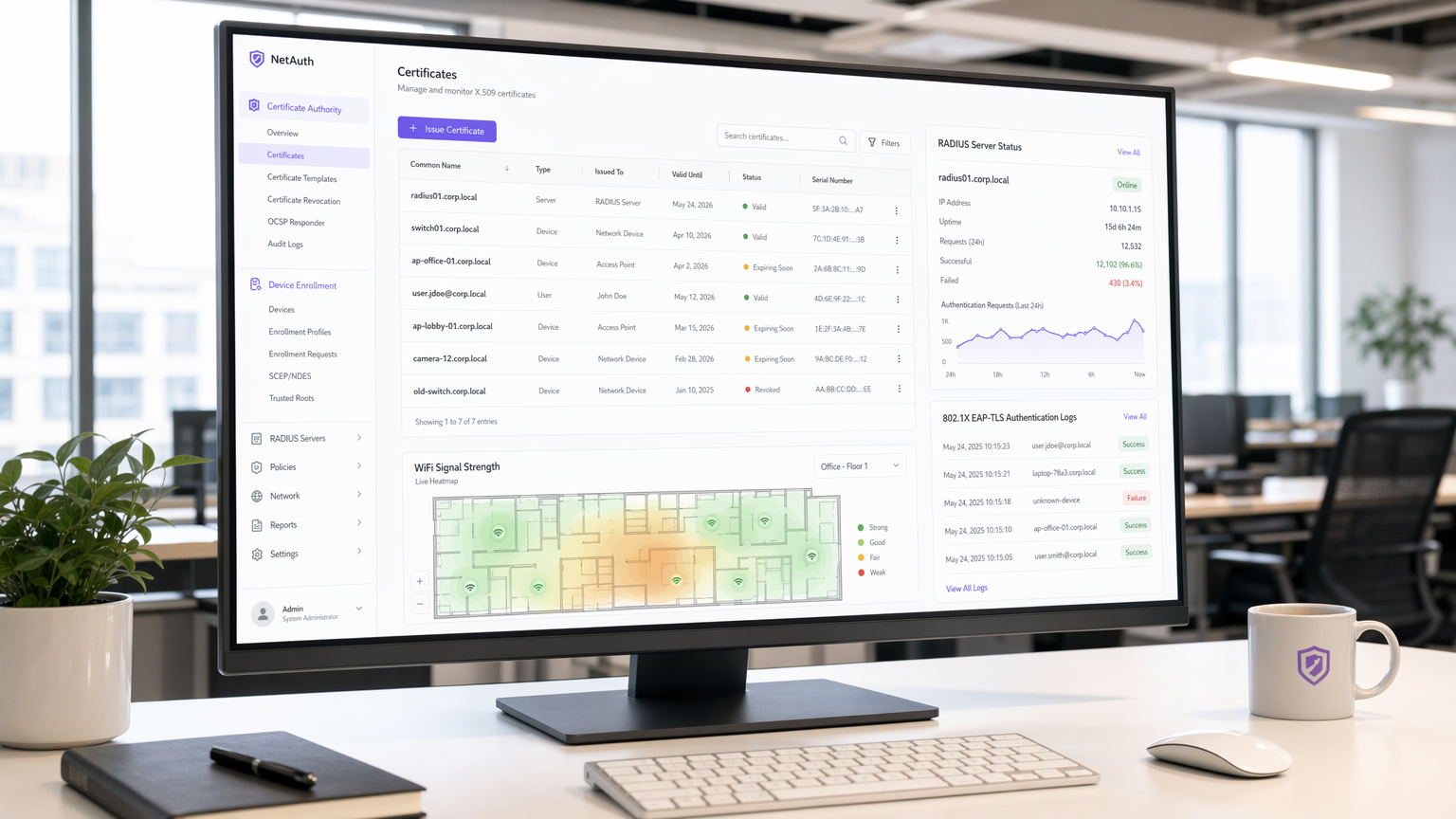
Resumo Executivo
EAP-TLS (Extensible Authentication Protocol – Transport Layer Security) é o método de autenticação IEEE 802.1X que elimina completamente as credenciais compartilhadas da sua cadeia de autenticação sem fio. Enquanto PEAP e EAP-TTLS dependem de nomes de usuário e senhas transmitidos por um túnel criptografado, o EAP-TLS exige que tanto o dispositivo cliente quanto o servidor RADIUS apresentem certificados X.509 válidos emitidos por uma Autoridade Certificadora (CA) confiável. Este modelo de autenticação mútua significa que uma senha roubada é irrelevante — sem um certificado válido e não revogado, um dispositivo não pode se conectar à rede.
Para operadores de locais que utilizam Guest WiFi em hotéis, estabelecimentos de varejo ou centros de conferências, e para equipes de TI responsáveis por redes de funcionários e dispositivos IoT, o EAP-TLS representa o nível máximo atual de segurança de autenticação sem fio. É obrigatório ou fortemente recomendado pelo PCI DSS 4.0 para ambientes de dados de titulares de cartão, pelo HIPAA para redes sem fio de saúde, e é o método exigido para implantações WPA3 Enterprise 192-bit (Suite B).
O custo de implantação é real — gerenciamento do ciclo de vida do certificado, infraestrutura PKI e integração MDM não são triviais — mas o ROI de segurança é substancial. Este guia aborda a arquitetura, o handshake, os padrões de implantação e as práticas operacionais que determinam se uma implementação de EAP-TLS será bem-sucedida ou estagnará.
Análise Técnica Detalhada
O Que o EAP-TLS Realmente Faz
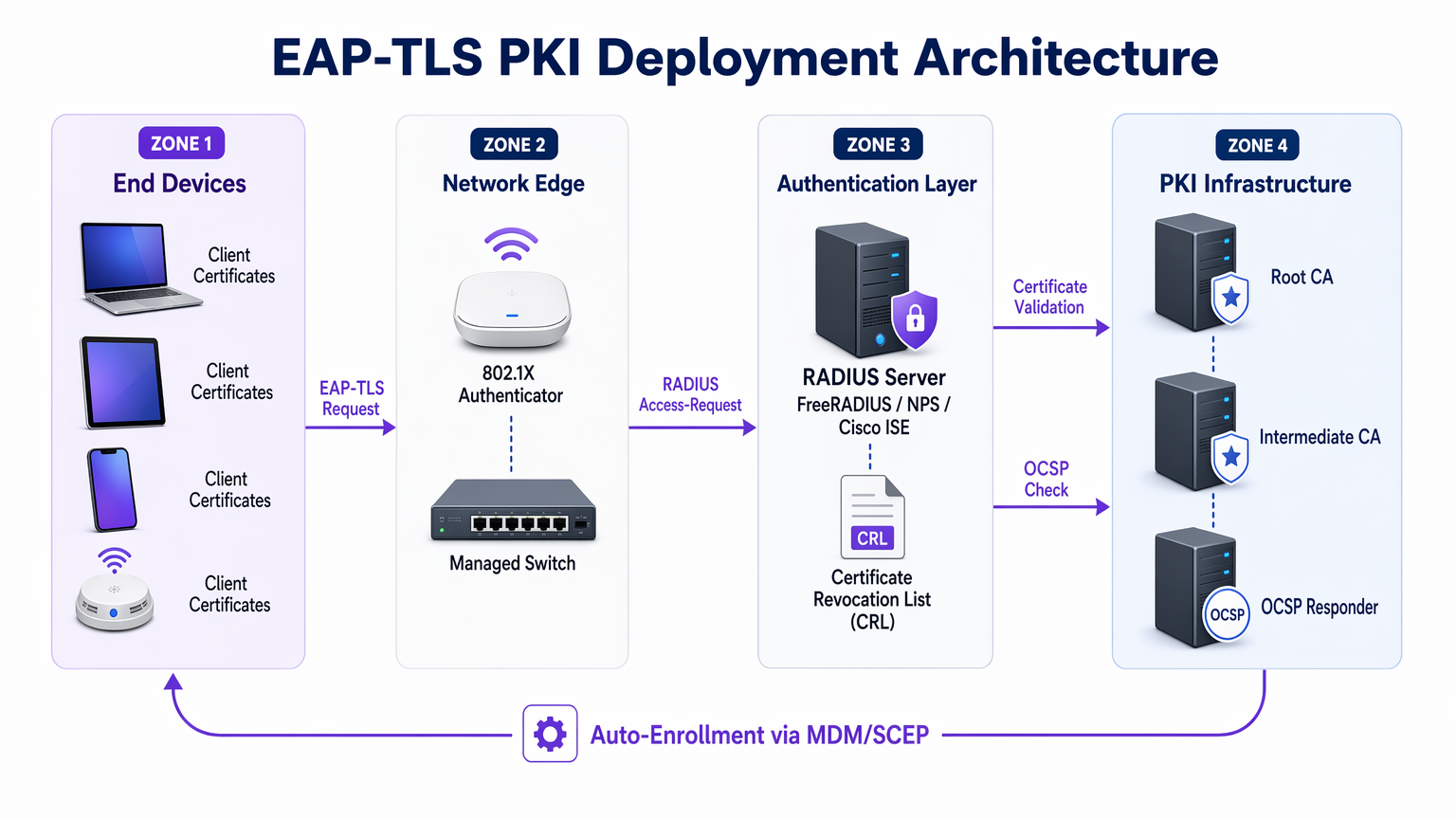
O EAP-TLS opera dentro da estrutura de controle de acesso baseado em porta 802.1X. Os três atores em cada troca de autenticação são o suplicante (o dispositivo cliente), o autenticador (o ponto de acesso sem fio ou switch gerenciado) e o servidor de autenticação (tipicamente um servidor RADIUS como FreeRADIUS, Microsoft NPS ou Cisco ISE). O ponto de acesso não toma decisões de autenticação por si só — ele atua como um relé transparente, encapsulando mensagens EAP em pacotes RADIUS e as encaminhando para o servidor de autenticação.
Para uma compreensão mais aprofundada de como o RADIUS sustenta essa arquitetura, consulte O Que é RADIUS? Como Servidores RADIUS Protegem Redes WiFi .
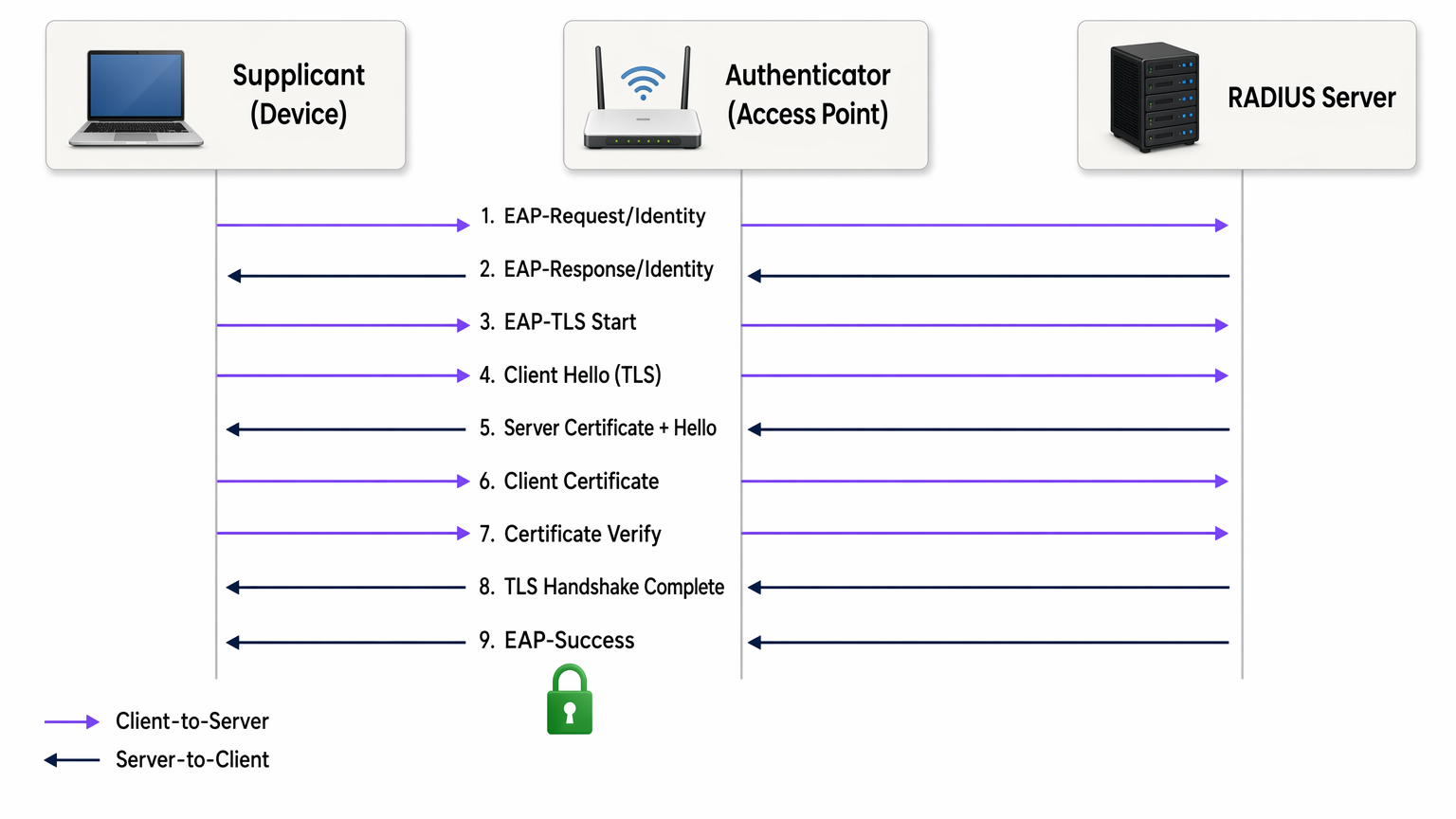
O handshake EAP-TLS prossegue da seguinte forma:
- O ponto de acesso envia um EAP-Request/Identity para o dispositivo de conexão.
- O dispositivo responde com sua identidade (comumente uma identidade externa anônima para proteger o nome de usuário de interceptações).
- O servidor RADIUS inicia o handshake TLS com uma mensagem EAP-TLS/Start.
- O cliente envia um ClientHello, anunciando suas suítes de cifras TLS suportadas.
- O servidor RADIUS responde com ServerHello, seu certificado de servidor X.509 e uma solicitação de certificado.
- O cliente valida o certificado do servidor em relação ao seu armazenamento de CA raiz confiável. Se a validação falhar, o handshake é encerrado — protegendo contra pontos de acesso maliciosos.
- O cliente apresenta seu próprio certificado de cliente X.509.
- O servidor RADIUS valida o certificado do cliente: ele verifica a cadeia de assinatura até a CA raiz confiável, verifica se o certificado não expirou e consulta a Lista de Revogação de Certificados (CRL) ou o respondedor OCSP para confirmar se o certificado não foi revogado.
- Ambos os lados derivam chaves de sessão do segredo mestre TLS. O servidor RADIUS envia um EAP-Success e o ponto de acesso abre a porta controlada.
Toda a troca ocorre antes que o dispositivo receba qualquer acesso à rede. Nenhuma senha é transmitida em nenhum momento. As chaves de sessão derivadas são únicas por sessão, proporcionando sigilo de encaminhamento perfeito ao usar suítes de cifras ECDHE — o que significa que o tráfego histórico não pode ser descriptografado mesmo que um certificado seja comprometido posteriormente.
Certificados X.509 e Arquitetura PKI
A segurança do EAP-TLS depende inteiramente da integridade da PKI subjacente. Uma PKI empresarial típica para EAP-TLS consiste em três camadas:
| Camada | Componente | Função |
|---|---|---|
| CA Raiz | Autoridade certificadora raiz offline | Assina certificados de CA intermediária; mantida isolada (air-gapped) |
| CA Intermediária | CA emissora online | Emite certificados de servidor e cliente; gerencia a publicação de CRL |
| Entidades Finais | Certificado de servidor RADIUS + certificados de cliente | Usado no handshake de autenticação em tempo real |
A CA raiz deve ser mantida offline e isolada (air-gapped). Sua chave privada, se comprometida, invalida toda a sua hierarquia de certificados. A CA intermediária gerencia a emissão diária e publica a CRL. Os certificados de cliente são emitidos para dispositivos individuais (não usuários), tipicamente com um Subject Alternative Name (SAN) contendo o endereço MAC do dispositivo ou um identificador de dispositivo do seu MDM.
EAP-TLS vs. Outros Métodos 802.1X
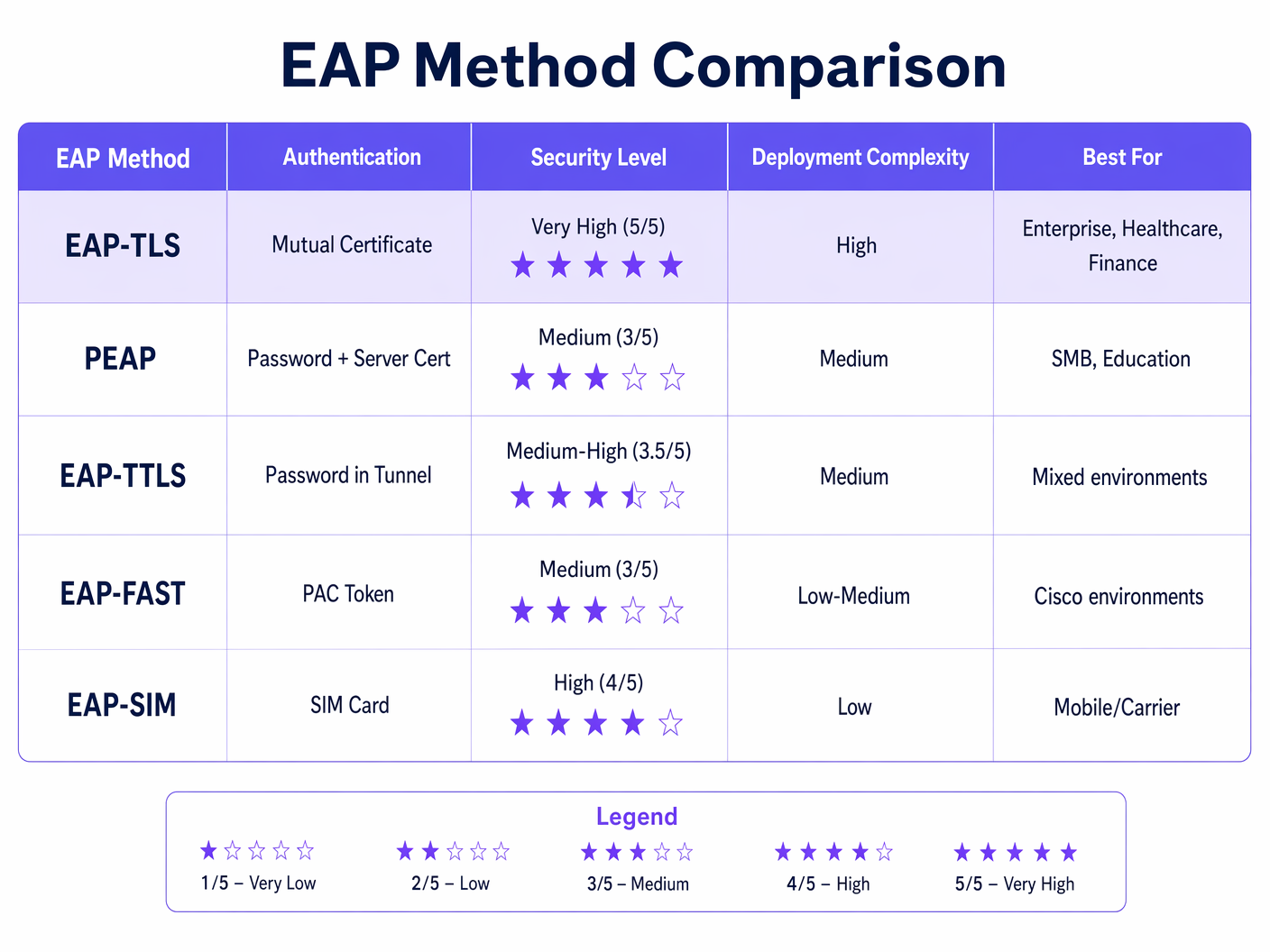
A tabela acima ilustra por que o EAP-TLS é a escolha recomendada para ambientes regulamentados. O PEAP-MSCHAPv2, ainda o método 802.1X mais amplamente implantado, possui vulnerabilidades conhecidas: o certificado do servidor frequentemente não é validado pelos clientes (uma configuração incorreta que permite ataques de APs maliciosos), e o próprio MSCHAPv2 foi criptograficamente quebrado desde 2012. O EAP-TLS elimina ambas as superfícies de ataque.
WPA2 Enterprise e WPA3 Enterprise
O EAP-TLS opera de forma idêntica tanto no WPA2 Enterprise (IEEE 802.11i) quanto no WPA3 Enterprise (IEEE 802.11ax). A distinção está na suíte de cifras negociada para a camada de criptografia de dados sem fio. O WPA3 Enterprise exige Protected Management Frames (PMF) e oferece um modo de segurança opcional de 192 bits (Suite B) que requer EAP-TLS com suítes de cifras de curva elíptica específicas (ECDHE + ECDSA ou RSA-3072). Para a maioria das implantações corporativas, o WPA3 Enterprise com EAP-TLS e suítes de cifras AES-256 padrão é o estado-alvo apropriado.
Guia de Implementação
Fase 1: Projeto e Implantação de PKI
Antes de configurar um único ponto de acesso, a PKI deve estar implementada. Para organizações sem uma CA interna existente, o Microsoft Active Directory Certificate Services (AD CS) é a escolha mais comum em ambientes Windows. Para implantações multiplataforma ou nativas da nuvem, HashiCorp Vault PKI, EJBCA ou um serviço PKI gerenciado como AWS Private CA são alternativas viáveis.
Decisões-chave nesta fase:
- Período de validade do certificado: Certificados de cliente de 1 a 2 anos equilibram segurança e sobrecarga operacional. Períodos mais curtos aumentam os eventos de revogação; períodos mais longos aumentam a janela de exposição para um certificado comprometido.
- Algoritmo de chave: RSA-2048 continua amplamente suportado. ECDSA P-256 oferece segurança equivalente com tamanhos de certificado menores e handshakes mais rápidos — recomendado para novas implantações.
- CRL vs. OCSP: A distribuição de CRL é mais simples de implementar, mas introduz latência e problemas de cache. OCSP fornece status de revogação em tempo real. Para ambientes de alta segurança, o OCSP stapling no servidor RADIUS é a abordagem preferida.
Fase 2: Configuração do Servidor RADIUS
Seu servidor RADIUS deve ser configurado para:
- Apresentar seu certificado de servidor (emitido por sua CA interna) aos clientes que se conectam.
- Confiar apenas em suas CAs raiz e intermediárias internas para validação de certificado de cliente — não confie em CAs públicas para autenticação de cliente.
- Realizar verificações de CRL ou OCSP em cada certificado de cliente apresentado.
- Mapear atributos de certificado (Common Name, SAN ou extensões OID) para regras de política de rede — por exemplo, atribuir dispositivos a VLANs específicas com base em atributos de certificado.
Para um guia detalhado da arquitetura e configuração do servidor RADIUS, consulte O que é RADIUS? Como os Servidores RADIUS Protegem Redes WiFi .
Fase 3: Distribuição de Certificados via MDM/SCEP
A instalação manual de certificados não é escalável. Para qualquer implantação além de alguns dispositivos, o provisionamento de certificados deve ser automatizado. A abordagem padrão é:
- Dispositivos corporativos gerenciados: Integre sua PKI com sua plataforma MDM (Microsoft Intune, Jamf, VMware Workspace ONE). Configure um perfil SCEP ou EST que solicita e instala automaticamente um certificado de cliente quando um dispositivo é registrado. O certificado é vinculado ao TPM ou Secure Enclave do dispositivo, onde suportado, impedindo a exportação do certificado.
- Dispositivos BYOD e de contratados: Implante um portal de integração (como o portal de convidados do Cisco ISE ou uma solução BYOD dedicada) que orienta o usuário através de um processo de instalação de certificado único. Emita certificados com períodos de validade mais curtos e restrinja o acesso à rede via política de VLAN.
- Dispositivos IoT e headless: Use SCEP com senhas de desafio pré-compartilhadas ou EST com credenciais de bootstrap. A renovação do certificado deve ser automatizada via o mesmo protocolo antes do vencimento.
Fase 4: Configuração de Ponto de Acesso e SSID
Configure o SSID corporativo com:
- Segurança: WPA2 Enterprise ou WPA3 Enterprise (802.1X)
- Tipo de EAP: EAP-TLS
- Servidor RADIUS: Aponte para seu servidor de autenticação com segredo compartilhado
- Atribuição de VLAN: Habilite a atribuição dinâmica de VLAN via atributos RADIUS (Tunnel-Type, Tunnel-Medium-Type, Tunnel-Private-Group-ID)
- PMF: Obrigatório para WPA3; fortemente recomendado para WPA2
Fase 5: Configuração do Suplicante Cliente
Para dispositivos Windows gerenciados via Política de Grupo ou Intune, implante uma Política de Rede Com Fio/Sem Fio que especifique EAP-TLS, a CA raiz confiável e os critérios de seleção de certificado. No macOS e iOS, implante um perfil de configuração. No Android, use o perfil WiFi gerenciado por MDM. Criticamente, force a validação do certificado do servidor — especifique a CA e o nome do servidor exatos. Deixar isso desmarcado é a falha de configuração mais comum em implantações 802.1X.
Melhores Práticas
Force a validação do certificado do servidor em todos os suplicantes. A falha de configuração mais explorável em implantações 802.1X são clientes que aceitam qualquer certificado de servidor, permitindo ataques de ponto de acesso não autorizado. Todo perfil WiFi implantado por MDM deve especificar a CA confiável e o nome do servidor esperado (CN ou SAN).
Automatize a renovação de certificados antes do vencimento. Configure o monitoramento para alertar quando os certificados estiverem a 30 dias do vencimento. Configure a renovação automática SCEP ou EST para que os dispositivos renovem os certificados sem intervenção do usuário. Um evento de expiração em massa de certificados é um dos incidentes mais disruptivos que uma equipe de rede corporativa pode enfrentar.
Implemente OCSP em vez de CRL sempre que possível. Os arquivos CRL podem ficar grandes e são armazenados em cache pelos clientes, o que significa que um certificado recentemente revogado ainda pode ser aceito até que o cache expire. OCSP fornece status em tempo real e é o mecanismo de revogação preferido para ambientes de alta segurança.
Segmente sua PKI. Use CAs intermediárias separadas para diferentes classes de certificado: uma para certificados de servidor RADIUS, uma para certificados de dispositivo cliente, uma para certificados de usuário. Isso limita o raio de impacto de um comprometimento de CA e simplifica a política de revogação.
Registre e monitore eventos de autenticação. Seu servidor RADIUS gera um log de autenticação para cada tentativa de conexão. Alimente esses logs em seu SIEM. Padrões como falhas de autenticação repetidas, erros de validação de certificado ou conexões de endereços MAC inesperados são indicadores precoces de falha de configuração ou ataque.
Alinhe-se com PCI DSS 4.0. O Requisito 8.6 exige autenticação forte para componentes do sistema. Para redes sem fio no escopo do PCI DSS, EAP-TLS com autenticação baseada em certificadoticação satisfaz o requisito de autenticação multifator na camada de rede, pois o certificado (algo que você tem) combinado com a chave privada vinculada ao TPM do dispositivo (algo que você é) constitui dois fatores.
Resolução de Problemas e Mitigação de Riscos
Modos de Falha Comuns
| Modo de Falha | Sintoma | Causa Raiz | Resolução |
|---|---|---|---|
| Falha na validação da cadeia de certificados | EAP-Failure após a troca do certificado do servidor | O cliente não confia na CA do servidor RADIUS | Enviar certificado raiz da CA para o armazenamento de confiança do dispositivo via MDM |
| Certificado do cliente não apresentado | Autenticação para após o certificado do servidor | Nenhum certificado de cliente instalado ou certificado errado selecionado | Verificar se o registro SCEP foi concluído; verificar perfil MDM |
| OCSP/CRL inacessível | Falhas de autenticação intermitentes | Servidor RADIUS não consegue alcançar o endpoint de revogação | Garantir que as URLs OCSP/CRL sejam acessíveis a partir do servidor RADIUS; implementar cache CRL local |
| Certificado expirado | Todos os dispositivos falham na autenticação simultaneamente | Automação de renovação não configurada | Implementar alertas de expiração de 30 dias; configurar auto-renovação SCEP |
| Ataque de AP malicioso | Usuários se conectam a AP malicioso | Validação de certificado do servidor desabilitada no suplicante | Impor validação de certificado do servidor em todos os perfis WiFi MDM |
| Falha na atribuição de VLAN | Dispositivo conecta, mas recebe segmento de rede errado | Atributos RADIUS mal configurados | Verificar Tunnel-Type (13=VLAN), Tunnel-Medium-Type (6=802), Tunnel-Private-Group-ID (VLAN ID) |
Mitigação de Riscos para Implantações em Grande Escala
Para ambientes de hospitalidade com centenas de pontos de acesso em várias propriedades, e para cadeias de varejo com sites distribuídos, o principal risco operacional é um evento de expiração de certificado sincronizado. Escalone as datas de emissão de certificados entre os grupos de dispositivos para que as renovações sejam distribuídas ao longo do tempo, em vez de ocorrerem simultaneamente. Mantenha um inventário de certificados em seu MDM e execute relatórios semanais sobre certificados que expiram em 60 dias.
Para ambientes de saúde , o risco adicional é a latência de autenticação que impacta os fluxos de trabalho clínicos. Otimize o posicionamento do seu servidor RADIUS para minimizar o tempo de ida e volta. Considere implantar servidores proxy RADIUS em cada local para reduzir a dependência da WAN para autenticação.
ROI e Impacto nos Negócios
Quantificando o Investimento em Segurança
O caso de negócios para EAP-TLS em relação ao 802.1X baseado em senha é direto quando comparado aos custos de violação. O custo médio de uma violação de dados no Reino Unido em 2024 foi de £3,58 milhões (Relatório IBM Cost of a Data Breach). Uma proporção significativa das violações empresariais se origina de credenciais comprometidas. O EAP-TLS elimina completamente o vetor de roubo de credenciais para acesso à rede.
Para organizações sujeitas ao PCI DSS, uma violação de rede sem fio que resulte na exposição de dados de titulares de cartão acarreta multas, custos de investigação forense e potenciais penalidades de esquemas de cartão que superam o custo de uma implantação de PKI. O alinhamento com a conformidade por si só justifica o investimento para qualquer organização que processe pagamentos com cartão sobre infraestrutura sem fio.
Ganhos de Eficiência Operacional
De forma contraintuitiva, uma implantação de EAP-TLS bem-sucedida com provisionamento de certificados integrado ao MDM pode reduzir a carga do helpdesk em comparação com o 802.1X baseado em senha. Redefinições de senha, gerenciamento de credenciais compartilhadas e tickets de "por que não consigo conectar ao WiFi" são eliminados. O esforço inicial de implantação é concentrado no início, mas as operações em estado estável exigem menos intervenção.
Para operadores de locais que implantam WiFi Analytics juntamente com redes seguras para funcionários, a segmentação habilitada por EAP-TLS e atribuição dinâmica de VLAN significa que o tráfego de convidados, o tráfego de funcionários e o tráfego de dispositivos IoT podem ser claramente separados na mesma infraestrutura física — reduzindo custos de hardware e melhorando a postura de segurança.
O Papel da Purple no WiFi Empresarial Seguro
A plataforma da Purple opera na intersecção entre Guest WiFi e inteligência de rede empresarial. Para redes de funcionários e dispositivos corporativos, o EAP-TLS fornece a camada de autenticação. A plataforma WiFi Analytics da Purple se posiciona acima disso, fornecendo visibilidade sobre padrões de uso da rede, tempos de permanência de dispositivos e fluxo de visitantes — dados que só são significativos quando a rede subjacente está devidamente segmentada e autenticada.
Para organizações que exploram conectividade contínua baseada em OpenRoaming e Passpoint em vários locais, a Purple atua como um provedor de identidade gratuito sob a licença Connect, aproveitando os mesmos frameworks de identidade baseados em 802.1X e certificados que sustentam o EAP-TLS. Isso posiciona o EAP-TLS não apenas como um controle de segurança, mas como a base para serviços avançados de conectividade em centros de transporte , propriedades de varejo e locais de hospitalidade.
Para arquitetos de rede que avaliam como a segurança de SD-WAN e WiFi empresarial se cruzam, Os Principais Benefícios do SD-WAN para Empresas Modernas fornece contexto complementar sobre como a autenticação segura se integra às arquiteturas WAN modernas.
Definições principais
EAP-TLS (Extensible Authentication Protocol – Transport Layer Security)
An 802.1X authentication method defined in RFC 5216 that uses mutual X.509 certificate authentication between the client device and the RADIUS server. Neither side gains network access without presenting a valid, non-revoked certificate signed by a trusted Certificate Authority.
IT teams encounter EAP-TLS when evaluating 802.1X authentication methods for WPA2 Enterprise or WPA3 Enterprise deployments. It is the recommended method for regulated environments (PCI DSS, HIPAA, ISO 27001) and the required method for WPA3 Enterprise 192-bit (Suite B).
X.509 Certificate
A digital certificate standard (defined in ITU-T X.509 and RFC 5280) that binds a public key to an identity (device, server, or user). It contains the subject's identity, the public key, the issuing CA's digital signature, and validity dates. In EAP-TLS, both the RADIUS server and the client device present X.509 certificates during the authentication handshake.
IT teams encounter X.509 certificates when configuring RADIUS servers (server certificate), enrolling devices via MDM (client certificate), and managing PKI infrastructure. Certificate expiry and revocation are the primary operational concerns.
PKI (Public Key Infrastructure)
The combination of hardware, software, policies, and procedures required to create, manage, distribute, store, and revoke digital certificates. In an EAP-TLS deployment, the PKI consists of at minimum a root CA and an issuing CA, plus the CRL/OCSP infrastructure for revocation.
PKI is the foundational dependency for any EAP-TLS deployment. IT teams must design and operate a PKI before EAP-TLS can be deployed. Common PKI platforms include Microsoft AD CS, EJBCA, HashiCorp Vault PKI, and managed services such as AWS Private CA.
RADIUS (Remote Authentication Dial-In User Service)
A networking protocol (RFC 2865) providing centralised authentication, authorisation, and accounting (AAA) for network access. In 802.1X/EAP-TLS deployments, the RADIUS server validates client certificates, enforces network policy, and returns VLAN assignment attributes to the access point.
RADIUS is the authentication server component in every 802.1X deployment. Common implementations include Microsoft NPS, FreeRADIUS, Cisco ISE, and Aruba ClearPass. The RADIUS server must be configured to trust the internal CA and perform certificate revocation checks.
Mutual Authentication
An authentication process in which both communicating parties verify each other's identity before establishing a connection. In EAP-TLS, the client validates the RADIUS server's certificate (protecting against rogue APs) and the RADIUS server validates the client's certificate (protecting against unauthorised device access).
Mutual authentication is the key differentiator of EAP-TLS over PEAP and EAP-TTLS. IT teams should emphasise mutual authentication when justifying EAP-TLS to security auditors and compliance teams, as it directly addresses the rogue AP and credential theft threat vectors.
SCEP (Simple Certificate Enrollment Protocol)
A protocol (originally defined by Cisco, standardised in RFC 8894) that enables automated certificate requests and issuance between a client device and a Certificate Authority. In EAP-TLS deployments, SCEP is used by MDM platforms to automatically provision client certificates to managed devices without user intervention.
SCEP is the standard mechanism for zero-touch certificate provisioning in enterprise MDM environments. IT teams configure SCEP profiles in Intune, Jamf, or Workspace ONE to automate client certificate deployment and renewal.
CRL (Certificate Revocation List)
A periodically published list of certificate serial numbers that have been revoked by the issuing CA before their expiry date. RADIUS servers check the CRL to ensure a client certificate presented during EAP-TLS authentication has not been revoked (e.g., due to device theft or employee departure).
CRL management is a critical operational consideration in EAP-TLS deployments. IT teams must ensure the CRL distribution point is accessible from RADIUS servers, that CRLs are published frequently enough to reflect recent revocations, and that RADIUS servers are configured to reject authentication if the CRL cannot be retrieved.
OCSP (Online Certificate Status Protocol)
A real-time certificate revocation checking protocol (RFC 6960) that allows a RADIUS server to query the CA's OCSP responder for the current status of a specific certificate, rather than downloading and parsing a full CRL. OCSP provides lower latency and more current revocation information than CRL-based checking.
IT teams should prefer OCSP over CRL for high-security environments where real-time revocation is important (e.g., immediately revoking a certificate when a device is reported stolen). OCSP stapling, where the RADIUS server caches and presents the OCSP response, reduces latency and eliminates dependency on the OCSP responder being reachable during every authentication.
802.1X (Port-Based Network Access Control)
An IEEE standard that provides an authentication framework for devices attempting to connect to a LAN or WLAN. It defines three roles: supplicant (the connecting device), authenticator (the access point or switch), and authentication server (RADIUS). EAP-TLS is one of several EAP methods that can be used within the 802.1X framework.
802.1X is the overarching framework within which EAP-TLS operates. IT teams encounter 802.1X when configuring WPA2 Enterprise or WPA3 Enterprise SSIDs, and when configuring wired port authentication on managed switches. Understanding 802.1X is a prerequisite for deploying EAP-TLS.
Perfect Forward Secrecy (PFS)
A cryptographic property of key exchange protocols that ensures session keys cannot be derived from the long-term private key. In EAP-TLS with ECDHE cipher suites, each session generates a unique ephemeral key pair, meaning that compromise of the certificate's private key does not expose historical session traffic.
IT teams should specify ECDHE-based cipher suites when configuring EAP-TLS to ensure PFS. This is particularly important in environments where network traffic is recorded and could be subject to future decryption attempts (a 'harvest now, decrypt later' attack scenario).
Exemplos práticos
A 450-room hotel group with 12 properties needs to migrate its staff WiFi from PEAP-MSCHAPv2 to EAP-TLS. The group runs Windows 10/11 laptops managed via Microsoft Intune, plus approximately 200 Android tablets used by housekeeping staff. The IT team has no existing internal PKI. What is the recommended deployment approach?
Step 1 — PKI Deployment (Weeks 1–3): Deploy Microsoft AD CS with a two-tier hierarchy. Stand up an offline root CA on a dedicated server that will be powered down after initial setup. Deploy an online issuing CA (intermediate CA) on a Windows Server VM. Configure the issuing CA to publish CRLs to an internal web server accessible from all RADIUS servers across the 12 properties. Enable the OCSP responder role on the issuing CA server.
Step 2 — RADIUS Infrastructure (Weeks 2–4): Deploy Microsoft NPS (Network Policy Server) at each property, or centralise with NPS proxy servers at each site pointing to a central NPS cluster. Issue a RADIUS server certificate from the internal CA to each NPS instance. Configure NPS network policy: authentication method = EAP-TLS, trusted root CA = internal root CA, certificate validation = enabled, VLAN assignment via RADIUS attributes.
Step 3 — Intune Certificate Profiles (Weeks 3–5): In Microsoft Intune, create a Trusted Certificate profile to push the root CA certificate to all managed devices. Create a SCEP Certificate profile targeting the issuing CA, with subject name format CN={{DeviceId}}, key usage = Digital Signature, extended key usage = Client Authentication. Create a WiFi profile specifying EAP-TLS, the SCEP certificate profile as the client certificate, and the root CA as the trusted server certificate authority.
Step 4 — Android Tablet Enrolment (Weeks 4–6): Enrol Android tablets into Intune via Android Enterprise (Dedicated Device mode). Deploy equivalent Trusted Certificate, SCEP Certificate, and WiFi configuration profiles. Verify certificate installation on a pilot group of 10 tablets before full rollout.
Step 5 — Pilot and Cutover (Weeks 6–8): Run EAP-TLS in parallel with PEAP on a separate SSID at one pilot property. Validate authentication success rates, VLAN assignment, and certificate renewal behaviour. Roll out property by property. Decommission PEAP SSID after 30-day parallel run at each site.
A national retail chain with 280 stores needs to secure its point-of-sale WiFi network to meet PCI DSS 4.0 requirements. Each store has 8–15 Windows-based POS terminals, a mix of managed and unmanaged devices, and a single IT administrator who manages all stores remotely. The chain currently uses a shared WPA2-PSK password across all stores. What is the migration path to EAP-TLS?
Assessment and Scoping: First, define the PCI DSS cardholder data environment (CDE) scope. POS terminals processing card data are in scope; staff break-room devices are not. Segment the network so that only POS terminals are on the EAP-TLS secured SSID. This limits the certificate deployment scope to a known, managed device population.
Centralised PKI and RADIUS: Deploy a cloud-hosted RADIUS service (e.g., Cisco ISE in the cloud, or JumpCloud RADIUS) to eliminate the need for on-premise RADIUS hardware at each store. This is critical for a distributed retail estate where local server management is not feasible. The cloud RADIUS service connects to the internal PKI via a secure tunnel.
MDM-Driven Certificate Deployment: All POS terminals must be enrolled in an MDM (Microsoft Intune or equivalent). Deploy the root CA trust anchor and SCEP certificate profile via MDM policy. The certificate subject should include the store number and terminal ID (e.g., CN=POS-STORE042-TERM003) to enable granular RADIUS policy and audit logging.
SSID Configuration: Configure a dedicated POS SSID at each store access point with WPA2 Enterprise / EAP-TLS. Use dynamic VLAN assignment to place authenticated POS terminals on the CDE VLAN. Implement a separate guest SSID on a completely isolated VLAN for customer WiFi.
Monitoring and Compliance Evidence: Configure RADIUS authentication logs to be forwarded to a central SIEM. Generate monthly reports showing authentication success rates, certificate validity status, and any revocation events. This log data constitutes audit evidence for PCI DSS Requirement 10 (logging and monitoring) and Requirement 8.6 (authentication management).
Questões práticas
Q1. Your organisation runs a 600-bed hospital with 1,200 managed Windows laptops and 400 shared Android tablets used by nursing staff. The current WiFi uses PEAP-MSCHAPv2 with Active Directory credentials. A recent penetration test identified that none of the client devices validate the RADIUS server certificate, and the tester successfully performed a rogue AP attack capturing AD credentials. You have been asked to remediate this within 90 days. What is your prioritised remediation plan?
Dica: Consider what can be fixed immediately (configuration change) versus what requires infrastructure work (PKI deployment). Not all remediation steps require EAP-TLS — some can be applied to the existing PEAP deployment while the longer-term migration is planned.
Ver resposta modelo
Immediate (Week 1–2): Fix server certificate validation on existing PEAP deployment. Push a GPO/Intune WiFi profile update to all managed Windows devices that specifies the trusted root CA and the RADIUS server's expected CN/SAN. This immediately closes the rogue AP vulnerability without requiring PKI changes. For Android tablets, push an updated MDM WiFi profile. This addresses the critical finding within days.
Short-term (Weeks 2–8): Deploy internal PKI. Stand up a two-tier AD CS PKI (offline root CA + online issuing CA). Issue a new RADIUS server certificate from the internal CA. Update the NPS configuration. Push the new root CA trust anchor to all devices via MDM.
Medium-term (Weeks 6–12): Migrate to EAP-TLS for managed devices. Configure SCEP profiles in Intune for Windows laptops. Deploy client certificate profiles. Create a new EAP-TLS SSID in parallel with the existing PEAP SSID. Pilot with 50 laptops, validate, then roll out in waves. Shared Android tablets are more complex — evaluate whether Android Enterprise Dedicated Device enrolment is feasible, or whether a certificate-based onboarding portal is more appropriate for shared-use devices.
Key consideration: HIPAA requires appropriate safeguards for wireless networks carrying ePHI. The rogue AP vulnerability is a reportable risk. Document the remediation timeline and interim controls for your compliance officer.
Q2. A conference centre is deploying a new WiFi infrastructure to support both a secure staff network (EAP-TLS) and a guest WiFi network. The venue hosts events for up to 5,000 attendees. The IT manager wants to use the same physical access point infrastructure for both networks. How should the network be architected to achieve this, and what are the key configuration decisions?
Dica: Consider SSID segmentation, VLAN design, and the different authentication requirements for staff (certificate-based) versus guests (captive portal or social login). Think about how Purple's guest WiFi platform integrates with this architecture.
Ver resposta modelo
SSID and VLAN Design: Deploy two SSIDs on the same physical access point infrastructure. SSID 1 (Staff): WPA3 Enterprise / EAP-TLS, broadcasting on 5GHz and 6GHz bands, mapped to Staff VLAN (e.g., VLAN 10). SSID 2 (Guest): WPA3 Personal or Open with OWE (Opportunistic Wireless Encryption), mapped to Guest VLAN (e.g., VLAN 20). The Guest VLAN should have no access to the Staff VLAN or internal infrastructure — only internet access.
Staff Network: Configure RADIUS server with EAP-TLS policy. Issue client certificates to all staff devices via MDM. Use dynamic VLAN assignment to place authenticated staff devices on VLAN 10. Consider deploying a separate SSID for AV/event management equipment on VLAN 30 with EAP-TLS and a separate certificate policy.
Guest Network: Integrate with Purple's Guest WiFi platform for captive portal authentication, social login, or email capture. The guest network operates entirely independently of the EAP-TLS infrastructure. Purple's WiFi Analytics platform provides dwell time, footfall, and engagement data from the guest network.
Capacity Planning: For 5,000 concurrent guests, ensure the guest VLAN's DHCP scope, internet uplink, and access point density are sized appropriately. EAP-TLS authentication adds negligible overhead per-connection but RADIUS server capacity should be validated for peak event load.
Q3. A retail CTO is evaluating whether to deploy EAP-TLS for 350 stores or to continue with WPA2-PSK with a rotated shared key. The IT team is small (3 people) and has no PKI experience. The CTO's primary concern is PCI DSS compliance for the POS network. What is your recommendation, and how do you frame the business case?
Dica: Consider the PCI DSS requirements, the operational capacity of a small IT team, and whether there are managed service options that reduce the PKI burden. The answer is not necessarily 'deploy full EAP-TLS immediately' — a phased or managed approach may be more appropriate.
Ver resposta modelo
Recommendation: EAP-TLS via a managed RADIUS and PKI service, phased over 6 months.
WPA2-PSK is not acceptable for a PCI DSS cardholder data environment. PCI DSS Requirement 8 mandates individual authentication for system components, and a shared PSK does not satisfy this. A breach of the PSK exposes all 350 stores simultaneously. The risk is not theoretical — POS network breaches via compromised WiFi credentials are a documented attack vector in retail.
Managed Service Approach: Rather than building internal PKI expertise, engage a managed RADIUS and PKI provider (e.g., Foxpass, JumpCloud, or SecureW2). These services provide a hosted RADIUS server, a managed CA, and MDM integration out of the box. The IT team configures MDM certificate profiles and access point RADIUS settings — no PKI expertise required. Cost is typically $3–8 per device per month, which is trivial against the cost of a PCI DSS breach.
Business Case: Frame the investment against three cost categories: (1) PCI DSS non-compliance fines and forensic investigation costs following a breach — typically £50k–£500k for a mid-size retailer; (2) card scheme penalties for a cardholder data breach — potentially millions; (3) reputational damage and customer churn. The managed service cost for 350 stores with 15 POS terminals each (5,250 devices) at $5/device/month is approximately $26,250/month — less than the daily cost of a breach investigation.
Continue a ler esta série
PSK por Dispositivo por Fabricante: Comparativo entre iPSK, DPSK, MPSK e PPSK (e Suporte a WPA3)
Uma comparação abrangente das implementações de PSK por dispositivo no Cisco Meraki, HPE Aruba, Ruckus, Juniper Mist, Extreme, Fortinet e Ubiquiti UniFi. Saiba como o WPA3-SAE impacta as estratégias de chaves por dispositivo e quando implantar modos de transição em vez de migrar para o 802.1X.
O Que É Autenticação por Endereço MAC? Quando Usar e Quando Evitar
Este guia de referência técnica abrangente aborda a autenticação por endereço MAC em ambientes de WiFi corporativos — como a autenticação MAC baseada em RADIUS funciona na Camada 2, suas vulnerabilidades de segurança inerentes (incluindo spoofing de MAC e o impacto da randomização de MAC em nível de OS), e os contextos operacionais precisos onde ela permanece uma ferramenta válida para gerenciar dispositivos IoT e sem interface. Ele fornece orientação de implantação acionável para gerentes de TI e arquitetos de rede em locais de hotelaria, varejo, saúde e setor público, com exemplos práticos do mundo real, estruturas de decisão e contexto de integração para a plataforma de guest WiFi e análise da Purple.
Como Configurar WiFi Corporativo em iOS e macOS com 802.1X
Este guia autorizado fornece aos líderes de TI sêniores passos acionáveis para implantar WiFi corporativo 802.1X em dispositivos iOS e macOS. Ele aborda autenticação baseada em certificado (EAP-TLS), perfis de configuração MDM e integração de arquitetura para proteger redes corporativas, ao mesmo tempo que suporta iniciativas BYOD.