
Autenticação de Certificados WiFi: Como os Certificados Digitais Protegem Redes Sem Fios
Este guia abrangente detalha como os certificados digitais X.509 e o EAP-TLS substituem palavras-passe vulneráveis em redes WiFi empresariais. Fornece a arquitetos de rede e gestores de TI passos práticos de implementação, design de arquitetura PKI e análise de ROI de negócio.
Ouça este guia
Ver transcrição do podcast
Resumo Executivo
A era da chave pré-partilhada (PSK) em redes sem fios empresariais está funcionalmente terminada. Para gestores de TI, arquitetos de rede e CTOs que supervisionam ambientes corporativos, estabelecimentos hoteleiros e cadeias de retalho, depender de palavras-passe partilhadas introduz um risco inaceitável, custos operacionais e falhas de conformidade. Autenticação de certificados WiFi—especificamente via IEEE 802.1X e EAP-TLS—substitui palavras-passe adivinháveis por certificados digitais X.509 criptograficamente seguros.
Ao ligar matematicamente uma identidade a um dispositivo específico, a autenticação por certificado permite a autenticação mútua, o acesso à rede de confiança zero (ZTNA) e a revogação instantânea. Este guia fornece uma referência técnica definitiva sobre como os certificados digitais protegem as redes sem fios, detalhando a Infraestrutura de Chave Pública (PKI) subjacente, a arquitetura de implementação e o impacto comercial concreto da transição para um modelo baseado em certificados. Para organizações que utilizam Guest WiFi juntamente com redes corporativas, segmentar adequadamente estes ambientes, mantendo uma gestão de identidade robusta, é um requisito de conformidade crítico.
Análise Técnica Aprofundada: A Arquitetura da Confiança
Certificados X.509 e Hierarquia PKI
No centro da autenticação de certificados WiFi está o certificado digital X.509. Ao contrário de uma palavra-passe, um certificado não é um segredo partilhado. Baseia-se em criptografia assimétrica: uma chave pública incorporada no certificado e uma chave privada armazenada de forma segura no hardware do dispositivo (como um TPM ou Secure Enclave).
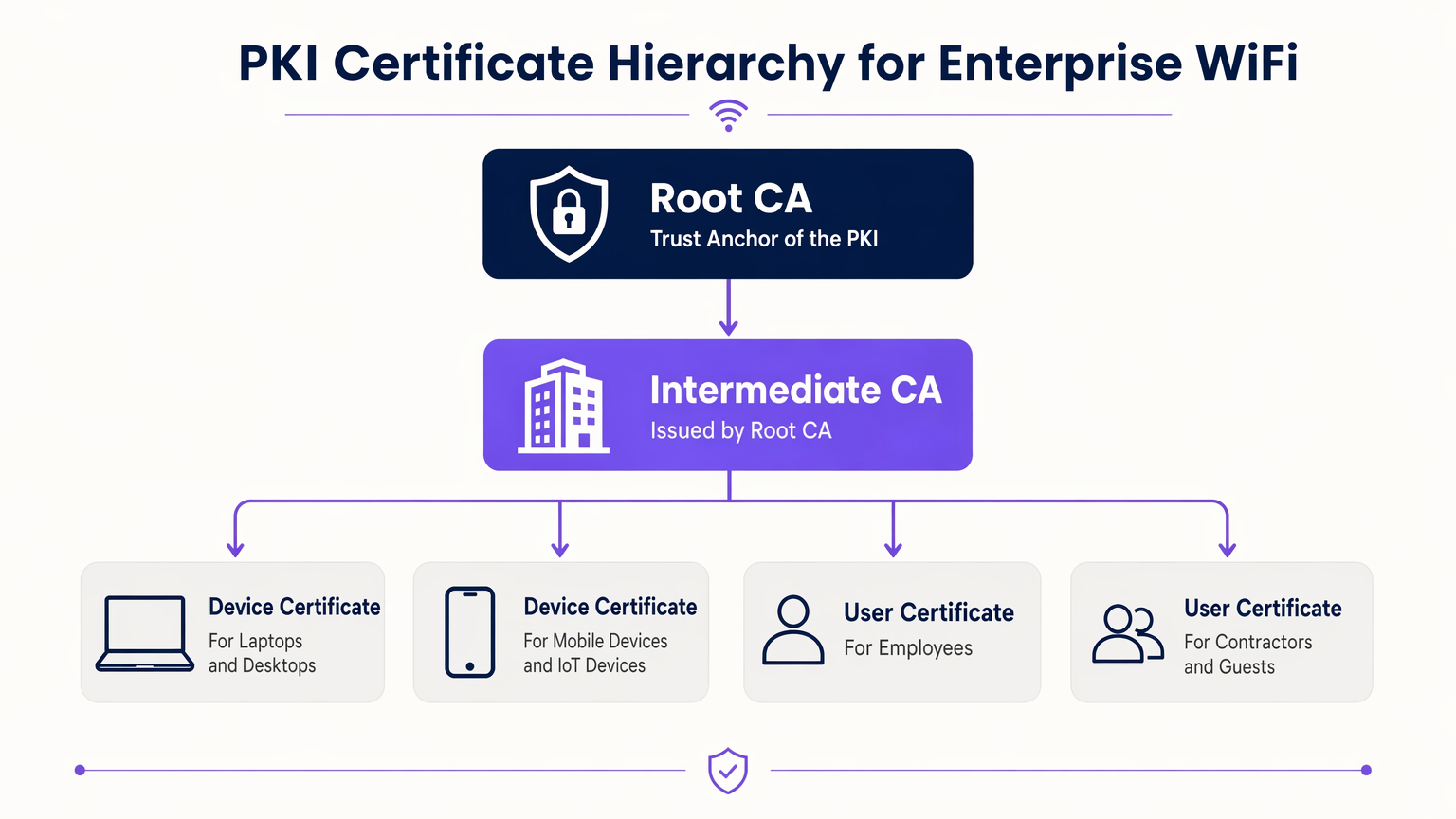
O modelo de confiança que rege estes certificados é a Infraestrutura de Chave Pública (PKI). Num ambiente empresarial, uma hierarquia PKI de vários níveis é a melhor prática:
- Autoridade de Certificação Raiz (CA): O derradeiro ponto de confiança, mantido offline para evitar comprometimento.
- CA Intermédia: Emitida pela CA Raiz, este servidor permanece online para emitir e revogar ativamente certificados para entidades finais.
- Certificados de Entidade Final: Implementados em dispositivos cliente (portáteis, telemóveis, sensores IoT) e infraestrutura (servidores RADIUS, Pontos de Acesso).
Fluxo de Autenticação 802.1X e EAP-TLS
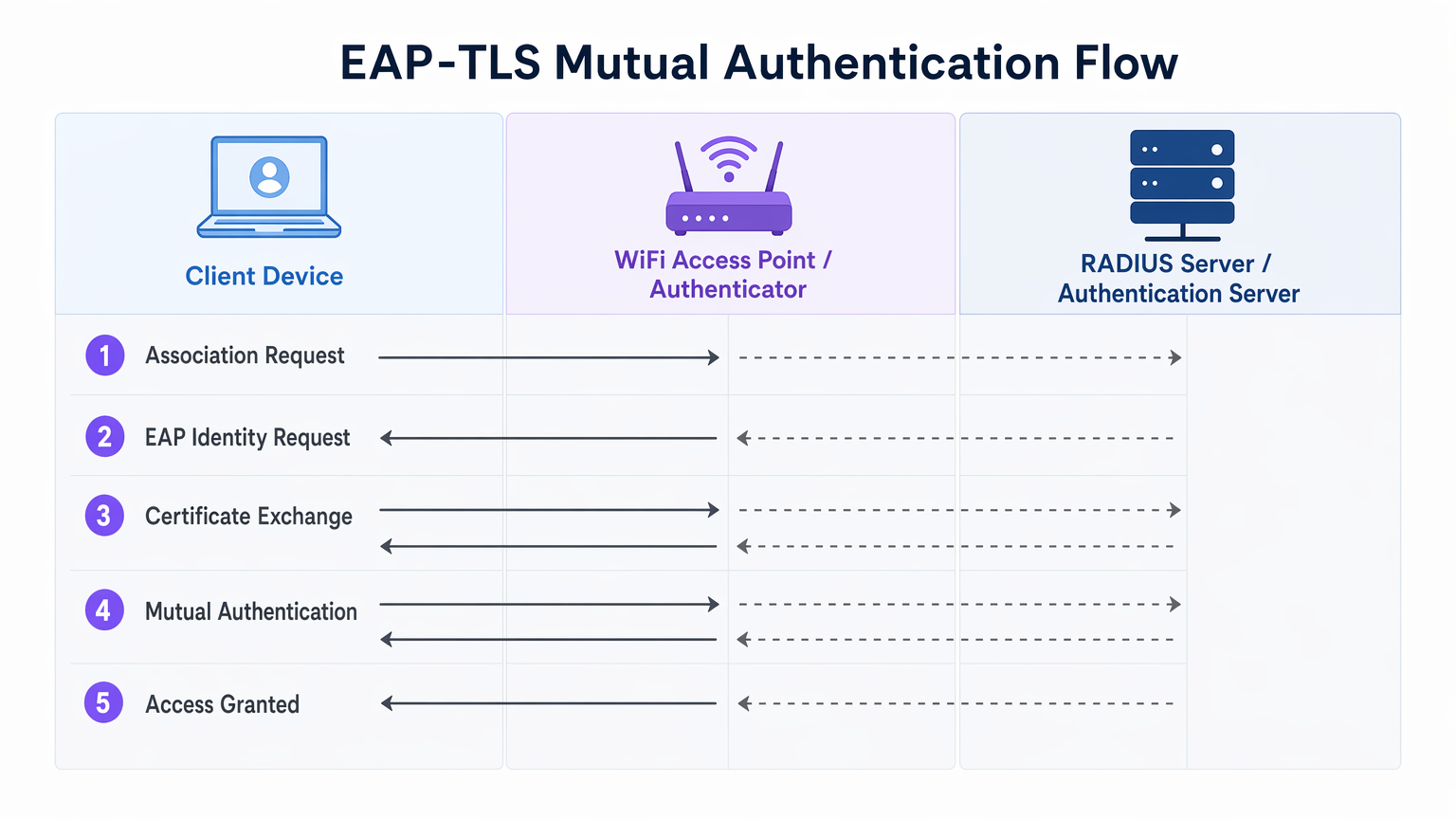
A segurança WiFi empresarial baseia-se na norma IEEE 802.1X para controlo de acesso à rede baseado em portas. Quando combinado com EAP-TLS (Extensible Authentication Protocol - Transport Layer Security), proporciona autenticação mútua.
- Associação: O dispositivo cliente conecta-se ao Ponto de Acesso (Autenticador). O acesso à rede é bloqueado ao nível da porta.
- Pedido de Identidade: O AP solicita a identidade do cliente e encaminha o tráfego EAP para o servidor RADIUS (Servidor de Autenticação).
- Autenticação do Servidor: O servidor RADIUS apresenta o seu certificado ao cliente. O cliente verifica o certificado do servidor em relação às suas CAs Raiz fidedignas, prevenindo ataques de APs maliciosos (Evil Twin).
- Autenticação do Cliente: O cliente apresenta o seu certificado ao servidor RADIUS. O servidor valida a assinatura do certificado, o período de validade e o estado de revogação.
- Acesso Concedido: Após autenticação mútua bem-sucedida, o servidor RADIUS envia uma mensagem
Access-Accept, frequentemente incluindo atributos específicos do fornecedor (VSAs) para atribuir dinamicamente o cliente a uma VLAN específica.
O Papel da Purple no Ecossistema de Identidade
Enquanto os dispositivos corporativos utilizam PKI empresarial e EAP-TLS, os utilizadores convidados e BYOD (Bring Your Own Device) requerem uma abordagem diferente. É aqui que plataformas de Guest WiFi como a Purple se integram na arquitetura. A Purple atua como um provedor de identidade robusto para SSIDs públicos, capturando dados primários e permitindo serviços como o OpenRoaming sob a licença Connect. Isto garante um onboarding contínuo e seguro para convidados sem comprometer o SSID corporativo protegido por certificado.
Guia de Implementação
A implementação da autenticação por certificado requer uma orquestração cuidadosa em todos os seus silos de rede, identidade e gestão de dispositivos.
1. Desenhar a Infraestrutura PKI e RADIUS
- Implementar uma PKI de Dois Níveis: Nunca utilize uma PKI plana. Mantenha a CA Raiz offline.
- Implementar RADIUS Redundante: Implemente pelo menos dois servidores RADIUS (por exemplo, FreeRADIUS, Cisco ISE, Aruba ISE) num cluster ativo-ativo ou ativo-passivo.
- Configurar Verificação de Revogação: Decida entre CRL (Certificate Revocation List) e OCSP (Online Certificate Status Protocol). Para requisitos de alta segurança e baixa latência, o OCSP é obrigatório.
2. Automatizar o Registo de Certificados
O provisionamento manual de certificados não é escalável. Integre a sua PKI com a sua solução de Mobile Device Management (MDM) ou Unified Endpoint Management (UEM) (por exemplo, Microsoft Intune, Jamf).
- Utilize SCEP (Simple Certificate Enrolment Protocol) ou o moderno EST (Enrolment over Secure Transport) para enviar certificados para dispositivos associados ao domínio e geridos automaticamente.
- Certifique-se de que o payload do MDM inclui tanto o certificado do cliente como o certificado da CA Raiz fidedigna para o servidor RADIUS.
3. Configuração e Segmentação de Rede
- Configure os seus controladores WLAN e Pontos de Acesso para usar WPA3-Enterprise (ou WPA2-Enterprise como fallback).
- Mapeie as respostas RADIUS para atribuições dinâmicas de VLAN para impor a micro-segmentação.
- Garanta uma separação rigorosa de firewall entre o SSID corporativo 802.1X e o SSID do captive portal gerido pela sua plataforma de WiFi Analytics .
Melhores Práticas
- Alinhar Períodos de Validade: Defina os períodos de vida dos certificados de cliente (por exemplo, 1 aano) para alinhar com os seus ciclos de check-in MDM e atualização de dispositivos.
- Cache de Respostas OCSP: Configure o seu servidor RADIUS para armazenar em cache as respostas OCSP (OCSP Stapling) para evitar tempos limite de autenticação caso o respondedor OCSP externo esteja inacessível.
- Monitorize o Edge: Utilize o seu sistema de gestão de rede para monitorizar os tempos limite e as taxas de rejeição 802.1X. Um pico repentino indica frequentemente uma CA Intermediária expirada ou uma carga útil MDM mal configurada.
- Adote o OpenRoaming: Para redes de convidados, aproveite as tecnologias Passpoint/OpenRoaming onde a Purple atua como fornecedor de identidade, estendendo o roaming contínuo semelhante a certificados a utilizadores públicos.
Resolução de Problemas e Mitigação de Riscos
| Modo de Falha | Causa Raiz | Estratégia de Mitigação |
|---|---|---|
| Cliente rejeita certificado do servidor | A CA Raiz do servidor RADIUS não está na loja de confiança do cliente. | Envie a CA Raiz via carga útil MDM antes de aplicar 802.1X. |
| Autenticação expira | O servidor RADIUS não consegue alcançar o respondedor OCSP ou a CRL é demasiado grande. | Implemente o cache OCSP no servidor RADIUS; garanta que o respondedor OCSP está altamente disponível. |
| Ataques de APs maliciosos | Os clientes estão configurados para ignorar a validação do certificado do servidor. | Aplique validação rigorosa do servidor no perfil do suplicante MDM. Nunca permita que os utilizadores cliquem em "Confiar" em certificados desconhecidos. |
| Atribuição de VLAN falha | Os VSAs RADIUS não correspondem à configuração do switch/AP. | Padronize as convenções de nomenclatura VSA entre os seus fornecedores de hardware de rede. |
ROI e Impacto no Negócio
A transição para a autenticação por certificado WiFi oferece resultados de negócio mensuráveis para operadores empresariais:
- Redução da Sobrecarga do Helpdesk: As redefinições de palavra-passe representam até 30% dos tickets do helpdesk de TI. O registo automático de certificados elimina as chamadas de suporte relacionadas com palavras-passe WiFi.
- Aceleração da Conformidade: O Requisito 8 do PCI DSS exige IDs únicos para todos os utilizadores. O EAP-TLS fornece um registo de auditoria criptográfico de qual dispositivo acedeu exatamente à rede, simplificando as auditorias de conformidade em ambientes de Retalho e Hotelaria .
- Contenção de Violações: Em caso de perda ou roubo de um dispositivo, a revogação de um único certificado termina instantaneamente o acesso à rede, enquanto uma PSK comprometida exige uma rotação global de palavras-passe.
Definições Principais
EAP-TLS
Extensible Authentication Protocol with Transport Layer Security. The most secure WiFi authentication method, requiring digital certificates on both the client and the server.
Used when an organisation mandates zero-trust network access and wants to eliminate password-based vulnerabilities.
PKI (Public Key Infrastructure)
The framework of hardware, software, policies, and procedures needed to create, manage, distribute, and revoke digital certificates.
The foundational architecture IT teams must build or procure before deploying certificate-based WiFi.
RADIUS
Remote Authentication Dial-In User Service. A networking protocol that provides centralized Authentication, Authorization, and Accounting (AAA) management.
The server that sits between your WiFi Access Points and your Active Directory/PKI to make the actual 'allow or deny' decision.
802.1X
An IEEE standard for port-based Network Access Control (PNAC). It provides an authentication mechanism to devices wishing to attach to a LAN or WLAN.
The protocol configured on the Access Point that blocks network traffic until the RADIUS server confirms the device is authenticated.
OCSP (Online Certificate Status Protocol)
An internet protocol used for obtaining the revocation status of an X.509 digital certificate in real-time.
Preferred over CRLs in enterprise environments to ensure a stolen device's certificate is rejected instantly.
MDM / UEM
Mobile Device Management / Unified Endpoint Management. Software used to manage, secure, and deploy policies to corporate devices.
The delivery mechanism used to push digital certificates to laptops and phones without manual IT intervention.
Supplicant
The software client on the end-user device that handles the 802.1X authentication process.
Configured via MDM to ensure the device knows which certificates to present and which RADIUS servers to trust.
VSA (Vendor-Specific Attribute)
Custom attributes passed in RADIUS messages to provide specific instructions to network hardware, such as assigning a specific VLAN.
Used to dynamically segment users (e.g., putting an IoT sensor on a restricted VLAN and a CEO's laptop on the corporate VLAN) based on their certificate.
Exemplos Práticos
A 400-room luxury hotel needs to secure its back-of-house corporate WiFi for staff tablets and POS terminals, while maintaining a separate guest network. They currently use a single WPA2-PSK for staff.
- Deploy a two-tier PKI and redundant RADIUS servers.\n2. Use the hotel's MDM to push device certificates via SCEP to all staff tablets and POS terminals.\n3. Configure the corporate SSID for WPA3-Enterprise with EAP-TLS.\n4. Segment the network: Corporate traffic routes internally; guest traffic routes to a separate VLAN managed by Purple's captive portal for analytics.
A large public-sector organisation is experiencing high helpdesk volume due to 90-day WiFi password rotation policies on their corporate network.
Transition from PEAP-MSCHAPv2 (username/password) to EAP-TLS (certificates). Issue 1-year device certificates via Active Directory Certificate Services (AD CS) and Group Policy to all Windows laptops. Configure RADIUS to validate the certificates against AD.
Perguntas de Prática
Q1. Your network monitoring tool alerts you to a sudden 100% failure rate for all 802.1X authentications across your [Retail](/industries/retail) stores. The RADIUS server logs show 'Unknown CA'. What is the most likely cause?
Dica: Consider the lifecycle of the certificates in your PKI hierarchy.
Ver resposta modelo
The Intermediate CA certificate installed on the RADIUS server has expired. When the Intermediate CA expires, the RADIUS server can no longer validate the chain of trust for the client certificates, causing all authentications to fail. The mitigation is to renew the Intermediate CA and update the RADIUS server.
Q2. You are designing the WiFi architecture for a new corporate headquarters. You need to support corporate laptops, BYOD smartphones, and guest users. How should you structure the SSIDs and authentication?
Dica: Remember the rule: Segment the Guests from the Certs.
Ver resposta modelo
Deploy two distinct SSIDs. 1) 'Corp-WiFi': Uses WPA3-Enterprise with EAP-TLS for corporate laptops, authenticated via certificates pushed by MDM. 2) 'Guest-WiFi': Uses an open network with a captive portal managed by Purple for BYOD and guests, providing client isolation and routing directly to the internet.
Q3. During an audit of your [Healthcare](/industries/healthcare) network, the auditor notes that users are occasionally prompted to 'Accept' a new certificate when connecting to the corporate WiFi. Why is this a security risk?
Dica: Think about what mutual authentication is designed to prevent.
Ver resposta modelo
This indicates that the client supplicant is not configured to strictly validate the server certificate. If users can manually accept unknown certificates, an attacker can set up a rogue Access Point (Evil Twin) and trick devices into connecting, potentially intercepting traffic or harvesting credentials. The fix is to push a strict MDM profile that hardcodes the trusted Root CA and prevents user overrides.
Continue a ler esta série
O Que É a Autenticação por Endereço MAC? Quando Usá-la e Quando Evitá-la
Este guia de referência técnica abrangente aborda a autenticação por endereço MAC em ambientes WiFi empresariais — como a autenticação MAC baseada em RADIUS funciona na Camada 2, as suas vulnerabilidades de segurança inerentes (incluindo a falsificação de MAC e o impacto da aleatorização de MAC ao nível do SO), e os contextos operacionais precisos onde continua a ser uma ferramenta válida para gerir dispositivos IoT e sem interface. Fornece orientação prática de implementação para gestores de TI e arquitetos de rede em hotelaria, retalho, saúde e locais do setor público, com exemplos práticos do mundo real, estruturas de decisão e contexto de integração para a plataforma de guest WiFi e análise da Purple.
Como Configurar WiFi Empresarial em iOS e macOS com 802.1X
Este guia abrangente fornece aos líderes de TI seniores passos acionáveis para implementar WiFi empresarial 802.1X em dispositivos iOS e macOS. Abrange autenticação baseada em certificados (EAP-TLS), perfis de configuração MDM e integração de arquitetura para proteger redes corporativas, ao mesmo tempo que apoia iniciativas BYOD.
Como Configurar WiFi Empresarial em Dispositivos Android com EAP-TLS
Este guia de referência técnica fornece aos líderes de TI seniores um plano abrangente para implementar a autenticação 802.1X EAP-TLS em dispositivos Android. Abrange a mecânica arquitetónica, estratégias de implementação manual e impulsionadas por MDM, e metodologias de resolução de problemas necessárias para proteger redes sem fios empresariais.