
Café WiFi: Como Configurar, Proteger e Rentabilizar a Sua Rede de Convidados
Uma referência técnica abrangente para gestores de TI e operadores de espaços sobre como projetar, proteger e rentabilizar redes de Café WiFi. Abrange segmentação essencial de rede, implementação de hardware Wi-Fi 6, Captive Portals compatíveis com GDPR e automação de marketing para gerar ROI mensurável.
Ouça este guia
Ver transcrição do podcast
Resumo Executivo
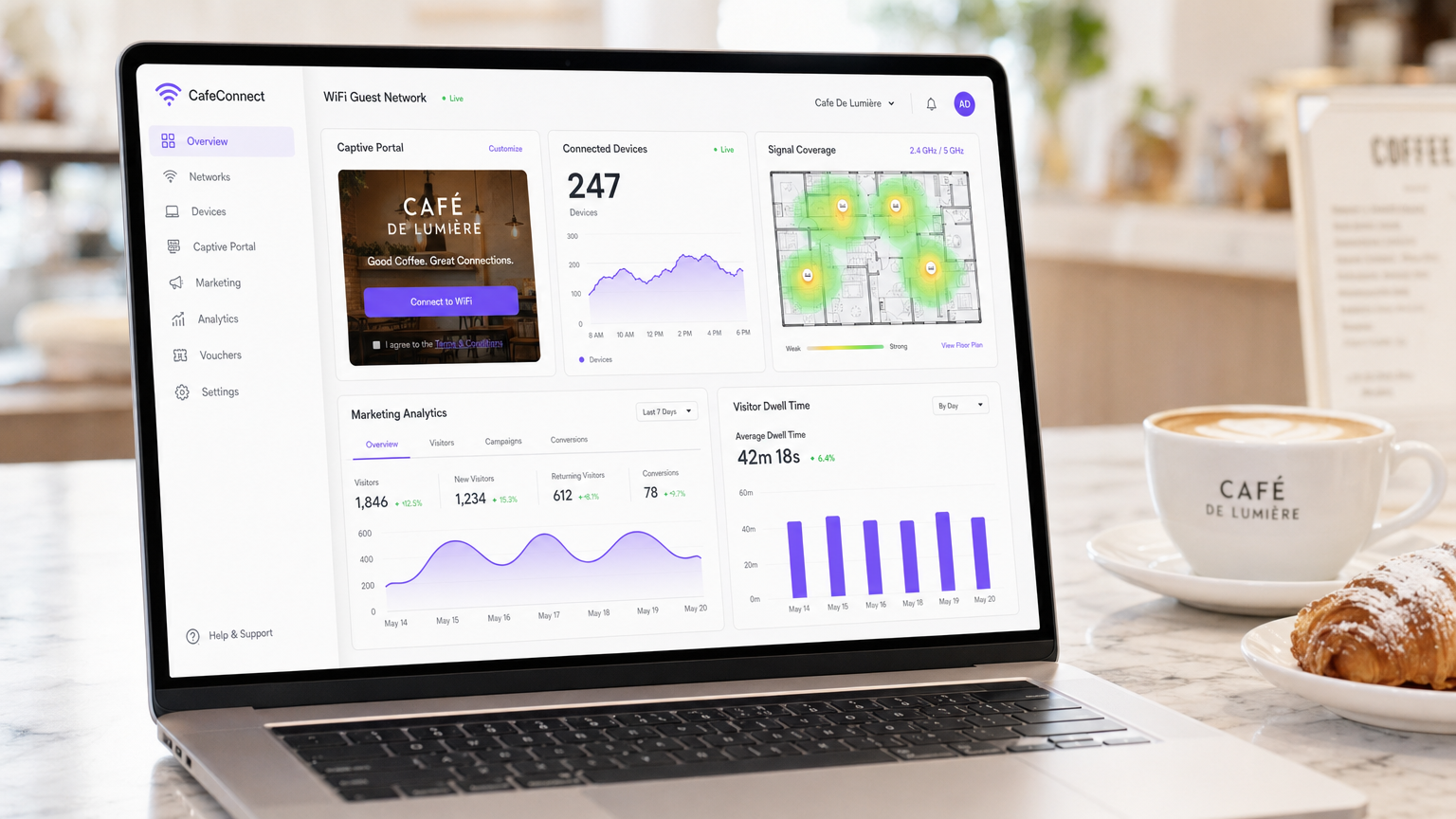
Para os espaços de hospitalidade modernos, o Café WiFi já não é uma mera utilidade operacional — é um ativo de dados primários crítico, um canal de automação de marketing e uma rigorosa obrigação de conformidade. Este guia de referência técnica fornece a gestores de TI, arquitetos de rede e diretores de operações de espaços um quadro abrangente para projetar, implementar e rentabilizar redes de convidados.
Desde cafés independentes a cadeias empresariais multi-site, os princípios arquitetónicos permanecem consistentes. Deve impor uma segmentação de rede rigorosa para manter a conformidade com PCI DSS, implementar hardware 802.11ax (Wi-Fi 6) de nível empresarial para ambientes com alta densidade de clientes e implementar um Captive Portal robusto para obter consentimento de marketing explícito e compatível com GDPR.
Ao fazer a transição de routers de consumo não geridos para uma plataforma empresarial de Guest WiFi , os espaços podem transformar um centro de custos num gerador de receita mensurável. Este guia descreve as especificações exatas de hardware, padrões de segurança, cálculos de largura de banda e fluxos de trabalho de automação de marketing necessários para construir uma rede de convidados resiliente e lucrativa.
Análise Técnica Detalhada
Arquitetura e Segmentação de Rede
O princípio fundamental de qualquer rede pública é a separação lógica absoluta da infraestrutura operacional. Implementar uma única rede plana que aloja tanto os seus sistemas de ponto de venda (POS) como o tráfego dos seus convidados é uma falha crítica tanto em segurança como em conformidade.
Implementação de VLAN: A sua infraestrutura de routing e switching deve suportar a marcação de VLAN IEEE 802.1Q. Uma implementação padrão requer um mínimo de duas Redes Locais Virtuais:
- VLAN 10 (Operacional): Dedicada a terminais POS, PCs de back-office e dispositivos IoT.
- VLAN 20 (Convidados): Dedicada exclusivamente à rede de convidados do Café WiFi.
O tráfego entre estas VLANs deve ser bloqueado ao nível da firewall. Os pontos de acesso (APs) irão transmitir Service Set Identifiers (SSIDs) distintos mapeados diretamente para as suas respetivas VLANs. Este isolamento é um requisito não negociável para a conformidade com PCI DSS, garantindo que o ambiente de dados de titulares de cartões (CDE) não pode ser comprometido por agentes maliciosos conectados à rede de convidados.
Padrões Sem Fios e Seleção de Hardware
Para ambientes com alta densidade de dispositivos — como um café movimentado onde 40-80 clientes podem estar a fazer streaming, a navegar e a sincronizar simultaneamente — o hardware de consumo irá degradar-se rapidamente.
Requisitos 802.11ax (Wi-Fi 6): As implementações modernas devem utilizar exclusivamente pontos de acesso Wi-Fi 6. A vantagem crítica do Wi-Fi 6 em ambientes de hospitalidade é o Acesso Múltiplo por Divisão de Frequência Ortogonal (OFDMA). Ao contrário dos padrões mais antigos que servem os clientes sequencialmente, o OFDMA permite que um único AP comunique com múltiplos dispositivos simultaneamente, dividindo os canais em subportadoras mais pequenas. Isto reduz drasticamente a latência e melhora o débito em ambientes congestionados.
Dimensionamento de Hardware:
- Local Único (50-150 m²): 1-2 APs Wi-Fi 6 montados no teto, um switch gerido PoE+ e uma firewall/router de nível empresarial.
- Implementações Multi-Site: A infraestrutura gerida na cloud é obrigatória para visibilidade centralizada, gestão de firmware e resolução de problemas remota em todas as pegadas de retalho distribuídas.
Protocolos de Segurança
A era do WiFi público aberto e não encriptado está a terminar. Embora o WPA2-Personal continue comum, as novas implementações devem aproveitar o WPA3.
Para redes de convidados que utilizam um Captive Portal, a transmissão sem fios subjacente deve ainda ser encriptada. O WPA3-SAE (Simultaneous Authentication of Equals) fornece sigilo de encaminhamento, mitigando ataques de dicionário offline. Se estiver a implementar uma rede aberta com um Captive Portal (frequentemente feito para máxima compatibilidade), certifique-se de que o isolamento de clientes está ativado ao nível do AP para que os dispositivos não possam comunicar entre si através da sub-rede local.
Guia de Implementação
A implementação de uma rede de Café WiFi segura e rentabilizada requer uma abordagem estruturada. Siga esta sequência de implementação neutra em relação ao fornecedor:
Passo 1: Levantamento do Local e Planeamento da Largura de Banda
Antes de adquirir hardware, realize um levantamento físico do local para identificar interferências de RF (por exemplo, micro-ondas, aço estrutural) e determinar o posicionamento ideal dos APs.
Calcule os seus requisitos de largura de banda. Uma regra geral padrão é provisionar 2 Mbps por utilizador concorrente para navegação geral e 5 Mbps se o streaming de vídeo for comum. Para um café que espera 50 utilizadores concorrentes, é aconselhada uma ligação simétrica mínima de 100 Mbps. Se o seu espaço acolhe eventos empresariais ou requer tempo de atividade garantido, consulte o nosso guia sobre O Que É uma Linha Dedicada? Internet Empresarial Dedicada para opções de conectividade empresarial. Para cálculos detalhados de largura de banda, consulte o nosso guia Velocidade de WiFi em Hotéis: O Que os Hóspedes Esperam e Como Entregá-lo .
Passo 2: Configuração da Infraestrutura
Instale o seu router, switch gerido e pontos de acesso. Configure as suas VLANs e regras de firewall antes de conectar os APs. Certifique-se de que os pools DHCP para a VLAN de convidados são dimensionados adequadamente (por exemplo, uma sub-rede /23 que fornece 510 endereços IP) com tempos de concessão curtos (por exemplo, 2 horas) para evitar o esgotamento de IPs durante períodos de grande afluência.
Passo 3: Implementação do Captive Portal
O Captive Portal é a interface crítica entre a sua rede e a sua base de dados de marketing.
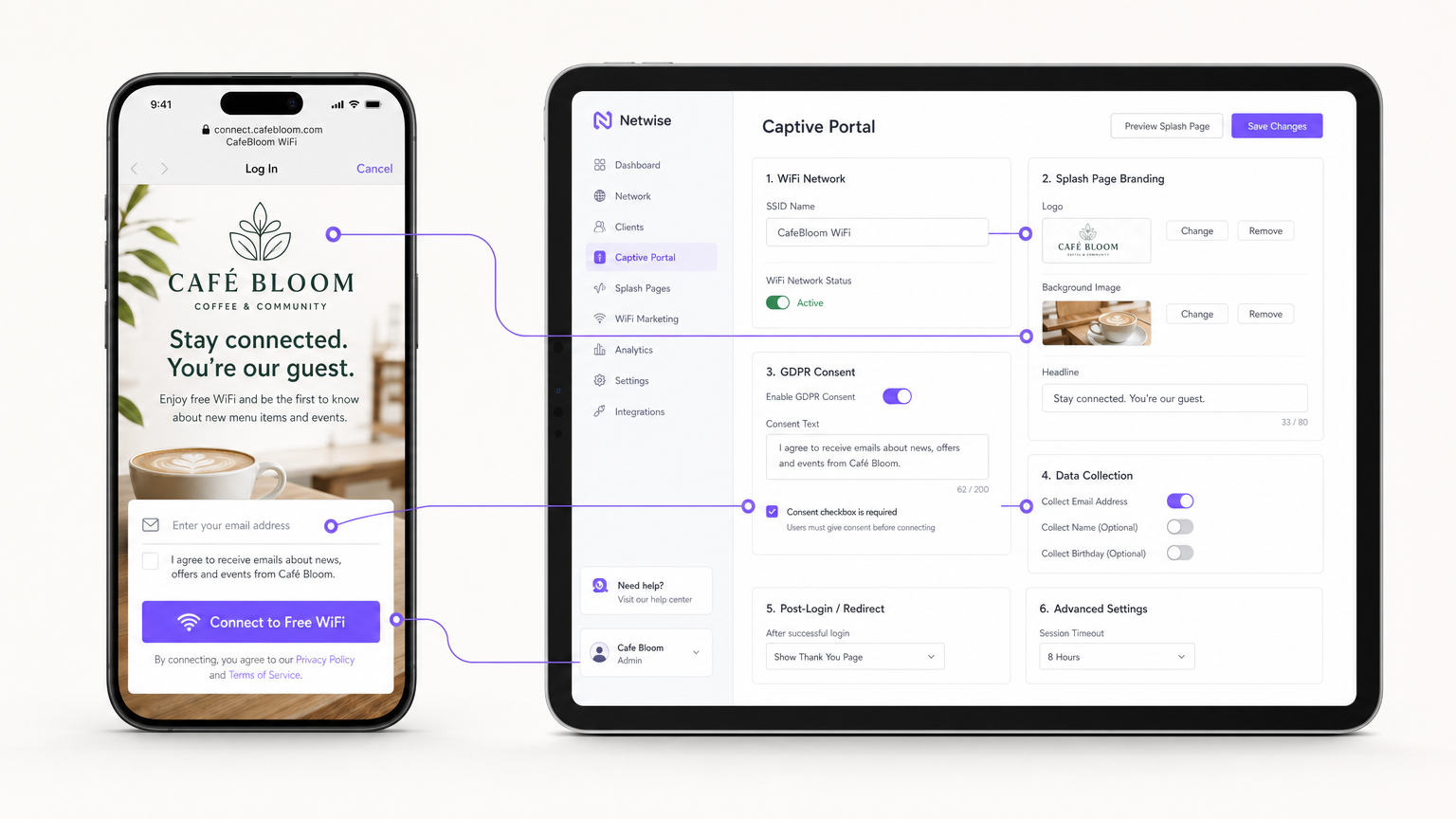
Em vez de alojar servidores de portal no local, integre o seu APs (via RADIUS ou API) com uma plataforma Guest WiFi baseada na cloud como a Purple. Configure a página de apresentação com a marca do seu local e defina os métodos de autenticação (por exemplo, e-mail, login social ou autenticação contínua baseada em perfil como OpenRoaming).
Passo 4: Conformidade e Gestão de Consentimento
Configure os campos de recolha de dados. Ao abrigo do GDPR, o consentimento de marketing deve ser explícito, informado e inequívoco. Certifique-se de que o seu Captive Portal apresenta uma caixa de seleção desmarcada para opt-ins de marketing. A plataforma deve registar o carimbo de data/hora, o endereço IP, o endereço MAC e a linguagem de consentimento exata apresentada ao utilizador para fornecer um registo de auditoria verificável.
Passo 5: Integração de Automação de Marketing
Ligue a plataforma WiFi ao seu CRM ou utilize as ferramentas nativas de WiFi Analytics da plataforma para criar campanhas automatizadas. Configure gatilhos para:
- Visitantes Pela Primeira Vez: E-mail de boas-vindas com um desconto de fidelidade.
- Visitantes Inativos: Oferta de reengajamento após 30 dias de ausência.
- Visitantes Frequentes: Convite para programa VIP.
Melhores Práticas
- Ativar Isolamento de Cliente: Ative sempre o isolamento de cliente da Camada 2 no SSID de convidado. Isso impede que os dispositivos conectados se vejam ou comuniquem entre si, mitigando o risco de movimento lateral de malware ou de interceção de pacotes.
- Implementar Qualidade de Serviço (QoS): Configure regras de QoS no seu router para priorizar o tráfego operacional (POS, VoIP) sobre o tráfego de convidados. Implemente limites de largura de banda por cliente (por exemplo, limitar convidados a 5 Mbps de download/upload) para evitar que um único utilizador sature o link WAN.
- Reduzir Prazos de DHCP: Em ambientes de alta rotatividade, como cafés, defina os prazos de concessão de DHCP para 1-2 horas em vez das 24 horas padrão para evitar o esgotamento do pool de IPs.
- Aproveitar a Autenticação Baseada em Perfil: Para cadeias multi-site ou ambientes de Retalho , implemente protocolos de autenticação contínua (como Passpoint/OpenRoaming) para permitir que os utilizadores que regressam se conectem automaticamente sem se autenticarem novamente no portal, melhorando significativamente a experiência do utilizador enquanto mantém o rastreamento de dados.
Resolução de Problemas e Mitigação de Riscos
| Modo de Falha | Causa Raiz | Estratégia de Mitigação |
|---|---|---|
| Esgotamento de IP | Os convidados não conseguem conectar-se porque o servidor DHCP ficou sem endereços IP disponíveis. | Expanda a máscara de sub-rede (por exemplo, de /24 para /23) e reduza os prazos de concessão de DHCP para 1-2 horas. |
| Interferência Co-Canal | Múltiplos APs a transmitir no mesmo canal, causando alta latência e perda de pacotes. | Implemente atribuição dinâmica de canais no controlador sem fios; evite canais de 2.4GHz que não sejam 1, 6 e 11. |
| Bypass do Captive Portal | Os dispositivos conectam-se, mas não acionam o redirecionamento da página de apresentação, deixando os utilizadores offline. | Certifique-se de que a firewall permite tráfego DNS e HTTP/HTTPS para os endereços IP do "walled garden" do portal antes da autenticação. |
| Violação de Conformidade | Recolha de e-mails através de um formulário aberto sem registo de consentimento explícito. | Utilize uma plataforma de Captive Portal certificada que lide nativamente com o registo de consentimento GDPR e políticas de retenção de dados. |
ROI e Impacto no Negócio
A transição de WiFi não gerido para uma rede de convidados empresarial transforma a infraestrutura de TI de um custo irrecuperável num ativo de marketing mensurável.
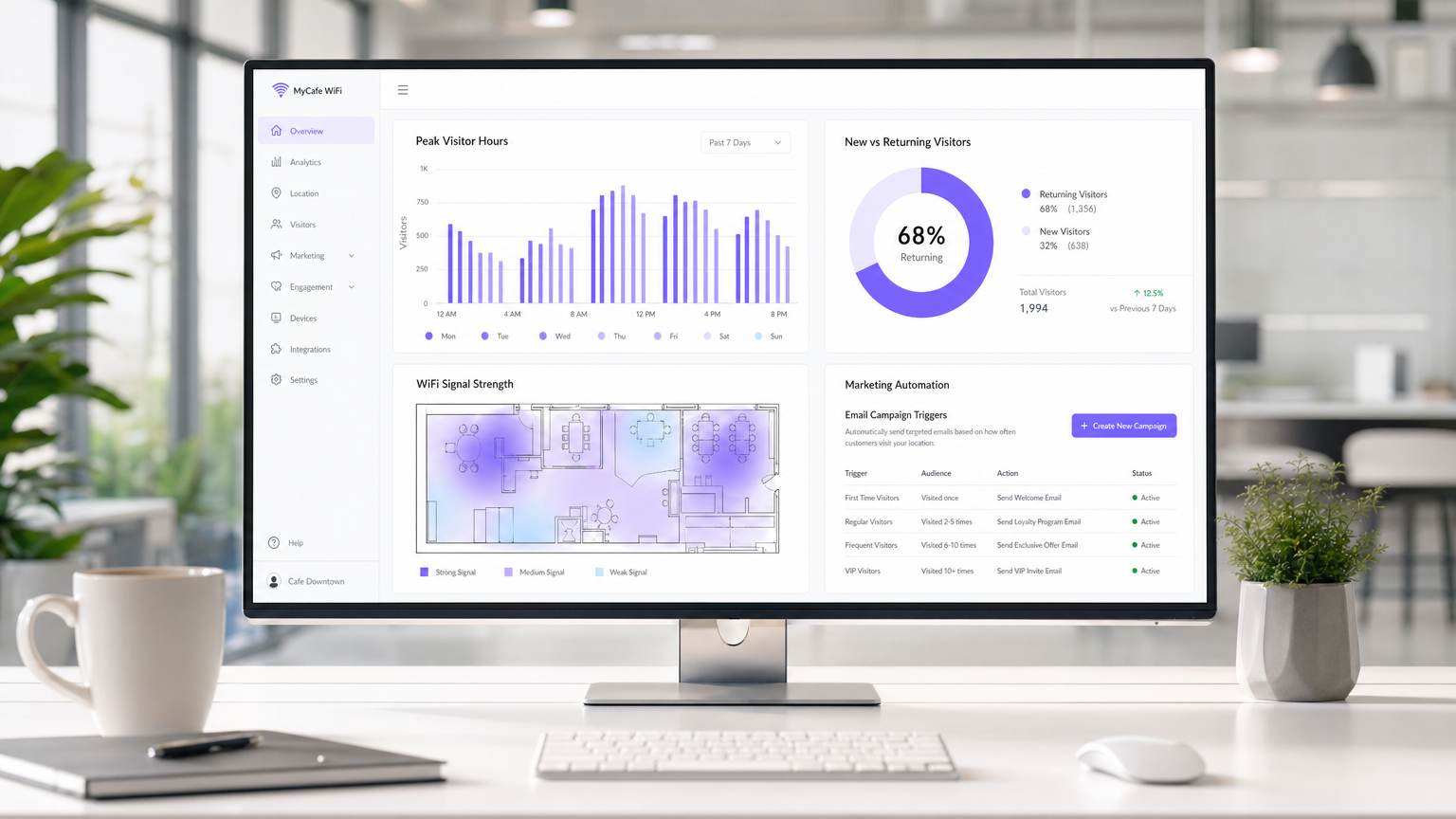
Medir o Sucesso: O ROI de uma implementação de WiFi em café é calculado através de três métricas principais:
- Taxa de Captura de Dados: A percentagem de utilizadores conectados que optam por comunicações de marketing. Um portal bem otimizado deve atingir uma taxa de captura de 30-40%.
- Conversão de Campanha: O tráfego gerado por campanhas automatizadas de e-mail/SMS acionadas pela plataforma WiFi. Por exemplo, rastrear quantos utilizadores regressam dentro de 7 dias após receberem uma oferta "sentimos a sua falta".
- Otimização do Tempo de Permanência: Utilizar análises para correlacionar o tempo de permanência do visitante com o valor médio da transação, permitindo que as equipas de operações otimizem a disposição dos assentos e a velocidade do serviço.
Ao capturar dados primários e impulsionar visitas repetidas através de marketing direcionado, uma solução de WiFi de convidado gerida geralmente alcança ROI dentro de 3-6 meses de implementação, particularmente em ambientes competitivos de Hotelaria ambientes.
Definições Principais
VLAN (Virtual Local Area Network)
A logical subnetwork that groups a collection of devices from different physical LANs. Used to securely separate guest traffic from operational traffic.
Essential for maintaining PCI DSS compliance and preventing guests from accessing back-office systems.
Captive Portal
A web page that the user of a public-access network is obliged to view and interact with before access is granted.
The primary mechanism for capturing user data, presenting terms of service, and securing GDPR marketing consent.
Client Isolation
A wireless security feature that prevents devices connected to the same AP from communicating with each other.
Crucial for public networks to prevent malicious users from scanning or attacking other guests' devices.
OFDMA (Orthogonal Frequency-Division Multiple Access)
A feature of Wi-Fi 6 that allows an AP to subdivide a channel to communicate with multiple devices simultaneously.
Solves the 'latency' problem in dense café environments where dozens of devices are competing for airtime.
PCI DSS
Payment Card Industry Data Security Standard. A set of security standards designed to ensure that all companies that accept, process, store or transmit credit card information maintain a secure environment.
The regulatory reason why network segmentation between POS and guest WiFi is legally required.
First-Party Data
Information a company collects directly from its customers and owns entirely.
The core asset generated by a guest WiFi platform, insulating venues from the deprecation of third-party cookies.
QoS (Quality of Service)
Technologies that manage data traffic to reduce packet loss, latency and jitter on the network.
Used to prioritize critical business traffic (like payment processing) over guest Netflix streaming.
Walled Garden
A restricted environment that controls user access to web content and services.
Required configuration on the firewall to allow unauthenticated users to access the captive portal and its associated resources (like social login APIs) before granting full internet access.
Exemplos Práticos
A growing independent café chain with 3 locations is experiencing network dropouts during peak hours. Their POS terminals frequently disconnect, and guests complain about slow speeds. They are currently using consumer-grade routers provided by their ISP, broadcasting a single SSID for both staff and guests.
- Replace consumer routers with a cloud-managed business gateway and Wi-Fi 6 access points at each location.
- Implement VLAN tagging: VLAN 10 for POS/Staff, VLAN 20 for Guests.
- Configure firewall rules to block inter-VLAN routing, securing the POS network.
- Set up QoS to prioritize VLAN 10 traffic over VLAN 20, and implement a 5 Mbps per-client bandwidth cap on the guest network.
- Deploy a centralized captive portal to manage guest access and collect GDPR-compliant marketing data.
A large conference centre café needs to provide seamless WiFi for returning delegates without forcing them to log in via the captive portal every day, while still tracking their presence for analytics.
Deploy a profile-based authentication system utilizing Passpoint (Hotspot 2.0) or OpenRoaming. Guests authenticate via the captive portal on their first visit, downloading a secure profile to their device. On subsequent visits, their device authenticates automatically via WPA2/3-Enterprise using EAP-TTLS, bypassing the splash page while still registering their MAC address and presence in the analytics dashboard.
Perguntas de Prática
Q1. A retail café chain wants to implement a guest WiFi network. The marketing director insists on making email collection mandatory for access to maximize database growth. The IT director is concerned about compliance. What is the correct architectural approach?
Dica: Consider the specific requirements of GDPR regarding 'freely given' consent.
Ver resposta modelo
Under GDPR, consent for marketing cannot be a precondition for service. The captive portal must allow users to access the WiFi without opting into marketing emails. The correct approach is to offer a clear, unticked checkbox for marketing consent, while allowing users to connect simply by accepting the terms and conditions. The marketing team should instead incentivize opt-ins by offering a clear value exchange (e.g., 'Sign up for 10% off your next coffee').
Q2. During peak hours (12:00 PM - 2:00 PM), guests at a busy city-centre café report that they can see the WiFi network with strong signal, but cannot connect or obtain an IP address. The network works perfectly in the morning and evening. What is the most likely cause and solution?
Dica: Think about the lifecycle of a connection in a high-turnover environment.
Ver resposta modelo
The most likely cause is DHCP IP pool exhaustion. Because the café has high footfall but short dwell times, the default 24-hour DHCP leases are tying up IP addresses long after the guests have left. The solution is to reduce the DHCP lease time for the guest VLAN to 1 or 2 hours, and potentially expand the subnet from a /24 (254 addresses) to a /23 (510 addresses).
Q3. A venue operator wants to deploy a single unified network for both their EPOS systems and guest WiFi to save on hardware costs, using a standard consumer broadband router. What are the specific technical and business risks of this approach?
Dica: Evaluate the scenario against PCI DSS requirements and wireless performance standards.
Ver resposta modelo
- Compliance Failure: A flat network violates PCI DSS requirements for isolating the Cardholder Data Environment, risking heavy fines and loss of card processing abilities. 2. Security Risk: Without client isolation and VLANs, guests can potentially access or attack the EPOS systems. 3. Performance Degradation: Consumer routers lack QoS to prioritize EPOS traffic, meaning guest streaming could cause payment processing to time out. 4. Device Limitations: Consumer routers cannot handle the concurrent connections typical in a café, leading to network crashes.
Continue a ler esta série
O que é um Pedido de Sondagem? Compreender Como os Dispositivos Descobrem Redes
Este guia de referência técnica oferece uma análise aprofundada dos pedidos de sondagem IEEE 802.11, da varredura ativa versus passiva e do impacto da aleatorização de MAC na análise de locais. Apresenta estratégias de implementação acionáveis para arquitetos de rede otimizarem implementações de alta densidade, mitigarem tempestades de sondagem e garantirem a recolha de dados precisa e em conformidade com o GDPR, utilizando camadas de identidade autenticadas.
Como Corrigir WiFi Lento Sem Atualizar o Seu Plano de Internet
Um guia de referência técnica abrangente para gestores de TI e arquitetos de rede sobre como otimizar o desempenho de WiFi empresarial sem aumentar a largura de banda do ISP. Abrange a otimização de RF, gestão da densidade de clientes, implementação de QoS e como aproveitar a análise de WiFi para diagnosticar e resolver gargalos.
A Lista de Verificação para Migrar de NAC Legado para NAC Nativo da Nuvem
Este guia de referência técnica e autoritário fornece uma lista de verificação estruturada em três fases para migrar do Network Access Control (NAC) legado para uma arquitetura nativa da nuvem. Ele equipa gestores de TI e arquitetos de rede com estratégias acionáveis para gerir a integração de identidades, a paridade de políticas e a conformidade sem interromper as operações do local.