
Como Configurar a Autenticação 802.1X WiFi: Um Guia Passo a Passo
Este guia técnico fornece um passo a passo para configurar a autenticação 802.1X WiFi empresarial. Abrange a configuração do servidor RADIUS, a implementação de certificados e estratégias de implementação práticas para líderes de TI em locais com grande afluência.
Ouça este guia
Ver transcrição do podcast
Resumo Executivo
Para redes empresariais, as PSKs (Pre-Shared Keys) partilhadas já não são suficientes para proteger a infraestrutura corporativa. À medida que as organizações enfrentam mandatos de conformidade mais rigorosos (PCI DSS, GDPR) e uma superfície de ataque em expansão, a transição para a autenticação 802.1X é um imperativo de segurança crítico.
Este guia fornece um passo a passo de implementação prático e independente de fornecedor para configurar o 802.1X em pontos de acesso empresariais. Abordamos a arquitetura central — Suplicante, Autenticador e Servidor de Autenticação — juntamente com a gestão de certificados, a configuração RADIUS e as armadilhas comuns de implementação. Para gestores de TI e arquitetos de rede que operam em ambientes de retalho, hotelaria ou setor público, esta referência fornece os passos acionáveis necessários para implementar um controlo de acesso à rede robusto e baseado em identidade, mantendo o tráfego corporativo e de convidados estritamente separado.
Ouça o nosso podcast complementar abaixo para uma visão geral de 10 minutos da arquitetura e estratégias de implementação.
Análise Técnica Detalhada: A Arquitetura 802.1X
O padrão IEEE 802.1X define o controlo de acesso à rede baseado em porta. Num contexto sem fios, impede que um dispositivo cliente envie ou receba tráfego de dados até que se tenha autenticado com sucesso num diretório central.
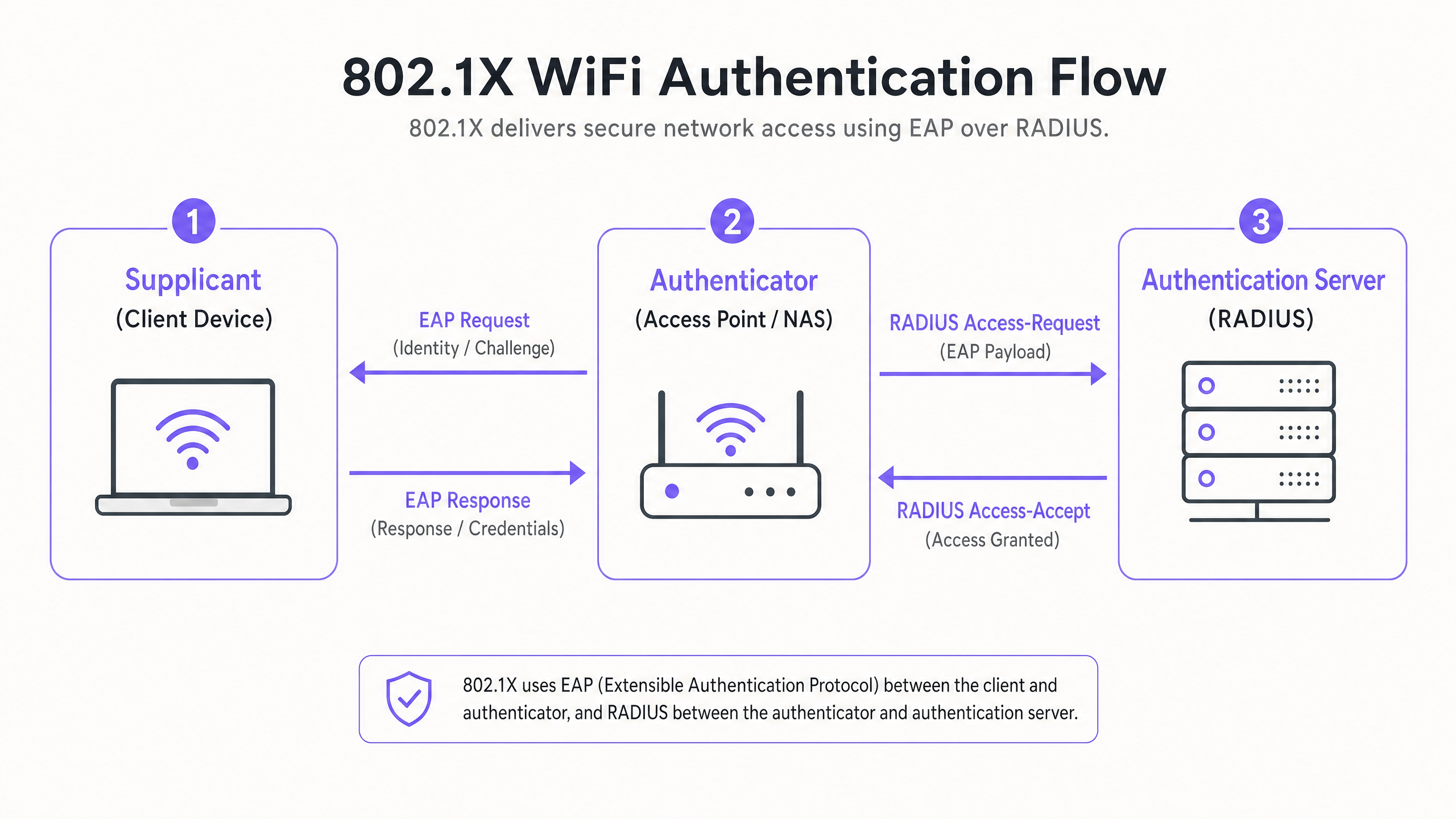
Os Três Componentes Principais
- O Suplicante (Dispositivo Cliente): O software no portátil, smartphone ou dispositivo IoT que solicita acesso. Deve suportar o método EAP (Extensible Authentication Protocol) escolhido.
- O Autenticador (Ponto de Acesso / WLC): O dispositivo de rede que atua como porteiro. Abre uma "porta controlada" que só permite tráfego EAP até que a autenticação seja bem-sucedida.
- O Servidor de Autenticação (RADIUS): O servidor central (por exemplo, Microsoft NPS, FreeRADIUS, Cisco ISE) que valida as credenciais contra um armazenamento de identidade (como o Active Directory) e retorna uma mensagem de Access-Accept ou Access-Reject.
Métodos EAP: Escolher a Postura de Segurança Correta
A escolha do método EAP dita o seu nível de segurança e a complexidade da implementação.
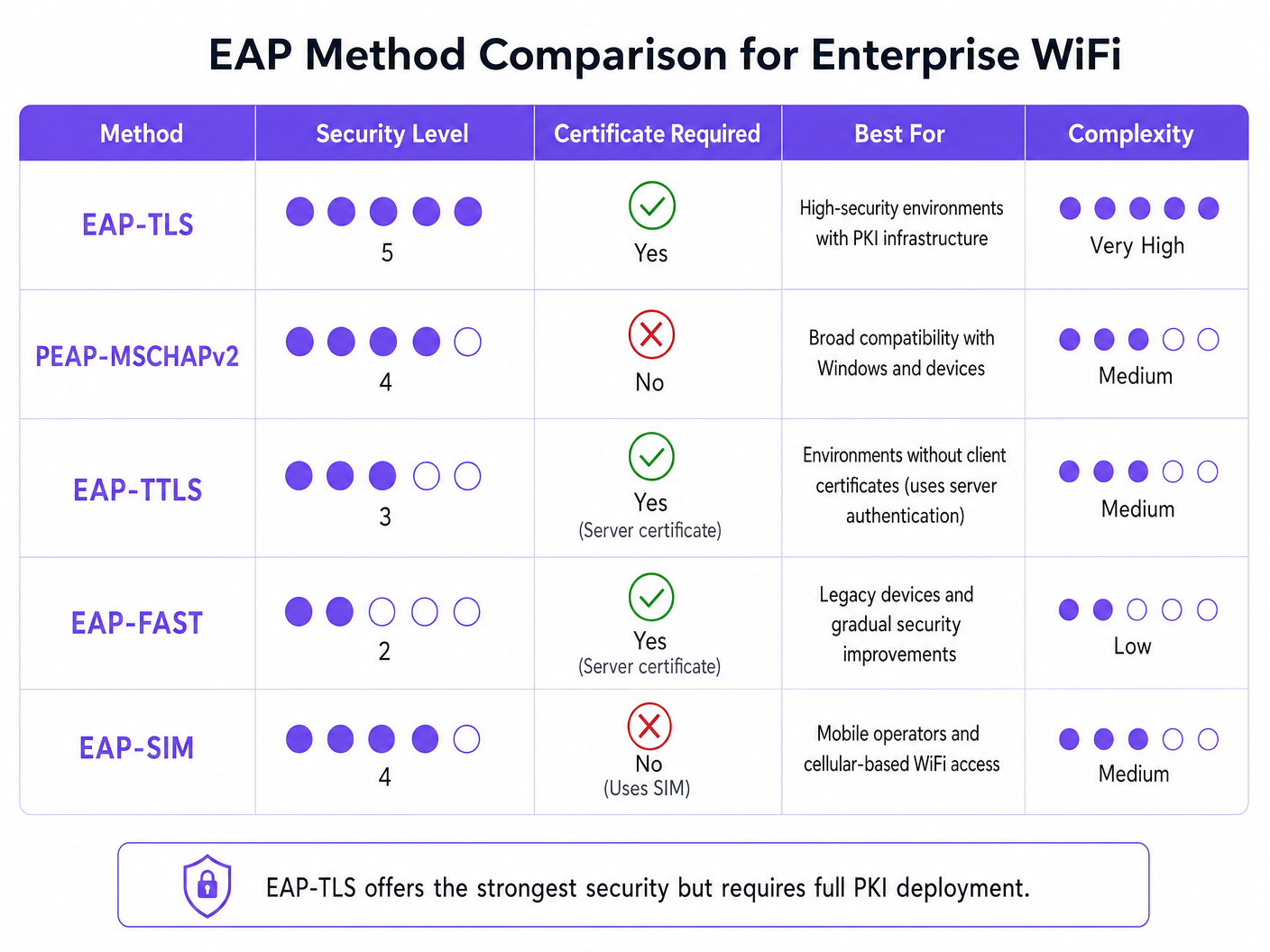
- EAP-TLS (Transport Layer Security): O padrão de excelência. Requer certificados de servidor e cliente. Não são transmitidas palavras-passe. Essencial para ambientes de alta segurança, mas requer uma Infraestrutura de Chave Pública (PKI) completa.
- PEAP-MSCHAPv2 (Protected EAP): A implementação empresarial mais comum. Utiliza um certificado do lado do servidor para criar um túnel TLS seguro, dentro do qual o cliente envia um nome de utilizador e uma palavra-passe. Mais fácil de implementar, mas vulnerável à recolha de credenciais se os dispositivos cliente não estiverem configurados para validar estritamente o certificado do servidor.
- EAP-SIM/AKA: Utiliza credenciais de cartão SIM para autenticação. Cada vez mais relevante para o onboarding contínuo em centros de Transporte e grandes espaços públicos.
Guia de Implementação: Configuração Passo a Passo
A implementação de 802.1X requer uma configuração coordenada entre o seu servidor RADIUS, os seus pontos de acesso e os seus dispositivos cliente.
Passo 1: Preparação do Servidor RADIUS
Quer esteja a utilizar o Microsoft Network Policy Server (NPS) ou uma alternativa, os princípios centrais permanecem idênticos.
- Definir Clientes RADIUS: Registe cada Ponto de Acesso (ou Controlador de LAN Sem Fios) no seu servidor RADIUS. Atribua um Segredo Partilhado forte e gerado aleatoriamente (mínimo de 22 caracteres) para proteger as comunicações entre o AP e o servidor RADIUS.
- Instalar o Certificado do Servidor: Para PEAP ou EAP-TLS, instale um certificado X.509 no servidor RADIUS. A utilização de um certificado de uma Autoridade de Certificação (CA) pública fidedigna simplifica a implementação para ambientes BYOD, uma vez que o certificado raiz já é fidedigno pelos sistemas operativos cliente.
Passo 2: Configuração de Políticas
Configure as suas políticas de rede para ditar os direitos de acesso com base na identidade.
- Políticas de Pedido de Conexão: Defina como o servidor RADIUS lida com os pedidos recebidos. Tipicamente, isto envolve corresponder o NAS-Port-Type (Wireless - IEEE 802.11) e autenticar os pedidos localmente.
- Políticas de Rede: Mapeie grupos do Active Directory para direitos de acesso à rede. Por exemplo, mapeie o grupo 'Domain Computers' para a VLAN corporativa. Utilize atributos RADIUS (
Tunnel-Type=VLAN,Tunnel-Medium-Type=802,Tunnel-Private-Group-ID=[VLAN_ID]) para atribuir VLANs dinamicamente após autenticação bem-sucedida.
Passo 3: Configuração do Ponto de Acesso
Configure o SSID na sua infraestrutura sem fios (por exemplo, Meraki, Aruba, Cisco).
- Crie um novo SSID e selecione WPA2-Enterprise ou WPA3-Enterprise.
- Introduza o endereço IP dos seus servidores RADIUS primário e secundário.
- Introduza o Segredo Partilhado definido no Passo 1.
- Ative a Atribuição Dinâmica de VLAN se o seu servidor RADIUS estiver a enviar atributos de VLAN.
Passo 4: Provisionamento do Suplicante Cliente
Este é o passo mais crítico e frequentemente negligenciado. Não dependa dos utilizadores para configurar manualmente os seus dispositivos.
- Dispositivos Corporativos: Utilize Objetos de Política de Grupo (GPO) ou a sua plataforma de Gestão de Dispositivos Móveis (MDM) para enviar o perfil WiFi. O perfil deve especificar a CA Raiz fidedigna e o nome exato do seu servidor RADIUS para prevenir ataques Evil Twin.
- BYOD: Implemente um portal de onboarding ou uma solução MDM para enviar perfis seguros para os funcionários-dispositivos próprios.
Melhores Práticas e Padrões da Indústria
Para garantir uma implementação robusta, siga as seguintes melhores práticas arquitetónicas:
- Validação Rigorosa de Certificados: Nunca permita que os clientes aceitem cegamente qualquer certificado de servidor. Este é o principal vetor para a recolha de credenciais PEAP.
- Isolar o Tráfego de Convidados: A sua infraestrutura 802.1X destina-se ao acesso corporativo. O tráfego de convidados deve permanecer completamente segregado. Implemente uma plataforma dedicada de Guest WiFi com o seu próprio captive portal e camada de análise. Conforme discutido no nosso guia sobre Proteja a Sua Rede com DNS e Segurança Fortes , a separação lógica é fundamental para a defesa da rede.
- Implementar Redundância: O RADIUS é um serviço de caminho crítico. Implemente servidores RADIUS primários e secundários. Em ambientes distribuídos, como grandes cadeias de Retalho , considere proxies RADIUS locais para garantir a continuidade se a ligação WAN cair.
Resolução de Problemas e Mitigação de Riscos
Quando as implementações falham, geralmente deve-se a alguns erros de configuração comuns:
- Erros de Tempo Limite do RADIUS: Frequentemente causados por um Shared Secret incompatível entre o AP e o servidor RADIUS, ou por regras de firewall que bloqueiam as portas UDP 1812 (Autenticação) e 1813 (Contabilidade).
- Rejeição de Cliente: Verifique os registos de eventos do RADIUS (por exemplo, Windows Event Viewer -> Custom Views -> Server Roles -> Network Policy and Access Services). Procure o Event ID 6273. As causas comuns incluem certificados de cliente expirados ou o cliente não conseguir confiar na cadeia de certificados do servidor.
- Falhas na Atribuição de VLAN: Se a autenticação for bem-sucedida, mas o cliente não obtiver um endereço IP, verifique se a porta do switch conectada ao AP está configurada como uma porta trunk que permite a VLAN atribuída dinamicamente.
ROI e Impacto no Negócio
A implementação de 802.1X gera um ROI operacional e de segurança significativo:
- Mitigação de Riscos: Elimina o risco de um único PSK comprometido violar toda a rede corporativa, apoiando diretamente os esforços de conformidade com PCI DSS e GDPR.
- Eficiência Operacional: Centraliza o controlo de acesso. Quando um funcionário sai, desativar a sua conta do Active Directory revoga imediatamente o seu acesso WiFi. Não há necessidade de rodar PSKs em toda a empresa.
- Visibilidade da Rede: Oferece visibilidade granular sobre exatamente quem está na rede e que dispositivo está a usar, permitindo um melhor planeamento de capacidade e caça a ameaças.
Para ambientes complexos e de alta densidade, como estádios ou locais de Hotelaria , gerir a segurança corporativa juntamente com o acesso de convidados é um desafio. Ao proteger os ativos corporativos com 802.1X e aproveitar uma plataforma robusta de WiFi Analytics para o tráfego de visitantes, os líderes de TI podem fornecer conectividade segura e escalável que serve tanto o negócio quanto os seus clientes. Para obter informações sobre a gestão de ambientes de alta densidade, consulte o nosso WiFi para Jardins Zoológicos e Parques Temáticos: Guia de Conectividade para Locais de Grande Afluência .
Definições Principais
802.1X
An IEEE standard for port-based network access control that provides an authentication mechanism to devices wishing to attach to a LAN or WLAN.
The foundational protocol for enterprise WiFi security, replacing vulnerable shared passwords.
Supplicant
The client device or software application requesting access to the network.
IT teams must manage supplicant configuration via MDM to ensure secure connections.
Authenticator
The network device (Access Point or Switch) that facilitates the authentication process by acting as a proxy between the Supplicant and the Authentication Server.
Configured with the RADIUS server IP and a shared secret to securely forward EAP traffic.
RADIUS
Remote Authentication Dial-In User Service; a networking protocol that provides centralized Authentication, Authorization, and Accounting (AAA) management.
The backend server (like Microsoft NPS) that actually validates the user's credentials against a directory.
EAP (Extensible Authentication Protocol)
An authentication framework frequently used in wireless networks and point-to-point connections, supporting multiple authentication methods.
The 'language' spoken between the Supplicant and the RADIUS server.
EAP-TLS
An EAP method that uses Transport Layer Security, requiring both server and client-side certificates for mutual authentication.
The most secure method available, often mandated for high-security or classified environments.
PEAP
Protected Extensible Authentication Protocol; encapsulates EAP within an encrypted and authenticated TLS tunnel.
The most widely deployed enterprise method, balancing security with ease of deployment by only requiring a server-side certificate.
Dynamic VLAN Assignment
The process where a RADIUS server instructs the Access Point to place an authenticated user onto a specific VLAN based on their directory group membership.
Crucial for segmenting network traffic (e.g., separating HR, Engineering, and IoT devices) while broadcasting only a single corporate SSID.
Exemplos Práticos
A 300-room luxury hotel needs to secure its back-of-house operational network (staff tablets, VoIP phones, management laptops) while keeping it entirely separate from the guest network. They currently use a single PSK for staff.
- Deploy Microsoft NPS linked to the hotel's existing Active Directory.
- Configure PEAP-MSCHAPv2, using a public certificate (e.g., DigiCert) on the NPS server to simplify tablet onboarding.
- Create an 802.1X SSID ('Hotel_Ops') on the APs.
- Use the hotel's MDM platform to push the 'Hotel_Ops' WiFi profile to all staff tablets and laptops, explicitly configuring the profile to trust the DigiCert root CA and validate the NPS server name.
- Maintain the existing open guest SSID, routing it through Purple's captive portal for terms acceptance and analytics, ensuring guest VLANs cannot route to the operational VLANs.
A university campus is migrating to 802.1X and needs to support a massive BYOD environment for 15,000 students across various operating systems.
- Deploy a robust RADIUS cluster (e.g., FreeRADIUS or Cisco ISE) with load balancing.
- Implement PEAP-MSCHAPv2 for broad device compatibility.
- Deploy an onboarding portal (e.g., SecureW2) that automatically configures the student's device supplicant to use the correct EAP settings and trust the university's RADIUS server certificate.
- Use dynamic VLAN assignment via RADIUS attributes to place students into appropriate subnets based on their campus location to manage broadcast domains.
Perguntas de Prática
Q1. Your organisation is deploying 802.1X using PEAP-MSCHAPv2. During testing, users report they are prompted to 'Accept a Certificate' when connecting for the first time. How should you address this?
Dica: Consider the security implications of allowing users to make trust decisions regarding network infrastructure.
Ver resposta modelo
You must configure the client supplicant profiles (via MDM or Group Policy) to explicitly trust the Root CA that issued the RADIUS server's certificate, and to validate the specific server name. Relying on users to manually accept certificates trains them to ignore security warnings and leaves the network vulnerable to Evil Twin (credential harvesting) attacks.
Q2. You need to secure a fleet of warehouse barcode scanners. They support WPA2-Enterprise but do not have a mechanism to install client certificates or join Active Directory. What is the most secure deployment approach?
Dica: Evaluate the EAP methods that do not require client-side certificates but still provide encrypted authentication.
Ver resposta modelo
Deploy PEAP-MSCHAPv2. Create a dedicated service account in your directory for the scanners. Configure the RADIUS server with a server certificate to establish the TLS tunnel, and configure the scanners to authenticate using the service account credentials inside the tunnel. Ensure the RADIUS policy restricts this service account to a specific, isolated warehouse VLAN.
Q3. After configuring the APs and the RADIUS server, client devices successfully authenticate (verified in RADIUS logs with an Access-Accept), but they fail to receive an IP address and cannot access the network. What is the most likely infrastructure issue?
Dica: Authentication has succeeded, meaning the 802.1X phase is complete. The issue lies in the subsequent network provisioning phase.
Ver resposta modelo
The most likely issue is a VLAN misconfiguration on the wired network. If the RADIUS server is using dynamic VLAN assignment to place the client on a specific VLAN (e.g., VLAN 20), the switch port connecting the Access Point must be configured as an 802.1Q trunk port that allows VLAN 20. If the VLAN is not trunked to the AP, the client's DHCP requests will be dropped.
Continue a ler esta série
O Que É a Autenticação por Endereço MAC? Quando Usá-la e Quando Evitá-la
Este guia de referência técnica abrangente aborda a autenticação por endereço MAC em ambientes WiFi empresariais — como a autenticação MAC baseada em RADIUS funciona na Camada 2, as suas vulnerabilidades de segurança inerentes (incluindo a falsificação de MAC e o impacto da aleatorização de MAC ao nível do SO), e os contextos operacionais precisos onde continua a ser uma ferramenta válida para gerir dispositivos IoT e sem interface. Fornece orientação prática de implementação para gestores de TI e arquitetos de rede em hotelaria, retalho, saúde e locais do setor público, com exemplos práticos do mundo real, estruturas de decisão e contexto de integração para a plataforma de guest WiFi e análise da Purple.
Como Configurar WiFi Empresarial em iOS e macOS com 802.1X
Este guia abrangente fornece aos líderes de TI seniores passos acionáveis para implementar WiFi empresarial 802.1X em dispositivos iOS e macOS. Abrange autenticação baseada em certificados (EAP-TLS), perfis de configuração MDM e integração de arquitetura para proteger redes corporativas, ao mesmo tempo que apoia iniciativas BYOD.
Como Configurar WiFi Empresarial em Dispositivos Android com EAP-TLS
Este guia de referência técnica fornece aos líderes de TI seniores um plano abrangente para implementar a autenticação 802.1X EAP-TLS em dispositivos Android. Abrange a mecânica arquitetónica, estratégias de implementação manual e impulsionadas por MDM, e metodologias de resolução de problemas necessárias para proteger redes sem fios empresariais.