
Como Configurar WiFi Empresarial em iOS e macOS com 802.1X
Este guia abrangente fornece aos líderes de TI seniores passos acionáveis para implementar WiFi empresarial 802.1X em dispositivos iOS e macOS. Abrange autenticação baseada em certificados (EAP-TLS), perfis de configuração MDM e integração de arquitetura para proteger redes corporativas, ao mesmo tempo que apoia iniciativas BYOD.

Resumo Executivo
Para CTOs e arquitetos de rede que gerem locais de grande escala — desde Hotelaria e Retalho a centros de Transporte — proteger a fronteira sem fios corporativa é fundamental. Confiar em Chaves Pré-Partilhadas (PSKs) ou em Captive Portals legados para o acesso de funcionários e dispositivos corporativos expõe a rede a roubo de credenciais e falhas de conformidade.
Esta referência técnica detalha a implementação de 802.1X usando EAP-TLS (Extensible Authentication Protocol-Transport Layer Security) para dispositivos Apple (iOS e macOS). Ao impor a autenticação baseada em certificados, as organizações eliminam vulnerabilidades relacionadas com palavras-passe, simplificam o onboarding de dispositivos através de plataformas de Mobile Device Management (MDM) como Jamf e Intune, e garantem uma segregação de rede robusta. Enquanto as soluções de Guest WiFi gerem o acesso público e a captura de dados, uma implementação 802.1X devidamente arquitetada protege os recursos internos, garantindo a conformidade com os mandatos PCI DSS e GDPR.
Ouça o nosso podcast de briefing técnico de 10 minutos abaixo para uma visão geral rápida da arquitetura e dos erros comuns.
Análise Técnica Detalhada
A Arquitetura 802.1X
O padrão IEEE 802.1X define o Controlo de Acesso à Rede baseado em porta (PNAC). Num contexto sem fios, impede que um cliente (o suplicante) passe tráfego através do Access Point (o autenticador) até que o servidor RADIUS (o servidor de autenticação) verifique a sua identidade.
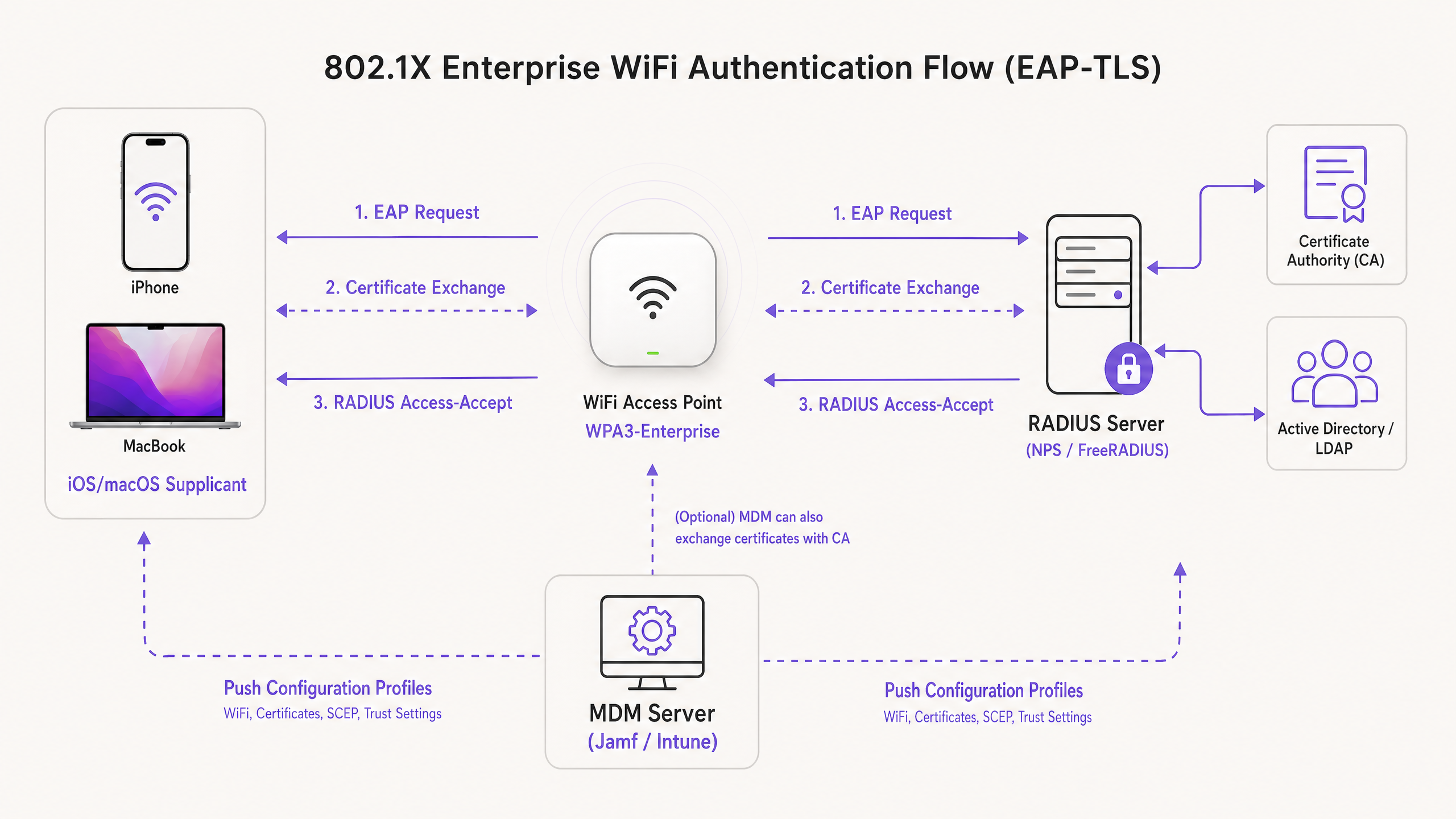
Ao implementar para ecossistemas Apple, o EAP-TLS é o padrão da indústria. Ao contrário de PEAP ou TTLS, que dependem de credenciais de utilizador que podem ser comprometidas, o EAP-TLS exige que tanto o servidor RADIUS como o dispositivo cliente apresentem certificados digitais. Este processo de autenticação mútua garante que o dispositivo está autorizado e que a rede à qual se conecta é legítima, impedindo ataques de APs não autorizados.
Perfis de Configuração da Apple
Os dispositivos Apple não suportam nativamente o registo automático de certificados sem gestão externa. Para implementar EAP-TLS em escala, as equipas de TI devem usar Perfis de Configuração (ficheiros .mobileconfig). Estes ficheiros XML contêm payloads específicos:
- WiFi Payload: Define o SSID, o tipo de segurança (WPA3-Enterprise) e os tipos de EAP suportados.
- Certificate Payloads: Entrega a Root CA e quaisquer Intermediate CAs necessárias para confiar no servidor RADIUS.
- SCEP/ACME Payload: Configura o protocolo usado para solicitar um certificado de cliente único à Autoridade de Certificação (CA).
Para mais informações sobre como proteger a sua infraestrutura de AP, consulte o nosso guia sobre Segurança de Access Point: O Seu Guia Empresarial 2026 .
Guia de Implementação
Passo 1: Preparação de PKI e RADIUS
Antes de configurar um MDM, a sua Public Key Infrastructure (PKI) e os servidores RADIUS (por exemplo, Cisco ISE, Aruba ClearPass ou FreeRADIUS) devem ser configurados para emitir e validar certificados. Certifique-se de que o certificado do seu servidor RADIUS é assinado por uma CA interna fidedigna ou uma CA pública, e que o SAN (Subject Alternative Name) corresponde ao FQDN do servidor.
Passo 2: Configuração do Payload MDM (Jamf / Intune)
A implementação via MDM é obrigatória para implementações empresariais escaláveis.
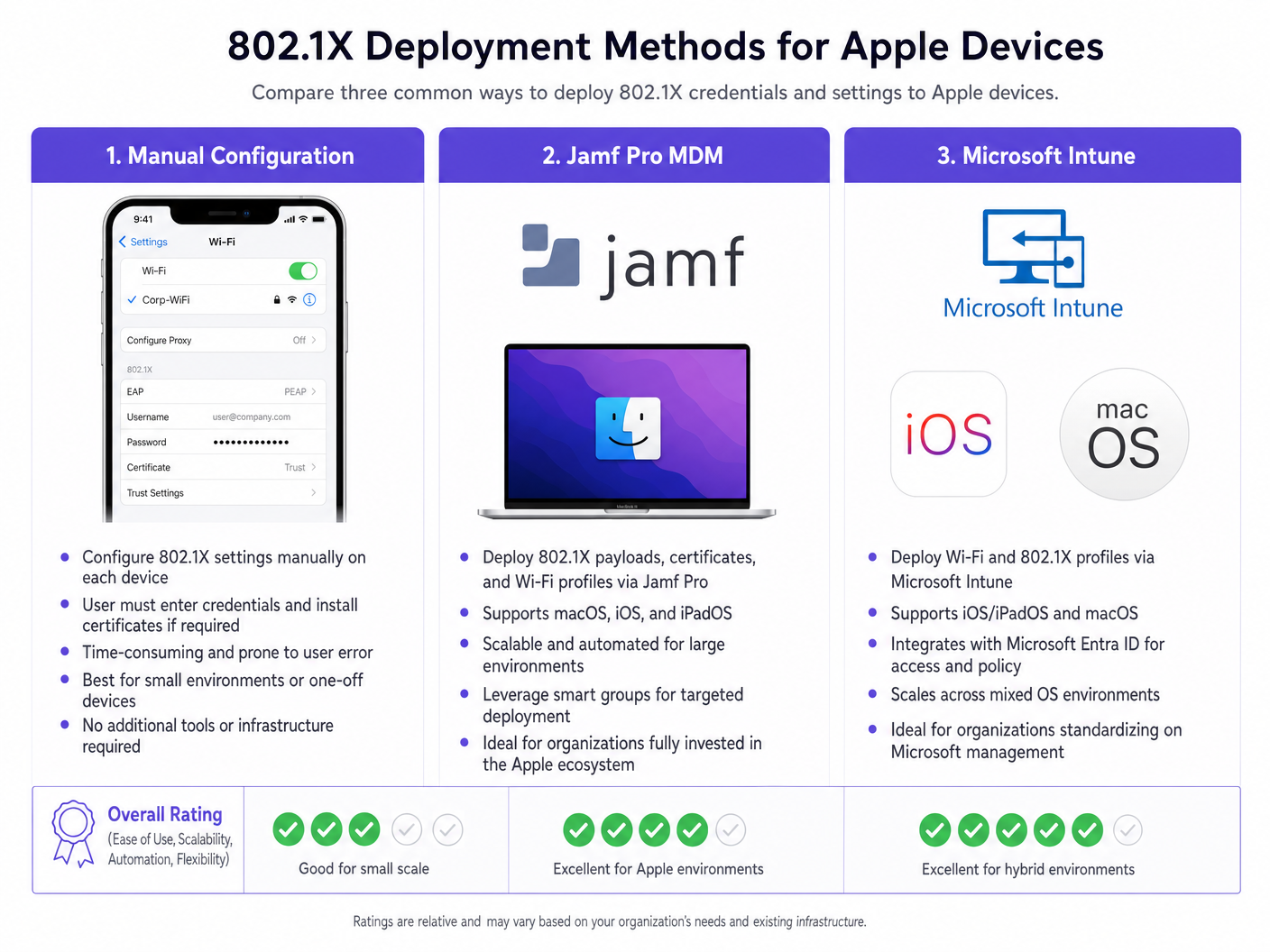
Criação do Perfil:
- Definições de Confiança: Isto é crítico. No payload WiFi, deve selecionar explicitamente o certificado da Root CA (implementado num payload separado dentro do mesmo perfil) como uma âncora de confiança para o servidor RADIUS. Além disso, especifique o Common Name (CN) ou SAN exato do servidor RADIUS no campo 'Nomes de Certificados de Servidor Fidedignos'. A falha em fazer isto resultará em iOS/macOS a solicitar ao utilizador que confie manualmente no certificado, quebrando o modelo de implementação zero-touch.
- Identity Certificate: Ligue o payload WiFi ao payload SCEP ou ACME para que o dispositivo saiba qual certificado apresentar durante o handshake EAP-TLS.
Passo 3: Segregação de Rede
Os dispositivos corporativos que autenticam via 802.1X devem ser colocados numa VLAN dedicada, completamente isolada de redes de acesso público. Para locais que utilizam o WiFi Analytics da Purple, os SSIDs de convidados funcionam em paralelo, garantindo que o tráfego corporativo e os dados de análise de convidados nunca se cruzam.
Para ambientes com frotas de dispositivos mistas, poderá também precisar de rever Como Configurar WiFi Empresarial em Dispositivos Android com EAP-TLS .
Melhores Práticas
- Enforce WPA3-Enterprise: Imponha WPA3 para todas as novas implementações para aproveitar a força criptográfica de 192 bits. Garanta a compatibilidade com dispositivos legados apenas se estritamente necessário para as operações de negócio.
- Automate Certificate Renewal: Configure payloads SCEP para renovar certificados de cliente automaticamente pelo menos 14 dias antes da expiração.
- Disable MAC Randomization: Para SSIDs corporativos enviados via MDM, desative 'Endereço Wi-Fi Privado' (iOS) para garantir um rastreamento consistente e a aplicação de políticas nas suas ferramentas de gestão de rede.
- Leverage DNS Security: Combine 802.1X com filtragem DNS robusta para evitar que dispositivos corporativos comprometidos alcancem servidores de comando e controlo. Consulte Proteja a Sua Rede com DNS e Segurança Robustos para detalhes de implementação.
Resolução de Problemas e Mitigação de Riscos
O Cenário de 'Falha Silenciosa'
O problema mais comum em implementações 802.1X em iOS/macOS é uma falha silenciosa em que o dispositivo se recusa a ligar sem solicitar ao utilizador. Isto quase sempre aponta para um problema de cadeia de confiança. Se o certificado do servidor RADIUS for renovado e as novas CAs Raiz/Intermédias não forem enviadas para os dispositivos antes da transição, os dispositivos Apple irão interromper o handshake EAP para proteger contra ataques man-in-the-middle.
Mitigação: Implemente um processo rigoroso de gestão de alterações para certificados RADIUS. Implemente sempre novas cadeias de CA via MDM pelo menos uma semana antes de atualizar o servidor RADIUS.
Tempos Limite de Registo SCEP
Se os dispositivos não conseguirem receber o seu certificado de cliente, verifique a palavra-passe de desafio SCEP e garanta que o servidor MDM pode comunicar com o servidor NDES/CA através das portas necessárias.
ROI e Impacto no Negócio
A implementação de 802.1X com EAP-TLS requer um investimento inicial em arquitetura PKI e MDM, mas o ROI é alcançado através da mitigação de riscos e eficiência operacional. Ao eliminar as reposições de palavra-passe e automatizar o onboarding de dispositivos, os pedidos de suporte de IT helpdesk relacionados com o acesso WiFi geralmente diminuem em 60-80%. Além disso, alcançar uma segmentação de rede rigorosa é frequentemente um requisito obrigatório para apólices de seguro cibernético e conformidade com PCI DSS, protegendo a organização de penalidades financeiras catastróficas em caso de violação.
Definições Principais
EAP-TLS
Extensible Authentication Protocol-Transport Layer Security. An authentication framework requiring digital certificates on both the client and the authentication server.
Considered the most secure 802.1X method, eliminating the need for passwords and protecting against credential theft.
Supplicant
The end-user device (e.g., iPhone, MacBook) requesting access to the network.
The supplicant must be configured via MDM to present the correct certificate and trust the correct server during the 802.1X handshake.
Authenticator
The network device, typically a WiFi Access Point or switch, that blocks traffic until the supplicant is authenticated.
The AP acts as a middleman, passing EAP messages between the supplicant and the RADIUS server.
RADIUS Server
Remote Authentication Dial-In User Service. The server that verifies the supplicant's credentials (certificates) and authorizes access.
The core decision engine for enterprise network access, often integrated with Active Directory and PKI.
MDM Configuration Profile
An XML file (.mobileconfig) pushed to Apple devices to enforce settings, deploy certificates, and configure network access.
The essential delivery mechanism for achieving zero-touch 802.1X deployments on iOS and macOS.
SCEP
Simple Certificate Enrollment Protocol. A protocol used by MDM systems to automatically request and install certificates on devices.
Crucial for automating the lifecycle of the client certificates required for EAP-TLS.
SAN (Subject Alternative Name)
An extension to an X.509 certificate that allows multiple values (like FQDNs or IP addresses) to be associated with the certificate.
Apple devices strictly check the SAN of the RADIUS server certificate against the trusted names defined in their configuration profile.
WPA3-Enterprise
The latest Wi-Fi security certification requiring 192-bit cryptographic strength and mandatory Protected Management Frames (PMF).
The recommended security standard for new enterprise deployments, offering significant protection against eavesdropping.
Exemplos Práticos
A global retail chain is deploying corporate iPads to 500 store managers. They currently use a hidden SSID with a PSK, which has been leaked. They need to secure the network using Microsoft Intune without requiring managers to manually enter credentials.
- Deploy an Enterprise CA and configure NDES/SCEP integration with Intune.
- Create a Trusted Certificate profile in Intune containing the Root CA for the RADIUS server.
- Create a SCEP Certificate profile targeting the iPads to issue unique client certificates.
- Create a Wi-Fi profile in Intune. Set the security type to WPA2/WPA3-Enterprise, EAP type to EAP-TLS. Link the SCEP profile as the client certificate and the Trusted Certificate profile for server validation. Specify the RADIUS server names.
- Push the profiles to a test group, verify connectivity, then roll out to all 500 devices.
A university is updating its network infrastructure and needs to ensure that faculty MacBooks managed by Jamf Pro transition seamlessly to a new RADIUS server cluster.
- Export the Root and Intermediate certificates of the new RADIUS server cluster.
- In Jamf Pro, update the existing Configuration Profile (or create a transition profile) to include the new CA certificates alongside the old ones.
- Update the 'Trusted Server Certificate Names' in the WiFi payload to include the FQDNs of the new RADIUS servers.
- Push the updated profile to all MacBooks.
- Once the profile is confirmed installed across the fleet, cut over the network infrastructure to the new RADIUS servers.
Perguntas de Prática
Q1. Your organization is rolling out WPA3-Enterprise to all corporate MacBooks. During testing, users report that their devices are repeatedly prompting them to 'Verify Certificate' for the RADIUS server, even though the profile was pushed via Jamf. What is the most likely configuration error?
Dica: Consider what specific information the Apple device needs to trust the server silently.
Ver resposta modelo
The Configuration Profile is missing the explicit trust mapping. While the Root CA might be installed on the device, the WiFi payload must explicitly list the RADIUS server's FQDN in the 'Trusted Server Certificate Names' field, and the Root CA must be selected as the trusted anchor for that specific WiFi network. Without this, macOS will prompt the user to manually verify and trust the certificate.
Q2. A hotel chain wants to secure its back-of-house operations (staff iPads) using 802.1X, while continuing to offer public access via a captive portal. How should the network architecture be designed to support both requirements securely?
Dica: Think about logical separation at the access point and switch level.
Ver resposta modelo
The architecture should utilize two distinct SSIDs broadcast from the same Access Points. The back-of-house SSID will be configured for WPA3-Enterprise (802.1X), authenticating staff iPads via EAP-TLS and placing them on a secure, internal VLAN. The public SSID will be open, redirecting users to the Purple Guest WiFi captive portal, and dropping authenticated guests onto a heavily restricted, internet-only VLAN. This ensures complete segregation of corporate and guest traffic.
Q3. You are migrating your RADIUS infrastructure from an on-premise Cisco ISE deployment to a cloud-based RADIUS provider. The new provider uses a different public Certificate Authority. What is the critical first step before changing the RADIUS configuration on the Access Points?
Dica: Consider the order of operations to prevent a complete loss of connectivity for the client devices.
Ver resposta modelo
The critical first step is to push an updated MDM Configuration Profile to all Apple devices that includes the Root and Intermediate certificates of the new public CA used by the cloud RADIUS provider. This trust chain must be established on the supplicants before the APs are cut over to the new RADIUS servers; otherwise, the devices will reject the new server certificates and fail to connect.
Continue a ler esta série
O Que É a Autenticação por Endereço MAC? Quando Usá-la e Quando Evitá-la
Este guia de referência técnica abrangente aborda a autenticação por endereço MAC em ambientes WiFi empresariais — como a autenticação MAC baseada em RADIUS funciona na Camada 2, as suas vulnerabilidades de segurança inerentes (incluindo a falsificação de MAC e o impacto da aleatorização de MAC ao nível do SO), e os contextos operacionais precisos onde continua a ser uma ferramenta válida para gerir dispositivos IoT e sem interface. Fornece orientação prática de implementação para gestores de TI e arquitetos de rede em hotelaria, retalho, saúde e locais do setor público, com exemplos práticos do mundo real, estruturas de decisão e contexto de integração para a plataforma de guest WiFi e análise da Purple.
Como Configurar WiFi Empresarial em Dispositivos Android com EAP-TLS
Este guia de referência técnica fornece aos líderes de TI seniores um plano abrangente para implementar a autenticação 802.1X EAP-TLS em dispositivos Android. Abrange a mecânica arquitetónica, estratégias de implementação manual e impulsionadas por MDM, e metodologias de resolução de problemas necessárias para proteger redes sem fios empresariais.
Como Utilizar o Microsoft Intune para Enviar Certificados WiFi para Dispositivos
Uma referência técnica abrangente para líderes de TI sobre a implementação de certificados WiFi 802.1X via Microsoft Intune. Abrange a arquitetura SCEP vs PKCS, passos de implementação, mapeamento de conformidade e cenários de implementação reais para ambientes empresariais.