
Como Configurar WPA2-Enterprise em Plataformas Comuns de Pontos de Acesso (Cisco, Aruba, Ubiquiti)
Este guia de referência técnica fornece a profissionais de TI seniores e arquitetos de rede um manual definitivo e específico do fornecedor para implementar WPA2-Enterprise em plataformas Cisco, Aruba e Ubiquiti. Detalha a arquitetura, integração RADIUS, requisitos de conformidade e cenários de implementação reais em ambientes empresariais e de eventos.
Ouça este guia
Ver transcrição do podcast
Resumo Executivo
Implementar WPA2-Enterprise já não é uma atualização de segurança opcional; é a base fundamental para qualquer rede sem fios empresarial. Para gestores de TI e arquitetos de rede que operam em ambientes de hotelaria, retalho e setor público, a transição de chaves pré-partilhadas para autenticação 802.1X é impulsionada por mandatos de conformidade rigorosos, incluindo PCI DSS e GDPR. Este guia de referência técnica fornece passos de configuração acionáveis e específicos da plataforma para os três fornecedores dominantes de pontos de acesso: Cisco, Aruba e Ubiquiti.
Ao fazer a transição para WPA2-Enterprise, as organizações eliminam os riscos associados a credenciais partilhadas, obtêm registos de auditoria granulares por sessão e permitem a segmentação dinâmica da rede. Quando implementada corretamente, esta arquitetura não só protege o perímetro corporativo, mas também se integra perfeitamente com redes de visitantes geridas por uma plataforma abrangente de Guest WiFi . As secções seguintes detalham a arquitetura técnica, os passos de implementação e as estratégias de mitigação de riscos necessárias para um lançamento bem-sucedido.
Análise Técnica Detalhada
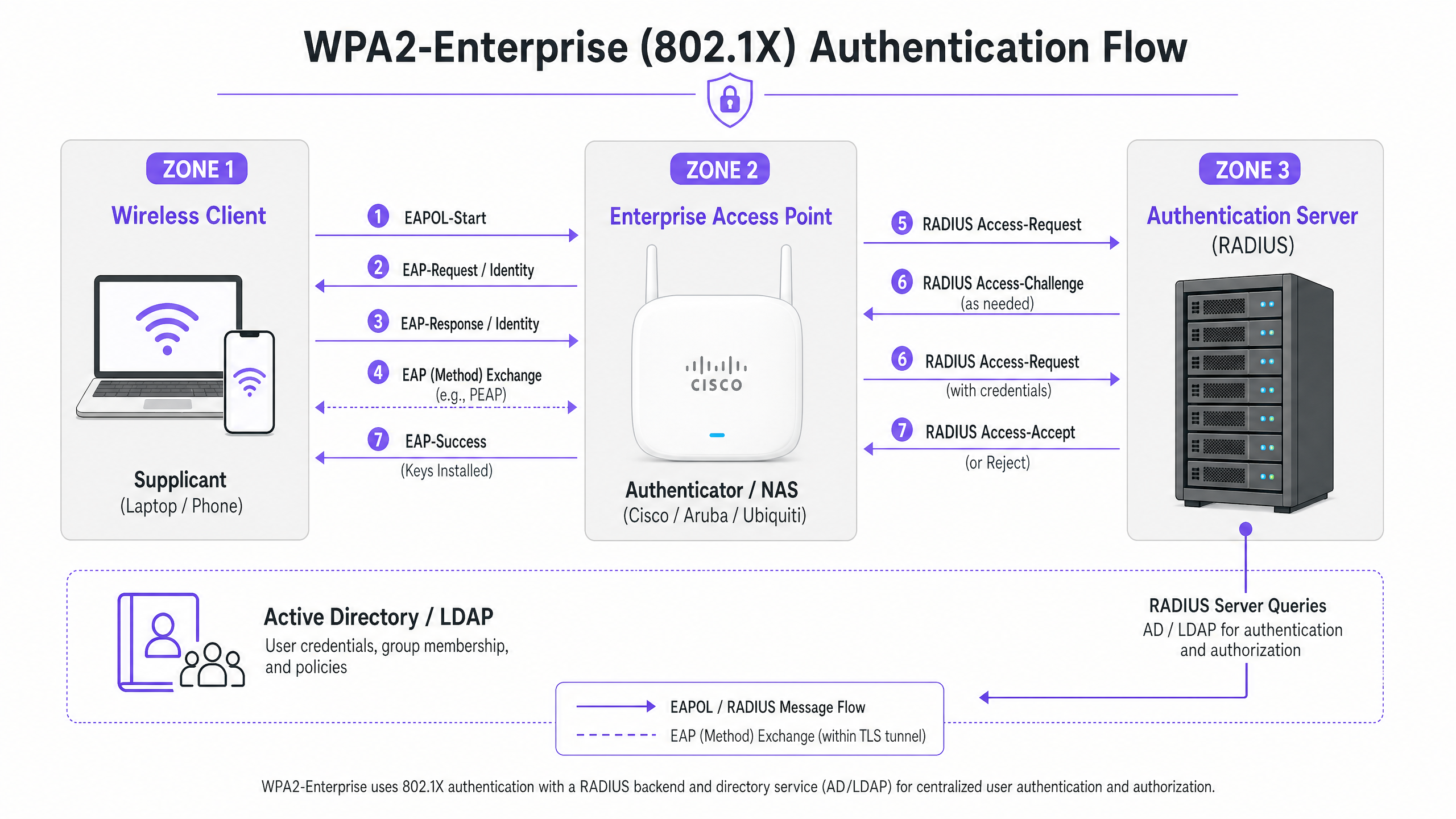
WPA2-Enterprise baseia-se no padrão IEEE 802.1X para fornecer controlo de acesso à rede baseado em portas. Ao contrário do WPA2-Personal, que utiliza uma Chave Pré-Partilhada (PSK) estática, o WPA2-Enterprise exige que cada suplicante (dispositivo cliente) se autentique individualmente contra um Servidor de Autenticação externo (tipicamente um servidor RADIUS) antes que o acesso à rede seja concedido.
A arquitetura consiste em três componentes principais:
- O Suplicante: O dispositivo cliente que tenta ligar-se à rede.
- O Autenticador: O ponto de acesso empresarial ou controlador de LAN sem fios (por exemplo, Cisco WLC, Aruba Mobility Controller) que facilita o processo de autenticação.
- O Servidor de Autenticação: O servidor RADIUS de backend (por exemplo, Cisco ISE, Aruba ClearPass, Windows NPS) que valida credenciais contra um serviço de diretório como o Active Directory ou LDAP.
O Processo de Troca EAP
O processo de autenticação utiliza o Extensible Authentication Protocol (EAP) encapsulado sobre LAN (EAPOL). O autenticador atua puramente como um proxy de passagem durante a fase inicial. Assim que o servidor RADIUS valida as credenciais, ele retorna uma mensagem Access-Accept ao autenticador, que então deriva as chaves de encriptação necessárias para proteger a sessão sem fios.
A escolha do método EAP é crítica. PEAP-MSCHAPv2 é o método mais amplamente implementado, pois suporta a autenticação de palavra-passe do Active Directory legada, ao mesmo tempo que protege a troca dentro de um túnel TLS estabelecido pelo certificado do servidor. No entanto, para máxima segurança, EAP-TLS é recomendado. EAP-TLS requer autenticação mútua de certificado — tanto o servidor quanto o cliente devem apresentar certificados válidos — o que mitiga o roubo de credenciais, mas requer uma robusta Public Key Infrastructure (PKI) ou solução de Mobile Device Management (MDM) para a distribuição de certificados.
Guia de Implementação
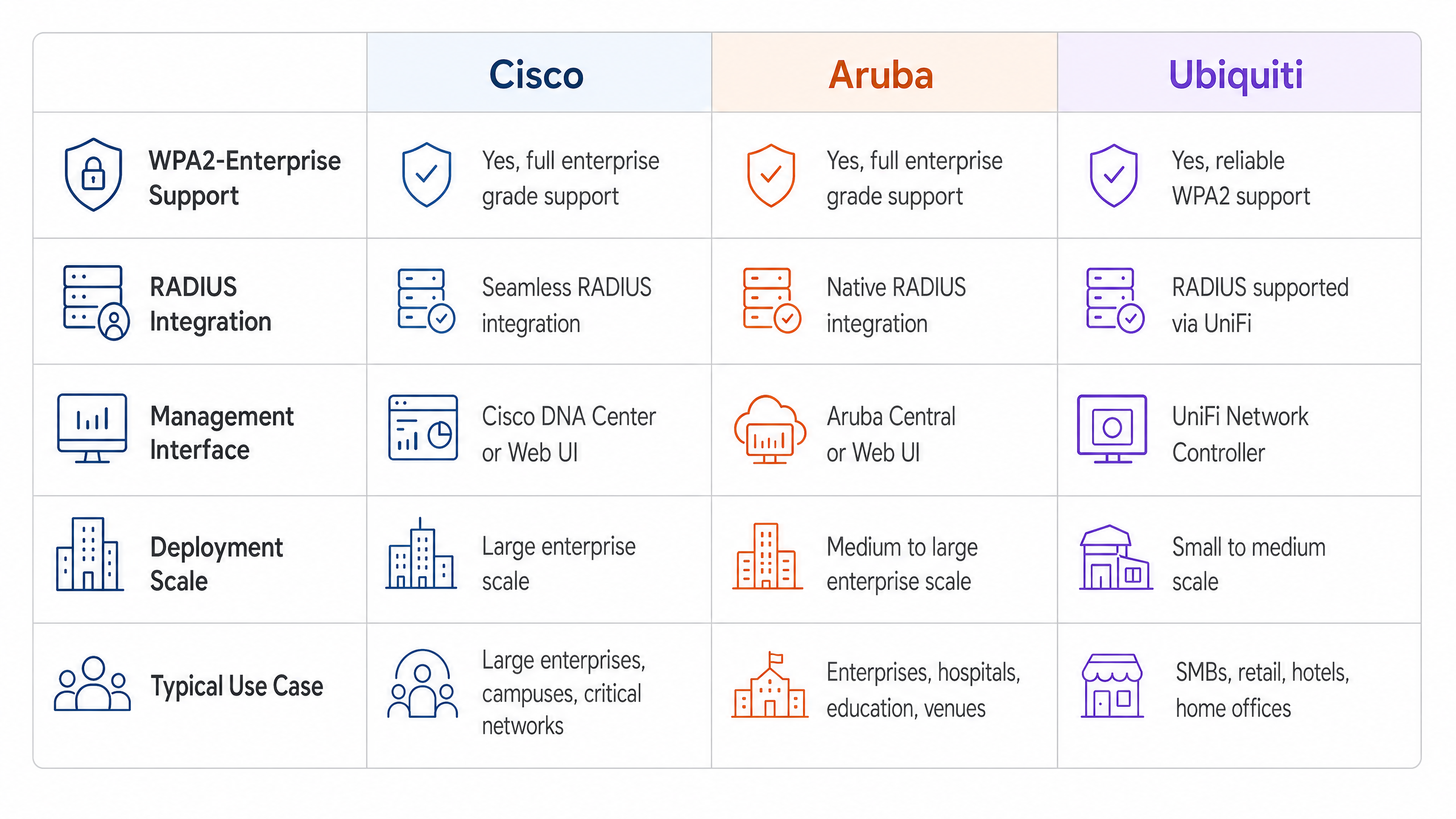
Os princípios fundamentais da configuração de WPA2-Enterprise são consistentes entre os fornecedores, mas a execução varia com base na interface de gestão e no ecossistema.
Cisco (Catalyst e Meraki)
Os ambientes Cisco tipicamente escalam de implementações em campus a redes empresariais distribuídas.
Cisco Catalyst (WLC/DNA Center):
- Definir Servidores RADIUS: Navegue até ao separador Segurança, selecione AAA e configure os servidores RADIUS de Autenticação e Contabilidade primários e secundários. Certifique-se de que o shared secret corresponde à configuração do servidor RADIUS.
- Criar Perfil WLAN: No separador WLANs, crie um novo perfil.
- Configurar Políticas de Segurança: Defina a Segurança da Camada 2 para WPA+WPA2 e ative 802.1X como o método Authentication Key Management (AKM).
- Associar Servidores AAA: Mapeie os servidores RADIUS previamente definidos ao perfil WLAN. Ative 'AAA Override' se for necessária a atribuição dinâmica de VLAN.
Cisco Meraki:
- Configuração de SSID: No Meraki Dashboard, navegue até Wireless > SSIDs e selecione a rede de destino.
- Controlo de Acesso: Defina o requisito de associação para 'WPA2-Enterprise com o meu servidor RADIUS'.
- Definições RADIUS: Insira os endereços IP, porta de autenticação (tipicamente 1812), porta de contabilidade (1813) e shared secrets para a sua infraestrutura RADIUS. O dashboard da Meraki inclui uma ferramenta de teste integrada para verificar a conectividade RADIUS antes da implementação.
Aruba Networks
Aruba é a plataforma dominante em Hotelaria e ensino superior, alavancando fortemente o seu ClearPass Policy Manager para controlo de acesso avançado.
- Definir Perfil AAA: No Aruba Central ou na UI do Mobility Controller, crie um novo perfil AAA. Este perfil dita como a autenticação é tratada.
- Configurar Grupo de Servidores RADIUS: Adicione os seus servidores RADIUS a um grupo de servidores, especificando regras de failover e valores de timeout. Anexe este grupo ao perfil AAA.
- Configuração de Virtual AP: Crie ou modifique um perfil de Virtual AP (SSID). Defina o tipo de segurança para WPA2-Enterprise.
- Anexar Perfis: Associe o perfil AAA ao perfil Virtual AP. Se estiver a usar ClearPass, certifique-se de que a porta RADIUS CoA (Change of Authorization) (3799) é permitida através de quaisquer firewalls intermédias para permitir a aplicação dinâmica de políticas.
Ubiquiti (UniFi)
Ubiquiti oferece uma solução económica para ambientes de Retalho e SMB através do UniFi Network Controller.
- **Perfil RADIUS 1. Criação: Navegue para Definições > Perfis > RADIUS. Crie um novo perfil com o endereço IP, portas (1812/1813) e segredo partilhado do seu servidor RADIUS externo.
- Configuração de SSID: Vá a Definições > WiFi e crie uma nova rede sem fios.
- Definições de Segurança: Selecione 'WPA2 Enterprise' como protocolo de segurança e anexe o perfil RADIUS recém-criado.
- Nota sobre a Infraestrutura RADIUS: Ao contrário dos controladores empresariais que podem oferecer RADIUS localizável e resiliente, o UniFi depende fortemente de servidores externos (por exemplo, FreeRADIUS, Windows NPS). Garanta conectividade fiável entre os APs UniFi e o backend RADIUS.
Melhores Práticas
Para garantir uma implementação resiliente e segura, os arquitetos de rede devem aderir a várias melhores práticas críticas:
- Impor Validação de Certificados: Os dispositivos cliente devem ser explicitamente configurados para validar o certificado do servidor RADIUS contra uma Autoridade de Certificação (CA) fidedigna. Não o fazer expõe a rede a ataques 'Evil Twin', onde pontos de acesso não autorizados recolhem credenciais de utilizador.
- Implementar Redundância RADIUS: O servidor RADIUS está no caminho crítico para o acesso à rede. Configure sempre servidores RADIUS primários e secundários. Em ambientes distribuídos, considere soluções RADIUS alojadas na nuvem para alta disponibilidade.
- Aproveitar a Atribuição Dinâmica de VLAN: Utilize atributos RADIUS (por exemplo,
Tunnel-Pvt-Group-ID) para atribuir dinamicamente utilizadores a VLANs específicas com base na sua adesão a grupos do Active Directory. Isto impõe a segmentação da rede sem difundir múltiplos SSIDs. - Ativar Contabilidade RADIUS: Não configure apenas a autenticação. A contabilidade RADIUS (Porta 1813) é obrigatória para gerar os registos de auditoria exigidos pelos frameworks de conformidade.
- Proteger a Borda da Rede: Saiba mais sobre como proteger a sua infraestrutura no nosso guia sobre como Proteger a Sua Rede com DNS e Segurança Fortes .
Resolução de Problemas e Mitigação de Riscos
Mesmo com um planeamento cuidadoso, as implementações podem encontrar problemas. Os modos de falha comuns incluem:
- Incompatibilidades de Segredo Partilhado: Um simples erro de digitação no segredo partilhado do RADIUS resultará em falhas de autenticação silenciosas. Verifique os segredos tanto no autenticador quanto no servidor RADIUS.
- Erros de Sincronização de Tempo: A validação de certificados requer uma cronometragem precisa. Garanta que todos os APs, controladores e servidores RADIUS estejam sincronizados através de uma fonte NTP fiável.
- Firewall a Bloquear Tráfego RADIUS: Garanta que as portas UDP 1812 (Autenticação) e 1813 (Contabilidade) estejam abertas entre os APs/Controladores e o servidor RADIUS. Se estiver a usar CoA, garanta que a UDP 3799 esteja aberta.
- Má Configuração do Suplicante Cliente: O problema mais comum é o dispositivo cliente não estar configurado para confiar na CA que emitiu o certificado do servidor RADIUS. Use MDM ou Política de Grupo para enviar os perfis sem fios corretos para os dispositivos corporativos.
Para uma compreensão mais ampla dos protocolos de autenticação, reveja Como Configurar a Autenticação WiFi 802.1X: Um Guia Passo a Passo .
ROI e Impacto no Negócio
A transição para WPA2-Enterprise oferece um valor de negócio significativo para além das melhorias de segurança brutas.
- Mitigação de Riscos: A eliminação de palavras-passe partilhadas reduz drasticamente a superfície de ataque e o risco de uma violação de dados, que pode acarretar penalidades financeiras e reputacionais severas.
- Eficiência Operacional: A integração da autenticação WiFi com provedores de identidade existentes (como o Active Directory) automatiza o onboarding e o offboarding de funcionários. Quando um funcionário sai, desativar a sua conta AD revoga instantaneamente o seu acesso WiFi.
- Facilitação da Conformidade: Registos de auditoria granulares e autenticação por utilizador são pré-requisitos para a conformidade com PCI DSS e ISO 27001.
- Infraestrutura Unificada: Ao usar a atribuição dinâmica de VLAN, os locais podem executar tráfego corporativo, de back-office e IoT de forma segura sobre o mesmo hardware físico usado para acesso de convidados. A rede de convidados pode então ser monetizada e analisada usando uma solução dedicada de WiFi Analytics , maximizando o retorno sobre o investimento em hardware. Garanta que tem a largura de banda necessária ao compreender O Que É uma Linha Dedicada? Internet Empresarial Dedicada .
Definições Principais
WPA2-Enterprise
A security protocol for wireless networks that uses IEEE 802.1X to provide per-user authentication via an external server, rather than a single shared password.
The mandatory standard for securing corporate and operational WiFi networks in enterprise environments.
802.1X
An IEEE standard for port-based network access control that provides an authentication mechanism to devices wishing to attach to a LAN or WLAN.
The underlying framework that makes WPA2-Enterprise work.
RADIUS
Remote Authentication Dial-In User Service; a networking protocol that provides centralized Authentication, Authorization, and Accounting (AAA) management.
The server component that validates user credentials against a database like Active Directory.
Supplicant
The software client on a device (laptop, smartphone) that communicates with the authenticator to request network access.
The endpoint that must be configured with the correct EAP settings and certificate trust.
Authenticator
The network device (Access Point or Switch) that facilitates the authentication process by passing messages between the supplicant and the authentication server.
The Cisco, Aruba, or Ubiquiti hardware managed by the IT team.
EAP (Extensible Authentication Protocol)
An authentication framework frequently used in wireless networks and point-to-point connections, supporting multiple authentication methods.
The protocol used to encapsulate the credential exchange.
PEAP-MSCHAPv2
An EAP method that encapsulates the MSCHAPv2 password exchange within a secure TLS tunnel established by the server's certificate.
The most common deployment method as it balances security with the convenience of using standard AD passwords.
Dynamic VLAN Assignment
The process where a RADIUS server instructs the access point to place an authenticated user onto a specific VLAN based on their identity or group membership.
Crucial for network segmentation, allowing different user types to share the same physical APs securely.
Exemplos Práticos
A 200-room hotel needs to deploy secure WiFi for its back-of-house staff (housekeeping, management) using existing Aruba access points, while keeping the staff traffic strictly separated from the guest network.
The IT team configures a single 'Hotel_Staff' SSID using WPA2-Enterprise. They integrate Aruba ClearPass with the hotel's Active Directory. In ClearPass, they configure enforcement policies: if a user is in the 'Management' AD group, ClearPass returns a RADIUS attribute assigning them to VLAN 10 (Management Network). If the user is in the 'Housekeeping' group, they are assigned to VLAN 20 (Operations Network). The APs are configured to enforce these dynamic VLAN assignments.
A national retail chain with 50 locations uses Cisco Meraki. They need to secure their point-of-sale (POS) terminals over WiFi to meet PCI DSS compliance, replacing their old WPA2-Personal setup.
The network architect deploys a cloud-hosted RADIUS service to avoid deploying local servers at each store. In the Meraki dashboard, they configure the 'Retail_POS' SSID for WPA2-Enterprise and point it to the cloud RADIUS IPs. They generate unique client certificates for each POS terminal via their MDM platform and configure the RADIUS server to require EAP-TLS. The Meraki APs are configured to send both RADIUS Authentication and Accounting data to the cloud service.
Perguntas de Prática
Q1. Your organisation is deploying WPA2-Enterprise using Ubiquiti UniFi access points. During testing, clients can connect successfully, but the compliance team notes that there are no logs of user session durations or data usage in the central logging system. What is the most likely configuration omission?
Dica: Authentication grants access, but another process tracks usage.
Ver resposta modelo
The RADIUS Accounting port (1813) has not been configured or is being blocked by a firewall. While Authentication (port 1812) is working, Accounting must be explicitly enabled to generate session audit trails.
Q2. A user reports they cannot connect to the corporate WPA2-Enterprise network. You check the Cisco WLC logs and see the AP is passing the EAP-Request, but the RADIUS server logs show an 'Access-Reject' due to 'Unknown CA'. What needs to be fixed?
Dica: Think about the trust relationship established during the TLS tunnel setup.
Ver resposta modelo
The client device's supplicant is not configured to trust the Certificate Authority (CA) that issued the RADIUS server's certificate. The client is terminating the connection to prevent a potential Evil Twin attack. The CA certificate must be pushed to the client device.
Q3. You are designing a network for a stadium. You need to support corporate staff, ticketing terminals, and guest WiFi. How should you architect the SSIDs to minimize RF interference while maintaining security?
Dica: Avoid broadcasting an SSID for every single use case.
Ver resposta modelo
Deploy a maximum of two SSIDs. One SSID for Guests using a captive portal (like Purple). A second SSID for all corporate operations using WPA2-Enterprise. Use Dynamic VLAN Assignment via the RADIUS server to segment the corporate staff onto one VLAN and the ticketing terminals onto another based on their authentication credentials.
Continue a ler esta série
O Que É a Autenticação por Endereço MAC? Quando Usá-la e Quando Evitá-la
Este guia de referência técnica abrangente aborda a autenticação por endereço MAC em ambientes WiFi empresariais — como a autenticação MAC baseada em RADIUS funciona na Camada 2, as suas vulnerabilidades de segurança inerentes (incluindo a falsificação de MAC e o impacto da aleatorização de MAC ao nível do SO), e os contextos operacionais precisos onde continua a ser uma ferramenta válida para gerir dispositivos IoT e sem interface. Fornece orientação prática de implementação para gestores de TI e arquitetos de rede em hotelaria, retalho, saúde e locais do setor público, com exemplos práticos do mundo real, estruturas de decisão e contexto de integração para a plataforma de guest WiFi e análise da Purple.
Como Configurar WiFi Empresarial em iOS e macOS com 802.1X
Este guia abrangente fornece aos líderes de TI seniores passos acionáveis para implementar WiFi empresarial 802.1X em dispositivos iOS e macOS. Abrange autenticação baseada em certificados (EAP-TLS), perfis de configuração MDM e integração de arquitetura para proteger redes corporativas, ao mesmo tempo que apoia iniciativas BYOD.
Como Configurar WiFi Empresarial em Dispositivos Android com EAP-TLS
Este guia de referência técnica fornece aos líderes de TI seniores um plano abrangente para implementar a autenticação 802.1X EAP-TLS em dispositivos Android. Abrange a mecânica arquitetónica, estratégias de implementação manual e impulsionadas por MDM, e metodologias de resolução de problemas necessárias para proteger redes sem fios empresariais.