
Como Corrigir WiFi Lento Sem Atualizar o Seu Plano de Internet
Um guia de referência técnica abrangente para gestores de TI e arquitetos de rede sobre como otimizar o desempenho de WiFi empresarial sem aumentar a largura de banda do ISP. Abrange a otimização de RF, gestão da densidade de clientes, implementação de QoS e como aproveitar a análise de WiFi para diagnosticar e resolver gargalos.
Ouça este guia
Ver transcrição do podcast
Resumo Executivo
Para CTOs e diretores de operações de espaços que gerem ambientes de alta densidade em Hotelaria , Retalho e Transportes , o WiFi lento é um risco crítico para a experiência do cliente e a eficiência operacional. O instinto imediato é muitas vezes atualizar a ligação ISP subjacente. No entanto, na vastíssima maioria das implementações empresariais, a 'tubagem' da internet raramente é o gargalo. A causa raiz do baixo desempenho reside tipicamente no ambiente de radiofrequência (RF) local, na configuração subótima do ponto de acesso (AP) ou na gestão inadequada da densidade de clientes.
Este guia fornece uma estrutura técnica, neutra em relação a fornecedores, para diagnosticar e resolver gargalos de rede locais. Ao implementar um planeamento de canais adequado, aplicar políticas de Qualidade de Serviço (QoS), gerir o comportamento de roaming e aproveitar as Análises de WiFi , as equipas de TI podem melhorar drasticamente o débito e reduzir a latência sem incorrer em custos mensais adicionais de ISP. Esta abordagem não só prolonga o ciclo de vida do hardware existente, como também garante a conformidade com os padrões de proteção de dados ao implementar soluções de WiFi para Convidados .
Análise Técnica Detalhada
Interferência de RF e Sobreposição de Canais
A causa mais comum de WiFi lento é a interferência de co-canal (CCI). O padrão IEEE 802.11 dita um protocolo de 'ouvir antes de falar' (CSMA/CA). Quando múltiplos APs operam nos mesmos canais ou em canais sobrepostos, devem esperar que o tempo de antena esteja livre antes de transmitir. Esta contenção reduz drasticamente o débito agregado.
Na banda de 2.4 GHz, apenas os canais 1, 6 e 11 não se sobrepõem. Confiar em algoritmos de atribuição automática de canais predefinidos resulta frequentemente em seleções de canais sobrepostos, especialmente em implementações densas.
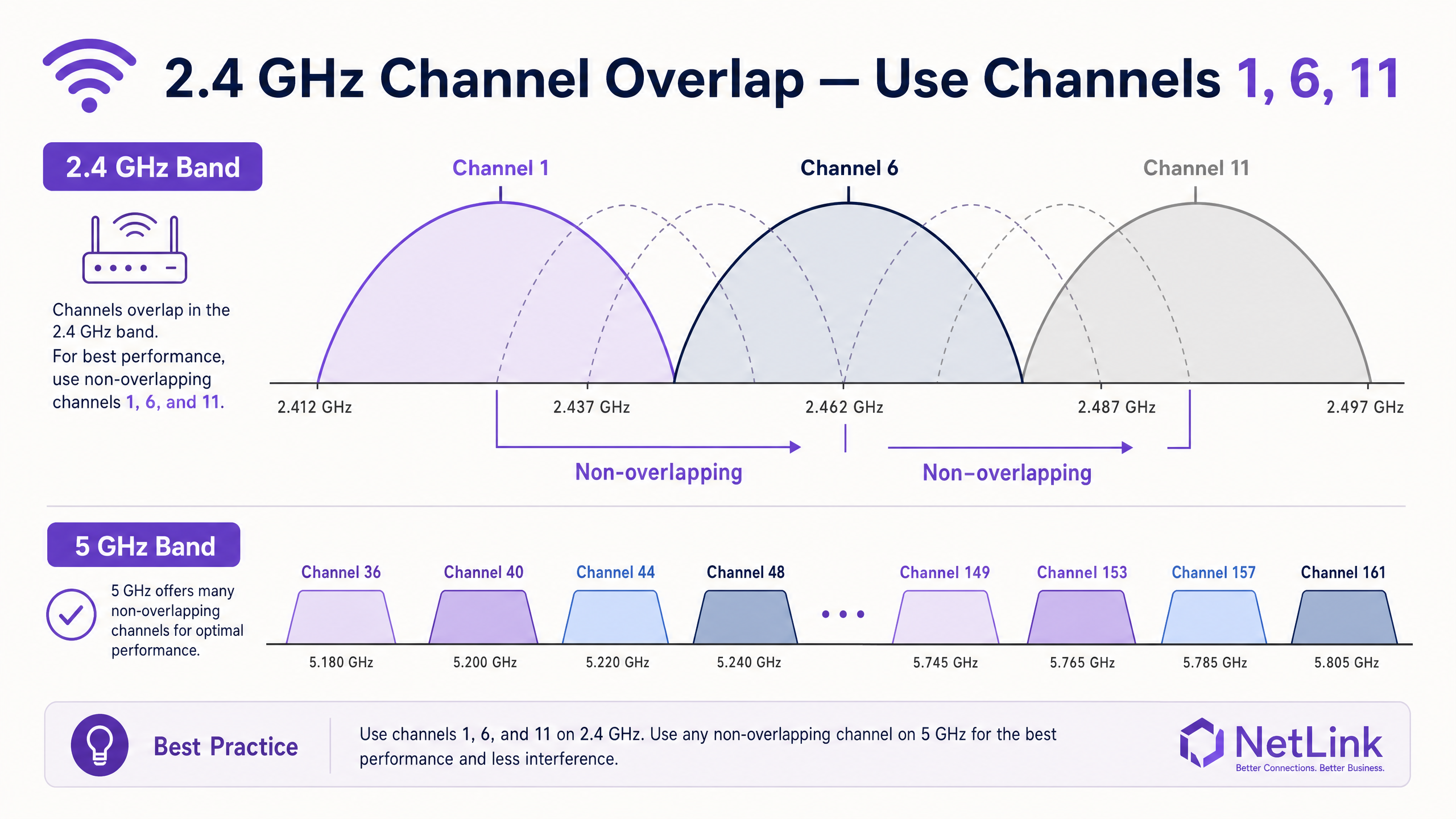
Migrar os clientes para a banda de 5 GHz é essencial. O espectro de 5 GHz oferece até 24 canais não sobrepostos (incluindo canais DFS no Reino Unido), reduzindo significativamente a CCI. Os controladores empresariais devem ser configurados com 'band steering' agressivo para forçar os clientes capazes para o rádio de 5 GHz.
Densidade de Clientes e Equidade de Tempo de Antena
O WiFi é um meio partilhado. Um AP classificado para um débito agregado de 1.2 Gbps terá dificuldades se for forçado a servir 100 clientes concorrentes. Além disso, clientes legados que operam a baixas taxas de dados (por exemplo, 1 Mbps ou 2 Mbps) consomem uma quantidade desproporcionada de tempo de antena para transmitir a mesma quantidade de dados que um cliente Wi-Fi 6 moderno.
Para resolver isto, os administradores devem desativar as taxas de dados legadas. Ao definir a taxa de dados mínima obrigatória para 12 Mbps ou 24 Mbps, os clientes legados são forçados a associar-se a uma taxa mais alta ou a desconectar-se, libertando tempo de antena para dispositivos mais rápidos. Este princípio de equidade de tempo de antena é crítico em ambientes de alta densidade, como centros de conferências e estádios.
Guia de Implementação
1. Linha de Base e Auditoria
Antes de implementar alterações, estabeleça uma linha de base de desempenho. Utilize As Melhores Ferramentas de Análise de WiFi para Resolução de Problemas de Sobreposição de Canais para mapear o ambiente de RF atual. Documente a utilização do canal, a relação sinal/ruído (SNR) e a colocação existente dos APs.
2. Otimização de RF
- Atribuição Estática de Canais: Atribua manualmente canais não sobrepostos (1, 6, 11) na banda de 2.4 GHz com base no seu levantamento do local.
- Redução da Potência de Transmissão: Em implementações densas, reduza a potência de transmissão (Tx) dos rádios de 2.4 GHz. Isto diminui a célula de cobertura de cada AP, reduzindo a sobreposição e a CCI. Os rádios de 5 GHz podem tipicamente operar com uma potência de Tx mais alta devido à maior atenuação dos sinais de 5 GHz.
- Desativar Taxas Legadas: Remova o suporte para taxas 802.11b (1, 2, 5.5, 11 Mbps) para melhorar a eficiência geral da célula.
3. Priorização de Tráfego (QoS)
Implemente Qualidade de Serviço (QoS) para proteger aplicações sensíveis à latência. Sem QoS, um único utilizador a descarregar um ficheiro grande pode perturbar chamadas VoIP ou transações POS em todo o BSSID.
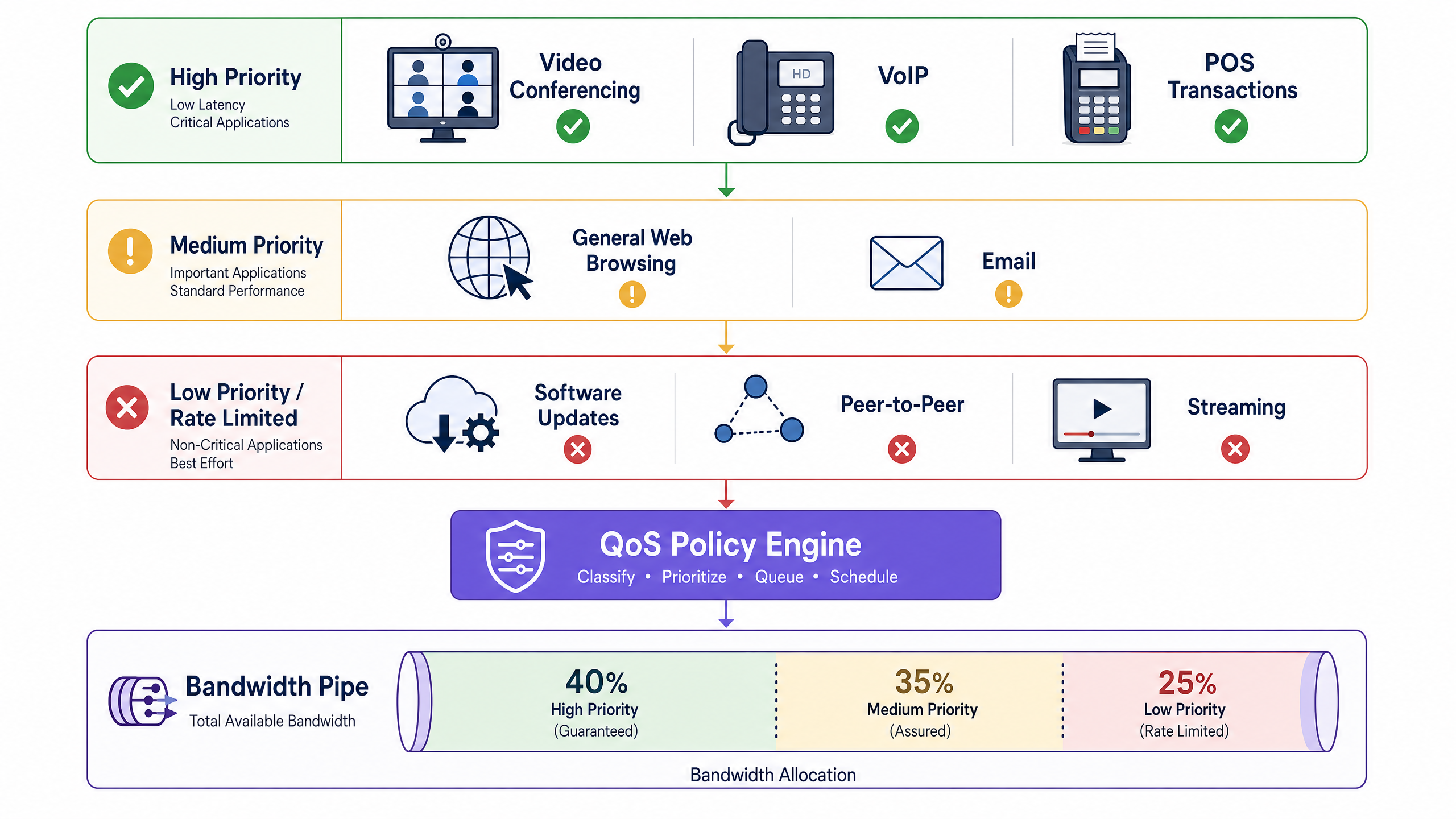
Configure as marcações DSCP (Differentiated Services Code Point) ao nível do controlador para classificar o tráfego em três níveis:
- Prioridade Alta (Garantida): VoIP, Videoconferência, sistemas POS.
- Prioridade Média (Assegurada): Navegação web geral, email, aplicações corporativas.
- Prioridade Baixa (Taxa Limitada): Peer-to-peer, atualizações de software, grandes downloads de multimédia.
4. Otimização de Roaming
Clientes 'pegajosos' — dispositivos que se mantêm ligados a um sinal de AP fraco em vez de fazerem roaming para um AP mais próximo e mais forte — degradam o desempenho de toda a célula. Ative o conjunto 802.11 RRM (802.11r, 802.11k e 802.11v) no seu controlador. Estes padrões facilitam a transição rápida de BSS e fornecem aos clientes relatórios de vizinhança, incentivando-os a fazer roaming proativamente.
Melhores Práticas
- Racionalização de SSID: Cada SSID transmitido incorre em sobrecarga de quadros de gestão (beacons). Limite o número de SSIDs transmitidos a um máximo de três ou quatro por AP. Utilize a marcação VLAN para segmentar o tráfego dinamicamente (por exemplo, via atributos 802.1X RADIUS) em vez de criar SSIDs separados para diferentes grupos de utilizadores.
- Segurança e Conformidade: Ao implementar redes públicas, garanta a conformidade com PCI DSS e GDPR. A transição para WPA3-Enterprise ou a utilização de métodos de autenticação seguros baseados em perfil, como Como um assistente de Wi-Fi Permite Acesso Sem Palavra-Passe em 2026 mitiga o risco enquanto melhora a experiência do utilizador.
- Monitorização Contínua: Implemente uma camada de análise agnóstica de hardware. Plataformas que fornecem visibilidade profunda sobre a duração da sessão, densidade de clientes e análises espaciais permitem que as equipas de TI identifiquem proativamente os estrangulamentos. Para locais amplos, a integração de Purple Launches Offline Maps Mode for Seamless, Secure Navigation to WiFi Hotspots pode melhorar ainda mais a experiência do visitante, ao mesmo tempo que fornece dados de localização valiosos.
Resolução de Problemas e Mitigação de Riscos
- Deteção de Radar DFS: Ao usar canais DFS de 5 GHz, os APs devem escutar por assinaturas de radar. Se o radar for detetado, o AP mudará imediatamente de canal, desconectando temporariamente os clientes. Em ambientes próximos a aeroportos ou estações meteorológicas, pode ser necessário excluir canais DFS específicos do plano de canais.
- Esgotamento do Orçamento PoE: Os APs modernos Wi-Fi 6 e Wi-Fi 6E frequentemente requerem PoE+ (802.3at) ou PoE++ (802.3bt). Se conectados a um switch 802.3af mais antigo, o AP pode iniciar, mas operar com rádios desativados ou potência de Tx reduzida. Verifique sempre o orçamento PoE do switch em relação aos requisitos do AP.
- Estrangulamentos de Uplink: Certifique-se de que as portas do switch que conectam os APs estão a negociar a velocidades Gigabit ou Multi-Gigabit completas. Um cabo defeituoso que faça com que uma porta negocie a 100 Mbps irá estrangular severamente um AP de alta capacidade.
ROI e Impacto no Negócio
Otimizar o ambiente de RF local proporciona um ROI imediato e mensurável. Ao adiar atualizações desnecessárias de largura de banda do ISP, as organizações podem redirecionar o OPEX para iniciativas estratégicas de TI.
Além disso, uma rede estável e de alto desempenho é fundamental para serviços geradores de receita. No retalho e na hotelaria, a conectividade fiável permite a implementação de aplicações de rich media e campanhas de marketing direcionadas. Conforme destacado quando Purple Appoints Iain Fox as VP Growth – Public Sector to Drive Digital Inclusion and Smart City Innovation , uma infraestrutura robusta é o pré-requisito para projetos avançados de cidades inteligentes e inclusão digital. O sucesso deve ser medido não apenas pelos tempos de ping, mas pelo aumento do tempo de permanência do utilizador, maiores taxas de conversão em captive portals e redução de tickets de suporte de TI.
Ouça o Briefing de Áudio
Para uma análise mais aprofundada destes conceitos, ouça o nosso arquiteto de soluções sénior a delinear o quadro de diagnóstico e as prioridades de implementação neste briefing técnico de 10 minutos.
Definições Principais
Co-Channel Interference (CCI)
Interference caused when two or more APs operate on the same channel, forcing them to share the available airtime.
When IT teams encounter high latency despite low user counts, CCI from poorly planned channel assignments or neighbouring networks is usually the cause.
Band Steering
A controller feature that encourages or forces dual-band client devices to connect to the less congested 5 GHz or 6 GHz bands rather than the crowded 2.4 GHz band.
Essential for balancing load across the AP's radios and ensuring modern devices get the throughput they expect.
Airtime Fairness
A mechanism that allocates equal transmission time to all clients, rather than equal packet counts, preventing slow legacy devices from dragging down the performance of the entire network.
Critical in mixed-device environments like public venues, where a single old smartphone can otherwise cripple the AP for everyone else.
Dynamic Frequency Selection (DFS)
A requirement for APs operating on certain 5 GHz channels to detect and avoid interfering with military or weather radar systems.
IT managers must be aware of DFS when designing networks near airports; if radar is detected, the AP must immediately vacate the channel, causing temporary client disconnects.
Minimum Mandatory Data Rate
The lowest speed at which an AP will allow a client to connect. Disabling lower rates (1, 2, 5.5 Mbps) forces clients to use faster modulation schemes or roam to a closer AP.
A primary tool for eliminating 'sticky clients' and improving overall cell efficiency.
802.11r (Fast BSS Transition)
An IEEE standard that allows a client device to roam seamlessly between APs without needing to re-authenticate to the RADIUS server every time.
Vital for maintaining active VoIP calls or video streams as a user walks through a large facility.
Quality of Service (QoS)
Network policies that prioritise certain types of traffic (e.g., voice or POS data) over less critical traffic (e.g., guest downloads).
Necessary to ensure business-critical operations remain stable even when the guest network is heavily utilised.
Spatial Streams
Multiple independent data signals transmitted simultaneously over different antennas (e.g., 2x2, 4x4 MIMO) to increase throughput.
When evaluating AP hardware, higher spatial streams indicate greater capacity to handle dense client environments.
Exemplos Práticos
A 200-room hotel in a dense urban environment is experiencing severe WiFi complaints during the evening peak (7 PM - 10 PM). The ISP connection is 1 Gbps symmetric, but guest throughput drops below 5 Mbps. The controller shows high channel utilisation on the 2.4 GHz band.
- Conduct an RF survey to identify overlapping APs from neighbouring buildings. 2. Manually assign non-overlapping channels (1, 6, 11) on 2.4 GHz and reduce Tx power by 3-6 dBm to shrink the cell size. 3. Enable aggressive band steering to force 5 GHz-capable devices off the congested 2.4 GHz band. 4. Increase the minimum mandatory data rate to 12 Mbps to prevent sticky legacy clients from consuming excessive airtime. 5. Implement QoS to rate-limit bulk downloads while prioritising streaming and VoIP traffic.
A large retail chain wants to deploy a new POS system over WiFi, but the current network supports 8 different SSIDs (Guest, Staff, IoT, Scanners, Managers, CCTV, HVAC, Vendors). Performance is sluggish even when the store is empty.
Consolidate the SSIDs to a maximum of three: 'Retail-Guest' (Open/Captive Portal), 'Retail-Secure' (802.1X), and 'Retail-IoT' (PSK/MPSK). Use RADIUS attributes via the 802.1X authentication on the 'Retail-Secure' SSID to dynamically assign staff, POS terminals, and managers to their respective VLANs. This drastically reduces the management frame overhead (beacons) that is currently consuming a large percentage of the available airtime.
Perguntas de Prática
Q1. A stadium deployment is experiencing poor throughput in the VIP seating area. The APs are configured to maximum transmit power on both 2.4 GHz and 5 GHz to 'ensure coverage'. What is the likely result of this configuration, and how should it be corrected?
Dica: Consider how clients decide when to roam, and the impact of large coverage cells overlapping.
Ver resposta modelo
Maximum Tx power creates massive overlapping coverage cells, leading to severe Co-Channel Interference (CCI) and 'sticky clients' that refuse to roam to closer APs because they still hear a strong signal from distant APs. The correction is to significantly reduce the Tx power (especially on 2.4 GHz) to create smaller, non-overlapping micro-cells, forcing clients to roam appropriately and increasing aggregate capacity.
Q2. You are auditing a network with 6 SSIDs broadcast across all APs. The client complains that the network feels 'sluggish' even when only a few users are connected. Why is this happening?
Dica: Think about the management frames that APs must broadcast for every active SSID.
Ver resposta modelo
Each SSID must broadcast beacon frames (typically every 100ms) at the lowest mandatory data rate. With 6 SSIDs, the management frame overhead is consuming a massive percentage of the available airtime before any actual user data is transmitted. The solution is to consolidate to 3 or fewer SSIDs and use 802.1X/RADIUS to dynamically assign VLANs.
Q3. A school has upgraded to 1 Gbps fibre, but laptops in a classroom with 30 students are struggling to load web pages. The AP is a modern Wi-Fi 6 model. A packet capture shows several legacy 802.11g devices connected. What is the most immediate fix?
Dica: Consider how legacy devices affect the transmission time for the entire BSSID.
Ver resposta modelo
The legacy 802.11g devices are connecting at very low data rates (e.g., 1 or 2 Mbps) and monopolising the airtime, dragging down performance for the modern Wi-Fi 6 laptops. The immediate fix is to disable legacy data rates by raising the minimum mandatory data rate to 12 Mbps or 24 Mbps, forcing the older devices off the network or requiring them to use faster modulation.