
Como Oferecer aos Clientes de Retalho uma Experiência Personalizada Usando WiFi
Este guia de referência técnica descreve como as equipas de TI e operações de retalho podem aproveitar a infraestrutura de WiFi de convidado existente para proporcionar experiências personalizadas e sensíveis à localização. Abrange arquitetura, captura de dados, integração de CRM e conformidade, demonstrando como transformar o fluxo de visitantes anónimos em dados acionáveis de primeira parte.
Ouça este guia
Ver transcrição do podcast
Resumo Executivo
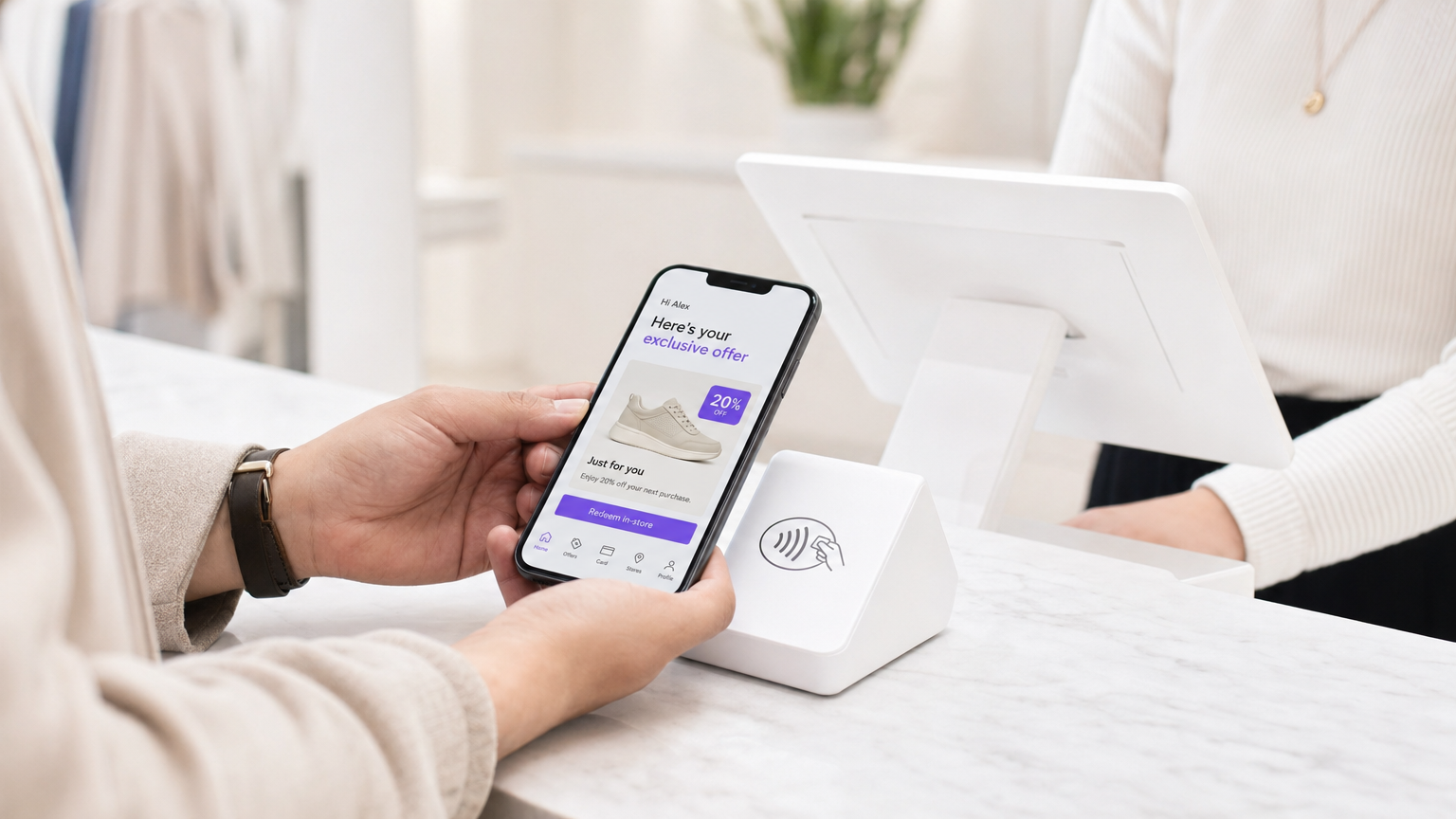
Para gestores de TI e diretores de operações de espaços, o mandato de proporcionar experiências personalizadas ao cliente traduz-se frequentemente em projetos complexos de integração multi-fornecedor. No entanto, a base mais eficaz para a personalização em loja provavelmente já está instalada nos seus tetos: a sua rede WiFi de convidado empresarial.
Ao sobrepor uma plataforma sofisticada de análise e autenticação sobre o hardware existente (como Cisco Meraki, Aruba ou Ruckus), os retalhistas podem transformar uma comodidade básica de conectividade num motor poderoso para a captura de dados de primeira parte. Este guia detalha como arquitetar, implementar e escalar uma estratégia de personalização impulsionada pelo WiFi. Exploramos a mecânica da resolução de identidade via captive portals, a integração do tempo de permanência e da análise espacial em sistemas CRM, e o acionamento automatizado de ofertas contextualmente relevantes — tudo isto mantendo uma estrita adesão aos padrões GDPR e PCI DSS.
Quer esteja a gerir uma única loja principal ou uma vasta propriedade de retalho, o objetivo permanece o mesmo: converter o fluxo de visitantes anónimos em clientes conhecidos e endereçáveis, permitindo que as equipas de marketing entreguem a mensagem certa no momento preciso de maior intenção.
Análise Técnica Detalhada
Arquitetura e Fluxo de Dados
A base do WiFi Analytics assenta numa arquitetura robusta que captura e processa dados do cliente de forma segura. O modelo de implementação típico envolve pontos de acesso (APs) finos a reportar a um controlador na cloud ou no local. A plataforma de análise ingere dados deste controlador via API ou feeds Syslog.
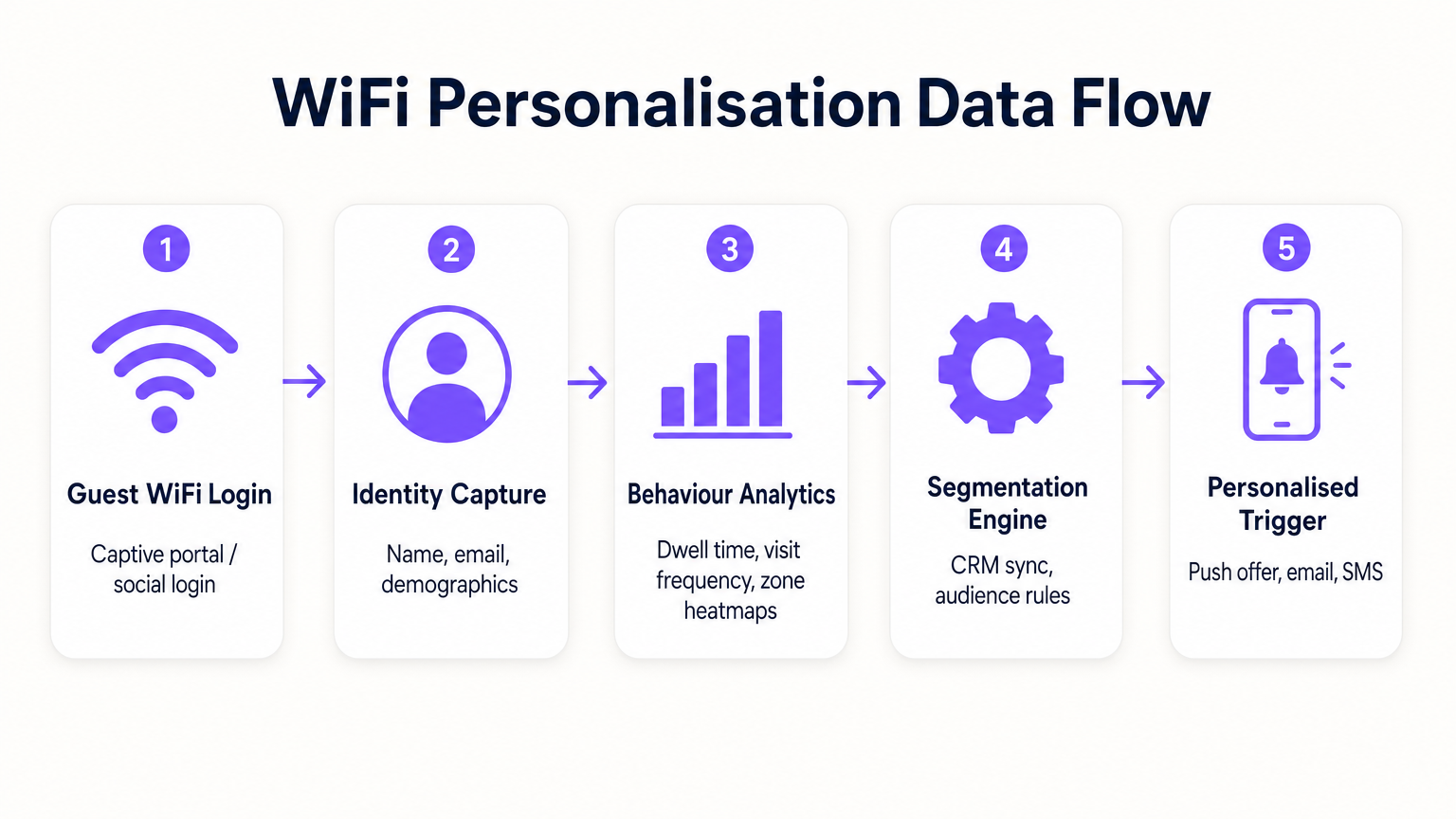
- Pedidos de Sondagem e Associação: Mesmo antes da autenticação, os APs detetam pedidos de sondagem de dispositivos móveis, capturando endereços MAC e força do sinal (RSSI). Isto fornece dados de base sobre o fluxo de visitantes e zonas.
- Autenticação (O Captive Portal): Quando um utilizador se associa ao SSID Guest WiFi , é redirecionado para um captive portal. Este é o ponto crítico de captura de identidade. Ao oferecer autenticação via e-mail, redes sociais ou SMS, o sistema liga o endereço MAC previamente anónimo a uma identidade verificada.
- Motor de Análise: A plataforma correlaciona dados de localização em tempo real (calculados via trilateração ou mapeamento de calor RSSI) com a identidade autenticada, construindo um perfil abrangente de tempo de permanência, frequência de visitas e preferências de zona.
- Camada de Integração: Webhooks ou REST APIs enviam estes dados de perfil enriquecidos para sistemas externos (CRM, automação de marketing, plataformas de fidelidade).
Resolução de Identidade e Aleatorização de MAC
Os sistemas operativos móveis modernos (iOS 14+, Android 10+) implementam a aleatorização de endereços MAC para evitar o rastreamento persistente. Isto torna a dependência exclusiva de endereços MAC para análise a longo prazo obsoleta. A solução é a autenticação baseada em perfil. Uma vez que um utilizador se autentica através do captive portal, o seu e-mail ou número de telefone torna-se o identificador persistente. Visitas subsequentes, mesmo com um novo endereço MAC aleatório, podem ser ligadas ao perfil principal após a reautenticação, garantindo a continuidade no registo do cliente.
Segmentação de Rede e Segurança
A segurança é primordial. O tráfego de convidados deve ser estritamente segregado da rede corporativa, tipicamente via VLANs dedicadas. Isto garante a conformidade com o PCI DSS, prevenindo qualquer sobreposição entre o acesso público à internet e os ambientes de dados de ponto de venda (POS). O SSID de convidado deve idealmente utilizar WPA3-Personal ou WPA3-Enterprise (onde suportado) para encriptar o tráfego sem fios, protegendo os dados do utilizador contra interceção.
Guia de Implementação
A implementação de uma estratégia de personalização requer um esforço coordenado entre TI e marketing.
Fase 1: Avaliação da Infraestrutura
Antes de implementar análises avançadas, certifique-se de que o ambiente de RF subjacente está em boas condições. Realize um levantamento do local para verificar a densidade de cobertura, particularmente em zonas de alto valor. A análise do tempo de permanência depende de uma receção de sinal consistente; zonas mortas distorcerão os dados.
Fase 2: Configuração do Captive Portal
Desenhe o captive portal para maximizar as taxas de adesão, garantindo a conformidade com o GDPR. A troca de valor deve ser clara. Em vez de um login genérico, ofereça um incentivo: "Conecte-se para ofertas exclusivas na loja." Crucialmente, o consentimento para o acesso à rede deve ser desagregado do consentimento para comunicações de marketing. O portal deve apresentar claramente os termos e condições e as políticas de privacidade.
Fase 3: Integração e Segmentação
Conecte a plataforma WiFi à sua pilha de marketing existente. Isto permite combinar dados comportamentais em loja (por exemplo, "visitou o departamento de calçado durante 20 minutos") com dados transacionais (por exemplo, "comprou sapatilhas no mês passado"). Crie segmentos acionáveis, como "Risco de Abandono de Alto Valor" (visitantes frequentes que não se conectaram nos últimos 60 dias).
Fase 4: Acionadores Automatizados
Configure fluxos de trabalho automatizados. Quando um cliente pertencente a um segmento específico se autentica, acione uma ação via API. Isto pode ser uma oferta por SMS, uma notificação push através da aplicação do retalhista, ou um e-mail. A latência entre a autenticação e a execução do acionador deve ser mínima (menos de 30 segundos) para garantir que a mensagem é recebida enquanto o cliente ainda está envolvido.
Para estratégias mais detalhadas sobre a construção destes perfis, consulte o nosso guia sobre WiFi em Lojas de Retalho: Construir Perfis de Clientes a Partir de Dados de Fluxo de Visitantes ou o equivalente francês, Le WiFi dans les magasins de détail : Créer des profils clients à partir des données de fréquentation .
Melhores Práticas
- Priorize a Troca de Valor: Os clientes só partilharão os seus dados se perceberem um benefício. Garanta que o WiFi é rápido e fiável e que quaisquer ofertas acionadas são genuinamente valiosas.
- Respeite os Limites de Frequência: Não bombardeie os clientes com notificações sempre que se conectam. Implemente limites de frequência (por exemplo, um máximo de uma mensagem por semana) para evitar a fadiga e os cancelamentos.
- Aproveite os Investimentos Existentes: Evite cenários de substituição total. As plataformas de análise modernas integram-se perfeitamente com os principais fornecedores de hardware, permitindo-lhe extrair mais valor da sua infraestrutura atual.
- Cruze Dados: Os dados de WiFi são mais poderosos quando combinados com outras fontes. Integre com o seu programa de fidelidade para entender como o comportamento na loja se correlaciona com o valor vitalício geral do cliente. Esta abordagem é altamente relevante em vários setores, incluindo Retalho , Hotelaria e até Saúde .
Resolução de Problemas e Mitigação de Riscos
- Baixas Taxas de Adesão: Se menos de 20% dos visitantes estão a autenticar-se, reveja o design do Captive Portal. Simplifique o processo de login, clarifique a proposta de valor e garanta que o portal é responsivo em dispositivos móveis.
- Dados de Localização Imprecisos: Se a análise de zona parecer distorcida, verifique a colocação dos APs e realize um novo levantamento de RF. Interferências de obstáculos físicos ou redes vizinhas podem afetar os cálculos de RSSI.
- Falhas de Integração: Garanta que existe um tratamento de erros robusto para as ligações API a CRMs. Monitorize as taxas de sucesso de entrega de webhooks e implemente mecanismos de repetição para payloads falhados.
- Riscos de Conformidade: Audite regularmente os seus fluxos de consentimento e políticas de retenção de dados. Garanta que tem um processo simplificado para lidar com Pedidos de Acesso de Titulares de Dados (DSARs) sob o GDPR.
ROI e Impacto no Negócio
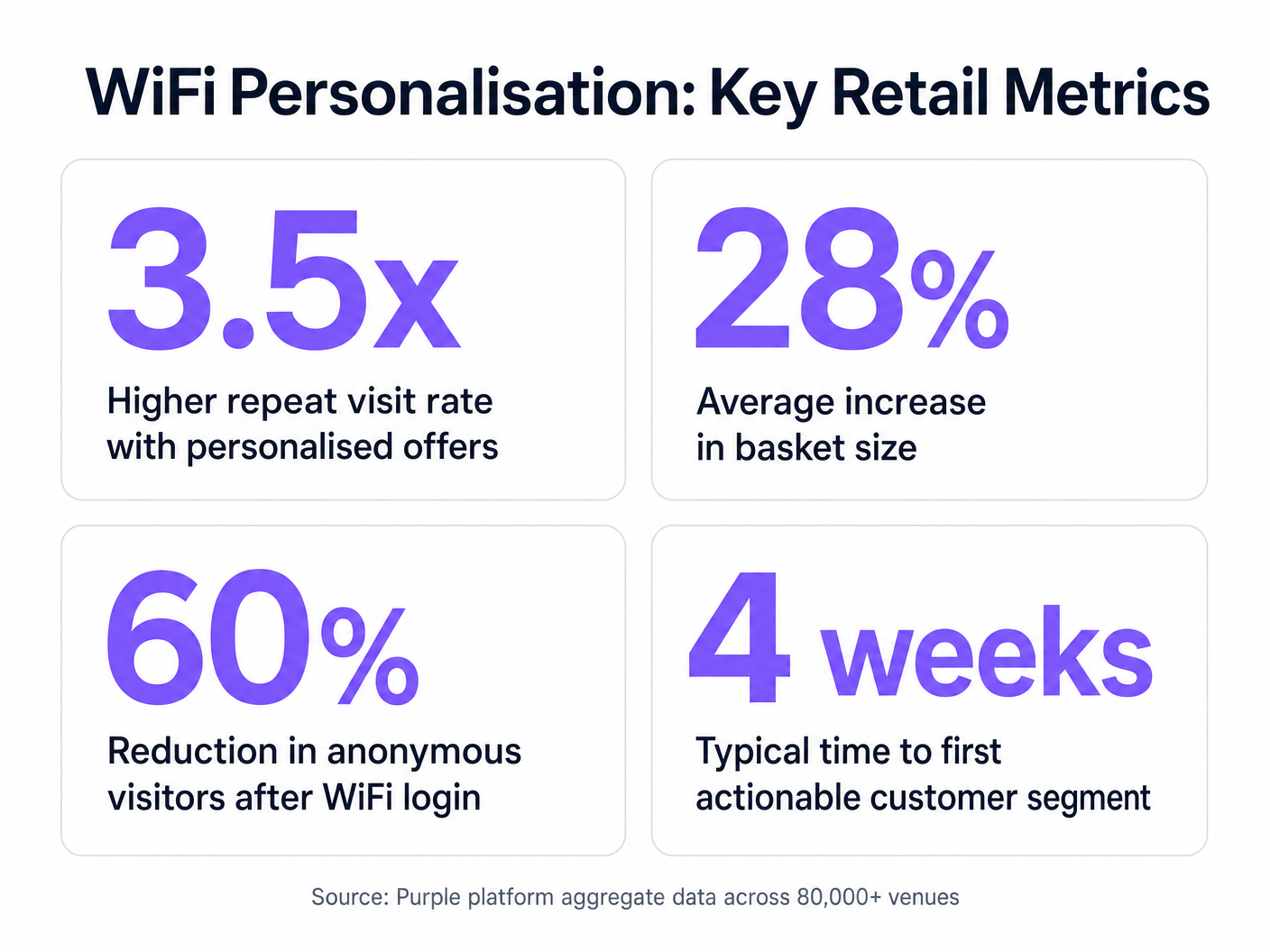
O caso de negócio para a personalização impulsionada por WiFi é convincente. Ao identificar visitantes anónimos, os retalhistas podem expandir significativamente a sua base de dados comercializável. As principais métricas a monitorizar incluem:
- Taxa de Crescimento da Base de Dados: O volume de novas identidades verificadas capturadas por mês.
- Taxa de Conversão de Ofertas Acionadas: A percentagem de clientes que resgatam uma oferta que lhes foi enviada enquanto estavam na loja.
- Aumento do Tempo de Permanência: Medir se o envolvimento personalizado leva a visitas mais longas à loja.
- Frequência de Visitas Repetidas: Monitorizar o impacto das campanhas de re-engajamento direcionadas na lealdade do cliente.
Ao ir além da conectividade básica, as equipas de TI podem posicionar-se como facilitadores de receita, fornecendo a infraestrutura essencial para operações de retalho modernas e orientadas por dados.
Definições Principais
Captive Portal
A web page that a user is forced to view and interact with before access is granted to a public network.
The primary interface for capturing user identity and establishing consent for data processing.
MAC Address Randomisation
A privacy feature where mobile devices use a temporary, randomly generated hardware address when scanning for or connecting to networks.
Forces IT teams to rely on authenticated profiles rather than hardware identifiers for long-term customer tracking.
Dwell Time
The duration a connected or probing device remains within the coverage area of a specific access point or defined zone.
A critical metric for understanding customer engagement with specific displays, departments, or the store as a whole.
Trilateration
A method of determining the location of a device by measuring its signal strength (RSSI) relative to three or more access points.
Used by spatial analytics platforms to generate accurate heatmaps and track customer movement patterns.
Probe Request
A frame sent by a client device to discover available wireless networks in its vicinity.
Allows analytics platforms to estimate footfall and capture anonymous presence data even if the user does not authenticate.
VLAN (Virtual Local Area Network)
A logical subnetwork that groups a collection of devices, isolating their traffic from other devices on the same physical network.
Essential for security and PCI DSS compliance, ensuring guest WiFi traffic is completely segregated from corporate systems.
Webhook
A method for one application to provide real-time information to another application, typically triggered by a specific event.
Used to instantly push authentication events from the WiFi platform to a CRM, enabling real-time triggered marketing.
RSSI (Received Signal Strength Indicator)
A measurement of the power present in a received radio signal.
The fundamental metric used by access points to estimate the distance of a client device, enabling location analytics.
Exemplos Práticos
A mid-sized high street fashion retailer with 50 locations wants to reduce customer churn. They have Cisco Meraki APs deployed but are only offering a simple 'click-to-accept' splash page. How should the IT team approach upgrading this to a personalisation engine?
- Platform Integration: Integrate a dedicated WiFi analytics platform with the existing Meraki dashboard via API. No new hardware is required.
- Portal Upgrade: Replace the 'click-to-accept' page with a branded captive portal offering Social Login (Facebook/Google) or email authentication, coupled with an explicit marketing opt-in checkbox.
- CRM Sync: Configure a webhook to push newly authenticated identities and their visit data into the retailer's CRM (e.g., Salesforce).
- Campaign Execution: The marketing team creates a segment in the CRM for 'Customers who haven't visited in 90 days'. When a customer in this segment connects to the WiFi, an automated email offering a 15% discount is triggered immediately.
A large shopping centre operator needs to understand the flow of visitors between different anchor stores to optimize tenant placement and rent models. They currently rely on manual footfall counting at entrances.
- Network Tuning: The IT team optimizes the AP density to ensure consistent coverage across all concourses and store entrances, focusing on overlapping coverage for accurate trilateration.
- Analytics Deployment: Deploy a spatial analytics platform that ingests probe request data from the APs.
- Zone Mapping: Define specific zones within the analytics dashboard corresponding to key areas (e.g., 'Food Court', 'Anchor Store A', 'North Entrance').
- Data Analysis: Utilize the platform to generate heatmaps and flow diagrams, analyzing the typical paths taken by visitors and the dwell time in specific zones.
Perguntas de Prática
Q1. A retail client wants to trigger an immediate SMS discount to any customer who spends more than 15 minutes in the high-margin electronics section. They currently have a single access point covering the entire store. What is the primary technical constraint?
Dica: Consider how the system determines location and dwell time.
Ver resposta modelo
The primary constraint is a lack of spatial resolution. With only a single access point, the system can determine that the customer is in the store (associated with the AP), but it cannot use trilateration to pinpoint their location to a specific zone like the electronics section. The retailer must deploy additional access points to provide overlapping coverage, enabling accurate location analytics.
Q2. The marketing director is concerned that MAC address randomisation in iOS will prevent them from tracking repeat visitors. How should the IT architect respond?
Dica: Focus on the transition from hardware-based tracking to identity-based tracking.
Ver resposta modelo
The architect should explain that while MAC randomisation disrupts passive tracking of anonymous devices, it does not impact authenticated users. By implementing a captive portal that requires email or social login, the system creates a persistent profile based on the user's identity. When the user returns and reconnects (even with a new MAC address), they re-authenticate, and the new session is linked to their existing persistent profile.
Q3. A stadium operator wants to deploy guest WiFi but is concerned about PCI DSS compliance, as POS terminals for concessions share the same physical network switches. What network design principle must be enforced?
Dica: Think about logical separation of network traffic.
Ver resposta modelo
The IT team must enforce strict network segmentation using Virtual Local Area Networks (VLANs). The guest WiFi traffic must be placed on a dedicated VLAN that is completely isolated from the VLAN used by the POS terminals. Firewall rules must ensure that no traffic can route between the guest VLAN and the Cardholder Data Environment (CDE), thereby maintaining PCI DSS compliance.
Continue a ler esta série
Privacidade por Design: Anonimização de Dados WiFi para Conformidade com o GDPR
Este guia autorizado detalha a arquitetura técnica e as estratégias de implementação para anonimizar dados WiFi para garantir a conformidade com o GDPR. Fornece a líderes de TI e arquitetos de rede estruturas acionáveis para equilibrar análises robustas de locais com requisitos rigorosos de privacidade de dados.
Heatmapping vs. Análise de Presença: Diferenças Técnicas
Este guia técnico e autoritário detalha as diferenças arquitetónicas e operacionais críticas entre o heatmapping WiFi e a análise de presença para operadores de espaços empresariais. Fornece a líderes de TI, arquitetos de rede e diretores de operações estruturas de implementação acionáveis, cenários de implementação reais e melhores práticas neutras em relação a fornecedores para extrair o máximo ROI da sua infraestrutura sem fios existente.
Como Calcular o Tempo de Permanência Usando Análise de Localização WiFi
Este guia fornece uma referência técnica abrangente para o cálculo do tempo de permanência wifi usando análise de localização WiFi, cobrindo a arquitetura completa desde a captura de pedidos de sonda 802.11, passando pela trilateração baseada em RSSI, até à análise de zonas georreferenciadas. É concebido para gestores de IT, arquitetos de rede e diretores de operações de espaços que necessitam de implementar inteligência de localização precisa e escalável em ambientes de retalho, hotelaria, saúde e setor público. Os leitores obterão orientações de implementação acionáveis, estudos de caso reais e uma estrutura clara para traduzir dados espaciais brutos em resultados de negócio mensuráveis.