
eduroam e 802.1X: Autenticação WiFi Segura para o Ensino Superior
Este guia de referência técnica autoritário explica a arquitetura, a implementação e a segurança do eduroam e da autenticação 802.1X. Concebido para gestores de TI e arquitetos de rede, aborda passos práticos de implementação, a seleção do método EAP e como os operadores de espaços podem apoiar o roaming académico de forma segura.
Ouça este guia
Ver transcrição do podcast
Parte da nossa série principal: Enterprise WiFi Security Guide →

Resumo Executivo
Para as instituições de ensino superior, e para os espaços que servem os seus funcionários e estudantes, fornecer uma conectividade sem fios segura e contínua já não é um luxo - é um requisito operacional. O padrão para esta conectividade é o eduroam, um serviço de roaming global construído sobre a estrutura IEEE 802.1X.
Este guia fornece aos gestores de TI, arquitetos de rede e diretores de operações de espaços uma referência abrangente e neutra em termos de fornecedor para compreender, implementar e resolver problemas do 802.1X e do eduroam. Vamos além dos modelos teóricos básicos para examinar como o WiFi de campus de nível empresarial realmente funciona na prática, incluindo a gestão de certificados, a arquitetura de proxy RADIUS e a integração com uma estratégia de rede de convidados mais ampla.
Quer esteja a atualizar uma rede universitária envelhecida ou a configurar um centro de conferências para apoiar visitantes académicos, a implementação correta do 802.1X reduz significativamente o risco de segurança - particularmente o roubo de credenciais - ao mesmo tempo que reduz drasticamente os custos de suporte. Para espaços fora do ensino superior tradicional, compreender estes padrões é essencial para avaliar federações de roaming comercial, como o OpenRoaming, que partilham a mesma arquitetura subjacente.
Análise Técnica Detalhada: Arquitetura 802.1X e eduroam
Na sua essência, o eduroam é uma implementação do IEEE 802.1X, o padrão de controlo de acesso à rede baseado em portas. O 802.1X foi originalmente concebido para redes com fios, mas constitui a base da segurança WPA2-Enterprise e WPA3-Enterprise.
O Modelo de Triângulo 802.1X
A estrutura 802.1X baseia-se na interação de três componentes distintos para autorizar o acesso:
- Suplicante (Supplicant): O dispositivo cliente que solicita acesso à rede (por exemplo, o portátil ou smartphone de um estudante).
- Autenticador (Authenticator): O dispositivo de acesso à rede (por exemplo, um ponto de acesso sem fios ou um switch gerido). Atua como um guardião, bloqueando todo o tráfego exceto as mensagens de autenticação até que o dispositivo seja autorizado.
- Servidor de Autenticação (Authentication Server): O sistema de back-end que valida as credenciais, quase universalmente um servidor RADIUS (Remote Authentication Dial-In User Service).
Quando um dispositivo se liga, o autenticador estabelece uma porta controlada. Este retransmite mensagens EAP (Extensible Authentication Protocol) entre o suplicante e o servidor de autenticação. Se as credenciais forem válidas, o servidor devolve uma mensagem Access-Accept de RADIUS e o autenticador abre a porta para permitir a passagem de tráfego IP padrão.

Hierarquia de Proxies RADIUS do eduroam
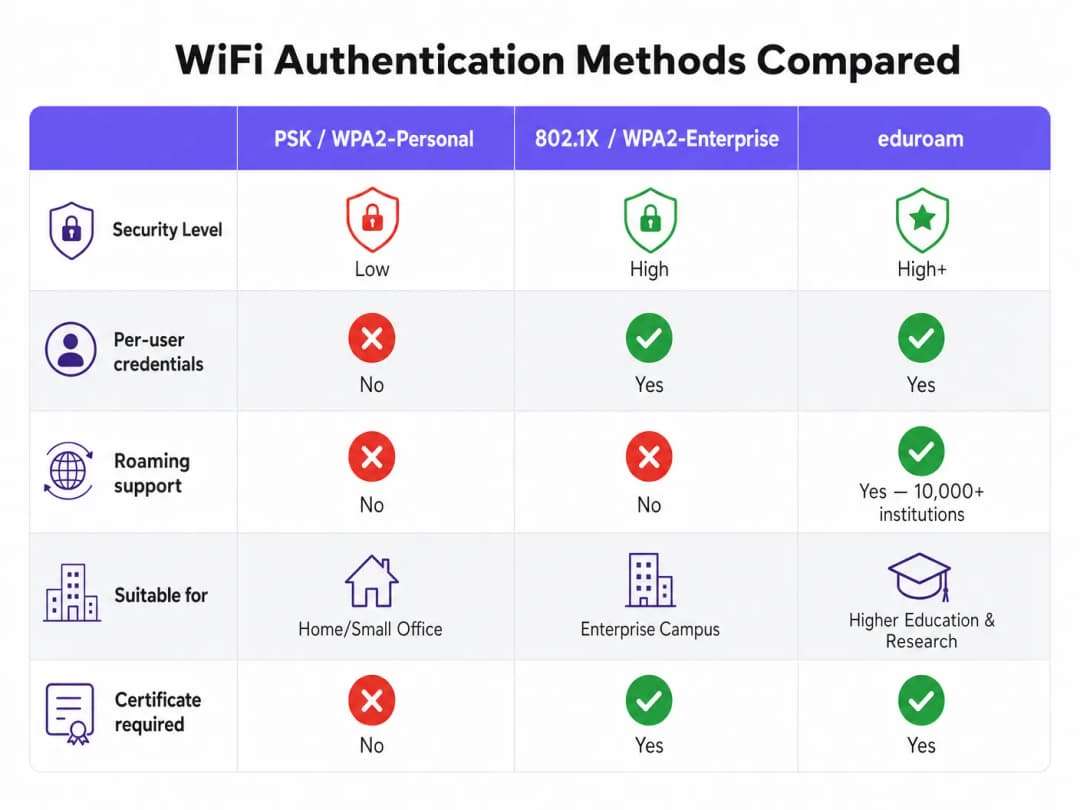
O que torna o eduroam único é a sua arquitetura federada. Permite que os utilizadores se autentiquem em qualquer instituição participante utilizando as suas credenciais de origem, sem que a instituição de acolhimento guarde uma cópia dessas credenciais.
Isto é alcançado através de uma cadeia hierárquica de proxies RADIUS. Quando um utilizador de username@university.ac.uk se liga ao SSID eduroam num local de acolhimento:
- O dispositivo do utilizador envia um pedido de autenticação no formato
username@university.ac.uk. - O servidor RADIUS do local de acolhimento inspeciona o domínio (a parte após o símbolo
@). Reconhecendo-o como um domínio externo, envia o pedido para o servidor RADIUS nacional de topo (operado pela Rede Nacional de Investigação e Educação, ou NREN). - O servidor nacional encaminha o pedido para o servidor RADIUS da instituição de origem (
university.ac.uk). - A instituição de origem valida as credenciais e devolve uma mensagem de
Access-AcceptouAccess-Rejectde volta ao longo da cadeia.
Todo o processo é normalmente concluído em menos de dois segundos. Crucialmente, a palavra-passe do utilizador nunca é exposta à instituição de acolhimento ou aos servidores proxy intermediários; está protegida dentro de um túnel EAP encriptado estabelecido diretamente entre o suplicante e o servidor RADIUS de origem.
Métodos EAP: O Compromisso entre Segurança e Facilidade de Implementação
A escolha do método EAP determina como o túnel encriptado é formado e como as credenciais são trocadas. A definição de serviço da política do eduroam limita estritamente os métodos permitidos para garantir a segurança.
- PEAP (Protected EAP): O método de implementação mais comum. Utiliza um certificado do lado do servidor no servidor RADIUS para estabelecer um túnel TLS. O cliente autentica-se então dentro desse túnel, normalmente utilizando MSCHAPv2 (nome de utilizador e palavra-passe). É relativamente fácil de implementar, mas é vulnerável a ataques de pontos de acesso falsos se os clientes não forem configurados para validar estritamente o certificado do servidor.
- EAP-TLS: O padrão de excelência para a segurança. Requer autenticação mútua, o que significa que tanto o servidor RADIUS como o dispositivo cliente devem apresentar certificados válidos. Embora seja imune a phishing de credenciais, requer uma infraestrutura de chaves públicas (PKI) robusta para emitir e gerir certificados de cliente, tornando a implementação em grande escala mais complexa.
Tem dúvidas sobre a sua configuração específica?
A nossa equipa trabalha com operadores de espaços, gestores de TI e engenheiros de rede em 80.000 espaços. Agende uma chamada de 20 minutos e mostraremos como outros profissionais na sua área o resolveram.
Guia de Implementação
A implementação de 802.1X e eduroam requer uma coordenação cuidadosa entre a infraestrutura de rede, a gestão de identidades e a configuração do cliente.
1. Preparação da Infraestrutura
Garanta que os seus pontos de acesso e controladores sem fios suportam WPA2-Enterprise/WPA3-Enterprise e 802.1X. Qualquer hardware moderno de nível empresarial (Cisco, Aruba, Juniper e outros) cumprirá este requisito. Deve também implementar uma infraestrutura RADIUS robusta (como FreeRADIUS, Cisco ISE ou Aruba ClearPass) capaz de lidar com a carga de autenticação esperada e de efetuar o proxy de pedidos.
2. Gestão de Certificados
Para implementações PEAP, o seu servidor RADIUS necessita de um certificado TLS emitido por uma autoridade de certificação (CA) fidedigna para os seus clientes. Nunca utilize certificados autoassinados numa implementação eduroam de produção. Os certificados devem ser renovados regularmente para evitar interrupções de autenticação.
3. Configuração do Cliente (a ferramenta CAT)
O ponto de falha mais comum nas implementações eduroam é a configuração incorreta do cliente. Quando os utilizadores se ligam manualmente, muitas vezes não configuram a validação do certificado, deixando-os expostos a ataques de recolha de credenciais.
Para mitigar este risco, as instituições devem utilizar a eduroam Configuration Assistant Tool (CAT) ou uma solução MDM para distribuir perfis pré-configurados. Estes perfis configuram automaticamente o método EAP correto, associam o certificado do servidor RADIUS esperado e definem o protocolo de autenticação interno adequado.
4. Atribuição e Segmentação de VLAN
Uma implementação madura utiliza atributos RADIUS para atribuir VLANs dinamicamente com base na identidade do utilizador.
- Utilizadores internos: Atribuídos a VLANs internas com acesso adequado aos recursos do campus.
- Utilizadores visitantes: Atribuídos a uma VLAN de convidados restrita que oferece apenas acesso à internet.
Esta segmentação é crítica para a segurança e conformidade, garantindo que os dispositivos dos visitantes não conseguem aceder a redes internas confidenciais.
Melhores Práticas e Recomendações Neutras em Relação a Fornecedores
- Priorize o WPA3: Para novas implementações, ative o WPA3-Enterprise para obter encriptação obrigatória de 192 bits e melhor proteção contra ataques de dicionário offline.
- Exija a validação de certificados: Exija a utilização de perfis de configuração (via CAT ou MDM) para garantir que o requerente valida estritamente o certificado do servidor RADIUS antes de transmitir as credenciais.
- Utilize RadSec: Ao configurar ligações proxy RADIUS para a federação nacional, utilize RadSec (RADIUS sobre TLS) em vez de UDP simples. Isto encripta o tráfego de proxy e melhora a fiabilidade em ligações de rede de área alargada.
- Integre com uma solução de convidados: O eduroam serve apenas utilizadores com credenciais académicas. Deve manter uma solução separada e segura de Guest WiFi para prestadores de serviços, público em geral e participantes em eventos.
- Reveja a infraestrutura relacionada: Certifique-se de que a sua rede subjacente está segura. Leia o nosso guia Garantir a segurança da sua rede com DNS e segurança robustos para mais detalhes. Se estiver a implementar uma infraestrutura temporária para eventos universitários, consulte Event WiFi: Planeamento e Implementação de Redes Sem Fios Temporárias ou a versão em português Event WiFi: Planeamento e Implementação de Redes Sem Fios Temporárias.
Resolução de Problemas e Mitigação de Riscos
Quando a autenticação falha, uma resolução de problemas sistemática é essencial.
- Isole o domínio da falha: Determine se a falha é local (afetando utilizadores na sua própria rede), remota (afetando os seus utilizadores noutro local) ou de entrada (afetando visitantes na sua rede).
- Verifique os registos RADIUS: Os registos do servidor RADIUS são a fonte oficial de verdade. Procure mensagens de
Access-Reject(indicando credenciais incorretas ou violações de políticas) ou tempos limite (indicando problemas de conectividade do proxy). - Verifique a validade do certificado: Certifique-se de que o certificado do servidor RADIUS não expirou e que a cadeia de certificados completa está a ser apresentada aos clientes.
- Monitorize a latência a montante: Uma latência elevada para o proxy RADIUS nacional pode causar tempos limite nos clientes, resultando em falhas de ligação mesmo quando as credenciais estão corretas.
ROI e Impacto no Negócio
Para as instituições de ensino superior, o retorno de uma implementação eduroam devidamente efetuada traduz-se numa redução drástica dos pedidos de suporte técnico. Ao eliminar os portais cativos e a introdução manual de palavras-passe, as equipas de suporte de TI registam uma quebra significativa nas chamadas relacionadas com conectividade. (O compromisso da Purple com este setor é claro; consulte Purple nomeia Tim Peers como VP of Education, sublinhando as suas ambições para o ensino superior).
Para espaços comerciais - como hotelaria, retalho, saúde ou transportes - o suporte ao eduroam Visitor Access (eVA) ou federações semelhantes, como o OpenRoaming, proporciona uma experiência sem atritos para um público-alvo de elevado valor. Garante que os visitantes académicos se liguem de forma automática e segura, melhorando a satisfação e permitindo ao espaço manter uma segmentação de rede rigorosa. Se o seu espaço necessita de largura de banda dedicada para suportar esta procura, sugerimos a leitura de O que é uma linha dedicada? Internet concebida para empresas.
Ao planear atualizações de rede, a integração da capacidade 802.1X garante que a sua infraestrutura está pronta para redes modernas baseadas em identidade, lançando as bases para serviços avançados de WiFi Analytics e localização.
Definições Principais
802.1X
Um padrão IEEE para Controlo de Acesso à Rede baseado em porta (PNAC). Fornece um mecanismo de autenticação para dispositivos que desejam ligar-se a uma LAN ou WLAN.
O protocolo fundamental para a segurança WiFi de nível empresarial, substituindo as palavras-passe partilhadas (PSKs) por autenticação individualizada.
RADIUS (Remote Authentication Dial-In User Service)
Um protocolo de rede que fornece gestão centralizada de Autenticação, Autorização e Contabilização (AAA) para utilizadores que se ligam e utilizam um serviço de rede.
O servidor de backend numa implementação 802.1X que realmente verifica as credenciais do utilizador num diretório (como o Active Directory).
EAP (Extensible Authentication Protocol)
Uma estrutura de autenticação frequentemente utilizada em redes sem fios e ligações ponto a ponto. Permite o transporte e utilização de vários mecanismos de autenticação.
O idioma falado entre o dispositivo cliente e o servidor RADIUS durante o handshake 802.1X.
Supplicant
O dispositivo cliente (por exemplo, portátil, smartphone) ou o software nesse dispositivo que tenta autenticar-se numa rede utilizando 802.1X.
A entidade que solicita o acesso. A sua configuração (especialmente no que diz respeito à validação de certificados) é crítica para a segurança.
Authenticator
O dispositivo de rede (por exemplo, ponto de acesso sem fios, switch Ethernet) que facilita o processo de autenticação 802.1X ao passar mensagens entre o Supplicant e o Servidor de Autenticação.
O guardião que bloqueia o tráfego de rede até que o servidor RADIUS dê luz verde.
PEAP (Protected Extensible Authentication Protocol)
Um método EAP que encapsula a transação EAP dentro de um túnel TLS estabelecido utilizando um certificado do lado do servidor, protegendo a autenticação interna (geralmente uma palavra-passe).
O método de autenticação mais comum para eduroam, equilibrando segurança com facilidade de implementação.
RadSec
Um protocolo para transmissão de dados RADIUS sobre TCP e TLS, em vez do tradicional UDP.
Recomendado para proteger as ligações de proxy entre instituições e a federação nacional eduroam, evitando a interceção do tráfego de autenticação.
Realm
A parte da identidade de um utilizador que segue o símbolo '@' (por exemplo, 'university.ac.uk' em 'user@university.ac.uk').
Utilizado por servidores proxy RADIUS para determinar para onde encaminhar o pedido de autenticação num ambiente federado como o eduroam.
Exemplos Práticos
Um hotel de conferências com 400 quartos adjacente a uma grande universidade acolhe frequentemente simpósios académicos. O Diretor de TI pretende permitir que os académicos visitantes se liguem automaticamente sem utilizar o Captive Portal padrão do hotel, mas deve garantir que estes visitantes não conseguem aceder à rede corporativa do hotel ou à VLAN da rede de convidados padrão.
O hotel deve implementar o eduroam Visitor Access (eVA) ou aderir a uma federação comercial como o OpenRoaming.
- O hotel configura um novo SSID ('eduroam' ou 'OpenRoaming') nos seus pontos de acesso empresariais.
- Os APs são configurados para utilizar WPA2-Enterprise/802.1X.
- O hotel implementa um servidor RADIUS local configurado para reencaminhar pedidos de autenticação de domínios externos para a federação nacional (para o eduroam) ou para o hub OpenRoaming.
- Crucialmente, o servidor RADIUS local é configurado para devolver um atributo de ID de VLAN específico na mensagem
Access-Acceptpara todas as autenticações reencaminhadas. - Os pontos de acesso colocam estes utilizadores autenticados numa VLAN isolada, apenas com acesso à Internet, completamente segmentada do tráfego corporativo e de convidados padrão do hotel.
Uma equipa de TI de uma universidade nota um pico de contas de estudantes comprometidas. A investigação revela que os estudantes se estão a ligar a um ponto de acesso desonesto que transmite o SSID 'eduroam' num café local. O AP desonesto está a utilizar um certificado autoassinado para recolher credenciais através de PEAP.
A equipa de TI deve impor imediatamente uma validação rigorosa de certificados em todos os dispositivos cliente.
- Devem deixar de aconselhar os estudantes a ligarem-se manualmente ao SSID e a 'aceitar o aviso de certificado'.
- Implementam a eduroam Configuration Assistant Tool (CAT) para dispositivos BYOD e atualizam os perfis de MDM para dispositivos geridos.
- Estes perfis configuram o suplicante para confiar apenas na Autoridade de Certificação (CA) específica que emitiu o certificado do servidor RADIUS da universidade, e para verificar o Common Name (CN) do servidor.
- Uma vez configurado, se o dispositivo de um estudante encontrar o AP desonesto, o estabelecimento do túnel EAP falhará porque o certificado desonesto não corresponde à CA/CN associada, impedindo a transmissão de credenciais.
Uma cadeia de retalho pretende disponibilizar OpenRoaming em 50 localizações utilizando a sua infraestrutura de WiFi de convidados existente, que atualmente depende de um SSID aberto com um Captive Portal.
A cadeia de retalho deve atualizar a sua rede para suportar 802.1X e proxying RADIUS.
- A equipa de rede ativa um novo SSID que transmite o OpenRoaming Consortium OI (Organisation Identifier).
- Configuram os pontos de acesso para autenticação através de 802.1X.
- Configuram o seu servidor RADIUS central para reencaminhar pedidos para o hub da federação OpenRoaming.
- Garantem que o seu backhaul de Internet consegue suportar o aumento esperado de ligações automatizadas, atualizando potencialmente para linhas dedicadas, se necessário.
Perguntas de Prática
Q1. A sua universidade está a implementar uma nova rede sem fios. O CISO exige que o phishing de credenciais através de pontos de acesso falsos seja matematicamente impossível. Que método EAP deve selecionar?
Dica: Considere qual o método que depende de palavras-passe versus qual depende inteiramente de chaves criptográficas.
Ver resposta modelo
Deve selecionar EAP-TLS. Ao contrário do PEAP, que depende de uma palavra-passe dentro de um túnel TLS, o EAP-TLS requer autenticação mútua por certificado. Como o dispositivo cliente se autentica utilizando um certificado criptográfico em vez de uma palavra-passe, não existem credenciais para um ponto de acesso falso pescar via phishing.
Q2. Um investigador visitante de outra universidade queixa-se de que não consegue ligar-se à sua rede eduroam. Os seus utilizadores locais estão a ligar-se sem problemas. Verifica os registos do seu servidor RADIUS local e vê o pedido a chegar, mas expira o tempo limite antes de receber um Access-Accept. Qual é a causa mais provável?
Dica: Pense no caminho que o pedido de autenticação faz para um utilizador visitante versus um utilizador local.
Ver resposta modelo
A causa mais provável é um problema de conectividade ou latência entre o seu servidor RADIUS local e o proxy RADIUS nacional da NREN. Como os utilizadores locais se autenticam diretamente contra o seu servidor, não são afetados. O pedido do utilizador visitante deve ser enviado por proxy para montante, e um timeout indica que a resposta da instituição de origem não está a regressar a tempo.
Q3. É arquiteto de rede para uma cadeia de retalho localizada perto de uma grande universidade. Deseja oferecer WiFi contínuo aos estudantes que utilizam o eduroam Visitor Access (eVA), mas deve cumprir com PCI DSS para os seus terminais de ponto de venda. Como integra o eVA de forma segura?
Dica: Como é que o 802.1X permite que o ponto de acesso à rede diferencie o tráfego após a autenticação?
Ver resposta modelo
Integra o eVA configurando o seu servidor RADIUS para atribuir todas as autenticações eVA bem-sucedidas a uma VLAN de convidados dedicada e exclusiva para internet. A mensagem Access-Accept do servidor RADIUS deve incluir o VLAN ID específico. Isto garante que os dispositivos dos estudantes fiquem completamente segmentados da VLAN em conformidade com PCI utilizada pelos terminais de ponto de venda, cumprindo os requisitos de conformidade.
Continue a ler esta série
Um Guia de Administrador de Rede para Configurar a Autenticação RADIUS para WiFi de Convidados
Uma referência técnica abrangente para administradores de rede sobre a implementação de autenticação RADIUS para WiFi de convidados. Aborda a arquitetura, etapas de configuração independentes de fornecedor, boas práticas de segurança e resolução de problemas comuns de implementação.
Implementar SCEP para WiFi 802.1X e BYOD Seguro no Ensino Superior
Este guia técnico detalha como as equipas de TI do ensino superior podem automatizar o registo de certificados 802.1X para milhares de dispositivos BYOD usando SCEP. Abrange a arquitetura, as vantagens de segurança e as etapas práticas de implementação para substituir o registo manual por um modelo de acesso à rede seguro e sem intervenção (zero-touch).
Configuring RADIUS Authentication for Guest and Staff WiFi Networks
Este guia de referência técnica descreve a arquitetura, configuração e implementação de autenticação RADIUS para redes WiFi empresariais de convidados e funcionários. Fornece aos arquitetos de rede e gestores de TI os protocolos exatos, normas de segurança e metodologias de resolução de problemas necessários para construir sistemas de controlo de acesso sem fios seguros e escaláveis.
Tem dúvidas sobre a sua configuração específica?
A nossa equipa trabalha com operadores de espaços, gestores de TI e engenheiros de rede em 80.000 espaços. Agende uma chamada de 20 minutos e mostraremos como outros profissionais na sua área o resolveram.