
Marketing WiFi para Restaurantes: Como Transformar WiFi Gratuito em Clientes Recorrentes
Este guia de referência técnica e autoritário explora a arquitetura e implementação do marketing WiFi para restaurantes — a prática de usar o acesso à rede de convidados como um canal estruturado de aquisição de dados e automação de marketing. Fornece a gestores de TI, arquitetos de rede e diretores de operações de espaços um plano tático para implementar captive portals, integrar com plataformas CRM e desencadear campanhas automatizadas que geram negócios recorrentes mensuráveis. Desde a captura de dados em conformidade com o GDPR até fluxos de trabalho de email orientados por eventos, este guia abrange todo o ciclo de vida de implementação com métricas de ROI concretas.
Ouça este guia
Ver transcrição do podcast
Resumo Executivo
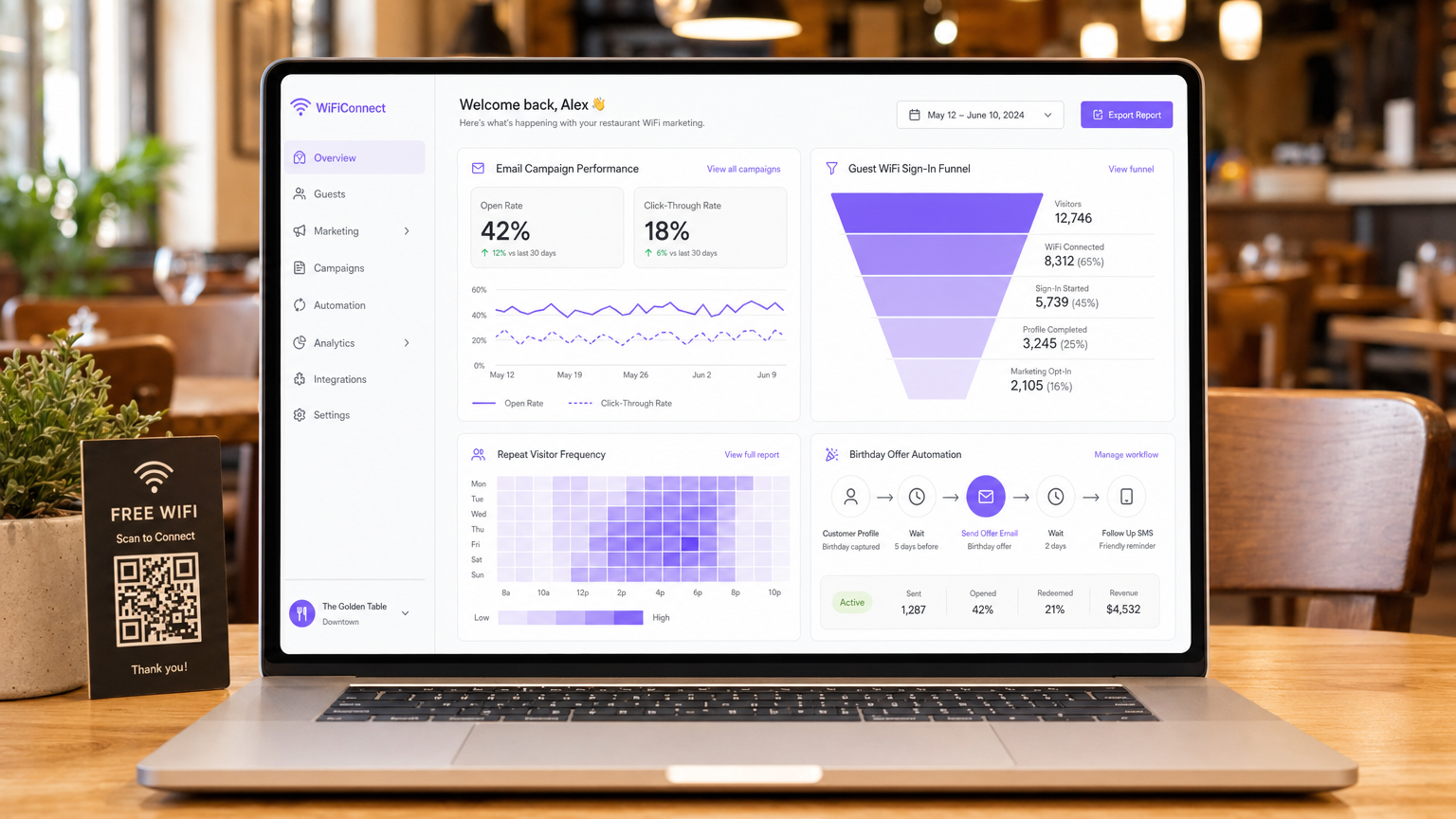
Para gestores de TI, arquitetos de rede e CTOs que operam em ambientes de hospitalidade, retalho e setor público, fornecer acesso à rede de convidados evoluiu de uma utilidade básica para um canal crítico de aquisição de dados. Compreender o que é marketing WiFi para restaurantes é fundamental para extrair ROI dos investimentos em infraestrutura de rede. Este guia descreve a arquitetura técnica, estratégias de implementação e protocolos de mitigação de riscos necessários para transformar um centro de custos — WiFi gratuito para convidados — num motor mensurável de negócios recorrentes e lealdade do cliente.
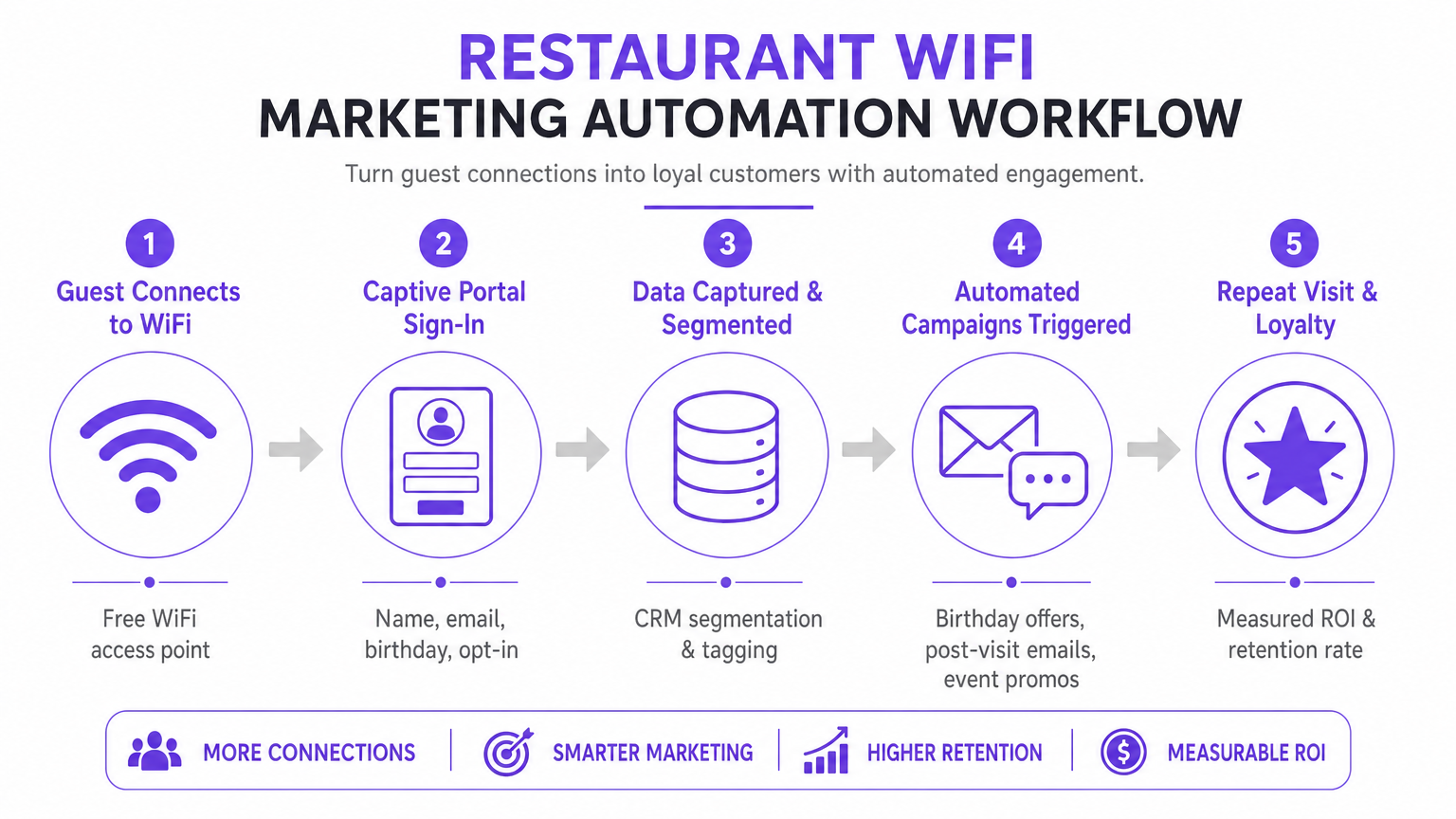
Implementar uma solução Guest WiFi de nível empresarial requer mais do que simplesmente difundir um SSID. Exige uma arquitetura robusta que se integre perfeitamente com plataformas CRM, ferramentas de automação de marketing e motores de análise, tudo isto enquanto adere a rigorosos padrões de conformidade, incluindo GDPR e PCI DSS. Ao implementar a captura de dados estruturados através de captive portals, os espaços podem segmentar utilizadores, desencadear campanhas de marketing automatizadas (emails pós-visita, ofertas de aniversário e promoções de eventos) e gerar avaliações valiosas. Este guia fornece um plano tático para configurar e otimizar fluxos de trabalho de marketing WiFi para maximizar o débito, garantir a segurança e impulsionar um impacto comercial mensurável.
Análise Técnica Aprofundada: Arquitetura e Padrões
A base de um marketing WiFi para convidados eficaz reside numa arquitetura de rede escalável e segura. No seu cerne, o sistema baseia-se num mecanismo de captive portal que interceta pedidos HTTP/HTTPS de dispositivos não autenticados, redirecionando-os para uma página de autenticação alojada. Este processo tipicamente utiliza RADIUS (Remote Authentication Dial-In User Service) para Autenticação, Autorização e Contabilidade (AAA) centralizadas.
Fluxos de Trabalho de Autenticação e Captura de Dados
Quando um dispositivo se conecta ao SSID de convidado, o Wireless LAN Controller (WLC) ou access point restringe o acesso à rede, colocando o dispositivo num "walled garden". O utilizador é apresentado com um captive portal, que serve como a interface primária de aquisição de dados. Para otimizar as taxas de conversão, o portal deve suportar múltiplos métodos de autenticação:
| Método de Autenticação | Nível de Fricção | Qualidade dos Dados | Complexidade de Implementação |
|---|---|---|---|
| Social Login (OAuth 2.0) | Baixo | Alta (rica em dados demográficos) | Média |
| Baseado em Formulário (Email + Opt-In) | Médio | Controlada | Baixa |
| Verificação por SMS | Médio-Alto | Alta (móvel verificado) | Média |
| Passpoint / Hotspot 2.0 | Muito Baixo | Média | Alta |
Integrações de Social Login (OAuth 2.0) com Google ou Facebook fornecem acesso de baixa fricção enquanto capturam dados demográficos ricos. Este método baseia-se na troca segura de tokens, eliminando a necessidade de os utilizadores criarem novas credenciais. A Autenticação Baseada em Formulário permite que os utilizadores forneçam o seu nome, endereço de email e, opcionalmente, data de nascimento ou número de telefone. Estes dados são validados e transmitidos de forma segura para a base de dados centralizada. A Reautenticação Contínua (MAC Caching) armazena em cache o endereço MAC de um dispositivo por uma duração configurável (por exemplo, 30 dias), permitindo acesso sem fricção e rastreamento preciso da frequência em visitas subsequentes.
Protocolos de Segurança e Conformidade
Implementar WiFi para marketing exige estrita adesão a padrões de segurança e privacidade. A arquitetura deve segregar o tráfego de convidados das redes corporativas usando VLANs para prevenir movimento lateral. A implementação deve estar em conformidade com:
- GDPR / CCPA: Mecanismos de consentimento explícito e desagregado devem ser integrados no captive portal. Os utilizadores devem optar ativamente por comunicações de marketing, e a plataforma deve fornecer capacidades robustas de pedido de acesso de dados do titular (DSAR). O consentimento de marketing não pode ser agregado aos termos de serviço de acesso à rede.
- PCI DSS: Se o espaço processa pagamentos na mesma infraestrutura física, a segmentação da rede e as regras de firewall devem isolar o Cardholder Data Environment (CDE) da rede de convidados.
- WPA3-Enhanced Open (OWE): A transição para protocolos de integração segura fornece encriptação oportunista para tráfego não autenticado, mitigando riscos de interceção em redes abertas sem exigir credenciais de utilizador.
Guia de Implementação: Estratégias de Implementação
A implementação bem-sucedida requer uma abordagem faseada, focando-se na integração e automação. O objetivo é estabelecer um fluxo de dados contínuo do access point para a plataforma de automação de marketing.
Passo 1: Avaliação e Dimensionamento da Infraestrutura
Antes de implementar um captive portal, certifique-se de que a infraestrutura RF subjacente pode lidar com a densidade de clientes antecipada. Conduza um levantamento de site preditivo e ativo para identificar lacunas de cobertura e otimizar a colocação dos APs. Considere a utilização do canal, a interferência de co-canal e o débito necessário por dispositivo. Para implementações empresariais, aproveitar uma conexão de internet empresarial dedicada — como uma linha dedicada — garante largura de banda garantida e velocidades simétricas, impedindo que o tráfego de convidados afete sistemas operacionais críticos.
Passo 2: Configuração do Captive Portal
Projete o captive portal com foco na otimização da conversão. A UI deve ser responsiva e carregar rapidamente em dispositivos móveis, pois a maioria das conexões terá origem em smartphones. Implemente o "progressive profiling": solicite informações básicas (endereço de email, opt-in) durante a visita inicial, e peça dados suplementares (aniversário, número de telefone) em conexões subsequentes. Isto minimiza a fricção enquanto enriquece o perfil do cliente ao longo do tempo.
Passo 3: CRM ed Integração de Automação
O verdadeiro valor de uma plataforma de WiFi Analytics é alcançado através da integração. Configure webhooks de API ou conectores nativos para sincronizar os dados capturados com o CRM do local (por exemplo, Salesforce, HubSpot) e ferramentas de automação de marketing. Estabeleça regras claras de mapeamento de dados para garantir que campos como Last Visit Date e Total Visits sejam atualizados em tempo real a cada evento de autenticação.
Passo 4: Configuração de Automação de Campanhas
Configure fluxos de trabalho automatizados acionados por eventos de rede específicos. As três campanhas principais que cada implementação deve incluir são:
- A Campanha de Boas-Vindas: Acionada imediatamente após a primeira autenticação bem-sucedida. Entrega uma mensagem de boas-vindas e uma oferta de baixo custo para incentivar uma visita de retorno dentro de um período definido.
- A Campanha Sentimos a Sua Falta: Acionada quando um dispositivo não é detetado na rede por uma duração especificada (por exemplo, 45 dias). Oferece um desconto direcionado para reativar clientes inativos no momento certo.
- A Campanha de Geração de Avaliações: Acionada 2 horas após um utilizador se desconectar da rede, aproveitando eventos RADIUS Accounting-Stop ou webhooks de API de localização. Solicita feedback via TripAdvisor ou Google My Business enquanto a experiência ainda está fresca.
Melhores Práticas para Locais Empresariais
Para maximizar a eficácia de como melhorar a experiência do cliente num restaurante através do marketing WiFi, as seguintes melhores práticas, independentes do fornecedor, aplicam-se em ambientes de Hotelaria , Retalho e Transportes .
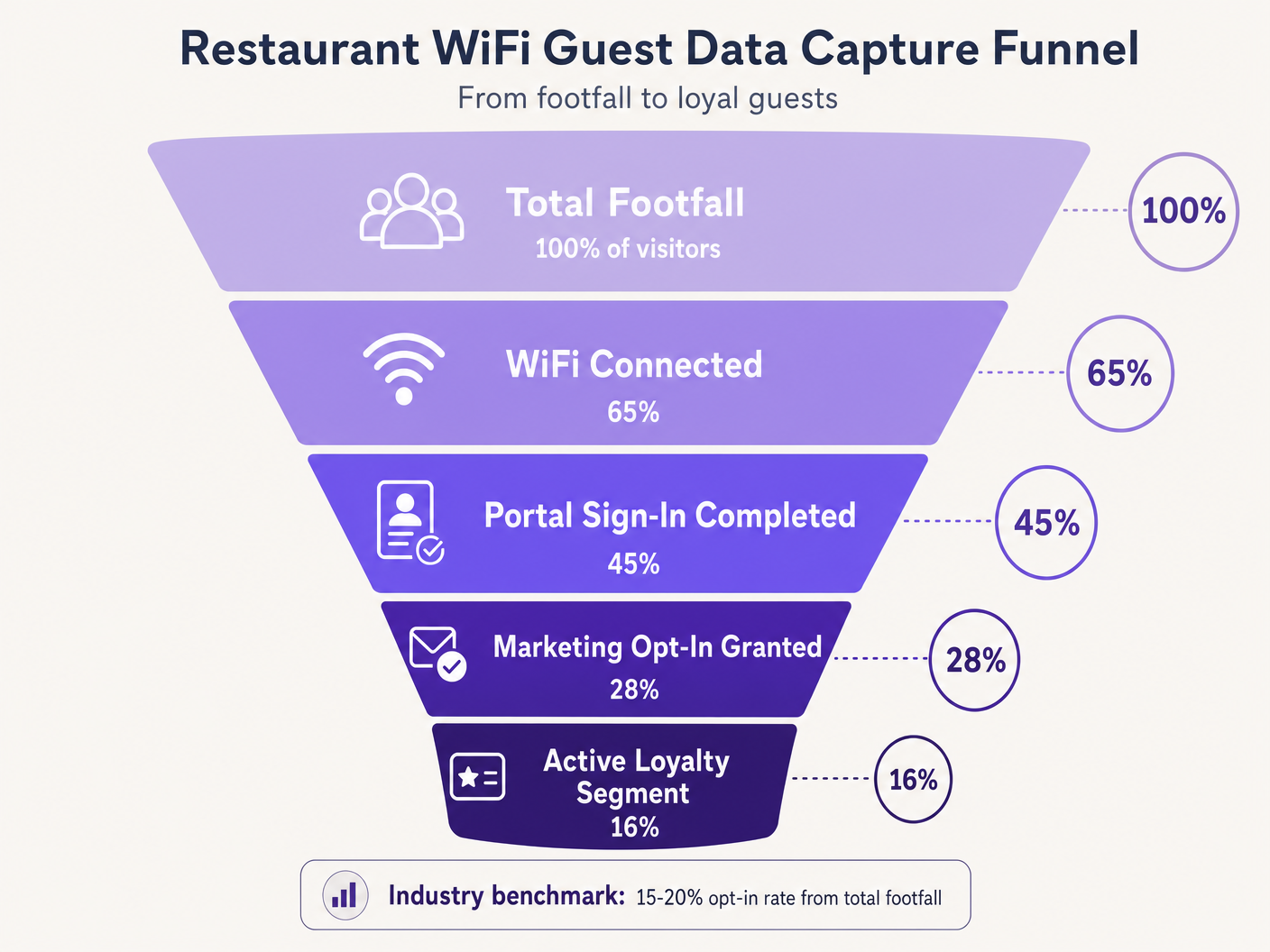
Priorize o Opt-In. O objetivo principal do Captive Portal é obter consentimento de marketing. Garanta que a proposta de valor — por exemplo, 'Junte-se ao nosso WiFi para ofertas exclusivas e um presente de aniversário' — seja exibida de forma proeminente. Os benchmarks da indústria sugerem que uma taxa de opt-in de 15–20% do total de visitantes é alcançável com portais otimizados. Locais com portais mal desenhados frequentemente registam taxas abaixo de 5%.
Aproveite o Location Analytics. Utilize os serviços de localização da infraestrutura sem fios (triangulação RSSI) para entender os tempos de permanência e os padrões de movimento. Estes dados informam decisões operacionais — níveis de pessoal, otimização de layout, gestão de horas de ponta — muito além das aplicações de marketing puro. A plataforma de WiFi Analytics fornece os dashboards e a camada de relatórios para esta inteligência.
Implemente a Limitação de Largura de Banda. Evite que um pequeno número de utilizadores monopolize os recursos da rede implementando limites de largura de banda por dispositivo e tempos limite de sessão. Isso garante uma Qualidade de Experiência (QoE) consistente para todos os convidados e protege os sistemas operacionais da saturação da largura de banda.
Aplicação Transversal a Vários Setores. Os princípios do marketing WiFi estendem-se diretamente a setores adjacentes. Para operadores que gerem estabelecimentos licenciados, o WiFi para Bares e Pubs: Um Guia Completo de Configuração e Marketing fornece uma referência tática paralela. Para implementações em saúde e setor público, os requisitos de conformidade são mais rigorosos, mas a arquitetura de captura de dados permanece fundamentalmente semelhante.
Resolução de Problemas e Mitigação de Riscos
A implementação de WiFi para convidados introduz riscos específicos que devem ser geridos proativamente antes do lançamento.
Modos de Falha Comuns e Resoluções
| Modo de Falha | Causa Raiz | Resolução |
|---|---|---|
| Captive Portal não aparece | Má configuração do walled garden, erro de certificado SSL | Auditar domínios na whitelist; implementar certificado SSL válido no portal |
| Login social falha silenciosamente | Domínios do provedor OAuth não estão na whitelist | Adicionar domínios de autenticação do provedor ao walled garden |
| Convidados recorrentes são solicitados a reautenticar | MAC randomization (iOS 14+, Android 10+) | Implementar perfis Passpoint ou aplicação do local |
| Atrasos na sincronização de dados do CRM | Limites de taxa da API ou falhas de webhook | Implementar exponential backoff, dead-letter queues |
| Baixa taxa de opt-in | Campos de formulário excessivos, proposta de valor fraca | Reduzir para email + opt-in; melhorar o texto do portal |
A Randomização de Endereços MAC merece atenção especial. Os sistemas operativos móveis modernos geram endereços MAC aleatórios para aumentar a privacidade, perturbando diretamente o MAC caching e o rastreamento de frequência. Os convidados que regressam podem ser tratados como novos visitantes, distorcendo as análises e acionando sequências de campanhas incorretas. A mitigação a longo prazo é a transição para o Passpoint (Hotspot 2.0), que utiliza perfis de dispositivo persistentes independentes do endereço MAC. Como a estratégia de plataforma em expansão da Purple demonstra — incluindo desenvolvimentos discutidos no contexto de Purple Signals Higher Education Ambitions with Appointment of VP Education Tim Peers — adaptar-se aos padrões de privacidade em evolução é fundamental para uma estratégia de dados sustentável em todos os setores.
ROI e Impacto no Negócio
O objetivo final da implementação de uma solução de marketing WiFi é gerar um retorno mensurável sobre o investimento. O sucesso deve ser quantificado usando um conjunto definido de KPIs monitorizados desde o primeiro dia.
| KPI | Definição | Benchmark da Indústria |
|---|---|---|
| Taxa de Captura de Dados | % do total de visitantes que autenticam | 40–65% |
| Taxa de Opt-In de Marketing | % de utilizadores autenticados que concedem consentimento | 15–28% |
| Taxa de Abertura de Campanha | % de emails de campanha abertos | 35–45% |
| Taxa de Conversão de Campanha | % de destinatários que resgatam uma oferta | 8–15% |
| Aumento de Visitas Repetidas | Aumento de visitas de retorno vs. grupo de controlo | 12–22% |
Ao capturar dados sistematicamente, segmentar públicos e automatizar campanhas direcionadas, as equipas de TI e marketing podem transformar a sua infraestrutura sem fios de uma despesa necessária num ativo estratégico. Para obter informações sobre tendências de conectividade mais amplas que impactam as operações dos locais em 2026, inclincluindo a convergência de estratégias de WiFi em veículos e locais, consulte Wi-Fi em Automóveis: O Guia Empresarial Completo para 2026 .
Briefing em Áudio: Um briefing de consultoria de 10 minutos sobre a arquitetura de WiFi para ROI de marketing — cobrindo arquitetura, integração, mitigação de riscos e perguntas e respostas rápidas.
Definições Principais
Captive Portal
A web page that a user of a public-access network is obliged to view and interact with before full internet access is granted. It serves as the primary data acquisition and consent interface in a guest WiFi deployment.
The captive portal is the single most important component in a WiFi marketing architecture. Its design directly determines data capture rates and marketing opt-in rates.
MAC Caching
The process of storing a device's Media Access Control (MAC) address in a database after initial authentication, allowing for automatic network access on subsequent visits without re-presenting the captive portal.
Essential for reducing friction for repeat customers and accurately tracking visit frequency. Increasingly challenged by MAC address randomization in modern mobile operating systems.
Walled Garden
A restricted network environment that controls which IP addresses or domains a device can access before completing authentication. In guest WiFi, it defines the resources accessible prior to captive portal sign-in.
Critical configuration required to allow devices to reach the captive portal, social login providers, and necessary backend services before full internet access is granted. Misconfiguration is the leading cause of portal non-appearance.
Progressive Profiling
The technique of gradually gathering customer information across multiple interactions or visits, rather than requesting all details at once during the initial interaction.
Used to maximise initial opt-in rates by keeping the first captive portal interaction brief (email + opt-in only), while building richer customer profiles over subsequent visits.
RADIUS (Remote Authentication Dial-In User Service)
A networking protocol providing centralised Authentication, Authorization, and Accounting (AAA) management for users connecting to a network service.
The underlying protocol used by most enterprise WLC infrastructure to communicate with the central database managing guest access. RADIUS Accounting-Stop messages are used to detect guest departures for event-driven campaign triggers.
OAuth 2.0
An industry-standard authorisation protocol allowing third-party applications to grant limited access to an HTTP service via secure token exchange, without sharing user passwords.
The protocol underlying Social Login options (Log in with Google, Log in with Facebook). Provides low-friction authentication for captive portals while capturing verified demographic data from the identity provider.
Passpoint (Hotspot 2.0)
A Wi-Fi Alliance standard enabling automatic, secure network discovery and connection using WPA2/WPA3 enterprise-grade encryption, without requiring manual captive portal interaction.
The strategic long-term alternative to open captive portals, providing persistent device identification that is not affected by MAC address randomization. Higher implementation complexity but superior user experience and data accuracy.
MAC Address Randomization
A privacy feature in modern mobile operating systems (iOS 14+, Android 10+) that generates a unique, randomized MAC address for each network connection, or rotates it periodically.
Directly disrupts MAC caching and frequency tracking in WiFi marketing deployments. Returning guests may be treated as new visitors, skewing analytics and triggering incorrect campaign sequences. Requires Passpoint or app-based identification as a mitigation strategy.
Exemplos Práticos
A national restaurant chain with 150 locations is experiencing low data capture rates — under 5% of total footfall — on their existing guest WiFi network. The current setup requires users to fill out a lengthy 6-field form before granting access. The IT team has been asked to improve this to at least 20% capture rate without replacing the underlying WLC infrastructure. How should the architecture be reconfigured?
The implementation requires a shift to progressive profiling and low-friction authentication, achievable without replacing WLC hardware. Step 1: Reconfigure the captive portal application layer to present OAuth 2.0 social login buttons (Google, Facebook) as the primary authentication option. This requires adding the OAuth provider authentication domains to the walled garden whitelist on the WLC. Step 2: For users who prefer form-based authentication, reduce the initial form to two fields only: Email Address and a clearly labelled Marketing Opt-In checkbox. Remove all other fields from the initial interaction. Step 3: Implement MAC caching with a 30-day expiry on the portal backend. Authenticated MAC addresses are stored in the portal database; the WLC checks this list before presenting the portal. Step 4: Configure the portal to present a secondary data capture prompt (birthday, phone number) on the second or third visit, after trust has been established. Step 5: Integrate the portal database with the central CRM via REST API webhooks, ensuring the 'Visit Count' field is incremented on each authentication event to drive the progressive profiling logic.
A large conference centre hosting 200+ events per year wants to implement an automated Review Generation campaign. They need the system to send an email to delegates exactly 2 hours after they leave the venue, with the email content personalised to the specific event they attended. What technical components and configurations are required?
This requires integration between the WLC, the Location Analytics engine, the event management system, and the Marketing Automation platform. Step 1: Configure the WLC to generate RADIUS Accounting-Stop messages when a client device disassociates. Alternatively, configure the location analytics engine to trigger a 'departure' event when a device's RSSI drops below the venue's geofence threshold for a sustained period (e.g., 5 minutes). Step 2: Configure a webhook in the WiFi Analytics platform that fires upon receiving the departure event. The webhook payload must include the user's email address, the venue zone ID, and the timestamp. Step 3: In the event management system, maintain a lookup table mapping venue zone IDs and time windows to specific event names. The marketing automation platform queries this table to enrich the webhook payload with the event name. Step 4: In the Marketing Automation platform, create a workflow that receives the enriched webhook, initiates a 2-hour delay timer, and then dispatches a personalised review request email using the event name as a dynamic content variable. Step 5: Configure suppression lists to prevent the email from sending if the delegate has already submitted a review or if they are flagged as a VIP requiring a personal follow-up.
Perguntas de Prática
Q1. A venue reports that iOS users are repeatedly asked to sign in every time they visit, despite MAC caching being enabled with a 30-day expiry. Android users are not experiencing this issue to the same extent. The WLC logs show new MAC addresses for each iOS connection from the same physical device. What is the root cause and what are the available mitigation strategies?
Dica: Consider privacy features introduced in iOS 14 and later regarding hardware identifiers on a per-network basis.
Ver resposta modelo
The root cause is MAC Address Randomization (Private Wi-Fi Address feature in iOS 14+). iOS devices generate a unique, randomized MAC address for each SSID, and may rotate it periodically. Because the cached MAC address no longer matches the device's current randomized address, the WLC treats each connection as a new device and presents the captive portal. Short-term mitigation: instruct users to disable Private Wi-Fi Address for the venue's specific SSID in their iOS network settings. Long-term mitigation: deploy Passpoint (Hotspot 2.0) profiles that provide persistent, certificate-based device identification independent of the MAC address, or develop a venue-specific mobile app that maintains a persistent user session identifier.
Q2. You are designing the walled garden configuration for a new captive portal deployment that utilises Facebook and Google for social login, and hosts the portal UI on a CDN. The portal also uses an external font library. What specific categories of resources must be whitelisted to ensure the authentication process completes successfully?
Dica: Map out the complete sequence of HTTP requests a client device makes from the moment it connects to the SSID to the moment it receives the OAuth callback token.
Ver resposta modelo
The walled garden must whitelist the following resource categories: 1. The captive portal server's own IP range or domain. 2. The CDN domains hosting the portal's HTML, CSS, and JavaScript assets. 3. The external font library domain (e.g., fonts.googleapis.com). 4. The OAuth authentication domains for Facebook (e.g., graph.facebook.com, www.facebook.com ) and Google (e.g., accounts.google.com, oauth2.googleapis.com). 5. Any image or asset CDNs used by the OAuth providers' login buttons. 6. Certificate Revocation List (CRL) or OCSP endpoints to allow the client device to validate the portal's SSL certificate. Missing any of these categories will cause the authentication flow to fail silently or present a broken UI.
Q3. A marketing team wants to trigger an SMS campaign to guests exactly when they walk past a specific dessert counter inside the restaurant. The current infrastructure uses standard 802.11ac access points with RSSI-based location analytics. Is this feasible with the required accuracy and latency? What infrastructure changes, if any, would be required?
Dica: Evaluate the spatial resolution and update latency of standard RSSI-based triangulation versus the precision required for a counter-level trigger.
Ver resposta modelo
No, this is not feasible with standard RSSI-based location analytics. RSSI triangulation typically provides a positional accuracy of 5–10 metres, which is insufficient for distinguishing a specific counter within a restaurant. Furthermore, the polling interval for RSSI updates introduces latency of several seconds, meaning the guest may have already moved past the target area before the trigger fires. To achieve counter-level accuracy with low latency, the infrastructure would need to be augmented with BLE (Bluetooth Low Energy) beacons placed at the dessert counter, or Ultra-Wideband (UWB) technology. The venue app or a BLE-capable device would detect the beacon's proximity signal and trigger the SMS via the marketing automation platform. This requires a venue-specific mobile application and a BLE beacon management system, representing a significant increase in deployment complexity and cost.
Continue a ler esta série
Como Ligar-se aos Clientes: Estratégias Digitais para Negócios Físicos
Este guia de referência técnica e autoritário detalha como negócios com localização física — hotéis, cadeias de retalho, estádios e espaços do setor público — podem implementar infraestruturas de WiFi empresariais como um motor de captura de dados primários e de envolvimento do cliente. Abrange a arquitetura completa, desde o design do Captive Portal e autenticação sem falhas (IEEE 802.11u/Passpoint) até à integração de CRM, conformidade com o GDPR e ROI mensurável. Líderes de TI e operadores de espaços encontrarão orientação de implementação acionável, estudos de caso reais e uma estrutura de mitigação de riscos com foco na conformidade.
Como Utilizar Dados de Primeira Parte em Campanhas de Marketing
Este guia abrangente detalha como as equipas de TI e marketing empresariais podem transformar a sua infraestrutura de WiFi para convidados num poderoso motor de dados de primeira parte. Abrange a arquitetura técnica para captura de dados, gestão de consentimento em conformidade com o GDPR, estratégias de segmentação e ativação no mundo real através de email, SMS, publicidade social e display programático. Operadores de espaços e equipas de TI encontrarão orientação de implementação concreta, exemplos práticos de hotelaria e retalho, e estruturas de ROI mensuráveis.
Porquê Usar WiFi Marketing? O Caso de Negócio com Dados Reais
Este guia de referência técnica descreve o caso de negócio baseado em evidências para o WiFi marketing. Fornece a líderes de TI e operadores de espaços dados acionáveis sobre ROI, tempo de permanência e métricas de visitas repetidas, derivados de implementações reais.