
NHS Staff WiFi: Como Implementar Redes Sem Fios Seguras na Área da Saúde
Este guia de referência técnica detalha a arquitetura, os protocolos de segurança e as estratégias de implementação para o NHS Staff WiFi, abrangendo autenticação 802.1X, segmentação de VLAN, políticas de BYOD e conformidade com o DSP Toolkit. Fornece orientações práticas para os líderes de TI sobre a implementação de redes sem fios de nível empresarial que servem utilizadores clínicos, administrativos e convidados numa infraestrutura física partilhada, sem comprometer a segurança. Quer esteja a planear uma nova implementação ou a reforçar um parque existente, este guia oferece as estruturas de decisão e as etapas de implementação necessárias para agir este trimestre.
Video overview
Ouça este guia
Ver transcrição do podcast
Parte da nossa série principal: Enterprise WiFi Security Guide →

Resumo Executivo
A implementação de um WiFi seguro e fiável em instalações do NHS já não é uma funcionalidade opcional - é uma infraestrutura clínica crítica. A transição para cuidados de saúde focados em dispositivos móveis, Registos de Saúde Eletrónicos (EHR) e dispositivos médicos ligados exige uma arquitetura sem fios que equilibre um roaming contínuo com controlos de segurança rigorosos.
Para gestores de TI, arquitetos de rede e CTOs, o principal desafio consiste em acomodar diferentes grupos de utilizadores - pessoal clínico, pessoal administrativo, doentes e convidados - numa infraestrutura física partilhada sem comprometer a segurança, cumprindo simultaneamente os requisitos do NHS Data Security and Protection (DSP) Toolkit. Este guia detalha os requisitos técnicos para o WiFi do pessoal do NHS, focando-se em estruturas de autenticação robustas como o IEEE 802.1X, segmentação lógica de rede através de VLANs e o registo seguro de dispositivos pessoais (BYOD).
Ao abandonar as chaves pré-partilhadas (PSK) legadas e ao adotar políticas de acesso baseadas na identidade, as organizações de saúde podem mitigar os riscos de violação de dados, reduzir a fricção operacional e fornecer uma base sem fios para programas de transformação digital. O argumento comercial é igualmente convincente: redução dos custos de suporte técnico, conformidade certificada com o DSP Toolkit e uma rede capaz de suportar futuras inovações clínicas sem necessidade de reconstruir totalmente a infraestrutura.
Análise Técnica Detalhada
Autenticação e Controlo de Acesso
A base de uma rede sem fios segura para cuidados de saúde é o controlo de acesso baseado na identidade. As redes antigas WPA2-Personal que utilizam chaves pré-partilhadas são fundamentalmente inadequadas para ambientes clínicos. Não oferecem responsabilidade individual, complicam o processo de desvinculação quando os funcionários saem e introduzem um ponto único de falha se as credenciais forem comprometidas ou partilhadas fora do grupo pretendido.
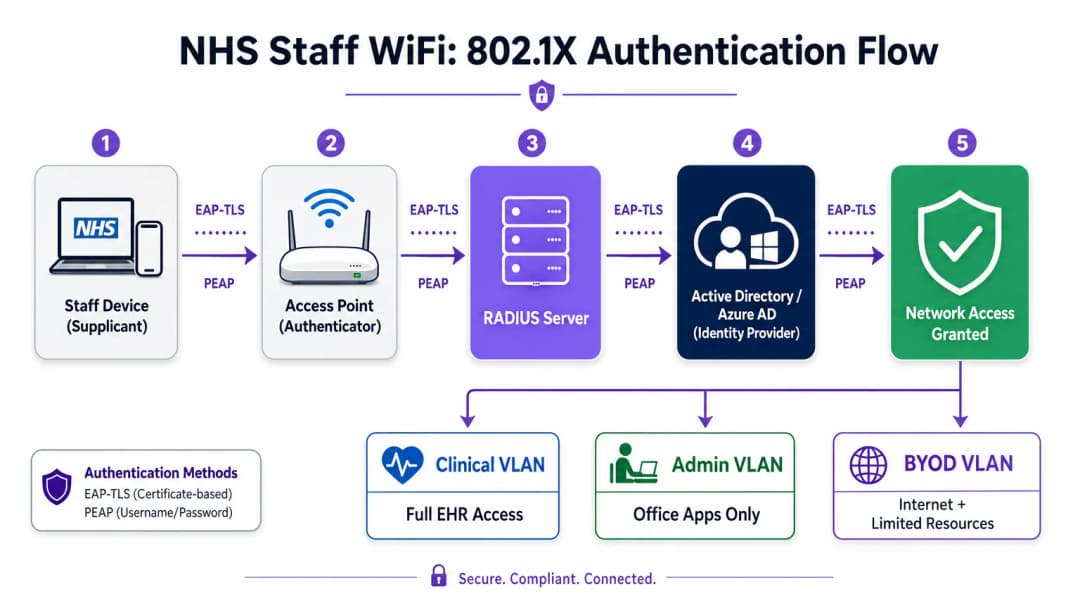
As implementações modernas do NHS devem exigir WPA3-Enterprise (ou WPA2-Enterprise como um estado de transição mínimo) utilizando a autenticação IEEE 802.1X. Esta estrutura exige que cada utilizador ou dispositivo apresente credenciais exclusivas antes de lhe ser concedido o acesso à rede, e o resultado dessa autenticação determina em que segmento lógico de rede o dispositivo é colocado.
Dois métodos EAP dominam as implementações de cuidados de saúde:
| Método EAP | Mecanismo de Autenticação | Mais Adequado Para | Nível de Segurança |
|---|---|---|---|
| EAP-TLS | Certificados digitais do lado do cliente | Dispositivos clínicos geridos pela empresa | O mais elevado - sem palavras-passe para fazer phishing |
| PEAP-MSCHAPv2 | Nome de utilizador/palavra-passe num túnel encriptado | BYOD, pessoal administrativo, dispositivos antigos | Elevado - credenciais protegidas por TLS |
O EAP-TLS é o padrão de excelência para dispositivos corporativos. Os certificados são distribuídos através de plataformas de Gestão de Dispositivos Móveis (MDM), permitindo uma autenticação sem intervenção - o dispositivo autentica-se silenciosamente em segundo plano. O PEAP-MSCHAPv2 canaliza de forma segura as credenciais de Active Directory ou Azure AD dentro de uma sessão TLS encriptada, tornando-o adequado para cenários BYOD onde a gestão de certificados é impraticável.
A integração da infraestrutura WiFi com o fornecedor de identidade central (IdP) da organização garante que o acesso seja automaticamente revogado quando a conta AD de um funcionário é desativada, respondendo diretamente aos requisitos do DSP Toolkit para a gestão do ciclo de vida de acesso.
Segmentação de Rede e Zonas de Confiança
Os pontos de acesso físicos transmitem por todo o piso do hospital, mas a segmentação lógica garante que o tráfego permaneça isolado com base no princípio do privilégio mínimo. Uma arquitetura de rede plana num ambiente de cuidados de saúde é uma vulnerabilidade de segurança grave, permitindo potencialmente que um dispositivo de convidado comprometido ou um sensor IoT vulnerável aceda a sistemas clínicos.
A melhor prática dita a criação de VLANs separadas mapeadas para SSIDs específicos, com regras de firewall a impor limites de tráfego entre elas:
| Zona | SSID | Autenticação | Acesso | Prioridade QoS |
|---|---|---|---|---|
| Clínica | NHS-Clinical | EAP-TLS (Certificado) | EHR, PACS, mensagens clínicas | A mais elevada |
| Administrativa | NHS-Staff | PEAP (credenciais AD) | Aplicações de escritório, Internet | Média |
| Medical IoT | Oculto/MAB | MAC Authentication Bypass | Apenas controlador do dispositivo | Alto |
| Guest / Patient | NHS-Guest | Captive Portal | Apenas Internet | Baixo |
| BYOD | NHS-BYOD | PEAP (credenciais AD) | Internet, VDI limitada | Baixo |
A VLAN de IoT médica merece atenção especial. Muitos dispositivos médicos conectados - bombas de infusão, monitores de pacientes, sistemas de chamada sem fios - não suportam 802.1X. O MAC Authentication Bypass (MAB) é a alternativa, mas deve ser combinado com Listas de Controlo de Acesso (ACLs) de firewall estritas que restrinjam a comunicação destes dispositivos apenas aos seus servidores de gestão designados.
O Desafio do BYOD
As políticas de Bring Your Own Device são cada vez mais comuns para o pessoal administrativo e clínicos visitantes. No entanto, os dispositivos pessoais não geridos representam um risco significativo se forem permitidos em segmentos de rede confiáveis.
Uma implementação de BYOD segura envolve a integração destes dispositivos numa VLAN de BYOD dedicada. Esta zona fornece acesso à Internet e, talvez, acesso limitado a recursos internos específicos e não confidenciais através de um gateway seguro ou Virtual Desktop Infrastructure (VDI). O encaminhamento direto para sistemas clínicos ou repositórios de dados de pacientes deve ser estritamente proibido.

Tem dúvidas sobre a sua configuração específica?
A nossa equipa trabalha com operadores de espaços, gestores de TI e engenheiros de rede em 80.000 espaços. Agende uma chamada de 20 minutos e mostraremos como outros profissionais na sua área o resolveram.
Guia de Implementação
A implementação de uma arquitetura segura de WiFi para funcionários do NHS requer uma abordagem faseada para minimizar a interrupção das operações clínicas em curso.
Fase 1: Avaliação e Design
Comece com um levantamento abrangente do local sem fios. Os ambientes de cuidados de saúde são notoriamente difíceis para a propagação de Radiofrequência (RF) devido a paredes revestidas a chumbo, maquinaria pesada e densidade populacional. O design deve focar-se na capacidade, e não apenas na cobertura, garantindo uma densidade adequada de pontos de acesso em áreas de elevado tráfego, tais como serviços de urgência e consultas externas.
Defina os SSIDs necessários e mapeie-os para as VLANs e políticas de segurança correspondentes. Mantenha o número de SSIDs de transmissão no mínimo - idealmente não mais do que quatro - para reduzir a sobrecarga de gestão e minimizar a congestão de tramas beacon, o que prejudica o desempenho global da rede.
Fase 2: Configuração da Infraestrutura
Configure a infraestrutura central de comutação e encaminhamento para suportar as VLANs definidas. Aplique regras de firewall nos limites entre segmentos para impor o princípio do menor privilégio. Configure o servidor RADIUS (por exemplo, Cisco ISE, Aruba ClearPass ou RADIUS-as-a-Service baseado na nuvem) e integre-o com o Fornecedor de Identidade central. Em ambientes onde a plataforma da Purple está implementada, a integração do WiFi Analytics nesta fase proporciona visibilidade sobre a utilização da rede, padrões de roaming e pontos críticos de capacidade.
Fase 3: Aplicação de Políticas e Integração
Implemente políticas de autenticação. Para dispositivos corporativos, utilize a solução de MDM para distribuir os perfis sem fios e certificados de cliente necessários (para EAP-TLS). Isto garante que os dispositivos geridos se ligam de forma automática e segura, sem intervenção do utilizador.
Para BYOD, estabeleça um fluxo de trabalho de integração claro - tipicamente um portal de integração que orienta o utilizador na autenticação com as suas credenciais corporativas, aceitação da política de utilização aceitável e transição do dispositivo para a VLAN segura de BYOD. A plataforma de Guest WiFi da Purple pode ser implementada como a camada de Captive Portal para o SSID de pacientes e convidados, gerindo a recolha de dados em conformidade com o GDPR e a aceitação de termos em grande escala.
Fase 4: Testes e Validação
Antes do lançamento oficial, teste cada caminho de autenticação, atribuição de VLAN e regra de firewall de ponta a ponta. Valide o comportamento de roaming caminhando pelas áreas clínicas com um dispositivo de teste, monitorizando especificamente os eventos de reautenticação. Confirme se os protocolos de fast roaming (802.11r e 802.11k) estão a funcionar corretamente e se as sessões das aplicações persistem durante as transições entre AP.
Melhores Práticas
Elimine chaves partilhadas. Migre todas as redes de funcionários e clínicas para autenticação 802.1X para garantir a responsabilidade individual e o controlo de acessos centralizado. Este é um requisito não negociável para a conformidade com o DSP Toolkit.
Imponha uma segmentação rigorosa. Nunca permita tráfego de convidados, BYOD ou IoT no mesmo segmento lógico que os dados clínicos. Utilize firewalls stateful para controlar o encaminhamento inter-VLAN, com regras de negação explícita como política predefinida.
Prioritize o tráfego clínico. Implemente políticas de QoS em controladores sem fios e switches para priorizar as aplicações clínicas - Voz sobre WLAN, acesso a EHR - em detrimento do tráfego de convidados ou administrativo, especialmente durante os períodos de maior congestionamento.
Ative o fast roaming. Implemente o 802.11r (Fast BSS Transition) e o 802.11k (Radio Resource Measurement) para garantir que a equipa clínica se pode deslocar pelas instalações sem sofrer falhas de ligação ou interrupções nas aplicações.
Monitorização contínua. Utilize plataformas de analítica para monitorizar a integridade da rede, identificar pontos de acesso não autorizados e acompanhar o comportamento de roaming dos utilizadores. Compreender o fluxo de pessoas e os padrões de utilização - uma técnica comprovada em ambientes de Retail e Hospitality - é igualmente valioso num ambiente hospitalar para o planeamento de capacidade e resolução de problemas.
Auditoria regular. Realize avaliações anuais de risco de redes sem fios para garantir a conformidade contínua com o DSP Toolkit, Cyber Essentials Plus e ISO 27001, quando aplicável.
Resolução de Problemas e Mitigação de Riscos
Falhas de Autenticação por Limite de Tempo
Em ambientes com elevada densidade de clientes, os servidores RADIUS podem ficar sobrecarregados, levando a falhas de autenticação por limite de tempo e quedas de ligação. Certifique-se de que a infraestrutura RADIUS está dimensionada de forma adequada e altamente disponível. Implemente o balanceamento de carga entre múltiplos servidores de autenticação e monitorize os tempos de resposta do RADIUS como uma métrica operacional fundamental.
Problemas de Roaming
A equipa clínica que se desloca rapidamente entre enfermarias pode sofrer quebras de ligação se a infraestrutura sem fios não suportar protocolos de roaming rápido. Ative o 802.11r e o 802.11k nos controladores sem fios e garanta que os dispositivos cliente suportam estes padrões. Realize inquéritos de roaming pós-implantação para identificar e resolver falhas de cobertura ou problemas de "sticky client", em que um dispositivo se agarra a um AP distante e mais fraco em vez de fazer roaming para um mais próximo.
Incompatibilidade de Dispositivos Antigos
Dispositivos médicos mais antigos podem não suportar protocolos de segurança modernos como WPA3 ou 802.1X. Isole estes dispositivos numa VLAN de IoT dedicada utilizando MAB. Aplique regras de firewall rigorosas para restringir a sua comunicação apenas a servidores de gestão essenciais. Considere atualizações de hardware ou pontes sem fios para dispositivos críticos que não possam ser protegidos nativamente.
Expiração de Certificados
As implementações EAP-TLS dependem de certificados com períodos de validade definidos. Se os certificados expirarem sem renovação, os dispositivos falharão na autenticação, causando uma interrupção clínica generalizada. Implemente a renovação automática de certificados via SCEP (Simple Certificate Enrolment Protocol) através da plataforma MDM, e monitorize proativamente as datas de expiração dos certificados.
ROI e Impacto no Negócio
O investimento numa arquitetura sem fios segura e de nível empresarial proporciona retornos mensuráveis em domínios clínicos, operacionais e de TI.
Eficiência clínica. A conectividade fiável garante que os médicos têm acesso instantâneo aos registos dos doentes no ponto de atendimento, reduzindo o tempo despendido a procurar informações ou a lidar com quebras de ligação. Isto tem um impacto direto na fluidez de atendimento dos doentes e na qualidade da prestação de cuidados.
Redução de custos operacionais de TI. A transição de palavras-passe partilhadas e do registo manual para uma autenticação automatizada e baseada em certificados reduz significativamente os pedidos de suporte técnico relacionados com a reposição de palavras-passe e problemas de conectividade. Um NHS Trust reportou uma redução de 40% nas chamadas de suporte técnico relacionadas com a rede sem fios após a migração para 802.1X.
Mitigação de riscos. A segmentação rigorosa e a autenticação robusta são fundamentais para cumprir os requisitos do DSP Toolkit, reduzindo os riscos financeiros e de reputação associados a violações de dados ou falhas de conformidade. O custo de uma violação de dados supera largamente o investimento numa infraestrutura WiFi devidamente concebida.
Preparação para o futuro. Uma rede WiFi bem concebida fornece a base para futuras iniciativas de saúde digital - serviços baseados na localização, rastreio de ativos em tempo real, aplicações avançadas de telessaúde - alinhando-se com objetivos estratégicos mais amplos em setores relacionados como a Saúde e o Transporte, onde a conectividade móvel apoia a eficiência operacional. Para as organizações que pretendem compreender como a plataforma da Purple se enquadra na camada de WiFi para visitantes e doentes desta arquitetura, a página do setor da Saúde fornece uma visão detalhada do Captive Portal em conformidade com o NHS, análises e capacidades de tratamento de dados em conformidade com o GDPR. Os mesmos princípios de análise que impulsionam o envolvimento do cliente no Retalho traduzem-se diretamente em inteligência operacional para as equipas de gestão de instalações hospitalares.
Definições Principais
IEEE 802.1X
Um padrão IEEE para Controlo de Acesso à Rede baseado em porta (PNAC). Fornece um mecanismo de autenticação para dispositivos que se desejam ligar a uma LAN ou WLAN, exigindo que cada dispositivo apresente credenciais antes de lhe ser concedido acesso.
Este é o padrão obrigatório para substituir palavras-passe partilhadas inseguras por inícios de sessão individuais baseados na identidade para funcionários e dispositivos clínicos. É a pedra angular de uma arquitetura wireless em conformidade com o DSP Toolkit.
VLAN (Virtual Local Area Network)
Uma sub-rede lógica que agrupa uma coleção de dispositivos de diferentes segmentos de rede física. As VLANs permitem que os administradores de rede particionem uma única rede comutada para responder aos requisitos funcionais e de segurança de diferentes grupos de utilizadores.
As VLANs são essenciais para segmentar o tráfego clínico do tráfego de convidados e administrativo, limitando o raio de impacto de uma potencial violação de segurança e aplicando o princípio do menor privilégio.
RADIUS (Remote Authentication Dial-In User Service)
Um protocolo de rede que fornece uma gestão centralizada de Autenticação, Autorização e Contabilidade (AAA) para utilizadores que se ligam e utilizam um serviço de rede.
O servidor RADIUS atua como o motor de decisão entre os pontos de acesso wireless e a base de dados de identidade central (Active Directory), decidindo quem obtém acesso e a que VLAN é atribuído.
EAP-TLS (Extensible Authentication Protocol - Transport Layer Security)
Um método EAP que se baseia em certificados de cliente e servidor para estabelecer uma ligação segura e mutuamente autenticada. Nenhuma das partes confia na outra sem um certificado válido.
O método mais seguro para autenticar dispositivos pertencentes ao hospital. Os certificados distribuídos via MDM garantem que apenas terminais geridos e fidedignos podem aceder à rede clínica, sem palavras-passe para fazer phishing ou partilhar.
MAB (MAC Authentication Bypass)
Um método de autenticação de dispositivos baseado no seu endereço MAC de hardware, utilizado como alternativa para dispositivos que não suportam 802.1X.
Necessário para dispositivos IoT médicos legados que precisam de acesso à rede mas não conseguem processar protocolos de autenticação complexos. Deve ser sempre combinado com ACLs de firewall rigorosas para conter o dispositivo nos seus caminhos de comunicação autorizados.
DSP Toolkit (Data Security and Protection Toolkit)
Uma ferramenta online de autoavaliação obrigatória pelo NHS England que todas as organizações devem preencher se tiverem acesso a dados e sistemas de doentes do NHS. Alinha-se com as dez normas de segurança de dados do National Data Guardian.
A conformidade com o DSP Toolkit é obrigatória para as organizações do NHS e os seus fornecedores. Uma segurança wireless robusta - incluindo 802.1X, segmentação e gestão do ciclo de vida de acessos - é um componente crítico para demonstrar a conformidade.
SSID (Service Set Identifier)
O nome principal associado a uma rede local wireless 802.11, transmitido por pontos de acesso para permitir que os dispositivos clientes identifiquem e se liguem à rede.
Os hospitais devem minimizar o número de SSIDs transmitidos (ex: NHS-Clinical, NHS-Guest) para reduzir a sobrecarga de gestão e de RF. Cada SSID deve mapear para uma política de segurança e VLAN específicas.
QoS (Quality of Service)
Tecnologias que gerem o tráfego de dados para reduzir a perda de pacotes, a latência e o jitter numa rede, ao priorizar certos tipos de tráfego sobre outros.
Crucial nos cuidados de saúde para garantir que as aplicações clínicas críticas para a vida e as comunicações de voz têm sempre prioridade sobre o tráfego menos importante, como a transmissão de vídeo de convidados ou atualizações de software.
802.11r (Fast BSS Transition)
Uma emenda do IEEE que permite o roaming rápido entre pontos de acesso através da pré-autenticação do cliente no AP de destino antes de a transição física ocorrer, reduzindo drasticamente a latência de roaming.
Essencial para ambientes clínicos onde os colaboradores estão em constante movimento. Sem o 802.11r, os dispositivos têm de realizar uma reautenticação RADIUS completa a cada transição de AP, o que pode causar a expiração das sessões das aplicações.
Exemplos Práticos
Um NHS Trust está a implementar novas estações de trabalho móveis (Workstations on Wheels) em várias enfermarias. A equipa de TI precisa de garantir que estes dispositivos mantêm a conectividade enquanto os enfermeiros se deslocam entre pontos de acesso, garantindo também que apenas dispositivos autorizados podem aceder à VLAN clínica que contém o sistema de Registo de Saúde Eletrónico.
O Trust deve implementar uma estrutura de autenticação 802.1X utilizando EAP-TLS. A equipa de TI utilizará a sua solução de MDM para instalar um certificado de cliente exclusivo e o respetivo perfil sem fios em cada estação de trabalho. Os controladores sem fios serão configurados para autenticar estes dispositivos num servidor RADIUS, que verifica o certificado na PKI interna. Após a autenticação bem-sucedida, o servidor RADIUS atribui dinamicamente a estação de trabalho à VLAN Clínica dedicada através de um atributo RADIUS (por exemplo, Tunnel-Private-Group-ID). Para responder ao requisito de roaming, o 802.11r (Fast BSS Transition) e o 802.11k (Radio Resource Measurement) devem ser ativados na infraestrutura sem fios para permitir que as estações de trabalho transitem sem falhas entre pontos de acesso, sem realizar um ciclo completo de nova autenticação no servidor RADIUS de cada vez.
Um hospital precisa de fornecer acesso à Internet para médicos tarefeiros visitantes que utilizem os seus computadores portáteis pessoais (BYOD). Estes médicos precisam de aceder a ferramentas de referência médica baseadas na nuvem, mas devem ser estritamente impedidos de aceder às bases de dados internas de doentes do hospital.
O hospital deve implementar um SSID BYOD dedicado mapeado para uma VLAN BYOD isolada. A autenticação deve ser realizada através de 802.1X usando PEAP-MSCHAPv2, permitindo que os tarefeiros iniciem sessão utilizando credenciais temporárias do Active Directory fornecidas pelos Recursos Humanos à chegada. O firewall principal deve ser configurado com uma ACL que negue explicitamente qualquer encaminhamento da VLAN BYOD para as VLANs Clínicas ou Administrativas, permitindo apenas tráfego de saída para a Internet. Adicionalmente, pode ser utilizado um Captive Portal na ligação inicial para impor uma Política de Utilização Aceitável antes de conceder acesso total à Internet. Quando a conta AD temporária do tarefeiro for desativada no final do seu contrato, o seu acesso sem fios é automaticamente revogado.
Perguntas de Prática
Q1. Está a ser adicionada uma nova ala ao hospital e a equipa de instalações quer implementar sensores de temperatura sem fios nos frigoríficos de armazenamento de medicamentos. Estes sensores apenas suportam WPA2-Personal (Pre-Shared Key) e não podem utilizar 802.1X. Como deve o arquiteto de rede integrá-los de forma segura?
Dica: Considere o princípio do privilégio mínimo e como isolar dispositivos não conformes dos sistemas clínicos.
Ver resposta modelo
O arquiteto deve criar um SSID oculto e dedicado, mapeado para uma VLAN específica "Facilities IoT". Os sensores ligar-se-ão utilizando a PSK. Crucialmente, devem ser aplicadas ACLs de firewall rigorosas a esta VLAN, permitindo que os sensores comuniquem apenas com o seu servidor de gestão central específico e negando todo o restante tráfego - particularmente o encaminhamento para a VLAN Clínica ou para a internet. O MAC Authentication Bypass (MAB) também deve ser configurado para garantir que apenas os endereços MAC específicos dos sensores adquiridos sejam permitidos nessa VLAN, evitando que dispositivos não autorizados se liguem utilizando a mesma PSK.
Q2. Durante um turno matinal movimentado, os enfermeiros relatam que os seus tablets perdem frequentemente a ligação ao sistema EHR enquanto percorrem a ala, exigindo que iniciem sessão novamente. O levantamento de cobertura sem fios mostra uma forte intensidade de sinal em toda a ala. Qual é a causa provável e a solução?
Dica: Um sinal forte não garante transições fluidas entre pontos de acesso. Considere a sobrecarga de autenticação em cada transição de AP.
Ver resposta modelo
A causa provável é a falta de protocolos de roaming rápido. À medida que o tablet se move para fora do alcance de um AP e se liga ao seguinte, é forçado a realizar uma reautenticação 802.1X completa contra o servidor RADIUS, o que introduz latência suficiente para fazer com que a sessão da aplicação EHR expire. A solução é ativar o 802.11r (Fast BSS Transition) nos controladores sem fios, o que permite ao cliente fazer roaming de forma segura entre APs sem a latência de um ciclo de reautenticação completo. O 802.11k também deve ser ativado para ajudar o dispositivo a identificar o AP de destino ideal antes de a transição ocorrer.
Q3. Um NHS Trust está a preparar-se para a sua avaliação anual do DSP Toolkit. O auditor observa que o pessoal administrativo utiliza uma palavra-passe partilhada para aceder à rede WiFi de colaboradores. Qual é o principal risco identificado aqui e qual é a remediação recomendada?
Dica: Foque-se na responsabilidade individual e no ciclo de vida do acesso quando os colaboradores deixam a organização.
Ver resposta modelo
O principal risco é a falta de responsabilidade individual e uma gestão deficiente do ciclo de vida dos acessos. Se um membro da equipa administrativa deixar o Trust, a palavra-passe partilhada permanece válida, permitindo potencialmente o acesso não autorizado. Além disso, é impossível auditar qual o utilizador específico que realizou uma ação na rede. A remediação consiste em descontinuar a rede com palavra-passe partilhada (PSK) e migrar o pessoal administrativo para uma rede autenticada por 802.1X utilizando PEAP-MSCHAPv2 com as suas credenciais do Active Directory. Isto garante a responsabilidade individual e a revogação automática do acesso quando a sua conta de AD for desativada ao sair, respondendo diretamente aos requisitos do DSP Toolkit para controlo de acessos e registo de auditoria.
Continue a ler esta série
Conformidade com a CIPA: lista de verificação de conformidade para operadores de locais públicos
Poderá decidir se a CIPA se aplica ao seu WiFi, depois segmentar redes, encaminhar o DNS através do Purple Shield e fechar caminhos de desvio. Saberá também quais as provas a conservar para a certificação do Form 486 ou Form 479. A lista de verificação atribui um proprietário a cada requisito, para que não falte nada na certificação do seu próximo ano de financiamento.
Falhas de ligação em modo de transição WPA3: uma checklist de implementação para Cisco Meraki, HPE Aruba e Ruckus
Utilize esta checklist para diagnosticar por que razão os dispositivos falham num SSID em modo de transição WPA3 SAE e resolva o problema em Cisco Meraki, HPE Aruba ou Ruckus. Irá associar códigos de estado 802.11 a causas, isolar problemas de PMF, 802.11r e 6GHz, e decidir quando mudar para um SSID exclusivo WPA3.
Melhor filtragem DNS: um guia abrangente para empresas
Este guia de referência técnica explica como a filtragem DNS empresarial protege as redes públicas ao bloquear domínios maliciosos na camada de resolução - antes de uma ligação ser estabelecida. Oferece aos diretores de TI, arquitetos de rede e equipas de operações de locais a arquitetura de implementação, configuração de firewall e o contexto de conformidade necessários para proteger o WiFi de convidados em ambientes de hotelaria, retalho e setor público. O Purple Shield bloqueia malware, botnets e conteúdo inadequado ao nível do DNS em mais de 80.000 locais ativos.
Tem dúvidas sobre a sua configuração específica?
A nossa equipa trabalha com operadores de espaços, gestores de TI e engenheiros de rede em 80.000 espaços. Agende uma chamada de 20 minutos e mostraremos como outros profissionais na sua área o resolveram.