
Soluções WiFi para Hotelaria: O que procurar num Fornecedor
Este guia autorizado detalha as considerações técnicas e comerciais críticas para a seleção de um fornecedor de WiFi para hotelaria. Abrange arquitetura de rede, padrões de segurança, design de Captive Portal e análise de dados em conformidade com o GDPR para ajudar os líderes de TI a implementar soluções que impulsionam a receita e a eficiência operacional.
Ouça este guia
Ver transcrição do podcast
Resumo Executivo
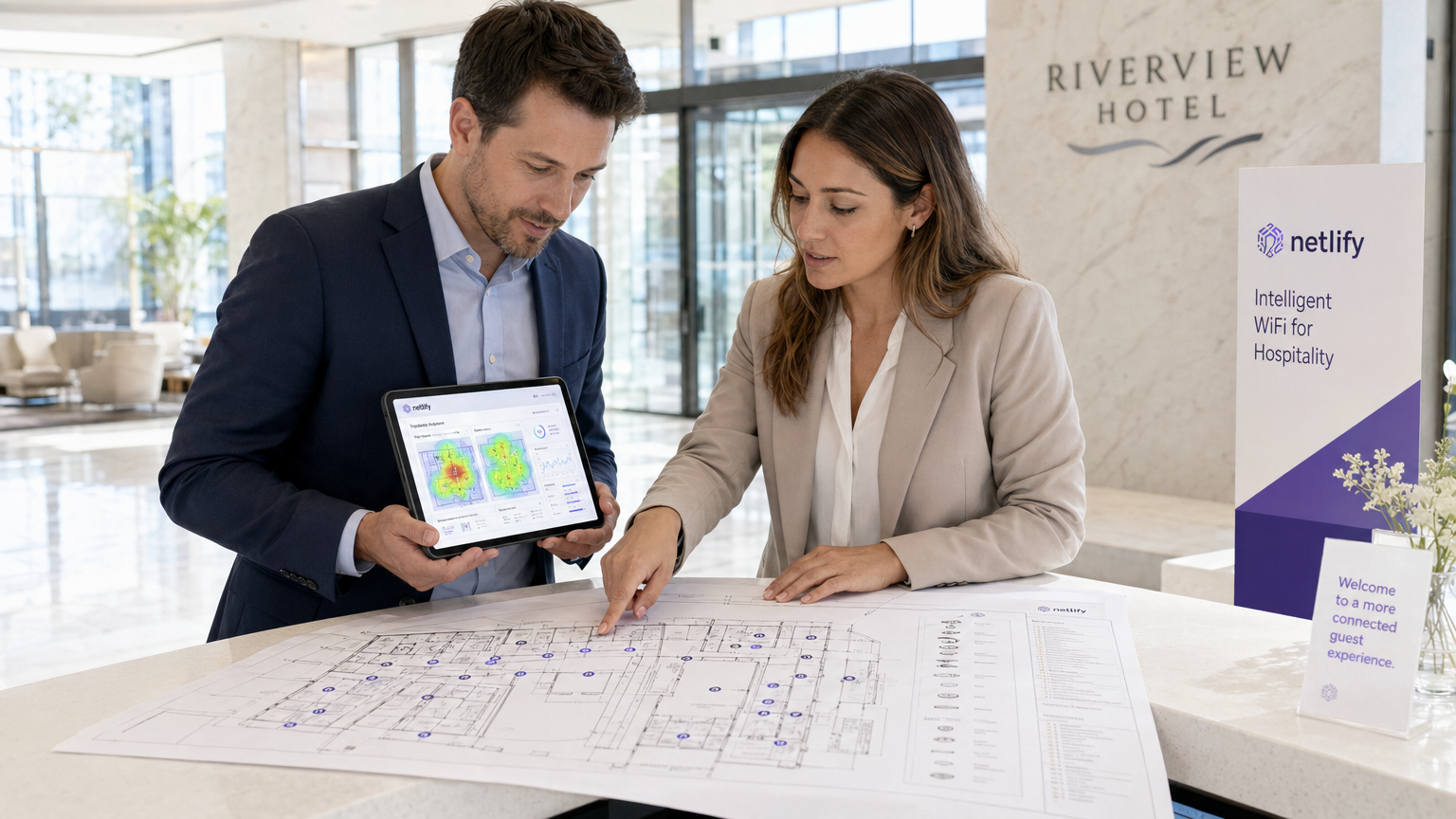
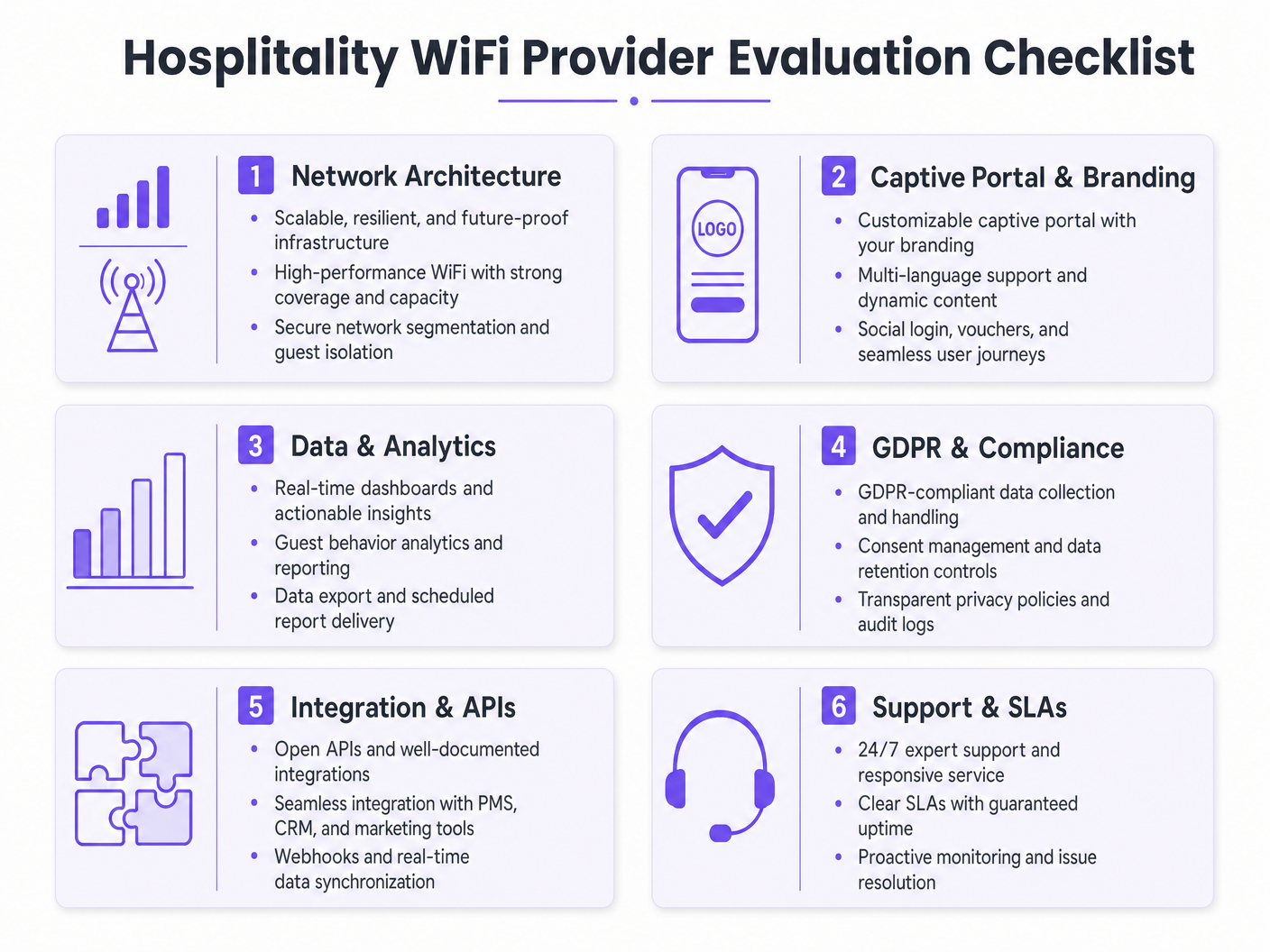
Para os operadores de espaços modernos, o guest WiFi deixou de ser um centro de custos; é um ativo de dados crítico e um impulsionador de receita. À medida que os gestores de TI, arquitetos de rede e CTOs avaliam as soluções de WiFi para hotelaria, o foco deve mudar da conectividade básica para análises de nível empresarial, conformidade e integração. Este guia fornece uma estrutura neutra em relação ao fornecedor para avaliar os provedores de guest WiFi, detalhando a arquitetura de rede essencial, os requisitos de Captive Portal e as capacidades de análise de dados necessárias para uma implementação bem-sucedida em ambientes de hotelaria, retalho e setor público.
A implementação de uma solução robusta de Guest WiFi exige o equilíbrio entre o desempenho de alta densidade e padrões de segurança rigorosos como WPA3 e PCI DSS. Além disso, a capacidade de capturar dados primários através de uma plataforma de WiFi Analytics transforma a rede num motor de marketing. Este guia de referência descreve as especificações técnicas e as considerações de impacto nos negócios necessárias para selecionar um fornecedor capaz de oferecer conectividade segura e inteligência acionável.
Análise Técnica Detalhada
Arquitetura de Rede e Padrões de Rádio
A base de qualquer implementação de WiFi empresarial é a arquitetura de rede subjacente. Para operadores multi-site, uma arquitetura gerida na cloud é vastamente superior aos controladores tradicionais on-premise. A gestão na cloud permite o provisionamento zero-touch, a aplicação centralizada de políticas e atualizações de firmware sem interrupções em centenas de localizações, sem a necessidade de recursos de TI locais.
Ao avaliar as especificações dos pontos de acesso (AP), o Wi-Fi 6 (802.11ax) deve ser o padrão de referência. O Wi-Fi 6 introduz o Acesso Múltiplo por Divisão de Frequência Ortogonal (OFDMA), que permite que um único AP comunique com múltiplos clientes simultaneamente através de diferentes subcanais. Em ambientes de alta densidade — como centros de conferências ou corredores de estádios — isto reduz drasticamente a latência e melhora o débito em comparação com o padrão Wi-Fi 5 (802.11ac) mais antigo. Para locais que antecipam densidade extrema de dispositivos, o Wi-Fi 6E estende estas capacidades para o espectro de 6 GHz não congestionado.
Segurança e Segmentação de Rede
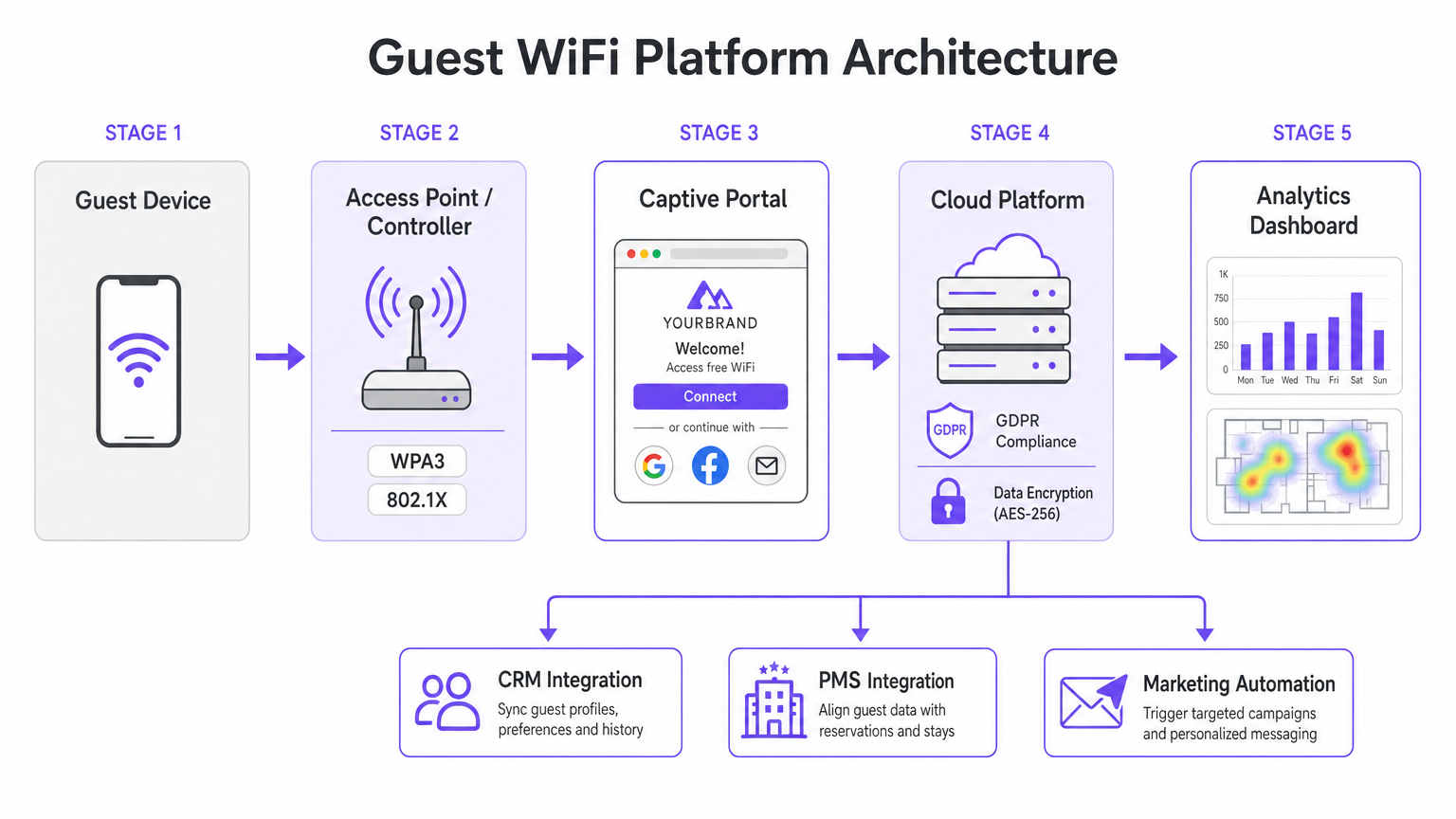
A arquitetura de segurança no WiFi para hotelaria deve abordar tanto a segurança dos hóspedes quanto a conformidade corporativa. A segmentação de rede é um requisito inegociável; o tráfego de hóspedes deve ser logicamente isolado das redes corporativas e de ponto de venda (POS). Isto é tipicamente alcançado usando VLAN tagging ao nível do AP, imposto por regras de firewall rigorosas no gateway. Este isolamento é um requisito central para a conformidade com o PCI DSS se os terminais de pagamento partilharem a infraestrutura de rede física.
Os padrões de autenticação são igualmente críticos. WPA3 deve ser o padrão para todas as novas redes de hóspedes, mitigando as vulnerabilidades inerentes ao WPA2 (como ataques KRACK). Para redes de funcionários internos que operam no mesmo hardware, a autenticação IEEE 802.1X suportada por um servidor RADIUS oferece segurança robusta baseada em certificados que excede em muito a proteção de chaves pré-partilhadas.
Guia de Implementação
O Captive Portal e a Captura de Dados
O Captive Portal serve como a porta de entrada entre o ponto de acesso e a internet, atuando como a interface principal para a interação do hóspede e a captura de dados. Uma página HTML estática básica é insuficiente para implementações empresariais. Os operadores exigem um portal dinâmico, totalmente personalizado, que suporte múltiplos métodos de autenticação, incluindo login social (Google, Facebook), registo por e-mail e verificação por SMS.
Cada método de autenticação produz diferentes ativos de dados. O login social fornece dados demográficos verificados, enquanto o registo por e-mail é crucial para construir uma base de dados de marketing. No entanto, esta captura de dados deve ser estritamente regida por protocolos de gestão de consentimento. Sob o GDPR, o consentimento de marketing deve ser explícito, informado e livremente dado. Os fornecedores devem suportar caixas de seleção separadas e desmarcadas para acesso à rede e comunicações de marketing, juntamente com mecanismos transparentes para pedidos de acesso de titulares de dados (DSARs).
Integração e Análise
O verdadeiro valor de uma solução moderna de WiFi para hotelaria reside nas suas capacidades de análise. Contagens básicas de conexão são inadequadas; as equipas de TI e marketing precisam de insights acionáveis derivados da análise do tempo de permanência, identificação de visitantes recorrentes e mapas de calor de fluxo de pessoas.
Para maximizar o ROI, a plataforma WiFi deve integrar-se perfeitamente com o stack tecnológico existente do local. Procure fornecedores que ofereçam APIs robustas e suporte a webhooks para sincronização de dados em tempo real com sistemas CRM, plataformas de automação de marketing e Property Management Systems (PMS). Esta integração permite campanhas automatizadas e direcionadas com base no comportamento do hóspede em tempo real.
Melhores Práticas
- Realize Inquéritos de Local RF Rigorosos: Nunca estime a colocação de APs com base apenas em plantas. Realize inquéritos de local RF abrangentes para contabilizar a atenuação de paredes, aço estrutural e clusters de utilizadores de alta densidade. Uma regra geral comum para áreas de alta densidade é um AP por 25-30 utilizadores concorrentes.
- Garanta Backhaul Adequado: A rede Wi-Fi 6 mais rápida falhará se o uplink de internet for um gargalo. Para locais que suportam mais de 100 utilizadores concorrentes, invista em linhas dedicadas para garantir largura de banda não contestada. Para mais informações, consulte o nosso guia: O Que É Uma Linha Dedicada? Internet Empresarial Dedicada .
- ContinuarOtimize o Portal: Trate o Captive Portal como um canal de marketing dinâmico. Atualize a marca, promoções e mensagens de fidelidade sazonalmente para maximizar o envolvimento e as taxas de captura de dados.
Resolução de Problemas e Mitigação de Riscos
Modos de Falha Comuns
- Segmentação de Rede Inadequada: A falha em isolar o tráfego de convidados dos sistemas POS expõe o local a riscos significativos de conformidade com o PCI DSS e potenciais violações de dados. Verifique sempre as configurações de VLAN e as regras da firewall durante a implementação.
- Captura de Dados Não Conforme: Agrupar a aceitação dos Termos de Serviço com o consentimento de marketing viola o GDPR. Garanta que o Captive Portal utiliza mecanismos de opt-in explícitos e separados para evitar a aplicação regulamentar e danos à reputação.
- Densidade de APs Subdimensionada: A implementação de poucos pontos de acesso em áreas de alto tráfego leva a contenção de canais, ligações perdidas e uma má experiência para o convidado. Projete para capacidade, não apenas para cobertura.
ROI e Impacto nos Negócios
O retorno do investimento para uma solução WiFi empresarial de hospitalidade vai além da conectividade básica. Ao aproveitar uma plataforma de WiFi Analytics , os locais podem transformar o tráfego anónimo em perfis de clientes conhecidos. Estes dados primários impulsionam campanhas de marketing direcionadas, aumentando as taxas de visitas repetidas e o gasto médio por convidado.
Além disso, são obtidas eficiências operacionais através da gestão centralizada na cloud e integrações CRM automatizadas, reduzindo a carga de trabalho de TI. Em última análise, uma solução WiFi bem arquitetada melhora a experiência do convidado, ao mesmo tempo que fornece inteligência de negócios mensurável às equipas de operações e marketing, particularmente em setores centrais como Hospitalidade e Retalho .
Definições Principais
Wi-Fi 6 (802.11ax)
The current standard for wireless networking that significantly improves performance in high-density environments through technologies like OFDMA.
Essential for venues with large numbers of simultaneous users, such as conference centres and stadiums, to prevent network congestion.
OFDMA (Orthogonal Frequency Division Multiple Access)
A technology that allows a single wireless channel to be divided into smaller sub-channels, enabling an access point to communicate with multiple clients simultaneously.
Crucial for reducing latency and improving throughput when many guests are trying to access the network at the same time.
Network Segmentation
The practice of dividing a computer network into multiple logical subnets (VLANs) to improve performance and security.
Mandatory for isolating untrusted guest traffic from sensitive corporate data and payment processing systems.
Captive Portal
A web page that a user of a public-access network is obliged to view and interact with before access is granted.
The primary touchpoint for guest interaction, branding, and GDPR-compliant data capture.
WPA3
The latest Wi-Fi security certification program, providing stronger encryption and better protection against offline dictionary attacks compared to WPA2.
The baseline security standard that should be deployed on all new guest and corporate wireless networks.
PCI DSS (Payment Card Industry Data Security Standard)
An information security standard for organizations that handle branded credit cards from the major card schemes.
Relevant when a venue processes payments; requires strict isolation of the payment network from the guest WiFi network.
Webhook
A method of augmenting or altering the behaviour of a web page or web application with custom callbacks, allowing real-time data transfer between applications.
Used to instantly sync guest data captured on the WiFi portal with a venue's CRM or marketing automation platform.
Dwell Time
The length of time a visitor spends in a specific physical location, measured by tracking the presence of their mobile device's MAC address.
A key analytics metric used by operations teams to understand venue utilization and by marketing teams to gauge engagement.
Exemplos Práticos
A 200-room hotel needs to upgrade its legacy Wi-Fi 4 network to support high-density conference facilities and seamless guest roaming, while ensuring PCI DSS compliance for its new mobile point-of-sale terminals.
Deploy a cloud-managed Wi-Fi 6 architecture with access points configured for OFDMA to handle the high client density in the conference rooms. Implement strict network segmentation using VLANs to isolate guest traffic from the mobile POS devices, enforcing the separation at the gateway firewall. Configure the captive portal to require explicit GDPR-compliant consent for marketing data capture.
A national pub chain wants to use guest WiFi to build a marketing database and understand customer dwell times across its 50 locations.
Implement an enterprise guest WiFi platform featuring a branded captive portal with social login and email registration options. Ensure the portal includes separate, un-ticked checkboxes for marketing consent. Utilize the platform's analytics dashboard to track MAC addresses (hashed for privacy) to calculate dwell times and repeat visit frequencies. Set up webhook integrations to push verified email addresses directly to the chain's CRM system in real-time.
Perguntas de Prática
Q1. Your marketing director wants to automatically add every guest who connects to the WiFi to the weekly promotional email blast to increase F&B revenue. How do you configure the captive portal to support this?
Dica: Consider GDPR requirements regarding consent for marketing communications.
Ver resposta modelo
You cannot automatically add guests to a marketing list just because they connected to the WiFi. The captive portal must be configured with a clear privacy notice and a separate, un-ticked checkbox explicitly requesting consent for marketing communications. Only guests who actively check this box can be synced to the CRM via API or webhook for the email blast.
Q2. A stadium IT director is evaluating a vendor who proposes deploying 802.11ac (Wi-Fi 5) access points, arguing it will save 30% on hardware costs while providing sufficient coverage. How should the director respond?
Dica: Consider the difference between coverage and capacity in a stadium environment.
Ver resposta modelo
The director should reject the proposal. While Wi-Fi 5 might provide adequate physical coverage, it lacks the capacity management features required for a stadium. Wi-Fi 6 (802.11ax) is essential in this environment because OFDMA allows the APs to handle many simultaneous connections efficiently, preventing the network from collapsing under high client density.
Q3. During a network upgrade at a retail chain, the deployment team suggests running the new guest WiFi and the staff inventory scanners on the same VLAN to simplify IP address management. What is the risk, and what is the correct approach?
Dica: Think about security best practices and compliance requirements.
Ver resposta modelo
Running guest and corporate traffic on the same VLAN is a severe security risk and violates best practices (and potentially PCI DSS if payment data is involved). It exposes internal systems to untrusted guest devices. The correct approach is strict network segmentation: configure separate SSIDs mapped to separate VLANs, and use firewall rules to block all traffic between the guest VLAN and the corporate VLAN.
Continue a ler esta série
O que é um Pedido de Sondagem? Compreender Como os Dispositivos Descobrem Redes
Este guia de referência técnica oferece uma análise aprofundada dos pedidos de sondagem IEEE 802.11, da varredura ativa versus passiva e do impacto da aleatorização de MAC na análise de locais. Apresenta estratégias de implementação acionáveis para arquitetos de rede otimizarem implementações de alta densidade, mitigarem tempestades de sondagem e garantirem a recolha de dados precisa e em conformidade com o GDPR, utilizando camadas de identidade autenticadas.
Como Corrigir WiFi Lento Sem Atualizar o Seu Plano de Internet
Um guia de referência técnica abrangente para gestores de TI e arquitetos de rede sobre como otimizar o desempenho de WiFi empresarial sem aumentar a largura de banda do ISP. Abrange a otimização de RF, gestão da densidade de clientes, implementação de QoS e como aproveitar a análise de WiFi para diagnosticar e resolver gargalos.
A Lista de Verificação para Migrar de NAC Legado para NAC Nativo da Nuvem
Este guia de referência técnica e autoritário fornece uma lista de verificação estruturada em três fases para migrar do Network Access Control (NAC) legado para uma arquitetura nativa da nuvem. Ele equipa gestores de TI e arquitetos de rede com estratégias acionáveis para gerir a integração de identidades, a paridade de políticas e a conformidade sem interromper as operações do local.