
WiFi para Centros Comerciais: Um Guia para Gestores de Propriedades
Este guia fornece um plano técnico e comercial abrangente para a implementação de WiFi em todo um centro comercial. Abrange arquitetura de rede de três camadas, design de RF de alta densidade, captura de dados em conformidade com o GDPR e estratégias de monetização de media de retalho. Gestores de propriedades, equipas de TI e CTOs encontrarão orientações de implementação acionáveis, juntamente com uma estrutura clara de ROI para transformar a conectividade de convidados num ativo de dados primários.
Ouça este guia
Ver transcrição do podcast
Resumo Executivo
A implementação de WiFi em toda uma propriedade de retalho já não é apenas uma despesa operacional ou uma comodidade genérica para os convidados. Para os centros comerciais modernos, uma rede sem fios robusta e de alta densidade constitui a base de uma estratégia de negócios orientada por dados. Ao implementar uma rede devidamente arquitetada, os gestores de propriedades e os líderes de TI podem transformar o fluxo de visitantes anónimos em dados primários acionáveis, impulsionando tanto a eficiência operacional quanto novas fontes de receita através da monetização de media de retalho.
Este guia descreve a arquitetura técnica, as considerações de implementação e o caso de negócio para Guest WiFi de nível empresarial em ambientes de retalho. Preenche a lacuna entre a engenharia de rede complexa e os resultados de negócio tangíveis, fornecendo um plano para gestores de TI, arquitetos de rede e CTOs entregarem uma solução de conectividade resiliente, escalável e segura que suporte tanto o acesso de convidados quanto os requisitos operacionais. Os mesmos princípios aplicam-se a setores adjacentes, incluindo Retalho , Hotelaria e grandes espaços públicos.
Análise Técnica Detalhada
Arquitetura e Topologia de Rede
A arquitetura de uma rede WiFi de centro comercial deve considerar a escala massiva, a alta densidade de clientes e ambientes de RF desafiadores. Um modelo hierárquico padrão de três camadas é essencial para qualquer implementação desta dimensão.
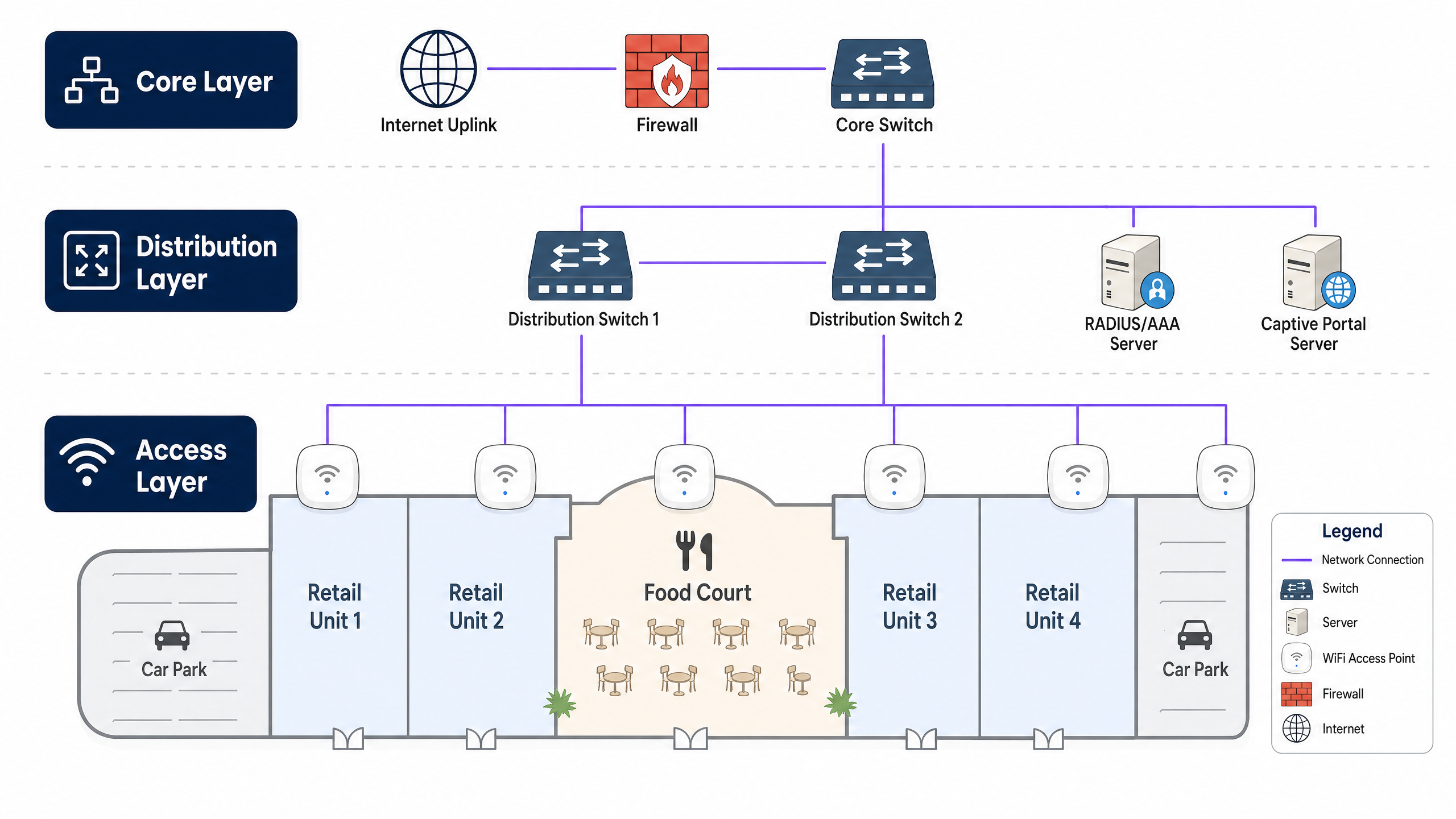
A Camada Central forma a espinha dorsal de alta velocidade, fornecendo roteamento redundante, serviços de firewall e conectividade de uplink de internet. Esta camada deve suportar alto débito para lidar com cargas de tráfego de pico sem gargalos. A Camada de Distribuição agrega o tráfego da camada de acesso, aplicando políticas de QoS (Quality of Service) e roteando o tráfego em direção ao núcleo. Geralmente aloja servidores RADIUS/AAA para autenticação e servidores de Captive Portal para o onboarding de convidados. A Camada de Acesso é a extremidade da rede onde os clientes se conectam, compreendendo switches Power over Ethernet (PoE) e pontos de acesso WiFi de alta densidade distribuídos pelo piso de retalho, praças de alimentação e parques de estacionamento.
Padrões e Frequências Sem Fios
As implementações modernas devem padronizar-se em WiFi 6 (802.11ax) ou WiFi 6E, que oferecem melhorias significativas em ambientes de alta densidade através de tecnologias como OFDMA (Orthogonal Frequency-Division Multiple Access) e MU-MIMO. Estes padrões permitem que os APs comuniquem com múltiplos dispositivos simultaneamente, reduzindo drasticamente a latência em áreas lotadas como praças de alimentação.
São necessários APs de banda dupla (2.4 GHz e 5 GHz) ou de banda tripla (adicionando 6 GHz). Embora os 2.4 GHz proporcionem melhor penetração através de paredes e maior alcance, estão altamente congestionados. Os 5 GHz e 6 GHz oferecem canais mais amplos e maior débito, mas exigem uma colocação mais densa dos APs. Uma rede bem projetada direcionará ativamente os clientes com capacidade de banda dupla para as bandas de 5 GHz ou 6 GHz (Band Steering) para otimizar a utilização geral do espectro.
Segurança e Conformidade
A segurança é primordial, especialmente ao lidar com dados de convidados e ao integrar potencialmente com sistemas de ponto de venda (POS) ou tecnologia operacional (OT).
Para Acesso de Convidados, implemente um Captive Portal seguro para o onboarding. Utilize WPA3-Personal (SAE) onde suportado, ou Open/Enhanced Open (OWE) para acesso contínuo. Crucialmente, o isolamento de clientes deve ser ativado ao nível do AP para evitar a comunicação peer-to-peer entre dispositivos de convidados. Para Privacidade de Dados, o mecanismo de recolha de dados deve estar em conformidade com o GDPR, CCPA ou regulamentos locais de proteção de dados. Uma plataforma robusta de Guest WiFi gerirá o consentimento explicitamente durante o processo de onboarding. Para Acesso Corporativo/OT, separe o tráfego operacional (por exemplo, sensores HVAC, câmaras de segurança, POS) em VLANs dedicadas, protegidas com autenticação 802.1X (WPA3-Enterprise).
Guia de Implementação
Passo 1: Levantamento do Local e Planeamento de RF
Um levantamento do local preditivo e ativo é o primeiro passo crítico. Os ambientes de retalho são dinâmicos; os layouts das lojas mudam e as exposições sazonais podem alterar significativamente a propagação de RF.
Um Levantamento Preditivo utiliza ferramentas de software para modelar o ambiente com base em plantas e materiais de construção, fornecendo uma estimativa inicial para o número e colocação de APs. Um Levantamento Ativo (AP-on-a-stick) testa fisicamente a cobertura e a interferência do AP no local. Isto é vital em centros comerciais para considerar variáveis como montras de vidro, acessórios metálicos e redes WiFi de inquilinos existentes que causam interferência de co-canal.
Passo 2: Provisionamento da Infraestrutura
Certifique-se de que a infraestrutura com fios pode suportar as exigências sem fios. Implemente cablagem Cat6A em todos os locais de AP para suportar débito multi-gigabit e orçamentos PoE mais elevados (PoE+ ou PoE++). Selecione switches de acesso com orçamentos PoE adequados para alimentar todos os APs simultaneamente, especialmente crítico ao implementar APs WiFi 6/6E que consomem muita energia. Uma ligação robusta à internet é essencial; considere uma linha dedicada para largura de banda garantida e SLAs. Saiba mais no nosso guia: O Que É uma Linha Dedicada? Internet Empresarial Dedicada .
Passo 3: Colocação e Configuração de APs
Em áreas de alta densidade, como praças de alimentação ou espaços para eventos, utilize APs com antenas direcionais para criar microcélulas menores e focadas, aumentando a capacidade sem aumentar a interferência de co-canal. Em corredores e passagens, escalone a colocação dos APs para fornecer cobertura contínua para clientes em roaming. Ajuste cuidadosamente os níveis de potência de transmissão; os APs não devem transmitir com potência máxima, pois isso cria clientes 'pegajosos' — dispositivos que se recusam a fazer roaming para um AP mais próximo — e aumenta a interferência.
Passo 4: Integração de Captive Portal e Análise
Integre a rede com uma plataforma de análise robusta. O captive portal é a porta de entrada para a recolha de dados. Mantenha o processo de integração sem atritos, oferecendo login social, registo por e-mail ou autenticação contínua como o OpenRoaming. Uma vez conectada, a plataforma deve começar a agregar dados de localização, tempos de permanência e frequências de visitas de retorno. Isto transforma a rede de um centro de custos num ativo de marketing. Explore as capacidades de uma solução abrangente de WiFi Analytics .
Melhores Práticas
Separar Tráfego de Convidados e Corporativo: Utilize sempre VLANs para separar logicamente o tráfego de convidados dos dados corporativos e operacionais. Este é um requisito de segurança fundamental, especialmente em ambientes sujeitos à conformidade PCI DSS, onde dados de cartões de pagamento podem atravessar a rede.
Implementar Band Steering: Direcione ativamente os clientes capazes para as bandas de 5 GHz ou 6 GHz para libertar o espectro congestionado de 2.4 GHz para dispositivos legados e sensores IoT.
Otimizar DHCP e DNS: Ambientes de alta rotatividade, como centros comerciais, esgotam rapidamente os pools de DHCP. Reduza os tempos de concessão de DHCP (por exemplo, para 1 ou 2 horas) para recuperar endereços IP de forma eficiente. Garanta uma infraestrutura DNS robusta para lidar com altos volumes de consultas. Leia mais sobre como Proteger a Sua Rede com DNS e Segurança Fortes .
Monitorização Contínua: O ambiente de RF muda constantemente. Utilize um sistema de gestão sem fios (WMS) que fornece visibilidade em tempo real sobre a saúde do cliente, o estado do AP e os níveis de interferência.
Resolução de Problemas e Mitigação de Riscos
Modos de Falha Comuns
Interferência Co-Canal (CCI) ocorre quando múltiplos APs operam no mesmo canal e conseguem ouvir-se mutuamente, fazendo com que os dispositivos esperem por tempo de antena livre e reduzindo drasticamente o débito. Mitigue isto com um planeamento cuidadoso de canais, gestão dinâmica de rádio (RRM) e redução da potência de transmissão do AP.
Clientes "Sticky" são dispositivos que permanecem conectados a um AP mesmo quando um AP mais próximo e mais forte está disponível. Implemente limiares mínimos de RSSI para desconectar suavemente os clientes com sinais fracos, forçando-os a fazer roaming para um AP melhor conectado.
Esgotamento do Pool DHCP impede que os utilizadores se conectem porque a rede ficou sem endereços IP. Utilize sub-redes maiores (por exemplo, /22 ou /21) para redes de convidados e reduza os tempos de concessão de DHCP.
APs Rogue são pontos de acesso não autorizados conectados à rede, representando um risco de segurança grave. Ative os Sistemas de Prevenção de Intrusões Sem Fios (WIPS) para detetar e conter dispositivos rogue automaticamente.
ROI e Impacto no Negócio
Recolha de Dados e Análise
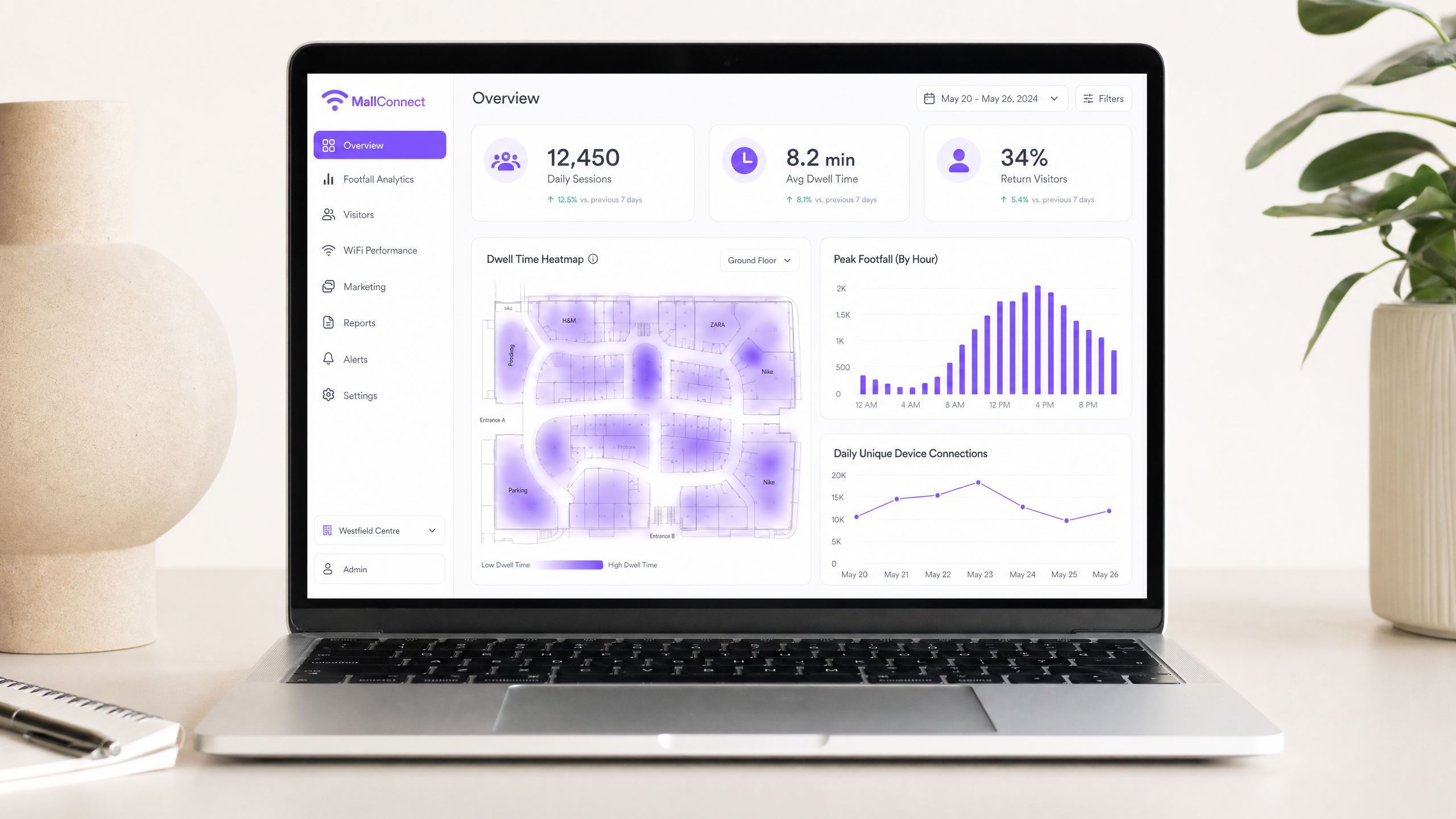
Uma rede devidamente configurada capta análises passivas (afluência, tempo de permanência, padrões de movimento) e análises ativas (dados demográficos, detalhes de contacto via captive portal). Estes dados fornecem aos operadores de espaços informações detalhadas sobre o comportamento dos compradores, permitindo decisões baseadas em dados sobre a colocação de inquilinos, avaliação de rendas e eficácia de marketing. A mesma abordagem baseada em dados é eficaz em locais de grande afluência, conforme detalhado no nosso WiFi para Jardins Zoológicos e Parques Temáticos: Guia de Conectividade para Locais de Grande Afluência .
Monetização de Mídia de Retalho
O próprio captive portal é um espaço digital privilegiado. Os gestores de propriedades podem monetizá-lo servindo anúncios direcionados ou patrocínios de inquilinos de retalho ou marcas de terceiros durante o processo de integração. Isto transforma a rede WiFi num canal direto de geração de receita.
Melhorar a Experiência do Cliente
A conectividade contínua permite navegação interior, ofertas baseadas na localização e comunicação personalizada. Ao integrar dados WiFi com programas de CRM ou fidelidade existentes, os espaços podem oferecer experiências altamente direcionadas e contextualmente relevantes que impulsionam o envolvimento e aumentam o gasto por visita.
Definições Principais
Co-Channel Interference (CCI)
Occurs when multiple access points transmit on the same frequency channel and can 'hear' each other. Because WiFi is a half-duplex medium (only one device can talk at a time on a channel), CCI forces devices to wait, severely degrading network performance and throughput.
A primary cause of poor WiFi performance in dense retail environments where too many APs are deployed without proper channel planning or power management.
Band Steering
A network feature that detects dual-band capable clients and actively encourages or forces them to connect to the less congested 5 GHz or 6 GHz bands rather than the crowded 2.4 GHz band.
Essential for maximising throughput and capacity in high-density areas like shopping centre food courts where the 2.4 GHz band is saturated.
Captive Portal
A web page that the user of a public-access network is obliged to view and interact with before internet access is granted. Typically used for authentication, accepting terms of service, and marketing data capture.
The primary mechanism for converting anonymous footfall into known contacts and gathering first-party data for marketing and analytics purposes.
Client Isolation
A security feature configured on the access point that prevents connected wireless clients from communicating directly with one another over the local network.
A mandatory security control for public guest networks to prevent peer-to-peer attacks and malware spread among shoppers' devices.
Dwell Time
The length of time a visitor spends within a specific defined area (zone) of the venue, calculated based on the presence of their WiFi-enabled device as detected by the access point infrastructure.
A key metric for venue operators to understand shopper engagement, value different retail zones, and measure the effectiveness of marketing campaigns and store layouts.
RSSI (Received Signal Strength Indicator)
A measurement of the power present in a received radio signal, expressed in dBm (decibels relative to one milliwatt). It indicates how well a device can 'hear' an access point.
Used in network design to determine AP placement and configured in minimum RSSI thresholds to force sticky clients to roam to a stronger access point.
OpenRoaming
A federation of WiFi networks that allows users to seamlessly and securely connect automatically across different venues without needing to repeatedly log in or use captive portals. Based on the Passpoint (802.11u) standard.
A modern approach to frictionless connectivity that improves the user experience while still allowing venues to maintain secure, authenticated connections and capture analytics data.
Power over Ethernet (PoE)
A technology standardised in IEEE 802.3af, 802.3at (PoE+), and 802.3bt (PoE++) that passes electric power along with data on twisted pair Ethernet cabling, allowing a single cable to provide both data connection and power to devices such as wireless access points.
Critical for deploying APs across a large retail estate, as it eliminates the need to install separate electrical outlets at every AP location, significantly reducing installation cost and complexity.
VLAN (Virtual Local Area Network)
A logical subdivision of a physical network that groups devices together regardless of their physical location. Traffic between VLANs requires routing through a Layer 3 device, providing logical isolation between network segments.
The fundamental mechanism for separating guest WiFi traffic from corporate, POS, and operational technology networks in a retail environment.
Exemplos Práticos
A regional shopping centre (approx. 50,000 sqm) is experiencing severe connectivity issues in its central food court during peak lunch hours. Users report being connected to WiFi but unable to load web pages. The current setup uses 4 standard omni-directional APs mounted on the 10-metre high ceiling.
- Conduct an active RF survey to confirm Co-Channel Interference (CCI) and capacity exhaustion. Validate that the APs are all operating on the same or overlapping channels, and measure the concurrent client count during peak hours.
- Replace the 4 omni-directional APs with 8-10 high-density APs utilising directional (patch) antennas. Mount them lower where possible, or angle them to create focused micro-cells over specific seating areas.
- Implement strict Band Steering to force 5GHz/6GHz connections for all capable clients.
- Reduce transmit power on all food court APs to minimise cell overlap and reduce CCI.
- Verify DHCP pool size and reduce lease time to 30 minutes for this specific zone to prevent pool exhaustion.
- Validate backhaul capacity from the distribution switch to the core to ensure the wired network is not the bottleneck.
A luxury retail outlet village wants to implement a guest WiFi network to collect shopper demographics and build a marketing database. However, the IT team is concerned about GDPR compliance and the security of the tenant POS networks.
- Network Segmentation: Create a dedicated, isolated VLAN specifically for guest WiFi traffic, completely separate from the corporate and POS VLANs. Route this guest VLAN directly to the internet firewall, bypassing all internal networks.
- Client Isolation: Enable Layer 2 client isolation on all guest APs to prevent devices from communicating with each other.
- Captive Portal Configuration: Implement a captive portal integrated with a compliant Guest WiFi platform such as Purple.
- Consent Management: Configure the portal to require explicit, opt-in consent for marketing communications and data processing, clearly linking to the privacy policy before granting access. Separate the marketing consent checkbox from the mandatory Terms of Service acceptance.
- Authentication: Offer social login or email registration to capture verified demographic data, and ensure all data is processed and stored in compliance with GDPR Article 6 (lawful basis for processing).
Perguntas de Prática
Q1. Your marketing team wants to implement a new augmented reality (AR) indoor navigation app that relies heavily on the guest WiFi network. The current network was designed three years ago primarily for basic web browsing. What is the most critical technical assessment you must perform before launching the app, and what specific metrics should you measure?
Dica: Consider the difference between a network designed for coverage versus one designed for high throughput, low latency, and precise location accuracy.
Ver resposta modelo
You must perform a capacity analysis and active site survey. The existing network was likely designed for coverage (basic connectivity). AR applications require high throughput (minimum 10–25 Mbps per active user), low latency (sub-20ms), and sufficient AP density for accurate location triangulation (typically APs within 10–15 metres of each user). Measure concurrent client counts per AP, average and peak throughput per user, RSSI variance across the estate, and roaming event frequency. If the network cannot meet these thresholds, an AP densification project and upgrade to WiFi 6 will be required before the app launch.
Q2. A tenant in the shopping centre complains that their wireless Point-of-Sale (POS) terminals frequently drop connections, especially during busy weekend hours. You observe that the tenant's AP is operating on channel 6 on the 2.4GHz band, and several nearby mall guest APs are also broadcasting on channel 6. What is the immediate recommended action, and what longer-term architectural change should be considered?
Dica: Think about how WiFi devices share airtime on the same frequency, and the implications of POS systems being on the same network as guest devices.
Ver resposta modelo
The immediate action is to mitigate Co-Channel Interference. Coordinate a channel plan: if the POS terminals support 5GHz, migrate the tenant's AP to the 5GHz band immediately. If 2.4GHz is required, ensure the tenant's AP and surrounding mall APs use non-overlapping channels (1, 6, or 11) with no adjacent APs on the same channel. The longer-term architectural change is to ensure POS systems are on a dedicated, isolated VLAN with a separate SSID, completely segregated from the guest network. This also addresses PCI DSS compliance requirements for cardholder data environments.
Q3. The property management team wants to monetize the guest WiFi by selling targeted ads on the captive portal. The legal team has flagged GDPR concerns. How should the network architecture and onboarding flow be designed to satisfy both the commercial requirement and legal compliance?
Dica: Focus on the specific GDPR requirements for consent, and how the captive portal flow must be structured to make consent freely given, specific, informed, and unambiguous.
Ver resposta modelo
The onboarding flow must implement a two-stage consent model. Stage one presents the mandatory Terms of Service (required for network access). Stage two presents a clearly separate, optional opt-in checkbox for marketing communications and data processing for targeted advertising. These must not be pre-ticked and must be independent of each other. The platform must log the timestamp, IP address, and specific consent given for each user. Users must be able to access, modify, or withdraw consent at any time via a self-service portal. Architecturally, all user data must be stored in a GDPR-compliant data store (ideally within the EEA), and the captive portal platform must provide a Data Processing Agreement (DPA). Only users who have explicitly opted in should be served targeted ads.
Continue a ler esta série
O que é um Pedido de Sondagem? Compreender Como os Dispositivos Descobrem Redes
Este guia de referência técnica oferece uma análise aprofundada dos pedidos de sondagem IEEE 802.11, da varredura ativa versus passiva e do impacto da aleatorização de MAC na análise de locais. Apresenta estratégias de implementação acionáveis para arquitetos de rede otimizarem implementações de alta densidade, mitigarem tempestades de sondagem e garantirem a recolha de dados precisa e em conformidade com o GDPR, utilizando camadas de identidade autenticadas.
Como Corrigir WiFi Lento Sem Atualizar o Seu Plano de Internet
Um guia de referência técnica abrangente para gestores de TI e arquitetos de rede sobre como otimizar o desempenho de WiFi empresarial sem aumentar a largura de banda do ISP. Abrange a otimização de RF, gestão da densidade de clientes, implementação de QoS e como aproveitar a análise de WiFi para diagnosticar e resolver gargalos.
A Lista de Verificação para Migrar de NAC Legado para NAC Nativo da Nuvem
Este guia de referência técnica e autoritário fornece uma lista de verificação estruturada em três fases para migrar do Network Access Control (NAC) legado para uma arquitetura nativa da nuvem. Ele equipa gestores de TI e arquitetos de rede com estratégias acionáveis para gerir a integração de identidades, a paridade de políticas e a conformidade sem interromper as operações do local.