
WiFi para Jardins Zoológicos e Parques Temáticos: Guia de Conectividade para Locais de Grande Afluência
Este guia fornece aos líderes de TI e arquitetos de rede uma estrutura abrangente para implementar WiFi de alto desempenho em jardins zoológicos e parques temáticos. Abrange o planeamento de RF exterior, a implementação de captive portal, a filtragem de conteúdo segura para a família e estratégias para transformar a conectividade em análises operacionais acionáveis.
Ouça este guia
Ver transcrição do podcast
Resumo Executivo
Para grandes locais de lazer como jardins zoológicos e parques temáticos, a implementação de Guest WiFi fiável já não é um luxo — é um requisito operacional fundamental. Os visitantes esperam conectividade contínua para aceder a mapas digitais, reservar horários de atrações e partilhar as suas experiências nas redes sociais. Simultaneamente, os operadores dos locais dependem desta infraestrutura para alimentar sistemas de ponto de venda, bilhética móvel e gestão de multidões em tempo real.
No entanto, as implementações em ambientes exteriores apresentam desafios de engenharia únicos. Densidades de multidões imprevisíveis, ambientes de RF complexos que envolvem água e folhagem, e a necessidade de uma filtragem de conteúdo robusta exigem uma abordagem estratégica ao design da rede. Este guia fornece a gestores de TI, arquitetos de rede e CTOs recomendações acionáveis e neutras em relação a fornecedores para arquitetar redes sem fios de alta densidade em ambientes exteriores de grande afluência. Iremos explorar a seleção de pontos de acesso, estratégias de backhaul, otimização de captive portal e como alavancar WiFi Analytics para gerar um ROI tangível.
Análise Técnica Detalhada
Planeamento de RF Exterior e Seleção de Pontos de Acesso
A implementação de infraestruturas sem fios em vastas áreas exteriores requer hardware projetado para condições adversas. Os pontos de acesso (APs) interiores falharão rapidamente quando expostos à humidade, flutuações de temperatura e radiação UV.
Para zonas exteriores, as equipas de TI devem especificar APs com classificação IP66 ou IP67, garantindo proteção completa contra a entrada de pó e jatos de água de alta pressão. Além disso, o hardware deve suportar uma gama de temperaturas de funcionamento adequada ao clima local, tipicamente de -20°C a +60°C. Em áreas acessíveis ao público, como filas de espera ou estruturas baixas, são obrigatórios invólucros resistentes a vandalismo para proteger o investimento.
Do ponto de vista do protocolo, o IEEE 802.11ax (Wi-Fi 6) é o padrão de base para novas implementações. A vantagem crítica do Wi-Fi 6 em ambientes de grande afluência é o Acesso Múltiplo por Divisão de Frequência Ortogonal (OFDMA). O OFDMA permite que um único canal de AP seja subdividido em unidades de recursos menores, permitindo a transmissão simultânea para múltiplos clientes. Isto reduz significativamente a latência e melhora a eficiência em áreas densas como praças de alimentação ou exposições de animais, onde centenas de dispositivos podem competir pelo tempo de antena. Embora o Wi-Fi 6E introduza a banda de 6 GHz, o prémio de hardware é atualmente difícil de justificar para a maioria das implementações em locais exteriores, tornando o Wi-Fi 6 a escolha pragmática para equilibrar desempenho e orçamento.
Arquitetura de Backhaul e Redundância
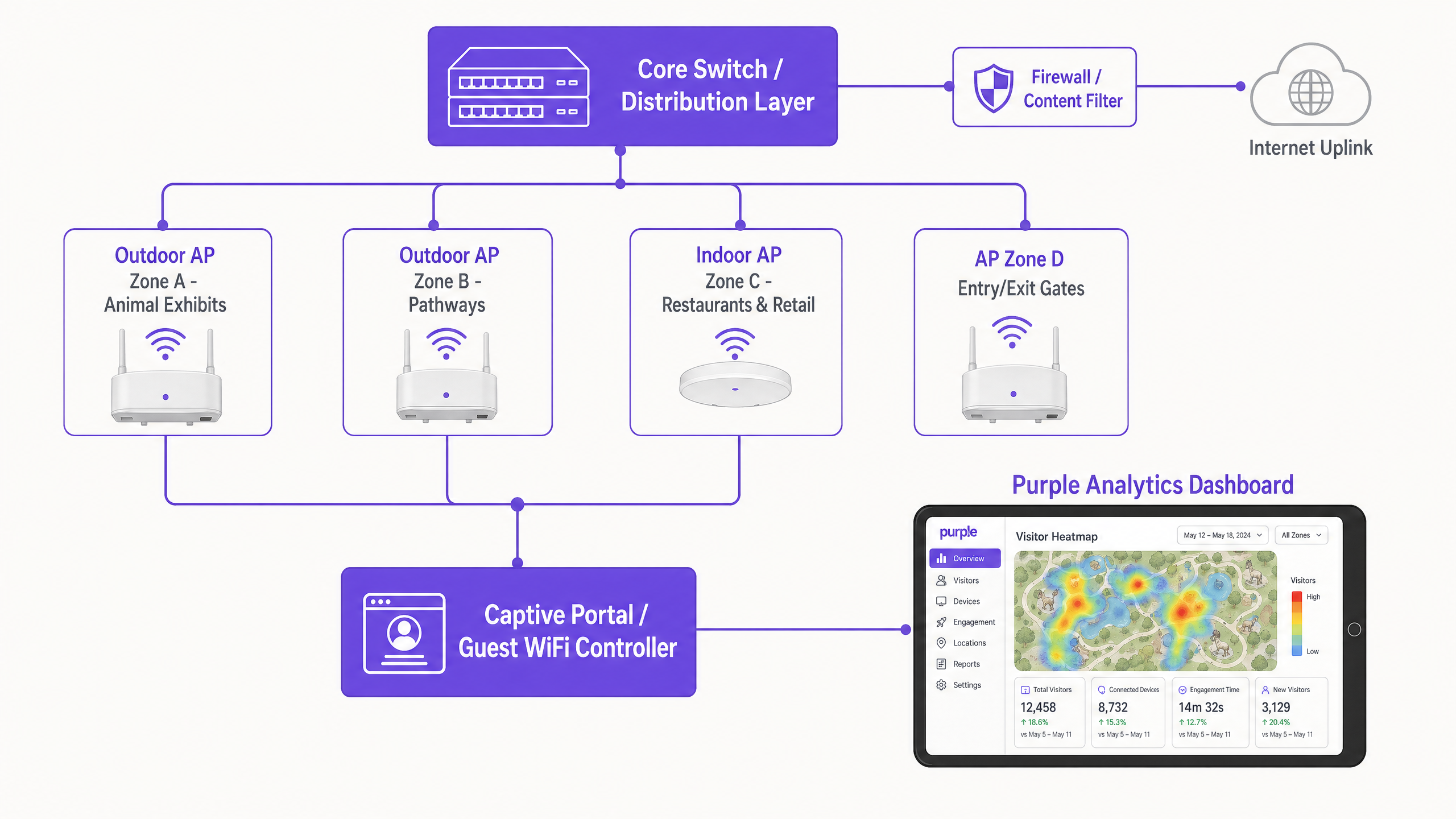
Um design de RF robusto é irrelevante se a infraestrutura de backhaul não conseguir suportar o débito agregado. Jardins zoológicos e parques temáticos estendem-se frequentemente por dezenas ou centenas de hectares, tornando o cabeamento de cobre tradicional inviável para ligar os switches de borda de volta ao núcleo.
Uma abordagem de backhaul híbrida é tipicamente necessária:
- Anéis de Fibra Ótica: Implementar anéis de fibra monomodo para ligar os switches de distribuição em todo o local. Isto proporciona alta largura de banda e resiliência; se um caminho for cortado (por exemplo, durante trabalhos de terraplenagem), o tráfego pode ser encaminhado na direção oposta.
- Wireless Ponto-a-Ponto: Em áreas onde a escavação de fibra é ambientalmente sensível ou proibitivamente cara (por exemplo, através de um lago ou de uma exposição de floresta densa), pontes wireless ponto-a-ponto ou ponto-a-multiponto de alta capacidade fornecem conectividade fiável.
- Power over Ethernet (PoE): Dos switches de distribuição, passar cabo Cat6A para fornecer dados e energia aos APs individuais, garantindo que os percursos não excedam o padrão de 100 metros.
Para o uplink de internet primário, a banda larga de consumo é insuficiente. Os locais devem adquirir uma linha dedicada, conforme detalhado no nosso guia O Que É uma Linha Dedicada? Internet Empresarial Dedicada , para garantir largura de banda simétrica e Acordos de Nível de Serviço (SLAs) rigorosos.
Segmentação e Segurança da Rede
A segurança é primordial ao misturar o acesso público de convidados com operações críticas do local. A rede deve ser logicamente segmentada usando Virtual Local Area Networks (VLANs).
- Rede de Convidados: Configurada com WPA3-Personal (ou modo misto WPA2/WPA3 para suporte a dispositivos legados) e estritamente isolada de todos os recursos internos. O isolamento de clientes deve ser ativado ao nível do AP para evitar que os dispositivos dos convidados comuniquem entre si.
- Rede Operacional: VLANs dedicadas para terminais de ponto de venda (POS), sinalização digital e dispositivos IoT. O acesso deve ser protegido usando IEEE 802.1X com autenticação baseada em certificado para garantir que apenas dispositivos de propriedade corporativa possam ligar-se.
Para mais informações sobre como proteger a infraestrutura do local, consulte o nosso artigo: Proteja a Sua Rede com DNS e Segurança Fortes .
Guia de Implementação
Passo 1: Levantamento Abrangente do Local
Nunca confie apenas na modelagem preditiva para ambientes exteriores. Realize um levantamento ativo de RF no local usando ferramentas de análise de espectro. Árvores, elementos aquáticos e invólucros metálicos (como jaulas ou estruturas de atrações) absorvem e refletem sinais de RF de forma imprevisível. O levantamento deve mapear os requisitos de cobertura zona a zona, identificando fontes de interferência e locais ótimos para a montagem de APs.
Passo 2: Captive Portal e Fluxo de Autenticação
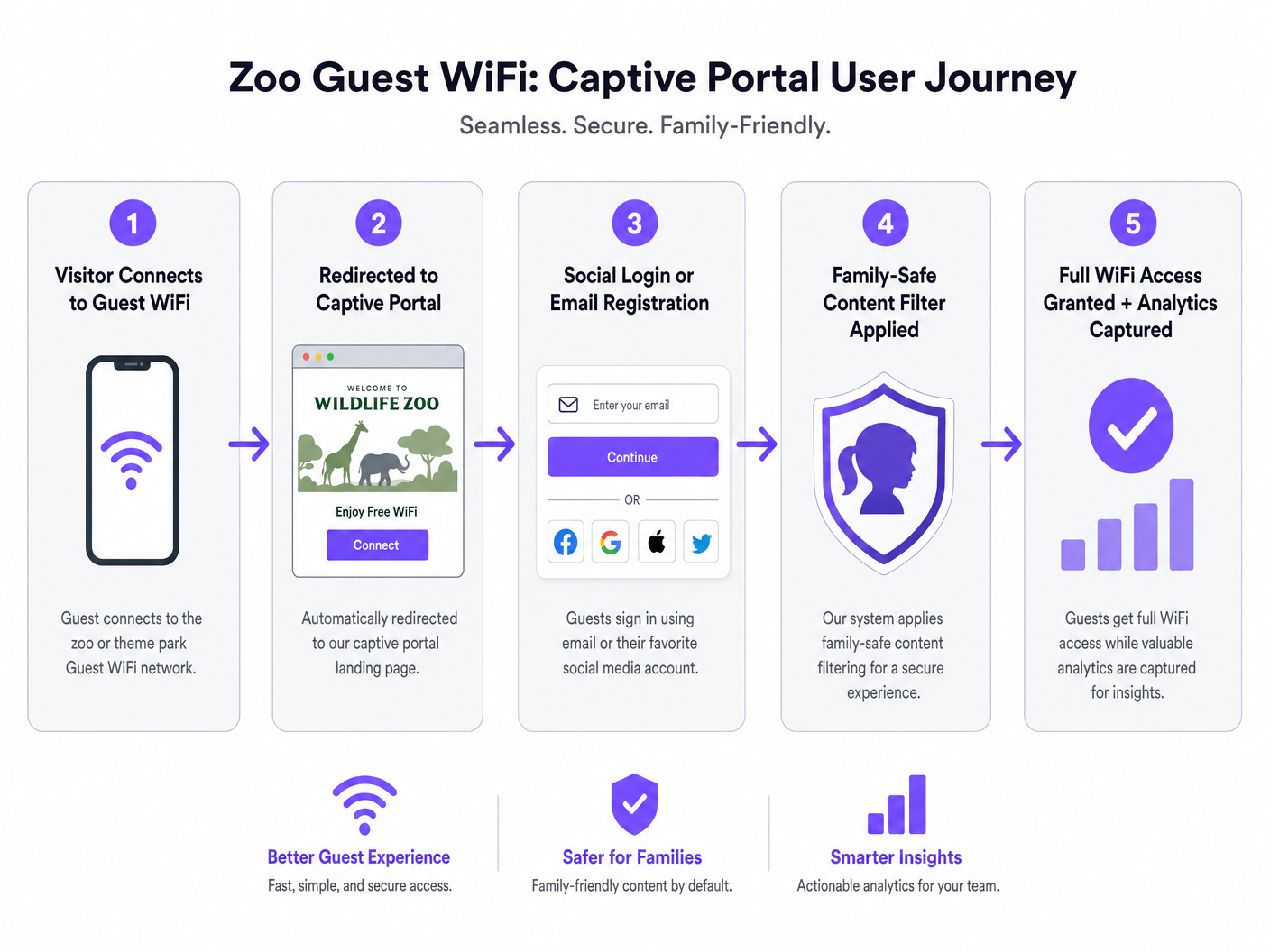
O captive portal é a porta de entrada para a rede de convidados e o principal mecanismo para a captura de dados. Uma experiência de integração contínuaência é fundamental para maximizar as taxas de conexão.
- Opções de Autenticação: Ofereça social login (Facebook, Google, Apple) juntamente com o registo tradicional por e-mail. Locais que oferecem social login geralmente observam taxas de conexão 30-40% mais altas do que aqueles que dependem exclusivamente de preenchimento de formulários.
- Conformidade: Garanta que o portal capte explicitamente o consentimento para o processamento de dados e comunicações de marketing, aderindo estritamente ao GDPR ou regulamentos de privacidade locais.
- Reautenticação Sem Atritos: Utilize o caching de endereços MAC ou plataformas como o OpenRoaming para reconectar automaticamente os visitantes que retornam, sem exigir que eles completem o fluxo do Captive Portal novamente.
Passo 3: Implementação de Filtragem de Conteúdo Seguro para a Família
Jardins zoológicos e parques temáticos têm o dever de fornecer um ambiente digital seguro. A filtragem de conteúdo baseada em DNS é o método mais eficiente para conseguir isso em escala. Ao intercetar pedidos DNS e bloquear a resolução para domínios categorizados como conteúdo adulto, jogos de azar ou violência, os locais podem aplicar políticas de uso aceitável sem a latência introduzida pela inspeção profunda de pacotes (DPI). Esta filtragem deve ser aplicada por defeito ao SSID de convidado.
Melhores Práticas
- Design para Densidade Máxima, Não Médias: Os locais frequentemente subestimam o número de dispositivos durante os períodos de pico (por exemplo, feriados). Assuma 2-3 dispositivos por visitante (smartphone, smartwatch, tablet) e projete a densidade de APs de acordo. Uma regra geral é um AP por 500 metros quadrados em zonas de alta densidade (praças de alimentação, arenas de espetáculos) e um por 1.000 metros quadrados em áreas de trânsito de menor densidade.
- Priorize a Jornada do Utilizador: O Captive Portal deve ser otimizado para dispositivos móveis e carregar rapidamente. Qualquer atraso na renderização do portal levará ao abandono.
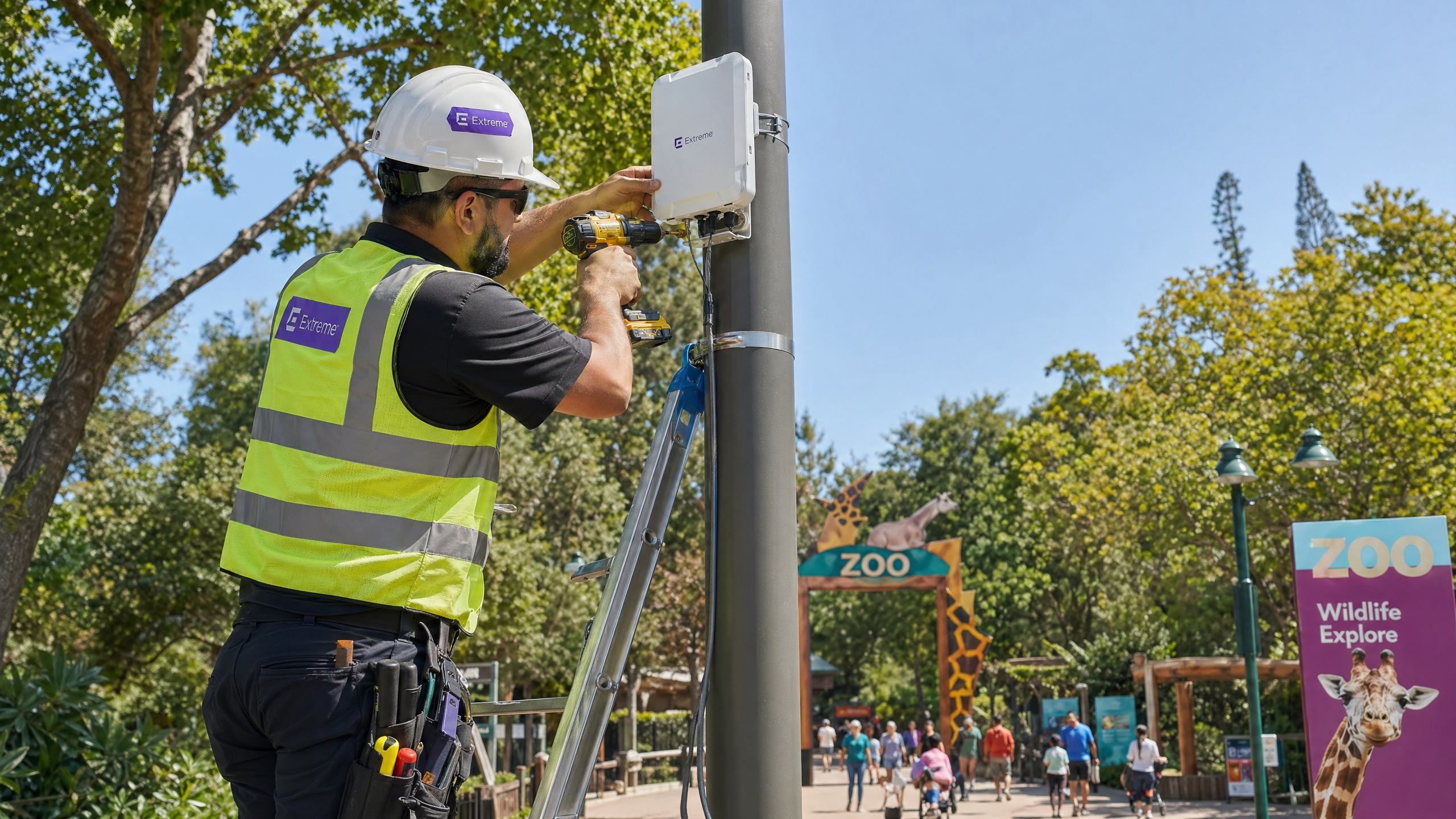
- Aproveite a Infraestrutura Existente: Ao montar APs externos, utilize postes de iluminação existentes, postes de CCTV ou fachadas de edifícios para minimizar os custos de instalação e o impacto visual.
Resolução de Problemas e Mitigação de Riscos
| Modo de Falha | Causa Raiz | Estratégia de Mitigação |
|---|---|---|
| Colapso da Rede Sob Carga | Densidade de APs insuficiente; falta de suporte OFDMA. | Atualize para infraestrutura Wi-Fi 6; redesenhe os mapas de cobertura com base nas estimativas de utilizadores simultâneos de pico. |
| Captive Portal Não Carrega | Má configuração de DNS; configurações de segurança agressivas do sistema operativo móvel. | Garanta que o walled garden inclua todos os domínios necessários para APIs de social login e URLs de deteção de Captive Portal (por exemplo, captive.apple.com). |
| Desempenho de Roaming Fraco | Potência de transmissão do AP definida muito alta, fazendo com que os clientes "fiquem" presos a APs distantes. | Implemente gestão dinâmica de rádio; diminua a potência TX para encorajar os dispositivos cliente a fazer roaming para APs mais próximos; ative 802.11k/v/r. |
ROI e Impacto nos Negócios
O caso de negócio para implementar WiFi de alto desempenho vai muito além da conectividade básica. Quando integrada com uma plataforma de análise robusta, a rede torna-se um ativo estratégico.
- Inteligência Operacional: Ao rastrear endereços MAC (mesmo anonimizados), os locais podem gerar mapas de calor e analisar o fluxo de visitantes. Estes dados identificam pontos de congestionamento, medem os tempos de permanência em exposições específicas e informam as alocações de pessoal e segurança.
- Marketing e Geração de Receita: Dados primários capturados através do Captive Portal alimentam diretamente o CRM do local. Isso permite campanhas de e-mail pós-visita direcionadas, inscrição em programas de fidelidade e ofertas personalizadas, impulsionando visitas repetidas e aumentando o valor vitalício do cliente.
- Experiência do Convidado Aprimorada: A conectividade fiável permite o uso de aplicações móveis específicas do local para orientação, pedido de comida móvel e filas virtuais, melhorando diretamente os índices de satisfação do convidado e reduzindo o atrito operacional.
Como visto em implementações semelhantes nos setores de Hotelaria e Retalho , a integração de conectividade e análise transforma a infraestrutura de TI de um centro de custos numa plataforma geradora de receita. Para mais informações sobre implementações temporárias, consulte o nosso guia sobre WiFi para Eventos: Planeamento e Implementação de Redes Sem Fios Temporárias .
Definições Principais
Captive Portal
A web page that intercepts a user's initial HTTP request on a public network, requiring authentication or acceptance of terms before granting internet access.
The primary mechanism for capturing visitor data and enforcing acceptable use policies in venue deployments.
OFDMA (Orthogonal Frequency Division Multiple Access)
A feature of Wi-Fi 6 that allows an AP to divide a wireless channel into smaller sub-channels (Resource Units), enabling simultaneous data transmission to multiple devices.
Critical for maintaining network performance in high-density areas like queues and food courts by reducing latency and overhead.
IP67 Rating
An ingress protection standard indicating a device is completely protected against dust and can withstand temporary immersion in water.
The minimum required environmental protection rating for hardware deployed in outdoor zoo and theme park environments.
Walled Garden
A limited environment that controls the user's access to web content and services prior to full authentication.
Must be configured to allow access to social media login APIs and captive portal detection URLs before the guest is fully connected.
DNS-Based Content Filtering
A security technique that blocks access to inappropriate websites by preventing the Domain Name System (DNS) from resolving restricted URLs into IP addresses.
The standard method for ensuring family-safe browsing on venue guest networks without impacting performance.
Client Isolation
A wireless security feature that prevents devices connected to the same AP or VLAN from communicating directly with one another.
Mandatory on guest networks to prevent lateral movement of malware and protect visitor devices from unauthorized access.
VLAN (Virtual Local Area Network)
A logical grouping of network devices that behave as if they are on the same physical network, regardless of their actual location.
Used to securely segment guest traffic from critical operational systems (e.g., point-of-sale, CCTV).
MAC Caching
A feature that remembers the Media Access Control (MAC) address of a previously authenticated device, allowing it to bypass the captive portal on subsequent visits.
Significantly improves the guest experience by providing frictionless connectivity for returning visitors.
Exemplos Práticos
A regional zoo spanning 40 acres is upgrading its legacy Wi-Fi 4 network. The IT Director notes that during the summer holidays, the network in the main food court (a 2,000 sq metre outdoor plaza) completely fails, with guests unable to load the captive portal. How should the team architect the food court coverage?
- Upgrade to Wi-Fi 6 (802.11ax) APs with IP67 ratings to leverage OFDMA for high-density client handling.
- Deploy high-density directional antennas (patch antennas) rather than omnidirectional antennas to create smaller, focused RF cells. This minimizes co-channel interference.
- Install 4-6 APs around the perimeter of the food court, pointing inward, ensuring transmit power is lowered to encourage roaming and prevent cell overlap.
- Ensure the backhaul switch supporting this zone has at least a 10Gbps uplink to the core to handle the aggregated traffic.
A theme park marketing team wants to increase the number of email addresses captured via the guest WiFi. Currently, visitors must fill out a 5-field form (Name, Email, Phone, Postcode, DOB). The connection rate is only 12%. What technical and strategic changes should be implemented?
- Implement Social Login (Facebook, Google, Apple) on the captive portal to provide a one-click authentication option.
- Reduce the manual form fields to just Name and Email for users who prefer not to use social login.
- Enable 'Seamless Mac Authentication' (MAC caching) so returning visitors are automatically reconnected without seeing the portal again, improving the user experience.
- Ensure the walled garden configuration allows traffic to the social network authentication APIs before the user is fully authorized.
Perguntas de Prática
Q1. You are designing the WiFi coverage for a new 5-acre outdoor primate enclosure. The landscape architect has specified dense tree planting and a large central water feature. What are the primary RF considerations, and how should you position the APs?
Dica: Consider how water and foliage interact with RF signals, particularly at 5GHz.
Ver resposta modelo
Foliage (which contains water) and the central water feature will heavily absorb and reflect RF signals, particularly in the 5GHz band. Predictive modeling will be inaccurate here. You must conduct an active site survey. APs should be positioned at the perimeter facing inward using directional antennas to punch through the foliage, rather than relying on omnidirectional APs in the center. Ensure all hardware is IP67 rated due to the outdoor environment.
Q2. During a busy bank holiday weekend, the IT helpdesk receives reports that guests in the main plaza can connect to the WiFi network but cannot reach the internet. The captive portal does not load. The APs show high utilization but are online. What is the most likely cause, and how do you resolve it?
Dica: Think about the IP addressing process before a device can reach the captive portal.
Ver resposta modelo
The most likely cause is DHCP pool exhaustion. The sheer volume of devices (including those just passing through and probing the network) has consumed all available IP addresses in the guest VLAN. The mitigation is to reduce the DHCP lease time (e.g., to 30 minutes or 1 hour) to quickly reclaim IP addresses from devices that have left the area, and to expand the subnet size for the guest VLAN (/22 or /21 instead of a standard /24).
Q3. The venue's operations director wants to use WiFi analytics to track visitor dwell times at various exhibits to optimize staffing. However, they are concerned about GDPR compliance, as they are tracking MAC addresses. How do you architect the solution to provide analytics while maintaining compliance?
Dica: Consider the difference between anonymized location data and personally identifiable information (PII).
Ver resposta modelo
To maintain compliance, the WiFi analytics platform must anonymize or pseudonymize MAC addresses (e.g., via cryptographic hashing) immediately upon collection if the user has not authenticated. For users who do authenticate via the captive portal, explicit consent must be obtained to link their location data with their PII (email/social profile). The privacy policy must clearly state that location analytics are being gathered and provide an opt-out mechanism.
Continue a ler esta série
O que é um Pedido de Sondagem? Compreender Como os Dispositivos Descobrem Redes
Este guia de referência técnica oferece uma análise aprofundada dos pedidos de sondagem IEEE 802.11, da varredura ativa versus passiva e do impacto da aleatorização de MAC na análise de locais. Apresenta estratégias de implementação acionáveis para arquitetos de rede otimizarem implementações de alta densidade, mitigarem tempestades de sondagem e garantirem a recolha de dados precisa e em conformidade com o GDPR, utilizando camadas de identidade autenticadas.
Como Corrigir WiFi Lento Sem Atualizar o Seu Plano de Internet
Um guia de referência técnica abrangente para gestores de TI e arquitetos de rede sobre como otimizar o desempenho de WiFi empresarial sem aumentar a largura de banda do ISP. Abrange a otimização de RF, gestão da densidade de clientes, implementação de QoS e como aproveitar a análise de WiFi para diagnosticar e resolver gargalos.
A Lista de Verificação para Migrar de NAC Legado para NAC Nativo da Nuvem
Este guia de referência técnica e autoritário fornece uma lista de verificação estruturada em três fases para migrar do Network Access Control (NAC) legado para uma arquitetura nativa da nuvem. Ele equipa gestores de TI e arquitetos de rede com estratégias acionáveis para gerir a integração de identidades, a paridade de políticas e a conformidade sem interromper as operações do local.