
WPA, WPA2 e WPA3: Qual a Diferença e Qual Deve Usar?
Este guia de referência técnica e autoritário explora as diferenças arquitetónicas entre os protocolos de segurança WPA, WPA2 e WPA3. Fornece recomendações de implementação acionáveis para gestores de TI e arquitetos de rede, a fim de proteger ambientes WiFi empresariais e de convidados, garantindo conformidade e desempenho ótimo.
Ouça este guia
Ver transcrição do podcast
Resumo Executivo
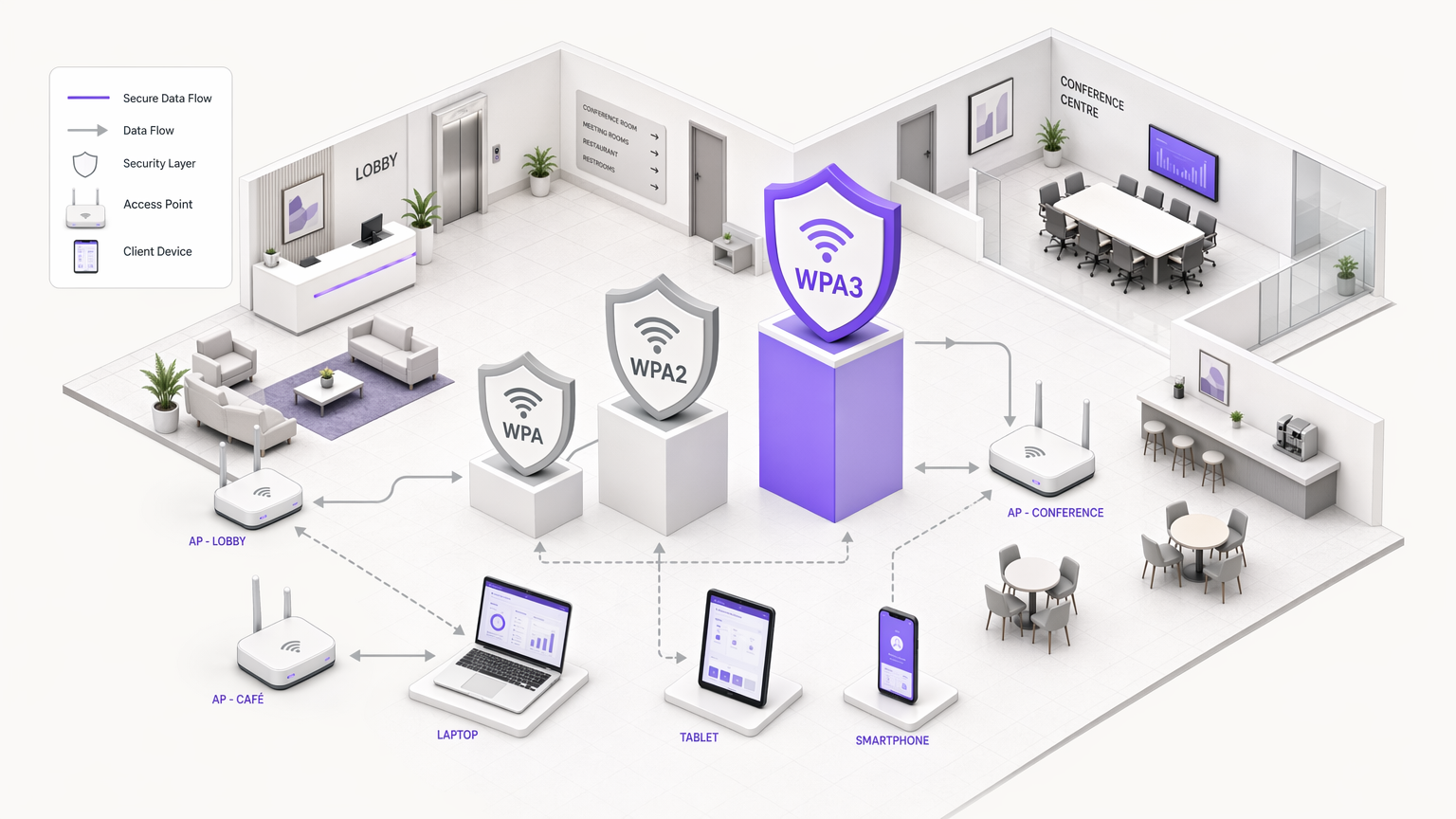
Para gestores de TI, arquitetos de rede e CTOs que operam em ambientes empresariais, a escolha do protocolo de segurança WiFi é uma decisão crítica de gestão de risco. À medida que os locais em Hotelaria , Retalho , Saúde e Transportes expandem as suas infraestruturas sem fios, a dependência de padrões de segurança desatualizados introduz vulnerabilidades significativas. Este guia de referência técnica fornece uma comparação definitiva das arquiteturas WPA, WPA2 e WPA3, detalhando as suas bases criptográficas e implicações operacionais.
Embora o WPA2 tenha servido como padrão da indústria por quase duas décadas, as suas vulnerabilidades estruturais — especificamente ataques de dicionário offline contra o four-way handshake — tornaram necessária a transição para o WPA3. O WPA3 introduz a Autenticação Simultânea de Iguais (SAE) para eliminar estes riscos, juntamente com o Enhanced Open (OWE) para proteger redes de convidados não autenticadas. Para os operadores empresariais, o mandato é claro: o WPA deve ser erradicado do ambiente, o WPA2-Enterprise permanece uma base viável para acesso corporativo, e o WPA3 deve ser implementado faseadamente para garantir a conformidade a longo prazo com os mandatos PCI DSS e GDPR. Este guia descreve os mecanismos técnicos por trás destes protocolos e fornece uma estratégia de implementação neutra em relação ao fornecedor para modernizar a sua infraestrutura sem fios.
Análise Técnica Aprofundada: Evolução Arquitetónica
A evolução do WiFi Protected Access (WPA) reflete a corrida armamentista contínua entre a segurança criptográfica e o poder computacional. Compreender a mecânica subjacente de cada protocolo é essencial para projetar arquiteturas de rede resilientes.
WPA: O Patch de Emergência
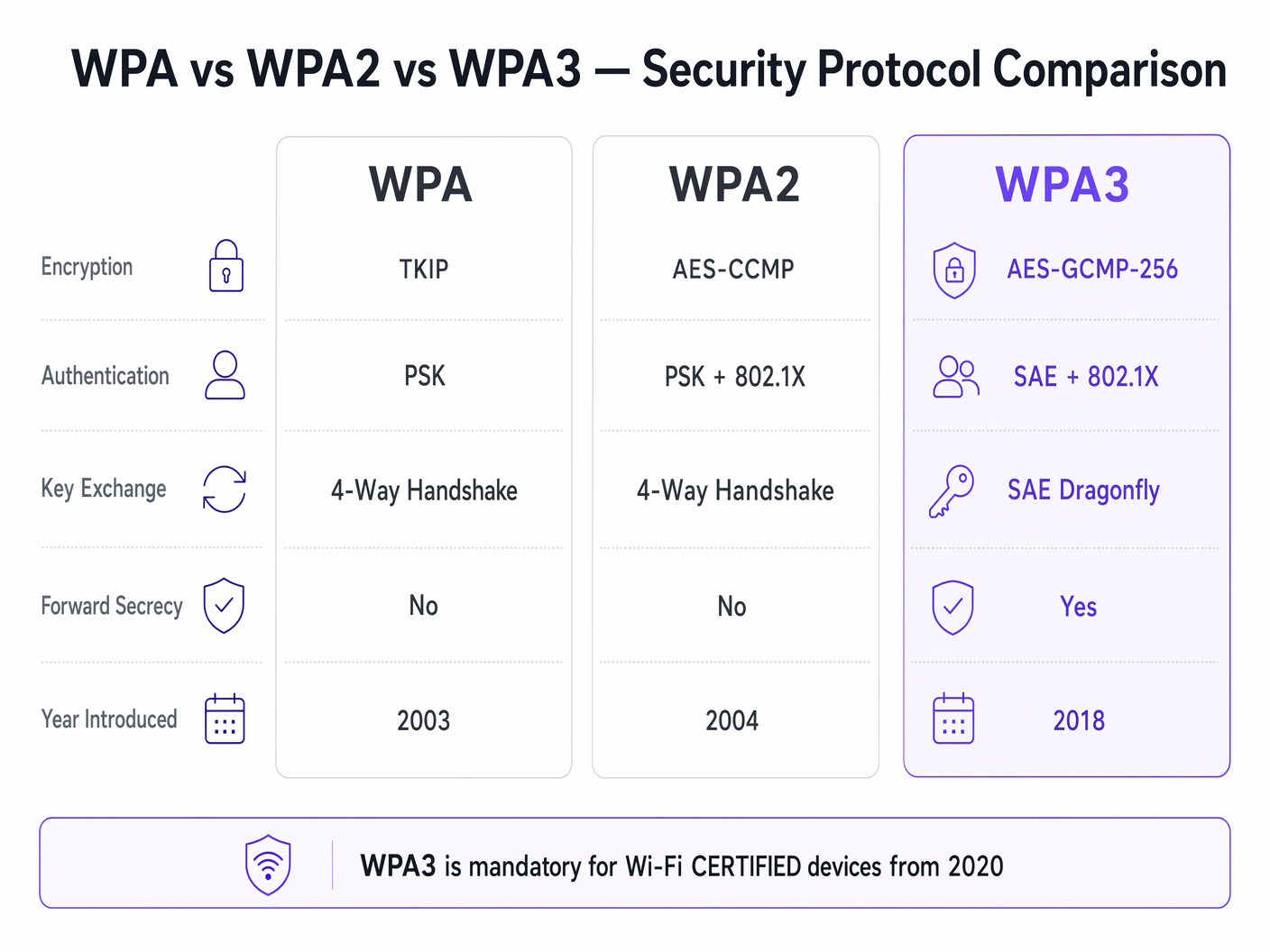
Introduzido em 2003, o WPA foi projetado como uma resposta rápida à falha catastrófica do Wired Equivalent Privacy (WEP). A principal inovação do WPA foi o Temporal Key Integrity Protocol (TKIP), que gerava dinamicamente uma nova chave de encriptação de 128 bits para cada pacote. Isto abordou a vulnerabilidade de reutilização de chave estática do WEP. No entanto, como o WPA tinha de funcionar em hardware WEP legado, o TKIP foi construído sobre o mesmo algoritmo de cifra de fluxo RC4. Em 2009, a pesquisa criptográfica demonstrou ataques práticos contra o TKIP, tornando o WPA fundamentalmente inseguro. Em ambientes empresariais modernos, o WPA representa uma responsabilidade crítica de segurança e deve ser ativamente descontinuado.
WPA2: A Base Empresarial
Ratificado em 2004, o WPA2 introduziu uma mudança estrutural ao substituir o TKIP pelo Advanced Encryption Standard (AES) a operar em Counter Mode com Cipher Block Chaining Message Authentication Code Protocol (CCMP). O AES é uma cifra de bloco robusta, e o CCMP fornece encriptação e validação de integridade de dados simultâneas. Esta arquitetura estabeleceu o WPA2 como o padrão dominante para redes empresariais.
No entanto, o WPA2 é bifurcado em dois modos operacionais distintos:
WPA2-Personal (PSK): Este modo depende de uma Chave Pré-Partilhada (PSK). Cada dispositivo no Service Set Identifier (SSID) usa a mesma palavra-passe para derivar chaves de sessão durante o four-way handshake. A vulnerabilidade crítica aqui é que o four-way handshake pode ser capturado passivamente. Os atacantes podem então sujeitar o handshake capturado a ataques de dicionário offline usando clusters de GPU de alto desempenho. Consequentemente, o WPA2-Personal oferece segurança mínima contra ataques direcionados se a palavra-passe não tiver entropia suficiente.
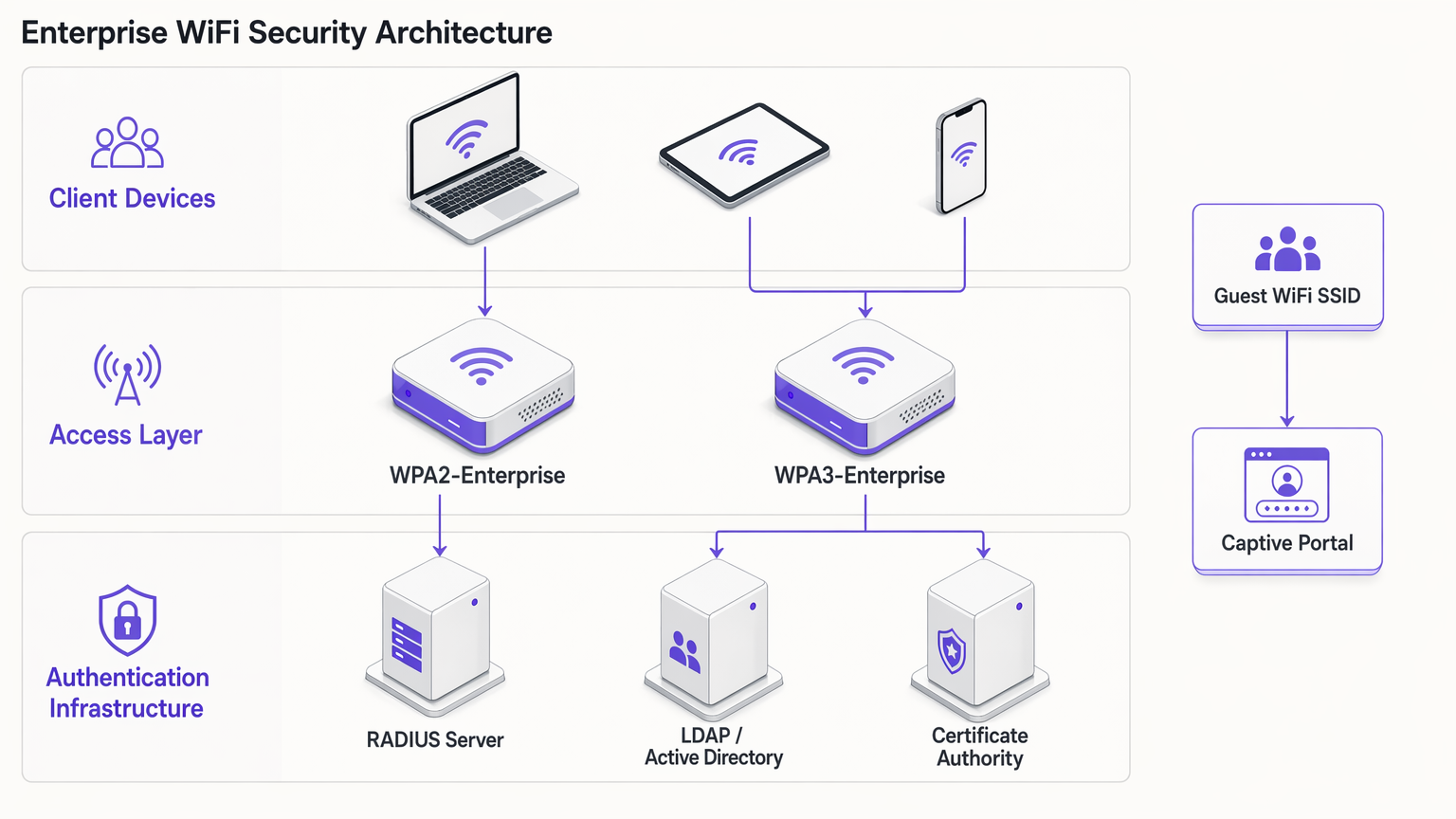
WPA2-Enterprise (802.1X): Em contraste, o WPA2-Enterprise utiliza o IEEE 802.1X para controlo de acesso à rede baseado em porta. Os dispositivos não partilham uma palavra-passe comum; em vez disso, autenticam-se individualmente usando o Extensible Authentication Protocol (EAP). A autenticação é intermediada por um servidor RADIUS que comunica com um serviço de diretório (por exemplo, Active Directory ou LDAP). Cada sessão autenticada recebe material de chave criptográfica único. Esta arquitetura mitiga os riscos associados a palavras-passe partilhadas e permanece o padrão base para acesso a redes corporativas.
WPA3: O Padrão Moderno
Obrigatório para dispositivos Wi-Fi CERTIFIED desde julho de 2020, o WPA3 aborda as vulnerabilidades criptográficas expostas no WPA2 ao longo da sua vida útil.
WPA3-Personal (SAE): A característica definidora do WPA3-Personal é a substituição do vulnerável four-way handshake pela Autenticação Simultânea de Iguais (SAE), também conhecida como Dragonfly handshake. O SAE é um protocolo de prova de conhecimento zero. Requer interação ativa com o ponto de acesso para cada tentativa de autenticação, tornando os ataques de dicionário offline computacionalmente inviáveis. Isto neutraliza efetivamente a classe de vulnerabilidade KRACK (Key Reinstallation Attacks).
WPA3-Enterprise: O WPA3-Enterprise melhora a segurança corporativa ao introduzir um conjunto de segurança opcional de 192 bits. Este modo utiliza AES-GCMP-256 para encriptação e HMAC-SHA-384 para integridade de mensagens, alinhando-se com o conjunto Commercial National Security Algorithm (CNSA) exigido para implementações governamentais e financeiras de alta segurança.
Sigilo de Encaminhamento (Forward Secrecy): O WPA3 implementa o sigilo de encaminhamento gerando chaves de sessão efémeras através do handshake SAE. Se um atacante registar o tráfego encriptado e mais tarde comprometer a credencial de rede, não poderá desencriptar retroativamente o tráfego histórico. Este é um mecanismo crucial de redução de risco para locais que processam dados sensíveis.
Enhanced Open (OWE): Para redes de convidados, o WPA3 introduz a Encriptação Sem Fios Oportunista (OWE). O OWE fornece encriptação não autenticada — os dispositivos conectam-se sem palavra-passe, mas o tráfego entre o dispositivo e o ponto de acesso é individualmente encriptado. Isto elimina a escuta passiva em redes de convidados abertas sem introduzindo atrito na ligação.
Guia de Implementação: Proteger o Ambiente Empresarial
A implementação de segurança WiFi moderna requer uma abordagem segmentada, equilibrando os requisitos rigorosos de acesso corporativo com as realidades operacionais de redes de convidados e dispositivos IoT legados.
Redes Corporativas e de Colaboradores
Para redes internas, o objetivo é uma validação de identidade forte e uma encriptação robusta.
- Exigir Autenticação 802.1X: Implemente WPA2-Enterprise ou WPA3-Enterprise. Nunca utilize WPA2-Personal para redes de colaboradores.
- Implementar Métodos EAP Fortes: Utilize EAP-TLS (Transport Layer Security) sempre que possível, pois requer certificados de cliente e de servidor, proporcionando o mais alto nível de garantia. Se a implementação de certificados for impraticável, PEAP-MSCHAPv2 pode ser usado, desde que o certificado do servidor RADIUS seja estritamente validado pelos clientes.
- Ativar Modo de Transição WPA3: Se os seus pontos de acesso suportam WPA3, ative o modo de transição. Isto permite que clientes compatíveis com WPA3 beneficiem de SAE e sigilo de encaminhamento, mantendo a conectividade para clientes WPA2 legados. Monitorize os registos RADIUS para acompanhar a taxa de migração de dispositivos cliente.
WiFi de Convidados e Acesso Público
As redes de convidados apresentam um desafio único: equilibrar segurança, conformidade e experiência do utilizador. A abordagem tradicional de difundir uma palavra-passe WPA2-Personal partilhada é insegura e não está em conformidade com os regulamentos de privacidade de dados, pois não oferece visibilidade sobre a identidade do utilizador.
- Implementar Captive Portals: Implemente um SSID aberto ou um SSID WPA2/WPA3-Personal integrado com um Captive Portal. Isto garante que os utilizadores devem autenticar-se e aceitar os termos e condições antes de obterem acesso à rede.
- Aproveitar Provedores de Identidade: Utilize plataformas como Purple para gerir a autenticação de convidados. Purple pode atuar como um provedor de identidade gratuito para serviços como OpenRoaming sob a licença Connect, simplificando o acesso enquanto capta dados primários consentidos para WiFi Analytics .
- Ativar OWE: Se a sua infraestrutura o suportar, ative a Encriptação Sem Fios Oportunista (OWE) no SSID de convidados aberto. Isto encripta o tráfego de convidados contra a interceção passiva sem exigir que os utilizadores introduzam uma palavra-passe, melhorando significativamente a postura de segurança do ambiente Guest WiFi .
Segmentação de Dispositivos IoT e Legados
Muitos dispositivos IoT — como terminais de ponto de venda legados, sistemas de gestão de edifícios e câmaras IP — não suportam WPA3 ou autenticação 802.1X.
- Isolar Dispositivos Legados: Não degrade a segurança das suas redes primárias para acomodar dispositivos legados. Em vez disso, crie VLANs e SSIDs dedicados especificamente para hardware IoT.
- Implementar MPSK/PPSK: Onde suportado pelo seu fornecedor, utilize Multi Pre-Shared Key (MPSK) ou Private Pre-Shared Key (PPSK) para redes IoT. Isto atribui uma palavra-passe WPA2 única a cada dispositivo IoT individual, limitando o raio de impacto se um único dispositivo for comprometido.
- Restringir Movimento Lateral: Aplique regras de firewall rigorosas às VLANs IoT, permitindo apenas a comunicação de saída necessária e bloqueando o movimento lateral para sub-redes corporativas.
Melhores Práticas e Conformidade
Manter um ambiente sem fios seguro requer disciplina operacional contínua.
- Gestão do Ciclo de Vida de Certificados: Em implementações WPA2/WPA3-Enterprise, certificados RADIUS expirados são uma causa principal de interrupções de rede. Implemente a renovação automatizada de certificados e monitorize rigorosamente as datas de expiração.
- Deteção de APs Maliciosos: Utilize as capacidades do Sistema de Prevenção de Intrusões Sem Fios (WIPS) dos seus pontos de acesso para detetar e neutralizar pontos de acesso maliciosos que difundem os seus SSIDs corporativos.
- Conformidade PCI DSS 4.0: Para ambientes que processam dados de cartões de pagamento, WPA2-Personal é geralmente insuficiente. O PCI DSS exige criptografia forte e controlo de acesso. WPA2-Enterprise ou WPA3-Enterprise com métodos EAP robustos é necessário para manter a conformidade.
- Auditoria Regular: Realize auditorias trimestrais da sua infraestrutura sem fios, verificando versões de firmware, configurações criptográficas e a segmentação de dispositivos IoT.
Resolução de Problemas e Mitigação de Riscos
Ao fazer a transição para WPA3 ou gerir ambientes mistos, surgem frequentemente modos de falha específicos:
- Problemas de Compatibilidade de Clientes: Alguns clientes legados podem falhar ao conectar-se a um SSID a operar em Modo de Transição WPA3 devido a uma implementação deficiente do driver. Se isto ocorrer, poderá ser necessário manter um SSID WPA2-only separado para dispositivos legados até que possam ser desativados.
- Erros de Tempo Limite 802.1X: Os tempos limite de autenticação em WPA2/WPA3-Enterprise são frequentemente causados por latência entre o servidor RADIUS e o serviço de diretório, ou por suplicantes de cliente mal configurados que falham na validação do certificado do servidor. Garanta que os servidores RADIUS estão geograficamente próximos dos pontos de acesso e que os armazenamentos de confiança dos clientes estão devidamente configurados.
- Incompatibilidade PMF: Protected Management Frames (PMF) são obrigatórios em WPA3 e altamente recomendados em WPA2 para prevenir ataques de desautenticação. No entanto, alguns clientes WPA2 mais antigos não suportam PMF e falharão ao associar se o PMF for definido como 'Obrigatório'. Defina o PMF como 'Opcional' durante a fase de transição.
ROI e Impacto no Negócio
Atualizar os protocolos de segurança sem fios não é meramente um exercício técnico; proporciona um valor de negócio tangível:
- Mitigação de Riscos: A transição para WPA3 e WPA2-Enterprise reduz significativamente a probabilidade de uma violação sem fios bem-sucedida, mitigando os danos financeiros e reputacionais associados à exfiltração de dados.
- Garantia de Conformidade: O alinhamento com os padrões criptográficos modernos garante a conformidade com PCI DSS, GDPR e regulamentos específicos da indústria, evitando multas regulatórias e simplisimplificando os processos de auditoria.
- Eficiência Operacional: A implementação de gestão automatizada de certificados e autenticação 802.1X reduz a sobrecarga operacional associada à gestão de palavras-passe partilhadas e à resolução de problemas de conectividade.
- Experiência de Convidado Melhorada: A implementação de OWE e autenticação de Captive Portal sem falhas através de plataformas como a Purple melhora a experiência do convidado, fornecendo conectividade segura e sem atritos, impulsionando taxas de adoção mais elevadas e uma recolha de dados mais rica para iniciativas de marketing. Consulte Os 10 Melhores Exemplos de Páginas de Boas-Vindas de WiFi (e o que os Torna Eficazes) para obter informações sobre como otimizar o fluxo de autenticação.
Ouça o nosso briefing abrangente sobre WPA, WPA2 e WPA3 para obter mais informações:
Definições Principais
802.1X
An IEEE standard for port-based network access control that provides an authentication mechanism to devices wishing to attach to a LAN or WLAN.
The foundation of WPA2/WPA3-Enterprise, requiring a RADIUS server to validate individual user or device credentials before granting network access.
AES-CCMP
Advanced Encryption Standard with Counter Mode CBC-MAC Protocol. A robust encryption protocol introduced in WPA2.
The standard encryption mechanism that replaced the vulnerable TKIP, providing both data confidentiality and integrity.
EAP-TLS
Extensible Authentication Protocol - Transport Layer Security. An authentication method that requires both client and server certificates.
Considered the gold standard for enterprise WiFi authentication, as it eliminates reliance on passwords and prevents credential theft.
Four-Way Handshake
The process used in WPA2-Personal to derive encryption keys from the Pre-Shared Key (PSK) and establish a secure session.
The primary vulnerability point in WPA2-Personal, as it can be captured and subjected to offline dictionary attacks.
Opportunistic Wireless Encryption (OWE)
A WPA3 feature that provides unauthenticated encryption for open WiFi networks.
Crucial for securing guest WiFi environments, preventing passive eavesdropping without requiring users to enter a password.
RADIUS
Remote Authentication Dial-In User Service. A networking protocol that provides centralised Authentication, Authorization, and Accounting (AAA) management.
The core infrastructure component required to deploy WPA2-Enterprise or WPA3-Enterprise, brokering authentication between the access point and the directory service.
Simultaneous Authentication of Equals (SAE)
A secure key establishment protocol used in WPA3-Personal, replacing the four-way handshake.
Prevents offline dictionary attacks by requiring active interaction for every authentication attempt, securing networks even with weak passwords.
TKIP
Temporal Key Integrity Protocol. An older encryption protocol introduced with WPA to replace WEP.
Now considered highly vulnerable and deprecated. Its presence on a network indicates a severe security risk.
Exemplos Práticos
A 200-room hotel needs to upgrade its wireless infrastructure. The current setup uses a single WPA2-Personal SSID for both guests and hotel staff (housekeeping tablets, maintenance devices). Guests are given a password printed on their keycard sleeve. How should the IT manager redesign this architecture for security and compliance?
The IT manager must segment the network into distinct SSIDs mapped to separate VLANs.
- Staff Network: Create a hidden SSID for staff devices using WPA2-Enterprise or WPA3-Enterprise (802.1X). Housekeeping tablets and maintenance devices should authenticate using client certificates (EAP-TLS) managed via a Mobile Device Management (MDM) solution. This eliminates shared passwords and allows individual device revocation.
- Guest Network: Create an open SSID utilising WPA3 Enhanced Open (OWE) if hardware permits, ensuring encrypted transit without a password. Integrate this with a captive portal via a platform like Purple to handle terms of service acceptance and capture consented identity data for marketing analytics.
- IoT Network: Create a dedicated SSID for legacy hotel systems (e.g., smart thermostats) using WPA2-Personal with Multi Pre-Shared Key (MPSK), assigning a unique password to each device type, and restricting this VLAN from accessing the internet or corporate subnets.
A large retail chain is deploying new point-of-sale (POS) terminals across 50 locations. The network architect must ensure the wireless deployment complies with PCI DSS 4.0 requirements. The existing network uses WPA2-Personal with a complex, frequently rotated passphrase. Is this sufficient?
No, relying on WPA2-Personal is insufficient for PCI DSS compliance in a modern retail environment, regardless of password complexity or rotation frequency. The network architect must deploy WPA2-Enterprise or WPA3-Enterprise for the POS network.
- Authentication: Implement 802.1X authentication using a RADIUS server. Each POS terminal must be provisioned with a unique client certificate (EAP-TLS) to authenticate to the network.
- Encryption: Ensure the network is configured to use AES-CCMP (WPA2) or AES-GCMP (WPA3). TKIP must be explicitly disabled on the wireless controller.
- Segmentation: The POS SSID must be mapped to a highly restricted VLAN that only permits traffic to the payment processing gateways. It must be completely isolated from the store's corporate and guest networks.
Perguntas de Prática
Q1. Your organisation is migrating from WPA2-Personal to WPA3-Enterprise for the corporate network. During the rollout, several older laptops running outdated wireless drivers are unable to connect to the new SSID, even when configured with the correct certificates. What is the most secure interim solution?
Dica: Consider the impact of downgrading the primary corporate network versus isolating the problem devices.
Ver resposta modelo
Create a temporary, hidden WPA2-Enterprise SSID specifically for the legacy laptops, mapped to the same corporate VLAN. Do not downgrade the primary SSID to WPA2-Personal or disable WPA3. Prioritise updating the wireless drivers or replacing the network cards on the legacy laptops to fully decommission the temporary WPA2-Enterprise SSID as quickly as possible.
Q2. A hospital IT director wants to secure the public guest WiFi network. They propose implementing WPA2-Personal with a password displayed on digital signage in the waiting areas to prevent drive-by eavesdropping. Why is this approach flawed, and what is the recommended alternative?
Dica: Evaluate the security value of a publicly broadcast password and the compliance requirements for guest identity.
Ver resposta modelo
Broadcasting a WPA2-Personal password provides negligible security, as anyone in range can capture the four-way handshake and decrypt traffic if they know the password (which is publicly displayed). Furthermore, it provides no visibility into user identity, complicating incident response and compliance. The recommended alternative is to deploy an open SSID with WPA3 Enhanced Open (OWE) to encrypt transit traffic without a password, integrated with a captive portal to authenticate users, accept terms of service, and capture identity data.
Q3. You are auditing a retail environment and discover that the wireless barcode scanners in the warehouse are connecting via WPA (TKIP) because their firmware cannot be updated to support WPA2. The warehouse manager refuses to replace the scanners due to budget constraints. How do you mitigate this risk?
Dica: Focus on network segmentation and access control when dealing with insecure legacy hardware.
Ver resposta modelo
The risk must be contained through strict network segmentation. Move the barcode scanners to a dedicated, isolated VLAN with its own hidden SSID. Implement stringent firewall rules on the router/firewall that only permit the scanners to communicate with the specific inventory management server on the required ports. Block all internet access and all lateral movement to other corporate subnets from the scanner VLAN.
Continue a ler esta série
Wi-Fi 7 (802.11be) Explicado: O Que Muda para o WiFi Empresarial
Este guia fornece uma referência técnica definitiva sobre Wi-Fi 7 (IEEE 802.11be) para gestores de TI, arquitetos de rede e CTOs que planeiam atualizações de infraestrutura em 2026–2027. Abrange os quatro avanços arquitetónicos principais — Multi-Link Operation (MLO), canais de 320 MHz, modulação 4K-QAM e Multi-RU — com uma comparação clara com o Wi-Fi 6E, cenários de implementação reais em hotelaria e retalho, e uma avaliação franca das atualizações de hardware e switching necessárias. A Purple é agnóstica em relação ao hardware e suporta qualquer implementação de Wi-Fi 7, tornando este guia um ponto de entrada natural para equipas que avaliam o seu stack de guest WiFi e analytics juntamente com uma atualização de AP.
Wi-Fi 6E vs Wi-Fi 7: Deve Ignorar o 6E e Ir Direto para o 7?
Um guia de decisão abrangente para diretores de TI e arquitetos de rede que avaliam uma atualização de hardware sem fios em 2026. Fornece uma comparação técnica de Wi-Fi 6E e Wi-Fi 7, uma matriz de preços atual de fornecedores e recomendações de implementação acionáveis para locais de alta densidade nos setores de hotelaria, retalho e público — ajudando as equipas a determinar se o prémio do Wi-Fi 7 se justifica para os seus requisitos operacionais específicos.
Wi-Fi 7 para Locais de Alta Densidade: Estádios, Salas de Conferências e Terminais
Este guia de referência técnica fornece a líderes de TI e arquitetos de rede estratégias acionáveis para implementar Wi-Fi 7 em locais de alta densidade como estádios e terminais de transporte. Explora como a Multi-Link Operation (MLO), 4K-QAM e o design de APs sob os assentos melhoram drasticamente a capacidade, reduzem os requisitos de hardware e proporcionam um ROI mensurável.