
Alcatel-Lucent Enterprise (ALE) OmniAccess Integration with Purple WiFi
本指南详细介绍了 Alcatel-Lucent Enterprise (ALE) OmniAccess Stellar 接入点与 Purple WiFi 之间的技术集成。它涵盖了 Captive Portal 重定向、RADIUS 身份验证、Walled Garden 配置、安全的 802.1X 员工 WiFi,以及使用私有预共享密钥 (PPSK) 和动态 VLAN 引导的多租户 WiFi 细分——为 IT 经理和网络架构师在 ALE 硬件上部署基于身份的网络提供了完整且可操作的参考。
收听本指南
查看播客转录
执行摘要
Alcatel-Lucent Enterprise (ALE) OmniAccess Stellar 接入点使用标准 RADIUS 协议和外部 Captive Portal 重定向与 Purple 进行集成。无需专有的中间件。Purple 作为云端覆盖层运行,部署在您现有的 ALE 基础设施之上,负责处理身份验证、数据捕获和会话策略,而无需更改硬件。
本指南涵盖三种部署场景。第一,具有外部 Captive Portal 重定向和 Walled Garden 配置的访客 WiFi。第二,使用 802.1X(配合 PEAP 或 EAP-TLS)的安全员工 WiFi。第三,使用私有预共享密钥 (PPSK) 并通过 RADIUS 属性 64、65 和 81 进行动态 VLAN 引导的多租户 WiFi。
Purple 为超过 80,000 个活跃场所提供服务,并在 2024 年处理了超过 4.4 亿次登录(Purple 内部数据,2024 年)。它持有 ISO 27001、GDPR、CCPA 和 Cyber Essentials 认证。该平台以 99.999% 的正常运行时间运行,使其成为企业部署中可靠的身份验证后端。
如果您是在酒店、零售、活动或公共部门环境中部署 ALE OmniAccess 硬件的 IT 经理或网络架构师,本指南将为您提供确切的配置步骤,帮助您从硬件过渡到完全运行的基于身份的网络。
技术架构与集成流程
Purple 与 ALE OmniAccess Stellar 的集成依赖于两种标准协议:用于身份验证和计费的 RADIUS,以及用于交付 Captive Portal 的 HTTP/HTTPS 重定向。ALE AP 作为网络接入服务器 (NAS),将身份验证请求转发到 Purple 云端 RADIUS 服务器,并执行 Access-Accept 响应中返回的策略。
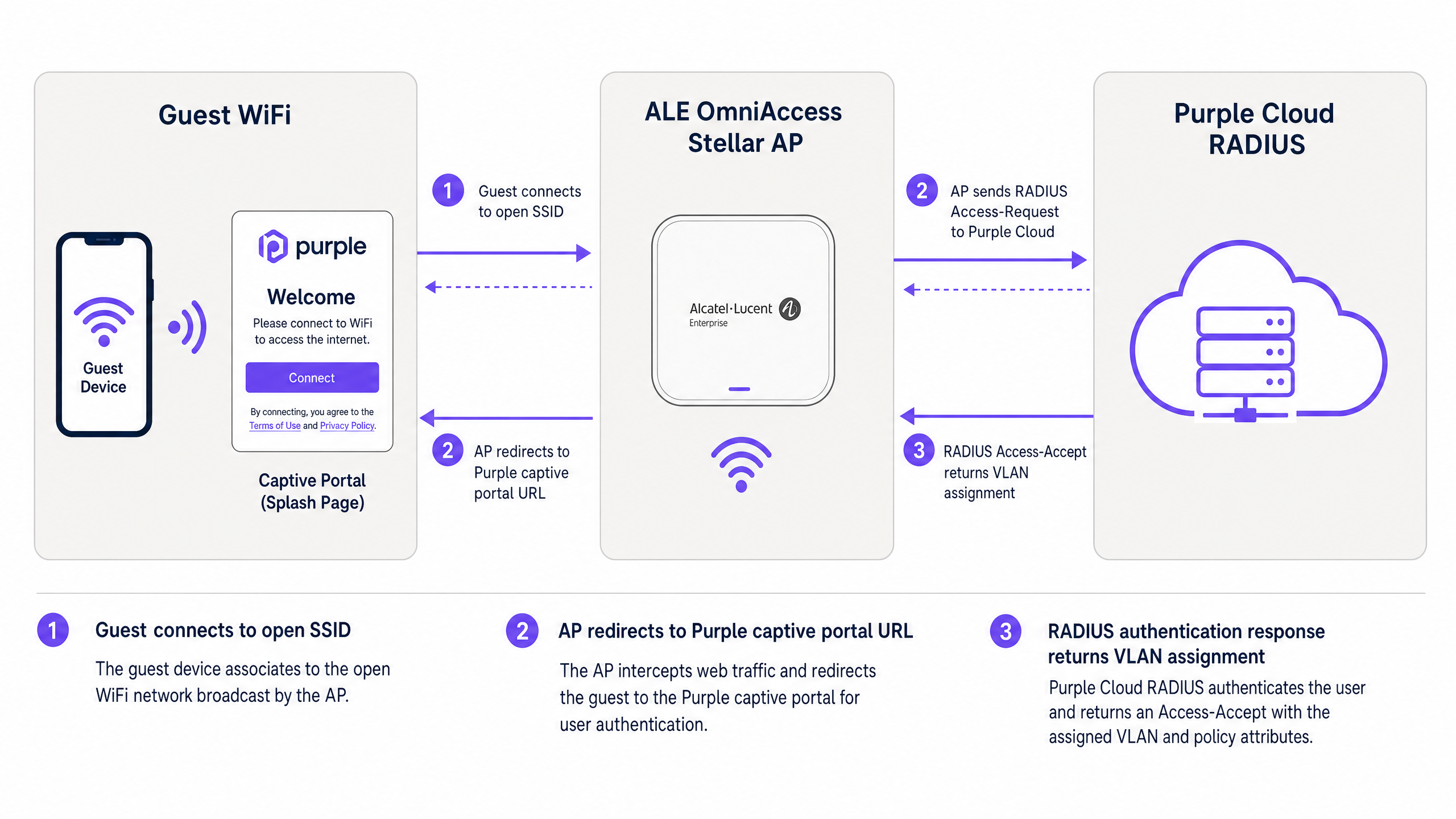
图 1:访客设备、ALE OmniAccess Stellar AP 与 Purple 云端 RADIUS 之间的身份验证流程。
该流程运行如下。访客连接到开放的访客 WiFi SSID。ALE AP 从预身份验证 DHCP 池中分配一个临时 IP 地址,并拦截访客的第一个 HTTP 或 HTTPS 请求。AP 将浏览器重定向到 Purple Captive Portal URL,并将客户端的 MAC 地址和 AP 的 NAS 标识符作为 URL 参数进行传递。访客通过 Purple 欢迎页面进行身份验证——使用电子邮件、社交登录或短信验证。Purple 的 RADIUS 服务器验证该会话,并向 ALE AP 返回一条 Access-Accept 消息。AP 授予互联网访问权限,并开始按配置的时间间隔向 Purple 发送 RADIUS 计费更新。
对于使用 PPSK 和动态 VLAN 引导的高级部署,RADIUS Access-Accept 消息还包含 VLAN 分配属性。ALE AP 使用这些属性将客户端流量直接投递到正确的 VLAN 网段,从而将他们与同一物理基础设施上的其他用户隔离开来。
实施指南
第 1 部分:具有外部 Captive Portal 的访客 WiFi
本部分涵盖了用于外部重定向到 Purple 的 Alcatel-Lucent Captive Portal 配置。这些步骤适用于通过 OmniVista Cirrus、OmniVista 2500 或 Stellar Express Web 界面管理的 ALE OmniAccess Stellar AP。
步骤 1:获取 Purple RADIUS 凭据
登录您的 Purple 门户。导航至 管理 > 场所,选择您的场所,然后打开 硬件 部分。添加新的硬件条目,并选择 Alcatel-Lucent OmniAccess Stellar 作为硬件类型。Purple 会为您的场所生成唯一的 RADIUS 共享密钥、身份验证服务器 IP 和 Captive Portal URL。在继续之前记录这些值。
步骤 2:在 ALE AP 上配置 RADIUS 服务器
在您的 ALE 管理界面中,导航至身份验证设置并添加一个新的 RADIUS 服务器配置文件。
| 参数 | 值 |
|---|---|
| 服务器 IP / 主机名 | 如 Purple 门户中提供 |
| 身份验证端口 | 1812 |
| 计费端口 | 1813 |
| 共享密钥 | 如 Purple 门户中提供 |
| RADIUS 计费 | 已启用 |
| 计费间隔 | 300 秒 |
使用 Purple 门户中的备用 IP 启用辅助 RADIUS 服务器。这可以确保在主服务器暂时不可用时进行故障转移。
步骤 3:配置 Walled Garden
Walled Garden 定义了设备在完成身份验证之前可以访问的域名。在预身份验证访问列表中配置以下条目:
核心 Purple 域名(必填):
| 域名 | 用途 |
|---|---|
| region1.purpleportal.net | Purple Captive Portal |
| venuewifi.com | Purple 会话管理 |
| cloudfront.net | 门户资源的 CDN |
| openweathermap.org | 天气小部件(可选) |
| stripe.com | 付费 WiFi 支付(如果适用) |
社交登录域名(根据需要添加):
| 提供商 | 域名 |
|---|---|
| facebook.com, fbcdn.net, connect.facebook.net | |
| linkedin.com, licdn.net | |
| accounts.google.com, googleapis.com |
遗漏任何必需的域名都会导致相应的登录方式静默失败。配置后请测试每种登录方式。
步骤 4:配置访客 WiFi SSID
使用以下设置创建新的 WLAN 配置文件:
| 参数 | 值 |
|---|---|
| 安全级别 | 开放 |
| Captive Portal | 已启用 |
| Captive Portal 类型 | 外部 |
| 重定向 URL | 如 Purple 门户中提供 |
| HTTPS 重定向 | 已禁用(除非安装了 SSL 证书) |
| 空闲超时 | 1800 秒(30 分钟) |
| RADIUS 服务器配置文件 | Purple RADIUS 配置文件(在步骤 2 中创建) |
如果您需要 HTTPS 重定向,请在 ALE AP 的 系统 > 常规 > 证书管理 下安装有效的 SSL 证书。请注意,通配符证书不受支由 Stellar AP 为此目的所支持。
步骤 5:将 SSID 分配给 AP 组
在 OmniVista 中将 WLAN 配置文件应用到相关的 AP 组。在测试 Captive Portal 流程之前,验证 AP 是否正在广播 SSID 并且客户端可以进行关联。
第 2 部分:使用 802.1X 保护员工 WiFi
对于员工 WiFi,请使用带有 802.1X 认证的 WPA2-Enterprise 或 WPA3-Enterprise。这消除了共享密码,并将访问权限与 Microsoft Entra ID、Okta 或 Google Workspace 中管理的个人用户身份绑定。
步骤 1:配置 802.1X SSID
为员工创建一个单独的 WLAN 配置文件。将安全类型设置为 WPA2-Enterprise 或 WPA3-Enterprise,并将 Purple RADIUS 服务器分配为认证后端。Purple 的 RADIUS 服务器通过 LDAP 或 SAML 将认证请求代理到您的身份提供商。
步骤 2:选择 EAP 方法
对于大多数部署,请使用 带有 MSCHAPv2 的 PEAP。这只需要服务器端证书,并且适用于标准的 Windows、macOS、iOS 和 Android 客户端。对于安全性要求更高的环境,请使用通过您的 PKI 颁发的客户端证书的 EAP-TLS。
步骤 3:将员工分配到专用 VLAN
配置 Purple RADIUS 服务器在 Access-Accept 响应中返回 Tunnel-Private-Group-ID = 您的员工 VLAN ID。这可以确保员工设备进入公司网络段,在第 2 层与访客流量隔离。
第 3 部分:使用 PPSK 和动态 VLAN 引导的多租户 WiFi
PPSK(私有预共享密钥)- 在某些厂商文档中也被称为 iPSK(身份 PSK)- 允许单个 SSID 为多个隔离的用户组提供服务。每个组接收一个唯一的密码。RADIUS 服务器将每个密码映射到特定的 VLAN,从而提供每个租户的网络隔离,而无需多个 SSID 的 RF 开销。
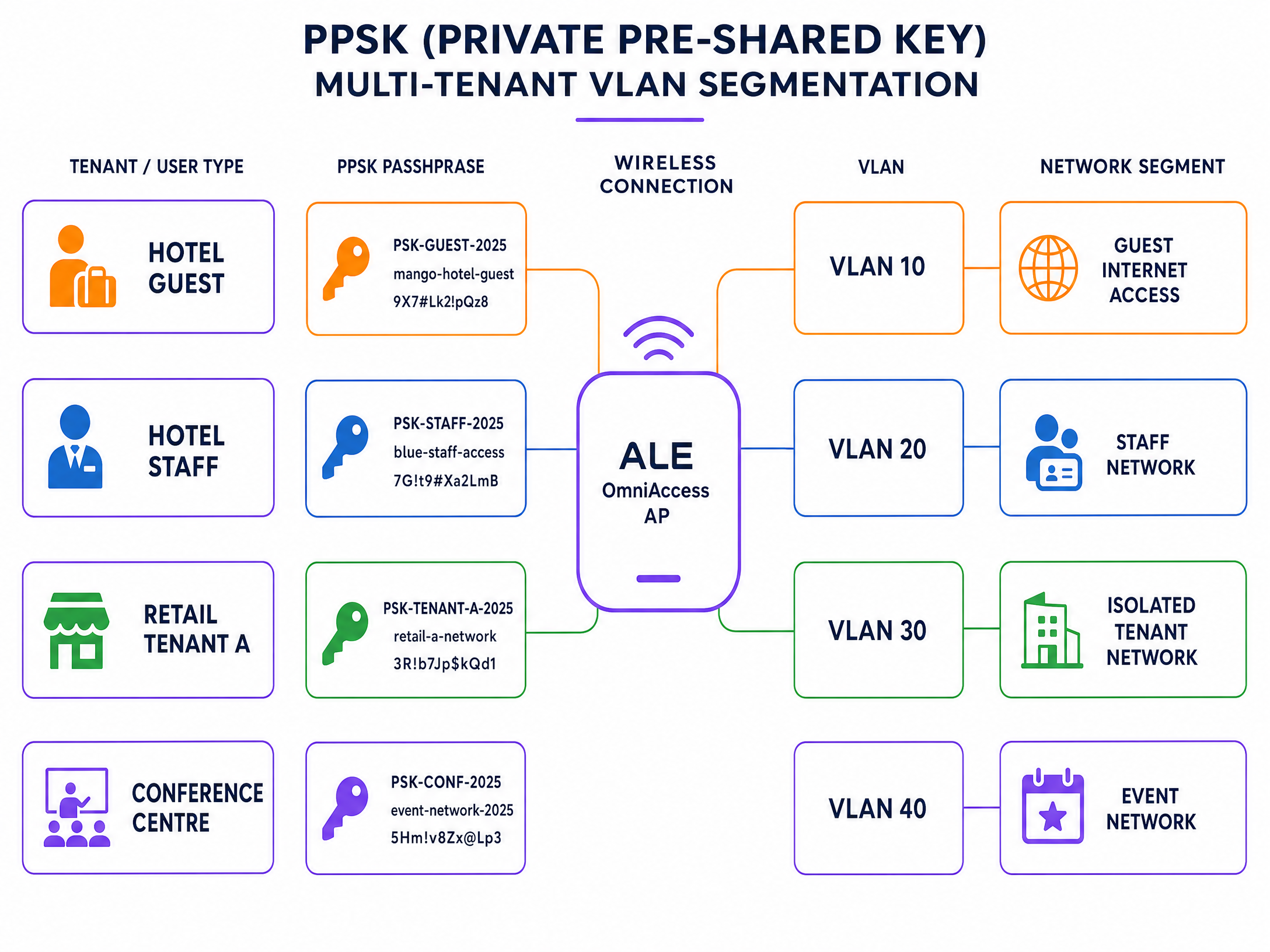
图 2:单个 ALE OmniAccess SSID 上的 PPSK 多租户 VLAN 分段。
步骤 1:创建 PPSK SSID
创建一个新的 WLAN 配置文件,并将认证类型设置为带有 RADIUS 支持的 PSK 验证的 WPA2-PSK。在 Stellar 固件 4.0.8.16 及以上版本(适用于 AP1301 及更高型号)中,极速模式(Express Mode)支持通过 RADIUS 进行动态 VLAN 分配。对于较旧的型号或较早的固件,请使用 OmniVista 管理模式。
步骤 2:在 Purple 中定义租户密码
在 Purple 门户中,为每个租户创建一个 PPSK 组。为每个租户分配一个唯一的密码,并将每个密码映射到相应的 VLAN ID。Purple 将这些映射存储在其 RADIUS 数据库中。
步骤 3:配置用于 VLAN 引导的 RADIUS 属性
确保 Purple RADIUS 服务器在每个 Access-Accept 响应中返回以下 IETF 标准属性:
| 属性编号 | 属性名称 | 值 |
|---|---|---|
| 64 | Tunnel-Type | 13 (VLAN) |
| 65 | Tunnel-Medium-Type | 6 (IEEE 802 / 以太网) |
| 81 | Tunnel-Private-Group-ID | VLAN ID(例如 "30") |
所有这三个属性都必须存在。如果缺少任何一个,ALE AP 将忽略 VLAN 分配,并将客户端置于默认 VLAN 中。
步骤 4:验证上行链路上的 VLAN Trunking
确保在 ALE AP 与分布层交换机之间的上行链路端口上标记了所有租户 VLAN。AP 无法将流量引导至其上行链路 Trunk 上不允许的 VLAN。
最佳实践
以下建议反映了企业无线部署的标准实践,并符合 IEEE 802.1X、PCI DSS 4.0 和 GDPR 要求。
在第 2 层将访客 WiFi 与员工 WiFi 隔离。 切勿将访客和员工流量置于同一个 VLAN 中。使用 RADIUS 驱动的 VLAN 分配来自动强制执行此隔离,无论用户连接到哪个 AP。
对所有 Captive Portal 重定向使用 HTTPS。 在 ALE AP 上安装有效的 SSL 证书以启用 HTTPS 重定向。这可以防止浏览器在 Splash Page 上显示安全警告,从而降低流失率,并符合 GDPR 对安全数据处理的要求。
将 RADIUS 计费(Accounting)间隔设置为 300 秒。 这可以为 Purple 提供定期的会话更新,以确保分析的准确性。如果客户端在没有干净去认证的情况下断开连接,超过 600 秒的间隔可能会导致会话数据丢失。
在上线前测试 Walled Garden。 将测试设备连接到访客 WiFi SSID,并尝试访问每个社交登录提供商。如果登录失败,则说明 Walled Garden 中缺少相应的域名。
使用 PPSK 细分 IoT 设备。 在零售和酒店环境中,数字标牌、支付终端和环境传感器等 IoT 设备应各自接收一个映射到隔离 VLAN 的唯一 PPSK。这可以防止受损的 IoT 设备访问更广泛的网络。
有关企业 WiFi 安全标准和架构的进一步阅读,请参阅我们的 企业 WiFi 安全指南 。
故障排除与风险缓解
下表涵盖了 ALE OmniAccess 和 Purple 集成中最常见的故障模式。
| 现象 | 最可能的原因 | 解决方案 |
|---|---|---|
| Captive Portal 未出现 | Walled Garden 配置错误或缺少 DNS | 验证 Purple 域名是否已列入白名单;检查 DHCP 作用域是否包含有效的 DNS 服务器 |
| RADIUS 认证失败 | 共享密钥不匹配或防火墙阻止 UDP 1812/1813 | 重新输入 Purple 门户中的共享密钥;确认防火墙规则允许出站 UDP 1812 和 1813 |
| 用户进入错误的 VLAN | 缺少 RADIUS Tunnel 属性或 AP 固件限制 | 确认返回了所有三个 RADIUS 属性(64、65、81);检查 ALE 固件版本是否支持动态 VLAN |
| 社交登录按钮失效 | Walled Garden 中缺少社交提供商域名 | 添加所需的社交提供商域名 t至预认证访问列表 |
| HTTPS Captive Portal 显示证书警告 | 使用了通配符证书或未安装证书 | 通过“系统 > 常规 > 证书管理”安装特定域的 SSL 证书 |
| Purple 分析中缺失会话数据 | RADIUS 计费已禁用或间隔过长 | 启用 RADIUS 计费;将间隔设置为 300 秒 |
对于持续存在的 RADIUS 问题,请在 ALE AP 上启用调试日志记录并捕获 RADIUS 交互。查找 Access-Reject 消息并检查拒绝原因代码。常见代码包括 16(身份验证失败)和 18(缺失属性)。
投资回报率 (ROI) 与业务影响
在 ALE OmniAccess 硬件上部署 Purple 可将无源网络转化为有源数据资产。每个经过身份验证的会话都会生成一个访客画像:电子邮件地址、访问频率、停留时间和设备类型。这些第一方数据可通过 Purple 包含 400 多个连接器的库直接导入您的 CRM。
Harrods 通过使用 Purple 的数据捕获来推动忠诚度计划注册,从其访客 WiFi 部署中实现了 57 倍的营销投资回报率(Purple 案例研究,2023 年)。AGS Airports 通过在其整个区域实施分层带宽的付费 WiFi,实现了 842% 的投资回报率(Purple 案例研究,2022 年)。
对于 酒店住宿 运营商而言,Captive Portal 是捕获访客数据的主要触点。对于 零售 环境,它能够实现购物者行为分析和定向促销。对于 交通运输 枢纽,它提供旅客流量数据和符合合规要求的会话日志记录。
Purple 的 访客 WiFi 平台和 WiFi 分析 工具为您提供了衡量这些成果的报告基础设施。通过单个仪表板跟踪身份验证率、会话时长、回头客率和选择加入转化率。
有关相关的集成指南,请参阅 WatchGuard Firebox 集成指南 ,该指南介绍了在不同硬件平台上类似的基于 RADIUS 的架构。
关键定义
PPSK (Private Pre-Shared Key)
A security method where individual users or devices are issued unique passphrases for a single SSID, rather than sharing one global password. The RADIUS server maps each passphrase to a specific policy or VLAN.
Used in Multi-Tenant WiFi to isolate traffic between tenants, residents, or event groups without deploying multiple SSIDs.
RADIUS (Remote Authentication Dial-In User Service)
A networking protocol defined in RFC 2865 that provides centralised Authentication, Authorization, and Accounting (AAA) management for users connecting to a network service.
The core protocol Purple uses to communicate with ALE hardware. The ALE AP sends Access-Request messages; Purple responds with Access-Accept or Access-Reject.
Dynamic VLAN steering
The process of assigning a connected device to a specific VLAN based on RADIUS attributes returned during authentication, rather than a static VLAN configured on the SSID.
Essential for multi-tenant deployments where different user groups must be isolated on the same physical AP infrastructure.
Walled Garden
A controlled environment that restricts a device's internet access to a predefined set of domains before authentication is complete.
Required to allow devices to reach the Purple captive portal and external identity providers before the user has logged in.
Captive portal
A web page that intercepts a user's browser session and requires them to authenticate or accept terms before gaining full network access.
The primary interface where visitors provide consent and first-party data. Purple hosts this page in the cloud; the ALE AP performs the redirect.
Identity-Based Network
A network architecture where access policies, VLAN assignments, and bandwidth controls are determined by who the user is, rather than where or how they connect.
The architectural outcome of integrating ALE hardware with Purple's authentication overlay.
802.1X
An IEEE standard for port-based network access control that provides an authentication mechanism for devices connecting to a LAN or WLAN. It requires a supplicant on the client device, an authenticator (the AP), and an authentication server (RADIUS).
The standard used for secure Staff WiFi deployments. Eliminates shared passwords and ties access to individual user identities.
EAP-TLS (Extensible Authentication Protocol - Transport Layer Security)
A certificate-based EAP method where both the client and the RADIUS server present digital certificates for mutual authentication.
The most secure 802.1X method. Requires a PKI infrastructure to issue client certificates, but eliminates password-based credential theft entirely.
PEAP (Protected Extensible Authentication Protocol)
An EAP method that tunnels the inner authentication exchange inside a TLS session, protecting credentials in transit. Commonly used with MSCHAPv2 as the inner method.
The most common 802.1X method in enterprise deployments. Requires only a server-side certificate and works with standard OS supplicants.
NAS (Network Access Server)
In RADIUS terminology, the device that enforces access control - in this case, the ALE OmniAccess Stellar AP. The NAS forwards authentication requests to the RADIUS server and enforces the policies returned.
The ALE AP acts as the NAS in the Purple integration. Its IP address and shared secret must be registered in the Purple portal as a trusted NAS client.
应用实例
A 200-room hotel in central London uses ALE OmniAccess Stellar APs throughout the property. They need to serve hotel guests, back-of-house staff, and a ground-floor restaurant as three completely separate network segments. They want to avoid broadcasting multiple SSIDs to preserve RF performance.
Deploy a single secure SSID using PPSK. Configure the ALE OmniAccess APs to authenticate against the Purple RADIUS server. In the Purple portal, create three PPSK groups: Hotel Guests (VLAN 10), Staff (VLAN 20), and Restaurant (VLAN 30). The RADIUS server returns Tunnel-Private-Group-ID = 10, 20, or 30 depending on which passphrase the device uses. The ALE AP dynamically steers each device to the correct VLAN. Hotel guests receive internet access only. Staff receive access to the property management system. The restaurant receives an isolated segment for their EPOS terminals.
A conference centre hosts 15 corporate events simultaneously. Each event organiser needs their own isolated WiFi network for attendees, but the venue only has a single ALE OmniAccess infrastructure. The venue IT team needs to provision and de-provision networks quickly between events.
Use Purple's PPSK management to create per-event passphrases mapped to dedicated event VLANs. The venue pre-configures 15 VLAN segments on the ALE infrastructure. For each event, the IT team creates a new PPSK entry in the Purple portal, assigns it to the correct VLAN, and provides the passphrase to the event organiser. At the end of the event, they revoke the passphrase in Purple. The ALE AP immediately stops accepting that passphrase, isolating the de-provisioned VLAN. No AP reconfiguration is required.
练习题
Q1. You have configured the Alcatel-Lucent captive portal on an ALE OmniAccess Stellar AP. Guests connect to the SSID and receive an IP address, but their devices show 'No Internet Connection' and the splash page does not appear. What are the two most likely causes, and how do you resolve each?
提示:Consider what must happen at the DNS and HTTP layer before the captive portal redirect can occur.
查看标准答案
Cause 1: The DHCP scope does not include a valid DNS server. Without DNS, the client cannot resolve the captive portal URL and the OS captive portal detection mechanism fails. Resolution: Add a valid DNS server (e.g., 8.8.8.8) to the DHCP scope on the guest VLAN. Cause 2: The Walled Garden does not include the Purple portal domains. Without these, the AP blocks the redirect request before it reaches the client. Resolution: Add region1.purpleportal.net, venuewifi.com, and cloudfront.net to the pre-authentication access list.
Q2. Your Multi-Tenant WiFi deployment uses PPSK on a single ALE OmniAccess SSID. Users authenticate successfully - the Purple portal shows successful logins - but all users receive IP addresses from VLAN 1 instead of their assigned tenant VLANs. What is the most likely cause?
提示:Check the communication between the RADIUS server and the AP, and the AP's uplink configuration.
查看标准答案
There are two likely causes. First, the Purple RADIUS server may not be returning all three required RADIUS tunnel attributes (64, 65, 81) in the Access-Accept message. Verify the enforcement policy includes Tunnel-Type = 13, Tunnel-Medium-Type = 6, and Tunnel-Private-Group-ID = the correct VLAN ID. Second, the tenant VLANs may not be tagged on the uplink trunk between the ALE AP and the distribution switch. If the VLAN does not exist on the trunk, the AP cannot steer traffic to it, even if the RADIUS attributes are correct.
Q3. A venue requires that guest sessions are automatically terminated after 60 minutes, and that guests who return within 24 hours are recognised and bypass the registration form. How should this be configured in the Purple and ALE architecture?
提示:Consider which system controls session lifetime and which system controls returning visitor recognition.
查看标准答案
Session termination is controlled via the RADIUS Session-Timeout attribute. Configure the Purple RADIUS server to include Session-Timeout = 3600 (seconds) in the Access-Accept message. The ALE AP will disconnect the client after 3600 seconds. Returning visitor recognition is controlled in the Purple portal. Enable the 'remember device' or MAC-based re-authentication setting for your venue. When a returning visitor connects within the configured window, Purple's RADIUS server recognises their MAC address and returns an Access-Accept without requiring the splash page interaction, providing a seamless reconnection experience.
Q4. You are deploying Staff WiFi using 802.1X on ALE OmniAccess Stellar APs. Your organisation uses Microsoft Entra ID as the identity provider. Staff devices are Windows 11 laptops managed via Intune. Which EAP method should you use, and what certificate requirements apply?
提示:Consider the balance between security, deployment complexity, and the capabilities of the existing infrastructure.
查看标准答案
Use PEAP with MSCHAPv2 as the EAP method. This requires only a server-side certificate on the Purple RADIUS server (already provisioned by Purple) and leverages the user's Entra ID credentials for authentication. No client certificates are required, which simplifies deployment on Intune-managed devices. Configure the Windows 11 supplicant via an Intune Wi-Fi profile, specifying the SSID, WPA2-Enterprise security, PEAP method, and the Purple RADIUS server certificate thumbprint for server validation. If your security policy requires certificate-based mutual authentication, upgrade to EAP-TLS and deploy client certificates via Intune SCEP profiles, but this adds significant PKI management overhead.
继续阅读本系列
CommScope Ruckus 与 Purple WiFi 集成:安装与配置指南
本技术参考指南为 CommScope Ruckus 架构与 Purple WiFi 的集成提供了权威的配置指南。它详细介绍了 Guest WiFi Captive Portal、通过 802.1X 实现的 Secure Staff WiFi 以及使用 Ruckus Dynamic PSK 实现的多租户网络隔离的逐步部署过程。
Allied Telesis 接入点与 Purple WiFi 集成
本指南为 Allied Telesis TQ 系列接入点与 Purple WiFi 的集成提供了全面的配置手册。内容涵盖外部 Captive Portal 重定向、802.1X RADIUS 身份验证,以及使用专用预共享密钥 (PPSK) 进行动态 VLAN 引导,以实现安全的多租户部署。
Grandstream GWN Access Points Integration with Purple WiFi
本权威技术参考指南详细介绍了如何将 Grandstream GWN 接入点与 Purple 的访客 WiFi 和分析平台进行集成。它涵盖了 Grandstream Captive Portal 配置、RADIUS AAA 设置、围墙花园(walled garden)设置、带有动态 VLAN 引导的安全员工 802.1X 认证以及多租户 PPSK 细分——为大规模部署访客和员工 WiFi 的 MSP 及 IT 团队提供可操作的逐步指导。