
适用于 Aruba 的 Captive Portal
本权威技术参考指南旨在指导如何配置 Aruba Instant (IAP) 和 Aruba Central 托管的接入点,以将访客用户重定向到 Purple 高转化率、安全的外部 Captive Portal。本指南涵盖了访客 SSID 设置、外部 Captive Portal 重定向、RADIUS 服务器认证和计费参数、围墙花园(walled garden)例外列表以及 WISPr 支持的逐步配置步骤。
收听本指南
查看播客转录
📚 核心系列的一部分:多租户 WiFi →
Executive Summary
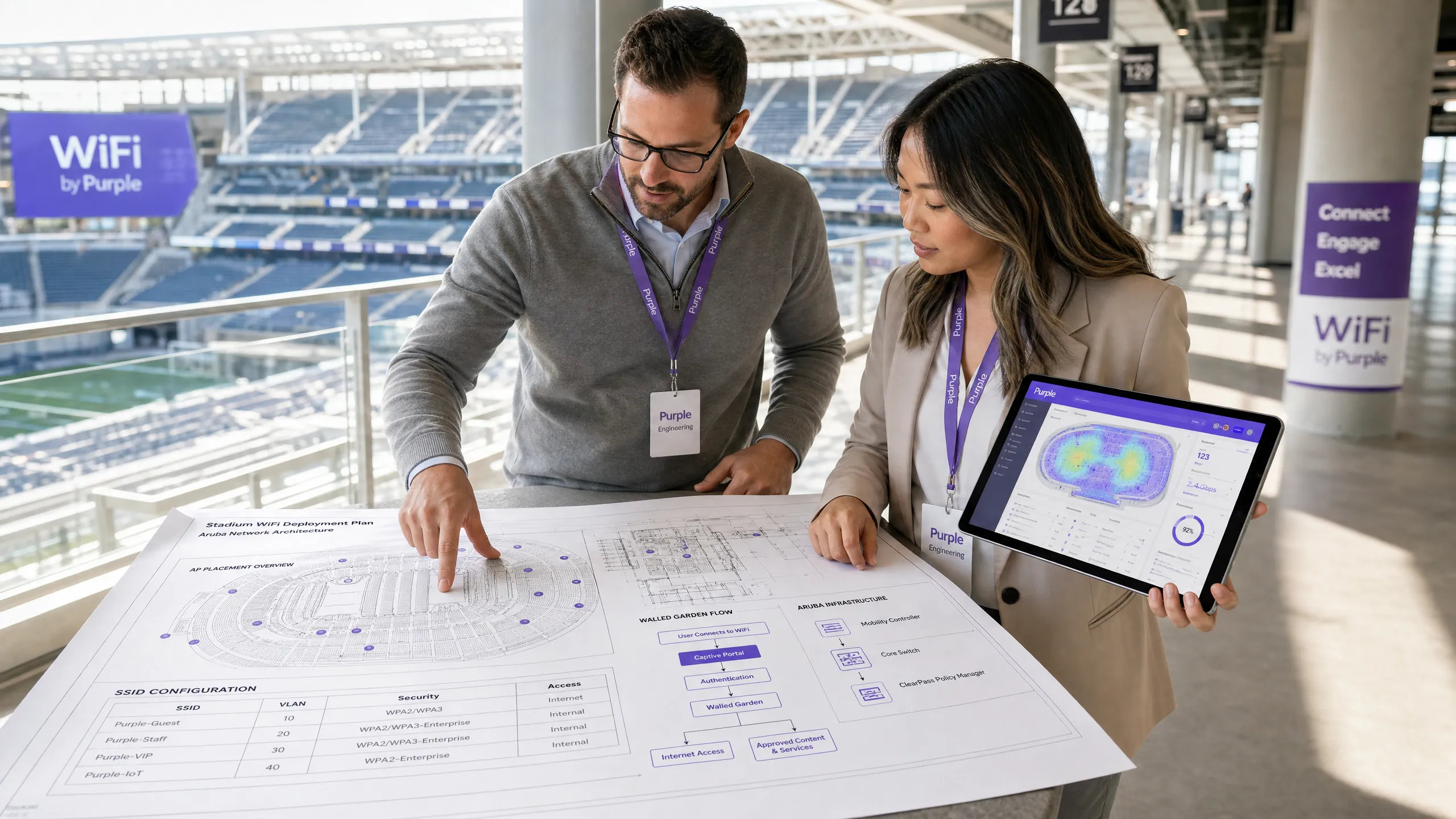
For enterprise wireless engineers, network architects, and venue operations directors, deploying a robust guest wireless infrastructure is no longer just about providing basic internet access. Modern venues require a solution that balances strict network security, regulatory compliance, and a high-converting guest experience. While HPE Aruba's native captive portal capabilities are highly reliable, they lack the sophisticated marketing data capture, global multi-site scalability, and real-time location and demographic analytics required by enterprise venues in hospitality, retail, and public sectors.
By integrating Purple directly with Aruba Instant (IAP) or Aruba Central managed access points, organisations can replace basic local splash pages with a secure, highly-scalable, global guest portal. This integration leverages standard network protocols, including Remote Authentication Dial-In User Service (RADIUS) and Wireless Internet Service Provider roaming (WISPr), to deliver seamless, secure, and brand-consistent onboarding. This technical reference guide provides the exact configuration parameters, architectural diagrams, and troubleshooting workflows required to successfully deploy Purple on Aruba infrastructure.
Technical Deep-Dive
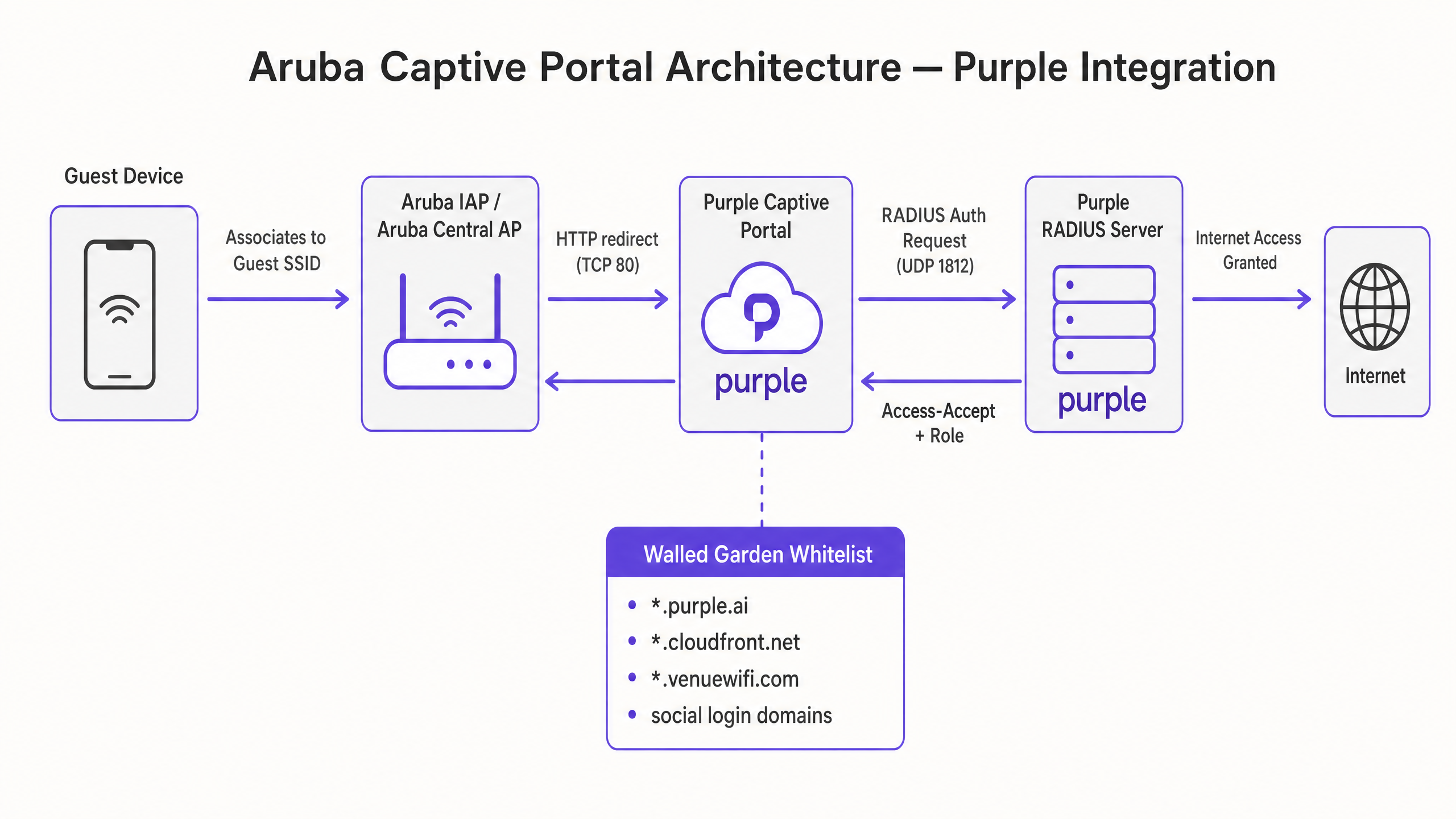
The integration of Purple with Aruba wireless infrastructure relies on a standard external captive portal redirect and RADIUS authentication flow. This architecture ensures that user authentication and traffic accounting are handled securely in the cloud, while local access points enforce access control and quality of service (QoS) policies.
The Captive Portal Redirect Flow
When an unauthenticated client associates with the guest Service Set Identifier (SSID), the Aruba access point intercepts the client's initial HTTP request (typically TCP port 80) and performs a HTTP 302 redirect to Purple's cloud-hosted splash page.
+--------------+             +-----------------+             +------------------+             +------------------+
| Guest Device |             |  Aruba AP / AP  |             |  Purple Captive  |             |  Purple RADIUS   |
|   (Client)   |             |  (Central/IAP)  |             |  Portal (Cloud)  |             |  Server (Cloud)  |
+--------------+             +-----------------+             +------------------+             +------------------+
       |                              |                               |                                |
       |-- 1. Associates to SSID ---->|                               |                                |
       |                              |                               |                                |
       |-- 2. HTTP Request (TCP 80) ->|                               |                                |
       |                              |-- 3. HTTP 302 Redirect ------>|                                |
       |<-- 4. Presents Splash Page ----------------------------------|                                |
       |                              |                               |                                |
       |-- 5. Submits Login Form ------------------------------------>|                                |
       |                              |                               |-- 6. RADIUS Access-Request --->|
       |                              |<-- 7. RADIUS Access-Accept ------------------------------------|
       |                              |      (with Session Timeout)   |                                |
       |<-- 8. Internet Granted ------|                               |                                |
       |                              |                               |                                |
       |                              |-- 9. RADIUS Accounting Start --------------------------------->|
       |                              |-- 10. RADIUS Accounting Interim (every 5 min) ---------------->|
RADIUS Authentication and Accounting Parameters
Once the guest submits their credentials or completes a social login on the Purple splash page, the Purple portal backend communicates with the local Aruba access point or controller to initiate RADIUS authentication. The Aruba AP acts as the Network Access Server (NAS) and sends a RADIUS Access-Request to Purple's cloud RADIUS servers on UDP port 1812.
To ensure accurate session tracking, policy enforcement, and reporting, the following RADIUS attributes must be exchanged:
| Attribute Name | Attribute ID | Description | Practical Context |
|---|---|---|---|
| NAS-IP-Address | 4 | The management IP address of the Aruba virtual controller or AP. | Identifies the physical hardware originating the authentication request. |
| Calling-Station-Id | 31 | The MAC address of the client device (typically formatted as XX-XX-XX-XX-XX-XX). |
Used by Purple to track unique devices and enforce MAC caching for returning guests. |
| Called-Station-Id | 30 | The MAC address of the AP radio (BSSID) combined with the SSID name (formatted as MAC:SSID). |
Crucial for Purple to identify the exact physical venue and specific SSID the user is connecting to. |
| Acct-Session-Id | 44 | A unique identifier generated by the AP for each client session. | Links authentication events with subsequent accounting start, interim, and stop records. |
| Acct-Status-Type | 40 | Indicates the type of accounting record: Start (1), Stop (2), or Interim-Update (3). |
Enables real-time tracking of active sessions and accurate dwell-time calculations. |
| Acct-Interim-Interval | 85 | Specifies the frequency (in seconds) of interim accounting updates sent by the AP. | Must be set to 300 seconds (5 minutes) to ensure Purple's analytics dashboard displays accurate real-time data. |
The Walled Garden (Exception List) Architecture
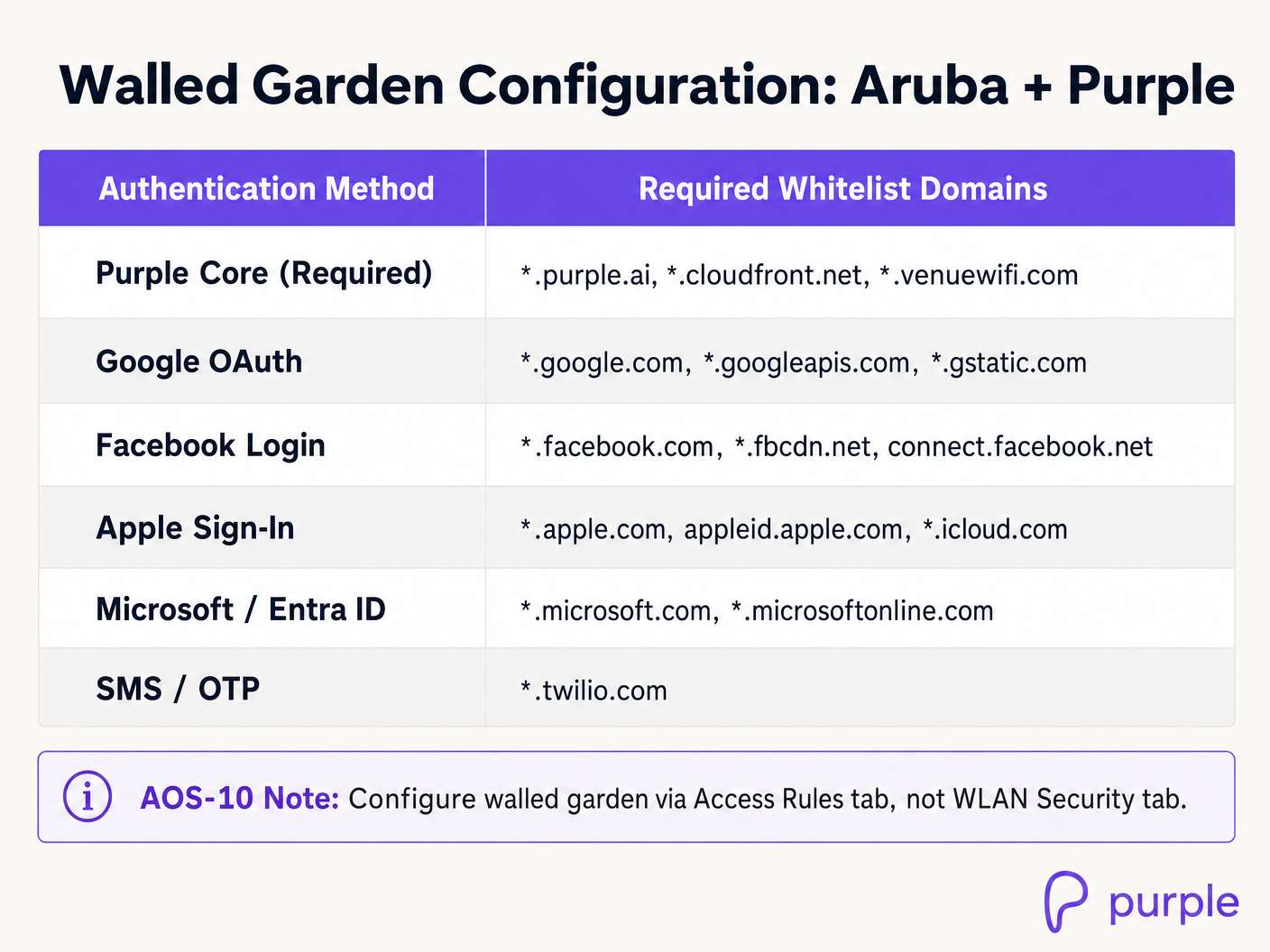
Before a user is authenticated, the Aruba AP restricts all traffic except for destinations explicitly defined in the Walled Garden (or exception list). Because Purple's portal is cloud-hosted and relies on external identity providers (such as Google, Facebook, and Apple) for social authentication, the AP must allow unauthenticated clients to resolve DNS and communicate with these external domains.
If any required domain is omitted from the walled garden, the guest will experience a blank page, broken CSS, missing images, or a complete timeout during the login flow.
Implementation Guide
Deploying Purple on Aruba wireless infrastructure can be achieved via Aruba Instant (IAP) running ArubaOS 8.x (on-premises virtual-controller mode) or Aruba Central (cloud-managed AOS-8 or AOS-10).
Aruba Instant (IAP) Configuration (ArubaOS 8.x)
Step 1: Configure RADIUS Servers
- Log in to the Aruba Instant AP virtual controller web interface.
- Navigate to Security > Authentication Server and click New.
- Configure the Primary RADIUS Server with the following parameters:
- Name:
Purple_Primary - IP Address:
34.94.146.135 - Auth Port:
1812 - Acct Port:
1813 - Shared Key: [Provided in your Purple Venue Dashboard]
- Name:
- Click OK to save.
- Click New again to configure the Secondary RADIUS Server:
- Name:
Purple_Secondary - IP Address:
34.94.183.201 - Auth Port:
1812 - Acct Port:
1813 - Shared Key: [Provided in your Purple Venue Dashboard]
- Name:
- Click OK to save.
Step 2: Create the Captive Portal Profile
- Navigate to Security > Captive Portal and click New.
- Configure the profile with the following settings:
- Name:
Purple_Portal - Type:
External - IP or Hostname:
portal.venuewifi.com - URL:
/ - Port:
443 - Use HTTPS:
Enabled - Redirect URL:
https://portal.venuewifi.com - WISPr:
Enabled(Crucial for auto-triggering the portal on iOS and Android devices)
- Name:
- Click OK to save.
Step 3: Configure the Walled Garden Whitelist
- In the Security > Captive Portal menu, select your newly created
Purple_Portalprofile. - Under the Walled Garden section, click the link to open the whitelist configuration.
- Add the following core Purple domains:
*.purple.ai*.cloudfront.net*.venuewifi.com
- If social login is enabled, add the respective domains (e.g.,
*.google.com,*.facebook.com,*.apple.com). - Click Save.
Step 4: Create and Configure the Guest SSID
- Navigate to Network > New to start the WLAN wizard.
- On the WLAN Settings tab:
- Name (SSID):
Guest-WiFi - Primary Usage:
Guest - Click Next.
- Name (SSID):
- On the VLAN tab, configure IP and VLAN assignment according to your network architecture (typically Client IP assignment: Network Assigned on a dedicated guest VLAN). Click Next.
- On the Security tab:
- Splash Page Type:
External - Captive Portal Profile: Select
Purple_Portal - Auth Server 1: Select
Purple_Primary - Auth Server 2: Select
Purple_Secondary - Reauth Interval:
1440(24 hours, or as per venue policy) - Accounting:
Enabled - Accounting Interval:
5minutes
- Splash Page Type:
- Click Next to proceed to the Access tab. Ensure the default guest rule allows DHCP and DNS pre-authentication, then click Finish.
Aruba Central Configuration (AOS-8 and AOS-10)
Aruba Central AOS-8
- Navigate to Devices under the Manage section of your group in Aruba Central.
- Click Config (gear icon) on the top right, then go to the WLANs tab and click + Add SSID.
- In Step 1: General, enter the SSID name (e.g.,
Guest-WiFi) and click Next. - In Step 2: VLANs, configure your guest VLAN mapping and click Next.
- In Step 3: Security:
- Set Security Level to
Visitors. - Set Type to
External Captive Portal. - Ensure Key Management is set to
Open(do not use Enhanced Open/OWE for standard guest portals as it can cause client compatibility issues). - Click the + icon next to Captive Portal Profile to add a new profile:
- Name:
Purple_Central_Portal - IP or Hostname:
portal.venuewifi.com - URL:
/ - Port:
443 - Redirect URL:
https://portal.venuewifi.com - Use HTTPS:
True - Captive Portal Failure:
Deny Internet(Recommended for security compliance)
- Name:
- Click Save.
- Click the + icon next to Primary Server and Secondary Server to add the Purple RADIUS servers using the IPs
34.94.146.135and34.94.183.201respectively, with ports1812(Auth) and1813(Acct). - Expand Advanced Settings, scroll to Accounting, select
Use authentication servers, and set Accounting Interval to5minutes.
- Set Security Level to
- Scroll down to the Walled Garden section, click + Add, and input the required Purple and social login domains.
- Click Save Settings.
Aruba Central AOS-10
In AOS-10, the walled garden configuration moves from the WLAN Security tab to Access Rules.
- Follow the same SSID and RADIUS configuration steps as AOS-8 above.
- In the SSID wizard, navigate to the Access tab.
- Click + Add Role and create a pre-authentication role named
Purple_Pre_Auth. - In the rules editor for this role, configure explicit Allow rules for DNS, DHCP, and the required walled garden domains (e.g.,
*.purple.ai,*.venuewifi.com). - Scroll down to Assign Pre-Authentication Role, enable the option, and select
Purple_Pre_Authfrom the dropdown. - The post-authorisation role (typically matching the SSID name) should remain configured with
Allow any to all destinationsor your specific corporate access policies. - Click Save Settings.
Best Practices
To ensure maximum performance, security, and compliance, network architects must adhere to the following industry standards and vendor-neutral best practices when deploying captive portals on Aruba and Purple.
1. Secure Certificate Management
Aruba access points must present a valid, trusted SSL/TLS certificate during the captive portal redirect flow.
- Avoid Self-Signed Certificates: If the AP presents a self-signed certificate, modern browsers will display a highly visible "Your connection is not private" warning, severely damaging guest trust and reducing conversion rates.
- Deploy a Trusted CA Certificate: Upload a wildcard certificate from a globally recognised Certificate Authority (CA) to your Aruba Central global settings or Instant virtual controllers. Ensure that the intermediate and root certificates are combined into a single file to complete the trust chain.
2. Network Segmentation and Compliance
Guest traffic must be kept entirely separate from corporate and administrative traffic to mitigate security risks and ensure compliance with industry standards.
- VLAN Isolation: Map the guest SSID to a dedicated, non-routable VLAN. Use Access Control Lists (ACLs) on the upstream core switch or firewall to prevent any routing between the guest VLAN and internal corporate subnets.
- PCI DSS Compliance: If your venue processes card payments (e.g., retail point-of-sale), network segmentation is a mandatory requirement under PCI DSS Requirement 1.2 [3]. Guest WiFi must be physically or logically isolated from the Cardholder Data Environment (CDE).
- GDPR and Data Privacy: Ensure that the Purple portal is configured to display explicit, un-ticked consent checkboxes for marketing opt-ins, meeting the strict requirements of the General Data Protection Regulation (GDPR) [4].
3. Optimising WISPr and Captive Portal Detection
Modern mobile operating systems use active probing to detect captive portals immediately upon association.
- Enable WISPr: Always ensure that WISPr support is enabled in your Aruba captive portal profile. This protocol passes XML-formatted metadata to the client operating system, allowing iOS (Captive Network Assistant) and Android (Captive Portal Login) to gracefully launch the login screen in a dedicated browser window.
- Prevent "Enhanced Open" (OWE) Issues: While Opportunistic Wireless Encryption (OWE) provides encryption on open networks, many legacy client devices do not support it. For public guest networks, stick to standard Open key management to maximise device compatibility.
Troubleshooting & Risk Mitigation
Even with meticulous planning, captive portal deployments can encounter common failure modes. The following troubleshooting matrix provides immediate, actionable steps for wireless engineers.
Captive Portal Troubleshooting Matrix
| Symptom | Probable Cause | Diagnostic Steps | Actionable Solution |
|---|---|---|---|
| Guest associates but the splash page does not load (Timeout/Blank Page). | Missing or incomplete Walled Garden configuration. | Attempt to ping portal.venuewifi.com from a wired device on the same VLAN. Check if the device is trying to load external resources (e.g., social login scripts) that are blocked. |
Explicitly add *.purple.ai, *.venuewifi.com, and *.cloudfront.net to the Aruba walled garden. Verify that DNS resolution is allowed in the pre-auth role. |
| Guest is redirected but browser displays an SSL/TLS Certificate Warning. | The Aruba AP is presenting an untrusted or self-signed certificate for the local redirect page. | Inspect the browser certificate details to see which certificate is being presented. | Upload a valid, trusted SSL certificate signed by a public CA to the Aruba virtual controller or Central global settings. |
| Guest completes the login form but is not granted internet access (Redirect Loop). | RADIUS communication failure between the Aruba AP and Purple servers. | Check the Aruba virtual controller logs for RADIUS timeouts or access-rejects. Run show auth-survivability or check firewall logs. |
Verify that outbound UDP ports 1812 (Auth) and 1813 (Acct) are open on your perimeter firewall. Ensure the RADIUS shared secret matches exactly on both Purple and Aruba. |
| The captive portal does not auto-popup on iOS or Android devices. | WISPr is disabled, or the AP is blocking the operating system's captive portal detection URLs. | Verify if the device can access the internet without logging in, or if it remains connected with "No Internet" and no popup. | Enable WISPr in the Aruba captive portal profile. Ensure that captive portal detection URLs (e.g., captive.apple.com, connectivitycheck.gstatic.com) are not blocked by custom pre-auth ACLs. |
| Real-time dwell-time analytics are inaccurate or missing in Purple. | RADIUS Accounting is disabled or the accounting interval is set too high. | Check the AP configuration to see if accounting is enabled and inspect the interval. | Enable RADIUS Accounting on the Aruba SSID. Set the Accounting Interval to exactly 5 minutes (300 seconds) to ensure regular session updates. |
ROI & Business Impact
Transitioning from a basic, local captive portal to an enterprise-grade WiFi intelligence platform like Purple delivers measurable business outcomes across operations, marketing, and network management.
Operational Efficiency and Scalability
Managing individual local captive portals across hundreds of retail stores, hotels, or public venues is an administrative bottleneck. Purple provides a centralised, cloud-managed console that allows IT teams to deploy, update, and audit captive portal configurations globally with a single click. This reduces configuration drift, ensures consistent branding, and slashes administrative overhead by up to 60%.
Data Monetisation and Marketing ROI
For industries like Retail and Hospitality, guest WiFi is a powerful channel for customer acquisition and engagement. Purple replaces anonymous connections with rich demographic profiles.
- Direct Integration: Purple integrates with CRM and marketing automation platforms to trigger real-time, context-aware campaigns. For example, a retail venue can trigger a personalised discount SMS the moment a loyalty customer connects to the guest WiFi.
- Measurable Footfall Analytics: By analysing RADIUS accounting data and BSSID associations, Purple provides highly accurate dwell-time, return-rate, and path-analysis reporting. This data enables venue operations directors to optimise staffing levels, evaluate window display effectiveness, and measure the direct ROI of marketing campaigns.
Cost-Benefit Analysis: Native Aruba vs. Purple Integration
| Feature / Metric | Native Aruba Local Portal | Aruba + Purple Integration | Business Impact |
|---|---|---|---|
| Centralised Multi-Site Management | Limited. Requires individual configuration per virtual controller or complex Central group mapping. | Fully Centralised. Manage thousands of venues and SSIDs from a single cloud dashboard. | Reduces IT overhead and eliminates configuration drift across distributed estates. |
| Data Capture & Compliance | Basic form capture. No built-in GDPR/CCPA consent validation workflows. | Enterprise-grade. Automated, legally-compliant consent tracking with real-time API sync to CRMs. | Mitigates legal risk and ensures compliance with global privacy regulations [4]. |
| Social Authentication | Requires custom external web development and manual API maintenance. | Out-of-the-box support for Google, Facebook, Apple, Microsoft, LinkedIn, and SMS. | Increases conversion rates by up to 40% through friction-free login options. |
| Analytics & Reporting | Basic session logs (IP, MAC, connect time). No demographic or behaviour tracking. | Rich analytics: age, gender, dwell-time, return rates, heatmaps, and cross-venue roaming. | Drives marketing ROI and provides actionable business intelligence for operations. |
关键定义
Captive Portal
在向新连接到 Wi-Fi 网络的用户授予更广泛的网络资源访问权限之前,向其展示的网页。
用于收集访客数据、强制执行服务条款并展示品牌营销内容。
RADIUS (Remote Authentication Dial-In User Service)
一种网络协议,为连接和使用网络服务的用户提供集中的认证、授权和计费 (AAA) 管理。
Purple 作为外部 RADIUS 服务器,对访客进行认证并跟踪其会话时长。
WISPr (Wireless Internet Service Provider roaming)
一种草案协议,允许独立的无线互联网服务提供商让用户使用通用的登录门户在彼此的网络之间进行漫游。
在 Aruba AP 上启用 WISPr 允许现代智能手机自动检测 Captive Portal,并在系统原生窗口中显示展示页面。
Walled Garden
在未认证用户完成 Captive Portal 登录过程之前,允许其访问的一组受限网站或域名。
对于允许访客在通过认证之前加载展示页面资源(CSS、JS、图片)并访问社交登录提供商(Google、Facebook)至关重要。
BSSID (Basic Service Set Identifier)
无线接入点针对特定 SSID 的射频接口的 MAC 地址。
在 RADIUS Called-Station-Id 属性中发送,允许 Purple 将用户的物理位置映射到特定的 AP。
NAS-IP-Address
发起 RADIUS 请求的网络接入服务器(Aruba AP 或控制器)的 IP 地址。
在 RADIUS 数据包中用于识别哪个物理硬件正在请求认证。
RadSec
一种通过 TCP 使用传输层安全 (TLS) 来保护 RADIUS 事务安全的协议。
当在本地 AP 与 Purple 云端之间穿过不可信的公共网络时,用于加密 RADIUS 认证和计费流量。
Enhanced Open (OWE)
Wi-Fi Certified Easy Connect 的扩展,可在无需密码的情况下对开放网络上的无线传输进行加密。
可能会导致旧版访客设备的兼容性问题;对于公共 Captive Portal,建议使用标准的 Open 安全模式。
应用实例
一名企业无线工程师正在一家拥有 150 家门店的全国零售连锁店中部署访客 WiFi。每家门店拥有 3-5 个通过 Aruba Central 托管的 Aruba Instant AP。营销团队需要一个带有 Facebook 和 Google 社交登录选项的品牌化 Captive Portal,合规团队则要求访客流量必须与门店的销售点 (PoS) 网络完全隔离。应如何进行架构设计和配置?
- 网络分段:将访客 SSID 映射到 Aruba AP 上的 VLAN 100。将本地交换机端口配置为 Trunk 端口,允许 VLAN 100 通过。在门店的网关防火墙上,为 VLAN 100 配置 DHCP 作用域和仅出站的 NAT 策略。在防火墙上应用 ACL,以丢弃从 VLAN 100 到 PoS VLAN (VLAN 10) 的所有流量。
- Aruba Central 中的 RADIUS 和 Portal 配置:在 VLAN 100 上创建一个名为“Store-Guest”的新 SSID。将安全(Security)设置为“Visitors”,并将展示页面(Splash Page)设置为“External Captive Portal”。添加 Purple 的主 RADIUS 服务器 (34.94.146.135) 和备用服务器 (34.94.183.201),端口为 1812/1813。启用 RADIUS 计费(RADIUS Accounting),间隔设置为 5 分钟。
- 围墙花园(Walled Garden):在 Aruba Central 中配置围墙花园,以包含:.purple.ai、.venuewifi.com、.cloudfront.net(用于 Purple 核心),以及社交登录域名:.google.com、.googleapis.com、.gstatic.com(用于 Google)和 .facebook.com、.fbcdn.net、connect.facebook.net(用于 Facebook)。
- 测试:将测试设备连接到“Store-Guest”,验证 DHCP 是否在 VLAN 100 上分配了 IP,确认浏览器是否通过 HTTPS 重定向到 Purple 门户,完成 Facebook 登录,并验证在内部 PoS 资源保持完全不可达的同时已授予互联网访问权限。
一个拥有 50,000 个座位的体育场馆正在 AOS-10 上运行 Aruba Central,并配备了高密度 AP-555 接入点。在活动高峰时段,数千名用户尝试同时连接到访客 WiFi。IT 总监担心 Captive Portal 重定向对虚拟控制器造成的性能影响,并希望确保认证过程尽可能快速且具弹性。应该应用哪些高级配置?
- 预认证角色 (AOS-10):在 AOS-10 中,配置一个名为“Stadium-Pre-Auth”的专用预认证角色。应用允许 DHCP (UDP 67-68)、DNS (UDP 53) 以及向 Purple 围墙花园域名发送出站流量的 ACL。在 SSID 设置中将此角色分配为“预认证角色”。这可以将数据包过滤工作从中央控制器卸载到各个 AP,从而分担负载。
- RADIUS 负载均衡:在 Aruba Central 中,启用跨 Purple 主备 RADIUS 服务器的 RADIUS 负载均衡。这可以在高峰接入期间均匀分配认证负载。
- 服务器卸载(Server Offload):在 Captive Portal 配置文件设置中启用“Server Offload”。这可以防止非浏览器客户端应用程序(如后台移动应用、系统更新或物联网设备)被重复重定向到外部 Captive Portal,从而节省 AP CPU 周期和 WAN 带宽。
- Captive Portal 失败策略:将“Captive Portal Failure”设置为“Deny Internet”(拒绝互联网)。虽然“Allow Internet”(允许互联网)看起来对客户很友好,但在极端网络事件期间,它可能会导致不受控制的开放访问,从而绕过安全控制并耗尽 DHCP 地址池。
练习题
Q1. 网络工程师在 Aruba Instant AP 集群上配置了新的访客 SSID。测试时,他们连接到该 SSID,但浏览器没有显示品牌化的 Purple 展示页面,而是出现了浏览器超时错误。此问题最可能的原因是什么?应该采取哪些排错步骤?
提示:思考在认证之前,客户端设备访问云端托管的展示页面需要满足什么条件。
查看标准答案
最可能的原因是缺失或不完整的围墙花园(Walled Garden)配置,或者是 DNS 解析问题。在认证之前,AP 会阻止除白名单域名之外的所有流量。如果 Purple 域名(.purple.ai、.venuewifi.com、*.cloudfront.net)不在围墙花园中,客户端就无法加载展示页面。排错步骤:1. 验证客户端设备是否已通过 DHCP 获取了有效的 IP 地址和 DNS 服务器。2. 尝试从同一 VLAN 上的有线设备解析“portal.venuewifi.com”,以确认 DNS 是否正常工作。3. 检查 Aruba AP 配置,确保围墙花园白名单已激活且包含所有必需的 Purple 域名。4. 验证预认证角色是否允许向 DNS 服务器发送 DNS 流量(UDP 端口 53)。
Q2. 在大型会议中心部署 Purple 访客 WiFi 期间,IT 团队报告称访客设备连接成功,但每隔 15 分钟就会被提示重新登录。期望的行为是让访客保持登录状态 24 小时。应检查哪些 Aruba 和 Purple 配置参数来解决此问题?
提示:查看控制会话生命周期和重新认证间隔的参数。
查看标准答案
此问题是由会话超时或重新认证间隔设置不匹配引起的。要解决此问题:1. 检查 Aruba SSID 安全选项卡上的“Reauth Interval”(重新认证间隔);应将其设置为 1440 分钟(24 小时),而不是 15 分钟。2. 检查 Purple RADIUS 服务器在 Access-Accept 消息中返回的“Session Timeout”属性。如果 Purple 配置了较短的会话生命周期,它将强制进行重新认证。3. 确保在 Aruba SSID 上启用了 MAC 认证(MAC Authentication)。这允许 AP 在 24 小时窗口内通过访客的 MAC 地址自动在 Purple 数据库中进行认证,而无需再次向其展示页面。
Q3. 某公共部门组织正在使用 AOS-10 上的 Aruba Central 在多个图书馆部署访客 WiFi。安全策略要求所有访客流量必须进行空中加密,但图书馆馆长希望提供无缝、无摩擦的登录体验。无线架构师如何利用 Aruba 和 Purple 同时满足这两个要求?
提示:考虑 Open、OWE(增强型开放)和 WPA2/WPA3-Enterprise 之间的区别,以及它们如何与 Captive Portal 交互。
查看标准答案
为了同时实现空中加密和无缝的 Captive Portal 体验,如果需要兼容旧设备,架构师应部署带有过渡模式的“增强型开放”(机会性无线加密 - OWE)。增强型开放可在不需要预共享密钥的情况下加密客户端与 AP 之间的无线连接,从而保护访客免受被动窃听。1. 在 Aruba Central 中配置访客 SSID,将安全级别(Security Level)设置为“Visitors”,并将密钥管理(Key Management)设置为“Enhanced Open”。2. 启用“OWE Transition Mode”(OWE 过渡模式)并将其与标准的 Open 访客 SSID 关联,以支持不支持 WPA3 OWE 的旧设备。3. 像往常一样配置指向 Purple 的外部 Captive Portal 配置文件。这种组合可确保现代设备自动获得加密的无线传输,同时仍能重定向到 Purple 展示页面以进行数据收集和合规性确认。
继续阅读本系列
Cisco WLC and Catalyst Integration with Purple WiFi: Step-by-Step Guest Access Guide
本权威指南详细介绍了 Cisco Catalyst 9800 WLC 与 Purple WiFi 的逐步集成过程。内容涵盖适用于访客 Captive Portal 的外部 Web 认证、用于保障员工安全接入的 802.1X EAP-TLS,以及用于多租户动态 VLAN 隔离的 Cisco iPSK。
CommScope Ruckus 与 Purple WiFi 集成:安装与配置指南
本技术参考指南为 CommScope Ruckus 架构与 Purple WiFi 的集成提供了权威的配置指南。它详细介绍了 Guest WiFi Captive Portal、通过 802.1X 实现的 Secure Staff WiFi 以及使用 Ruckus Dynamic PSK 实现的多租户网络隔离的逐步部署过程。
Allied Telesis 接入点与 Purple WiFi 集成
本指南为 Allied Telesis TQ 系列接入点与 Purple WiFi 的集成提供了全面的配置手册。内容涵盖外部 Captive Portal 重定向、802.1X RADIUS 身份验证,以及使用专用预共享密钥 (PPSK) 进行动态 VLAN 引导,以实现安全的多租户部署。