部署 SCEP 以实现安全的网络高等教育 BYOD 和 WiFi 身份验证
本技术指南为网络架构师和 IT 经理提供了一个独立于厂商的蓝图,用于部署基于 SCEP 的证书注册,以保障高等教育 WiFi 的安全。它详细介绍了从易受攻击的基于密码的身份验证向 EAP-TLS 的转变,重点是可扩展的 BYOD 引导和 MDM 集成。
收听本指南
查看播客转录
- Executive Summary
- The Architecture of SCEP Certificate Enrollment
- Core Infrastructure Components
- The SCEP Enrollment Flow
- Implementation Guide: A Phased Deployment Strategy
- Step 1: Directory Synchronisation and Group Policy
- Step 2: PKI and SCEP Gateway Configuration
- Step 3: RADIUS Server Integration
- Step 4: MDM Profile Sequencing
- Step 5: BYOD Self-Service Onboarding
- Best Practices and Risk Mitigation
- RADIUS Capacity Planning
- Certificate Lifecycle Management
- Handling Headless IoT Devices
- Listen to the Technical Briefing
- ROI and Business Impact

Executive Summary
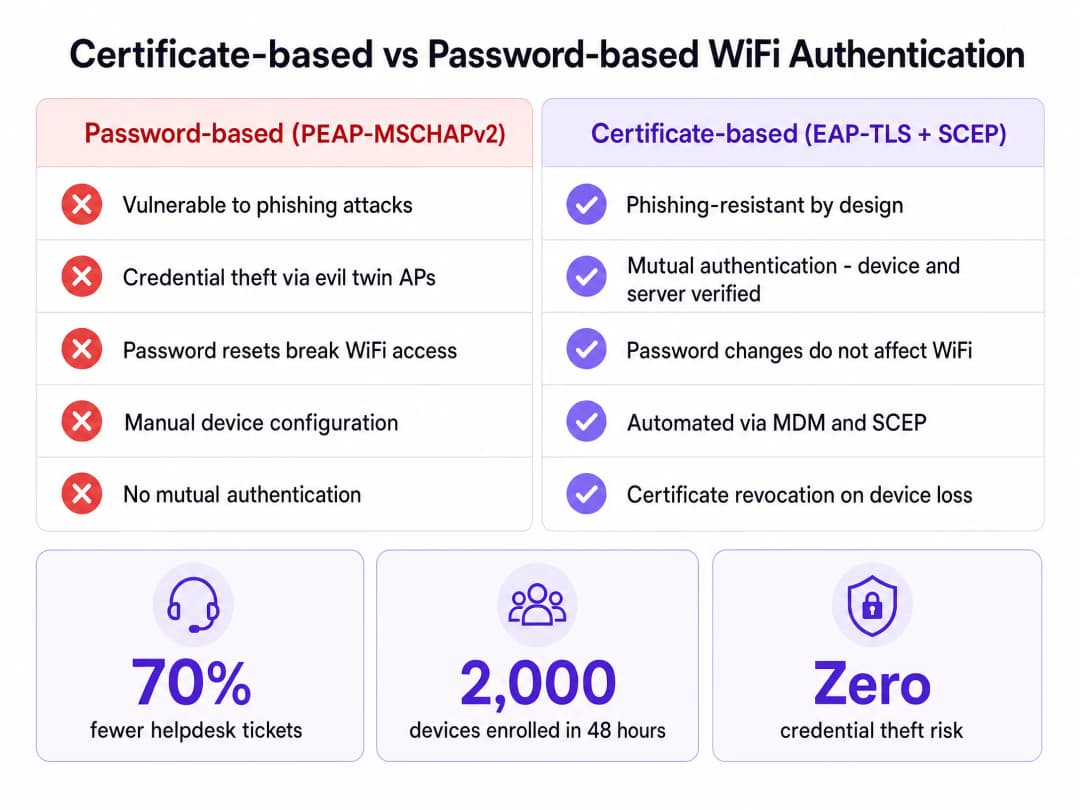
For higher education IT teams, the start of the academic year brings an immediate stress test. Thousands of students arrive on campus with multiple unmanaged devices, expecting instant, secure connectivity. When universities rely on password-based authentication like PEAP-MSCHAPv2, this influx predictably results in massive helpdesk queues, configuration errors, and severe vulnerabilities to credential theft via evil twin access points.
The architectural solution to this scale and security challenge is certificate-based authentication using EAP-TLS. To make certificate deployment viable across tens of thousands of endpoints, universities must implement the Simple Certificate Enrollment Protocol (SCEP). SCEP automates the provisioning of digital certificates to both managed devices via MDM and unmanaged student devices via self-service onboarding portals. This guide details the technical requirements for deploying SCEP in a higher education environment, providing actionable steps to eliminate password-related helpdesk tickets and secure the campus perimeter.
The Architecture of SCEP Certificate Enrollment
Transitioning to certificate-based WiFi requires a fundamental shift from validating user knowledge (a password) to validating device identity (a certificate). The SCEP protocol acts as the bridge between your device management layer and your Public Key Infrastructure (PKI).

Core Infrastructure Components
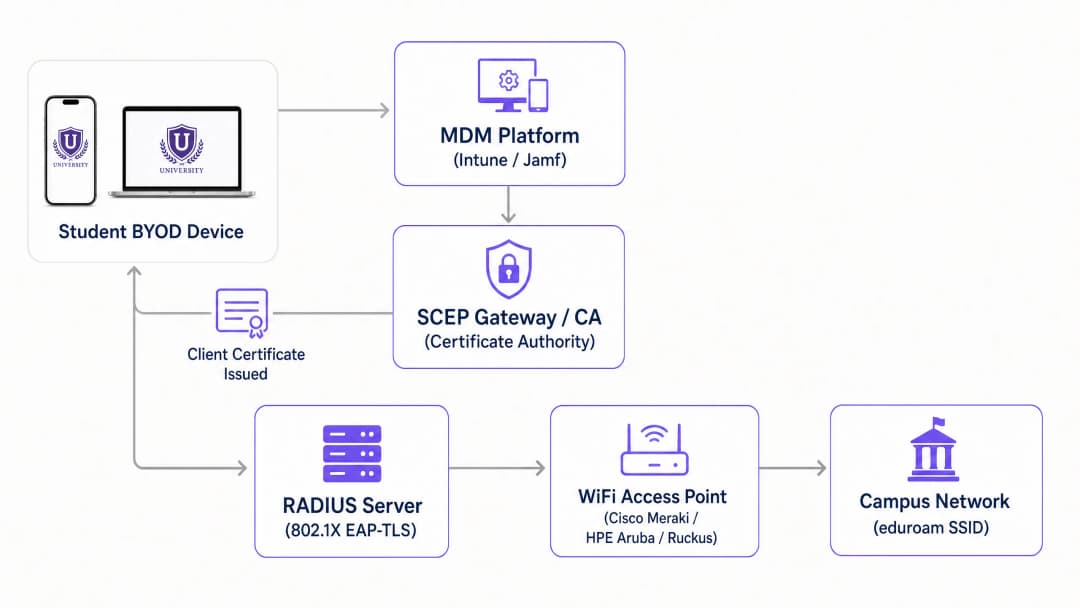
A production-ready SCEP deployment requires six integrated components working in sequence:
- Identity Provider (IdP): The authoritative directory (Microsoft Entra ID, Okta, or Google Workspace) that verifies the user's identity before certificate issuance.
- Mobile Device Management (MDM): Platforms like Microsoft Intune or Jamf that push the SCEP payload to institution-owned devices.
- Certificate Authority (CA): The PKI engine that signs and issues the certificates. This can be an on-premises Microsoft ADCS deployment or a cloud-native PKI overlay.
- SCEP Gateway: The HTTP endpoint that receives Certificate Signing Requests (CSRs) from devices, validates the challenge password, and forwards the request to the CA.
- RADIUS Server: The authentication server that evaluates the presented client certificate against network access policies during the 802.1X EAP-TLS exchange.
- Wireless Access Network: The physical access points (Cisco Meraki, HPE Aruba, Ruckus, or Juniper Mist) configured to enforce 802.1X authentication.
The SCEP Enrollment Flow
The enrollment process executes without user intervention on managed devices. The MDM platform pushes a configuration profile containing the SCEP gateway URL and a dynamically generated challenge password. The device generates a private key locally and constructs a CSR. It then transmits this CSR to the SCEP gateway over HTTP.
The gateway intercepts the request and validates the challenge password against the MDM API to confirm the device is authorised. Once verified, the gateway forwards the CSR to the CA. The CA signs the certificate and returns it through the gateway to the device. The private key never leaves the endpoint, ensuring cryptographic integrity.
Implementation Guide: A Phased Deployment Strategy
Deploying SCEP requires precise sequencing. Profile dependencies mean that executing these steps out of order will result in authentication failures.
Step 1: Directory Synchronisation and Group Policy
Before touching certificates, ensure your identity store is clean. Create distinct security groups for students, staff, and faculty in Entra ID or Active Directory. Your RADIUS server will use these group memberships, embedded as Subject Alternative Names (SAN) in the certificates, to assign devices to the correct VLANs dynamically.
Step 2: PKI and SCEP Gateway Configuration
Establish your CA hierarchy. If building on-premises, deploy an offline Root CA and an online Issuing CA. For higher education environments looking to reduce infrastructure footprint, cloud PKI solutions offer operational simplicity. Configure the SCEP gateway to communicate with your CA and expose the enrollment endpoint to the network segment where devices will initially connect.
Step 3: RADIUS Server Integration
Import the Issuing CA certificate into your RADIUS server's trusted certificate store. Configure the authentication protocol strictly to EAP-TLS. Define network policies that map certificate attributes (such as the User Principal Name) to specific VLAN return attributes, enabling micro-segmentation across the campus.
Step 4: MDM Profile Sequencing
For institution-owned devices managed by Intune or Jamf, profile deployment order is critical. You must deploy profiles in this exact sequence:
- Trusted Certificate Profile: Distributes the Root CA certificate to establish trust.
- SCEP Certificate Profile: Directs the device to the gateway to obtain its client certificate.
- WiFi Profile: Configures the SSID to use WPA3-Enterprise with EAP-TLS, explicitly referencing the certificate acquired in the previous step.
Step 5: BYOD Self-Service Onboarding
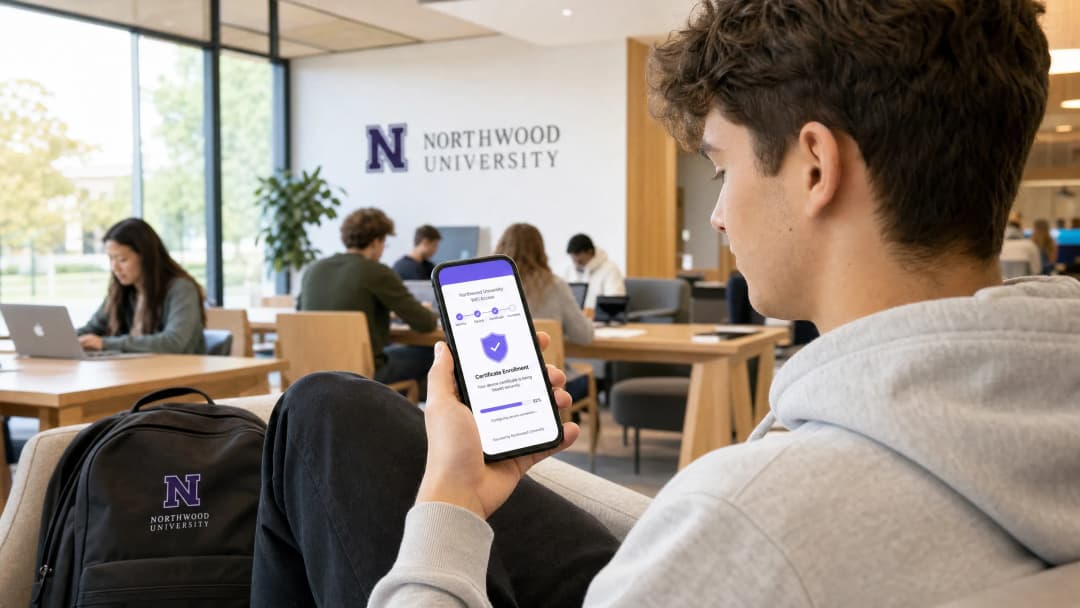
Students will not manually install certificates on their personal devices. You must provide an automated onboarding pathway. Deploy an open SSID that restricts traffic exclusively to the captive portal and the SCEP gateway. When a student connects, the portal prompts them to authenticate via Single Sign-On using their university credentials. Upon successful authentication, the portal provisions the SCEP payload to the device. Purple integrates this onboarding flow directly into the captive portal experience, enabling students to complete enrollment in under two minutes without IT intervention.
Best Practices and Risk Mitigation
Transitioning to EAP-TLS eliminates credential theft, but introduces new operational considerations. Network architects must anticipate scale and lifecycle events.

RADIUS Capacity Planning
The computational overhead of EAP-TLS certificate validation is significantly higher than PEAP password checking. During the first week of term, thousands of devices will attempt to authenticate simultaneously. A single RADIUS node will likely exhaust its resources and drop requests, leading to widespread connection failures. You must implement load balancing across multiple RADIUS nodes and increase the authentication timeout on your access points to at least five seconds to accommodate peak latency.
Certificate Lifecycle Management
Certificates for student devices should typically carry a validity period of one to two years. This duration covers the academic cycle while limiting exposure if a device is compromised. Crucially, you must implement a robust revocation mechanism. When a student graduates or reports a lost device, the certificate must be revoked immediately. Ensure your CA publishes a Certificate Revocation List (CRL) or operates an Online Certificate Status Protocol (OCSP) responder, and configure your RADIUS server to check revocation status on every authentication attempt.
Handling Headless IoT Devices
Smart TVs, gaming consoles, and wireless printers in residence halls lack the native 802.1X supplicants required for SCEP enrollment. For these devices, implement MAC Authentication Bypass (MAB). Provide a self-service device registration portal where students can register the MAC addresses of their IoT hardware. The Network Access Control (NAC) system then authenticates these registered addresses and places them into the appropriate student VLAN.
Listen to the Technical Briefing
For a deeper dive into the architecture and real-world deployment scenarios, listen to our 10-minute technical briefing podcast.
ROI and Business Impact
The business case for SCEP deployment in higher education rests on two pillars: security posture and operational efficiency.
From a security perspective, EAP-TLS provides mutual authentication. The device verifies the RADIUS server's certificate before transmitting any data, entirely mitigating the risk of evil twin access points harvesting credentials. This architecture aligns with zero-trust principles, ensuring that only cryptographically verified devices access the campus network.
Operationally, decoupling WiFi authentication from directory passwords yields immediate financial returns. When a university forces a 90-day password reset, students using PEAP must update their credentials on every device. Inevitably, many fail, resulting in a surge of helpdesk tickets. With SCEP and EAP-TLS, the certificate remains valid regardless of password changes. Universities deploying automated certificate onboarding consistently report up to a 70% reduction in WiFi-related support tickets during peak periods, allowing IT staff to focus on strategic initiatives rather than basic connectivity troubleshooting.
关键定义
SCEP (Simple Certificate Enrollment Protocol)
一种无需手动干预即可自动向网络设备请求和颁发数字证书的协议。
对于扩展 EAP-TLS 部署至关重要,因为它允许 MDM 和引导门户无缝地向数万个学生设备配发证书。
EAP-TLS (Extensible Authentication Protocol - Transport Layer Security)
最安全的 802.1X 身份验证方法,需要服务器端和客户端证书进行双向身份验证。
取代了易受攻击的基于密码的协议(如 PEAP),消除了通过邪恶双子接入点盗取凭据的风险。
MDM (Mobile Device Management)
用于管理和保护机构拥有的设备的软件平台,例如 Microsoft Intune 或 Jamf。
用于将 SCEP 负载和 WiFi 配置文件静默推送到托管设备,确保它们在部署前已配置为可访问网络。
CSR (Certificate Signing Request)
由客户端设备生成的包含公钥和身份信息的编码文本块,发送给证书颁发机构(CA)以申请证书。
在 SCEP 工作流中,设备在本地生成私钥,并且仅将 CSR 发送到网关,从而确保私钥在端点上保持安全。
RADIUS (Remote Authentication Dial-In User Service)
提供集中式身份验证、授权和计费管理的核心网络协议。
在 802.1X 交换过程中评估设备所提供客户端证书,并指示 VLAN 分配的服务器。
Evil Twin Attack
一种安全漏洞利用行为,攻击者设置一个与合法网络具有相同 SSID 的恶意接入点,以截获用户凭据。
EAP-TLS 可以防止此类攻击,因为客户端设备在传输任何数据之前会验证 RADIUS 服务器的证书;如果攻击者缺少受信任的服务器证书,连接就会断开。
MAB (MAC Authentication Bypass)
一种备用身份验证方法,将设备的 MAC 地址用作其身份凭据。
在无法支持 802.1X 或 SCEP 的学生宿舍中,注册无端口的 IoT 设备(如游戏机)时需要此功能。
CRL (Certificate Revocation List)
由证书颁发机构(CA)发布的列表,其中包含在过期日期之前已被废弃的证书序列号。
对网络安全至关重要;RADIUS 服务器必须检查 CRL,以确保被盗设备或已毕业的学生被立即拒绝访问。
应用实例
一所拥有 20,000 名学生的大学正在从 PEAP-MSCHAPv2 迁移到 EAP-TLS。他们使用 Microsoft Intune 管理 3,000 台大学拥有的 Windows 笔记本电脑,但其余 45,000 台设备是学生 BYOD(手机、平板电脑、个人笔记本电脑)。他们应该如何设计证书部署架构,以确保所有设备在开学第一天都能进行身份验证?
该大学必须实施分流注册策略。对于 3,000 台 Intune 管理的笔记本电脑,IT 团队在 Intune 内配置 SCEP 证书配置文件,将网关 URL 和挑战密码静默推送到设备。对于 45,000 台 BYOD 设备,他们部署一个开放的“Onboarding” SSID,限制流量只能访问自助服务 Captive Portal 和 SCEP 网关。学生连接到 Onboarding SSID,通过 SAML SSO 向 Entra ID 进行身份验证,并下载触发 SCEP 注册的配置负载。证书安装完成后,设备将使用 EAP-TLS 自动关联到安全的“eduroam” SSID。
在开学的第一周,大学的服务台收到报告,学生可以用笔记本电脑连接到 WiFi,但宿舍里的智能音箱和游戏机无法连接到 802.1X 网络。网络架构师应该如何解决这个问题?
架构师必须为无头设备实施 MAC 身份验证绕过 (MAB)。由于智能音箱和控制台缺少 802.1X 请求方,它们无法处理 SCEP 负载或提供客户端证书。大学应部署一个自助设备注册门户,学生使用其大学凭据登录并输入其 IoT 设备的 MAC 地址。RADIUS 服务器配置为通过 MAB 接受这些注册的 MAC 地址,并将它们分配给学生特定的每房 VLAN。
练习题
Q1. 您的大学正在部署 EAP-TLS。您已经配置了 SCEP 网关和 MDM 配置文件。然而,当测试设备尝试连接到安全 SSID 时,连接静默失败。RADIUS 日志显示客户端证书有效,但设备拒绝了服务器。最可能的配置错误是什么?
提示:考虑双向身份验证的要求以及设备信任服务器所需的内容。
查看标准答案
MDM 受信任证书配置文件可能缺失或配置错误。在 EAP-TLS 中,双向身份验证要求设备验证 RADIUS 服务器的证书。如果设备的受信任存储中未安装根 CA 证书,它将无法验证服务器的证书,并会断开连接以防止潜在的 Evil Twin Attack。
Q2. 一名学生报告称,他们的笔记本电脑已通过 BYOD 门户成功注册并拥有有效的客户端证书,但在更改大学目录密码后无法再访问网络。这表明存在什么架构缺陷?
提示:EAP-TLS 身份验证完全依赖于证书,而不是密码。
查看标准答案
这表明网络实际上并未采用 EAP-TLS,而是可能回退到了 PEAP-MSCHAPv2 或其他基于密码的协议。如果配置了真正的 EAP-TLS,RADIUS 服务器会验证证书的加密签名,从而将网络访问与目录密码完全解耦。网络架构师必须在 RADIUS 服务器上强制执行严格的 EAP-TLS 策略,并禁用回退协议。
Q3. 在开学的第一周,RADIUS 服务器出现高 CPU 利用率和间歇性超时错误,导致大范围的身份验证失败。服务器的配置足以应对并发会话总数。是什么原因导致了超时?
提示:考虑在初始连接阶段,检查密码与验证证书链之间的计算开销差异。
查看标准答案
超时是由返校学生初始身份验证风暴期间,EAP-TLS 加密握手带来的沉重计算开销引起的。架构师必须将无线接入点(例如 Cisco Meraki 或 HPE Aruba)上的 RADIUS 超时值增加到至少 5 秒以适应延迟,并确保负载均衡将初始完整身份验证请求均匀分配到所有 RADIUS 节点。
继续阅读本系列
Server RADIUS:面向企业的全面指南
本指南为 IT 经理、网络架构师和 CTO 提供关于企业 WiFi 的 server RADIUS 身份验证的权威技术参考。它涵盖了 AAA 框架、802.1X 架构、EAP 方法选择、云端与本地部署的权衡以及动态 VLAN 分配。酒店、零售、活动和公共部门的场所运营商将获得可行的实施指导、真实案例研究以及从不安全的预共享密钥迁移到安全的、身份驱动的网络访问控制架构所需的决策框架。
Aruba ClearPass vs. Purple WiFi: 比较功能与协同部署
一份全面的技术指南,详细介绍了 Aruba ClearPass 和 Purple WiFi 的协同部署架构。内容涵盖 RADIUS 代理配置、动态 VLAN 分配,以及在企业级 NAC 旁部署安全且由数据分析驱动的访客网络的最佳实践。
Cisco ISE 对比 Purple WiFi:如何比较以及如何协同工作
本指南阐述了 Cisco ISE 和 Purple WiFi 在企业网络中如何承担不同但互补的角色。它详细介绍了如何使用 Cisco ISE 进行安全的 802.1X 企业级访问,同时利用 Purple 进行符合 GDPR 要求的客用 WiFi、营销分析和 CRM 集成。