
Cisco WLC and Catalyst Integration with Purple WiFi: Step-by-Step Guest Access Guide
本指南详细介绍了 Cisco WLC 和 Catalyst 9800 无线网络与 Purple 的分步集成,涵盖了通过中央 Web 认证(CWA)实现的 Guest WiFi captive portal 重定向、使用 802.1X EAP-TLS 的安全员工 WiFi,以及使用 Cisco 身份预共享密钥(iPSK)和动态 VLAN 分配的多租户隔离。本指南适用于在酒店、零售和大型公共场所部署 Cisco 基础设施的企业网络架构师和 IT 安全总监。
收听本指南
查看播客转录
执行摘要
企业无线网络必须同时服务于不同的用户群体:需要无缝互联网接入的访客、需要安全访问公司资源的员工,以及需要相互隔离的无终端或租户设备。对这些群体中的任何一个依赖单一的共享预共享密钥(Pre-Shared Key)都是一种安全隐患。单一凭据泄露就会暴露整个网络段,而撤销访问权限则需要更改全局密码,这会中断网络上的每台设备。
本指南详细介绍了 Cisco 无线局域网控制器(WLC)和 Catalyst 9800 系列硬件与 Purple 云覆盖网络的集成。我们提供了三个不同认证层级的逐步配置:由 Purple 提供支持、具有 captive portal 重定向功能的开放式 Guest WiFi 网络;使用 802.1X EAP-TLS 证书认证的安全员工 WiFi 网络;以及使用 Cisco 身份预共享密钥(iPSK)和动态 VLAN 分配的多租户 WiFi 环境。通过部署此架构,您可以将公司资源与访客流量隔离开来,实现基于身份的自动访问控制,并通过 Purple 的 WiFi Analytics 平台捕获第一方数据。Purple 在全球 80,000 多个活跃场所运行,并在 2024 年记录了 4.4 亿次登录(Purple 内部数据),这使其成为 Cisco 基础设施大规模部署中经受过验证的云覆盖网络。
技术深度剖析:三层架构
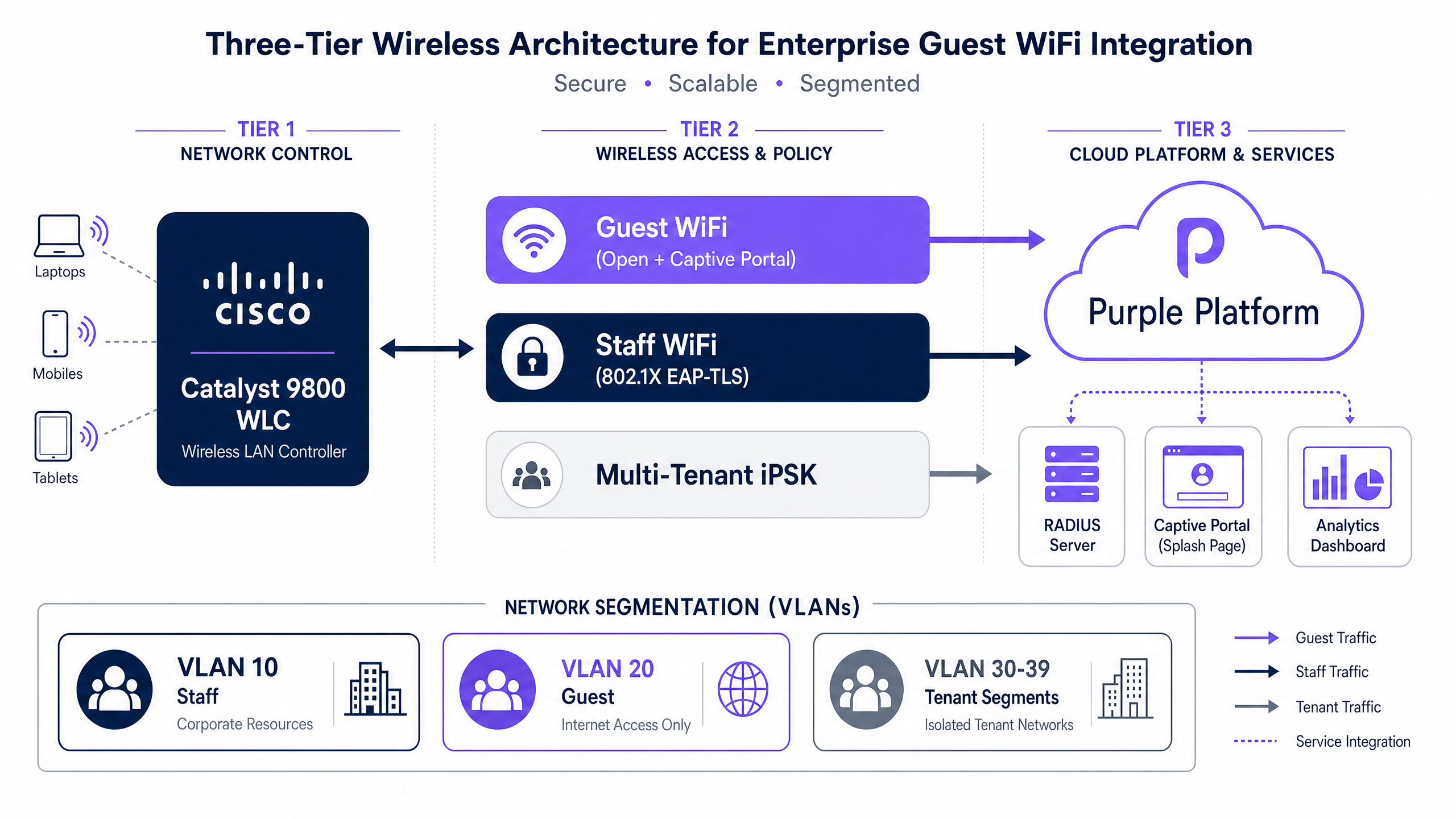
Cisco 硬件上的现代企业无线部署必须迎合具有不同安全和访问要求的不同用户画像。Cisco WLC 与 Purple 的集成使统一的硬件基础架构能够通过不同的认证机制服务于这些画像,且全部由单个 Catalyst 9800 控制器进行管理。
第 1 层:Guest WiFi - 中央 Web 认证 (CWA)
对于 酒店 和 零售 环境中的访客,其目标是实现低摩擦的接入以及合规的数据捕获。这是通过使用开放式 SSID 结合中央 Web 认证(CWA)来实现的。当访客连接时,Cisco WLC 会应用预认证访问控制列表(ACL)——即围墙花园(walled garden)。该 ACL 会阻止常规互联网流量,同时允许访问 Purple 的 captive portal 域名、DNS 和社交登录端点。
当访客尝试浏览网页时,WLC 会拦截 HTTP 请求并重定向到 Purple 的展示页面(splash page)。访客通过其选择的方法(社交登录、电子邮件注册或凭证码)进行认证。然后,Purple 作为 RADIUS 服务器,向 WLC 发送 RADIUS 授权变更(CoA)消息。CoA 指示 WLC 将客户端从预认证状态转移到隔离的访客 VLAN 上的后认证状态,从而授予互联网访问权限。每次登录都会记录在 Purple 的分析平台中,在符合 GDPR 和 CCPA 的前提下捕获第一方数据。
第 2 层:员工 WiFi - 802.1X EAP-TLS
公司设备需要最高级别的安全性。IEEE 802.1X 定义了基于端口的网络访问控制(PNAC),当与 EAP-TLS(可扩展身份验证协议 - 传输层安全)结合使用时,它提供了完全消除密码的基于证书的认证。数字证书通过移动设备管理(MDM)——Microsoft Intune、Jamf 或同等工具部署到公司设备。Cisco WLC 作为认证器,在请求方(设备)和 RADIUS 服务器之间传递 EAP 消息。RADIUS 服务器验证证书并返回带有可选 VLAN 分配属性的 Access-Accept。
由于认证依赖于证书而非密码,因此不存在可被窃取的凭据。如果设备丢失或员工离职,您只需撤销该证书。访问权限会立即终止,而不会中断任何其他用户。有关包括 WPA3 和零信任在内的企业安全标准的全面论述,请参阅我们的指南: 企业 WiFi 安全:2026 年完整指南 。
第 3 层:多租户 WiFi - Cisco iPSK 和动态 VLAN 分配
在学生宿舍、联合办公空间或零售商场等环境中,您需要为不同的租户提供私有的、隔离的网络,而无需广播几十个 SSID。Cisco 身份 PSK(iPSK)解决了这个问题。所有租户都连接到单个 SSID。WLC 为每个连接的设备向 RADIUS 服务器发送 MAC 认证请求。RADIUS 服务器将该租户的特定 PSK 作为 cisco-av-pair 属性返回,同时返回标准的 IETF RADIUS 属性,以动态地将客户端分配到正确的 VLAN。
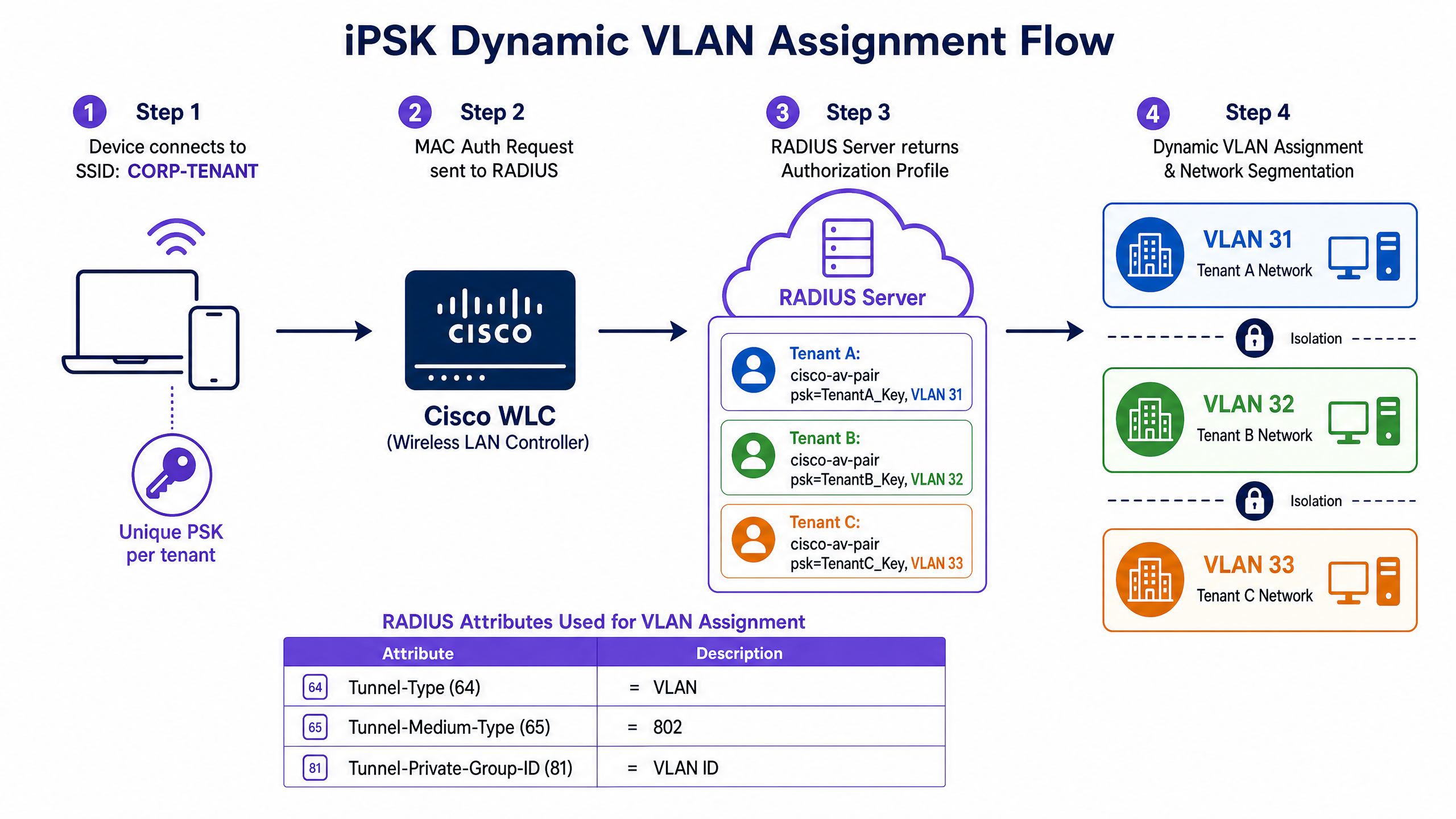
驱动动态 VLAN 分配的三个 IETF RADIUS 属性是:
| RADIUS 属性 | ID | 值 |
|---|---|---|
| Tunnel-Type | 64 | VLAN |
| Tunnel-Medium-Type | 65 | 802 |
| Tunnel-Private-Group-ID | 81 | 目标 VLAN ID(例如 31) |
Tunnel-Private-Group-ID 被编码为字符串,如 RFC 2868 中所定义。VLAN ID 必须存在于 WLC 上,分配才能成功。
实施指南:Cisco Catalyst 9800 WLC 配置
以下步骤详细介绍了运行 IOS-XE 的 Cisco Catalyst 9800 WLC 的配置,以便与 Purple 集成以进行 Guest WiFi 重定向。对于传统的 AireOS WLC 部署,Purple 支持门户中提供了等效的设置。
步骤 1:配置 RADIUS 认证和计费
您必须将 WLC 指向 Purple 的 RADIUS 服务器,以处理访客认证和会话计费。
- 导航至 Configuration > Security > AAA > Servers/Groups > RADIUS > Servers > + Add。
- 输入 Purple 主 RADIUS 服务器的 IP 地址,将 auth-port 设置为 1812,acct-port 设置为 1813,并输入来自 Purple 门户的共享密钥。
- 启用 Support for CoA - 这对于 Captive Portal 重定向是强制性的。
- 对 Purple 备用 RADIUS 服务器重复此操作。
- 导航至 RADIUS > Server Groups > + Add 并创建一个包含这两台服务器的组。
- 导航至 AAA Method List > Authorization > + Add,将 Type 设置为 network,并将其指向该 RADIUS 服务器组。
- 导航至 AAA Method List > Accounting > + Add,将 Type 设置为 identity,并将其指向同一个组。
IOS-XE 上等效的 CLI 命令为:
radius server Purple-Primary
 address ipv4  auth-port 1812 acct-port 1813
 key 0
!
radius server Purple-Secondary
 address ipv4  auth-port 1812 acct-port 1813
 key 0
!
aaa group server radius Purple-RADIUS-Group
 server name Purple-Primary
 server name Purple-Secondary
!
aaa authorization network Purple-Authz group Purple-RADIUS-Group
aaa accounting identity Purple-Acct start-stop group Purple-RADIUS-Group
步骤 2:定义预认证 ACL(围墙花园)
预认证 ACL 允许在用户认证之前访问 Purple 的展示页面和基本服务。这就是围墙花园。
- 导航至 Configuration > Security > ACL > + Add。
- 创建一个名为
Purple_Guest_Walled_Garden的 IPv4 扩展 ACL。 - 添加规则以**拒绝(deny)**流向 WLC 管理 IP 和 RADIUS 服务器 IP 的流量。
- 添加规则以**允许(permit)**流向您的 DNS 服务器的 DNS(UDP 端口 53)流量。
- 添加规则以**允许(permit)**流向 Purple 围墙花园 IP 范围和域名的流量(从 Purple 支持门户获取适用于您特定硬件类型的最新列表)。
- 添加最后一条 permit ip any any 规则 - WLC 将把允许的流量重定向到 CPU 以进行门户处理。
步骤 3:配置访客 WLAN
- 导航至 Configuration > Tags & Profiles > WLANs > + Add。
- 创建一个名为
Guest-WiFi且包含您所选 SSID 的 WLAN。 - 在 Security > Layer 2 下,将安全设置为 None (Open)。
- 在 Security > Layer 3 下,启用 Web Policy 并将 Web Auth 类型设置为 External。
- 在重定向字段中输入您的 Purple 访问 URL。
- 应用
Purple_Guest_Walled_GardenACL。 - 在 Security > AAA Servers 下,将 Purple RADIUS 服务器分配给认证(Authentication)和计费(Accounting)。
步骤 4:配置策略配置文件(Policy Profile)
- 导航至 Configuration > Tags & Profiles > Policy > + Add。
- 在 Access Policies 下,分配 VLAN 20(或您指定的访客 VLAN)。
- 在 Advanced 下,启用 Allow AAA Override 和 NAC State。
- 分配 Purple 计费方法列表。
等效 CLI:
wireless profile policy Guest-Policy
 aaa-override
 nac
 vlan 20
 accounting-list Purple-Acct
 no shutdown
!
wireless tag policy Guest-Policy-Tag
 wlan Guest-WiFi policy Guest-Policy
步骤 5:为多租户或物联网(IoT)部署配置 iPSK
对于 iPSK,WLAN 配置与访客设置不同。WLAN 使用启用了 MAC 过滤的 WPA2-PSK,并且策略配置文件(Policy Profile)激活了 AAA Override,以接受来自 RADIUS 服务器的每个客户端的 PSK 和 VLAN。
wlan Tenant-WiFi 2 Tenant-WiFi
 mac-filtering Purple-Authz
 security wpa psk set-key ascii 0 DefaultKey123
 no security wpa akm dot1x
 security wpa akm psk
 peer-blocking allow-private-group
 no shutdown
!
wireless profile policy Tenant-Policy
 aaa-override
 accounting-list Purple-Acct
 vlan 30
 no shutdown
RADIUS 服务器(在 Purple 或您的 RADIUS 平台中配置)为每个租户组返回以下属性:
cisco-av-pair = psk-mode=ascii
cisco-av-pair = psk=
Tunnel-Type = VLAN
Tunnel-Medium-Type = 802
Tunnel-Private-Group-ID =
最佳实践
遵循既定标准可确保您整个部署的稳定性、安全性和合规性。
强制执行严格的证书验证。 部署 802.1X 时,通过 MDM 配置客户端设备以显式信任您的 RADIUS 服务器的证书颁发机构,并指定预期的服务器名称。如果不强制执行此操作,客户端将容易受到流氓接入点攻击,攻击者会提供伪造的证书来捕获凭据。这是一项硬性要求,而非建议。
在网络层隔离访客流量。 访客 WiFi 必须终止在与所有企业资源隔离(通过防火墙)的专用 VLAN 上。PCI DSS 4.0 要求将持卡人数据环境与公共网络隔离。VLAN 20 上的访客必须无法路由到 VLAN 10 上的企业网络。
对 IoT 设备使用 iPSK,而不是 MAC 认证绕过(MAC Authentication Bypass)。 MAC 地址以明文形式广播,极易被伪造。iPSK 为无头(headless)设备提供加密安全保障。有关显示设备和 IoT 设备如何与无线协议交互的指南,请参阅 什么是无线显示:协议与最佳实践 2026 。
定义明确的使用条款。 您的 Captive Portal 必须在授予访问权限之前展示使用条款协议。这是 GDPR 对数据收集的要求,也是网络使用政策的法律必要性。对于内部员工网络,请参考 员工 WiFi 条款和条件:法律与合规要点 。
部署 RADIUS 冗余。 务必配置主 RADIUS 服务器和备用 RADIUS 服务器。Purple 为此提供了两个服务器 IP 地址。单个 RADIUS 服务器故障将导致所有访客无法登录。
故障排除与风险规避
即使配置再仔细,集成在出现问题时。在升级上报之前,系统地解决最常见的故障模式。
问题:访客已连接,但未显示展示页面。
这是最常见的问题。预认证 ACL 正在阻止 DNS。如果没有 DNS,客户端将无法解析初始 HTTP 请求,且操作系统不会触发 Captive Portal 微型浏览器。请验证在围墙花园 ACL 中是否允许 UDP 端口 53 访问您的 DNS 服务器。在 WLC 上,运行 show wireless client summary 以确认客户端处于 Webauth Pending 状态,而不是 Run 状态。
问题:iPSK 客户端连接失败或进入了错误的 VLAN。
Tunnel-Private-Group-ID 中指定的 VLAN 在 WLC 上不存在,或者 cisco-av-pair 属性格式错误。在 WLC 上运行 debug radius all 以检查原始 RADIUS 响应。验证是否已在 Configuration > Layer 2 > VLAN > VLAN List 下创建了该 VLAN ID。
问题:802.1X 员工客户端间歇性认证失败。
这通常是 RADIUS 服务器超时或客户端上的证书信任问题。检查 RADIUS 服务器日志中是否有 Access-Reject 消息。在 Windows 客户端上,验证 WiFi 配置文件是否已配置为验证服务器证书,并指定了正确的受信任 CA。
问题:来自 Purple 的 CoA 未被 WLC 处理。
CoA 共享密钥必须与 WLC 上配置的 RADIUS 共享密钥一致。在 IOS-XE 17.4 及更高版本中,CoA 密钥是与共享密钥分开配置的。验证两者是否与 Purple 门户中的值匹配。
投资回报率(ROI)与业务影响
从基础的 PSK 网络过渡到采用 Purple 的结构化、基于身份的架构,可在 酒店餐饮 、 零售 、 医疗保健 和 交通运输 等垂直行业带来可衡量的业务成果。
首先,该架构消除了管理共享密码的运营成本。当员工离职时,您只需撤销其证书,而无需更改全局密码并更新园区内的每台设备。其次,与 Purple 的 Captive Portal 集成将 IT 成本中心转变为收入驱动力。Purple 的平台在每次登录时捕获合规的第一方数据,从而实现自动化营销活动和访客分析。通过在 Purple 网络中收集的 290 亿个数据点(Purple 内部数据),该平台可对访客行为、停留时间和回访率提供具有指导意义的洞察。
对于通过开展调查来了解访客满意度的场所运营商,Purple 平台可直接与研究工作流集成。请参阅 调查设计:场所实用指南 以获取有关如何构建通过 Captive Portal 投放的有效场所调查的指导。
通过将 Cisco 的企业级硬件与 Purple 的云覆盖网络相结合,您可以获得一个安全、可扩展的网络,从而积极助力实现场所的商业目标。Purple 已通过 ISO 27001 认证、符合 GDPR 和 CCPA、通过 Cyber Essentials 认证以及 B Corp 认证——满足企业采购团队的合规性要求。
关键定义
RADIUS
Remote Authentication Dial-In User Service. A networking protocol that provides centralised Authentication, Authorization, and Accounting (AAA) management for network access. Defined in RFC 2865 and RFC 2866.
IT teams configure the Cisco WLC to forward client credentials to the RADIUS server, which checks them against a directory and returns an Access-Accept or Access-Reject response along with policy attributes.
Captive portal
A web page that a user of a public-access network must view and interact with before internet access is granted. Implemented via HTTP redirection by the network access device.
Used in Guest WiFi deployments to capture visitor data, present terms of use, or display branded content before allowing internet access. Purple provides the hosted captive portal infrastructure.
iPSK (Identity Pre-Shared Key)
A Cisco feature that allows unique Pre-Shared Keys to be assigned to different users or device groups on the same SSID, with the PSK delivered per-client by a RADIUS server.
Essential for IoT devices or multi-tenant environments where 802.1X is not feasible but network segmentation is required. Eliminates the need to broadcast multiple SSIDs.
IEEE 802.1X
An IEEE standard for port-based Network Access Control (PNAC). It provides an authentication mechanism that blocks all data traffic from a device until the RADIUS server has confirmed authorisation.
The foundation of enterprise Staff WiFi, ensuring only authorised corporate devices with valid credentials or certificates can access internal resources.
EAP-TLS
Extensible Authentication Protocol - Transport Layer Security. A certificate-based authentication method that requires digital certificates on both the RADIUS server and the client device, eliminating passwords entirely.
The most secure method for authenticating corporate devices. Certificates are deployed via MDM. Access is revoked by invalidating the certificate, not by changing a shared password.
Walled garden
A limited network environment that controls the user's access to web content before they have fully authenticated. Implemented as a pre-authentication ACL on the WLC.
Configured on the Cisco WLC to allow access to the Purple splash page, DNS, and social login providers before the guest is granted full internet access.
Dynamic VLAN assignment
The process of automatically placing a connected device on a specific Virtual LAN based on RADIUS authorization attributes returned at authentication time.
Ensures that staff, guests, and IoT devices are placed on isolated network segments automatically upon connection, without manual configuration per device.
Change of Authorization (CoA)
A RADIUS extension (RFC 5176) that allows the RADIUS server to dynamically modify the session authorization attributes of an already-connected client.
Required for captive portals. Once the guest authenticates on the Purple splash page, Purple sends a CoA message to the WLC to transition the client from the pre-authentication walled garden state to full internet access.
Central Web Authentication (CWA)
A Cisco authentication method where the RADIUS server (rather than the WLC) hosts or redirects to the web authentication portal, enabling cloud-hosted captive portal solutions.
Used to integrate the Cisco WLC with Purple's cloud-hosted captive portal, allowing Purple to manage the guest authentication experience and data capture.
应用实例
A large shopping centre needs to provide secure, private WiFi to 50 retail tenants using a single Cisco Catalyst 9800 WLC and a single broadcast SSID. Each tenant must be isolated from every other tenant's devices. How do they achieve this without broadcasting 50 separate SSIDs?
The IT team deploys Cisco iPSK. They configure a single SSID named 'Mall-Tenant-WiFi' with WPA2-PSK and MAC filtering enabled. In the RADIUS server, they create 50 endpoint identity groups, one per tenant. Each group is assigned a unique PSK via the cisco-av-pair psk= attribute and a unique VLAN ID via the IETF Tunnel-Private-Group-ID attribute. When a retail tenant's point-of-sale device connects using their specific password, the WLC sends a MAC authentication request to the RADIUS server. The server matches the MAC address to the tenant's group and returns the PSK and VLAN assignment. The WLC processes the attributes, validates the PSK, and places the device on the tenant's isolated VLAN. The peer-blocking allow-private-group setting ensures devices sharing the same PSK can communicate with each other, while devices on different PSKs are blocked from cross-tenant communication.
A 300-room Premier Inn property is migrating from local WLC guest accounts to Purple's cloud captive portal. After the configuration is applied, guests report they connect to the WiFi SSID, receive an IP address, but their devices show 'No Internet' and the splash page never appears. What is the diagnostic process?
Step 1: Verify the client state on the WLC using show wireless client detail <mac-address>. The client should be in 'Webauth Pending' state. If it shows 'Run', the pre-authentication ACL is not applied correctly. Step 2: Check the pre-authentication ACL. The most common cause of this symptom is that the ACL blocks DNS (UDP port 53). Without DNS, the client cannot resolve any domain, and the OS captive portal detection mechanism fails silently. Add an explicit permit rule for UDP port 53 to the venue's DNS server IPs. Step 3: Verify the Purple walled garden domains are permitted in the ACL. The client must be able to reach the Purple splash page URL before authentication. Step 4: Confirm the WLC virtual IP address has been changed from the default 1.1.1.1 to a non-routable address such as 192.0.2.1, as the default address can conflict with legitimate internet traffic.
练习题
Q1. You are deploying Staff WiFi across 40 retail branches using Cisco Catalyst 9800 WLCs. You want to use 802.1X, but the company does not yet have an MDM solution to distribute certificates to employee smartphones. What is the most secure viable approach, and what risk mitigation must you implement?
提示:Consider the balance between credential security and deployment feasibility when certificates are not yet an option. Focus on the specific risk that arises from the alternative method.
查看标准答案
Deploy PEAP-MSCHAPv2 as an interim measure. While not as secure as EAP-TLS, it provides encrypted password authentication within a TLS tunnel. The critical risk mitigation is enforcing server certificate validation on every client device. For Windows laptops, deploy a Group Policy Object that specifies the exact trusted Certificate Authority and the expected RADIUS server name in the WiFi profile. For iOS and Android devices, distribute a WiFi configuration profile via email or a lightweight MDM-free tool that enforces certificate validation. Without this, an attacker can deploy a rogue access point with a fraudulent certificate and capture credentials. Plan the migration to EAP-TLS as soon as MDM is available.
Q2. A stadium IT director needs to segment media broadcasters, ticketing terminals, and HVAC IoT sensors onto separate isolated networks. The IoT sensors do not support 802.1X. All three groups must use WiFi. How should the WLC be configured?
提示:Look for a solution that provides unique credentials and VLAN assignment per device group without requiring enterprise supplicants on headless devices.
查看标准答案
Implement Cisco iPSK with a single SSID for venue operations. Create three endpoint identity groups in the RADIUS server: Broadcasters, Ticketing, and HVAC. Assign each group a unique PSK via cisco-av-pair and a unique VLAN ID via Tunnel-Private-Group-ID. Configure the WLC WLAN with WPA2-PSK, MAC filtering enabled, and AAA Override active. Broadcasters receive PSK-A and VLAN 31, ticketing receives PSK-B and VLAN 32, and HVAC sensors receive PSK-C and VLAN 33. Set peer-blocking to allow-private-group so devices within the same group can communicate (e.g., ticketing terminals to their server), while cross-group communication is blocked. This avoids MAC Authentication Bypass, which would be trivially spoofed.
Q3. During a Guest WiFi deployment at a conference centre, clients connect to the SSID and receive an IP address, but the captive portal redirect never occurs. The walled garden ACL permits traffic to all Purple IP ranges. What is the most likely missing configuration element, and how do you verify it?
提示:Think about the protocols required before an HTTP request can be made by the client device.
查看标准答案
The most likely cause is that the pre-authentication ACL blocks DNS traffic (UDP port 53). Before a client device can make the HTTP request that the WLC intercepts to trigger the redirect, it must resolve the domain name via DNS. Modern OS captive portal detection mechanisms (Apple's captive.apple.com, Microsoft's www.msftconnecttest.com , Google's connectivitycheck.gstatic.com) all require DNS resolution. To verify: run 'show wireless client detail ' on the WLC and confirm the client is in 'Webauth Pending' state. Then review the ACL hit counters to see if DNS traffic is being denied. Fix by adding an explicit permit rule for UDP port 53 to the venue's DNS server IPs in the walled garden ACL.
继续阅读本系列
CommScope Ruckus 与 Purple WiFi 集成:安装与配置指南
本技术参考指南为 CommScope Ruckus 架构与 Purple WiFi 的集成提供了权威的配置指南。它详细介绍了 Guest WiFi Captive Portal、通过 802.1X 实现的 Secure Staff WiFi 以及使用 Ruckus Dynamic PSK 实现的多租户网络隔离的逐步部署过程。
Allied Telesis 接入点与 Purple WiFi 集成
本指南为 Allied Telesis TQ 系列接入点与 Purple WiFi 的集成提供了全面的配置手册。内容涵盖外部 Captive Portal 重定向、802.1X RADIUS 身份验证,以及使用专用预共享密钥 (PPSK) 进行动态 VLAN 引导,以实现安全的多租户部署。
Grandstream GWN Access Points Integration with Purple WiFi
本权威技术参考指南详细介绍了如何将 Grandstream GWN 接入点与 Purple 的访客 WiFi 和分析平台进行集成。它涵盖了 Grandstream Captive Portal 配置、RADIUS AAA 设置、围墙花园(walled garden)设置、带有动态 VLAN 引导的安全员工 802.1X 认证以及多租户 PPSK 细分——为大规模部署访客和员工 WiFi 的 MSP 及 IT 团队提供可操作的逐步指导。