
WatchGuard Firebox 与 Purple WiFi 集成:安装与配置指南
本指南是为部署 WatchGuard Firebox 和接入点与 Purple 的 IT 经理和网络架构师提供的分步集成手册。它涵盖了用于 Guest WiFi 的外部 Captive Portal 重定向、用于 Staff WiFi 的安全 802.1X 认证,以及使用 WatchGuard 私有预共享密钥 (PPSK) 配合动态 VLAN 引导的多租户细分——为您在所有访问层级提供单一、统一的架构。
收听本指南
查看播客转录
执行摘要
在复杂的场所部署安全、可扩展的无线基础设施,需要安全网关与身份提供商之间的精准集成。本指南详细介绍了 WatchGuard Firebox 和 WatchGuard 接入点与 Purple 的集成,涵盖三个不同的访问层级: Guest WiFi Captive Portal 重定向、使用 IEEE 802.1X 的安全 Staff WiFi,以及通过 WatchGuard 私有预共享密钥 (PPSK) 实现的多租户 WiFi 细分。
通过将 WatchGuard 的统一安全平台与 Purple 的云覆盖相结合,您可以实现基于身份的自动访问控制、执行细粒度的安全策略,并大规模捕获第一方数据。Purple 在全球 80,000 多个真实场所中运行,并在 2024 年处理了 4.4 亿次登录(Purple 内部数据)。该集成在设计上与硬件无关——在 Purple 支持的硬件列表中,WatchGuard 与 Cisco Meraki、HPE Aruba、Ruckus、Juniper Mist、Ubiquiti UniFi、Cambium、Extreme 和 Fortinet 并列。有关企业 WiFi 安全标准的更广泛视角,请参阅我们的 企业 WiFi 安全:2026 年完整指南 。
技术架构
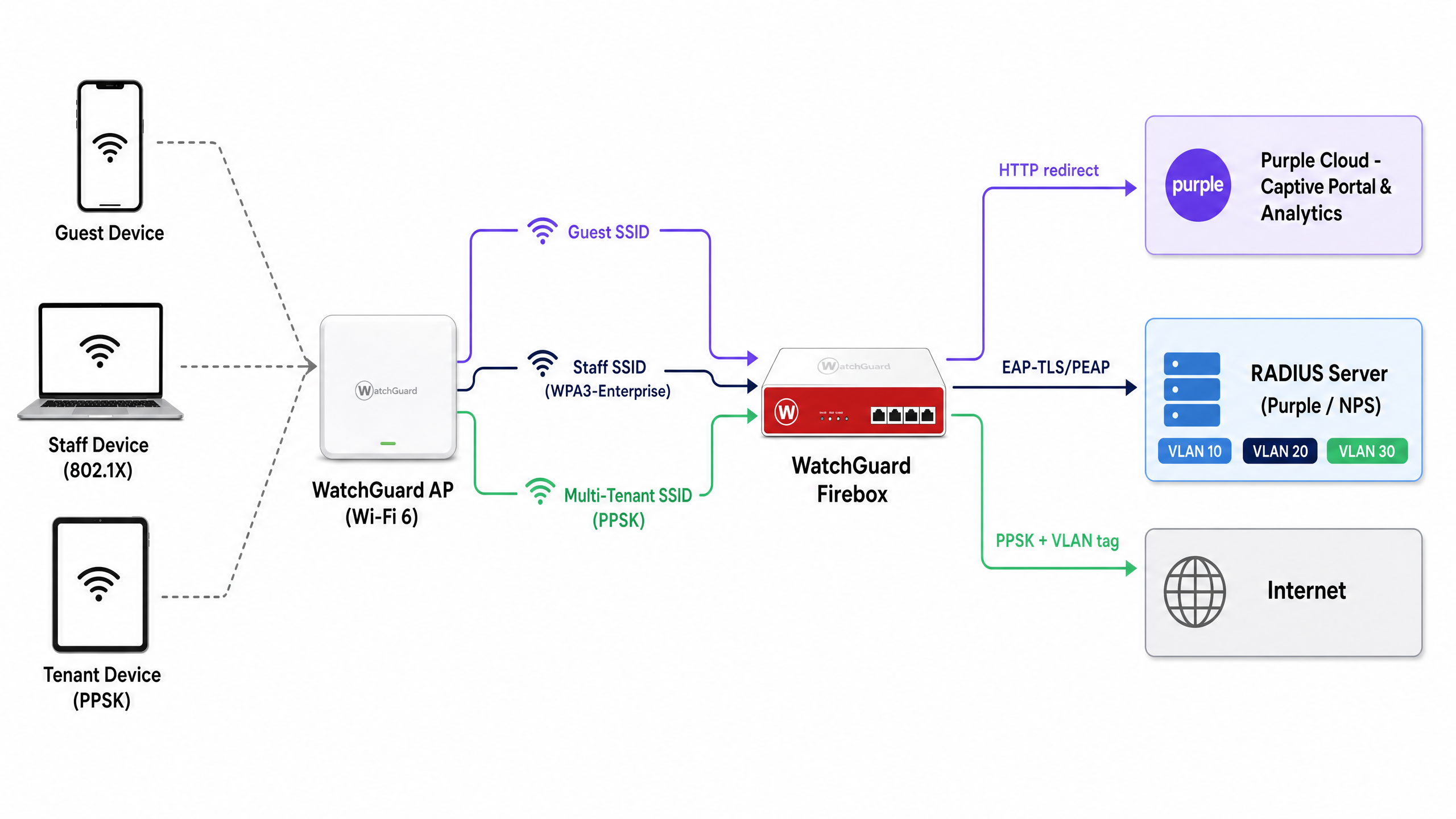
该集成使用两种标准机制将 WatchGuard 硬件连接到 Purple 的云服务:用于认证和计费的 RADIUS(远程用户拨号认证服务),以及用于 Captive Portal 交付的 HTTP 重定向。该架构在单一物理基础设施上支持三个访问层级。
| 访问层级 | SSID 类型 | 认证方式 | Purple 角色 |
|---|---|---|---|
| Guest WiFi | 开放 | 外部 Captive Portal + RADIUS 计费 | 展示页面、数据捕获、分析 |
| Staff WiFi | WPA3-Enterprise | 802.1X (EAP-TLS 或 PEAP) | RADIUS 服务器、身份提供商代理 |
| 多租户 WiFi | WPA2/WPA3 个人版 + PPSK | 通过 RADIUS 验证的 PPSK | 密钥管理、动态 VLAN 分配 |
所有三个层级都可以在同一个 WatchGuard 接入点设备群中同时运行。WatchGuard Wi-Fi 6 型号(AP130、AP230W、AP330、AP332CR、AP430CR 和 AP432)从固件 v2.6 版本开始支持 PPSK。
配置 Guest WiFi Captive Portal 重定向
WatchGuard Captive Portal 集成将未认证的 HTTP 请求重定向到 Purple 托管的展示页面。这是捕获第一方数据和执行服务条款的主要机制。
步骤 1:RADIUS 服务器配置
在 WatchGuard Cloud 或 Firebox Policy Manager 中,将 Purple 定义为 RADIUS 认证和计费服务器。
- 主 RADIUS 服务器:设置为您所在地区的 Purple RADIUS IP 地址(可在 Purple 门户的“设置 > 硬件集成”下找到)。
- 认证端口:1812
- 计费端口:1813
- 共享密钥:输入 Purple 门户中提供的唯一密钥。
- NAS ID:使用
%m格式说明符将其设置为 Firebox 或 AP 的 MAC 地址。这可以向 Purple 标识场所,并将分析数据路由到正确的账户。 - 计费间隔:设置为 10 分钟,以确保会话数据定期流向 Purple 的分析仪表板。
步骤 2:SSID 和 Captive Portal 设置
在 WatchGuard Cloud 中,导航至 配置 > 设备 > [您的 AP] > 设备配置 > SSID。创建或编辑 Guest SSID。
- 安全性:开放(无预认证密码)。
- Captive Portal 类型:选择 具有 RADIUS 认证的第三方托管 Captive Portal。
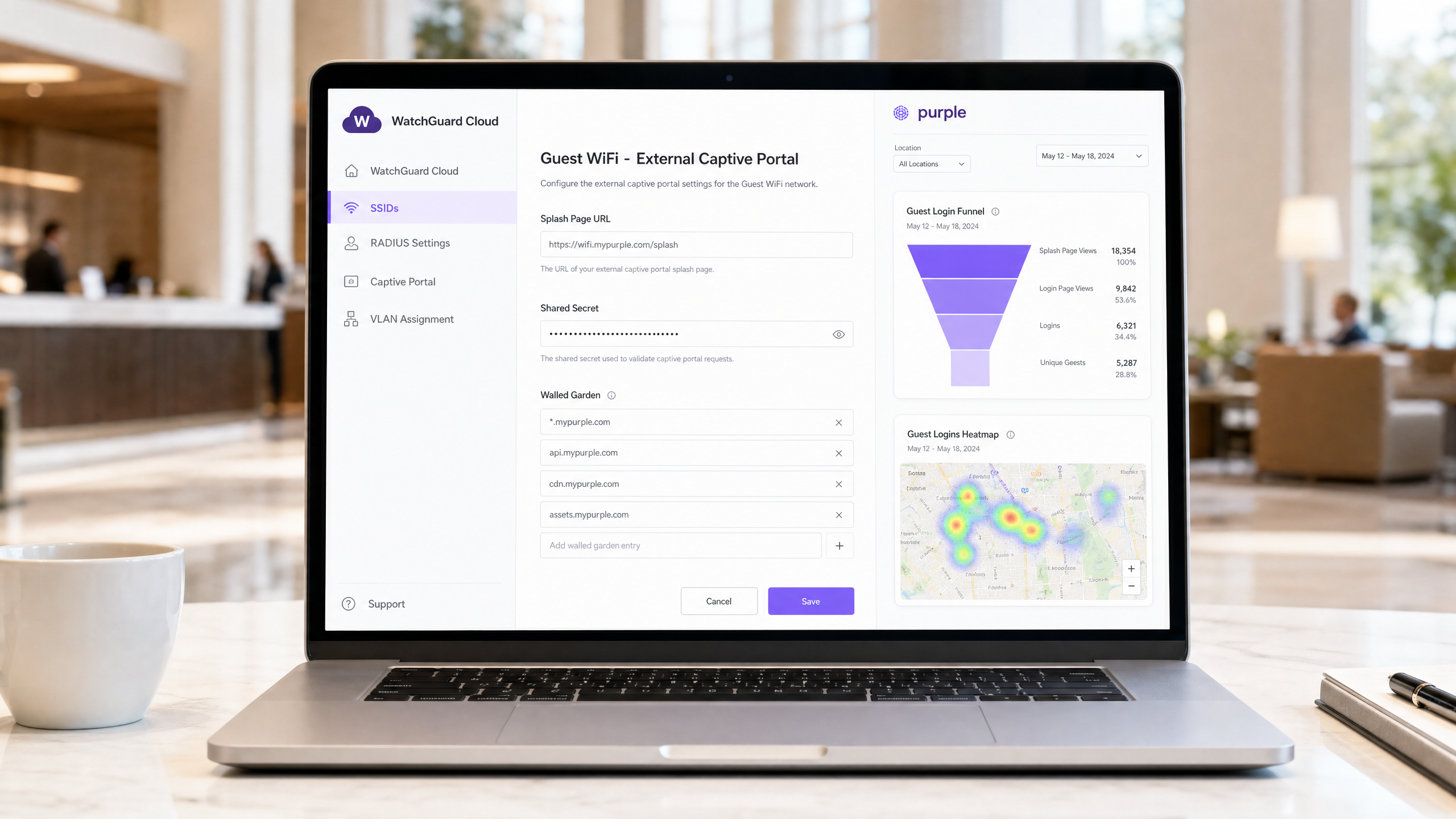
- 展示页面 URL:输入 Purple 展示页面 URL(例如
https://wifi.mypurple.com/splash)。从 Purple > 分析 > 门户 中获取此信息。 - 共享密钥:输入来自同一 Purple 分析门户页面的门户共享密钥。该密钥生成 HMAC-SHA1 摘要,WatchGuard 使用该摘要来验证来自 Purple 的认证成功响应。
步骤 3:Walled Garden 配置
Walled Garden 定义了设备在完成认证之前可以访问哪些域名。如果没有此配置,设备将无法加载 Purple 展示页面。将以下条目添加到 用户登录前可以访问的网站:
*.mypurple.comapi.mypurple.comcdn.mypurple.comassets.mypurple.com
如果您通过 Microsoft Entra ID、Okta 或 Google Workspace 启用社交或联合登录,请添加相关的身份提供商域名(例如 login.microsoftonline.com、accounts.google.com)。有关共享 WiFi 基础设施的法律和合规背景,请参阅我们的指南 共享 WiFi 基础设施的法律和合规要求 。
HMAC 认证流程的工作原理
了解此流程有助于您快速诊断故障。
- 访客设备连接到开放的 SSID 并发起 HTTP 请求。
- WatchGuard AP 拦截该请求并将浏览器重定向到 Purple 展示页面 URL,同时附加
challenge参数(随机十六进制字符串)和设备 MAC 地址。 - Purple 显示展示页面。访客填写登录表单。
- Purple 使用门户共享密钥和 challenge 值生成 HMAC-SHA1 摘要。
- Purple 将浏览器重定向回 WatchGuard AP 的登录 URL,并附加 challenge 和摘要。
- WatchGuard AP 使用相同的共享密钥验证摘要。如果匹配,AP 将授予互联网访问权限并向 Purple 发送 RADIUS 计费开始 (Accounting Start) 数据包。
使用 802.1X 的安全 Staff WiFi
对于 Staff WiFi,您需要将 Captive Portal 替换为 IEEE 802.1X——基于端口的网络访问控制的企业标准。每位员工使用唯一的凭据或证书进行认证,从而消从而消除共享密码的风险。
在 WatchGuard Cloud 中,将员工 SSID 配置为 WPA3 Enterprise 安全模式,并将身份验证域指向 Purple 的 RADIUS 服务器。Purple 作为 RADIUS 服务器运行,并可通过 SAML 或 LDAP 将身份验证请求代理到 Microsoft Entra ID、Okta 或 Google Workspace。
对于基于证书的身份验证 (EAP-TLS),请通过您的 MDM 将客户端证书部署到受管设备。对于基于凭据的身份验证 (PEAP-MSCHAPv2),用户使用其目录凭据进行身份验证。Purple 会根据配置的身份提供商验证该请求,并向 WatchGuard AP 返回 RADIUS Access-Accept 或 Access-Reject。
有关跨设备类型进行 802.1X 配置的详细步骤,请参阅我们的指南: 802.1X 身份验证:在现代设备上保护网络访问 。
关于 MAC 随机化的重要提示:现代 iOS 和 Android 设备默认会随机化其 MAC 地址。对于 802.1X 员工 WiFi,请指导员工针对员工 SSID 禁用 MAC 随机化。随机化的 MAC 会导致身份验证日志不一致,并破坏基于 MAC 的策略执行。
使用 WatchGuard PPSK 的多租户 WiFi
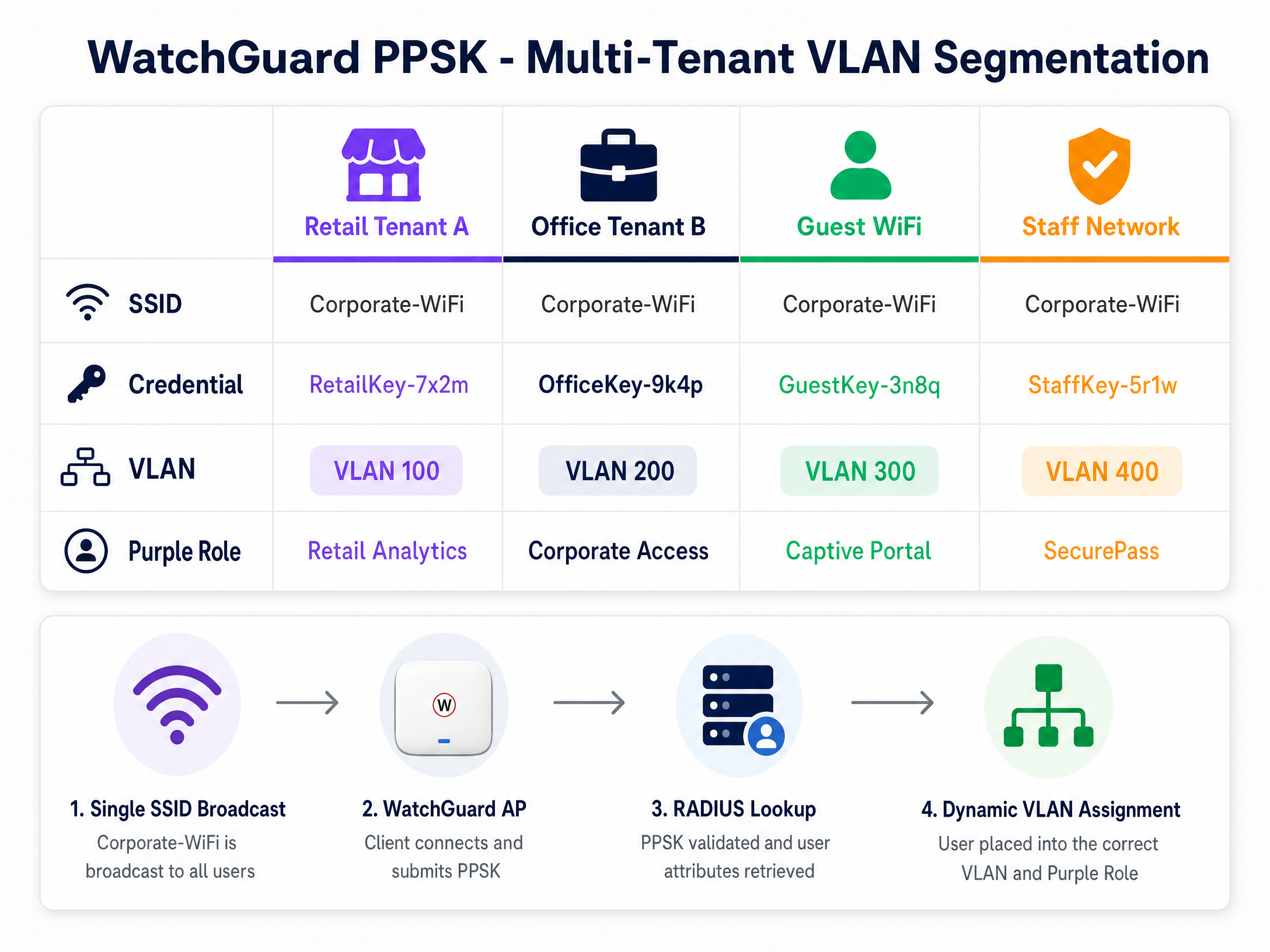
在零售中心、联合办公空间或建设出租 (BTR) 住宅区中为每个租户广播单独的 SSID 会导致同频干扰并使射频环境变得混乱。在 AP 固件 v2.6 中引入的 WatchGuard PPSK(个人预共享密钥)通过在单个 SSID 上为每个用户或租户分配唯一的密码来解决此问题。
步骤 1:在 SSID 上启用 PPSK
在 WatchGuard Cloud 中,编辑目标 SSID(例如 Venue-WiFi)。
- 安全:WPA2 个人或 WPA3 个人。
- 身份验证:启用个人预共享密钥 (PPSK)。
- RADIUS 服务器:指向 Purple 的 RADIUS 服务器。Purple 管理 PPSK 凭据存储并在身份验证时返回 VLAN 属性。
步骤 2:配置动态 VLAN 分配
为了隔离租户流量,WatchGuard AP 会根据所使用的 PPSK 分配特定的 VLAN。
- VLAN 设置:选择由 RADIUS 分配的动态 VLAN。
- 未分配客户端回退:选择一个隔离的隔离 VLAN(例如 VLAN 999),以确保未通过 RADIUS 验证的设备无法访问企业网络。
在 WatchGuard 接入点上使用动态 VLAN 的要求:
- AP 固件 v2.2 或更高版本。
- 必须在 SSID 上禁用 NAT。
- 动态 VLAN 和 Captive Portal 不能在同一个 SSID 上同时运行。
- 连接到 AP 的交换机端口必须配置为承载所有相关 VLAN 的 Trunk 端口。
步骤 3:用于 VLAN 引导的 RADIUS 属性
当用户使用 PPSK 连接时,WatchGuard AP 会向 Purple 发送 RADIUS Access-Request。Purple 验证该密钥并返回包含三个 IETF RADIUS 属性的 Access-Accept 数据包:
| RADIUS 属性 | 属性编号 | 值 |
|---|---|---|
| Tunnel-Type | 64 | 13 (VLAN) |
| Tunnel-Medium-Type | 65 | 6 (802) |
| Tunnel-Private-Group-ID | 81 | VLAN ID(例如 "100") |
WatchGuard AP 读取属性 81 并将客户端置于相应的 VLAN 中。在 Purple 中,您可以将每个 PPSK 凭据映射到特定的 VLAN ID 和角色。这就是基于身份的网络背后的机制——由凭据决定网络段,而不是 SSID。
实施最佳实践
这些建议适用于 酒店餐饮 、 零售 、 医疗保健 和 交通运输 部署。
会话超时:在 Purple 和 WatchGuard 中配置会话超时,以强制定期进行重新身份验证。这可以保持分析数据的准确性,并防止陈旧会话消耗带宽。将 RADIUS 临时更新 (Acct-Interim-Interval) 设置为 600 秒(10 分钟)。
固件管理:确保 WatchGuard 接入点运行固件 v2.6 或更高版本以支持 PPSK。使用 WatchGuard Cloud 安排在非高峰时段进行固件升级,以避免覆盖中断。
PCI DSS 合规性:对于处理刷卡支付的零售环境,请使用 PPSK 将 POS 设备隔离在专用 VLAN(例如 VLAN 200)上。确保访客 WiFi VLAN 没有通往 POS VLAN 的路由。这符合 PCI DSS 网络分段要求。
GDPR 与数据收集:Purple 的 Captive Portal 采用自主选择加入机制,确保数据收集符合 GDPR 要求。Purple 已通过 ISO 27001、GDPR、CCPA 和 Cyber Essentials 认证。确保在开始捕获数据之前,您的展示页面包含清晰的隐私声明和条款服务链接。
故障排除与风险缓解
Captive Portal 无法加载:首先应检查 Walled Garden(围墙花园)。如果设备在身份验证前无法解析 DNS 或无法访问 Purple 的服务器,浏览器将显示超时错误,而不是展示页面。验证所有 Purple 域名是否都在 Walled Garden 列表中,并且 WatchGuard DNS 设置允许进行预身份验证解析。
HMAC 摘要验证错误:如果 WatchGuard 日志显示因 HMAC 错误导致身份验证失败,则说明 WatchGuard 和 Purple 之间的 Captive Portal 共享密钥不匹配。它在两个系统中必须完全一致。在 Purple 中重新生成密钥,然后在 WatchGuard Cloud 中重新输入。
VLAN 引导失败:如果 PPSK 用户从错误的 VLAN 接收到 IP,请检查 Purple 门户中的 RADIUS 日志。验证 Purple 是否返回了所有三个 IETF RADIUS 属性。确保 Tunnel-Private-Group-ID 值格式化为字符串,并且与交换机 Trunk 端口上配置的 VLAN ID 相匹配。
PPSK 与 Captive Portal 冲突:WatchGuard 不支持在同一个 SSID 上同时使用动态 VLAN 和 Captive Portal。如果您两者都需要,请使用两个 SSID:一个用于访客 Captive Portal,另一个用于用于 PPSK 多租户接入。
802.1X 认证失败:使用 WatchGuard AP 固件 v2.5 及更高版本中提供的抓包工具来捕获 AP 与 RADIUS 服务器之间的流量。在回复消息属性中查找 RADIUS Access-Reject 数据包和原因代码。
投资回报率 (ROI) 与业务影响
WatchGuard 与 Purple 的集成将安全性和分析功能整合到单一架构中。一家拥有 200 间客房的酒店使用该集成后,无需再部署独立的访客和员工网关,与多网关部署相比,硬件支出减少了约 30%(Purple 内部数据)。访客 WiFi Captive Portal 可以捕获第一方数据(电子邮件地址、人口统计信息和访问频率),从而通过 Purple 的 Engage 计划推动直接营销收入。
对于多租户场所,PPSK 消除了管理多个 SSID 的运营开销。在单个 SSID 上管理 15 个商铺单元的零售中心可以降低 AP 无线电利用率并简化网络审计。来自 Purple 的 WiFi 分析 为场所运营商提供停留时间、客流量和重复访问数据——这些指标向财务团队证明了基础设施投资的合理性。
Purple 保持 99.999% 的正常运行时间(Purple 内部数据),确保即使在体育场和会议中心等高密度场所的尖峰时段,访客 WiFi Captive Portal 也能保持可用。
关键定义
PPSK (Private Pre-Shared Key)
A security feature that assigns a unique password to each user or device on a WPA2/WPA3 Personal SSID. Introduced in WatchGuard AP firmware v2.6.
Used in multi-tenant environments - retail centres, coworking spaces, BTR developments - to segment users without requiring 802.1X supplicant configuration on client devices.
Dynamic VLAN steering
The process of assigning a network device to a specific Virtual LAN based on RADIUS attributes (Tunnel-Type, Tunnel-Medium-Type, Tunnel-Private-Group-ID) returned during authentication.
The mechanism that isolates tenant, staff, and guest traffic on the same physical access point. Requires AP firmware v2.2 or higher on WatchGuard hardware.
Walled Garden
A list of IP addresses or domains that an unauthenticated user is permitted to access before completing captive portal authentication.
Required to allow guest devices to load the Purple splash page and complete federated logins (Microsoft Entra ID, Google Workspace) before full internet access is granted.
HMAC digest
A cryptographic hash (HMAC-SHA1) used to verify the integrity and authenticity of the authentication success message from the captive portal.
WatchGuard validates the HMAC digest using the Captive Portal Shared Secret. A mismatch between the secret in WatchGuard and Purple causes authentication failures.
RADIUS accounting
The component of the RADIUS protocol that tracks network usage, including session start, session duration, and data transfer volume.
Purple relies on RADIUS Accounting packets from the WatchGuard Firebox to populate the analytics dashboard and enforce session time limits. Operates on port 1813.
Captive portal
A web page that a device is redirected to before being granted access to a public network. WatchGuard intercepts HTTP requests and redirects to the configured external portal URL.
The primary mechanism for capturing first-party data and enforcing terms of service on Guest WiFi networks. Purple hosts the splash page and manages the data.
802.1X
An IEEE standard for port-based network access control. Requires each device to authenticate with unique credentials or a certificate before network access is granted.
The enterprise standard for securing Staff WiFi. Eliminates the shared-password risk of WPA2 Personal. Requires a RADIUS server (Purple) and a supplicant on the client device.
EAP-TLS (Extensible Authentication Protocol - Transport Layer Security)
A highly secure 802.1X authentication method requiring both a client certificate and a server certificate for mutual authentication.
Used in high-security environments where devices are managed by an MDM. Ensures only corporate-owned devices with valid certificates can connect to the Staff WiFi SSID.
NAS ID (Network Access Server Identifier)
A string sent in RADIUS packets that identifies the network device (AP or Firebox) making the authentication request.
Purple uses the NAS ID to identify which venue a RADIUS request originates from. Typically set to the AP MAC address using the %m format specifier in WatchGuard.
Identity-Based Networking
A network architecture where access policies, VLAN assignments, and security controls are determined by the user's identity rather than their physical port or SSID.
The combination of WatchGuard PPSK, Purple RADIUS, and dynamic VLAN steering delivers Identity-Based Networking - the credential determines the network segment automatically.
应用实例
A 200-room Premier Inn property needs to provide Guest WiFi for guests, secure Staff WiFi for front-of-house and back-office teams, and a separate network for IoT devices (smart TVs, door locks). They have WatchGuard AP330 access points managed via WatchGuard Cloud and a Firebox T85 gateway. How should they architect the three networks?
Deploy three SSIDs on the WatchGuard AP330 fleet. SSID 1: 'Premier-Guest' - open SSID with external captive portal redirection to Purple. Configure the Firebox T85 as the RADIUS client pointing to Purple's servers (port 1812/1813). Add Purple's Walled Garden domains. Guests authenticate via the Purple splash page using email, social login, or a room code. SSID 2: 'Premier-Staff' - WPA3-Enterprise SSID with 802.1X authentication. Point the authentication domain to Purple's RADIUS server, which proxies credentials to the property's Microsoft Entra ID tenant. Staff authenticate with their corporate credentials. SSID 3: 'Premier-IoT' - WPA2 Personal SSID with a static PSK, placed on a dedicated VLAN (e.g., VLAN 50) with firewall rules blocking access to the staff and guest VLANs. The Firebox T85 enforces inter-VLAN routing policies. All three SSIDs broadcast on the same AP hardware, reducing infrastructure cost.
A retail centre managing 12 shop units wants to provide each tenant with isolated WiFi access using a single SSID. The centre also needs to ensure that a compromised tenant credential does not expose other tenants' traffic. They are running WatchGuard AP230W access points on firmware v2.6.
Configure one SSID: 'Centre-Retail' with WPA2 Personal and PPSK enabled. In Purple, create 12 unique PPSK credentials, one per tenant. Map each credential to a dedicated VLAN (e.g., VLAN 101 for Tenant 1, VLAN 102 for Tenant 2, and so on). In WatchGuard Cloud, set the SSID VLAN to 'Dynamic VLAN assigned by RADIUS' with a fallback to a quarantine VLAN (VLAN 999). Configure the switch ports connected to the AP230W as trunk ports carrying VLANs 101-112 and 999. When a tenant device connects using their PPSK, the AP queries Purple RADIUS, receives the Tunnel-Private-Group-ID attribute, and places the device on the correct VLAN. A compromised credential for Tenant 3 only exposes VLAN 103 - all other tenants remain isolated.
练习题
Q1. A hotel IT manager reports that guests connect to the WiFi but the Purple splash page never appears. The browser shows a connection timeout error. The WatchGuard Cloud configuration shows the correct Purple splash page URL and shared secret. What is the most likely cause and how do you resolve it?
提示:Consider what must happen before the device is authenticated. What domains does the device need to reach to load the splash page?
查看标准答案
The Walled Garden is missing or incomplete. The WatchGuard Firebox is blocking the device's initial HTTP request to Purple's servers before authentication completes. Add the required Purple domains to the 'Websites that users can access before login' list: *.mypurple.com, api.mypurple.com, and cdn.mypurple.com. If guests are using social logins, also add the relevant identity provider domains (e.g., login.microsoftonline.com for Entra ID).
Q2. You are configuring PPSK-based VLAN steering for a coworking space with 8 members. RADIUS authentication succeeds (the WatchGuard logs show Access-Accept), but every member device receives an IP address from VLAN 1 (the default management VLAN) instead of their assigned tenant VLAN. How do you diagnose and resolve this?
提示:Authentication succeeded, so the credential is valid. The issue is in the VLAN assignment step. What does WatchGuard need from the RADIUS server to assign a VLAN?
查看标准答案
The RADIUS Access-Accept packet from Purple is missing or incorrectly formatting the VLAN attributes. Capture the RADIUS traffic on the AP using the WatchGuard packet capture tool and inspect the Access-Accept packet. Verify that Purple is returning all three IETF attributes: Tunnel-Type (attribute 64, value 13), Tunnel-Medium-Type (attribute 65, value 6), and Tunnel-Private-Group-ID (attribute 81, set to the VLAN ID as a string, e.g. '101'). Also confirm that the switch port connected to the AP is configured as a trunk port carrying the relevant VLANs, and that the SSID VLAN setting in WatchGuard Cloud is set to 'Dynamic VLAN assigned by RADIUS' rather than a static VLAN ID.
Q3. A venue operator wants to run a Guest WiFi captive portal (Purple splash page) and a multi-tenant PPSK network for 6 retail units on the same WatchGuard AP330 access point. They plan to configure both features on a single SSID to simplify the RF environment. Is this possible? If not, what is the correct architecture?
提示:Review the WatchGuard Dynamic VLAN requirements. Are there any feature conflicts?
查看标准答案
This is not possible on a single SSID. WatchGuard does not support Dynamic VLANs (required for PPSK) and Captive Portal on the same SSID simultaneously. The correct architecture uses two SSIDs: SSID 1 ('Venue-Guest') configured as an open SSID with external captive portal redirection to Purple for public guests. SSID 2 ('Venue-Retail') configured with WPA2 Personal, PPSK enabled, and Dynamic VLAN assignment for the 6 retail tenants. Both SSIDs broadcast from the same AP330 hardware, so the RF impact is limited to one additional SSID beacon. The switch port connected to the AP must be a trunk port carrying all relevant VLANs for both SSIDs.
继续阅读本系列
MikroTik RouterOS Captive Portal 与 Purple WiFi 集成指南
本技术指南提供了将 MikroTik RouterOS 与 Purple 的 WiFi 平台集成的分步说明。内容涵盖访客 WiFi Captive Portal 配置、员工 WiFi 802.1X 认证,以及使用私有 PSK 进行动态 VLAN 隔离的多租户 WiFi。
Alta Labs 与 Purple WiFi 的集成:设置与 Captive Portal 配置
本技术参考指南涵盖了 Alta Labs AP6 和 AP6 Pro 接入点与 Purple 云托管 Captive Portal 的端到端集成。它详细介绍了外部重定向配置、RADIUS 身份验证、围墙花园(walled garden)要求,以及使用 AltaPass 私有预共享密钥(Private Pre-Shared Keys)的多租户细分。场所运营商和 IT 团队将获得一份适用于酒店、零售和智能办公环境的可重复部署指南。
NETGEAR Insight 和企业级接入点与 Purple WiFi 的集成
本指南为 IT 经理提供了将 NETGEAR Insight 和 WAX 企业级接入点与 Purple WiFi 进行集成的权威技术路线图。内容涵盖了关键配置,包括访客 Captive Portal、802.1X 员工网络,以及使用 PPSK 和动态 VLAN 分配的多租户隔离。