
Grandstream GWN 接入点与 Purple WiFi 集成
本权威技术参考指南详细介绍了如何将 Grandstream GWN 接入点与 Purple 的访客 WiFi 和分析平台进行集成。它涵盖了 Grandstream Captive Portal 配置、RADIUS AAA 设置、围墙花园(walled garden)设置、带有动态 VLAN 引导的安全员工 802.1X 认证以及多租户 PPSK 细分——为大规模部署访客和员工 WiFi 的 MSP 及 IT 团队提供可操作的逐步指导。
收听本指南
查看播客转录
执行摘要
在企业场所部署高性能无线网络需要平衡无缝的用户体验与强大的技术安全性。对于采用 Grandstream GWN 架构的组织(从酒店、零售到多租户物业),Grandstream Captive Portal 是用户互动和访问控制的主要网关。本指南提供了将 Grandstream GWN 接入点与 Purple 的 访客 WiFi 和 WiFi 分析 平台集成的逐步操作指南。
通过从基础的预共享密钥(Pre-Shared Keys)升级到基于 RADIUS 的认证和基于身份的网络(Identity-Based Networks),您可以为访客、员工和租户提供安全、细分的访问。本指南涵盖了关键的配置组件:RADIUS AAA 设置、HTTP 302 重定向、围墙花园(walled garden)例外、动态 VLAN 引导以及专用预共享密钥(PPSK)多租户隔离。Purple 在全球 80,000 多个活跃场所运行,并在 2024 年处理了 4.4 亿次登录(Purple 内部数据),这证明了该平台在大规模应用中的成熟度。
技术深挖
集成架构
Grandstream GWN 硬件与 Purple 之间的集成依赖于行业标准的 RADIUS 和 HTTP 重定向协议。当用户连接到访客 SSID 时,GWN 接入点会拦截其初始 HTTP 请求,并向 Purple 托管的 Captive Portal URL 发送 HTTP 302 重定向。在用户通过电子邮件、社交登录、短信或自定义表单进行身份验证后,Purple 会验证该会话,并通过 UDP 端口 1812 向接入点发送 RADIUS Access-Accept 数据包,从而授予网络访问权限。RADIUS 计费(Accounting)在 UDP 端口 1813 上运行,为 GDPR 和 PCI DSS 合规性提供完整的会话审计追踪。
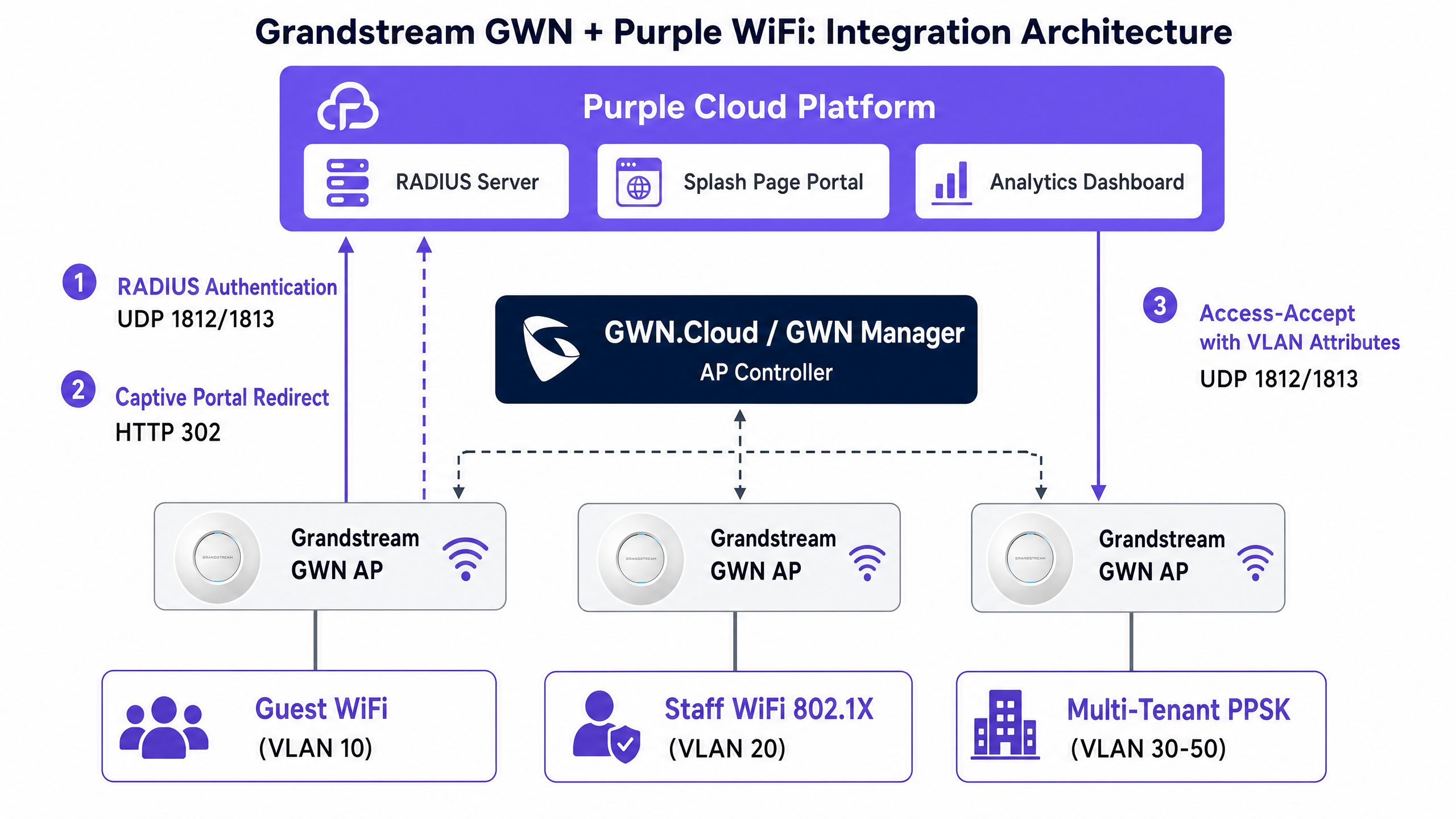
Grandstream GWN 接入点通过以下两个平台之一进行管理。GWN Manager 是一款安装在 Linux 或 Windows 服务器上的本地控制器,适用于单站点部署以及有数据主权要求的组织。GDMS Networking(前身为 GWN.Cloud)是 Grandstream 的云托管管理平台,是需要通过单一窗口管理多个站点的 MSP 的首选。这两个平台提供完全相同的 Captive Portal 和 SSID 配置选项。
对于员工和租户网络,架构将转向 IEEE 802.1X 和 PPSK。在 802.1X 部署中,接入点充当认证器,在连接设备与 Purple 的 RADIUS 服务器之间代理可扩展身份验证协议(EAP)消息。Purple 会根据其目录验证凭据,并可以返回厂商特定属性(VSA)以将设备动态引导至特定 VLAN。这就是实践中的基于身份的网络:一个 SSID,多个网络细分,全部由用户身份驱动。
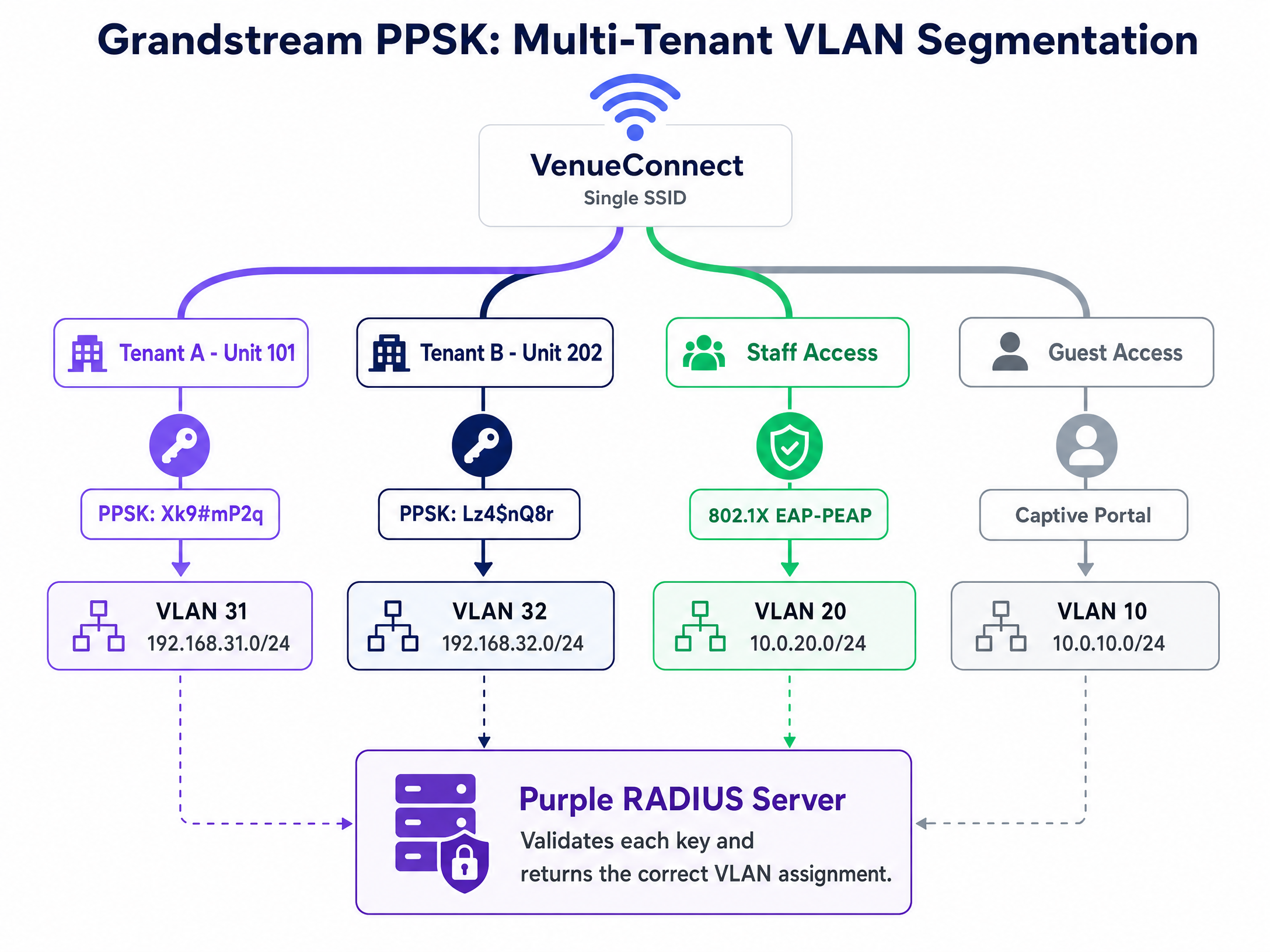
对于多租户环境,Grandstream 的 PPSK 功能允许单个 SSID 支持多个唯一的密码。与 RADIUS 后端集成时,接入点会将输入的 PSK 发送到 Purple 进行验证,从而实现集中式凭据管理和动态网络细分,而无需广播数十个 SSID。带有 RADIUS 后端的 PPSK 要求 GWN76xx 系列上的 GWN 固件版本为 1.0.19 或更高。
用于动态 VLAN 引导的 RADIUS 属性
动态 VLAN 分配由 Access-Accept 数据包中返回的三个标准 IETF RADIUS 属性控制。必须在 Purple 的 RADIUS 用户配置文件中为每个角色或租户配置这些属性:
| 属性 | 值 | 描述 |
|---|---|---|
| Tunnel-Type (64) | 13 (VLAN) | 将隧道类型指定为 VLAN |
| Tunnel-Medium-Type (65) | 6 (IEEE-802) | 将介质指定为 IEEE 802 |
| Tunnel-Private-Group-ID (81) | 例如 "20" | 目标 VLAN ID(字符串形式) |
Access-Accept 响应中必须同时存在这三个属性。如果缺少任何一个,GWN 接入点将忽略 VLAN 引导指令,并将设备置于默认 VLAN 中。
实施指南
步骤 1:配置 Captive Portal 策略
无论您使用的是 GWN Manager 还是 GDMS Networking,请导航至 Captive Portal > Policy List 并创建一个新策略。下表总结了 Purple 集成所需的设置:
| 字段 | 值 | 备注 |
|---|---|---|
| 策略名称 | Purple-Guest-Portal | 使用描述性名称 |
| 认证类型 | RADIUS Server | 启用 RADIUS 认证流程 |
| RADIUS 服务器地址 | [来自 Purple 管理控制台] | 主 RADIUS IP |
| RADIUS 服务器端口 | 1812 | 标准 RADIUS 认证端口 |
| RADIUS 服务器密钥 | [来自 Purple 管理控制台] | 准确复制并粘贴 |
| RADIUS 认证方法 | PAP | Purple Captive Portal 所需 |
| 落地页 | 重定向至外部页面 | 启用外部门户重定向 |
| 重定向 URL | [来自 Purple 管理控制台] | 您的唯一门户 URL |
| 过期时间 | 24 小时(酒店)/ 4 小时(零售) | 匹配您的会话策略 |
| 故障安全模式 | 已启用 | 如果 RADIUS 无法访问,则授予访问权限 |
启用故障安全模式。如果 GWN 接入点无法连接到 Purple 的 RADIUS 服务器,故障安全模式将授予互联网访问权限,而不是阻止所有访客。对于酒店和零售部署,短暂的 RADIUS 中断应不应导致所有访客失去连接。
步骤 2:配置围墙花园
围墙花园定义了设备在进行认证前可以访问哪些域名。围墙花园配置不完整是导致门户加载失败最常见的原因。在 GWN Manager 中,围墙花园是在 Captive Portal 策略下的**认证前规则 (Pre-Authentication Rules)**中进行配置的。
您至少必须包含:Purple portal 域名(portal.purple.ai)、CDN 资源域名(*.cloudfront.net)以及 Google 的连接性检查端点(connectivitycheck.gstatic.com)。对于社交媒体登录,请添加相关的社交平台域名。
针对 captive.apple.com 的处理是刻意设计的。排除它可以让设备在连接时自动触发 iOS Captive Network Assistant (CNA) 微型浏览器。如果您希望访客手动打开浏览器,则将其包含在内。对于大多数 酒店业 部署,排除它能提供更好的访客体验。
请使用 support.purple.ai 上的 Purple 动态围墙花园生成器。从硬件列表中选择 Grandstream,选择您的认证方式,该工具就会生成您所需的准确域名列表。请勿手动构建该列表。
步骤 3:将 Captive Portal 与访客 SSID 进行关联
导航至 SSID 设置并编辑您的访客网络。启用 Captive Portal 功能并选择您创建的策略。将 SSID 分配给您指定的访客 VLAN(通常约定为 VLAN 10)。启用**客户端隔离 (Client Isolation)**以防止访客设备之间相互通信——这是任何处理刷卡支付的场所的基本安全要求,也是 PCI DSS 的考量因素。
步骤 4:使用 802.1X 配置安全的员工 WiFi
为员工创建一个单独的 SSID。将安全模式设置为 WPA2-Enterprise 以启用 IEEE 802.1X。将 RADIUS 服务器配置为指向端口 1812 上的 Purple,并在端口 1813 上启用 RADIUS 计费。此计费数据可提供 GDPR 合规和安全事件响应所需的审计轨迹。
对于 EAP 方法,请根据您的设备管理能力进行选择。EAP-TLS 使用双向证书认证——这是最安全的选择,可完全消除凭据被盗的风险,但需要移动设备管理 (MDM) 平台(如 Microsoft Intune 或 Jamf)将证书推送到设备。PEAP 在加密的 TLS 隧道内使用用户名和密码,更易于在 BYOD 环境中部署,但需要对员工进行有关证书警告的培训。
在 SSID 设置中启用动态 VLAN (Dynamic VLAN)。Purple 的 RADIUS 服务器将返回三个隧道属性,以引导每个已认证的设备进入其指定的 VLAN。IT 员工进入 VLAN 20,管理层进入 VLAN 21,POS 终端进入 VLAN 40——所有这些都来自同一个 SSID,全部由身份驱动。
有关员工网络策略的更多指导,请参阅 员工 WiFi 条款和条件:法律与合规要点 。
步骤 5:配置多租户 PPSK
对于多租户环境,创建一个采用 WPA2-Personal 安全模式的 SSID 并启用 PPSK。要将 Purple 用作 PPSK 验证的 RADIUS 后端,请在 SSID 的 PPSK 部分中配置 RADIUS 服务器设置。Purple 负责管理 PSK 数据库、验证每个密钥并返回相应的 VLAN 分配。
每个租户都会收到一个唯一的密码。当他们连接时,AP 会将 PSK 发送给 Purple,Purple 则返回正确的 VLAN ID。租户 A 进入 VLAN 31,租户 B 进入 VLAN 32。他们共享同一个 SSID,但在网络层完全隔离。当租户搬离时,在 Purple 的管理控制台中撤销其凭据即可。访问权限将立即终止。无需重新配置 AP。
如需深入了解企业 WiFi 安全架构,请参阅 企业 WiFi 安全:2026 年完整指南 。
最佳实践
务必配置 RADIUS 计费。 为访客和员工 SSID 启用端口 1813 上的计费。计费数据会向 Purple 的分析仪表板提供会话时长和访问频率,并提供 GDPR 所要求的审计轨迹。如果没有计费,您只有认证记录,而没有会话记录。
复制并粘贴共享密钥。 RADIUS 共享密钥不匹配会导致接入点(AP)静默丢弃数据包。AP 会显示超时,而不是认证失败。这是新部署中最常见的错误配置。请直接从 Purple 管理控制台复制该密钥。
使用 Purple 的 围墙花园生成器。 现代门户页面会从多个 CDN 域名、社交登录 SDK 和分析脚本加载资源。手动构建围墙花园是不可靠的。support.purple.ai 上的生成器会根据您的认证方式考虑所有必需的域名。
在接入点隔离访客流量。 客户端隔离是任何访客 SSID 不可逾越的基线。它可以防止访客设备之间的横向移动,并且是对于在同一网络基础设施上处理刷卡支付的场所的 PCI DSS 要求。
在部署带 RADIUS 的 PPSK 之前验证固件。 带有 RADIUS 后端的 PPSK 需要 GWN 固件 1.0.19 或更高版本。运行过时的固件是 PPSK 部署中出现异常行为最常见的原因。请在部署前检查固件版本,而不是在部署后。
对于 零售业 部署,请确保您的访客 SSID VLAN 与任何支付网络网段之间设有防火墙。对于 医疗保健 环境,请确保患者或访客 WiFi 与临床系统隔离。对于 交通运输 枢纽,请考虑与平均停留时间相匹配的会话过期策略。
故障排除与风险规避
症状:展示页面(Splash Page)加载失败,返回“无法访问此网站”错误。 围墙花园阻止了 portal 页面资源。连接测试设备,打开浏览器开发者工具,检查网络(Network)标签页,并识别被阻止的请求。添加将失败的域名添加到 captive portal 策略中的预认证规则中。
症状:访客已认证,但接入点超时并拒绝互联网访问。 要么是防火墙阻止了从 AP 的管理 VLAN 到 Purple 的 RADIUS IP 范围的 UDP 1812 出站流量,要么是共享密钥不匹配。请先检查防火墙规则。然后验证双方的共享密钥是否完全一致。
症状:员工设备进入了默认 VLAN,而不是分配给他们的 VLAN。 SSID 设置中的“启用动态 VLAN”复选框未勾选。这是一个单独的复选框,很容易被忽略。第二个原因则是共享密钥不匹配,导致 AP 静默忽略了 RADIUS 响应。
症状:iOS 设备未显示 captive portal 微型浏览器。
captive.apple.com 域名位于围墙花园中。iOS 在连接时会探测该域名。如果收到 200 响应,它会认为互联网连接可用,从而不会触发 CNA。请将其从围墙花园中移除,以恢复自动 CNA 行为。
症状:PPSK 租户进入了错误的 VLAN。
请验证 GWN 固件版本是否为 1.0.19 或更高。确认已启用 PPSK RADIUS 后端且共享密钥匹配。检查 Purple 的 PSK RADIUS 用户配置文件是否返回了正确的 Tunnel-Private-Group-ID 属性。
ROI 与业务影响
将 Grandstream GWN 硬件与 Purple 集成,可将 WiFi 从沉没成本转化为可衡量的业务资产。通过用经过身份验证的 captive portals 取代通用的开放式网络,场所可以收集第一方数据并推动忠诚度计划的增长。Purple 已在其网络中收集了 290 亿个数据点(Purple 内部数据),为运营商提供了衡量自身业绩的基准。
在 酒店 环境中,Purple 的分析功能可以直观地展示访客的到访频率、停留时间和选择加入率。使用 Purple 的 Engage 计划的酒店运营商可以对回头客进行细分,以开展针对性的营销活动,从而推动直接预订并减少对 OTA 的依赖。在 零售 环境中,基于 WiFi 数据的客流量分析使门店经理能够将客流模式与销售业绩进行关联。
通过自动执行网络准入控制,802.1X 和 PPSK 的实施降低了 IT 服务台的开销。消除共享密码免去了密码轮换的运营成本,并降低了凭据共享的安全风险。对于多租户运营商而言,结合 Purple 集中式管理的 PPSK 意味着入驻新租户只需几分钟,而不是几小时。
Purple 拥有 99.999% 的在线率(Purple 内部数据),并获得了 ISO 27001、GDPR、CCPA 和 Cyber Essentials 认证,这意味着该平台能够满足最苛刻的企业和公共部门运营商的合规性要求。要全面了解访客 WiFi 分析功能,请参阅 WiFi 分析 。
关键定义
Captive portal
A web page that intercepts unauthenticated HTTP traffic from a connected device, forcing the user to interact or authenticate before granting internet access. The Grandstream captive portal uses HTTP 302 redirection to send users to an external portal URL.
The primary mechanism for guest data capture, terms of service acceptance, and access control in public venues.
RADIUS
Remote Authentication Dial-In User Service; a networking protocol operating over UDP that provides centralised Authentication, Authorization, and Accounting (AAA) management. Authentication runs on port 1812, accounting on port 1813.
The backend engine that validates credentials for both captive portals and 802.1X enterprise networks. Purple operates RADIUS servers that GWN access points communicate with directly.
Walled garden
A predefined list of IP addresses and domains that a device can access before completing the captive portal authentication process. Configured as Pre-Authentication Rules in GWN Manager.
Essential for allowing devices to load the portal page assets, CDN resources, social login endpoints, and OS captive portal detection probes.
IEEE 802.1X
An IEEE standard for port-based network access control that provides an authentication mechanism for devices connecting to a LAN or WLAN. Uses EAP to exchange credentials between the device (supplicant) and the RADIUS server (authentication server) via the access point (authenticator).
Replaces shared passwords with per-user credentials for secure staff and corporate WiFi access. Required for GDPR and PCI DSS compliant staff networks.
PPSK
Private Pre-Shared Key; a feature that allows a single SSID to support multiple unique passwords, each tied to specific network policies or VLANs. Grandstream GWN supports PPSK with local storage or RADIUS backend validation.
Used in multi-tenant environments like apartments, coworking spaces, and serviced offices to isolate users without broadcasting multiple SSIDs.
Dynamic VLAN assignment
The process where a RADIUS server returns three specific attributes in the Access-Accept packet (Tunnel-Type, Tunnel-Medium-Type, Tunnel-Private-Group-ID) to steer an authenticated device to a designated VLAN. Must be explicitly enabled in GWN SSID settings.
Allows IT teams to consolidate SSIDs while maintaining strict network segmentation for different user groups, departments, or tenants.
Client isolation
A wireless security feature that prevents devices connected to the same access point from communicating directly with each other at Layer 2.
A mandatory configuration for guest networks to protect users from peer-to-peer attacks and meet PCI DSS requirements for venues processing card payments.
EAP-PEAP
Protected Extensible Authentication Protocol; an 802.1X EAP method that encapsulates the authentication exchange within an encrypted TLS tunnel using a username and password. The outer TLS tunnel protects the inner credentials from interception.
Commonly used for BYOD staff networks where deploying client certificates (EAP-TLS) is not operationally feasible. Requires staff training on certificate validation to prevent rogue AP attacks.
Failsafe mode
A GWN captive portal setting that grants internet access to connecting devices if the access point cannot reach the configured RADIUS server. Prevents a RADIUS outage from blocking all guest access.
Recommended for hospitality and retail deployments where guest connectivity is business-critical and a brief RADIUS interruption should not result in a complete service outage.
GWN Manager
Grandstream's on-premise, enterprise-grade management platform for GWN series access points. Installed on a local Linux or Windows server, it provides full captive portal, SSID, RADIUS, and PPSK configuration.
Preferred for single-site deployments and organisations with data sovereignty requirements. GDMS Networking is the cloud-hosted equivalent for multi-site MSP deployments.
应用实例
A 120-room hotel needs to deploy a branded guest portal for guests, a secure staff network with department-level VLAN segmentation for housekeeping and front desk, and a separate management VLAN for the property management system. The hotel runs Grandstream GWN7660 access points managed through GDMS Networking.
Configure three SSIDs in GDMS Networking. First, create 'Guest WiFi' assigned to VLAN 10. Create a captive portal policy with Authentication Type set to RADIUS Server, pointing to Purple's RADIUS IP on port 1812 with the shared secret from the Purple admin console. Set the Landing Page to Redirect to External Page with the Purple portal URL. Enable Failsafe Mode and Client Isolation. Second, create 'Staff WiFi' with WPA2-Enterprise (802.1X) security. Configure RADIUS on port 1812 and Accounting on port 1813. Enable Dynamic VLAN. In Purple's directory, configure housekeeping accounts to return Tunnel-Private-Group-ID = 21 and front desk accounts to return VLAN 20. Third, create a hidden 'Management' SSID on VLAN 30 with WPA2-Personal for PMS terminals. Build the walled garden using Purple's generator tool, excluding captive.apple.com to trigger the iOS CNA.
A 40-unit build-to-rent apartment block requires isolated network access for each tenant, with the ability to instantly revoke access when a tenant moves out. The operator runs GWN7630 access points with GWN Manager on-premise and wants to minimise the number of visible SSIDs in the building.
Deploy a single SSID named 'BuildingConnect' with WPA2-Personal security and enable PPSK with RADIUS backend. Ensure GWN firmware is at version 1.0.19 or higher. Configure the RADIUS server settings in the PPSK section to point to Purple. In Purple's admin console, create 40 unique PSK credentials, each mapped to a VLAN (e.g., VLAN 101 for Unit 101, VLAN 102 for Unit 102). When a resident connects using their unit's password, the GWN AP sends the PSK to Purple, which validates it and returns Tunnel-Private-Group-ID = 101. The resident lands on their isolated VLAN. When a resident moves out, revoke the credential in Purple's admin console. Access terminates immediately without any AP reconfiguration.
练习题
Q1. You have configured the captive portal policy in GWN Manager with the correct Purple RADIUS IP and shared secret, but guests are reporting a 'site cannot be reached' error when their browser opens after connecting to the SSID. What is the most likely cause and how do you diagnose it?
提示:Consider what controls which domains a device can access before it has authenticated through the portal.
查看标准答案
The walled garden (Pre-Authentication Rules) is incomplete or misconfigured. The access point is blocking the device from reaching the Purple portal domain or the CDN assets the portal page loads. To diagnose: connect a test device to the guest SSID, open browser developer tools, navigate to the network tab, and attempt to load the portal URL. Identify which requests return connection errors. Add those domains to the Pre-Authentication Rules. Use Purple's walled garden generator at support.purple.ai to generate the complete domain list for Grandstream hardware.
Q2. Your hotel wants iOS guests to automatically see the captive portal mini-browser as soon as they connect to the guest WiFi, without needing to open a browser manually. How do you configure the walled garden to achieve this?
提示:Consider how iOS determines whether a network has internet access when it first connects.
查看标准答案
You must exclude captive.apple.com from the walled garden. When an iOS device connects to a network, it probes captive.apple.com. If the probe receives a 200 OK response (meaning the domain is accessible), iOS assumes the network has internet access and does not trigger the Captive Network Assistant mini-browser. If the probe is blocked or redirected, iOS recognises the network as captive and automatically opens the CNA. By keeping captive.apple.com out of the walled garden, the probe is intercepted and redirected, triggering the CNA automatically.
Q3. A staff member connects to the 802.1X SSID using their credentials. Purple's authentication logs show a successful Access-Accept response with the correct VLAN 20 attributes. However, the staff member is placed on VLAN 1 (the default). What GWN Manager setting needs to be checked?
提示:The RADIUS server is correctly authorising the user and returning the VLAN attributes. The issue is on the access point side.
查看标准答案
The 'Enable Dynamic VLAN' checkbox in the SSID settings within GWN Manager is not ticked. Even when Purple returns the correct Tunnel-Type, Tunnel-Medium-Type, and Tunnel-Private-Group-ID attributes in the Access-Accept packet, the GWN access point will ignore them unless Dynamic VLAN is explicitly enabled. Navigate to the SSID configuration, locate the Dynamic VLAN setting, enable it, and save. The staff member should then be placed on the correct VLAN on their next connection.
Q4. A build-to-rent operator wants to deploy PPSK with Purple as the RADIUS backend on their Grandstream GWN7630 access points running firmware 1.0.17. A tenant reports they can connect to the SSID but are placed on the wrong VLAN. What should you check first?
提示:There are two potential causes here: one is a firmware version issue, the other is a configuration issue.
查看标准答案
The first thing to check is the firmware version. PPSK with RADIUS backend requires GWN firmware 1.0.19 or higher on the GWN76xx series. Firmware 1.0.17 may not correctly support the RADIUS-backed PPSK VLAN assignment. Upgrade the firmware to 1.0.19 or higher before further troubleshooting. If the firmware is correct, verify that the PPSK RADIUS backend is enabled in the SSID settings, the shared secret matches Purple's configuration, and that Purple's RADIUS user profile for the specific PSK is returning the correct Tunnel-Private-Group-ID attribute.
继续阅读本系列
SonicWall TZ 和 SonicWave 与 Purple WiFi 的集成
本技术参考详细介绍了 SonicWall TZ 防火墙和 SonicWave AP 与 Purple WiFi 平台的集成。它提供了有关 Captive Portal 重定向、Walled Garden 豁免、802.1X 认证以及使用私有预共享密钥 (PPSK) 进行动态 VLAN 引导的操作配置步骤。
Cambium Networks cnPilot 和 cnMaestro 与 Purple WiFi 的集成
本权威指南详细介绍了 Cambium Networks cnPilot 接入点和 cnMaestro 云控制器与 Purple WiFi 智能平台的集成。内容涵盖架构、Captive Portal 配置、围墙花园要求、802.1X 员工 WiFi,以及在多租户环境下使用 Cambium ePSK 进行的动态 VLAN 划分。
MikroTik RouterOS Captive Portal 与 Purple WiFi 集成指南
本技术指南提供了将 MikroTik RouterOS 与 Purple 的 WiFi 平台集成的分步说明。内容涵盖访客 WiFi Captive Portal 配置、员工 WiFi 802.1X 认证,以及使用私有 PSK 进行动态 VLAN 隔离的多租户 WiFi。