跳至主要内容

MikroTik RouterOS Captive Portal 与 Purple WiFi 集成指南

本技术指南提供了将 MikroTik RouterOS 与 Purple 的 WiFi 平台集成的分步说明。内容涵盖访客 WiFi Captive Portal 配置、员工 WiFi 802.1X 认证,以及使用私有 PSK 进行动态 VLAN 隔离的多租户 WiFi。

📖 4 分钟阅读📝 872 🔧 2 应用实例3 练习题📚 8 关键定义

收听本指南

查看播客转录
MikroTik RouterOS Captive Portal and Purple WiFi Integration Guide - Podcast Script [INTRO - approximately 1 minute] Welcome. If you're managing WiFi infrastructure at a hotel, a retail chain, a stadium, or a conference centre, and you're running MikroTik RouterOS, this episode is for you. I'm going to walk you through exactly how to integrate MikroTik's Hotspot Gateway with Purple's guest WiFi platform - covering three distinct use cases: guest WiFi with a captive portal and walled garden, secure staff WiFi using 802.1X, and multi-tenant network segregation using MikroTik's Private Pre-Shared Key feature. This isn't a theoretical overview. By the end of this, you'll have the specific CLI commands, RADIUS attributes, and configuration logic you need to deploy or audit these setups yourself. Let's get into it. [TECHNICAL DEEP-DIVE - approximately 5 minutes] Part one: Guest WiFi and the MikroTik captive portal. MikroTik's Hotspot Gateway is the engine behind guest WiFi redirection on RouterOS. When a visitor connects to your guest SSID, the Hotspot Gateway intercepts their HTTP traffic and redirects them to a splash page - that's your captive portal. Purple hosts that splash page. Your MikroTik router acts as the Hotspot Gateway and RADIUS client. Purple's platform acts as the RADIUS server. Here's how you set it up. First, run the Hotspot Setup wizard from the IP menu in Winbox or via the CLI. You'll assign it to your guest-facing interface - typically a VLAN interface or a bridge port. Set your local address pool, configure your DNS servers, and give the hotspot a DNS name. That DNS name is what guests see in their browser before they authenticate. Once the wizard completes, you need to point the hotspot profile at Purple's RADIUS server. In the CLI, that looks like this: /radius add service=hotspot address=YOUR-PURPLE-RADIUS-IP secret=YOUR-SHARED-SECRET authentication-port=1812 accounting-port=1813 Then enable RADIUS on the hotspot profile: /ip hotspot profile set default use-radius=yes Purple will provide you with the RADIUS IP address, the shared secret, and the splash page URL when you set up your venue in the Purple dashboard. Now, the walled garden. This is critical. Before a guest authenticates, their device needs to be able to reach Purple's splash page and any OAuth providers you're using - Google, Facebook, and so on. Without walled garden entries, the redirect loop breaks and guests can't log in. In RouterOS, you add walled garden entries under IP, Hotspot, Walled Garden. You need to add Purple's splash page domain, any social login domains, and any CDN hosts that serve the login page assets. Purple's documentation lists the exact domains for your region. Add them as IP entries or hostname entries - hostname entries are more resilient when IP addresses change. The key RADIUS attributes Purple returns on a successful authentication include the session timeout, which controls how long a guest stays connected before being prompted again, and optionally a bandwidth rate limit using the Mikrotik-Rate-Limit vendor-specific attribute. This lets you enforce fair-use policies per guest session directly from the Purple dashboard without touching the router config. Part two: Secure Staff WiFi with 802.1X. This is where you move away from shared passwords entirely. IEEE 802.1X is the standard for port-based network access control. On a MikroTik wireless interface, you enable WPA2-Enterprise or WPA3-Enterprise authentication, which means the access point becomes an authenticator - it passes EAP credentials from the staff device to a RADIUS server, which validates them and returns an Access-Accept or Access-Reject. Purple's Staff WiFi product integrates with Microsoft Entra ID, Okta, and Google Workspace as identity providers. When a staff member's device connects, it presents a certificate or username and password via PEAP-MSCHAPv2. Purple's RADIUS server validates that credential against your identity provider in real time. On the MikroTik side, you configure the wireless security profile with authentication-types set to wpa2-eap, and you point the RADIUS client at Purple's server with service=wireless. In CAPsMAN - that's MikroTik's centralised access point management system - you set this at the security configuration level so it applies across all your managed access points consistently. The RADIUS server can return the Mikrotik-Wireless-VLANID attribute to place authenticated staff on a specific VLAN. This is how you enforce network segmentation - finance staff land on VLAN 10, operations on VLAN 20, and so on - all from a single SSID, all driven by identity. For automatic revocation - when a staff member leaves - Purple's integration with your identity provider means that when you disable the account in Entra ID or Okta, the next re-authentication attempt fails and the device is disconnected. No manual router config changes required. Part three: Multi-Tenant WiFi with Private Pre-Shared Keys. This is the most architecturally interesting of the three. Private PSK - sometimes called PPSK or iPSK - lets you run a single SSID where each tenant, resident, or device group connects with a unique passphrase, and each passphrase maps to a different VLAN. On MikroTik, this works through MAC-based RADIUS authentication on the wireless interface. When a device connects, the access point sends the device's MAC address to the RADIUS server as the username. The RADIUS server - either MikroTik's own User Manager in RouterOS 7, or FreeRADIUS - looks up that MAC address and returns two vendor-specific attributes: Mikrotik-Wireless-Psk, which is the per-device passphrase, and Mikrotik-Wireless-VLANID, which places the device on the correct VLAN. The wireless security profile needs radius-mac-authentication set to yes, and the RADIUS client needs service=wireless. In practice, for a build-to-rent property with 200 apartments, you'd pre-register each resident's device MAC addresses in Purple's platform when they move in. Purple maps each MAC to a unique PSK and a VLAN corresponding to that apartment's network segment. The resident connects using their apartment passphrase. Their devices land on an isolated VLAN. Their neighbour's devices are on a completely separate VLAN. Neither can see the other's traffic. For devices that don't support 802.1X - smart TVs, games consoles, IoT devices - this approach is the practical alternative. The device just needs to support WPA2-PSK, which everything does. [IMPLEMENTATION RECOMMENDATIONS AND PITFALLS - approximately 2 minutes] Let me give you the four things that most commonly go wrong in these deployments. First: walled garden gaps. If Purple's splash page fails to load, check your walled garden entries. The most common culprit is a missing CDN domain or a social login redirect that isn't whitelisted. Use the MikroTik torch tool or packet sniffer to watch what DNS queries are being blocked before authentication. Second: RADIUS timeout mismatches. MikroTik's default RADIUS timeout is 1,100 milliseconds. If Purple's RADIUS server is geographically distant or the network path has latency, you'll see intermittent authentication failures. Increase the timeout to 3,000 milliseconds and configure a backup RADIUS server for resilience. Third: VLAN filtering not enabled on the bridge. Dynamic VLAN assignment via RADIUS only works if bridge VLAN filtering is enabled. This is a RouterOS requirement. If you're seeing all clients land on the default VLAN regardless of what RADIUS returns, check that vlan-filtering=yes is set on your bridge interface. Fourth: CAPsMAN version mismatch. If you're running a mix of CAPsMAN version 2 and version 3 managed access points, VLAN tagging behaviour can differ. Standardise on RouterOS 7 with CAPsMAN version 3 across your AP estate before deploying dynamic VLAN features. One architectural recommendation: run your guest, staff, and management traffic on separate VLANs from day one, even if you're not using all three Purple use cases immediately. Retrofitting VLAN segmentation onto a flat network is significantly more disruptive than building it in from the start. [RAPID-FIRE Q AND A - approximately 1 minute] Can I use MikroTik's built-in User Manager instead of an external RADIUS server? Yes, for smaller deployments. User Manager in RouterOS 7 supports PEAP-MSCHAPv2 for wireless 802.1X and can return the Mikrotik-Wireless-VLANID attribute. For production deployments with Purple, you'll use Purple's hosted RADIUS infrastructure, which handles the identity provider integration and session management for you. Does Purple support MikroTik CAPsMAN? Yes. Purple is hardware-agnostic. The integration works at the RADIUS and hotspot redirect level, so it's compatible with standalone MikroTik access points and CAPsMAN-managed deployments equally. What RouterOS version do I need? RouterOS 7.x is recommended for all three use cases covered in this guide. Dynamic VLAN assignment via wireless RADIUS and the updated User Manager are RouterOS 7 features. RouterOS 6.x supports hotspot and basic RADIUS authentication but lacks some of the wireless VLAN capabilities. [SUMMARY AND NEXT STEPS - approximately 1 minute] To summarise: MikroTik RouterOS gives you three distinct integration points with Purple. The Hotspot Gateway handles guest WiFi redirection and captive portal authentication. The wireless 802.1X configuration with RADIUS handles secure staff WiFi with identity-based access. And MAC-based RADIUS authentication with Private PSK handles multi-tenant network segregation for residential and mixed-use properties. The common thread across all three is RADIUS. Get your RADIUS client configuration right - correct IP, correct shared secret, correct service type, correct timeout - and the rest follows. Your next steps: log into your Purple dashboard, navigate to the venue configuration, and grab your RADIUS credentials. Then follow the CLI commands in the written guide to configure your hotspot profile, your wireless security profile, and your walled garden entries. Test with a single access point before rolling out to your full estate. If you're deploying this at scale - multiple sites, hundreds of access points - Purple's Professional Services team can support the rollout. Purple runs across 80,000 live venues globally, with 99.999% uptime, and is certified to ISO 27001, GDPR, and Cyber Essentials. Thanks for listening. The full written guide with all CLI commands, RADIUS attribute tables, and worked examples is linked in the show notes.

header_image.png

执行摘要

将 MikroTik RouterOS 与 Purple 集成,可在访客、员工和多租户环境中构建统一的、身份驱动的网络。本指南提供了在 MikroTik 硬件上部署 Purple 云覆盖所需的特定配置逻辑。您将学习如何配置 RouterOS Hotspot 网关以进行 Guest WiFi 重定向、实施 IEEE 802.1X 以实现安全的 Staff WiFi,以及部署私有预共享密钥 (PPSK) 以隔离 Multi-Tenant WiFi 流量。

通过遵循这些部署模式,您可以在安全隔离网络的同时,为 WiFi Analytics 捕获第一方数据。Purple 在 2024 年处理了 4.4 亿次登录,正常运行时间达 99.999%,使该架构非常适合 零售酒店交通 行业的高密度环境。

技术深度解析

访客 WiFi: Captive Portal 与 Walled Garden

MikroTik Hotspot 网关拦截未认证的 HTTP 流量,并将其重定向到 Purple 托管的 Captive Portal。Purple 作为 RADIUS 服务器,处理认证和会话管理。

为确保 Captive Portal 正常加载,您必须配置 Walled Garden(围墙花园)。这允许在认证前访问 Purple 的展示页面域名、内容分发网络 (CDN) 和 OAuth 提供商(例如 Google Workspace 和 Microsoft Entra ID)。如果没有这些条目,重定向循环将会中断。

认证成功后,Purple 的 RADIUS 服务器会返回标准属性,包括用于强制执行连接限制的 Session-Timeout,以及可选的 Mikrotik-Rate-Limit,以便直接从 Purple 控制面板强制执行带宽限制。

员工 WiFi: 802.1X 认证

对于员工 WiFi,您可以通过部署 IEEE 802.1X 来消除共享密码。MikroTik 接入点作为认证器,将 EAP 凭据传递给 Purple 的 RADIUS 服务器。Purple 与 Microsoft Entra ID、Okta 和 Google Workspace 原生集成,通过 PEAP-MSCHAPv2 或 EAP-TLS 验证凭据。

当员工连接时,Purple 的 RADIUS 服务器可以返回 Mikrotik-Wireless-VLANID 属性。这会指示 MikroTik 路由器将已认证的设备分配到特定的 VLAN,从而通过单个 SSID 实现基于角色的网络隔离。如需了解更广泛的安全标准概述,请参阅 企业 WiFi 安全:2026 年完整指南

多租户 WiFi: 私有 PSK (PPSK)

多租户环境需要安全隔离,而无需 802.1X 的复杂性,因为许多消费级设备(如智能电视和游戏机)并不支持它。MikroTik 通过基于 MAC 的 RADIUS 认证支持私有 PSK (PPSK)。

当设备连接到 SSID 时,MikroTik 路由器会将设备的 MAC 地址发送给 Purple。Purple 会返回 Mikrotik-Wireless-Psk 属性(该租户的唯一密码)和 Mikrotik-Wireless-VLANID 属性。这种架构允许数百个租户共享单个 SSID,同时保持在完全隔离的网络气泡中。
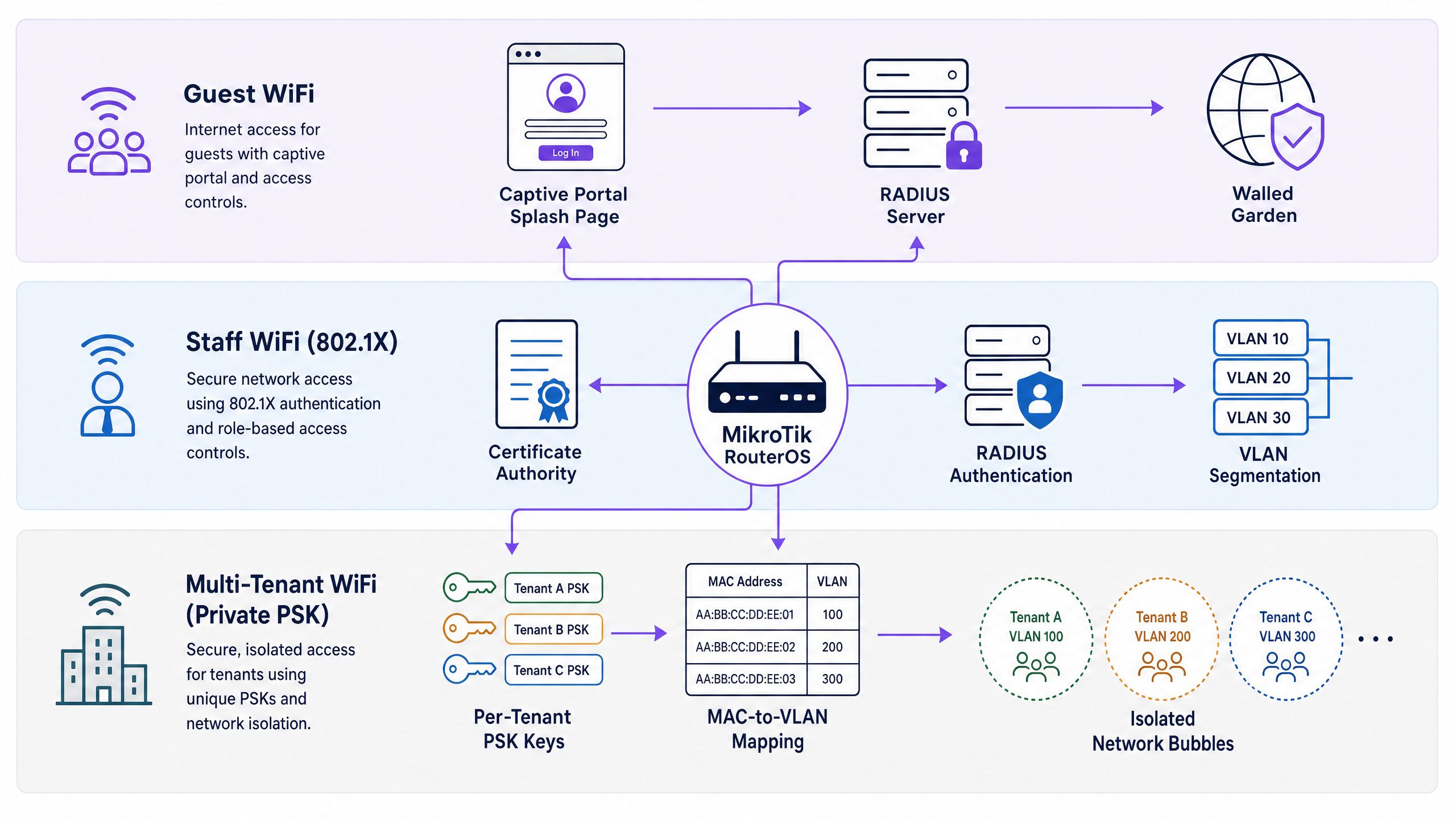
architecture_overview.png

实施指南

1. 配置 RADIUS 客户端

首先,在 RouterOS 中将 Purple 定义为 RADIUS 服务器。这适用于所有三个使用场景。

/radius
add address=YOUR-PURPLE-RADIUS-IP secret=YOUR-SHARED-SECRET service=hotspot,wireless authentication-port=1812 accounting-port=1813 timeout=3000ms

2. 访客 WiFi Hotspot 设置

在您的访客 VLAN 接口上运行 Hotspot 设置向导,然后在生成的配置文件中启用 RADIUS 认证。

/ip hotspot profile
set [ find default=yes ] use-radius=yes radius-accounting=yes

配置 Walled Garden 以允许访问 Purple 的基础设施。

/ip hotspot walled-garden
add action=allow dst-host=*purple.ai
add action=allow dst-host=*purpleportal.net

3. 员工 WiFi 802.1X 设置

将无线安全配置文件配置为使用 WPA2-Enterprise,并将其指向 RADIUS 服务器。

/interface wireless security-profiles
add authentication-types=wpa2-eap eap-methods=passthrough mode=dynamic-keys name=staff-8021x radius-mac-authentication=no

确保启用网桥 VLAN 过滤以支持动态 VLAN 分配。

/interface bridge
set bridge1 vlan-filtering=yes

4. 多租户 PPSK 设置

对于 PPSK,在无线安全配置文件上启用 MAC 认证,并配置 MAC 地址格式。

/interface wireless security-profiles
add authentication-types=wpa2-psk mode=dynamic-keys name=multi-tenant-ppsk radius-mac-authentication=yes radius-mac-format=XX:XX:XX:XX:XX:XX
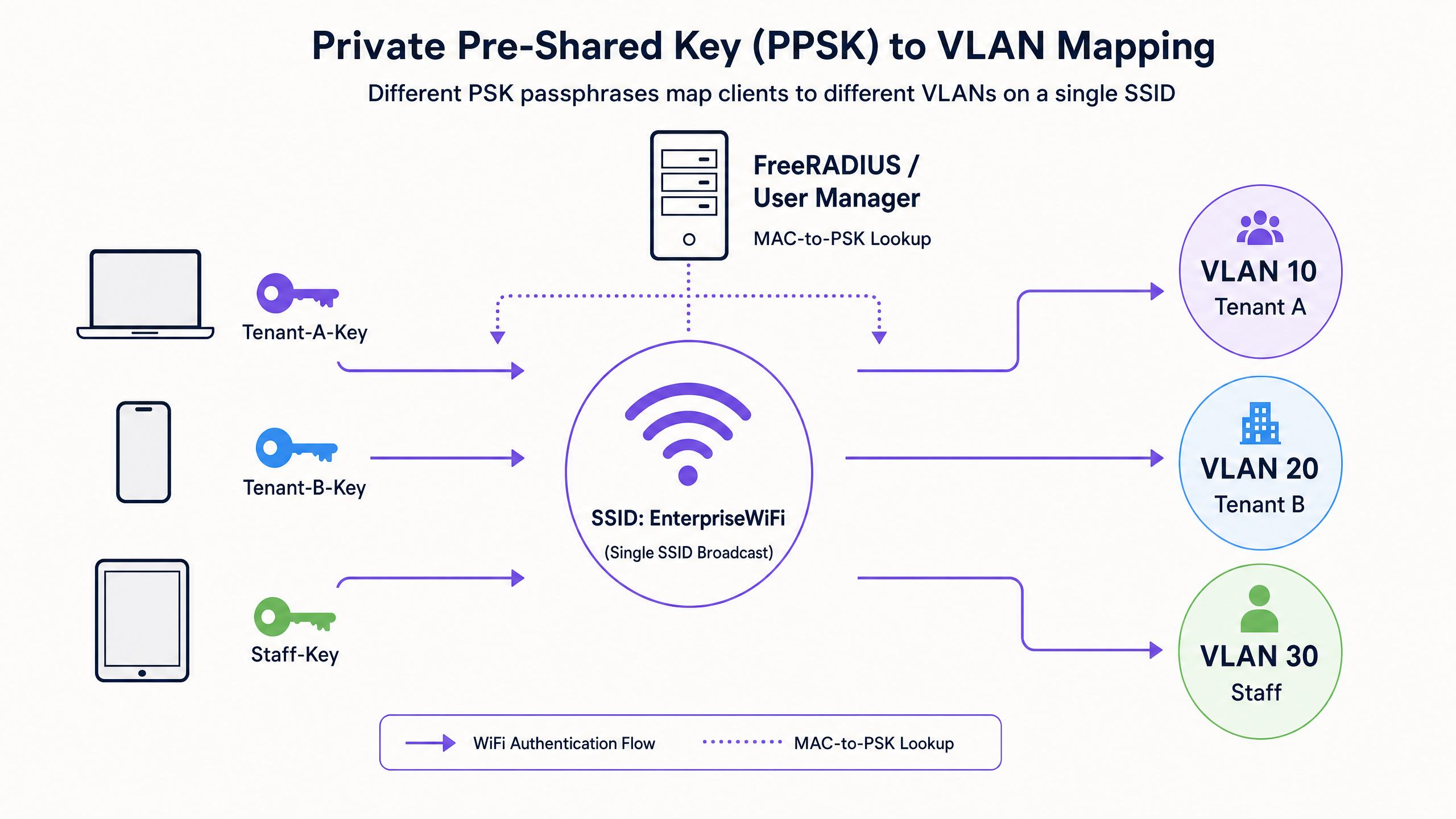
ppsk_vlan_diagram.png

最佳实践

  • 标准化使用 RouterOS 7:与 RouterOS 6 相比,RouterOS 7 中通过无线 RADIUS 进行的动态 VLAN 分配要健壮得多。
  • 增加 RADIUS 超时时间:MikroTik 默认的 RADIUS 超时时间为 1100ms。将其增加到 3000ms,以防止因网络延迟导致间歇性认证失败。
  • 使用主机名 Walled Garden 条目:对于 Walled Garden 条目,请始终使用 dst-host 代替 dst-address,因为云基础设施的 IP 地址可能会发生变化经常变动。
  • 启用网桥 VLAN 过滤:通过 RADIUS (Mikrotik-Wireless-VLANID) 进行动态 VLAN 分配需要在网桥接口上设置 vlan-filtering=yes

故障排除与风险规避

如果 Captive Portal 无法加载,几乎可以肯定围墙花园配置不完整。使用 MikroTik Torch 工具监控访客 VLAN 上未认证客户端丢弃的 DNS 查询。将缺失的域名添加到围墙花园中。

如果 802.1X 客户端无法通过认证,请验证共享密钥并确保 RADIUS 客户端配置了 service=wireless。检查 Purple 控制面板日志,确认 Access-Reject 是源自 Purple 还是您的身份提供商。

如果客户端通过了认证但获取了错误的 IP 地址,请确认已启用网桥 VLAN 过滤,并且 DHCP 服务器已正确绑定到动态分配的 VLAN 接口。

投资回报率与业务影响

在您的 MikroTik 基础设施中部署 Purple,可将成本中心转化为收入来源。通过捕获第一方数据,场所可以构建详细的数字化画像并自动执行营销活动。例如,Avanti West Coast 通过利用回头客和追加销售机会,实现了 463% 的投资回报率。

此外,身份驱动的网络连接可减少 IT 开销。通过 Entra ID 自动办理员工 WiFi 的入网和离网手续,消除了手动密码管理的繁琐,而用于多租户 WiFi 的 PPSK 则允许物业经理在无需为每个单元部署专用硬件的情况下配置隔离的网络。

关键定义

Hotspot Gateway

A RouterOS feature that intercepts unauthenticated HTTP traffic and redirects it to a captive portal splash page.

Used to capture guest data and enforce terms of service before granting internet access.

Walled Garden

A list of allowed destinations that unauthenticated users can access.

Critical for allowing guests to reach the Purple splash page, CDNs, and OAuth providers (like Google) to complete the login process.

802.1X

An IEEE standard for port-based network access control that provides an authentication mechanism to devices wishing to attach to a LAN or WLAN.

Used for secure Staff WiFi, allowing authentication via Entra ID or Okta instead of a shared password.

Private PSK (PPSK)

A security architecture where multiple unique Pre-Shared Keys are used on a single SSID, often tied to specific MAC addresses and VLANs.

Ideal for Multi-Tenant WiFi, providing isolated network bubbles for residents and their consumer devices.

RADIUS

Remote Authentication Dial-In User Service. A networking protocol that provides centralised Authentication, Authorization, and Accounting (AAA) management.

The core protocol linking MikroTik hardware to Purple's cloud platform for identity validation.

VLAN Filtering

A RouterOS bridge setting that enforces VLAN tagging and untagging rules on bridge ports.

Must be enabled for dynamic VLAN assignment via RADIUS to function correctly.

CAPsMAN

Controlled Access Point system Manager. MikroTik's centralised wireless management system.

Used to deploy consistent wireless security profiles and RADIUS settings across multiple access points.

EAP-TLS

Extensible Authentication Protocol - Transport Layer Security. A highly secure authentication method requiring client-side certificates.

Supported by Purple for zero-trust Staff WiFi deployments where passwordless authentication is required.

应用实例

A 200-room hotel needs to deploy secure Staff WiFi across their MikroTik access points. They want finance staff on VLAN 10 and operations staff on VLAN 20, using their existing Microsoft Entra ID credentials.

  1. Integrate Purple with Microsoft Entra ID in the Purple dashboard.
  2. Configure the MikroTik RADIUS client to point to Purple with service=wireless.
  3. Create a MikroTik wireless security profile with authentication-types=wpa2-eap.
  4. Enable vlan-filtering=yes on the MikroTik bridge.
  5. In Purple, map the Entra ID 'Finance' group to return Mikrotik-Wireless-VLANID=10 and the 'Operations' group to return Mikrotik-Wireless-VLANID=20.
考官评语: This approach uses IEEE 802.1X for secure, passwordless authentication. By relying on Entra ID groups and RADIUS attributes, the network dynamically segments traffic at the edge, reducing the attack surface and eliminating manual VLAN configuration on the router.

A build-to-rent property manager needs to provide isolated WiFi networks for 50 apartments using a single SSID broadcast from MikroTik CAPsMAN.

  1. Configure the MikroTik wireless security profile for the SSID with authentication-types=wpa2-psk and radius-mac-authentication=yes.
  2. Ensure the RADIUS client is configured with service=wireless pointing to Purple.
  3. In the Purple dashboard, register the MAC addresses of the residents' devices.
  4. Assign a unique PSK and VLAN ID to each apartment in Purple.
  5. When a device connects, Purple returns the Mikrotik-Wireless-Psk and Mikrotik-Wireless-VLANID attributes, placing the device in its isolated network bubble.
考官评语: This Private PSK (PPSK) architecture provides enterprise-grade isolation while supporting consumer devices that lack 802.1X capabilities. It scales efficiently and allows centralised management via Purple.

练习题

Q1. You have configured the MikroTik Hotspot Gateway and pointed it to Purple's RADIUS server. Guests connect to the SSID, but their browsers display a timeout error instead of the Purple splash page. What is the most likely configuration error?

提示:Consider what must happen before the guest authenticates.

查看标准答案

The walled garden is misconfigured or missing entries. Without allowing access to Purple's splash page domains and associated CDNs in the /ip hotspot walled-garden, the unauthenticated guest cannot load the login page, resulting in a timeout.

Q2. A retail chain wants to deploy Staff WiFi using 802.1X and Entra ID. They configure `authentication-types=wpa2-eap` and set up the RADIUS client. However, authentication fails. You check the RADIUS client configuration and see `service=hotspot`. How do you resolve this?

提示:Different wireless authentication methods require different RADIUS service types in RouterOS.

查看标准答案

Change the RADIUS client configuration to include service=wireless. The hotspot service type is only used for captive portal authentication. 802.1X and MAC authentication require the wireless service type.

Q3. You are deploying Multi-Tenant WiFi using Private PSKs. Purple successfully returns the `Mikrotik-Wireless-Psk` and `Mikrotik-Wireless-VLANID` attributes, and the device connects. However, the device receives an IP address from the default management subnet, not the isolated tenant subnet. What RouterOS setting is missing?

提示:Dynamic VLAN assignment requires the bridge to process VLAN tags.

查看标准答案

Bridge VLAN filtering is disabled. You must set vlan-filtering=yes on the bridge interface. Without this, the bridge ignores the dynamic VLAN tag assigned by RADIUS, and the traffic falls back to the default untagged PVID.