
What is a WLC (Wireless LAN Controller) and Do You Still Need One?
This comprehensive guide explores the evolution of Wireless LAN Controllers (WLCs) and provides a technical framework for determining the right architecture in 2026. It covers traditional hardware, cloud-managed, and controller-less models, detailing their impact on compliance, scalability, and guest experience.
Listen to this guide
View podcast transcript
Executive Summary
For IT managers and network architects deploying enterprise wireless networks, the Wireless LAN Controller (WLC) has historically been the central nervous system of the wireless infrastructure. However, the architectural landscape has shifted significantly. With the rise of cloud-managed architectures and distributed data planes, the fundamental question for any new deployment or refresh cycle is no longer simply "which controller should we purchase," but rather "do we still need a hardware controller at all?"
This guide provides a comprehensive technical breakdown of WLC architectures in 2026. We examine the evolution from traditional centralised hardware to modern cloud-managed and controller-less topologies. By mapping these technical architectures against real-world compliance requirements (such as PCI DSS and GDPR), scalability needs, and guest experience outcomes, this reference empowers technical decision-makers to select the appropriate control plane strategy.
Furthermore, we explore how platforms like Purple operate agnostically above this infrastructure layer, transforming raw connectivity into actionable intelligence regardless of the underlying hardware vendor.
Technical Deep-Dive: Understanding the WLC
The Evolution of the Control Plane
A Wireless LAN Controller (WLC) is a network device responsible for the centralised management, configuration, and security policy enforcement across multiple wireless access points (APs). In early wireless deployments, APs operated autonomously, requiring individual configuration and lacking the ability to coordinate RF environments or roaming handoffs. As wireless transitioned from a convenience network to mission-critical infrastructure, the administrative overhead of autonomous APs became untenable.
The WLC resolved this through the introduction of the split-MAC architecture. In this model, the AP (often referred to as a "lightweight" AP) handles the real-time, time-sensitive 802.11 physical layer functions, such as beacon transmission and probe responses. The controller assumes responsibility for non-real-time, MAC-layer functions, including RF management, security policy enforcement, and client authentication. The communication between the lightweight AP and the controller is typically encapsulated within a CAPWAP (Control and Provisioning of Wireless Access Points) tunnel.
The Role of CAPWAP
CAPWAP is fundamental to traditional WLC operations. It establishes a secure tunnel between the AP and the controller, carrying both control traffic (management and configuration) and data traffic (client payloads).
In a centralised data plane deployment, all client traffic is backhauled to the controller before being routed to the wired network. This allows for centralised policy enforcement, deep packet inspection, and simplified VLAN management. However, it can create a significant bottleneck in high-density environments.
To mitigate this, many modern deployments utilise FlexConnect (Cisco) or similar local-switching architectures. Here, the control plane remains centralised at the WLC, but the data plane is distributed, allowing client traffic to break out locally at the edge switch. This dramatically reduces the processing load on the WLC and improves throughput, particularly across WAN links.
Seamless Roaming and Client Management
One of the primary technical drivers for deploying a WLC is seamless client roaming. In a multi-AP environment, a client moving across the coverage area must hand off from one AP to another. Without a controller, the client makes this decision entirely independently, often resulting in "sticky client" syndrome, where the device maintains a weak connection to a distant AP, degrading overall channel capacity.
A WLC orchestrates this process. By maintaining a centralised view of the RF environment and the client's authentication state (particularly critical for 802.1X deployments), the controller can pre-stage the roaming event. It facilitates the transfer of the client's PMK (Pairwise Master Key) cache to the target AP, enabling a seamless transition in milliseconds, ensuring VoIP calls and streaming sessions remain uninterrupted. This is vital for maintaining high guest satisfaction in venues like Hospitality and Retail .
Implementation Guide: Choosing the Right Architecture
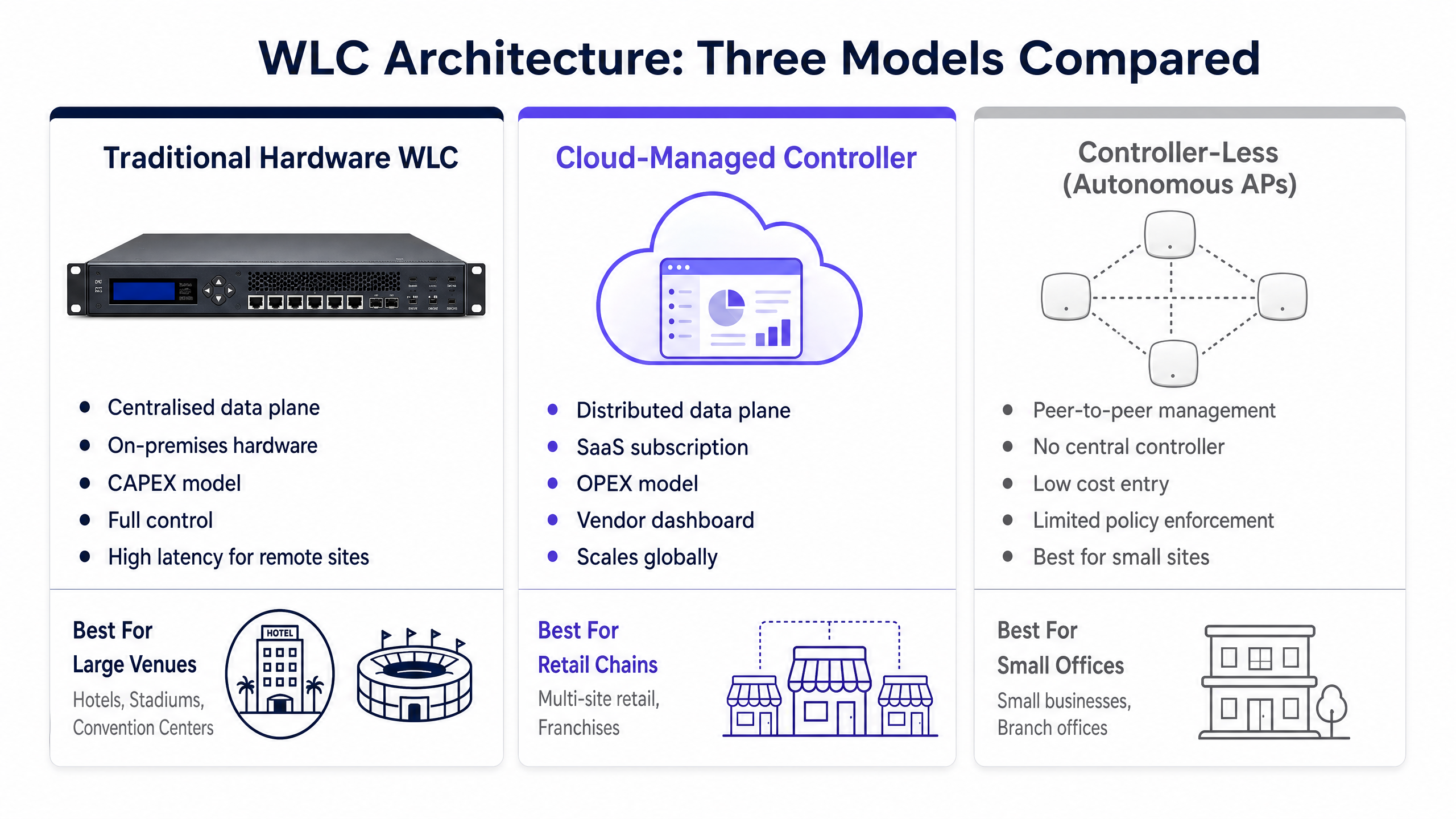
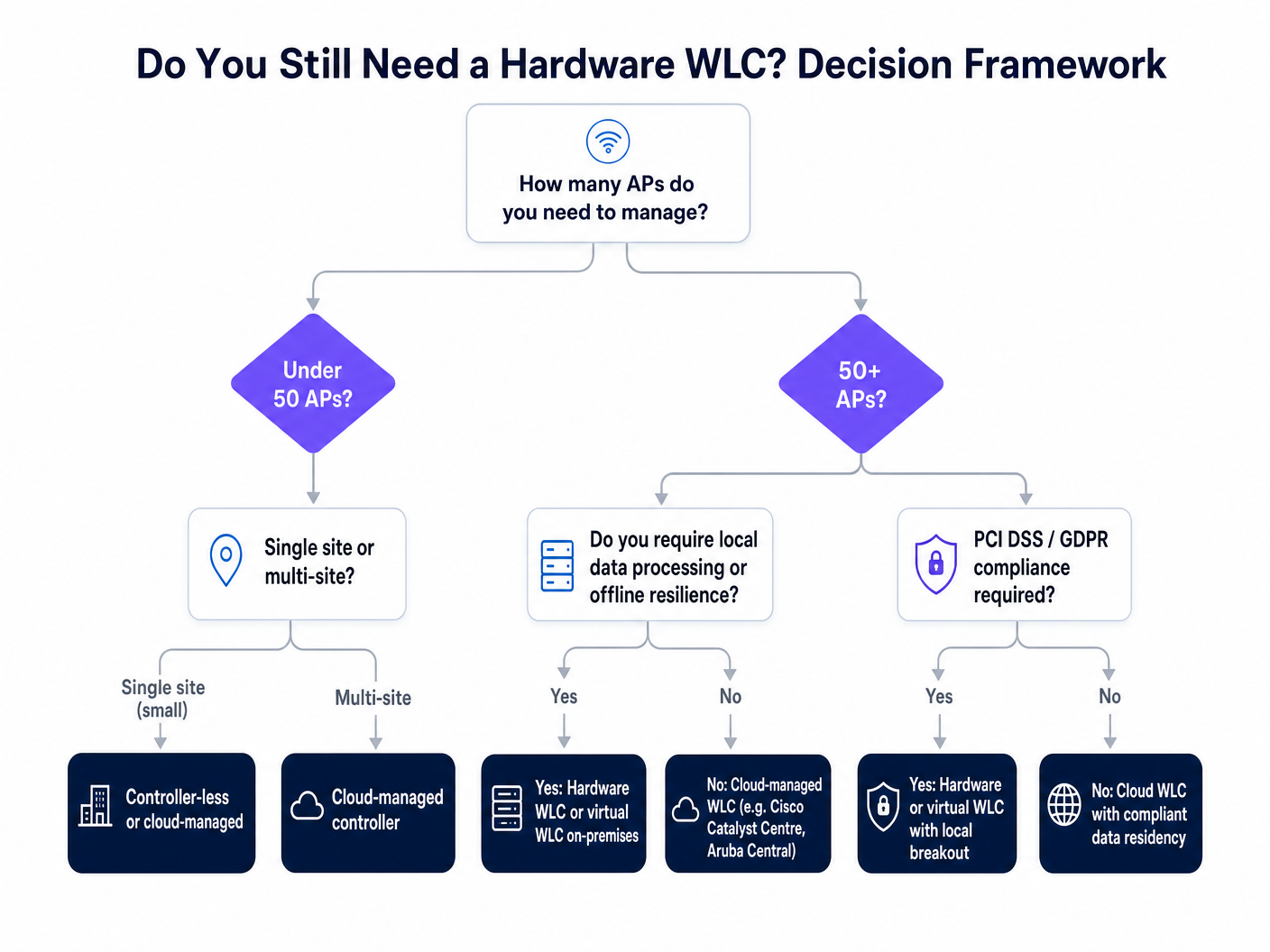
In 2026, network architects must evaluate three distinct deployment models. The decision hinges on scale, compliance, latency tolerance, and CAPEX vs. OPEX budget structures.
1. Traditional Hardware WLC (On-Premises)
The traditional model involves a physical appliance deployed in a local data centre or server room.
- Architecture: Centralised control and data planes (typically).
- Advantages: Complete control over data residency, offline resilience (survives WAN outages), and highly granular policy enforcement.
- Disadvantages: High upfront CAPEX, finite capacity limits requiring hardware replacement for significant scaling, and complex redundancy configurations (N+1 or Active/Standby).
- Best Fit: Large single-site deployments (e.g., stadiums, major hospitals, university campuses) where local data processing is mandated by compliance or latency constraints.
2. Cloud-Managed Controller
The cloud-managed model abstracts the control plane to a vendor-hosted SaaS platform, while the data plane remains distributed at the edge.
- Architecture: Centralised cloud control plane, distributed local data plane.
- Advantages: Rapid scalability, OPEX subscription model, zero-touch provisioning, and a unified management dashboard across geographically dispersed sites.
- Disadvantages: Requires reliable WAN connectivity for management (though local data switching survives outages), and potential data residency concerns depending on the vendor's cloud region.
- Best Fit: Multi-site environments like retail chains, distributed enterprise branches, and franchised operations.
3. Controller-Less (Autonomous/Mesh)
In this model, access points communicate peer-to-peer, electing a virtual controller amongst themselves to handle basic coordination.
- Architecture: Distributed control and data planes.
- Advantages: Lowest cost of entry, simple deployment, no dedicated controller hardware or cloud subscription required.
- Disadvantages: Limited scalability, basic roaming capabilities, and lack of advanced enterprise security features.
- Best Fit: Small, single-site deployments (e.g., small retail units, boutique cafés) with low client density and minimal compliance requirements.
Best Practices for Deployment
Regardless of the chosen architecture, adhering to industry-standard best practices is critical for ensuring network stability and performance.
- Size for Peak, Not Average: WLC capacity is strictly licensed and enforced based on concurrent APs and concurrent client sessions. When designing for high-density environments like Transport hubs or stadiums, you must calculate capacity based on peak event load, not average daily usage. Failing to do so will result in the WLC dropping client association requests during critical periods.
- Design for Redundancy: A hardware WLC is a single point of failure. Deployments must incorporate high availability (HA). Modern platforms support Stateful Switchover (SSO), ensuring that client sessions and AP associations seamlessly fail over to a standby controller without requiring re-authentication.
- Implement Local Breakout for High Bandwidth: In centralised WLC architectures, avoid backhauling high-bandwidth guest traffic (e.g., video streaming) across the CAPWAP tunnel to the core network. Utilise local switching at the edge to offload this traffic directly to the internet, preserving WLC processing capacity for control plane functions and secure corporate traffic.
- Enforce Strict Security Policies: Utilise the WLC as the central enforcement point for security. Ensure WPA3 Enterprise is deployed where supported, and enforce robust client isolation on Guest WiFi networks to prevent peer-to-peer communication between untrusted devices.
Troubleshooting & Risk Mitigation
When WLC deployments fail, the impact is often systemic. Understanding common failure modes is essential for rapid mitigation.
Asymmetric Routing and CAPWAP Fragmentation
Risk: When deploying a centralised WLC across a complex WAN, MTU (Maximum Transmission Unit) mismatches can cause CAPWAP packets to fragment. This significantly degrades AP performance and can lead to intermittent AP disconnects. Mitigation: Ensure the MTU is consistent across the entire path between the AP and the WLC. If fragmentation is unavoidable, configure the WLC to adjust the TCP MSS (Maximum Segment Size) to prevent packet drops.
AP Density vs. Channel Interference
Risk: Adding more APs to a WLC does not linearly increase capacity if channel planning is ignored. The WLC's automated RF management (e.g., Cisco's RRM or Aruba's ARM) can become unstable in overly dense deployments, constantly changing channels and power levels, leading to a degraded client experience. Mitigation: Conduct thorough predictive and active site surveys. Manually tune the WLC's RF algorithms, defining strict minimum and maximum transmit power thresholds to prevent co-channel interference.
Compliance and Data Residency
Risk: Deploying a cloud-managed controller without verifying the vendor's data centre locations can lead to immediate GDPR or PCI DSS violations, particularly if guest MAC addresses or authentication logs are processed outside of compliant jurisdictions. Mitigation: Verify the data residency architecture of the cloud WLC vendor. Ensure Data Processing Agreements (DPAs) are in place and that the vendor supports localised data storage for European deployments.
ROI & Business Impact
The decision to deploy, upgrade, or migrate a WLC architecture must be justified by measurable business outcomes. The ROI is typically evaluated across three vectors:
- Operational Efficiency: Cloud-managed WLCs significantly reduce the operational overhead of managing distributed networks. Zero-touch provisioning allows APs to be shipped directly to remote sites, automatically downloading configuration from the cloud upon connection. This eliminates the need for expensive on-site engineering visits.
- Risk Reduction: A centralised hardware WLC with robust HA provides the offline resilience required for mission-critical operations, such as Healthcare environments. The cost of a redundant WLC is often negligible compared to the financial and reputational damage of a systemic network outage.
- Enabling Advanced Analytics: The WLC provides the foundational connectivity, but the true business value is unlocked at the application layer. By integrating a WLC with a platform like Purple's WiFi Analytics , raw connection data is transformed into actionable intelligence. Purple acts as a free identity provider (IdP) for services like OpenRoaming, capturing valuable first-party data. This allows venues to measure dwell time, understand footfall patterns, and drive targeted marketing campaigns, directly contributing to revenue generation.
As discussed in our recent announcement, Purple Appoints Iain Fox as VP Growth , the focus is increasingly on digital inclusion and smart city innovation. A robust WLC architecture, paired with Purple's analytics, forms the bedrock of these initiatives, enabling seamless, secure, and insightful connectivity across vast public spaces. Furthermore, adopting modern authentication methods, such as those detailed in How a wi fi assistant Enables Passwordless Access in 2026 , relies entirely on the secure, centralised policy enforcement provided by the WLC infrastructure.
Key Definitions
CAPWAP
Control and Provisioning of Wireless Access Points. The standard protocol used to encapsulate communication between a lightweight AP and a WLC.
Understanding CAPWAP is crucial for troubleshooting connectivity issues between APs and the controller across WAN links.
Split-MAC Architecture
A design where the functions of the 802.11 MAC layer are divided between the access point (real-time functions) and the WLC (management functions).
This is the foundational concept that enables centralized control of a large wireless estate.
Local Switching (FlexConnect)
A configuration where the control plane remains at the WLC, but client data traffic is routed directly onto the local wired network at the AP or edge switch.
Essential for reducing bandwidth bottlenecks on the WLC and WAN links in distributed environments.
Stateful Switchover (SSO)
A high-availability feature where a standby WLC maintains the state of all client sessions, allowing for seamless failover without client re-authentication.
Critical for mission-critical deployments where dropped VoIP calls or streaming sessions are unacceptable during a hardware failure.
Sticky Client
A wireless device that remains connected to a distant AP with a weak signal, rather than roaming to a closer AP with a stronger signal.
WLCs mitigate this by orchestrating roaming decisions based on a centralized view of the RF environment.
802.1X
An IEEE standard for port-based network access control, providing an authentication mechanism to devices wishing to attach to a LAN or WLAN.
The standard for enterprise wireless security, requiring a WLC to act as the centralized authenticator.
Zero-Touch Provisioning (ZTP)
The ability to deploy network devices (like APs) without manual configuration on-site; the device automatically connects to a cloud controller to download its configuration.
The primary operational advantage of cloud-managed WLC architectures for multi-site deployments.
Data Plane vs. Control Plane
The data plane carries user traffic (payloads), while the control plane carries management and routing information.
Modern WLC architectures often separate these, keeping the control plane in the cloud while distributing the data plane to the edge.
Worked Examples
A national retail chain with 400 locations is planning a network refresh. Each location averages 3 APs. The current infrastructure relies on aging, autonomous APs, leading to inconsistent security policies and zero visibility into network health from head office. They need a solution that minimizes CAPEX, requires no on-site IT staff for deployment, and provides centralized analytics.
The optimal solution is a Cloud-Managed Controller architecture. Deploying 400 hardware WLCs is financially unviable, and managing 1,200 autonomous APs is operationally impossible. The cloud model allows APs to be drop-shipped to stores (Zero-Touch Provisioning). Upon connection, they securely tunnel to the vendor's cloud dashboard to download their configuration. The data plane remains local (handling point-of-sale traffic directly), while the control plane is centralized in the cloud. Purple's analytics platform is integrated via the cloud controller's API to provide footfall and dwell time metrics across the entire estate.
A major teaching hospital is deploying a new wireless network across a sprawling campus to support critical VoIP communications for clinical staff and secure access to electronic health records (EHR). The environment is highly sensitive to latency, requires strict HIPAA/GDPR compliance, and must remain operational even if the external internet connection fails.
A Traditional Hardware WLC deployed on-premises in a High Availability (Active/Standby) pair is required. The strict requirement for offline resilience (surviving a WAN outage) eliminates cloud-managed controllers as the primary control plane. All clinical traffic should be locally switched at the edge to minimize latency, while management and authentication traffic is centralized at the WLC. The WLC enforces 802.1X authentication uniformly across the campus.
Practice Questions
Q1. A university campus is upgrading its wireless network. They require seamless roaming for students moving between lecture halls, robust 802.1X authentication, and all user traffic must be inspected by an on-premises firewall before reaching the internet. Which WLC architecture is most appropriate?
Hint: Consider the requirement for all traffic to be inspected by an on-premises appliance.
View model answer
A Traditional Hardware WLC with a centralized data plane. The requirement to route all traffic through an on-premises firewall dictates that client traffic should be backhauled to a central point (the WLC) before being handed off to the core network and firewall. A cloud-managed controller with local breakout would bypass the central firewall.
Q2. A boutique hotel with 20 rooms needs a basic wireless network for guest internet access. They have no dedicated IT staff and a minimal budget. Compliance requirements are low. What is the most cost-effective approach?
Hint: Focus on the lack of IT staff and minimal budget for a very small deployment.
View model answer
A Controller-Less (Autonomous/Mesh) architecture. For a small deployment of likely under 10 APs, the cost of a hardware WLC or the recurring subscription of a cloud controller is not justified. The APs can elect a virtual controller to handle basic configuration and roaming.
Q3. You are designing a network for a stadium with 60,000 seats. The design calls for 800 access points. The vendor's WLC datasheet states a maximum capacity of 1,000 APs and 10,000 concurrent clients. Is this WLC suitably sized?
Hint: Look beyond the AP count and consider the density of the venue.
View model answer
No. While the WLC supports the 800 APs, the concurrent client limit of 10,000 is vastly insufficient for a 60,000-seat stadium. During an event, concurrent connections will likely exceed 30,000. The WLC must be sized based on peak concurrent clients, requiring a significantly larger controller or a cluster of controllers.