
802.1X-Authentifizierung für Unternehmensnetzwerke erklärt
Dieser maßgebliche Leitfaden bietet IT-Führungskräften und Netzwerkarchitekten eine detaillierte technische Analyse der 802.1X-Authentifizierung für Unternehmensnetzwerke. Er behandelt Architektur, EAP-Methoden, Bereitstellungsstrategien und Risikominderung, um einen sicheren, konformen WiFi-Zugang in Multi-Site-Umgebungen zu gewährleisten.
Diesen Leitfaden anhören
Podcast-Transkript ansehen
Zusammenfassung für Führungskräfte
Für Unternehmensumgebungen, die Gastgewerbe, Einzelhandel und den öffentlichen Sektor umfassen, hat sich der Perimeter aufgelöst. Hybride Arbeitskräfte, BYOD-Richtlinien und eine Explosion vernetzter Geräte bedeuten, dass die Sicherung von Unternehmensnetzwerken über Pre-Shared Keys (PSKs) keine praktikable Strategie mehr ist. Moderne Compliance-Frameworks – einschließlich PCI DSS v4.0 und GDPR – erfordern strenge, identitätsbasierte Zugriffskontrollen für jedes Netzwerk, das sensible Daten verarbeitet.
Dieser Leitfaden beschreibt die Architektur und Implementierung von IEEE 802.1X, dem Standard für portbasierte Netzwerkzugriffskontrolle. Durch die Verlagerung der Authentifizierung von einem gemeinsamen Passwort auf eine verifizierte Identität, die durch eine zentrale RADIUS-Infrastruktur gestützt wird, können Unternehmen eine dynamische Segmentierung durchsetzen, den Diebstahl von Anmeldeinformationen mindern und sicherstellen, dass nur autorisierte Geräte auf Unternehmensressourcen zugreifen. Dieses Dokument wurde für Netzwerkarchitekten und IT-Direktoren entwickelt und bietet die technische Tiefe, die für die Architektur, Bereitstellung und Fehlerbehebung von 802.1X in komplexen, standortübergreifenden Topologien erforderlich ist.
Technischer Tiefgang
Die 802.1X-Architektur
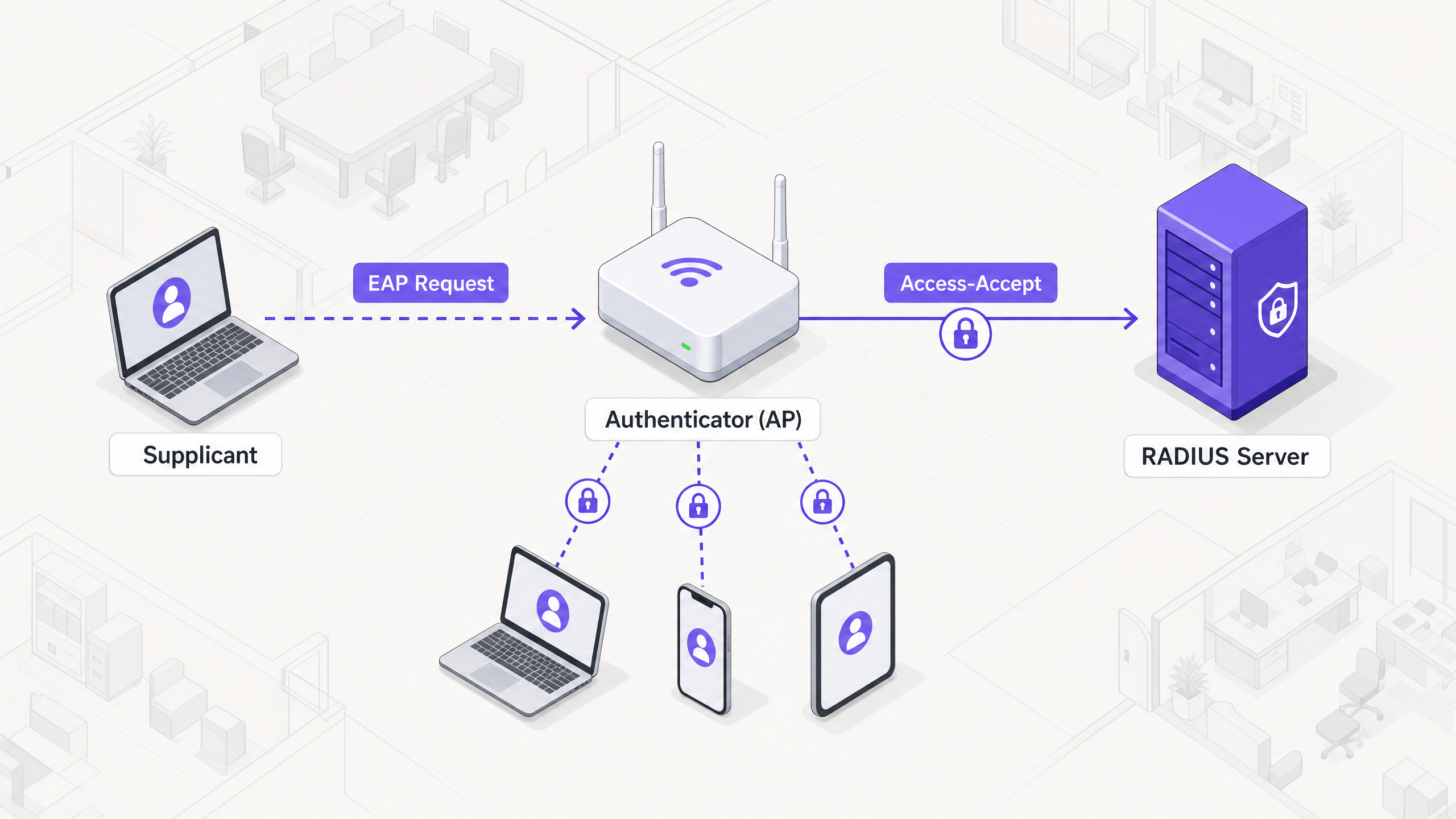
Das 802.1X-Framework basiert auf drei verschiedenen Komponenten, die zusammenarbeiten, um den Netzwerkzugriff zu sichern:
- Supplicant: Das Endgerät (z. B. Laptop, Smartphone), das den Zugriff auf das Netzwerk anfordert.
- Authenticator: Das Netzwerkgerät (typischerweise ein Wireless Access Point oder Switch), das den physischen oder logischen Zugriff auf das Netzwerk steuert.
- Authentication Server: Die zentrale Datenbank (fast ausschließlich ein RADIUS-Server), die die Anmeldeinformationen des Supplicanten validiert und den Zugriff autorisiert.
Wenn ein Supplicant versucht, sich mit einer 802.1X-gesicherten SSID zu verbinden, versetzt der Authenticator die Verbindung in einen nicht autorisierten Zustand und blockiert den gesamten Datenverkehr außer Extensible Authentication Protocol (EAP)-Frames. Der Authenticator fungiert als Pass-Through, indem er EAP-Nachrichten vom Supplicanten in RADIUS-Pakete kapselt und an den Authentifizierungsserver weiterleitet.
Extensible Authentication Protocol (EAP)-Methoden
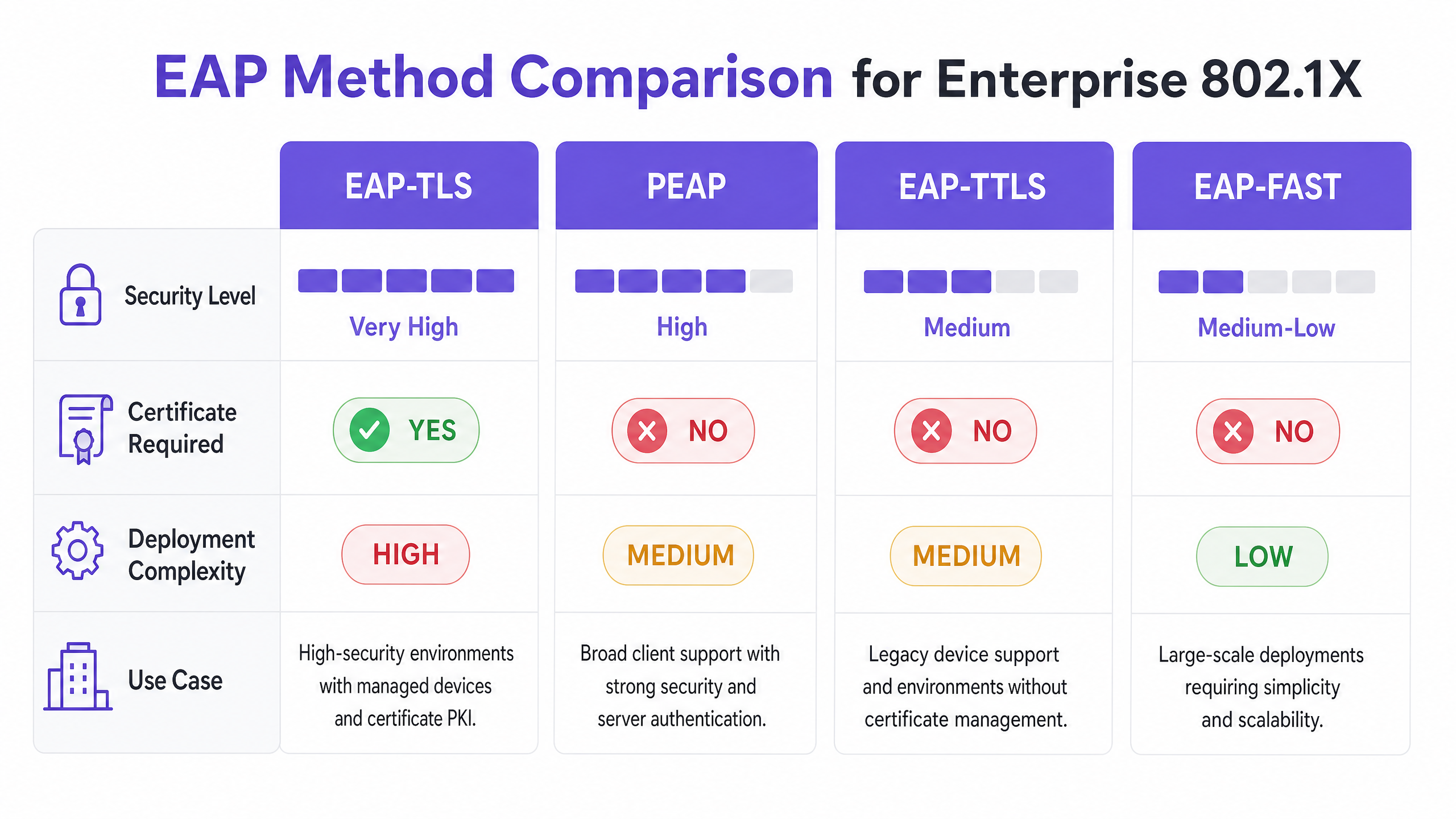
EAP ist der Transportmechanismus für die eigentlichen Authentifizierungsdaten. Die Auswahl der geeigneten EAP-Methode ist eine kritische architektonische Entscheidung, die Sicherheitsanforderungen mit der Komplexität der Bereitstellung in Einklang bringt.
- EAP-TLS (Transport Layer Security): Der Goldstandard für Unternehmenssicherheit. Es erfordert sowohl ein Serverzertifikat als auch ein Clientzertifikat und bietet eine gegenseitige Authentifizierung. Da es auf Zertifikaten statt auf Passwörtern basiert, ist es immun gegen Credential-Phishing und Offline-Wörterbuchangriffe. Es erfordert jedoch eine robuste Public Key Infrastructure (PKI) und Mobile Device Management (MDM)-Lösung, um Clientzertifikate in großem Umfang bereitzustellen und zu verwalten.
- PEAP (Protected EAP): Die am weitesten verbreitete Methode aufgrund ihres Gleichgewichts zwischen Sicherheit und einfacher Bereitstellung. PEAP erfordert ein Zertifikat nur auf dem RADIUS-Server. Es etabliert einen sicheren TLS-Tunnel zwischen dem Supplicanten und dem Server, innerhalb dessen die Anmeldeinformationen des Benutzers (Benutzername und Passwort) sicher übertragen werden. Eine ordnungsgemäße Konfiguration erfordert, den Supplicanten so einzustellen, dass er nur dem spezifischen RADIUS-Serverzertifikat vertraut, um Rogue AP-Angriffe zu verhindern.
- EAP-TTLS (Tunneled TLS): Ähnlich wie PEAP etabliert es einen sicheren Tunnel unter Verwendung eines Serverzertifikats. EAP-TTLS unterstützt jedoch eine breitere Palette innerer Authentifizierungsprotokolle, wodurch es für Umgebungen mit Altsystemen oder Nicht-Windows-Endpunkten geeignet ist, die MSCHAPv2 nicht unterstützen.
- EAP-FAST (Flexible Authentication via Secure Tunneling): Von Cisco als schnellere Alternative zu zertifikatsbasierten Methoden entwickelt. Es verwendet Protected Access Credentials (PACs), die dynamisch zwischen Client und Server etabliert werden. Obwohl effizient, wird es in modernen, herstellerneutralen Architekturen seltener eingesetzt.
RADIUS-Infrastruktur und -Integration
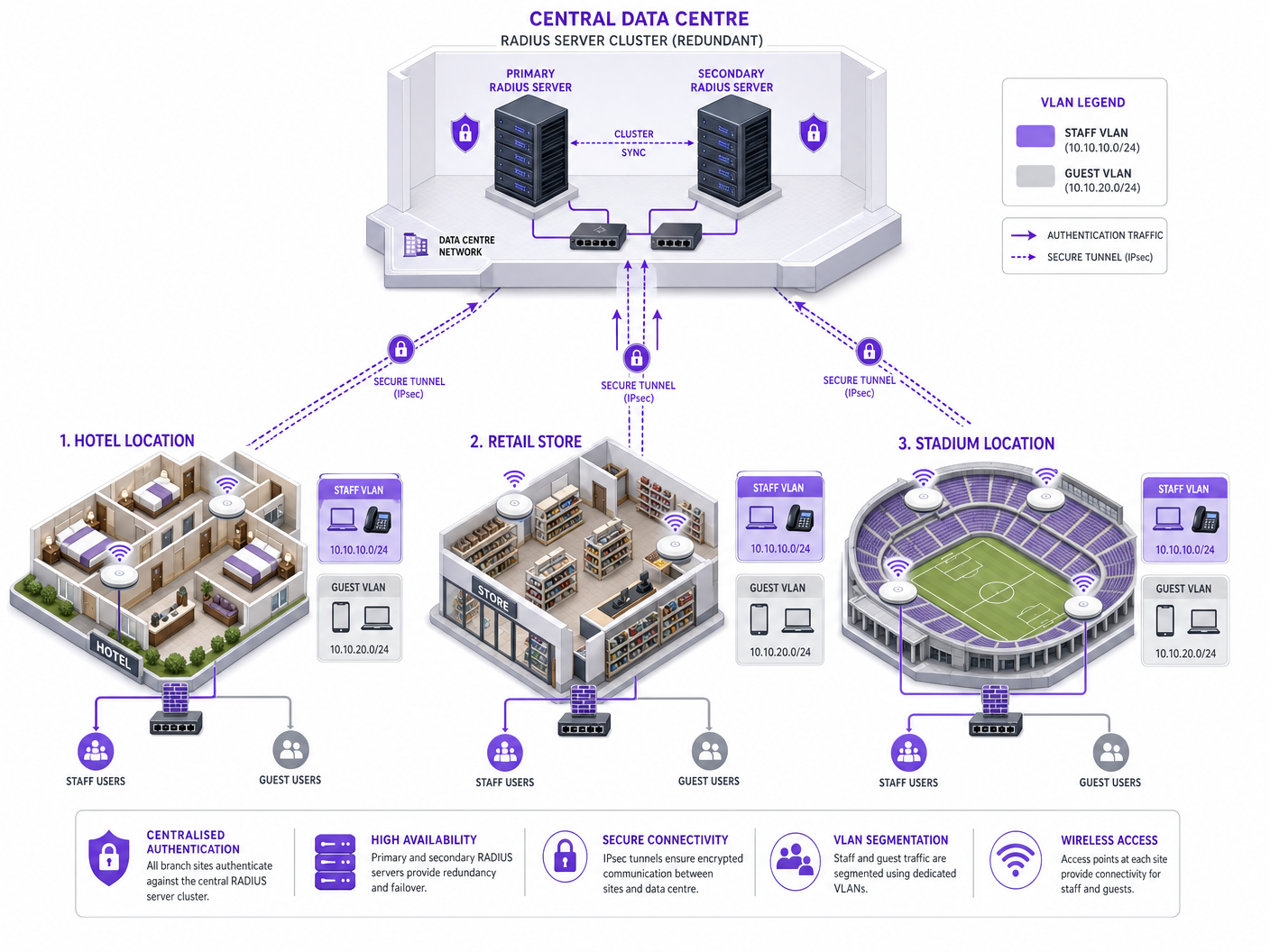
Der RADIUS-Server ist der Motor von 802.1X. Gängige Unternehmenslösungen umfassen Microsoft Network Policy Server (NPS), FreeRADIUS und kommerzielle Angebote wie Cisco ISE oder Aruba ClearPass. Der RADIUS-Server integriert sich mit dem Identity Provider (IdP) der Organisation – wie Active Directory, Entra ID oder Okta – um Anmeldeinformationen zu validieren.
Entscheidend ist, dass der RADIUS-Server spezifische Attribute in der Access-Accept-Nachricht zurückgeben kann, was eine dynamische Netzwerkkonfiguration ermöglicht. Die mächtigste davon ist die dynamische VLAN-Zuweisung. Basierend auf der Gruppenmitgliedschaft des Benutzers oder dem Gerätestatus weist der RADIUS-Server den Authenticator an, die Verbindung in ein bestimmtes VLAN zu platzieren. Dies ermöglicht eine nahtlose Mikrosegmentierung: Ein Mitarbeiter wird in das Unternehmens-VLAN, ein Auftragnehmer in ein eingeschränktes VLAN und ein Gerät, das die Statusprüfungen nicht besteht, in ein Quarantäne-VLAN platziert.
Implementierungsleitfaden
Die Bereitstellung von 802.1X in einem standortübergreifenden Unternehmen erfordert einen schrittweisen, methodischen Ansatz, um Störungen zu minimieren.
Phase 1: Netzwerkerkennung und -profilierung
Bevor Sie Konfigurationen ändern, führen Sie eine umfassende Prüfung aller Geräte durch, die sich mit dem Netzwerk verbinden. Dies ist besonders kritisch in Umgebungen wie Gastgewerbe und Einzelhandel , wo headless Geräte (Drucker, POS-Terminals, IoT-Sensoren) weit verbreitet sind. Diesen Geräten fehlt typischerweise ein 802.1X-Supplicant. Sie müssen diese identifizieren und alternative Authentifizierungsmethoden, wie MAC Authentication Bypass (MAB), planen, um sicherzustellen, dass sie in eingeschränkten VLANs isoliert sind.
Phase 2: RADIUS-InfrastArchitektur-Bereitstellung
Stellen Sie eine hochverfügbare RADIUS-Architektur bereit. Ein einzelner RADIUS-Server ist ein Single Point of Failure, der das gesamte Unternehmensnetzwerk lahmlegen kann. Implementieren Sie einen primären und sekundären Server-Cluster, idealerweise verteilt über verschiedene Rechenzentren oder Cloud-Verfügbarkeitszonen. Konfigurieren Sie Authentifikatoren (APs und Switches) so, dass sie bei Ausfall des primären Servers automatisch auf den sekundären Server umschalten.
Phase 3: Richtlinienkonfiguration und Segmentierung
Definieren Sie granulare Zugriffsrichtlinien innerhalb des RADIUS-Servers. Ordnen Sie Active Directory-Gruppen bestimmten VLANs und Access Control Lists (ACLs) zu. Stellen Sie sicher, dass die Richtlinien das Prinzip der geringsten Rechte durchsetzen. Zum Beispiel sollten in einem Gesundheitswesen klinisches Personal Zugriff auf Patientenaktensysteme haben, während Verwaltungspersonal in ein anderes VLAN segmentiert wird, mit Zugriff nur auf Abrechnungssysteme.
Phase 4: Supplicant-Bereitstellung
Für PEAP-Bereitstellungen verwenden Sie Group Policy Objects (GPOs) oder MDM-Profile, um die erforderlichen WLAN-Einstellungen auf verwaltete Geräte zu übertragen. Entscheidend ist, das Profil so zu konfigurieren, dass es das Serverzertifikat streng validiert und die genauen RADIUS-Servernamen angibt, denen vertraut werden soll. Dies verhindert, dass Benutzer sich versehentlich mit nicht autorisierten Access Points verbinden.
Für nicht verwaltete Geräte lesen Sie unseren Leitfaden zu Sichere BYOD-Richtlinien für Mitarbeiter-WiFi-Netzwerke für Strategien zur sicheren Einbindung persönlicher Geräte, ohne das Unternehmensnetzwerk zu gefährden.
Phase 5: Phasenweise Einführung und Tests
Führen Sie niemals eine „Big-Bang“-Bereitstellung durch. Beginnen Sie mit einer Pilotgruppe an einem einzigen Standort. Überwachen Sie RADIUS-Protokolle sorgfältig auf Authentifizierungsfehler. Testen Sie Grenzfälle, einschließlich Server-Failover, Zertifikatsablauf und Roaming zwischen Access Points. Fahren Sie erst mit einer breiteren Einführung fort, wenn der Pilot stabil ist.
Best Practices
- Serverzertifikatsvalidierung erzwingen: Dies ist die wichtigste Sicherheitskontrolle für PEAP-Bereitstellungen. Wenn Supplicants das Serverzertifikat nicht validieren, ist das Netzwerk anfällig für Man-in-the-Middle (MitM)-Angriffe.
- Dynamische VLAN-Zuweisung implementieren: Verlassen Sie sich nicht auf statische VLANs pro SSID. Verwenden Sie RADIUS-Attribute, um VLANs dynamisch basierend auf der Benutzeridentität zuzuweisen, wodurch die Angriffsfläche drastisch reduziert wird.
- Headless-Geräte mit MAB sichern: Verwenden Sie MAC Authentication Bypass ausschließlich für Geräte, die 802.1X nicht unterstützen können. Stellen Sie sicher, dass diese Geräte in stark eingeschränkten VLANs platziert werden, da MAC-Adressen leicht gefälscht werden können.
- Gast- und Unternehmensverkehr trennen: Sorgen Sie für eine strikte logische Trennung zwischen 802.1X-gesicherten Unternehmensnetzwerken und offenen oder portalbasierten Gastnetzwerken. Für ein erweitertes Gastzugangsmanagement ziehen Sie Lösungen wie die Guest WiFi -Plattform von Purple in Betracht.
Fehlerbehebung & Risikominderung
Häufige Fehlerursachen
- Zertifikatsablauf: Ein abgelaufenes RADIUS-Serverzertifikat führt zu weitreichenden Authentifizierungsfehlern für PEAP- und EAP-TLS-Clients. Implementieren Sie eine robuste Überwachung und Alarmierung für Zertifikatsgültigkeitsdauern.
- Clock Skew: 802.1X ist stark auf eine genaue Zeitmessung angewiesen, insbesondere für die Zertifikatsvalidierung. Stellen Sie sicher, dass alle Infrastrukturkomponenten (RADIUS-Server, IdPs, APs) mit einer zuverlässigen NTP-Quelle synchronisiert sind.
- Unerreichbarkeit des RADIUS-Servers: Netzwerkkonnektivitätsprobleme zwischen dem Authentifikator und dem RADIUS-Server führen zur Zugriffsverweigerung. Implementieren Sie redundante Netzwerkpfade und konfigurieren Sie APs mit mehreren RADIUS-Server-IPs.
- Fehlkonfiguration des Supplicants: Falsch konfigurierte Supplicants (z. B. falsche EAP-Methode, fehlende Root CA) sind eine häufige Ursache für Helpdesk-Tickets. Verwenden Sie MDM, um konsistente Konfigurationen durchzusetzen.
Strategien zur Risikominderung
Um das Risiko von durch die Bereitstellung verursachten Ausfallzeiten zu mindern, etablieren Sie eine robuste Audit-Trail für alle Konfigurationsänderungen an der RADIUS-Infrastruktur. Dies gewährleistet schnelle Rollback-Fähigkeiten im Falle eines unvorhergesehenen Problems.
ROI & Geschäftsauswirkungen
Die Implementierung von 802.1X liefert einen erheblichen Geschäftswert, der über die grundlegende Sicherheitskonformität hinausgeht:
- Reduzierter Betriebsaufwand: Durch die Eliminierung der Notwendigkeit, Pre-Shared Keys zu rotieren, wenn Mitarbeiter das Unternehmen verlassen oder Schlüssel kompromittiert werden, sparen IT-Teams erheblich administrative Zeit.
- Verbesserte Compliance: 802.1X bietet die identitätsbasierten Zugriffskontrollen, die zur Einhaltung strenger regulatorischer Rahmenbedingungen (PCI DSS, HIPAA, GDPR) erforderlich sind, wodurch kostspielige Bußgelder und Reputationsschäden vermieden werden.
- Verbesserte Bedrohungsisolierung: Die dynamische VLAN-Zuweisung stellt sicher, dass im Falle einer Kompromittierung eines Geräts der Explosionsradius auf ein bestimmtes Netzwerksegment begrenzt ist, wodurch eine laterale Bewegung im gesamten Unternehmen verhindert wird.
- Datengestützte Einblicke: In Kombination mit Plattformen wie Purple's WiFi Analytics können die von 802.1X bereitgestellten Identitätsdaten tiefe Einblicke in die Netzwerkauslastung und Kapazitätsplanung bieten.
Schlüsseldefinitionen
Supplicant
The client device or software requesting access to the network.
Essential for understanding where the authentication request originates and how credentials are provided.
Authenticator
The network device (AP or switch) that acts as a gatekeeper, blocking access until authentication succeeds.
The authenticator does not verify credentials; it merely passes them to the RADIUS server.
RADIUS Server
Remote Authentication Dial-In User Service; the central server that validates credentials against an identity store.
The core decision engine of an 802.1X deployment.
EAP (Extensible Authentication Protocol)
A framework for transporting authentication credentials securely over the network.
Understanding EAP is crucial for selecting the right authentication method (e.g., PEAP vs. EAP-TLS).
Dynamic VLAN Assignment
The process where a RADIUS server instructs the authenticator to place a user in a specific VLAN based on their identity.
A key benefit of 802.1X, enabling automated network segmentation.
MAC Authentication Bypass (MAB)
A fallback authentication method that uses a device's MAC address as its credential.
Required for onboarding IoT and legacy devices that cannot support 802.1X.
PKI (Public Key Infrastructure)
The system used to issue, manage, and validate digital certificates.
A prerequisite for deploying EAP-TLS authentication.
Rogue AP Attack
An attack where a malicious access point impersonates the corporate network to harvest credentials.
Highlighting the importance of enforcing server certificate validation in PEAP deployments.
Ausgearbeitete Beispiele
A 200-room hotel needs to secure its staff WiFi network. The current setup uses a single PSK for all staff devices (laptops, tablets) and IoT devices (smart thermostats, IP cameras). How should they transition to 802.1X?
- Deploy a redundant RADIUS infrastructure (e.g., FreeRADIUS) integrated with the hotel's Active Directory. 2. Audit all devices. 3. Configure the wireless controller to use 802.1X (PEAP-MSCHAPv2) for the staff SSID. 4. Push MDM profiles to staff laptops and tablets enforcing server certificate validation. 5. For IoT devices, configure MAC Authentication Bypass (MAB) on the RADIUS server, placing them in an isolated IoT VLAN. 6. Use RADIUS attributes to dynamically assign staff devices to the corporate VLAN upon successful authentication.
A retail chain is rolling out 802.1X across 50 stores. During the pilot phase in Store 1, users report intermittent authentication failures, particularly when moving between the stockroom and the shop floor.
The issue is likely related to roaming and re-authentication delays. The solution is to enable Fast BSS Transition (802.11r) and Opportunistic Key Caching (OKC) on the wireless controller and access points. This allows the client device to cache the Pairwise Master Key (PMK) derived during the initial 802.1X authentication, enabling rapid roaming between APs without requiring a full RADIUS round-trip.
Übungsfragen
Q1. Your organisation is migrating from PSK to 802.1X. You have a fleet of 5,000 corporate-owned Windows laptops managed via Microsoft Intune. You want the highest level of security to prevent credential theft. Which EAP method should you deploy?
Hinweis: Consider which method eliminates the use of passwords entirely.
Musterlösung anzeigen
EAP-TLS. Since the devices are corporate-owned and managed via Intune, you can leverage MDM to deploy client certificates at scale. EAP-TLS provides mutual authentication and is immune to password-based attacks like phishing or offline dictionary attacks.
Q2. During a security audit, it is discovered that users can connect to the corporate 802.1X network using their personal smartphones without any MDM profile installed. What is the primary security risk, and how should it be remediated?
Hinweis: Think about how PEAP validates the server.
Musterlösung anzeigen
The primary risk is a Man-in-the-Middle (MitM) or Rogue AP attack. If users manually configure the connection, they often accept any server certificate presented to them. To remediate this, the organisation must enforce a policy where only managed devices (with an MDM profile that strictly validates the specific RADIUS server certificate) are allowed on the corporate SSID. Personal devices should be directed to a separate BYOD or Guest network.
Q3. A remote branch office loses WAN connectivity to the central data centre where the primary and secondary RADIUS servers reside. What happens to the wireless clients at the branch office?
Hinweis: Consider where the authentication decision is made.
Musterlösung anzeigen
New clients attempting to connect will fail authentication because the authenticator (AP) cannot reach the RADIUS server to validate credentials. Existing connected clients may remain connected until their session times out or they need to re-authenticate (e.g., roaming to a new AP), at which point they will also lose access. To mitigate this, survivable branch architectures often deploy a local, read-only domain controller and a local RADIUS proxy or server at critical branch sites.