
Bar und Pub WiFi: Ein vollständiger Einrichtungs- und Marketing-Leitfaden
Dieser umfassende technische Leitfaden beschreibt die Architektur, Bereitstellung und Monetarisierung von unternehmensgerechtem Gast-WiFi für Bars und Pubs. Er bietet umsetzbare Konzepte für IT-Führungskräfte zur Implementierung sicherer, hochleistungsfähiger Netzwerke, die die Compliance fördern, Kundendaten aus erster Hand erfassen und gezielte Marketingkampagnen zur Steigerung des ROI unterstützen.
Diesen Leitfaden anhören
Podcast-Transkript ansehen
Executive Summary
Die Bereitstellung von robustem Bar WiFi und Pub WiFi ist nicht länger nur ein operativer Aufwand; es ist eine grundlegende Anforderung, um Besucherfrequenz zu steigern, die Kundenbindung zu erhöhen und neue Einnahmequellen zu erschließen. Für IT-Manager, CTOs und Betriebsleiter von Veranstaltungsorten im gesamten Gastgewerbe besteht die Herausforderung darin, von veralteten, unmanaged Internetverbindungen zu unternehmensgerechten, sicheren und datenreichen Netzwerken überzugehen. Dieser Leitfaden bietet einen umfassenden Plan für die Architektur, Bereitstellung und Monetarisierung von Gast-WiFi für Restaurants, Bars und Pubs.
Durch die Integration eines ausgeklügelten Captive Portal mit robusten Analysefunktionen können Veranstaltungsorte nahtlos Kundendaten aus erster Hand erfassen und gleichzeitig die vollständige Einhaltung der GDPR- und PCI DSS-Standards gewährleisten. Diese Infrastruktur sichert nicht nur ein hochleistungsfähiges Konnektivitätserlebnis für die Gäste, sondern ermöglicht auch gezielte Marketingkampagnen, die Gelegenheitsbesucher in treue Fürsprecher verwandeln. Ob Sie einen einzelnen Premium-Standort oder ein weitläufiges Anwesen verwalten, die Implementierung dieser herstellerneutralen Best Practices wird Ihr WiFi von einem Kostenfaktor in einen messbaren ROI-Treiber verwandeln.
Technical Deep-Dive
Netzwerkarchitektur und Hardwareauswahl
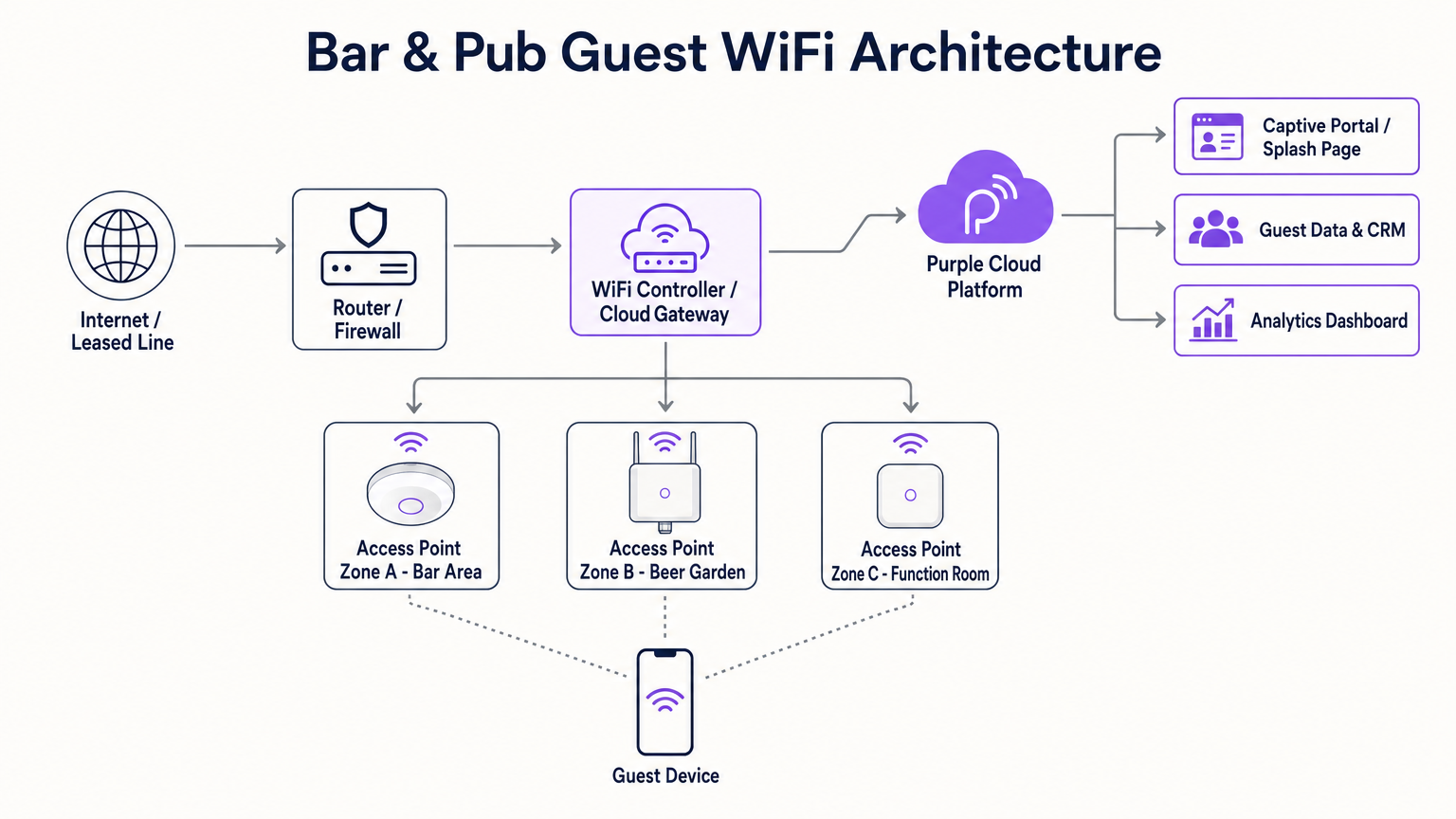
Die Grundlage jeder hochleistungsfähigen WiFi-Bereitstellung im Gastgewerbe ist eine robuste und skalierbare Netzwerkarchitektur. Router für Endverbraucher sind für die Dichte und den Durchsatzbedarf einer modernen Bar oder eines Pubs völlig unzureichend. Stattdessen benötigen Veranstaltungsorte Access Points (APs) der Enterprise-Klasse, die über einen zentralisierten Wireless LAN Controller oder ein Cloud-basiertes Gateway verwaltet werden. Dies ermöglicht nahtloses Roaming, eine einheitliche Richtliniendurchsetzung und proaktive Überwachung über das gesamte Anwesen hinweg.
Bei der Auswahl der Hardware sind Dual-Band-APs, die 802.11ac (Wi-Fi 5) oder, vorzugsweise, 802.11ax (Wi-Fi 6) unterstützen, unerlässlich. Wi-Fi 6 bietet erhebliche Vorteile in Umgebungen mit hoher Dichte, indem es Orthogonal Frequency-Division Multiple Access (OFDMA) und Multi-User Multiple Input Multiple Output (MU-MIMO) nutzt, um gleichzeitige Verbindungen effizient zu verwalten. Für die Abdeckungsplanung gilt als Faustregel ein AP pro 1.500 bis 2.000 Quadratfuß Innenfläche, obwohl dies durch eine professionelle prädiktive und aktive Standortuntersuchung validiert werden muss, um die Dämpfung durch Ziegelwände, Metallvorrichtungen und hohe Gästedichte zu berücksichtigen.
Außenbereiche wie Biergärten und Terrassen erfordern spezielle IP67-zertifizierte APs, um Umwelteinflüssen standzuhalten. Darüber hinaus ist die Backhaul-Konnektivität entscheidend. Während eine Standard-FTTC-Verbindung für einen kleinen Pub ausreichen mag, sollten größere Veranstaltungsorte oder solche, die stark auf Cloud-basierte Point of Sale (POS)-Systeme angewiesen sind, in eine dedizierte Standleitung investieren. Wie in unserem Leitfaden zu Was ist eine Standleitung? Dediziertes Business Internet beschrieben, bietet dies eine symmetrische, ungeteilte Verbindung, die sicherstellt, dass der Gastverkehr kritische Geschäftsabläufe nicht ausbremst.
Netzwerksegmentierung und Sicherheit
Sicherheit und Compliance sind von größter Bedeutung. Das Gast-WiFi-Netzwerk muss streng vom Unternehmensnetzwerk getrennt sein, insbesondere von der POS- und Zahlungsabwicklungsinfrastruktur. Dies wird typischerweise durch Virtual Local Area Networks (VLANs) und robuste Firewall-Regeln erreicht. Eine fehlende Segmentierung des Netzwerks stellt einen schwerwiegenden Verstoß gegen die PCI DSS-Compliance dar und setzt den Veranstaltungsort erheblichen finanziellen und reputativen Risiken aus.
Darüber hinaus ist die Implementierung eines Captive Portal nicht nur ein Marketinginstrument; es ist eine kritische Sicherheitskontrolle. Das Portal authentifiziert Benutzer und erzwingt die Annahme einer Acceptable Use Policy (AUP), wodurch die Haftung des Veranstaltungsortes für illegale Aktivitäten, die über das Netzwerk durchgeführt werden, gemindert wird. Inhaltsfilterung auf DNS- oder Firewall-Ebene sollte ebenfalls implementiert werden, um bösartige Domains und unangemessene Inhalte zu blockieren und eine sichere Browsing-Umgebung zu gewährleisten.
Implementierungsleitfaden
Schritt 1: Standortanalyse und Kapazitätsplanung
Führen Sie vor der Beschaffung von Hardware eine umfassende Standortanalyse durch. Identifizieren Sie Zonen mit hoher Dichte (z. B. die Hauptbar, Veranstaltungsräume) und potenzielle Störquellen. Berechnen Sie die erwartete Anzahl gleichzeitiger Geräte, wobei zu berücksichtigen ist, dass die meisten Gäste mindestens ein, oft sogar zwei, verbundene Geräte mit sich führen. Diese Daten bestimmen die erforderliche AP-Dichte, das PoE-Budget des Switches und die Internet-Backhaul-Kapazität.
Schritt 2: Hardwarebeschaffung und Installation
Wählen Sie Netzwerkgeräte der Enterprise-Klasse von renommierten Anbietern. Stellen Sie sicher, dass die Switches ausreichend Power over Ethernet (PoE+) liefern, um alle APs zu versorgen. Bei der Montage von APs ist die Deckenplatzierung im Allgemeinen optimal für eine ungehinderte Ausbreitung. Stellen Sie sicher, dass die Verkabelung ordnungsgemäß zertifiziert ist und dass Outdoor-APs korrekt geerdet und wetterfest versiegelt sind.
Schritt 3: Netzwerkkonfiguration und Segmentierung
Konfigurieren Sie den Core-Router und die Switches, um isolierte VLANs für den Unternehmensverkehr, POS-Systeme, IoT-Geräte (z. B. intelligente Beleuchtung, HLK) und Gast-WiFi einzurichten. Implementieren Sie Bandbreiten-Shaping- und Quality of Service (QoS)-Richtlinien auf dem Gast-VLAN, um zu verhindern, dass einzelne Benutzer die Verbindung monopolisieren, und um ein grundlegendes Serviceniveau für alle Gäste zu gewährleisten. Weitere Einblicke in die Bandbreitenplanung finden Sie in unserem umfassenden Leitfaden: Hotel WiFi Speed: What Guests Expect and How to Deliver It . (German speakers can also review Hotel WiFi-Geschwindigkeit: Was Gäste erwarten und wie man es liefert ).
Schritt 4: Captive Portal und Authentifizierungseinrichtung
Integrieren Sie eine robuste Captive Portal-Lösung, wie die Guest WiFi -Plattform von Purple. Gestalten Sie die Splash Page passend zum Branding des Veranstaltungsortes und halten Sie den Authentifizierungsprozess so reibungslos wie möglich. Gängige Authentifizierungsmethoden umfassen E-Mail-Registrierung, SMS-Verifizierung oder Social Login. Stellen Sie entscheidend sicher, dass der Datenerfassungsprozess explizite, granulare Opt-in-Kontrollkästchen für Marketingkommunikation enthält, begleitet von einem klaren Link zur Datenschutzerklärung, um die GDPR-Konformität zu gewährleisten.
Schritt 5: Analytics- und CRM-Integration
Verbinden Sie die WiFi-Plattform mit Ihrer bestehenden CRM- oder E-Mail-Marketing-Software. Dies ermöglicht die nahtlose Übertragung erfasster Profildaten und Verhaltensmetriken (z. B. Besuchshäufigkeit, Verweildauer). Konfigurieren Sie automatisierte Workflows, wie das Senden einer Willkommens-E-Mail an Erstbesucher oder ein Re-Engagement-Angebot an Gäste, die in den letzten 30 Tagen nicht zu Besuch waren.
Best Practices
- Priorisieren Sie reibungsloses Onboarding: Das Captive Portal sollte intuitiv und mobiloptimiert sein. Vermeiden Sie es, im Voraus übermäßige persönliche Informationen zu verlangen; eine E-Mail-Adresse oder Telefonnummer ist für die anfängliche Profilerstellung ausreichend.
- Nutzen Sie profilbasierte Authentifizierung: Wie in unserer Analyse der Zukunft von nahtlosem, sicherem WiFi erörtert, ermöglicht die profilbasierte Authentifizierung (wie OpenRoaming) wiederkehrenden Gästen, sich automatisch ohne erneute Authentifizierung zu verbinden, was das Benutzererlebnis erheblich verbessert und gleichzeitig wertvolle Analytics-Daten protokolliert. Purple fungiert als kostenloser Identitätsanbieter für Dienste wie OpenRoaming unter der Connect-Lizenz.
- Gewährleisten Sie GDPR-Konformität durch Design: Verwenden Sie niemals vorab angekreuzte Kästchen für die Marketingzustimmung. Trennen Sie die Annahme der Nutzungsbedingungen klar von den Marketing-Opt-ins.
- Kontinuierlich überwachen und optimieren: Überprüfen Sie regelmäßig das WiFi Analytics -Dashboard, um Funklöcher zu identifizieren, Spitzenlastzeiten zu überwachen und die Konversionsraten Ihrer Marketingkampagnen zu bewerten.
Fehlerbehebung & Risikominderung
Selbst die sorgfältigsten Netzwerke stoßen auf Probleme. Hier sind häufige Fehlerursachen und Minderungsstrategien:
- Fehlerursache: DHCP-Erschöpfung. In Umgebungen mit hoher Fluktuation, wie belebten Pubs, kann dem DHCP-Server die Zuweisung von IP-Adressen ausgehen, was neue Geräte am Verbinden hindert.
- Minderung: Reduzieren Sie die DHCP-Lease-Zeit im Gast-VLAN auf 1 oder 2 Stunden, um sicherzustellen, dass IP-Adressen schnell in den Pool zurückkehren, wenn Gäste gehen. Erweitern Sie den DHCP-Subnetzbereich (z. B. von einem /24 auf ein /22 oder /21), um mehr gleichzeitige Geräte aufzunehmen.
- Fehlerursache: Gleichkanalinterferenz. Wenn mehrere APs auf demselben Frequenzkanal arbeiten, stören sich ihre Signale gegenseitig, was den Durchsatz erheblich beeinträchtigt.
- Minderung: Implementieren Sie eine dynamische Kanalzuweisung über den Wireless Controller. Stellen Sie sicher, dass 2,4-GHz-Funkgeräte nur nicht überlappende Kanäle (1, 6 und 11) verwenden und minimieren Sie die Verwendung breiter Kanäle (z. B. 40 MHz oder 80 MHz) in dichten Installationen, es sei denn, sie arbeiten ausschließlich in den 5-GHz- oder 6-GHz-Bändern.
- Fehlerursache: Captive Portal Umgehungsprobleme. Moderne mobile Betriebssysteme verwenden MAC-Randomisierung und strenge Sicherheitsprüfungen, die manchmal die Captive Portal-Weiterleitung stören können.
- Minderung: Stellen Sie sicher, dass das Netzwerk ein vertrauenswürdiges SSL-Zertifikat für das Captive Portal verwendet. Whitelisten Sie wesentliche Domains (z. B. Apple- und Google Captive Portal-Erkennungs-URLs) in der „Walled Garden“-Konfiguration der Firewall, um sicherzustellen, dass das Betriebssystem die Anmeldeaufforderung zuverlässig auslösen kann.
ROI & Geschäftsauswirkungen
Der wahre Wert von Bar-WiFi liegt in seiner Fähigkeit, umsetzbare Business Intelligence zu generieren. Durch die Umwandlung von anonymem Fußgängerverkehr in eine strukturierte Kundendatenbank können Veranstaltungsorte hochgradig zielgerichtete Marketinginitiativen durchführen.
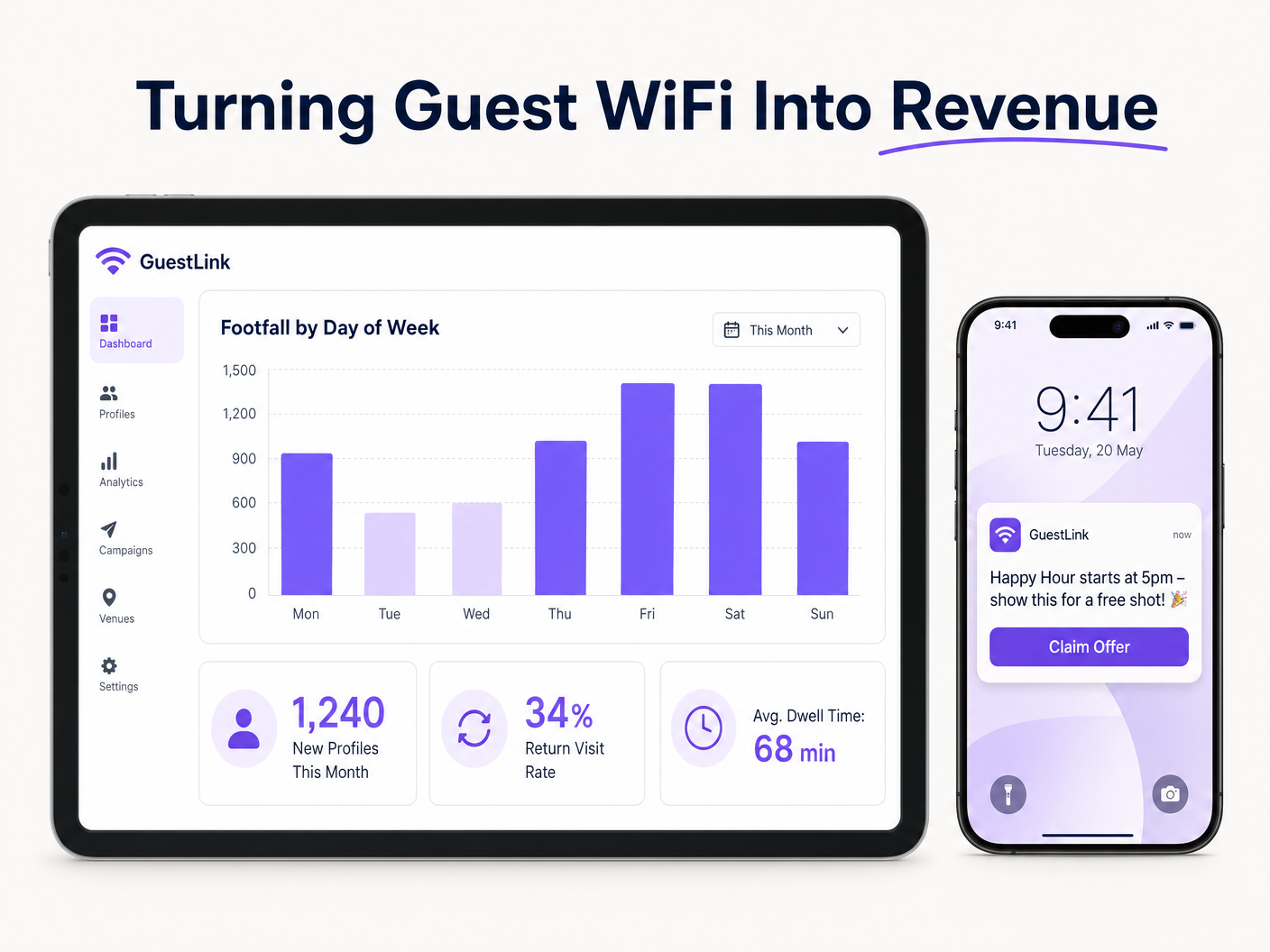
Betrachten Sie ein Szenario, in dem Analytics einen deutlichen Rückgang der Besucherzahlen an Dienstagabenden aufzeigen. Mithilfe der über das Gast-WiFi erfassten Daten kann das Marketingteam die Datenbank segmentieren, um Gäste zu identifizieren, die häufig am Wochenende, aber selten an Wochentagen kommen. Eine automatisierte, personalisierte E-Mail-Kampagne mit einer nur dienstags gültigen Aktion kann an diese spezifische Kohorte versendet werden. Dieser zielgerichtete Ansatz führt zu wesentlich höheren Konversionsraten im Vergleich zu generischem Broadcast-Marketing.
Der ROI wird nicht nur am Volumen der gesammelten Daten gemessen, sondern auch an den zusätzlichen Einnahmen, die durch diese gezielten Kampagnen generiert werden, der Reduzierung der Kundenabwanderung und der verbesserten betrieblichen Effizienz, die durch Einblicke in Spitzenhandelszeiten und Verweildauern erzielt wird. Dieser datengesteuerte Ansatz wird in allen Sektoren immer wichtiger, von Hospitality und Retail bis hin zu Healthcare und Transport . Darüber hinaus erkennen Führungskräfte mit der Entwicklung der Branche die umfassenderen Auswirkungen vernetzter Infrastrukturen, ein Trend, der durch Entwicklungen wie Purple Signals Higher Education Ambitions with Appointment of VP Education Tim Peers und die wachsende Bedeutung nahtloser Konnektivität in mobilen Umgebungen, wie in Wi Fi in Auto: The Complete 2026 Enterprise Guide detailliert beschrieben, hervorgehoben wird.
Schlüsseldefinitionen
Captive Portal
A web page that a user of a public-access network is obliged to view and interact with before access is granted.
Crucial for authenticating users, presenting Acceptable Use Policies, and capturing first-party data for marketing.
VLAN (Virtual Local Area Network)
A logical subnetwork that groups a collection of devices from different physical LANs.
Used to isolate guest WiFi traffic from sensitive corporate and POS traffic, ensuring security and compliance.
Leased Line
A dedicated, fixed-bandwidth, symmetric data connection connecting a business directly to the internet.
Necessary for high-capacity venues to ensure consistent throughput that isn't shared with neighboring premises.
Wi-Fi 6 (802.11ax)
The latest generation of the Wi-Fi standard, designed to improve efficiency and performance in dense environments.
Essential for venues with high concurrent device counts, utilizing technologies like OFDMA to handle multiple users simultaneously.
DHCP Exhaustion
A state where the DHCP server has allocated all available IP addresses in its pool, preventing new devices from connecting.
A common issue in high-turnover hospitality environments; mitigated by reducing DHCP lease times and expanding subnet sizes.
PCI DSS (Payment Card Industry Data Security Standard)
An information security standard for organizations that handle branded credit cards.
Mandates strict network segmentation to ensure guest WiFi users cannot access payment processing infrastructure.
Profile-Based Authentication
A method where returning users are automatically authenticated based on their device profile without needing to interact with the captive portal again.
Improves user experience and encourages seamless connectivity, facilitating ongoing analytics tracking.
Co-Channel Interference
Performance degradation caused when multiple access points operate on the same frequency channel, causing them to compete for airtime.
Addressed through careful RF planning, dynamic channel assignment, and utilizing non-overlapping channels.
Ausgearbeitete Beispiele
A busy city-centre pub with a capacity of 300 patrons and a large outdoor beer garden is experiencing severe WiFi performance degradation on Friday nights. The current setup consists of two consumer-grade ISP routers. The venue wants to upgrade the network to ensure reliable connectivity and begin capturing customer data for marketing.
- Replace the consumer routers with a dedicated enterprise firewall/router and a PoE+ managed switch. 2. Provision a dedicated leased line (e.g., 100Mbps symmetrical) to handle the backhaul traffic. 3. Deploy three indoor Wi-Fi 6 access points (ceiling-mounted) in the main bar area and two IP67-rated outdoor APs in the beer garden. 4. Configure the switch to create isolated VLANs for the corporate network, POS terminals, and guest WiFi. 5. Integrate the Purple Guest WiFi platform, configuring a branded captive portal with email authentication and explicit GDPR-compliant marketing opt-ins. 6. Reduce the DHCP lease time on the guest VLAN to 2 hours to prevent IP exhaustion.
A regional chain of 15 sports bars wants to standardize their guest WiFi to build a centralized CRM database. Currently, each venue manages its own standalone network with varying SSIDs and no data capture mechanisms.
- Standardize the hardware stack across all venues using cloud-managed APs and switches from a single vendor. 2. Deploy a centralized cloud controller to manage configurations and firmware updates across the entire estate. 3. Implement a unified SSID (e.g., 'Free_SportsBar_WiFi') across all 15 locations. 4. Deploy the Purple analytics platform centrally, configuring a consistent captive portal experience. 5. Enable profile-based authentication so a guest registering at Venue A automatically connects when visiting Venue B. 6. Integrate the centralized WiFi database via API with the chain's primary CRM system to trigger automated loyalty campaigns.
Übungsfragen
Q1. A historic pub with thick stone walls is planning a WiFi upgrade. The manager wants to place a single high-powered AP in the centre of the venue to save on cabling costs. As the IT architect, what is your recommendation?
Hinweis: Consider how building materials affect RF propagation and the limitations of client device transmit power.
Musterlösung anzeigen
Advise against a single AP deployment. Thick stone walls severely attenuate RF signals, particularly in the 5 GHz band. Even if a high-powered AP can transmit a signal to the edges of the venue, mobile devices (which have weak transmitters) will struggle to send data back, resulting in a poor user experience. Recommend a professional site survey and a multi-AP deployment using lower transmit power to ensure adequate coverage and capacity throughout the venue.
Q2. During an audit, you discover that the guest WiFi network is operating on the same VLAN as the venue's cloud-based EPOS system. The venue owner argues that because the EPOS is cloud-based, local segmentation is unnecessary. How do you respond?
Hinweis: Focus on compliance standards and the risks of lateral movement within a flat network.
Musterlösung anzeigen
Explain that this configuration is a critical security vulnerability and a direct violation of PCI DSS compliance. Even if the EPOS communicates with the cloud, placing guest devices on the same local subnet allows malicious actors to attempt lateral movement, sniff local traffic, or launch attacks against the EPOS hardware. Immediate remediation is required to implement VLAN segregation and strict firewall rules isolating the guest network.
Q3. A venue's marketing team complains that they are capturing thousands of email addresses via the captive portal, but their email marketing campaigns have an extremely high bounce rate and low engagement. What technical or configuration issue might be causing this?
Hinweis: Consider the user experience during onboarding and how users might bypass data entry requirements.
Musterlösung anzeigen
The high bounce rate is likely due to users entering fake or disposable email addresses to bypass the captive portal quickly. To mitigate this, implement email verification (requiring the user to click a link in an email to gain full internet access) or SMS authentication. Additionally, review the captive portal design to ensure it is not overly demanding, which incentivizes users to provide false information.
Weiterlesen in dieser Reihe
Was ist eine Probe Request? Verstehen, wie Geräte Netzwerke entdecken
Dieser technische Leitfaden bietet einen tiefen Einblick in IEEE 802.11 Probe Requests, aktives versus passives Scannen und die Auswirkungen der MAC randomisation auf Standortanalysen. Er liefert umsetzbare Implementierungsstrategien für Netzwerkarchitekten zur Optimierung von High-Density-Bereitstellungen, zur Minderung von Probe Storms und zur Sicherstellung einer genauen, GDPR-konformen Datenerfassung mithilfe authentifizierter Identitätsschichten.
Wie man langsames WiFi behebt, ohne Ihr Internetpaket zu aktualisieren
Ein umfassender technischer Leitfaden für IT-Manager und Netzwerkarchitekten zur Optimierung der Unternehmens-WiFi-Leistung, ohne die ISP-Bandbreite zu erhöhen. Behandelt HF-Tuning, Client-Dichte-Management, QoS-Implementierung und wie man WiFi-Analysen nutzt, um Engpässe zu diagnostizieren und zu beheben.
Die Checkliste für die Migration von Legacy NAC zu Cloud-Native NAC
Dieser maßgebliche technische Leitfaden bietet eine strukturierte, dreiphasige Checkliste für die Migration von der traditionellen Netzwerkzugriffskontrolle (NAC) zu einer Cloud-nativen Architektur. Er stattet IT-Manager und Netzwerkarchitekten mit umsetzbaren Strategien aus, um die Identitätsintegration, Richtlinienkonsistenz und Compliance zu gewährleisten, ohne den Veranstaltungsbetrieb zu stören.